Windows 7Tea TrebickaAnnelise Hansen
Operating systemWhat is it?An operating system (OS) is a set of computer programs that runs the computer hardware.Operating systems control common hardware functions such as:Managing the processor and memoryManaging files and storageFormatting disksCommunicating with peripheral devicesCapturing user inputProviding output
Operating systemWhat is it?The operating system provides a user interface that allows the user to interact with the system.
This is what defines the user’s experience and causes some users to prefer Windows or Mac.
The operating system also provides a structure for organizing data on the system.
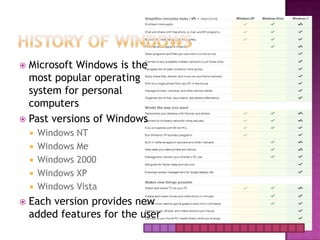
The operating system also multitasks, running multiple applications at the same time.History of WindowsMicrosoft Windows is the most popular operating system for personal computersPast versions of Windows Windows NTWindows MeWindows 2000Windows XPWindows Vista Each version provides new added features for the user
Windows 7Microsoft Windows runs on roughly 90% of all personal computers. Windows 7, the most recent version of Windows, provides a high-quality graphical user experience that supports all types of computer activities from business applications to video games and media production
Windows 7Windows 7 provides high quality graphical user experience that supports all types of computer activitiesAvailable in different computing needsWindows 7 Home Premium Windows 7 ProfessionalWindows 7 Ultimate
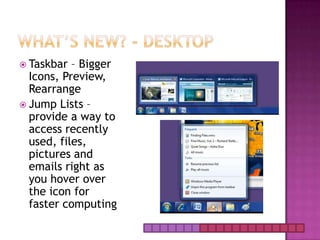
What’s New? - DesktopTaskbar – Bigger Icons, Preview, Rearrange  Jump Lists – provide a way to access recently used, files, pictures and emails right as you hover over the icon for faster computing
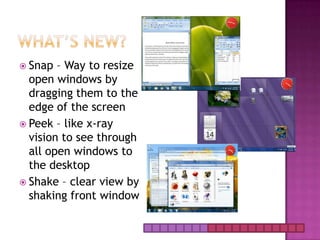
What’s New?Snap – Way to resize open windows by dragging them to the edge of the screenPeek – like x-ray vision to see through all open windows to the desktop Shake – clear view by shaking front window
What’s New?Desktop SearchNow you wont have to go looking through your start menu to find what you need. Simply type it in the search bar and it shows up.External Hard DriveWith Windows XP you needed a third party to help you back up your data. Now you just plug in your external hard drive and an option to “Use this drive for backup” shows up in auto play.
What’s New?-Performance64-bit processor Large amount of information support Can use more RAM up to 4GBMore responsive when running multiple programsCompared to the 32-bit processor more power
File Management-LibrariesBringing together information from different access pointsExternal Hard DriveHome Computer  Work LaptopFiles will remain in original places but can be put together so they can be worked on
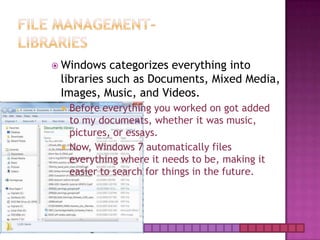
File Management-LibrariesWindows categorizes everything into libraries such as Documents, Mixed Media, Images, Music, and Videos.Before everything you worked on got added to my documents, whether it was music, pictures, or essays.Now, Windows 7 automatically files everything where it needs to be, making it easier to search for things in the future.
New & Improved
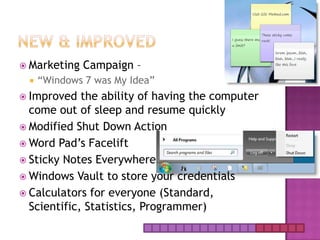
New & ImprovedMarketing Campaign – “Windows 7 was My Idea”Improved the ability of having the computer come out of sleep and resume quickly Modified Shut Down ActionWord Pad’s FaceliftSticky Notes EverywhereWindows Vault to store your credentialsCalculators for everyone (Standard, Scientific, Statistics, Programmer)
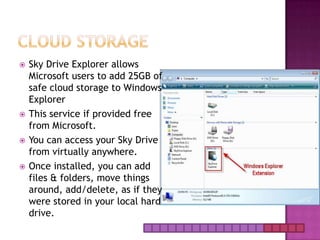
Cloud StorageSky Drive Explorer allows Microsoft users to add 25GB of safe cloud storage to Windows ExplorerThis service if provided free from Microsoft.You can access your Sky Drive from virtually anywhere.Once installed, you can add files & folders, move things around, add/delete, as if they were stored in your local hard drive.
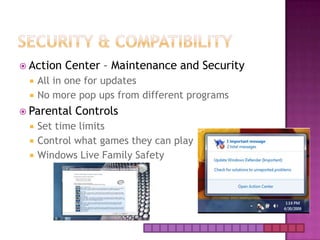
Security & CompatibilityAction Center – Maintenance and Security All in one for updatesNo more pop ups from different programsParental Controls Set time limits Control what games they can play Windows Live Family Safety
Reasons to Switch to windows 7Best operating system by Microsoft up to dateTaskbar & Jump ListBetter security and interfaceSpeedBetter integration with hardwareUpgrading won’t screw you overXP ModeAutomatically Installed Device DriversIt just looks better 
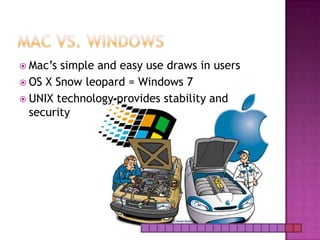
Mac VS. WindowsMac’s simple and easy use draws in usersOS X Snow leopard = Windows 7UNIX technology provides stability and security

Windows 7 project final

  • 1.
  • 2.
    Operating systemWhat isit?An operating system (OS) is a set of computer programs that runs the computer hardware.Operating systems control common hardware functions such as:Managing the processor and memoryManaging files and storageFormatting disksCommunicating with peripheral devicesCapturing user inputProviding output
  • 3.
    Operating systemWhat isit?The operating system provides a user interface that allows the user to interact with the system.
  • 4.
    This is whatdefines the user’s experience and causes some users to prefer Windows or Mac.
  • 5.
    The operating systemalso provides a structure for organizing data on the system.
  • 6.
    The operating systemalso multitasks, running multiple applications at the same time.History of WindowsMicrosoft Windows is the most popular operating system for personal computersPast versions of Windows Windows NTWindows MeWindows 2000Windows XPWindows Vista Each version provides new added features for the user
  • 7.
    Windows 7Microsoft Windowsruns on roughly 90% of all personal computers. Windows 7, the most recent version of Windows, provides a high-quality graphical user experience that supports all types of computer activities from business applications to video games and media production
  • 8.
    Windows 7Windows 7provides high quality graphical user experience that supports all types of computer activitiesAvailable in different computing needsWindows 7 Home Premium Windows 7 ProfessionalWindows 7 Ultimate
  • 9.
    What’s New? -DesktopTaskbar – Bigger Icons, Preview, Rearrange Jump Lists – provide a way to access recently used, files, pictures and emails right as you hover over the icon for faster computing
  • 10.
    What’s New?Snap –Way to resize open windows by dragging them to the edge of the screenPeek – like x-ray vision to see through all open windows to the desktop Shake – clear view by shaking front window
  • 11.
    What’s New?Desktop SearchNowyou wont have to go looking through your start menu to find what you need. Simply type it in the search bar and it shows up.External Hard DriveWith Windows XP you needed a third party to help you back up your data. Now you just plug in your external hard drive and an option to “Use this drive for backup” shows up in auto play.
  • 12.
    What’s New?-Performance64-bit processorLarge amount of information support Can use more RAM up to 4GBMore responsive when running multiple programsCompared to the 32-bit processor more power
  • 13.
    File Management-LibrariesBringing togetherinformation from different access pointsExternal Hard DriveHome Computer Work LaptopFiles will remain in original places but can be put together so they can be worked on
  • 14.
    File Management-LibrariesWindows categorizeseverything into libraries such as Documents, Mixed Media, Images, Music, and Videos.Before everything you worked on got added to my documents, whether it was music, pictures, or essays.Now, Windows 7 automatically files everything where it needs to be, making it easier to search for things in the future.
  • 15.
  • 16.
    New & ImprovedMarketingCampaign – “Windows 7 was My Idea”Improved the ability of having the computer come out of sleep and resume quickly Modified Shut Down ActionWord Pad’s FaceliftSticky Notes EverywhereWindows Vault to store your credentialsCalculators for everyone (Standard, Scientific, Statistics, Programmer)
  • 17.
    Cloud StorageSky DriveExplorer allows Microsoft users to add 25GB of safe cloud storage to Windows ExplorerThis service if provided free from Microsoft.You can access your Sky Drive from virtually anywhere.Once installed, you can add files & folders, move things around, add/delete, as if they were stored in your local hard drive.
  • 18.
    Security & CompatibilityActionCenter – Maintenance and Security All in one for updatesNo more pop ups from different programsParental Controls Set time limits Control what games they can play Windows Live Family Safety
  • 19.
    Reasons to Switchto windows 7Best operating system by Microsoft up to dateTaskbar & Jump ListBetter security and interfaceSpeedBetter integration with hardwareUpgrading won’t screw you overXP ModeAutomatically Installed Device DriversIt just looks better 
  • 20.
    Mac VS. WindowsMac’ssimple and easy use draws in usersOS X Snow leopard = Windows 7UNIX technology provides stability and security