David J. Rosenthal
CEO, Atidan
Microsoft Technology Center, Malvern, PA
September 10, 2015
Visual Studio Enterprise
Optimized for enterprise-scale development
Microsoft developer tools
01
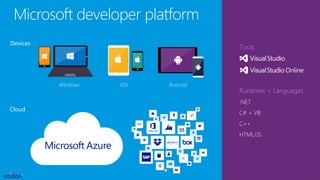
Microsoft developer platform
Runtimes + Languages
.NET
C# + VB
C++
HTML/JS
Tools
Cloud
Devices
AndroidiOSWindows
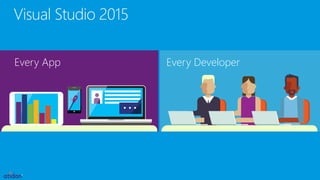
Visual Studio 2015
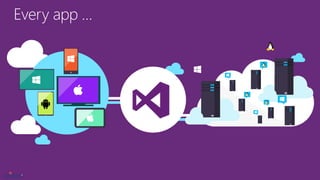
Every DeveloperEvery App
Every app …
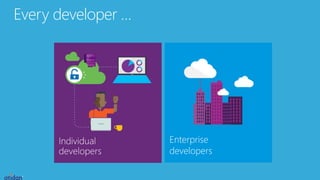
Every developer …
Enterprise
developers
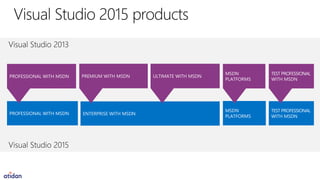
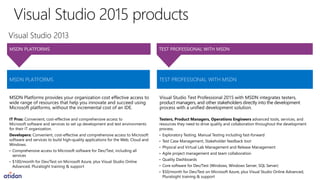
Visual Studio 2015 products
02
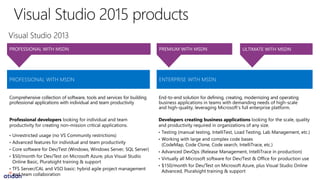
Comprehensive collection of software, tools and services for building
professional applications with individual and team productivity
End-to-end solution for defining, creating, modernizing and operating
business applications in teams with demanding needs of high-scale
and high-quality, leveraging Microsoft’s full enterprise platform.
MSDN Platforms provides your organization cost effective access to
wide range of resources that help you innovate and succeed using
Microsoft platforms, without the incremental cost of an IDE.
Visual Studio Test Professional 2015 with MSDN integrates testers,
product managers, and other stakeholders directly into the development
process with a unified development solution.
Visual Studio Enterprise with MSDN
03
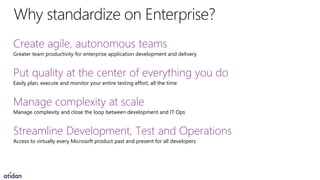
Create agile, autonomous teams
Greater team productivity for enterprise application development and delivery
Put quality at the center of everything you do
Easily plan, execute and monitor your entire testing effort, all the time
Manage complexity at scale
Manage complexity and close the loop between development and IT Ops
Streamline Development, Test and Operations
Access to virtually every Microsoft product past and present for all developers
Enterprise
with MSDN
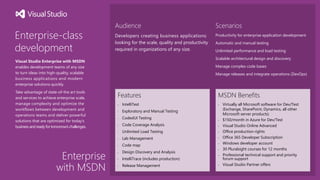
Enterprise-class
development
Visual Studio Enterprise with MSDN
enables development teams of any size
to turn ideas into high-quality, scalable
business applications and modern
enterprise solutions quickly.
Take advantage of state-of-the art tools
and services to achieve enterprise scale,
manage complexity and optimize the
workflows between development and
operations teams and deliver powerful
solutions that are optimized for today’s
business and ready fortomorrow’schallenges.
Audience
Developers creating business applications
looking for the scale, quality and productivity
required in organizations of any size.
Features
• IntelliTest
• Exploratory and Manual Testing
• CodedUI Testing
• Code Coverage Analysis
• Unlimited Load Testing
• Lab Management
• Code map
• Design Discovery and Analysis
• IntelliTrace (includes production)
• Release Management
MSDN Benefits
• Virtually all Microsoft software for Dev/Test
(Exchange, SharePoint, Dynamics, all other
Microsoft server products)
• $150/month in Azure for Dev/Test
• Visual Studio Online Advanced
• Office production rights
• Office 365 Developer Subscription
• Windows developer account
• 30 Pluralsight courses for 12 months
• Professional technical support and priority
forum support
• Visual Studio Partner offers
Scenarios
Productivity for enterprise application development
Automatic and manual testing
Unlimited performance and load testing
Scalable architectural design and discovery
Manage complex code bases
Manage releases and integrate operations (DevOps)
Greater productivity for enterprise
application development and delivery
Plan, execute and monitor your
entire testing effort, continuously
Manage complexity and close
the loop between Dev and Ops
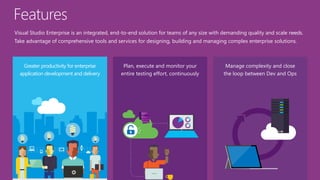
Visual Studio Enterprise is an integrated, end-to-end solution for teams of any size with demanding quality and scale needs.
Take advantage of comprehensive tools and services for designing, building and managing complex enterprise solutions.
Features
Greater productivity for enterprise
application development and delivery
Enterprise Agile
Developer & team productivity
Visibility and transparency
Enterprise Agile
Collaboration
Effortlessly collaborate and innovate across
multiple teams and projects
Keep teams with many stakeholders in sync
with lightweight requirements and feedback
management tools
Productivity
Build your backlog, execute sprints and track
work and progress from a single location
Developer and
team productivity
Achieve more
Take advantage of state-of-the art tools and
services that empower developers, increase
productivity and integrate development and
operations teams
Debug, profile, diagnose
Improved tools and capabilities for developer
testing help you focus on quality in an environment
that’s productive and easy to use
Visibility and
transparency
Visibility
Stay on top of your priorities with enterprise
portfolio management, work item charting,
dashboards and advanced reporting capabilities
Transparency
Eliminate uncertainty, lower risk and get visibility
on deployments with Release Management
Plan, execute and monitor your
entire testing effort, continuously
Agile test planning and execution
Unlimited performance testing
Monitor & share quality status
Test planning
and execution
Tools for agile testing
Improved browser-based test case management
helps testers author, manage and execute test
cases in any modern web browser
Microsoft Test Manager empowers testers by
giving them a toolset for automated and
manual testing in a rich desktop application
optimized for the needs of agile QA professionals
Performance
testing
Unlimited load testing
Visual Studio makes integrating load testing
into your development process easy and will
help you avoid nasty surprises in production
Use cloud-based or on-premises load testing
capabilities to validate and assess application
performance under real-world conditions
before you deploy
Manage complexity and close
the loop between Dev and Ops
Manage complexity
Close the loop & lower cycle time
Enterprise DevOps
Manage
complexity
Manage dependencies
Easily manage dependencies and even the
largest codebases with advanced tools for
code mapping and architectural discovery
Innovative architecture and modeling tools
allow you to easily create high-quality, mission-
critical software - faster
Close the loop &
lower cycle time
From prod to dev
After deployment, close the loop between dev
and prod and fix bugs faster with insights and
information captured directly in production
Developers now have a wealth of valuable
information available right within the Visual
Studio IDE, allowing them to diagnose, triage
and remediate issues faster than ever before
Enterprise
DevOps
Ship better apps, faster
The Release Management capabilities in Visual
Studio 2015 make it easier to streamline releases
so you can deploy continuously
Create automated and repeatable workflows
between development and operations
Audit progress of your release at every stage
of the deployment pipeline, all the way to
production
Visual Studio Enterprise - DevOps
DEMO
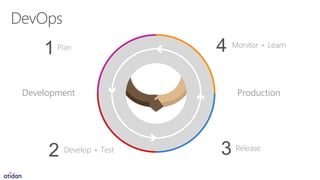
Plan
1 Monitor + Learn
ReleaseDevelop + Test
2
Development Production
4
3
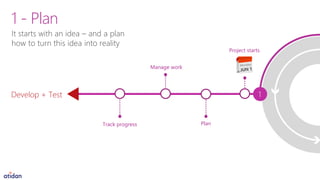
It starts with an idea – and a plan
how to turn this idea into reality
1 - Plan
Plan
Manage work
Track progress
Develop + Test 1
Project starts
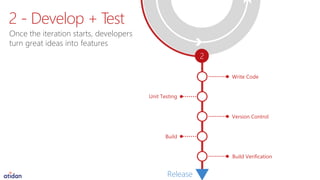
Write Code
Unit Testing
2
Build
Version Control
Build Verification
Release
Once the iteration starts, developers
turn great ideas into features
2 - Develop + Test
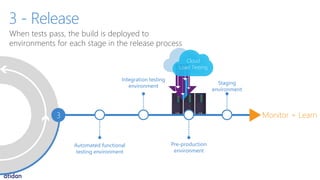
Cloud
Load Testing
Integration testing
environment
Automated functional
testing environment
3
Pre-production
environment
Staging
environment
Monitor + Learn
When tests pass, the build is deployed to
environments for each stage in the release process
3 - Release
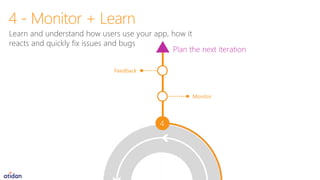
4
Monitor
Feedback
Plan the next iteration
Learn and understand how users use your app, how it
reacts and quickly fix issues and bugs
4 - Monitor + Learn
www.visualstudio.com
Powerful Flexible Open
microsoft@atidan.com
Visual Studio SKU details
A
Professional
with MSDN
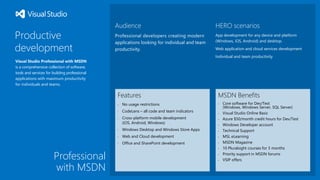
Productive
development
Visual Studio Professional with MSDN
is a comprehensive collection of software,
tools and services for building professional
applications with maximum productivity
for individuals and teams.
Audience
Professional developers creating modern
applications looking for individual and team
productivity.
Features
• No usage restrictions
• CodeLens – all code and team indicators
• Cross-platform mobile development
(iOS, Android, Windows)
• Windows Desktop and Windows Store Apps
• Web and Cloud development
• Office and SharePoint development
MSDN Benefits
• Core software for Dev/Test
(Windows, Windows Server, SQL Server)
• Visual Studio Online Basic
• Azure $50/month credit hours for Dev/Test
• Windows Developer account
• Technical Support
• MSL eLearning
• MSDN Magazine
• 10 Pluralsight courses for 3 months
• Priority support in MSDN forums
• VSIP offers
HERO scenarios
App development for any device and platform
(Windows, iOS, Android) and desktop.
Web application and cloud services development
Individual and team productivity
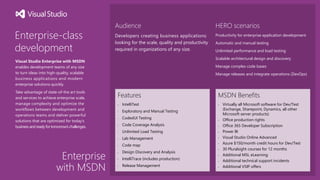
Enterprise
with MSDN
Enterprise-class
development
Visual Studio Enterprise with MSDN
enables development teams of any size
to turn ideas into high-quality, scalable
business applications and modern
enterprise solutions quickly.
Take advantage of state-of-the art tools
and services to achieve enterprise scale,
manage complexity and optimize the
workflows between development and
operations teams and deliver powerful
solutions that are optimized for today’s
business and ready fortomorrow’schallenges.
Audience
Developers creating business applications
looking for the scale, quality and productivity
required in organizations of any size.
Features
• IntelliTest
• Exploratory and Manual Testing
• CodedUI Testing
• Code Coverage Analysis
• Unlimited Load Testing
• Lab Management
• Code map
• Design Discovery and Analysis
• IntelliTrace (includes production)
• Release Management
MSDN Benefits
• Virtually all Microsoft software for Dev/Test
(Exchange, Sharepoint, Dynamics, all other
Microsoft server products)
• Office production rights
• Office 365 Developer Subscription
• Power BI
• Visual Studio Online Advanced
• Azure $150/month credit hours for Dev/Test
• 30 Pluralsight courses for 12 months
• Additional MSL eLearning
• Additional technical support incidents
• Additional VSIP offers
HERO scenarios
Productivity for enterprise application development
Automatic and manual testing
Unlimited performance and load testing
Scalable architectural design and discovery
Manage complex code bases
Manage releases and integrate operations (DevOps)
Visual Studio Enterprise features
B
Enterprise Agile
Key features
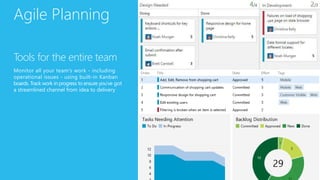
Agile Planning
Tools for the entire team
Monitor all your team’s work - including
operational issues - using built-in Kanban
boards. Track work in progress to ensure you’ve got
a streamlined channel from idea to delivery
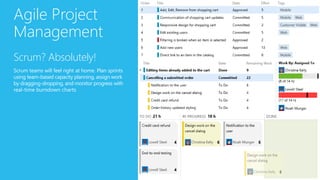
Agile Project
Management
Scrum? Absolutely!
Scrum teams will feel right at home. Plan sprints
using team-based capacity planning, assign work
by dragging-dropping, and monitor progress with
real-time burndown charts
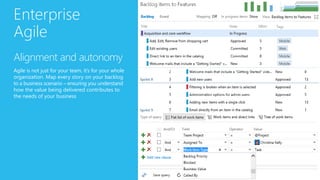
Enterprise
Agile
Alignment and autonomy
Agile is not just for your team, it’s for your whole
organization. Map every story on your backlog
to a business scenario – ensuring you understand
how the value being delivered contributes to
the needs of your business
Visibility and transparency
Key features
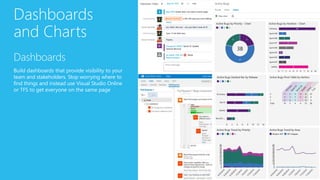
Dashboards
and Charts
Dashboards
Build dashboards that provide visibility to your
team and stakeholders. Stop worrying where to
find things and instead use Visual Studio Online
or TFS to get everyone on the same page
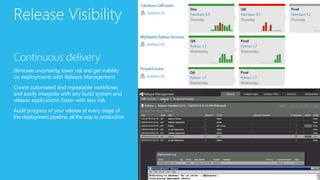
Release Visibility
Continuous delivery
Eliminate uncertainty, lower risk and get visibility
on deployments with Release Management
Create automated and repeatable workflows
and easily integrate with any build system and
release applications faster with less risk
Audit progress of your release at every stage of
the deployment pipeline, all the way to production
Developer productivity:
Developer testing
Key features
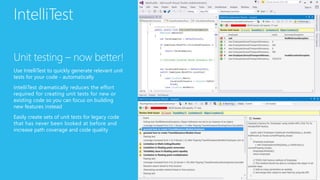
IntelliTest
Unit testing – now better!
Use IntelliTest to quickly generate relevant unit
tests for your code - automatically
IntelliTest dramatically reduces the effort
required for creating unit tests for new or
existing code so you can focus on building
new features instead
Easily create sets of unit tests for legacy code
that has never been looked at before and
increase path coverage and code quality
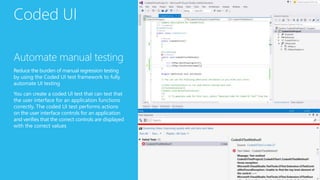
Coded UI
Automate manual testing
Reduce the burden of manual regression testing
by using the Coded UI test framework to fully
automate UI testing
You can create a coded UI test that can test that
the user interface for an application functions
correctly. The coded UI test performs actions
on the user interface controls for an application
and verifies that the correct controls are displayed
with the correct values
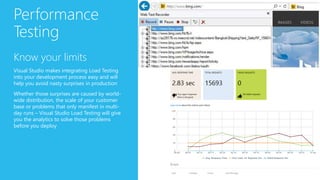
Performance
Testing
Know your limits
Visual Studio makes integrating Load Testing
into your development process easy and will
help you avoid nasty surprises in production
Whether those surprises are caused by world-
wide distribution, the scale of your customer
base or problems that only manifest in multi-
day runs – Visual Studio Load Testing will give
you the analytics to solve those problems
before you deploy
Developer productivity:
Debugging and Diagnostics
Key features
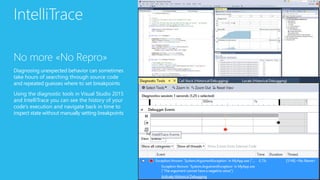
IntelliTrace
No more «No Repro»
Diagnosing unexpected behavior can sometimes
take hours of searching through source code
and repeated guesses where to set breakpoints
Using the diagnostic tools in Visual Studio 2015
and IntelliTrace you can see the history of your
code’s execution and navigate back in time to
inspect state without manually setting breakpoints
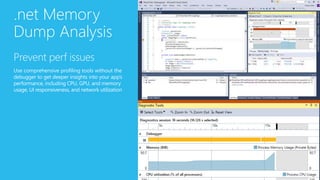
.net Memory
Dump Analysis
Prevent perf issues
Use comprehensive profiling tools without the
debugger to get deeper insights into your app’s
performance, including CPU, GPU, and memory
usage, UI responsiveness, and network utilization
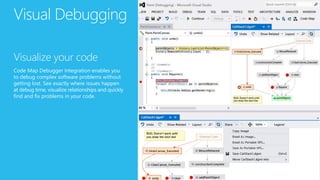
Visual Debugging
Visualize your code
Code Map Debugger Integration enables you
to debug complex software problems without
getting lost. See exactly where issues happen
at debug time, visualize relationships and quickly
find and fix problems in your code.
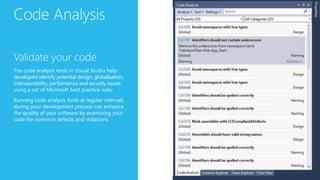
Code Analysis
Validate your code
The code analysis tools in Visual Studio help
developers identify potential design, globalization,
interoperability, performance and security issues,
using a set of Microsoft best practice rules
Running code analysis tools at regular intervals
during your development process can enhance
the quality of your software by examining your
code for common defects and violations
Test planning and execution
Key features
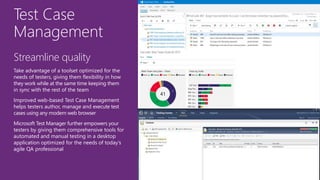
Test Case
Management
Streamline quality
Take advantage of a toolset optimized for the
needs of testers, giving them flexibility in how
they work while at the same time keeping them
in sync with the rest of the team
Improved web-based Test Case Management
helps testers author, manage and execute test
cases using any modern web browser
Microsoft Test Manager further empowers your
testers by giving them comprehensive tools for
automated and manual testing in a desktop
application optimized for the needs of today’s
agile QA professional
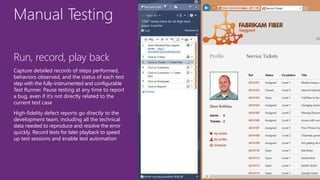
Manual Testing
Run, record, play back
Capture detailed records of steps performed,
behaviors observed, and the status of each test
step with the fully-instrumented and configurable
Test Runner. Pause testing at any time to report
a bug, even if it’s not directly related to the
current test case
High-fidelity defect reports go directly to the
development team, including all the technical
data needed to reproduce and resolve the error
quickly. Record tests for later playback to speed
up test sessions and enable test automation
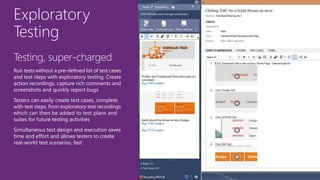
Exploratory
Testing
Testing, super-charged
Run tests without a pre-defined list of test cases
and test steps with exploratory testing. Create
action recordings, capture rich comments and
screenshots and quickly report bugs
Testers can easily create test cases, complete
with test steps, from exploratory test recordings
which can then be added to test plans and
suites for future testing activities
Simultaneous test design and execution saves
time and effort and allows testers to create
real-world test scenarios, fast
Manage complex solutions:
Architecture and modeling
Key features
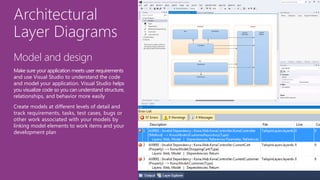
Architectural
Layer Diagrams
Model and design
Make sure your application meets user requirements
and use Visual Studio to understand the code
and model your application. Visual Studio helps
you visualize code so you can understand structure,
relationships, and behavior more easily
Create models at different levels of detail and
track requirements, tasks, test cases, bugs or
other work associated with your models by
linking model elements to work items and your
development plan
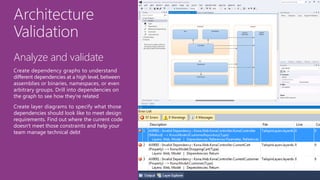
Architecture
Validation
Analyze and validate
Create dependency graphs to understand
different dependencies at a high level, between
assemblies or binaries, namespaces, or even
arbitrary groups. Drill into dependencies on
the graph to see how they're related
Create layer diagrams to specify what those
dependencies should look like to meet design
requirements. Find out where the current code
doesn't meet those constraints and help your
team manage technical debt
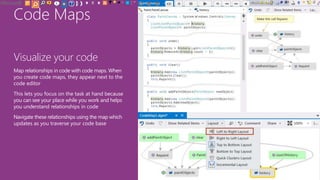
Code Maps
Visualize your code
Map relationships in code with code maps. When
you create code maps, they appear next to the
code editor
This lets you focus on the task at hand because
you can see your place while you work and helps
you understand relationships in code
Navigate these relationships using the map which
updates as you traverse your code base
Close the loop and lower cycle times
Key features
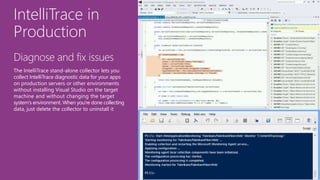
IntelliTrace in
Production
Diagnose and fix issues
The IntelliTrace stand-alone collector lets you
collect IntelliTrace diagnostic data for your apps
on production servers or other environments
without installing Visual Studio on the target
machine and without changing the target
system's environment. When you're done collecting
data, just delete the collector to uninstall it
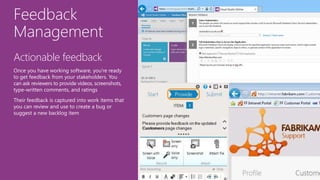
Feedback
Management
Actionable feedback
Once you have working software, you're ready
to get feedback from your stakeholders. You
can ask reviewers to provide videos, screenshots,
type-written comments, and ratings
Their feedback is captured into work items that
you can review and use to create a bug or
suggest a new backlog item
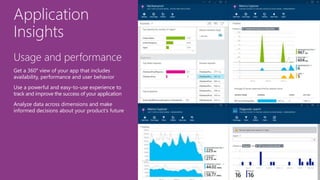
Application
Insights
Usage and performance
Get a 360° view of your app that includes
availability, performance and user behavior
Use a powerful and easy-to-use experience to
track and improve the success of your application
Analyze data across dimensions and make
informed decisions about your product’s future
Enterprise DevOps
Key features
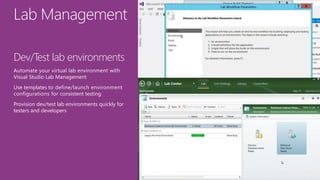
Lab Management
Dev/Test lab environments
Automate your virtual lab environment with
Visual Studio Lab Management
Use templates to define/launch environment
configurations for consistent testing
Provision dev/test lab environments quickly for
testers and developers
Release
Management
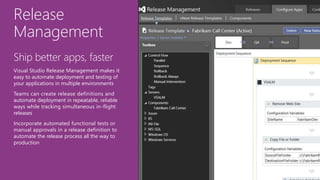
Ship better apps, faster
Visual Studio Release Management makes it
easy to automate deployment and testing of
your applications in multiple environments
Teams can create release definitions and
automate deployment in repeatable, reliable
ways while tracking simultaneous in-flight
releases
Incorporate automated functional tests or
manual approvals in a release definition to
automate the release process all the way to
production
Cloud Dev/Test
Environments
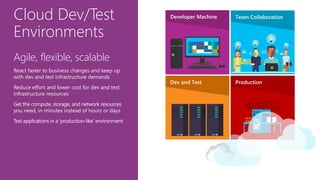
Agile, flexible, scalable
React faster to business changes and keep up
with dev and test infrastructure demands
Reduce effort and lower cost for dev and test
infrastructure resources
Get the compute, storage, and network resources
you need, in minutes instead of hours or days
Test applications in a ‘production-like’ environment

Visual Studio Enterprise 2015 Overview atidan

  • 1.
    David J. Rosenthal CEO,Atidan Microsoft Technology Center, Malvern, PA September 10, 2015 Visual Studio Enterprise Optimized for enterprise-scale development
  • 3.
  • 4.
    Microsoft developer platform Runtimes+ Languages .NET C# + VB C++ HTML/JS Tools Cloud Devices AndroidiOSWindows
  • 5.
    Visual Studio 2015 EveryDeveloperEvery App
  • 6.
  • 7.
  • 8.
    Visual Studio 2015products 02
  • 10.
    Comprehensive collection ofsoftware, tools and services for building professional applications with individual and team productivity End-to-end solution for defining, creating, modernizing and operating business applications in teams with demanding needs of high-scale and high-quality, leveraging Microsoft’s full enterprise platform.
  • 11.
    MSDN Platforms providesyour organization cost effective access to wide range of resources that help you innovate and succeed using Microsoft platforms, without the incremental cost of an IDE. Visual Studio Test Professional 2015 with MSDN integrates testers, product managers, and other stakeholders directly into the development process with a unified development solution.
  • 12.
  • 13.
    Create agile, autonomousteams Greater team productivity for enterprise application development and delivery Put quality at the center of everything you do Easily plan, execute and monitor your entire testing effort, all the time Manage complexity at scale Manage complexity and close the loop between development and IT Ops Streamline Development, Test and Operations Access to virtually every Microsoft product past and present for all developers
  • 14.
    Enterprise with MSDN Enterprise-class development Visual StudioEnterprise with MSDN enables development teams of any size to turn ideas into high-quality, scalable business applications and modern enterprise solutions quickly. Take advantage of state-of-the art tools and services to achieve enterprise scale, manage complexity and optimize the workflows between development and operations teams and deliver powerful solutions that are optimized for today’s business and ready fortomorrow’schallenges. Audience Developers creating business applications looking for the scale, quality and productivity required in organizations of any size. Features • IntelliTest • Exploratory and Manual Testing • CodedUI Testing • Code Coverage Analysis • Unlimited Load Testing • Lab Management • Code map • Design Discovery and Analysis • IntelliTrace (includes production) • Release Management MSDN Benefits • Virtually all Microsoft software for Dev/Test (Exchange, SharePoint, Dynamics, all other Microsoft server products) • $150/month in Azure for Dev/Test • Visual Studio Online Advanced • Office production rights • Office 365 Developer Subscription • Windows developer account • 30 Pluralsight courses for 12 months • Professional technical support and priority forum support • Visual Studio Partner offers Scenarios Productivity for enterprise application development Automatic and manual testing Unlimited performance and load testing Scalable architectural design and discovery Manage complex code bases Manage releases and integrate operations (DevOps)
  • 15.
    Greater productivity forenterprise application development and delivery Plan, execute and monitor your entire testing effort, continuously Manage complexity and close the loop between Dev and Ops Visual Studio Enterprise is an integrated, end-to-end solution for teams of any size with demanding quality and scale needs. Take advantage of comprehensive tools and services for designing, building and managing complex enterprise solutions. Features
  • 16.
    Greater productivity forenterprise application development and delivery Enterprise Agile Developer & team productivity Visibility and transparency
  • 17.
    Enterprise Agile Collaboration Effortlessly collaborateand innovate across multiple teams and projects Keep teams with many stakeholders in sync with lightweight requirements and feedback management tools Productivity Build your backlog, execute sprints and track work and progress from a single location
  • 18.
    Developer and team productivity Achievemore Take advantage of state-of-the art tools and services that empower developers, increase productivity and integrate development and operations teams Debug, profile, diagnose Improved tools and capabilities for developer testing help you focus on quality in an environment that’s productive and easy to use
  • 19.
    Visibility and transparency Visibility Stay ontop of your priorities with enterprise portfolio management, work item charting, dashboards and advanced reporting capabilities Transparency Eliminate uncertainty, lower risk and get visibility on deployments with Release Management
  • 20.
    Plan, execute andmonitor your entire testing effort, continuously Agile test planning and execution Unlimited performance testing Monitor & share quality status
  • 21.
    Test planning and execution Toolsfor agile testing Improved browser-based test case management helps testers author, manage and execute test cases in any modern web browser Microsoft Test Manager empowers testers by giving them a toolset for automated and manual testing in a rich desktop application optimized for the needs of agile QA professionals
  • 22.
    Performance testing Unlimited load testing VisualStudio makes integrating load testing into your development process easy and will help you avoid nasty surprises in production Use cloud-based or on-premises load testing capabilities to validate and assess application performance under real-world conditions before you deploy
  • 23.
    Manage complexity andclose the loop between Dev and Ops Manage complexity Close the loop & lower cycle time Enterprise DevOps
  • 24.
    Manage complexity Manage dependencies Easily managedependencies and even the largest codebases with advanced tools for code mapping and architectural discovery Innovative architecture and modeling tools allow you to easily create high-quality, mission- critical software - faster
  • 25.
    Close the loop& lower cycle time From prod to dev After deployment, close the loop between dev and prod and fix bugs faster with insights and information captured directly in production Developers now have a wealth of valuable information available right within the Visual Studio IDE, allowing them to diagnose, triage and remediate issues faster than ever before
  • 26.
    Enterprise DevOps Ship better apps,faster The Release Management capabilities in Visual Studio 2015 make it easier to streamline releases so you can deploy continuously Create automated and repeatable workflows between development and operations Audit progress of your release at every stage of the deployment pipeline, all the way to production
  • 27.
  • 28.
    Plan 1 Monitor +Learn ReleaseDevelop + Test 2 Development Production 4 3
  • 29.
    It starts withan idea – and a plan how to turn this idea into reality 1 - Plan Plan Manage work Track progress Develop + Test 1 Project starts
  • 30.
    Write Code Unit Testing 2 Build VersionControl Build Verification Release Once the iteration starts, developers turn great ideas into features 2 - Develop + Test
  • 31.
    Cloud Load Testing Integration testing environment Automatedfunctional testing environment 3 Pre-production environment Staging environment Monitor + Learn When tests pass, the build is deployed to environments for each stage in the release process 3 - Release
  • 32.
    4 Monitor Feedback Plan the nextiteration Learn and understand how users use your app, how it reacts and quickly fix issues and bugs 4 - Monitor + Learn
  • 34.
  • 35.
  • 36.
  • 37.
    Professional with MSDN Productive development Visual StudioProfessional with MSDN is a comprehensive collection of software, tools and services for building professional applications with maximum productivity for individuals and teams. Audience Professional developers creating modern applications looking for individual and team productivity. Features • No usage restrictions • CodeLens – all code and team indicators • Cross-platform mobile development (iOS, Android, Windows) • Windows Desktop and Windows Store Apps • Web and Cloud development • Office and SharePoint development MSDN Benefits • Core software for Dev/Test (Windows, Windows Server, SQL Server) • Visual Studio Online Basic • Azure $50/month credit hours for Dev/Test • Windows Developer account • Technical Support • MSL eLearning • MSDN Magazine • 10 Pluralsight courses for 3 months • Priority support in MSDN forums • VSIP offers HERO scenarios App development for any device and platform (Windows, iOS, Android) and desktop. Web application and cloud services development Individual and team productivity
  • 38.
    Enterprise with MSDN Enterprise-class development Visual StudioEnterprise with MSDN enables development teams of any size to turn ideas into high-quality, scalable business applications and modern enterprise solutions quickly. Take advantage of state-of-the art tools and services to achieve enterprise scale, manage complexity and optimize the workflows between development and operations teams and deliver powerful solutions that are optimized for today’s business and ready fortomorrow’schallenges. Audience Developers creating business applications looking for the scale, quality and productivity required in organizations of any size. Features • IntelliTest • Exploratory and Manual Testing • CodedUI Testing • Code Coverage Analysis • Unlimited Load Testing • Lab Management • Code map • Design Discovery and Analysis • IntelliTrace (includes production) • Release Management MSDN Benefits • Virtually all Microsoft software for Dev/Test (Exchange, Sharepoint, Dynamics, all other Microsoft server products) • Office production rights • Office 365 Developer Subscription • Power BI • Visual Studio Online Advanced • Azure $150/month credit hours for Dev/Test • 30 Pluralsight courses for 12 months • Additional MSL eLearning • Additional technical support incidents • Additional VSIP offers HERO scenarios Productivity for enterprise application development Automatic and manual testing Unlimited performance and load testing Scalable architectural design and discovery Manage complex code bases Manage releases and integrate operations (DevOps)
  • 39.
  • 40.
  • 41.
    Agile Planning Tools forthe entire team Monitor all your team’s work - including operational issues - using built-in Kanban boards. Track work in progress to ensure you’ve got a streamlined channel from idea to delivery
  • 42.
    Agile Project Management Scrum? Absolutely! Scrumteams will feel right at home. Plan sprints using team-based capacity planning, assign work by dragging-dropping, and monitor progress with real-time burndown charts
  • 43.
    Enterprise Agile Alignment and autonomy Agileis not just for your team, it’s for your whole organization. Map every story on your backlog to a business scenario – ensuring you understand how the value being delivered contributes to the needs of your business
  • 44.
  • 45.
    Dashboards and Charts Dashboards Build dashboardsthat provide visibility to your team and stakeholders. Stop worrying where to find things and instead use Visual Studio Online or TFS to get everyone on the same page
  • 46.
    Release Visibility Continuous delivery Eliminateuncertainty, lower risk and get visibility on deployments with Release Management Create automated and repeatable workflows and easily integrate with any build system and release applications faster with less risk Audit progress of your release at every stage of the deployment pipeline, all the way to production
  • 47.
  • 48.
    IntelliTest Unit testing –now better! Use IntelliTest to quickly generate relevant unit tests for your code - automatically IntelliTest dramatically reduces the effort required for creating unit tests for new or existing code so you can focus on building new features instead Easily create sets of unit tests for legacy code that has never been looked at before and increase path coverage and code quality
  • 49.
    Coded UI Automate manualtesting Reduce the burden of manual regression testing by using the Coded UI test framework to fully automate UI testing You can create a coded UI test that can test that the user interface for an application functions correctly. The coded UI test performs actions on the user interface controls for an application and verifies that the correct controls are displayed with the correct values
  • 50.
    Performance Testing Know your limits VisualStudio makes integrating Load Testing into your development process easy and will help you avoid nasty surprises in production Whether those surprises are caused by world- wide distribution, the scale of your customer base or problems that only manifest in multi- day runs – Visual Studio Load Testing will give you the analytics to solve those problems before you deploy
  • 51.
    Developer productivity: Debugging andDiagnostics Key features
  • 52.
    IntelliTrace No more «NoRepro» Diagnosing unexpected behavior can sometimes take hours of searching through source code and repeated guesses where to set breakpoints Using the diagnostic tools in Visual Studio 2015 and IntelliTrace you can see the history of your code’s execution and navigate back in time to inspect state without manually setting breakpoints
  • 53.
    .net Memory Dump Analysis Preventperf issues Use comprehensive profiling tools without the debugger to get deeper insights into your app’s performance, including CPU, GPU, and memory usage, UI responsiveness, and network utilization
  • 54.
    Visual Debugging Visualize yourcode Code Map Debugger Integration enables you to debug complex software problems without getting lost. See exactly where issues happen at debug time, visualize relationships and quickly find and fix problems in your code.
  • 55.
    Code Analysis Validate yourcode The code analysis tools in Visual Studio help developers identify potential design, globalization, interoperability, performance and security issues, using a set of Microsoft best practice rules Running code analysis tools at regular intervals during your development process can enhance the quality of your software by examining your code for common defects and violations
  • 56.
    Test planning andexecution Key features
  • 57.
    Test Case Management Streamline quality Takeadvantage of a toolset optimized for the needs of testers, giving them flexibility in how they work while at the same time keeping them in sync with the rest of the team Improved web-based Test Case Management helps testers author, manage and execute test cases using any modern web browser Microsoft Test Manager further empowers your testers by giving them comprehensive tools for automated and manual testing in a desktop application optimized for the needs of today’s agile QA professional
  • 58.
    Manual Testing Run, record,play back Capture detailed records of steps performed, behaviors observed, and the status of each test step with the fully-instrumented and configurable Test Runner. Pause testing at any time to report a bug, even if it’s not directly related to the current test case High-fidelity defect reports go directly to the development team, including all the technical data needed to reproduce and resolve the error quickly. Record tests for later playback to speed up test sessions and enable test automation
  • 59.
    Exploratory Testing Testing, super-charged Run testswithout a pre-defined list of test cases and test steps with exploratory testing. Create action recordings, capture rich comments and screenshots and quickly report bugs Testers can easily create test cases, complete with test steps, from exploratory test recordings which can then be added to test plans and suites for future testing activities Simultaneous test design and execution saves time and effort and allows testers to create real-world test scenarios, fast
  • 60.
    Manage complex solutions: Architectureand modeling Key features
  • 61.
    Architectural Layer Diagrams Model anddesign Make sure your application meets user requirements and use Visual Studio to understand the code and model your application. Visual Studio helps you visualize code so you can understand structure, relationships, and behavior more easily Create models at different levels of detail and track requirements, tasks, test cases, bugs or other work associated with your models by linking model elements to work items and your development plan
  • 62.
    Architecture Validation Analyze and validate Createdependency graphs to understand different dependencies at a high level, between assemblies or binaries, namespaces, or even arbitrary groups. Drill into dependencies on the graph to see how they're related Create layer diagrams to specify what those dependencies should look like to meet design requirements. Find out where the current code doesn't meet those constraints and help your team manage technical debt
  • 63.
    Code Maps Visualize yourcode Map relationships in code with code maps. When you create code maps, they appear next to the code editor This lets you focus on the task at hand because you can see your place while you work and helps you understand relationships in code Navigate these relationships using the map which updates as you traverse your code base
  • 64.
    Close the loopand lower cycle times Key features
  • 65.
    IntelliTrace in Production Diagnose andfix issues The IntelliTrace stand-alone collector lets you collect IntelliTrace diagnostic data for your apps on production servers or other environments without installing Visual Studio on the target machine and without changing the target system's environment. When you're done collecting data, just delete the collector to uninstall it
  • 66.
    Feedback Management Actionable feedback Once youhave working software, you're ready to get feedback from your stakeholders. You can ask reviewers to provide videos, screenshots, type-written comments, and ratings Their feedback is captured into work items that you can review and use to create a bug or suggest a new backlog item
  • 67.
    Application Insights Usage and performance Geta 360° view of your app that includes availability, performance and user behavior Use a powerful and easy-to-use experience to track and improve the success of your application Analyze data across dimensions and make informed decisions about your product’s future
  • 68.
  • 69.
    Lab Management Dev/Test labenvironments Automate your virtual lab environment with Visual Studio Lab Management Use templates to define/launch environment configurations for consistent testing Provision dev/test lab environments quickly for testers and developers
  • 70.
    Release Management Ship better apps,faster Visual Studio Release Management makes it easy to automate deployment and testing of your applications in multiple environments Teams can create release definitions and automate deployment in repeatable, reliable ways while tracking simultaneous in-flight releases Incorporate automated functional tests or manual approvals in a release definition to automate the release process all the way to production
  • 71.
    Cloud Dev/Test Environments Agile, flexible,scalable React faster to business changes and keep up with dev and test infrastructure demands Reduce effort and lower cost for dev and test infrastructure resources Get the compute, storage, and network resources you need, in minutes instead of hours or days Test applications in a ‘production-like’ environment

Editor's Notes

  • #5 Visual Studio 2015 is the next major release of Visual Studio which will come out in summer 2015. Our goal with Visual Studio 2015 is to enable developers to create any app, from a mission critical core banking application to an indie game – on any platform. The second thing we are aiming is to bring the Microsoft development platform to every developer. No matter if you are a startup, a student, a hobbyist, an open source developer or a commercial developer… no matter which platform you are targeting or what app you are creating, Visual Studio is your tool.
  • #6 Visual Studio 2015 is the next major release of Visual Studio which will come out in summer 2015. Our goal with Visual Studio 2015 is to enable developers to create any app, from a mission critical core banking application to an indie game – on any platform. The second thing we are aiming is to bring the Microsoft development platform to every developer. No matter if you are a startup, a student, a hobbyist, an open source developer or a commercial developer… no matter which platform you are targeting or what app you are creating, Visual Studio is your tool.
  • #7 This huge transformation for Visual Studio to enable the creation of any application is two-fold, on the server and on the client: On the client side, Visual Studio 2015 provides a solution to create first-class applications for any device including iOS, Android and Windows. On the server side, just like the rest of the Microsoft platform, Visual Studio is embracing Linux and provides a development environment for creating server applications that run on Linux. We will also support major platforms in our ALM tooling – with features like cross-platform build and heterogenous release management offered by TFS 2015 and Visual Studio Online
  • #8 What about “every developer”? Last year, at our Connect() event we made a significant announcement targeted at individual developers, such as students, start-ups, small businesses. With VS Community, eligible developers can use a full IDE, equivalent to the current VS Professional edition, for creating applications across the cloud and devices – for free! But what about Enterprises? With Visual Studio 2015, we are making it easier for enterprises to acquire and use Visual Studio, with a simpler model that will give developers working in organizations easier and more affordable access to Visual Studio. In this new model, we have introduced a new edition of Visual Studio called Visual Studio Enterprise.