Windows 10 Migration: Scope & Methodology
Ambareesh Kulkarni, VP Customer Success, 1E
Zero Touch Windows 10 migration: Business Concerns
• Is this is another 18-24 month project?
• How can I reduce the cost of deployment if I have to send
technicians to every single desktop, every time?
• Have too many applications to test and remediate
• Will our infrastructure be able to handle automated and
zero-touch deployments?
• Can we implement new Windows 10 Security features
without having to manually touch machines?
• Is it worth re-engineering our current business processes?
Zero Touch Windows 10 migration: Process Concerns
• How do I plan the migration so its not disruptive to end-users?
• How do I take care of my distinct and different deployment needs?
Self-service, Depot, Home based users
• How can I minimize the number of images I have to maintain?
• How do I deploy Applications intelligently?
• How do I replicate my image and applications to all my geographic
locations?
• How do I securely preserve user state during a migration?
• How can I track progress of 1,000s of PCs being upgraded?
• How do I convert Software distribution to a BAU activity and not have
it be a complex project every time?
Zero Touch Windows 10 Migration: How 1E helps
• Through automation, 1E customers have achieved migration
rates of over 2,000 machines per day
• Self-service scheduling eliminates any disruption to the end-
user
• We automate the reconfiguration of firmware and disk
during the migration, while ensuring user data and apps are
restored
• Our peer to peer sharing capability with bandwidth
management ensures minimal network impact
• 1E’s ability to highly optimize SCCM infrastructure ensures
reliability and scalability
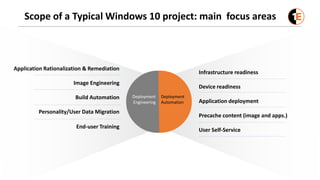
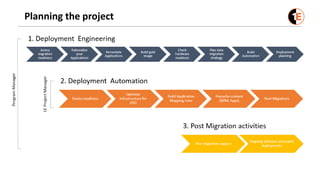
Scope of a Typical Windows 10 project: main focus areas
Application Rationalization & Remediation
Image Engineering
Build Automation
Personality/User Data Migration
Infrastructure readiness
Device readiness
Application deployment
Precache content (image and apps.)
User Self-Service
End-user Training
Deployment
Automation
Deployment
Engineering
Planning the project
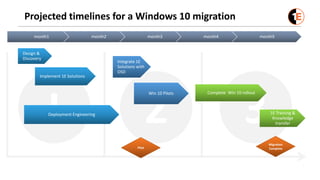
Projected timelines for a Windows 10 migration
32I
month1 month2 month3 month4 month5
Design &
Discovery
Integrate 1E
Solutions with
OSD
Complete Win 10 rollout
1E Training &
Knowledge
transfer
Pilot
Migration
Complete
Implement 1E Solutions
Deployment Engineering
Win 10 Pilots
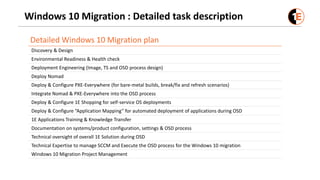
Windows 10 Migration : Detailed task description
Detailed Windows 10 Migration plan
Discovery & Design
Environmental Readiness & Health check
Deployment Engineering (Image, TS and OSD process design)
Deploy Nomad
Deploy & Configure PXE-Everywhere (for bare-metal builds, break/fix and refresh scenarios)
Integrate Nomad & PXE-Everywhere into the OSD process
Deploy & Configure 1E Shopping for self-service OS deployments
Deploy & Configure “Application Mapping” for automated deployment of applications during OSD
1E Applications Training & Knowledge Transfer
Documentation on systems/product configuration, settings & OSD process
Technical oversight of overall 1E Solution during OSD
Technical Expertise to manage SCCM and Execute the OSD process for the Windows 10 migration
Windows 10 Migration Project Management
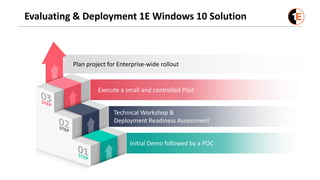
Evaluating & Deployment 1E Windows 10 Solution
Initial Demo followed by a POC
Technical Workshop &
Deployment Readiness Assessment
Execute a small and controlled Pilot
Plan project for Enterprise-wide rollout
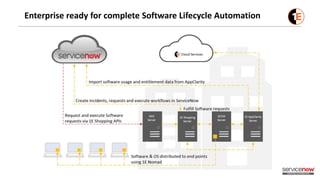
Enterprise ready for complete Software Lifecycle Automation
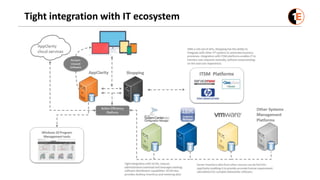
Tight integration with IT ecosystem
Thank you
QUESTIONS
www.1e.com

Windows 10 Migration

  • 1.
    Windows 10 Migration:Scope & Methodology Ambareesh Kulkarni, VP Customer Success, 1E
  • 2.
    Zero Touch Windows10 migration: Business Concerns • Is this is another 18-24 month project? • How can I reduce the cost of deployment if I have to send technicians to every single desktop, every time? • Have too many applications to test and remediate • Will our infrastructure be able to handle automated and zero-touch deployments? • Can we implement new Windows 10 Security features without having to manually touch machines? • Is it worth re-engineering our current business processes?
  • 3.
    Zero Touch Windows10 migration: Process Concerns • How do I plan the migration so its not disruptive to end-users? • How do I take care of my distinct and different deployment needs? Self-service, Depot, Home based users • How can I minimize the number of images I have to maintain? • How do I deploy Applications intelligently? • How do I replicate my image and applications to all my geographic locations? • How do I securely preserve user state during a migration? • How can I track progress of 1,000s of PCs being upgraded? • How do I convert Software distribution to a BAU activity and not have it be a complex project every time?
  • 4.
    Zero Touch Windows10 Migration: How 1E helps • Through automation, 1E customers have achieved migration rates of over 2,000 machines per day • Self-service scheduling eliminates any disruption to the end- user • We automate the reconfiguration of firmware and disk during the migration, while ensuring user data and apps are restored • Our peer to peer sharing capability with bandwidth management ensures minimal network impact • 1E’s ability to highly optimize SCCM infrastructure ensures reliability and scalability
  • 5.
    Scope of aTypical Windows 10 project: main focus areas Application Rationalization & Remediation Image Engineering Build Automation Personality/User Data Migration Infrastructure readiness Device readiness Application deployment Precache content (image and apps.) User Self-Service End-user Training Deployment Automation Deployment Engineering
  • 6.
  • 7.
    Projected timelines fora Windows 10 migration 32I month1 month2 month3 month4 month5 Design & Discovery Integrate 1E Solutions with OSD Complete Win 10 rollout 1E Training & Knowledge transfer Pilot Migration Complete Implement 1E Solutions Deployment Engineering Win 10 Pilots
  • 8.
    Windows 10 Migration: Detailed task description Detailed Windows 10 Migration plan Discovery & Design Environmental Readiness & Health check Deployment Engineering (Image, TS and OSD process design) Deploy Nomad Deploy & Configure PXE-Everywhere (for bare-metal builds, break/fix and refresh scenarios) Integrate Nomad & PXE-Everywhere into the OSD process Deploy & Configure 1E Shopping for self-service OS deployments Deploy & Configure “Application Mapping” for automated deployment of applications during OSD 1E Applications Training & Knowledge Transfer Documentation on systems/product configuration, settings & OSD process Technical oversight of overall 1E Solution during OSD Technical Expertise to manage SCCM and Execute the OSD process for the Windows 10 migration Windows 10 Migration Project Management
  • 9.
    Evaluating & Deployment1E Windows 10 Solution Initial Demo followed by a POC Technical Workshop & Deployment Readiness Assessment Execute a small and controlled Pilot Plan project for Enterprise-wide rollout
  • 10.
    Enterprise ready forcomplete Software Lifecycle Automation
  • 11.
  • 12.