Turning Data into Information and
Information into Business Insights.
Actuate e.Services
Certified Business Solutions
for SAP and PeopleSoft.
Introduction
Value Statement
Actuate e.Services, with proven expertise in delivering world class Information
Delivery and Technology solutions has the ability to design applications that
transform operational ERP data into business insights that can be delivered real
time, is highly adaptive, scalable and secure.
Value Proposition
ļ‚· Offer BI Solutions that connect to both structured and unstructured ERP
data (without having to rely on building a data warehouse solution first).
ļ‚· Provide a single and unified interface to access data from multiple ERP
transaction sources.
ļ‚· Apply Actuate e.Services best practice and implementation methodology to
maximize ROI (Return On Investment).
ļ‚· Provide ā€˜Just In Time (JIT)’ metrics via ā€˜Executive Dash Boards’ to measure
business performance and enable quick decision-making.
Document Purpose
The purpose of this document is to develop a blueprint for Actuate e.Services
Enterprise Systems business and practice development initiative.
This document provides a high level overview of:
ļ‚§ ERP market distribution and business potential.
ļ‚§ SAP and PeopleSoft product architecture.
ļ‚§ Technical architecture of SAP and PeopleSoft.
ļ‚§ GAP analysis of existing BI solutions available within SAP and PeopleSoft.
ļ‚§ Actuate Value Proposition to provide enhanced BI solutions.
Business Development Opportunities
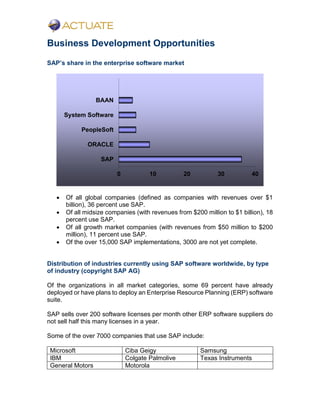
SAP’s share in the enterprise software market
ļ‚· Of all global companies (defined as companies with revenues over $1
billion), 36 percent use SAP.
ļ‚· Of all midsize companies (with revenues from $200 million to $1 billion), 18
percent use SAP.
ļ‚· Of all growth market companies (with revenues from $50 million to $200
million), 11 percent use SAP.
ļ‚· Of the over 15,000 SAP implementations, 3000 are not yet complete.
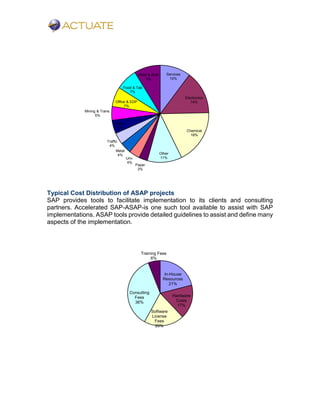
Distribution of industries currently using SAP software worldwide, by type
of industry (copyright SAP AG)
Of the organizations in all market categories, some 69 percent have already
deployed or have plans to deploy an Enterprise Resource Planning (ERP) software
suite.
SAP sells over 200 software licenses per month other ERP software suppliers do
not sell half this many licenses in a year.
Some of the over 7000 companies that use SAP include:
Microsoft Ciba Geigy Samsung
IBM Colgate Palmolive Texas Instruments
General Motors Motorola
0 10 20 30 40
SAP
ORACLE
PeopleSoft
System Software
BAAN
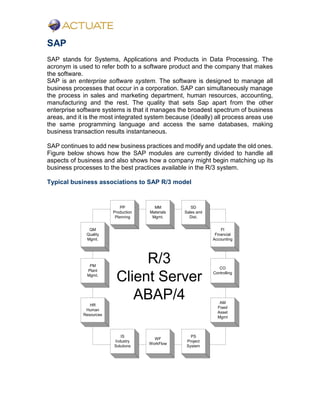
Typical Cost Distribution of ASAP projects
SAP provides tools to facilitate implementation to its clients and consulting
partners. Accelerated SAP-ASAP-is one such tool available to assist with SAP
implementations. ASAP tools provide detailed guidelines to assist and define many
aspects of the implementation.
Services
10%
Electronics
14%
Chemical
18%
Other
11%
Paper
3%
Unv.
4%
Metal
4%
Traffic
4%
Trade
4%
Mining & Trans.
5%
Office & EDP
7%
Food & Tab
7%
Steel & Auto
9%
In-House
Resources
21%
Hardware
Costs
17%
Software
License
Fees
20%
Consulting
Fees
36%
Training Fees
6%
SAP
SAP stands for Systems, Applications and Products in Data Processing. The
acronym is used to refer both to a software product and the company that makes
the software.
SAP is an enterprise software system. The software is designed to manage all
business processes that occur in a corporation. SAP can simultaneously manage
the process in sales and marketing department, human resources, accounting,
manufacturing and the rest. The quality that sets Sap apart from the other
enterprise software systems is that it manages the broadest spectrum of business
areas, and it is the most integrated system because (ideally) all process areas use
the same programming language and access the same databases, making
business transaction results instantaneous.
SAP continues to add new business practices and modify and update the old ones.
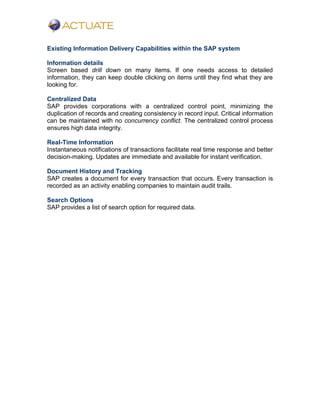
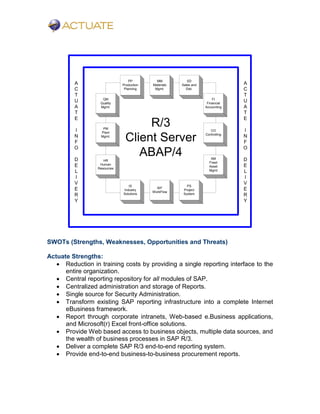
Figure below shows how the SAP modules are currently divided to handle all
aspects of business and also shows how a company might begin matching up its
business processes to the best practices available in the R/3 system.
Typical business associations to SAP R/3 model
R/3
Client Server
ABAP/4
QM
Quality
Mgmt.
PM
Plant
Mgmt.
HR
Human
Resources
PP
Production
Planning
MM
Materials
Mgmt.
SD
Sales and
Dist.
FI
Financial
Accounting
CO
Controlling
AM
Fixed
Asset
Mgmt
IS
Industry
Solutions
WF
WorkFlow
PS
Project
System
Existing Information Delivery Capabilities within the SAP system
Information details
Screen based drill down on many items. If one needs access to detailed
information, they can keep double clicking on items until they find what they are
looking for.
Centralized Data
SAP provides corporations with a centralized control point, minimizing the
duplication of records and creating consistency in record input. Critical information
can be maintained with no concurrency conflict. The centralized control process
ensures high data integrity.
Real-Time Information
Instantaneous notifications of transactions facilitate real time response and better
decision-making. Updates are immediate and available for instant verification.
Document History and Tracking
SAP creates a document for every transaction that occurs. Every transaction is
recorded as an activity enabling companies to maintain audit trails.
Search Options
SAP provides a list of search option for required data.
Current Limitations of the Reporting Systems within SAP and
Actuate Solutions to provide enhanced Information delivery
solutions for SAP
Distributed Reporting Systems in SAP
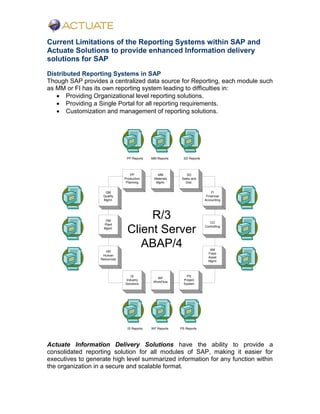
Though SAP provides a centralized data source for Reporting, each module such
as MM or FI has its own reporting system leading to difficulties in:
ļ‚· Providing Organizational level reporting solutions.
ļ‚· Providing a Single Portal for all reporting requirements.
ļ‚· Customization and management of reporting solutions.
R/3
Client Server
ABAP/4
QM
Quality
Mgmt.
PM
Plant
Mgmt.
HR
Human
Resources
PP
Production
Planning
MM
Materials
Mgmt.
SD
Sales and
Dist.
FI
Financial
Accounting
CO
Controlling
AM
Fixed
Asset
Mgmt
IS
Industry
Solutions
WF
WorkFlow
PS
Project
System
PP Reports MM Reports SD Reports
IS Reports WF Reports PS Reports
Actuate Information Delivery Solutions have the ability to provide a
consolidated reporting solution for all modules of SAP, making it easier for
executives to generate high level summarized information for any function within
the organization in a secure and scalable format.
texttext
R/3
Client Server
ABAP/4
QM
Quality
Mgmt.
PM
Plant
Mgmt.
HR
Human
Resources
PP
Production
Planning
MM
Materials
Mgmt.
SD
Sales and
Dist.
FI
Financial
Accounting
CO
Controlling
AM
Fixed
Asset
Mgmt
IS
Industry
Solutions
WF
WorkFlow
PS
Project
System
A
C
T
U
A
T
E
I
N
F
O
D
E
L
I
V
E
R
Y
A
C
T
U
A
T
E
I
N
F
O
D
E
L
I
V
E
R
Y
SWOTs (Strengths, Weaknesses, Opportunities and Threats)
Actuate Strengths:
ļ‚· Reduction in training costs by providing a single reporting interface to the
entire organization.
ļ‚· Central reporting repository for all modules of SAP.
ļ‚· Centralized administration and storage of Reports.
ļ‚· Single source for Security Administration.
ļ‚· Transform existing SAP reporting infrastructure into a complete Internet
eBusiness framework.
ļ‚· Report through corporate intranets, Web-based e.Business applications,
and Microsoft(r) Excel front-office solutions.
ļ‚· Provide Web based access to business objects, multiple data sources, and
the wealth of business processes in SAP R/3.
ļ‚· Deliver a complete SAP R/3 end-to-end reporting system.
ļ‚· Provide end-to-end business-to-business procurement reports.
Actuate Weaknesses:
ļ‚§ No reference implementation.
ļ‚§ Need to compete with SAP BW and other SAP BI vendors.
PeopleSoft
PeopleSoft is recognized as one of the leading contenders in the ERP arena.
Each packaged application produced by the ERP vendor must have functionality
to accommodate a wide range of companies with varying business requirements.
Some requirements may be dictated by the particular laws of a given state or
even country. With the expansion of companies into the Global marketplace, the
challenge to provide complete ERP solutions is greater than ever. PeopleSoft
has responded to these challenges and has produced an impressive set of
functional applications in areas such as Finance, Human Resource Management,
Manufacturing, and Student Administration.
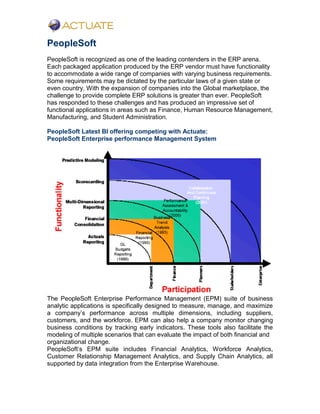
PeopleSoft Latest BI offering competing with Actuate:
PeopleSoft Enterprise performance Management System
The PeopleSoft Enterprise Performance Management (EPM) suite of business
analytic applications is specifically designed to measure, manage, and maximize
a company’s performance across multiple dimensions, including suppliers,
customers, and the workforce. EPM can also help a company monitor changing
business conditions by tracking early indicators. These tools also facilitate the
modeling of multiple scenarios that can evaluate the impact of both financial and
organizational change.
PeopleSoft’s EPM suite includes Financial Analytics, Workforce Analytics,
Customer Relationship Management Analytics, and Supply Chain Analytics, all
supported by data integration from the Enterprise Warehouse.
Business Development Objectives
Develop Actuate e.Services solutions/offerings for SAP R/3 and SAP
Business Warehouse
According to Gartner’s 2002 BI Market study many customers who have now
successfully implemented their ERP systems are treating their data as an
enterprise wide asset and are looking for BI solutions that ā€œtease out business
opportunities and cost savingsā€.
Most customers that have installed SAP R/3 as their ERP system often choose
SAP’s Business Information Warehouse (BW) as their business intelligence
platform.
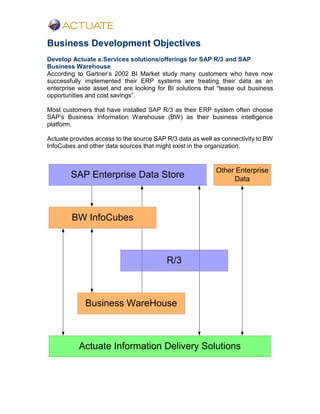
Actuate provides access to the source SAP R/3 data as well as connectivity to BW
InfoCubes and other data sources that might exist in the organization.
R/3
Business WareHouse
SAP Enterprise Data Store
BW InfoCubes
Actuate Information Delivery Solutions
Other Enterprise
Data
Actuate e.Services Offerings
1.Actuate e.Services ā€˜BI Development Strategy Sessions’ for Enterprise
Systems
By leveraging tried and tested best practices and with years of accumulated
knowledge in developing BI solutions for other industry applications, Actuate
e.services can guide companies though the associated complexities of developing
an enterprise wide Information Delivery solution for SAP implementations.
2.Actuate e.Services assistance in Development and Implementation of BI
solutions for Enterprise Systems
Typical e.Services project execution plan for developing SAP/BW Information
delivery solution
Define and Assess Information Delivery Requirements
1. Jointly define Information Delivery Blueprint
2. Define Solution Strategy
3. Develop Solution
4. Solution Rollout
5. Service & Support
Information delivery Pilot implementation
For the Pilot focus on extracting Business Content from a specific analysis area
such as Sales Analysis, Accounts Receivables, Procurement etc.
1. Configure standard InfoCube
2. Create Set of Standard Actuate Reports
3. Organizational buy-in is obtained.
* No major customization and integration effort is undertaken in this
phase
Information Delivery Infrastructure Set-up
1. Setup of Hardware and Software
2. Actuate Cluster Set-up and configuration
3. Configure R3 connectivity
4. Test Data Access and Flow
Project Implementation and rollout
Actuate e.Services methodology complements the ASAP methodology to ensure
a robust Information delivery solution is implemented, tested and deployed.
Project milestones include
1. Blueprinting
2. Realization
3. Roll Out
4. Post-Implementation Support
5. Organizational Change Management
3. Packaged Offerings
1. Information Delivery Requirements Analysis
2. Deployment Strategy Sessions for SAP and PeopleSoft
3. Security Integration and Configuration Management
4. Base Report designs/templates for different SAP and PeopleSoft
modules
R&D, Training and Infrastructure requirements
Training:
PeopleSoft
Formal PeopleSoft training is not a requirement at this stage, since e.services has
over the years accumulated actual project experience in complex PeopleSoft-
Actuate implementations.
SAP
SAP has training course offerings for different levels:
ļ‚§ Level One and Two for basic Introduction and Orientation.
ļ‚§ Level Three for Installation and Configuration
ļ‚§ Optional: Currently SAP has 14 modules (areas of functionality) and offers
training in each module.
It is not necessary for an Actuate e.Services consultant to undergo formal
training in any of these modules as long as they have received training in
Level One and Two.
Requirements:
ļ‚§ Senior Technical Architects and Project Managers to attend Level One and
Two training.
ļ‚§ Senior and Staff Consultants to attend Level Two training.
Current Status:
Level One Training will be completed shortly
Level Two and Three training to be scheduled.
Train the Trainer:
Not all consultants need to attend formal in-class training. Once a Senior
consultant has attended a paid formal training course, the same consultant will
tailor the training course to focus on BI requirements and train other e.services
consultants in the organization.
Team Training Costs for SAP (excluding travel and expenses):
# Consultants Avg. Course
Rate
Average # of
Classes
Total
6 $5,000.00 1.5 $45,000.00
R&D, Hardware & Software
Software:
ļ‚§ Access to the latest version of core SAP and PeopleSoft Software will be a
must along with,
o One major functional module of both these ERP systems (e.g. Sales or
Accounting)
ļ‚§ Licensed copies of all associated software to successfully configure SAP and
PeopleSoft. (e.g. Oracle or DB2)
Approximate Limited User/Functionality Software License cost: $20K-$40K
Hardware:
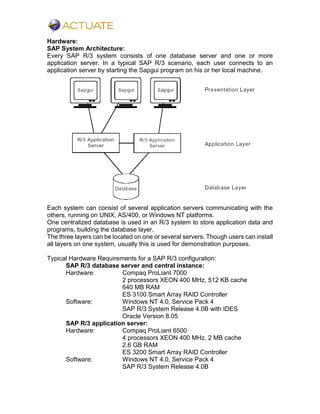
SAP System Architecture:
Every SAP R/3 system consists of one database server and one or more
application server. In a typical SAP R/3 scenario, each user connects to an
application server by starting the Sapgui program on his or her local machine.
Each system can consist of several application servers communicating with the
others, running on UNIX, AS/400, or Windows NT platforms.
One centralized database is used in an R/3 system to store application data and
programs, building the database layer.
The three layers can be located on one or several servers. Though users can install
all layers on one system, usually this is used for demonstration purposes.
Typical Hardware Requirements for a SAP R/3 configuration:
SAP R/3 database server and central instance:
Hardware: Compaq ProLiant 7000
2 processors XEON 400 MHz, 512 KB cache
640 MB RAM
ES 3100 Smart Array RAID Controller
Software: Windows NT 4.0, Service Pack 4
SAP R/3 System Release 4.0B with IDES
Oracle Version 8.05
SAP R/3 application server:
Hardware: Compaq ProLiant 6500
4 processors XEON 400 MHz, 2 MB cache
2.6 GB RAM
ES 3200 Smart Array RAID Controller
Software: Windows NT 4.0, Service Pack 4
SAP R/3 System Release 4.0B
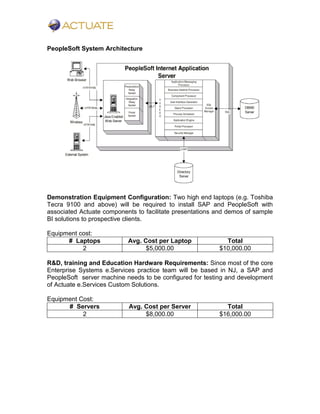
PeopleSoft System Architecture
Demonstration Equipment Configuration: Two high end laptops (e.g. Toshiba
Tecra 9100 and above) will be required to install SAP and PeopleSoft with
associated Actuate components to facilitate presentations and demos of sample
BI solutions to prospective clients.
Equipment cost:
# Laptops Avg. Cost per Laptop Total
2 $5,000.00 $10,000.00
R&D, training and Education Hardware Requirements: Since most of the core
Enterprise Systems e.Services practice team will be based in NJ, a SAP and
PeopleSoft server machine needs to be configured for testing and development
of Actuate e.Services Custom Solutions.
Equipment Cost:
# Servers Avg. Cost per Server Total
2 $8,000.00 $16,000.00
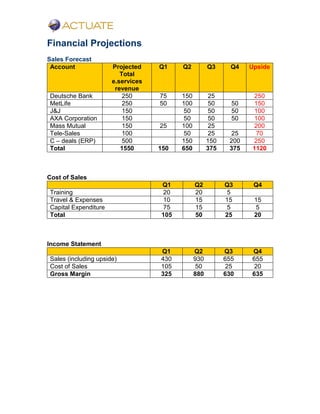
Financial Projections
Sales Forecast
Account Projected
Total
e.services
revenue
Q1 Q2 Q3 Q4 Upside
Deutsche Bank 250 75 150 25 250
MetLife 250 50 100 50 50 150
J&J 150 50 50 50 100
AXA Corporation 150 50 50 50 100
Mass Mutual 150 25 100 25 200
Tele-Sales 100 50 25 25 70
C – deals (ERP) 500 150 150 200 250
Total 1550 150 650 375 375 1120
Cost of Sales
Q1 Q2 Q3 Q4
Training 20 20 5
Travel & Expenses 10 15 15 15
Capital Expenditure 75 15 5 5
Total 105 50 25 20
Income Statement
Q1 Q2 Q3 Q4
Sales (including upside) 430 930 655 655
Cost of Sales 105 50 25 20
Gross Margin 325 880 630 635
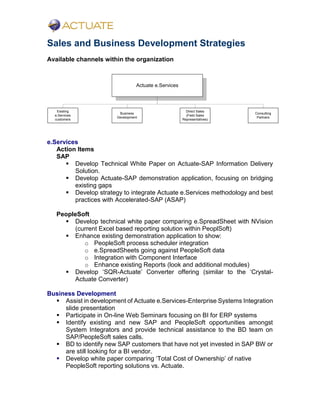
Sales and Business Development Strategies
Available channels within the organization
Actuate e.Services
Business
Development
Direct Sales
(Field Sales
Representatives)
Existing
e.Services
customers
Consulting
Partners
e.Services
Action Items
SAP
ļ‚§ Develop Technical White Paper on Actuate-SAP Information Delivery
Solution.
ļ‚§ Develop Actuate-SAP demonstration application, focusing on bridging
existing gaps
ļ‚§ Develop strategy to integrate Actuate e.Services methodology and best
practices with Accelerated-SAP (ASAP)
PeopleSoft
ļ‚§ Develop technical white paper comparing e.SpreadSheet with NVision
(current Excel based reporting solution within PeoplSoft)
ļ‚§ Enhance existing demonstration application to show:
o PeopleSoft process scheduler integration
o e.SpreadSheets going against PeopleSoft data
o Integration with Component Interface
o Enhance existing Reports (look and additional modules)
ļ‚§ Develop ā€˜SQR-Actuate’ Converter offering (similar to the ā€˜Crystal-
Actuate Converter)
Business Development
ļ‚§ Assist in development of Actuate e.Services-Enterprise Systems Integration
slide presentation
ļ‚§ Participate in On-line Web Seminars focusing on BI for ERP systems
ļ‚§ Identify existing and new SAP and PeopleSoft opportunities amongst
System Integrators and provide technical assistance to the BD team on
SAP/PeopleSoft sales calls.
ļ‚§ BD to identify new SAP customers that have not yet invested in SAP BW or
are still looking for a BI vendor.
ļ‚§ Develop white paper comparing ā€˜Total Cost of Ownership’ of native
PeopleSoft reporting solutions vs. Actuate.
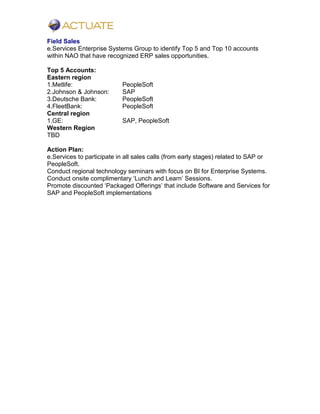
Field Sales
e.Services Enterprise Systems Group to identify Top 5 and Top 10 accounts
within NAO that have recognized ERP sales opportunities.
Top 5 Accounts:
Eastern region
1.Metlife: PeopleSoft
2.Johnson & Johnson: SAP
3.Deutsche Bank: PeopleSoft
4.FleetBank: PeopleSoft
Central region
1.GE: SAP, PeopleSoft
Western Region
TBD
Action Plan:
e.Services to participate in all sales calls (from early stages) related to SAP or
PeopleSoft.
Conduct regional technology seminars with focus on BI for Enterprise Systems.
Conduct onsite complimentary ā€˜Lunch and Learn’ Sessions.
Promote discounted ā€˜Packaged Offerings’ that include Software and Services for
SAP and PeopleSoft implementations
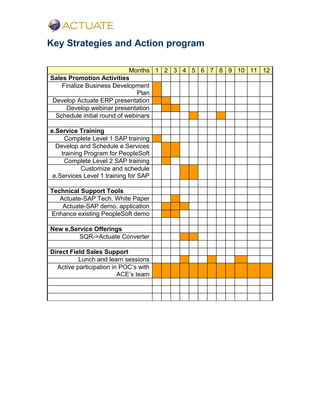
Key Strategies and Action program
Months 1 2 3 4 5 6 7 8 9 10 11 12
Sales Promotion Activities
Finalize Business Development
Plan
Develop Actuate ERP presentation
Develop webinar presentation
Schedule initial round of webinars
e.Service Training
Complete Level 1 SAP training
Develop and Schedule e.Services
training Program for PeopleSoft
Complete Level 2 SAP training
Customize and schedule
e.Services Level 1 training for SAP
Technical Support Tools
Actuate-SAP Tech. White Paper
Actuate-SAP demo. application
Enhance existing PeopleSoft demo
New e.Service Offerings
SQR->Actuate Converter
Direct Field Sales Support
Lunch and learn sessions
Active participation in POC’s with
ACE’s team

Actuate Certified Business Solutions for SAP

  • 1.
    Turning Data intoInformation and Information into Business Insights. Actuate e.Services Certified Business Solutions for SAP and PeopleSoft.
  • 2.
    Introduction Value Statement Actuate e.Services,with proven expertise in delivering world class Information Delivery and Technology solutions has the ability to design applications that transform operational ERP data into business insights that can be delivered real time, is highly adaptive, scalable and secure. Value Proposition ļ‚· Offer BI Solutions that connect to both structured and unstructured ERP data (without having to rely on building a data warehouse solution first). ļ‚· Provide a single and unified interface to access data from multiple ERP transaction sources. ļ‚· Apply Actuate e.Services best practice and implementation methodology to maximize ROI (Return On Investment). ļ‚· Provide ā€˜Just In Time (JIT)’ metrics via ā€˜Executive Dash Boards’ to measure business performance and enable quick decision-making. Document Purpose The purpose of this document is to develop a blueprint for Actuate e.Services Enterprise Systems business and practice development initiative. This document provides a high level overview of: ļ‚§ ERP market distribution and business potential. ļ‚§ SAP and PeopleSoft product architecture. ļ‚§ Technical architecture of SAP and PeopleSoft. ļ‚§ GAP analysis of existing BI solutions available within SAP and PeopleSoft. ļ‚§ Actuate Value Proposition to provide enhanced BI solutions.
  • 3.
    Business Development Opportunities SAP’sshare in the enterprise software market ļ‚· Of all global companies (defined as companies with revenues over $1 billion), 36 percent use SAP. ļ‚· Of all midsize companies (with revenues from $200 million to $1 billion), 18 percent use SAP. ļ‚· Of all growth market companies (with revenues from $50 million to $200 million), 11 percent use SAP. ļ‚· Of the over 15,000 SAP implementations, 3000 are not yet complete. Distribution of industries currently using SAP software worldwide, by type of industry (copyright SAP AG) Of the organizations in all market categories, some 69 percent have already deployed or have plans to deploy an Enterprise Resource Planning (ERP) software suite. SAP sells over 200 software licenses per month other ERP software suppliers do not sell half this many licenses in a year. Some of the over 7000 companies that use SAP include: Microsoft Ciba Geigy Samsung IBM Colgate Palmolive Texas Instruments General Motors Motorola 0 10 20 30 40 SAP ORACLE PeopleSoft System Software BAAN
  • 4.
    Typical Cost Distributionof ASAP projects SAP provides tools to facilitate implementation to its clients and consulting partners. Accelerated SAP-ASAP-is one such tool available to assist with SAP implementations. ASAP tools provide detailed guidelines to assist and define many aspects of the implementation. Services 10% Electronics 14% Chemical 18% Other 11% Paper 3% Unv. 4% Metal 4% Traffic 4% Trade 4% Mining & Trans. 5% Office & EDP 7% Food & Tab 7% Steel & Auto 9% In-House Resources 21% Hardware Costs 17% Software License Fees 20% Consulting Fees 36% Training Fees 6%
  • 5.
    SAP SAP stands forSystems, Applications and Products in Data Processing. The acronym is used to refer both to a software product and the company that makes the software. SAP is an enterprise software system. The software is designed to manage all business processes that occur in a corporation. SAP can simultaneously manage the process in sales and marketing department, human resources, accounting, manufacturing and the rest. The quality that sets Sap apart from the other enterprise software systems is that it manages the broadest spectrum of business areas, and it is the most integrated system because (ideally) all process areas use the same programming language and access the same databases, making business transaction results instantaneous. SAP continues to add new business practices and modify and update the old ones. Figure below shows how the SAP modules are currently divided to handle all aspects of business and also shows how a company might begin matching up its business processes to the best practices available in the R/3 system. Typical business associations to SAP R/3 model R/3 Client Server ABAP/4 QM Quality Mgmt. PM Plant Mgmt. HR Human Resources PP Production Planning MM Materials Mgmt. SD Sales and Dist. FI Financial Accounting CO Controlling AM Fixed Asset Mgmt IS Industry Solutions WF WorkFlow PS Project System
  • 6.
    Existing Information DeliveryCapabilities within the SAP system Information details Screen based drill down on many items. If one needs access to detailed information, they can keep double clicking on items until they find what they are looking for. Centralized Data SAP provides corporations with a centralized control point, minimizing the duplication of records and creating consistency in record input. Critical information can be maintained with no concurrency conflict. The centralized control process ensures high data integrity. Real-Time Information Instantaneous notifications of transactions facilitate real time response and better decision-making. Updates are immediate and available for instant verification. Document History and Tracking SAP creates a document for every transaction that occurs. Every transaction is recorded as an activity enabling companies to maintain audit trails. Search Options SAP provides a list of search option for required data.
  • 7.
    Current Limitations ofthe Reporting Systems within SAP and Actuate Solutions to provide enhanced Information delivery solutions for SAP Distributed Reporting Systems in SAP Though SAP provides a centralized data source for Reporting, each module such as MM or FI has its own reporting system leading to difficulties in: ļ‚· Providing Organizational level reporting solutions. ļ‚· Providing a Single Portal for all reporting requirements. ļ‚· Customization and management of reporting solutions. R/3 Client Server ABAP/4 QM Quality Mgmt. PM Plant Mgmt. HR Human Resources PP Production Planning MM Materials Mgmt. SD Sales and Dist. FI Financial Accounting CO Controlling AM Fixed Asset Mgmt IS Industry Solutions WF WorkFlow PS Project System PP Reports MM Reports SD Reports IS Reports WF Reports PS Reports Actuate Information Delivery Solutions have the ability to provide a consolidated reporting solution for all modules of SAP, making it easier for executives to generate high level summarized information for any function within the organization in a secure and scalable format.
  • 8.
    texttext R/3 Client Server ABAP/4 QM Quality Mgmt. PM Plant Mgmt. HR Human Resources PP Production Planning MM Materials Mgmt. SD Sales and Dist. FI Financial Accounting CO Controlling AM Fixed Asset Mgmt IS Industry Solutions WF WorkFlow PS Project System A C T U A T E I N F O D E L I V E R Y A C T U A T E I N F O D E L I V E R Y SWOTs(Strengths, Weaknesses, Opportunities and Threats) Actuate Strengths: ļ‚· Reduction in training costs by providing a single reporting interface to the entire organization. ļ‚· Central reporting repository for all modules of SAP. ļ‚· Centralized administration and storage of Reports. ļ‚· Single source for Security Administration. ļ‚· Transform existing SAP reporting infrastructure into a complete Internet eBusiness framework. ļ‚· Report through corporate intranets, Web-based e.Business applications, and Microsoft(r) Excel front-office solutions. ļ‚· Provide Web based access to business objects, multiple data sources, and the wealth of business processes in SAP R/3. ļ‚· Deliver a complete SAP R/3 end-to-end reporting system. ļ‚· Provide end-to-end business-to-business procurement reports.
  • 9.
    Actuate Weaknesses: ļ‚§ Noreference implementation. ļ‚§ Need to compete with SAP BW and other SAP BI vendors.
  • 10.
    PeopleSoft PeopleSoft is recognizedas one of the leading contenders in the ERP arena. Each packaged application produced by the ERP vendor must have functionality to accommodate a wide range of companies with varying business requirements. Some requirements may be dictated by the particular laws of a given state or even country. With the expansion of companies into the Global marketplace, the challenge to provide complete ERP solutions is greater than ever. PeopleSoft has responded to these challenges and has produced an impressive set of functional applications in areas such as Finance, Human Resource Management, Manufacturing, and Student Administration. PeopleSoft Latest BI offering competing with Actuate: PeopleSoft Enterprise performance Management System The PeopleSoft Enterprise Performance Management (EPM) suite of business analytic applications is specifically designed to measure, manage, and maximize a company’s performance across multiple dimensions, including suppliers, customers, and the workforce. EPM can also help a company monitor changing business conditions by tracking early indicators. These tools also facilitate the modeling of multiple scenarios that can evaluate the impact of both financial and organizational change. PeopleSoft’s EPM suite includes Financial Analytics, Workforce Analytics, Customer Relationship Management Analytics, and Supply Chain Analytics, all supported by data integration from the Enterprise Warehouse.
  • 11.
    Business Development Objectives DevelopActuate e.Services solutions/offerings for SAP R/3 and SAP Business Warehouse According to Gartner’s 2002 BI Market study many customers who have now successfully implemented their ERP systems are treating their data as an enterprise wide asset and are looking for BI solutions that ā€œtease out business opportunities and cost savingsā€. Most customers that have installed SAP R/3 as their ERP system often choose SAP’s Business Information Warehouse (BW) as their business intelligence platform. Actuate provides access to the source SAP R/3 data as well as connectivity to BW InfoCubes and other data sources that might exist in the organization. R/3 Business WareHouse SAP Enterprise Data Store BW InfoCubes Actuate Information Delivery Solutions Other Enterprise Data
  • 12.
    Actuate e.Services Offerings 1.Actuatee.Services ā€˜BI Development Strategy Sessions’ for Enterprise Systems By leveraging tried and tested best practices and with years of accumulated knowledge in developing BI solutions for other industry applications, Actuate e.services can guide companies though the associated complexities of developing an enterprise wide Information Delivery solution for SAP implementations. 2.Actuate e.Services assistance in Development and Implementation of BI solutions for Enterprise Systems Typical e.Services project execution plan for developing SAP/BW Information delivery solution Define and Assess Information Delivery Requirements 1. Jointly define Information Delivery Blueprint 2. Define Solution Strategy 3. Develop Solution 4. Solution Rollout 5. Service & Support Information delivery Pilot implementation For the Pilot focus on extracting Business Content from a specific analysis area such as Sales Analysis, Accounts Receivables, Procurement etc. 1. Configure standard InfoCube 2. Create Set of Standard Actuate Reports 3. Organizational buy-in is obtained. * No major customization and integration effort is undertaken in this phase Information Delivery Infrastructure Set-up 1. Setup of Hardware and Software 2. Actuate Cluster Set-up and configuration 3. Configure R3 connectivity 4. Test Data Access and Flow Project Implementation and rollout Actuate e.Services methodology complements the ASAP methodology to ensure a robust Information delivery solution is implemented, tested and deployed. Project milestones include 1. Blueprinting 2. Realization 3. Roll Out 4. Post-Implementation Support 5. Organizational Change Management
  • 13.
    3. Packaged Offerings 1.Information Delivery Requirements Analysis 2. Deployment Strategy Sessions for SAP and PeopleSoft 3. Security Integration and Configuration Management 4. Base Report designs/templates for different SAP and PeopleSoft modules
  • 14.
    R&D, Training andInfrastructure requirements Training: PeopleSoft Formal PeopleSoft training is not a requirement at this stage, since e.services has over the years accumulated actual project experience in complex PeopleSoft- Actuate implementations. SAP SAP has training course offerings for different levels: ļ‚§ Level One and Two for basic Introduction and Orientation. ļ‚§ Level Three for Installation and Configuration ļ‚§ Optional: Currently SAP has 14 modules (areas of functionality) and offers training in each module. It is not necessary for an Actuate e.Services consultant to undergo formal training in any of these modules as long as they have received training in Level One and Two. Requirements: ļ‚§ Senior Technical Architects and Project Managers to attend Level One and Two training. ļ‚§ Senior and Staff Consultants to attend Level Two training. Current Status: Level One Training will be completed shortly Level Two and Three training to be scheduled. Train the Trainer: Not all consultants need to attend formal in-class training. Once a Senior consultant has attended a paid formal training course, the same consultant will tailor the training course to focus on BI requirements and train other e.services consultants in the organization. Team Training Costs for SAP (excluding travel and expenses): # Consultants Avg. Course Rate Average # of Classes Total 6 $5,000.00 1.5 $45,000.00 R&D, Hardware & Software Software: ļ‚§ Access to the latest version of core SAP and PeopleSoft Software will be a must along with, o One major functional module of both these ERP systems (e.g. Sales or Accounting) ļ‚§ Licensed copies of all associated software to successfully configure SAP and PeopleSoft. (e.g. Oracle or DB2) Approximate Limited User/Functionality Software License cost: $20K-$40K
  • 15.
    Hardware: SAP System Architecture: EverySAP R/3 system consists of one database server and one or more application server. In a typical SAP R/3 scenario, each user connects to an application server by starting the Sapgui program on his or her local machine. Each system can consist of several application servers communicating with the others, running on UNIX, AS/400, or Windows NT platforms. One centralized database is used in an R/3 system to store application data and programs, building the database layer. The three layers can be located on one or several servers. Though users can install all layers on one system, usually this is used for demonstration purposes. Typical Hardware Requirements for a SAP R/3 configuration: SAP R/3 database server and central instance: Hardware: Compaq ProLiant 7000 2 processors XEON 400 MHz, 512 KB cache 640 MB RAM ES 3100 Smart Array RAID Controller Software: Windows NT 4.0, Service Pack 4 SAP R/3 System Release 4.0B with IDES Oracle Version 8.05 SAP R/3 application server: Hardware: Compaq ProLiant 6500 4 processors XEON 400 MHz, 2 MB cache 2.6 GB RAM ES 3200 Smart Array RAID Controller Software: Windows NT 4.0, Service Pack 4 SAP R/3 System Release 4.0B
  • 16.
    PeopleSoft System Architecture DemonstrationEquipment Configuration: Two high end laptops (e.g. Toshiba Tecra 9100 and above) will be required to install SAP and PeopleSoft with associated Actuate components to facilitate presentations and demos of sample BI solutions to prospective clients. Equipment cost: # Laptops Avg. Cost per Laptop Total 2 $5,000.00 $10,000.00 R&D, training and Education Hardware Requirements: Since most of the core Enterprise Systems e.Services practice team will be based in NJ, a SAP and PeopleSoft server machine needs to be configured for testing and development of Actuate e.Services Custom Solutions. Equipment Cost: # Servers Avg. Cost per Server Total 2 $8,000.00 $16,000.00
  • 17.
    Financial Projections Sales Forecast AccountProjected Total e.services revenue Q1 Q2 Q3 Q4 Upside Deutsche Bank 250 75 150 25 250 MetLife 250 50 100 50 50 150 J&J 150 50 50 50 100 AXA Corporation 150 50 50 50 100 Mass Mutual 150 25 100 25 200 Tele-Sales 100 50 25 25 70 C – deals (ERP) 500 150 150 200 250 Total 1550 150 650 375 375 1120 Cost of Sales Q1 Q2 Q3 Q4 Training 20 20 5 Travel & Expenses 10 15 15 15 Capital Expenditure 75 15 5 5 Total 105 50 25 20 Income Statement Q1 Q2 Q3 Q4 Sales (including upside) 430 930 655 655 Cost of Sales 105 50 25 20 Gross Margin 325 880 630 635
  • 18.
    Sales and BusinessDevelopment Strategies Available channels within the organization Actuate e.Services Business Development Direct Sales (Field Sales Representatives) Existing e.Services customers Consulting Partners e.Services Action Items SAP ļ‚§ Develop Technical White Paper on Actuate-SAP Information Delivery Solution. ļ‚§ Develop Actuate-SAP demonstration application, focusing on bridging existing gaps ļ‚§ Develop strategy to integrate Actuate e.Services methodology and best practices with Accelerated-SAP (ASAP) PeopleSoft ļ‚§ Develop technical white paper comparing e.SpreadSheet with NVision (current Excel based reporting solution within PeoplSoft) ļ‚§ Enhance existing demonstration application to show: o PeopleSoft process scheduler integration o e.SpreadSheets going against PeopleSoft data o Integration with Component Interface o Enhance existing Reports (look and additional modules) ļ‚§ Develop ā€˜SQR-Actuate’ Converter offering (similar to the ā€˜Crystal- Actuate Converter) Business Development ļ‚§ Assist in development of Actuate e.Services-Enterprise Systems Integration slide presentation ļ‚§ Participate in On-line Web Seminars focusing on BI for ERP systems ļ‚§ Identify existing and new SAP and PeopleSoft opportunities amongst System Integrators and provide technical assistance to the BD team on SAP/PeopleSoft sales calls. ļ‚§ BD to identify new SAP customers that have not yet invested in SAP BW or are still looking for a BI vendor. ļ‚§ Develop white paper comparing ā€˜Total Cost of Ownership’ of native PeopleSoft reporting solutions vs. Actuate.
  • 19.
    Field Sales e.Services EnterpriseSystems Group to identify Top 5 and Top 10 accounts within NAO that have recognized ERP sales opportunities. Top 5 Accounts: Eastern region 1.Metlife: PeopleSoft 2.Johnson & Johnson: SAP 3.Deutsche Bank: PeopleSoft 4.FleetBank: PeopleSoft Central region 1.GE: SAP, PeopleSoft Western Region TBD Action Plan: e.Services to participate in all sales calls (from early stages) related to SAP or PeopleSoft. Conduct regional technology seminars with focus on BI for Enterprise Systems. Conduct onsite complimentary ā€˜Lunch and Learn’ Sessions. Promote discounted ā€˜Packaged Offerings’ that include Software and Services for SAP and PeopleSoft implementations
  • 20.
    Key Strategies andAction program Months 1 2 3 4 5 6 7 8 9 10 11 12 Sales Promotion Activities Finalize Business Development Plan Develop Actuate ERP presentation Develop webinar presentation Schedule initial round of webinars e.Service Training Complete Level 1 SAP training Develop and Schedule e.Services training Program for PeopleSoft Complete Level 2 SAP training Customize and schedule e.Services Level 1 training for SAP Technical Support Tools Actuate-SAP Tech. White Paper Actuate-SAP demo. application Enhance existing PeopleSoft demo New e.Service Offerings SQR->Actuate Converter Direct Field Sales Support Lunch and learn sessions Active participation in POC’s with ACE’s team