DM110 Emerging Web Media Dr. John Breslin [email_address] http://sw.deri.org/~jbreslin/ Week 3: Wikis
Definition of wikis A community-developed documentation project “ A piece of server software that allows users to freely create and edit Web page content using any Web browser. Wiki supports hyperlinks and has a simple text syntax for creating new pages and crosslinks between internal pages on the fly.” --  http://wiki.org/wiki.cgi?WhatIsWiki “ A  wiki  is a type of website that allow users to easily add and edit content and is especially suited for collaborative writing. The name is based on the Hawaiian term wiki, meaning "quick", "fast", or "to hasten" (Hawaiian dictionary).” --  http://en.wikipedia.org/wiki/Wiki Makao, famous Hawaiian runner
So, what are wikis used for? A wiki is an  informational resource , like a reference manual, encyclopaedia, or handbook It amasses to a group of web pages that  allows users to add content  and also allows others to edit the content: It relies on cooperation, checks and balances of its members, and a belief in sharing of ideas This creates a  community effort  in resource and information management, disseminating the  'voice' amongst many  instead of concentrating it upon few Wikis are being used in many ways, including the  Wikipedia , a highly used, online, free-access encyclopaedia
History (adapted from the Wikipedia) The  WikiWikiWeb  was the first wiki, established by  Ward Cunningham  in March 1995. He invented the wiki name and concept, and implemented the first wiki engine.  Cunningham coined the term  wiki  after the "wiki wiki" or "quick" shuttle buses at Honolulu Airport.  Wiki wiki  was the first Hawaiian term he learned on his first visit to the islands, when the airport counter agent directed him to take the  wiki wiki  bus between terminals. According to Cunningham, "I chose wiki-wiki as an alliterative substitute for 'quick' and thereby avoided naming this stuff quick-web."   In the late 1990s, wikis increasingly were recognised as a promising way to develop  knowledge bases , and this potential inspired the founders of the  Nupedia  encyclopedia project,  Jimbo  Wales  and  Larry Sanger , to use wiki technology as a basis for an electronic encyclopedia:  Wikipedia  was launched in January 2001. In the early 2000s, wikis were increasingly adopted in the enterprise as  collaborative software . Common uses included project communication, intranets and documentation, initially for technical users. In December 2002,  Socialtext  launched the first commercial open source wiki solution. Open source wikis such as  MediaWiki ,  Kwiki  and  TWiki  grew to over 1 million downloads on the  Sourceforge  repository by 2004. Today some companies use wikis as their only collaborative software and as a replacement for static intranets. There is arguably greater use of wikis behind firewalls than on the public internet.
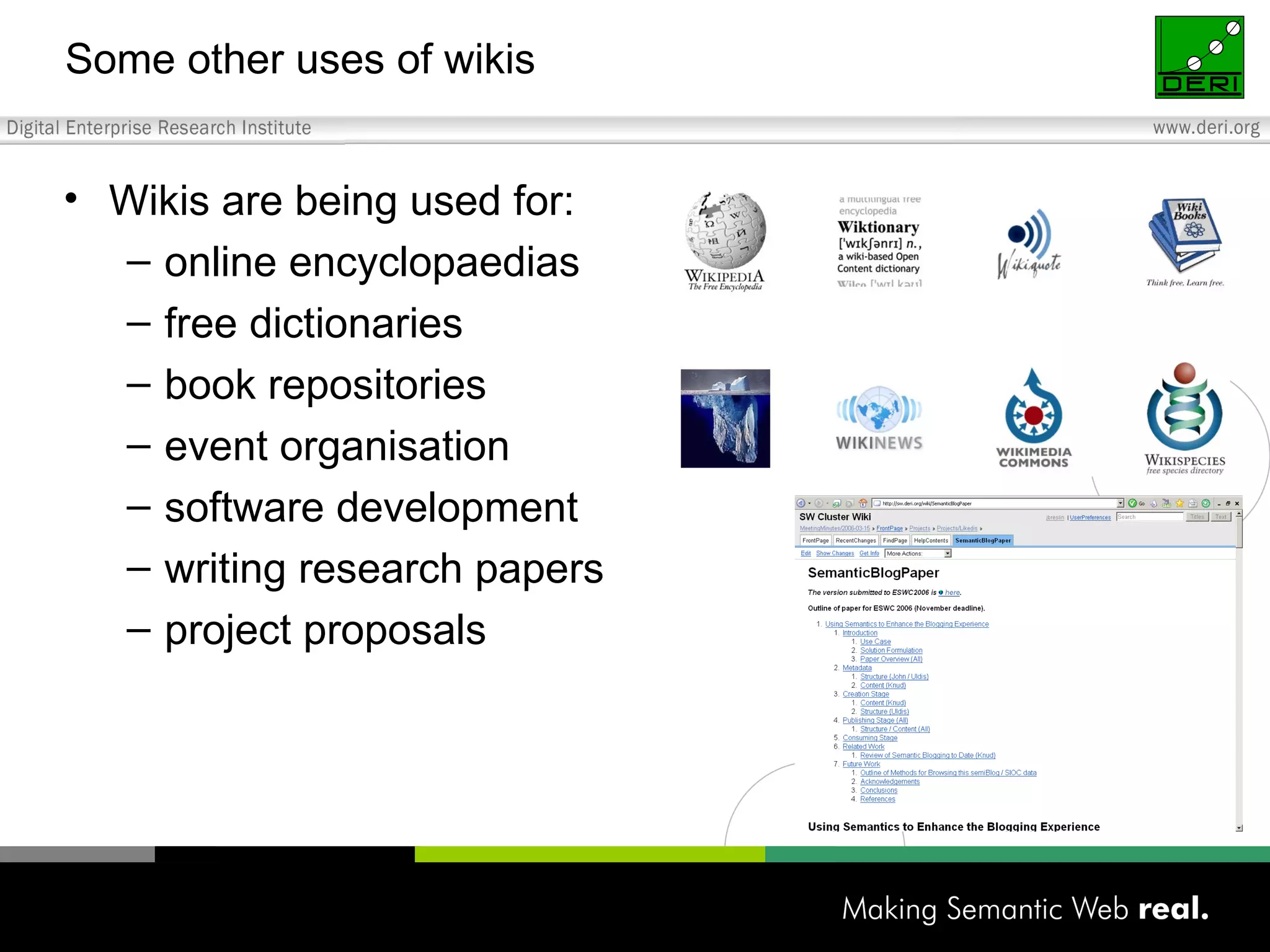
Some other uses of wikis Wikis are being used for: online encyclopaedias free dictionaries book repositories event organisation software development writing research papers project proposals
The Wikipedia: from Gaeilge to Klingon  (Star Trek) Arabic version Chinese version Klingon version
Typical wiki page
Entering information Anyone can edit an existing wiki article If an article does not exist on a particular topic, you can create it If someone messes up an article (deliberately or erroneously), there is a revision history so you can revert the contents “ If removing paint were as easy as painting, we’d only have nice graffiti!”
Updating information When you see an article, click on “Edit” Type in the new text, click on “Save Page” Simple “markup”, e.g. [[NUIM]] -> link to National University of Ireland Maynooth article This is '''important''' -> This is  important
Templates  Templates are used within articles to provide a consistent look to the content placed into them Templates can also provide a structure for entering data, so that it is easy to extract metadata about the topic of an article: e.g. from a template field called “population” in an article about Galway e.g. emoticons
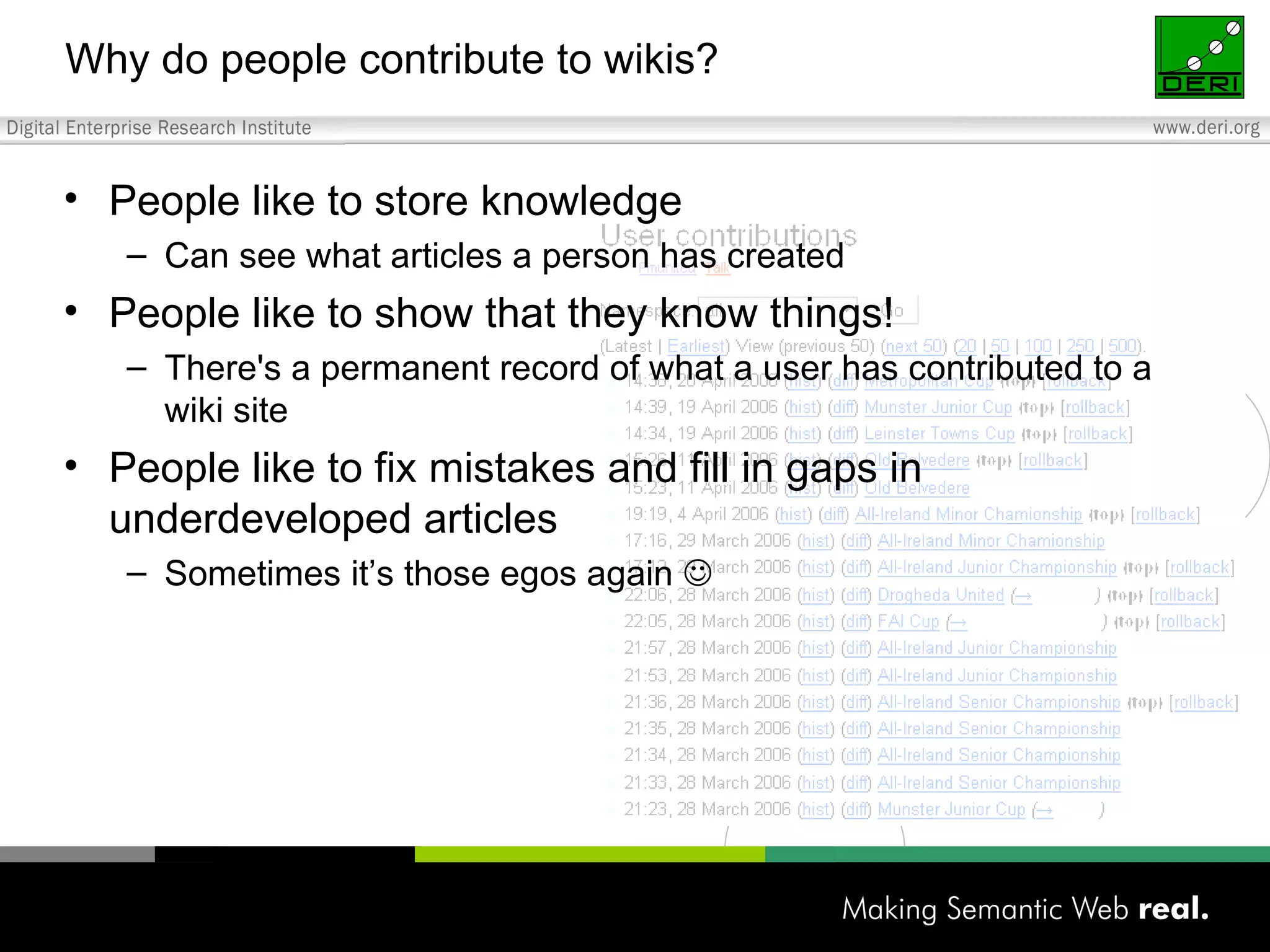
Why do people contribute to wikis? People like to store knowledge Can see what articles a person has created People like to show that they know things! There's a permanent record of what a user has contributed to a wiki site People like to fix mistakes and fill in gaps in underdeveloped articles Sometimes it’s those egos again  
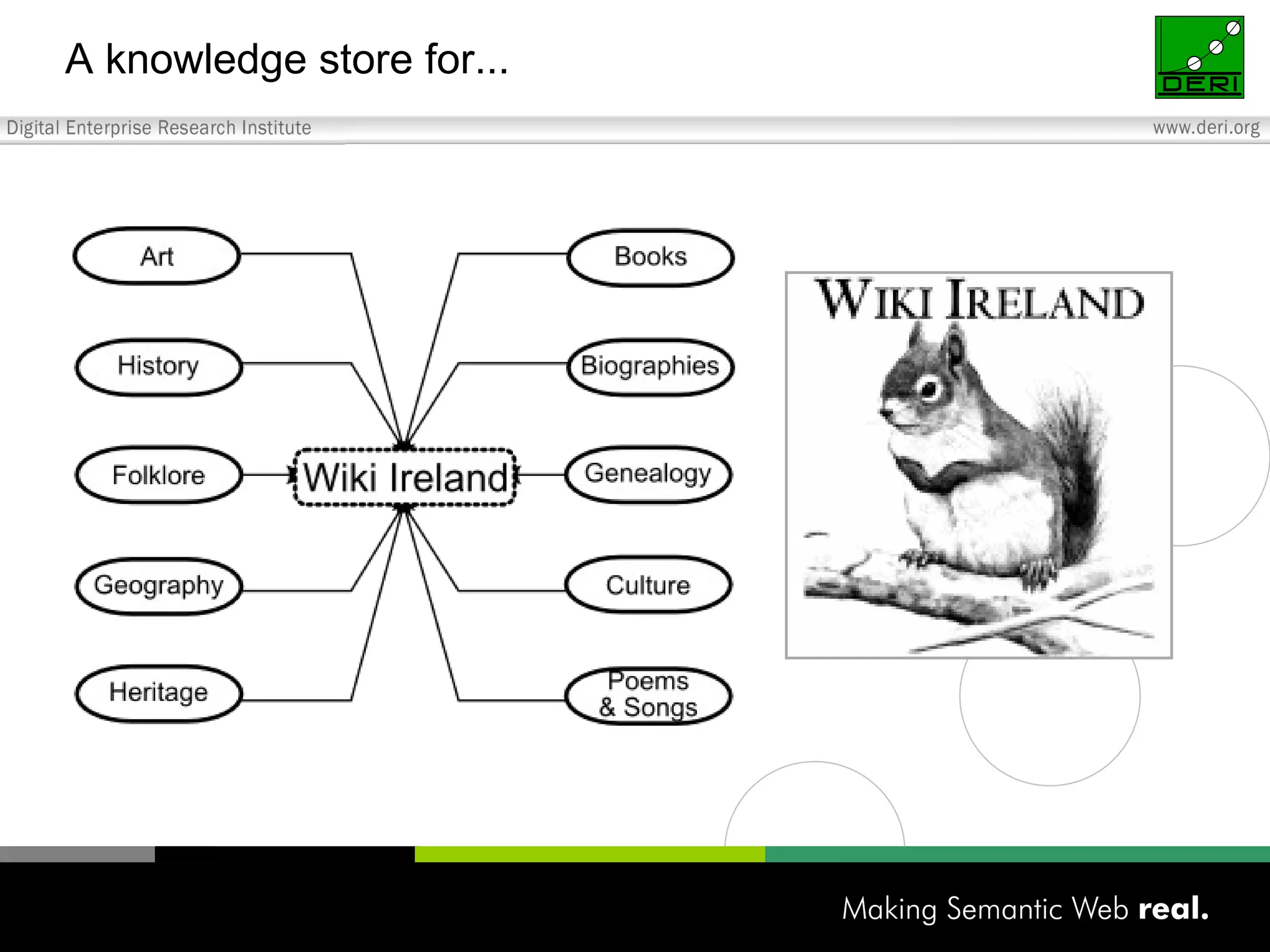
Some Irish wiki sites www.wiki.ie – Wiki Ireland The aim of Wiki Ireland is use wiki technology to create a knowledge store for Ireland's culture and heritage wiki.politics.ie – An Irish politics wiki Aim is to create the largest online resource of Irish political information wiki.boards.ie – The boards.ie Wiki or “Biki” Collaborative pages devoted to boards.ie culture and topics of interest
Wiki engines Many!  Most important  (see http://en.wikipedia.org/wiki/Comparison_of_wiki_software)  and free are: Confluence  coWiki  DokuWiki  Instiki  JSPWiki  MediaWiki   MoinMoin  OpenWiki  Perspective  PhpWiki  PmWiki  TikiWiki  TWiki    WackoWiki  WikkaWiki  XWiki  FlexWiki WikidPad Differences: Features:  The database used (if any), attachments, file uploading, spam prevention, page access control, inline HTML, user-customisable user interface, document renaming, extensibility, RSS feeds… Environment:  Windows, Linux… Other software required:  Java, MySQL, PHP, Python, .NET, Ruby…
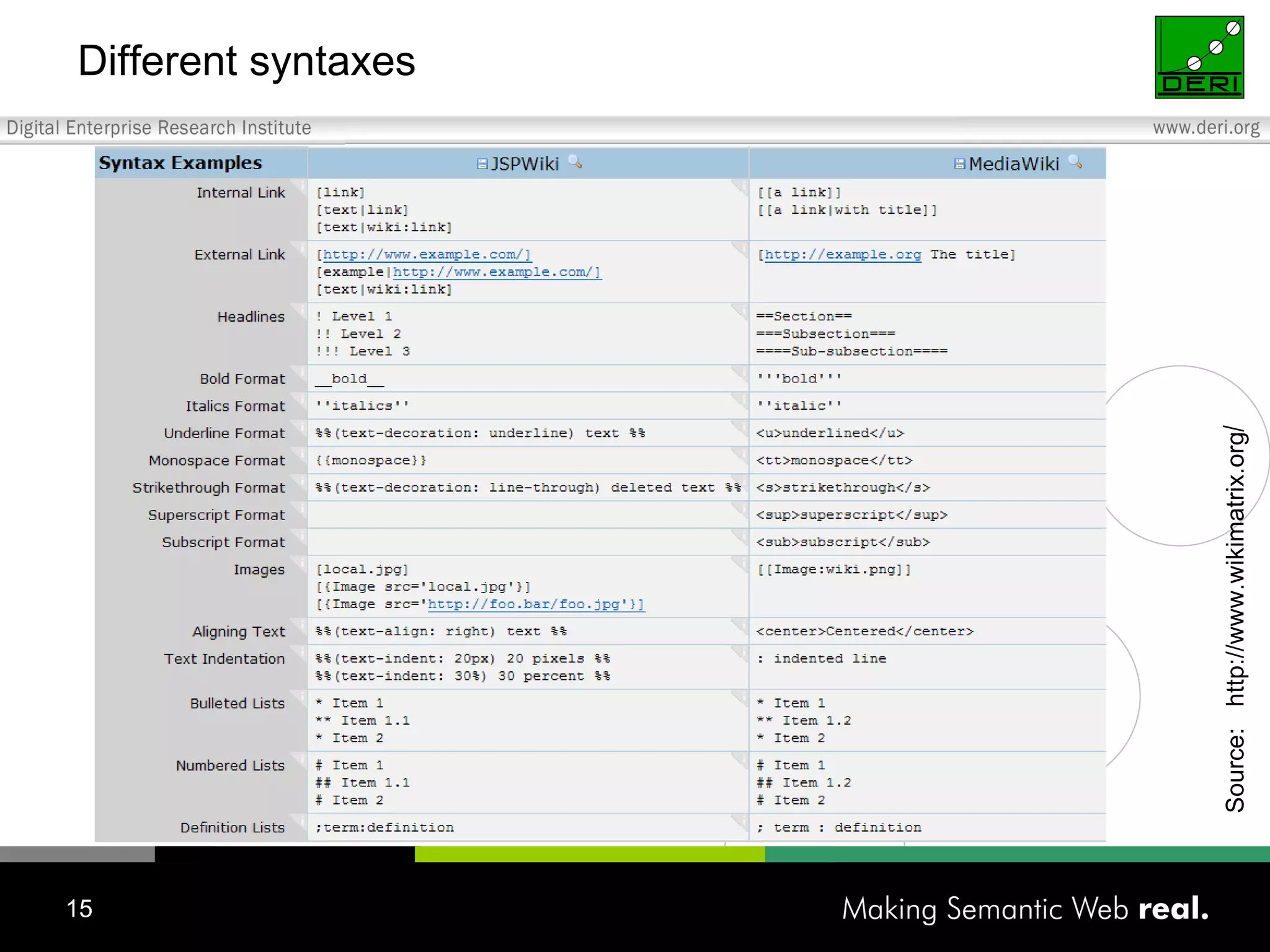
Formatting commands External link to the site called  Galway.net . External link to the site called [http://www.galway.net |Galway.net]. This is an internal link to the  Galway  article in the wiki. This is an internal link to the [[Galway]] article in the wiki. This is a subsection heading ===This is a subsection heading=== This is a section heading ==This is a section heading== This is how you number something. #This is how you number something. This is how you bullet something. *This is how you bulletin something. This is how you indent something. :This is how you indent something. This is  bold and italicized . This is '''''bold and italicized'''''. This is  bold . This is '''bold'''. This is  italicized . This is ''italicized''. Format Command
Different syntaxes  Source:  http://www.wikimatrix.org /
Glossary Dead-End Page A page which does not contain any further links. Internal Link Links to a page within the wiki. External Link Links to a page outside of the wiki. Orphaned Page A page which no other page links to   Special Pages Infrastructural pages automatically-generated by the system explaining things relative to our wiki but not containing its content. User List A list of Wiki Ireland members found in Special Pages. Wanted Page A page which someone has created a request for by creating a link to that page but not actually writing anything in it; links to these pages appear in red.
What is Wiki Ireland? Wikipedia is an excellent resource that has over a million articles, with 100s of articles about or related to Ireland But  in a general encyclopaedia, there will be local knowledge that cannot be included if it is non-notable or “obscure” Wiki Ireland aims to be a knowledge store for...
A knowledge store for...
Who can contribute? Anyone with an interest in preserving Irish culture / heritage General public Educators Archivists ...
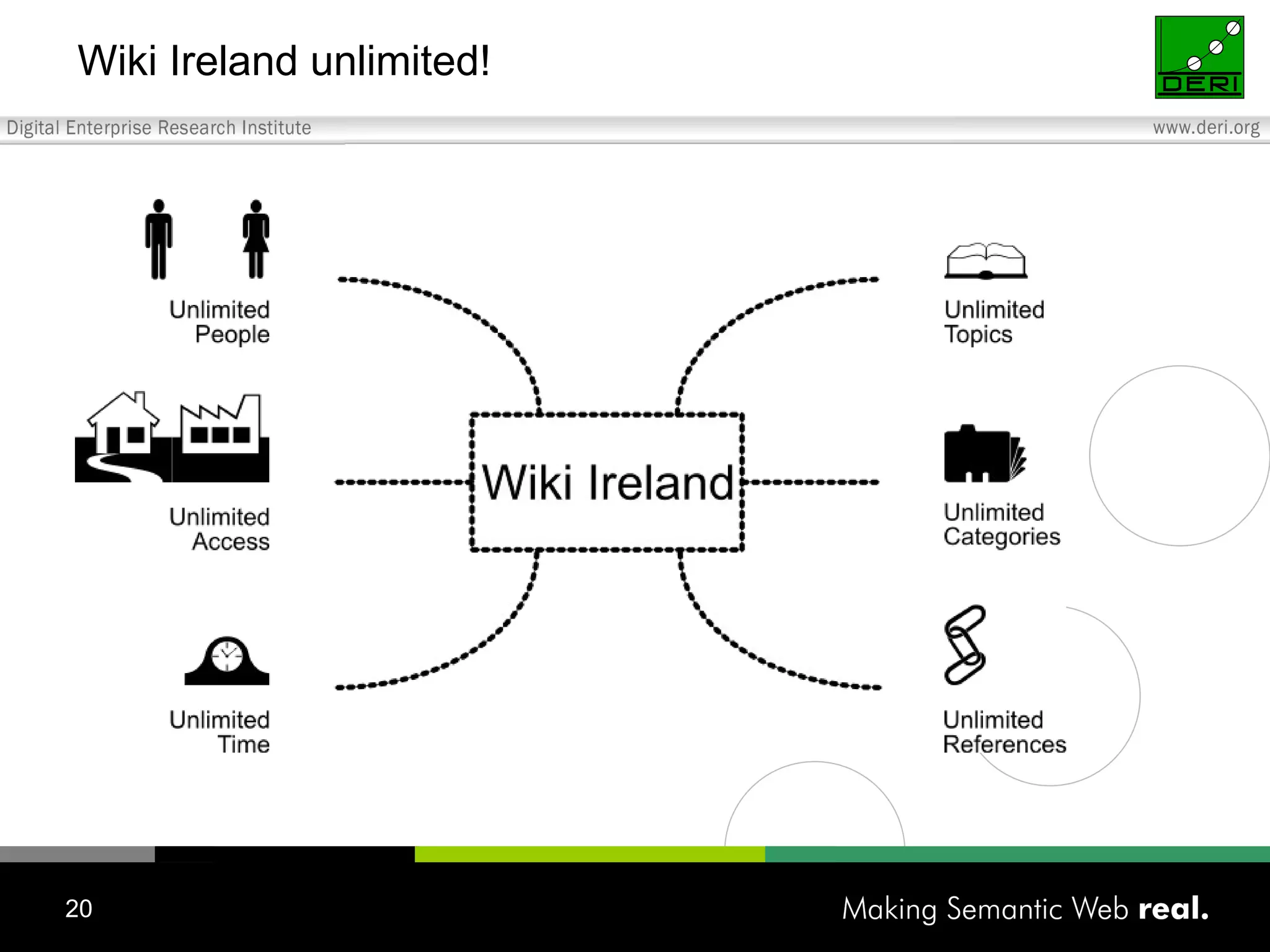
Wiki Ireland unlimited!
What do you want to preserve today?
From a wiki tutorial in Galway a year ago…
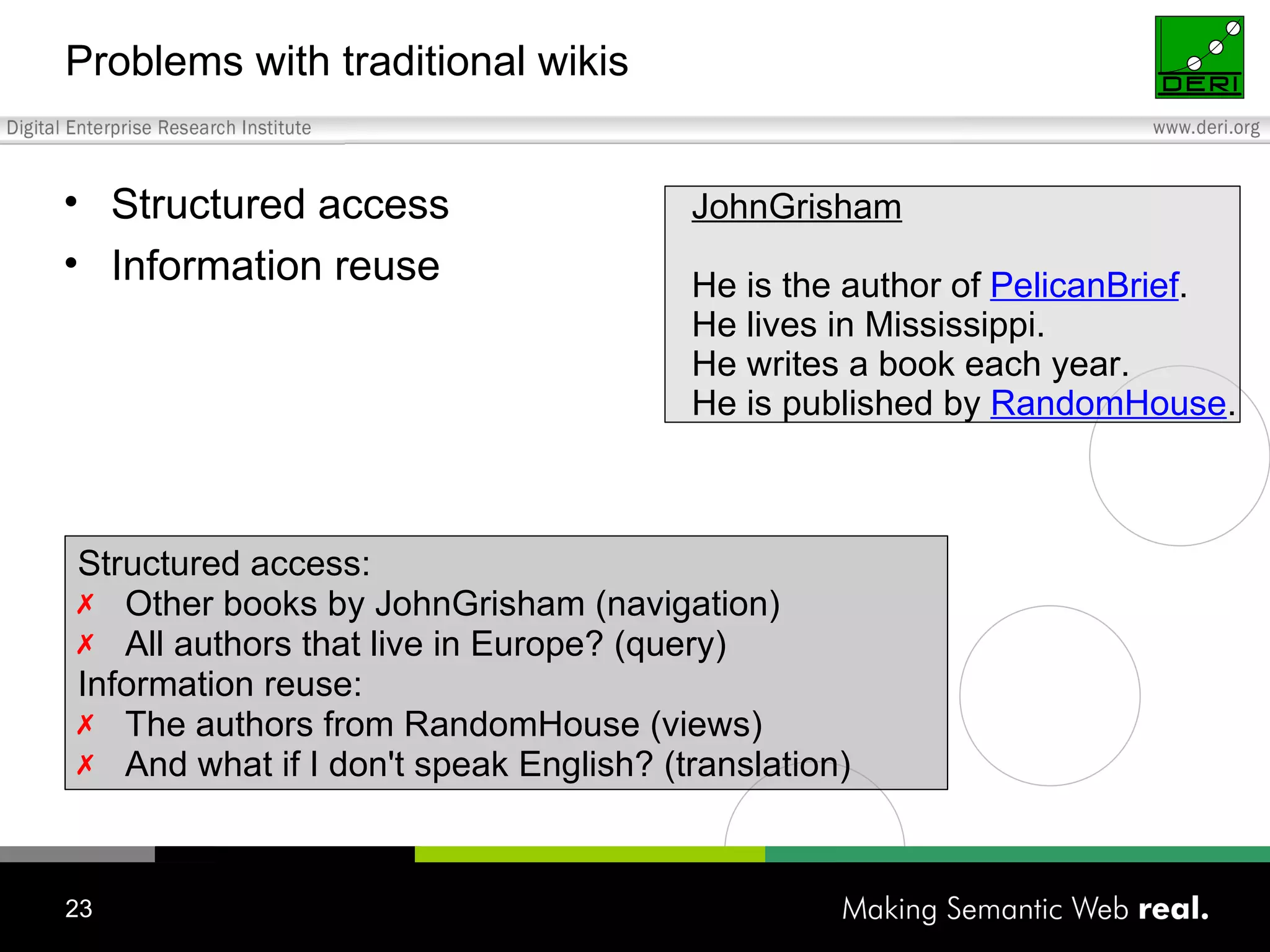
Problems with traditional wikis Structured access Information reuse JohnGrisham He is the author of  PelicanBrief . He lives in Mississippi. He writes a book each year. He is published by  RandomHouse . Structured access: Other books by JohnGrisham (navigation) All authors that live in Europe? (query) Information reuse: The authors from RandomHouse (views) And what if I don't speak English? (translation)
Personal wikis Enabling personal information management Should be very simple, very fast, very usable “ Note-taking on steroids” Examples include Tomboy, WikidPad, VoodooPad Notes, links, categories (to do lists, appointments) Popularity: simplicity, usability
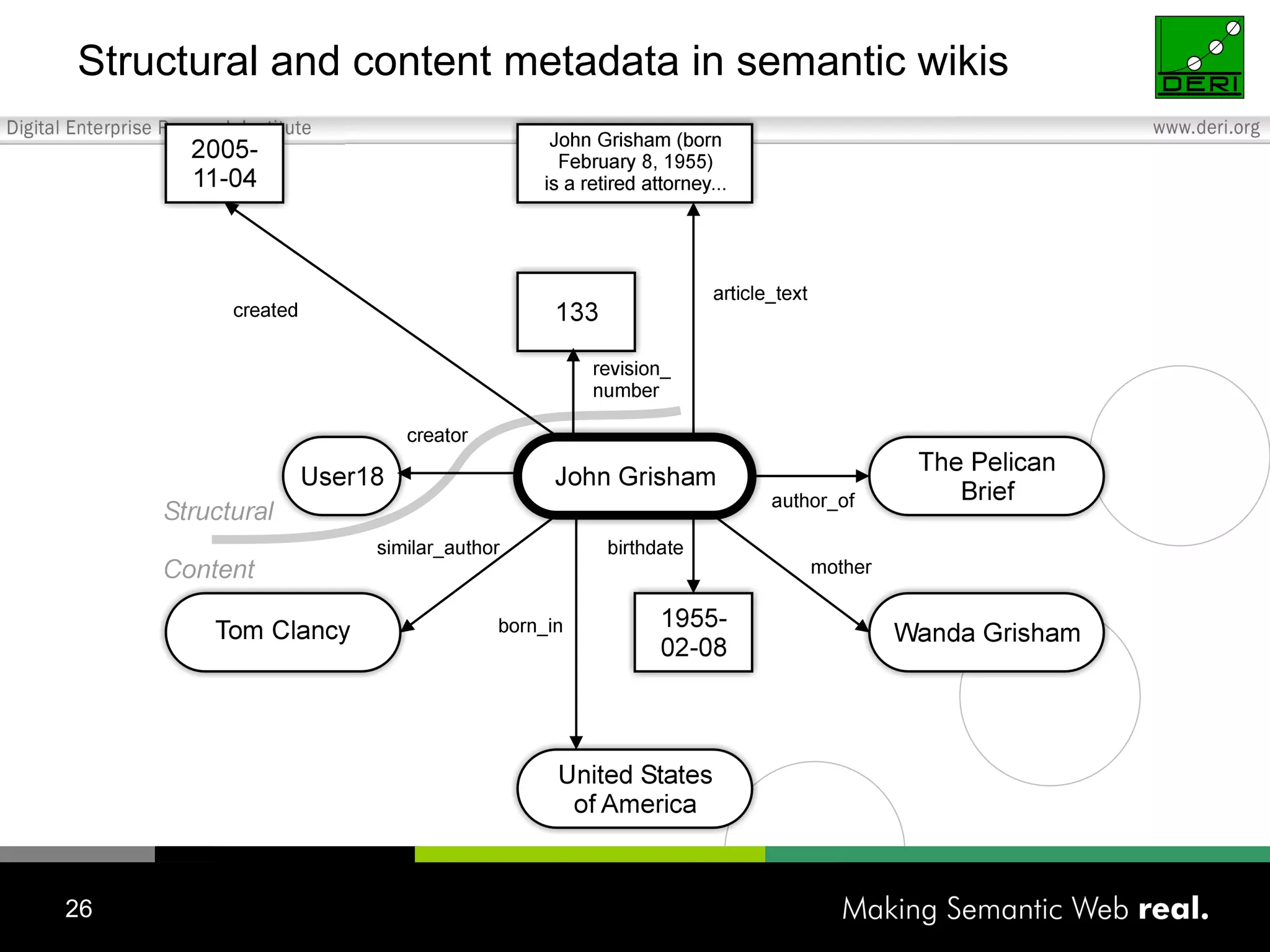
What are semantic wikis? A wiki that has an underlying model of the knowledge described in its pages: Semantic wikis allow to capture or identify further information about the pages (metadata) and their relations Knowledge model available in a formal language, so that machines can (at least partially) process and reason on it A semantic wiki would be able to capture that an "apple" article is a "fruit" (through an inheritance relationship) and present you with further fruits when you look at apple Some are used for personal knowledge management, others aimed at KM for communities http://wiki.ontoworld.org/wiki/Swikig http://www.semwiki.org/
Structural and content metadata in semantic wikis
Semantic wiki prototypes At least 22 semantic wiki prototypes to date For a comprehensive list see: wiki.ontoworld.org/index.php/Semantic_Wiki_State_Of_The_Art or www.cfcl.com/rdm/MBD/mbd_sem_wiki.php Semantic wikis are aiming at collaboration: Typically web based (two modes) Semantic personal wikis are aiming at personal information management: Typically a desktop application (one mode)
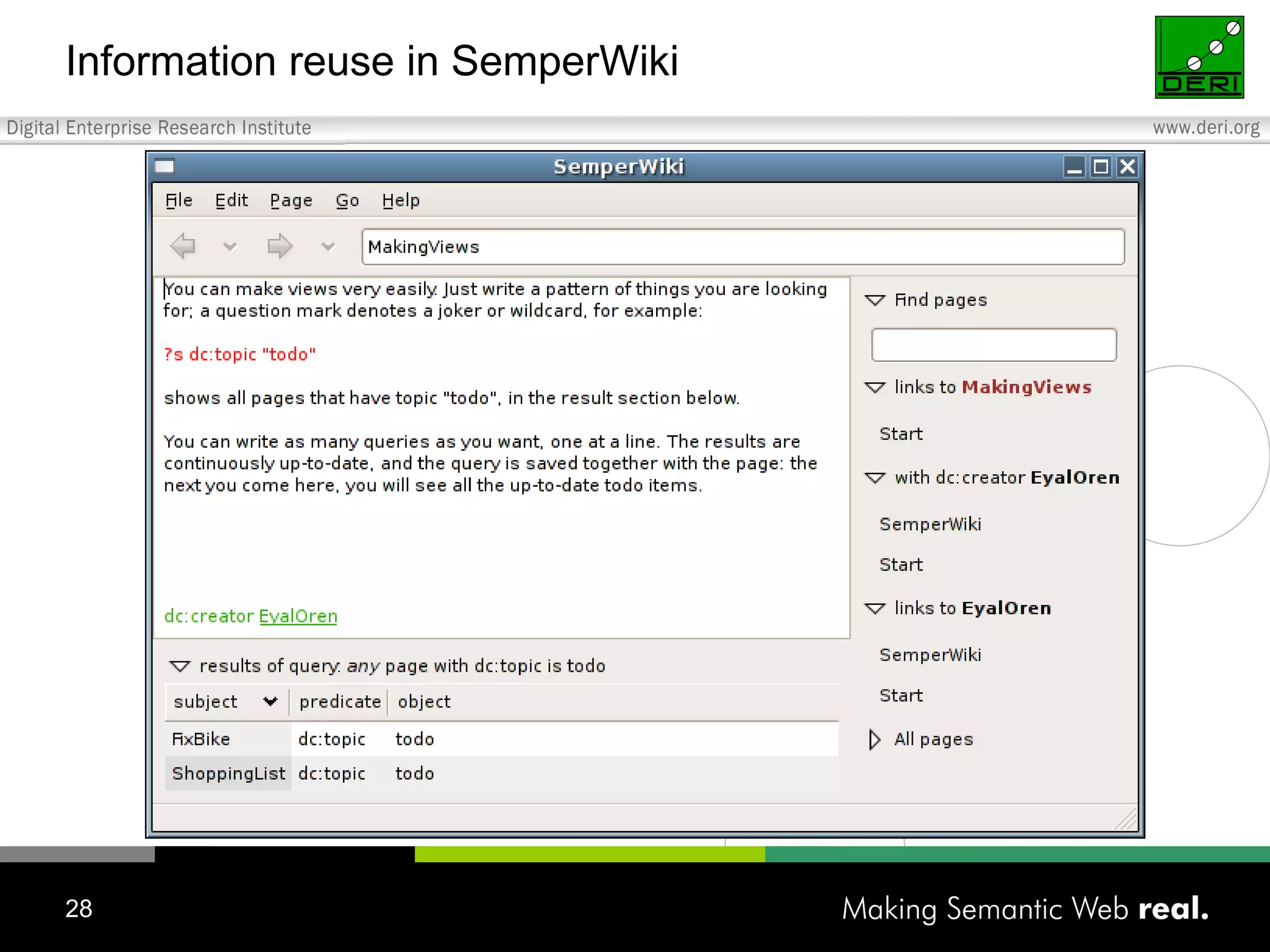
Information reuse in SemperWiki
Semantic MediaWiki “ The  Semantic MediaWiki  is an extension to the  MediaWiki  software, which allows every user to make information more accessible to computer programs (including the ask query and the triple search available in SMW itself), which in turn makes it easier for humans to search or further use this information.” Semantic MediaWiki offers two means to make information about a page more explicit: Categorisation of links (relations between pages)  Typed attributes (of a page)  Users can classify the “type” of links, e.g. making a relationship such as “capital of” between  Berlin  and  Germany  explicit: ... [[capital of::Germany]] ... resulting in the semantic statement  "Berlin" "capital of" "Germany" . On the page  Berlin , users can explicitly define its population by writing: ... the population is [[population:=3,993,933]] ... resulting in the semantic statement  "Berlin" "has population" "3993933" .
Wiki guide The Wikipedia project and Wiki Ireland both use the MediaWiki system As mentioned, there are a number of different wiki platforms but most have similar methods of doing things We will now show you how to create and edit wiki pages using MediaWiki Try it out at www.wiki.ie
How to edit a page To start editing a page, click “ edit ”, either at the top of the page (which lets you edit the entire page) or towards the right within the page (which lets you edit a section of the page only, which is at times less overwhelming). Once in the editing mode, you can preview the page before finalising it by clicking  Show Preview  at the bottom of the page, beneath the editing box.  This also lets you get familiar with the results of the commands.  After you have decided on your changes, click  Save Page .  Be sure to save your changes! To see who has previously edited a page and when, at any time click “ history ” at the top of the page.  To talk about a page, click “ discussion ” at the top of the page.
The quick toolbar Rather than writing commands by hand, you can use the toolbar as a shortcut.  Leaving your cursor over any of the buttons will explain what it does.  While not all of the formatting options can be accessed through the toolbar (the rest must be written out by hand), you can edit by highlighting the text and clicking a command button. Alternatively, you can just click any button and it will write the command with generic text which you can then go in an edit.  For example, clicking the first button, the “bold text button”, will write ‘‘‘Bold text’’’.  You can then replace the words ‘bold text’ with whatever words you want to embolden. Spacing is a bit tricky.  You must hit “enter” twice in editing for it to show up once in the page.  The command <br> can also be used to move the text downwards.
Creating a new page In order to have all pages connect to one another, it is best to create a page by first creating a link to it in another, previously established page.  To do so, edit the page where you’d like to link the new page and type [[New page]] where “New page” will be the title of your new page.  Please make the title of your page fairly specific (e.g. “Galway Rowing Club”, not “Rowing Club”) After you have created a link and saved, you can open the new page via its link, which should appear in  red , indicating that it has not yet been developed.  You can make requests for “Wanted” pages to be written by creating these red links.  Clicking on a  red link  will immediately open the editing box for that page.
Adding an image In addition to adding textual information and being able to modify it, you can also add other files, including images, to your pages.  All files that are placed inside of a page, must, however, first be uploaded as separate files to the wiki.  Do this by first clicking “ Upload file ” in the lower left-hand frame in the section labelled “toolbox”. Then you can add a file by clicking  Browse , finding the desired file, checking the copyright compliance box, and then choosing to  Upload File  at the bottom of the page.  Once the file has been uploaded, the markup to display the image will be shown, e.g.  [[Image:MyPicture.jpg]]
Resources, and the end Some tutorials on wikis, wiki markup, and how to edit wiki pages can be found here:  http://en.wikipedia.org/wiki/Wikipedia:Tutorial http://en.wikipedia.org/wiki/Wikification_guide  http://en.wikipedia.org/wiki/Wikipedia:How_to_edit_a_page

DM110 - Week 3 - Wikis

  • 1.
    DM110 Emerging WebMedia Dr. John Breslin [email_address] http://sw.deri.org/~jbreslin/ Week 3: Wikis
  • 2.
    Definition of wikisA community-developed documentation project “ A piece of server software that allows users to freely create and edit Web page content using any Web browser. Wiki supports hyperlinks and has a simple text syntax for creating new pages and crosslinks between internal pages on the fly.” -- http://wiki.org/wiki.cgi?WhatIsWiki “ A wiki is a type of website that allow users to easily add and edit content and is especially suited for collaborative writing. The name is based on the Hawaiian term wiki, meaning &quot;quick&quot;, &quot;fast&quot;, or &quot;to hasten&quot; (Hawaiian dictionary).” -- http://en.wikipedia.org/wiki/Wiki Makao, famous Hawaiian runner
  • 3.
    So, what arewikis used for? A wiki is an informational resource , like a reference manual, encyclopaedia, or handbook It amasses to a group of web pages that allows users to add content and also allows others to edit the content: It relies on cooperation, checks and balances of its members, and a belief in sharing of ideas This creates a community effort in resource and information management, disseminating the 'voice' amongst many instead of concentrating it upon few Wikis are being used in many ways, including the Wikipedia , a highly used, online, free-access encyclopaedia
  • 4.
    History (adapted fromthe Wikipedia) The WikiWikiWeb was the first wiki, established by Ward Cunningham in March 1995. He invented the wiki name and concept, and implemented the first wiki engine. Cunningham coined the term wiki after the &quot;wiki wiki&quot; or &quot;quick&quot; shuttle buses at Honolulu Airport. Wiki wiki was the first Hawaiian term he learned on his first visit to the islands, when the airport counter agent directed him to take the wiki wiki bus between terminals. According to Cunningham, &quot;I chose wiki-wiki as an alliterative substitute for 'quick' and thereby avoided naming this stuff quick-web.&quot; In the late 1990s, wikis increasingly were recognised as a promising way to develop knowledge bases , and this potential inspired the founders of the Nupedia encyclopedia project, Jimbo Wales and Larry Sanger , to use wiki technology as a basis for an electronic encyclopedia: Wikipedia was launched in January 2001. In the early 2000s, wikis were increasingly adopted in the enterprise as collaborative software . Common uses included project communication, intranets and documentation, initially for technical users. In December 2002, Socialtext launched the first commercial open source wiki solution. Open source wikis such as MediaWiki , Kwiki and TWiki grew to over 1 million downloads on the Sourceforge repository by 2004. Today some companies use wikis as their only collaborative software and as a replacement for static intranets. There is arguably greater use of wikis behind firewalls than on the public internet.
  • 5.
    Some other usesof wikis Wikis are being used for: online encyclopaedias free dictionaries book repositories event organisation software development writing research papers project proposals
  • 6.
    The Wikipedia: fromGaeilge to Klingon (Star Trek) Arabic version Chinese version Klingon version
  • 7.
  • 8.
    Entering information Anyonecan edit an existing wiki article If an article does not exist on a particular topic, you can create it If someone messes up an article (deliberately or erroneously), there is a revision history so you can revert the contents “ If removing paint were as easy as painting, we’d only have nice graffiti!”
  • 9.
    Updating information Whenyou see an article, click on “Edit” Type in the new text, click on “Save Page” Simple “markup”, e.g. [[NUIM]] -> link to National University of Ireland Maynooth article This is '''important''' -> This is important
  • 10.
    Templates Templatesare used within articles to provide a consistent look to the content placed into them Templates can also provide a structure for entering data, so that it is easy to extract metadata about the topic of an article: e.g. from a template field called “population” in an article about Galway e.g. emoticons
  • 11.
    Why do peoplecontribute to wikis? People like to store knowledge Can see what articles a person has created People like to show that they know things! There's a permanent record of what a user has contributed to a wiki site People like to fix mistakes and fill in gaps in underdeveloped articles Sometimes it’s those egos again 
  • 12.
    Some Irish wikisites www.wiki.ie – Wiki Ireland The aim of Wiki Ireland is use wiki technology to create a knowledge store for Ireland's culture and heritage wiki.politics.ie – An Irish politics wiki Aim is to create the largest online resource of Irish political information wiki.boards.ie – The boards.ie Wiki or “Biki” Collaborative pages devoted to boards.ie culture and topics of interest
  • 13.
    Wiki engines Many! Most important (see http://en.wikipedia.org/wiki/Comparison_of_wiki_software) and free are: Confluence coWiki DokuWiki Instiki JSPWiki MediaWiki MoinMoin OpenWiki Perspective PhpWiki PmWiki TikiWiki TWiki WackoWiki WikkaWiki XWiki FlexWiki WikidPad Differences: Features: The database used (if any), attachments, file uploading, spam prevention, page access control, inline HTML, user-customisable user interface, document renaming, extensibility, RSS feeds… Environment: Windows, Linux… Other software required: Java, MySQL, PHP, Python, .NET, Ruby…
  • 14.
    Formatting commands Externallink to the site called Galway.net . External link to the site called [http://www.galway.net |Galway.net]. This is an internal link to the Galway article in the wiki. This is an internal link to the [[Galway]] article in the wiki. This is a subsection heading ===This is a subsection heading=== This is a section heading ==This is a section heading== This is how you number something. #This is how you number something. This is how you bullet something. *This is how you bulletin something. This is how you indent something. :This is how you indent something. This is bold and italicized . This is '''''bold and italicized'''''. This is bold . This is '''bold'''. This is italicized . This is ''italicized''. Format Command
  • 15.
    Different syntaxes Source: http://www.wikimatrix.org /
  • 16.
    Glossary Dead-End PageA page which does not contain any further links. Internal Link Links to a page within the wiki. External Link Links to a page outside of the wiki. Orphaned Page A page which no other page links to  Special Pages Infrastructural pages automatically-generated by the system explaining things relative to our wiki but not containing its content. User List A list of Wiki Ireland members found in Special Pages. Wanted Page A page which someone has created a request for by creating a link to that page but not actually writing anything in it; links to these pages appear in red.
  • 17.
    What is WikiIreland? Wikipedia is an excellent resource that has over a million articles, with 100s of articles about or related to Ireland But in a general encyclopaedia, there will be local knowledge that cannot be included if it is non-notable or “obscure” Wiki Ireland aims to be a knowledge store for...
  • 18.
  • 19.
    Who can contribute?Anyone with an interest in preserving Irish culture / heritage General public Educators Archivists ...
  • 20.
  • 21.
    What do youwant to preserve today?
  • 22.
    From a wikitutorial in Galway a year ago…
  • 23.
    Problems with traditionalwikis Structured access Information reuse JohnGrisham He is the author of PelicanBrief . He lives in Mississippi. He writes a book each year. He is published by RandomHouse . Structured access: Other books by JohnGrisham (navigation) All authors that live in Europe? (query) Information reuse: The authors from RandomHouse (views) And what if I don't speak English? (translation)
  • 24.
    Personal wikis Enablingpersonal information management Should be very simple, very fast, very usable “ Note-taking on steroids” Examples include Tomboy, WikidPad, VoodooPad Notes, links, categories (to do lists, appointments) Popularity: simplicity, usability
  • 25.
    What are semanticwikis? A wiki that has an underlying model of the knowledge described in its pages: Semantic wikis allow to capture or identify further information about the pages (metadata) and their relations Knowledge model available in a formal language, so that machines can (at least partially) process and reason on it A semantic wiki would be able to capture that an &quot;apple&quot; article is a &quot;fruit&quot; (through an inheritance relationship) and present you with further fruits when you look at apple Some are used for personal knowledge management, others aimed at KM for communities http://wiki.ontoworld.org/wiki/Swikig http://www.semwiki.org/
  • 26.
    Structural and contentmetadata in semantic wikis
  • 27.
    Semantic wiki prototypesAt least 22 semantic wiki prototypes to date For a comprehensive list see: wiki.ontoworld.org/index.php/Semantic_Wiki_State_Of_The_Art or www.cfcl.com/rdm/MBD/mbd_sem_wiki.php Semantic wikis are aiming at collaboration: Typically web based (two modes) Semantic personal wikis are aiming at personal information management: Typically a desktop application (one mode)
  • 28.
  • 29.
    Semantic MediaWiki “The Semantic MediaWiki is an extension to the MediaWiki software, which allows every user to make information more accessible to computer programs (including the ask query and the triple search available in SMW itself), which in turn makes it easier for humans to search or further use this information.” Semantic MediaWiki offers two means to make information about a page more explicit: Categorisation of links (relations between pages) Typed attributes (of a page) Users can classify the “type” of links, e.g. making a relationship such as “capital of” between Berlin and Germany explicit: ... [[capital of::Germany]] ... resulting in the semantic statement &quot;Berlin&quot; &quot;capital of&quot; &quot;Germany&quot; . On the page Berlin , users can explicitly define its population by writing: ... the population is [[population:=3,993,933]] ... resulting in the semantic statement &quot;Berlin&quot; &quot;has population&quot; &quot;3993933&quot; .
  • 30.
    Wiki guide TheWikipedia project and Wiki Ireland both use the MediaWiki system As mentioned, there are a number of different wiki platforms but most have similar methods of doing things We will now show you how to create and edit wiki pages using MediaWiki Try it out at www.wiki.ie
  • 31.
    How to edita page To start editing a page, click “ edit ”, either at the top of the page (which lets you edit the entire page) or towards the right within the page (which lets you edit a section of the page only, which is at times less overwhelming). Once in the editing mode, you can preview the page before finalising it by clicking Show Preview at the bottom of the page, beneath the editing box. This also lets you get familiar with the results of the commands. After you have decided on your changes, click Save Page . Be sure to save your changes! To see who has previously edited a page and when, at any time click “ history ” at the top of the page. To talk about a page, click “ discussion ” at the top of the page.
  • 32.
    The quick toolbarRather than writing commands by hand, you can use the toolbar as a shortcut. Leaving your cursor over any of the buttons will explain what it does. While not all of the formatting options can be accessed through the toolbar (the rest must be written out by hand), you can edit by highlighting the text and clicking a command button. Alternatively, you can just click any button and it will write the command with generic text which you can then go in an edit. For example, clicking the first button, the “bold text button”, will write ‘‘‘Bold text’’’. You can then replace the words ‘bold text’ with whatever words you want to embolden. Spacing is a bit tricky. You must hit “enter” twice in editing for it to show up once in the page. The command <br> can also be used to move the text downwards.
  • 33.
    Creating a newpage In order to have all pages connect to one another, it is best to create a page by first creating a link to it in another, previously established page. To do so, edit the page where you’d like to link the new page and type [[New page]] where “New page” will be the title of your new page. Please make the title of your page fairly specific (e.g. “Galway Rowing Club”, not “Rowing Club”) After you have created a link and saved, you can open the new page via its link, which should appear in red , indicating that it has not yet been developed. You can make requests for “Wanted” pages to be written by creating these red links. Clicking on a red link will immediately open the editing box for that page.
  • 34.
    Adding an imageIn addition to adding textual information and being able to modify it, you can also add other files, including images, to your pages. All files that are placed inside of a page, must, however, first be uploaded as separate files to the wiki. Do this by first clicking “ Upload file ” in the lower left-hand frame in the section labelled “toolbox”. Then you can add a file by clicking Browse , finding the desired file, checking the copyright compliance box, and then choosing to Upload File at the bottom of the page. Once the file has been uploaded, the markup to display the image will be shown, e.g. [[Image:MyPicture.jpg]]
  • 35.
    Resources, and theend Some tutorials on wikis, wiki markup, and how to edit wiki pages can be found here: http://en.wikipedia.org/wiki/Wikipedia:Tutorial http://en.wikipedia.org/wiki/Wikification_guide http://en.wikipedia.org/wiki/Wikipedia:How_to_edit_a_page