

Welcome to Channel
VIGNESH KUMAR
Why Backup, Restore & Backup Types
Why Backup & Restore
The primary reason for data backup is to save
important files in the event of a system crash or
hard drive failure. Additional data backups should
be made if the original backups result in data
corruption or hard drive failure. This is best
accomplished through the use of the cloud or offsite
storage.
Types of Backup
Full backup
Incremental backup
Differential backup
What is a full backup?
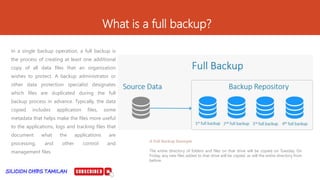
In a single backup operation, a full backup is
the process of creating at least one additional
copy of all data files that an organization
wishes to protect. A backup administrator or
other data protection specialist designates
which files are duplicated during the full
backup process in advance. Typically, the data
copied includes application files, some
metadata that helps make the files more useful
to the applications, logs and tracking files that
document what the applications are
processing, and other control and
management files.
A Full Backup Example
The entire directory of folders and files on that drive will be copied on Tuesday. On
Friday, any new files added to that drive will be copied, as will the entire directory from
before.
What is a Incremental Backup?
An incremental backup is a type of backup
that only copies data that has changed or
been created since the previous backup
activity. When the amount of data to be
protected is too large to do a full backup of
that data every day, an incremental backup
approach is used.
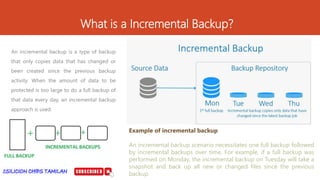
Example of incremental backup
An incremental backup scenario necessitates one full backup followed
by incremental backups over time. For example, if a full backup was
performed on Monday, the incremental backup on Tuesday will take a
snapshot and back up all new or changed files since the previous
backup.
What is a Differential backup?
A differential backup is a data backup that
copies all of the files that have changed
since the last full backup was performed.
This includes any data that has been
created, updated or altered in any way and
does not copy all of the data every time.
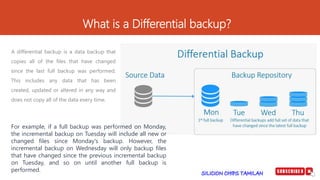
For example, if a full backup was performed on Monday,
the incremental backup on Tuesday will include all new or
changed files since Monday's backup. However, the
incremental backup on Wednesday will only backup files
that have changed since the previous incremental backup
on Tuesday, and so on until another full backup is
performed.
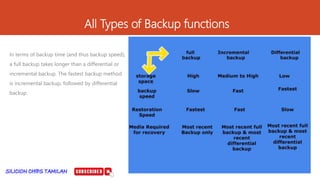
All Types of Backup functions
In terms of backup time (and thus backup speed),
a full backup takes longer than a differential or
incremental backup. The fastest backup method
is incremental backup, followed by differential
backup.
SILICON CHIPS TAMILAN அணில் சேவைகள் (Squirrel
Services) Hello friends, this is my YouTube channel where I
share knowledge about computer hardware, software,
networking, server details and Job openings..
NAME : VIGNESH KUMAR
ADDRESS : INDIA , (TAMILNADU).
INSTAGRAM USER NAME : vignesh301992
YouTube Link
https://www.youtube.com/@siliconchipstamilan3159/about
Mobile Number : 9003325678
Mail ID : vignesh301992@gmail.com
FB Link
https://www.facebook.com/profile.php?id=100063722750309
&
https://www.facebook.com/profile.php?id=100063637014376
Linkedin
https://www.linkedin.com/in/vignesh-k-60a70a11a/
Slide Share Link
https://www.slideshare.net/vigneshvickyk
Thank you
VIGNESH KUMAR
why backup, restore & Backup Types.pptx

why backup, restore & Backup Types.pptx

  • 1.
    Welcome to Channel VIGNESHKUMAR Why Backup, Restore & Backup Types
  • 2.
    Why Backup &Restore The primary reason for data backup is to save important files in the event of a system crash or hard drive failure. Additional data backups should be made if the original backups result in data corruption or hard drive failure. This is best accomplished through the use of the cloud or offsite storage.
  • 3.
    Types of Backup Fullbackup Incremental backup Differential backup
  • 4.
    What is afull backup? In a single backup operation, a full backup is the process of creating at least one additional copy of all data files that an organization wishes to protect. A backup administrator or other data protection specialist designates which files are duplicated during the full backup process in advance. Typically, the data copied includes application files, some metadata that helps make the files more useful to the applications, logs and tracking files that document what the applications are processing, and other control and management files. A Full Backup Example The entire directory of folders and files on that drive will be copied on Tuesday. On Friday, any new files added to that drive will be copied, as will the entire directory from before.
  • 5.
    What is aIncremental Backup? An incremental backup is a type of backup that only copies data that has changed or been created since the previous backup activity. When the amount of data to be protected is too large to do a full backup of that data every day, an incremental backup approach is used. Example of incremental backup An incremental backup scenario necessitates one full backup followed by incremental backups over time. For example, if a full backup was performed on Monday, the incremental backup on Tuesday will take a snapshot and back up all new or changed files since the previous backup.
  • 6.
    What is aDifferential backup? A differential backup is a data backup that copies all of the files that have changed since the last full backup was performed. This includes any data that has been created, updated or altered in any way and does not copy all of the data every time. For example, if a full backup was performed on Monday, the incremental backup on Tuesday will include all new or changed files since Monday's backup. However, the incremental backup on Wednesday will only backup files that have changed since the previous incremental backup on Tuesday, and so on until another full backup is performed.
  • 7.
    All Types ofBackup functions In terms of backup time (and thus backup speed), a full backup takes longer than a differential or incremental backup. The fastest backup method is incremental backup, followed by differential backup.
  • 8.
    SILICON CHIPS TAMILANஅணில் சேவைகள் (Squirrel Services) Hello friends, this is my YouTube channel where I share knowledge about computer hardware, software, networking, server details and Job openings.. NAME : VIGNESH KUMAR ADDRESS : INDIA , (TAMILNADU). INSTAGRAM USER NAME : vignesh301992 YouTube Link https://www.youtube.com/@siliconchipstamilan3159/about Mobile Number : 9003325678 Mail ID : vignesh301992@gmail.com FB Link https://www.facebook.com/profile.php?id=100063722750309 & https://www.facebook.com/profile.php?id=100063637014376 Linkedin https://www.linkedin.com/in/vignesh-k-60a70a11a/ Slide Share Link https://www.slideshare.net/vigneshvickyk Thank you VIGNESH KUMAR

Editor's Notes

  • #9 In Slide Show mode, click the arrow to enter the PowerPoint Getting Started Center.