LOSS OF YOURCRITICAL DATA
… Computers systems may crash. Files may be accidentally deleted.
… Disks may accidentally be reformatted. Computer viruses may
corrupt files.
… Files may be accidentally overwritten.
… Disgruntled employees may try to destroy your files.
… …
All of these can lead to the loss of your critical data. You may
think it’s lost forever, but you should employ the latest tools
and techniques to recover your data.
data recovery as it relates to computer forensics, but before
delving into the ins and outs, what is data recovery?
03/15/25 CH.VijayaBhaskar,SNIST. 2
3.
DATA RECOVERY DEFINED
Data recovery is the process in which highly trained engineers
evaluate and extract data from damaged media and return it in
an intact format.
Many people, even computer experts, fail to recognize data
recovery as an option during a data crisis, yet it is possible to
retrieve files that have been deleted and passwords that have
been forgotten or to recover entire hard drives that have been
physically damaged.
03/15/25 CH.VijayaBhaskar,SNIST. 3
4.
DATA BACKUP ANDRECOVERY
specialized hardware and software companies that
manufacture products for the centralized backup and recovery
of business critical data.
Hardware manufacturers offer automated tape libraries that
can manage millions of megabytes of backed up information
and eliminate the need for operators charged with mounting
tape cartridges.
Software companies have created solutions that can back-up
and recover dozens of disparate systems from a single console.
03/15/25 CH.VijayaBhaskar,SNIST. 4
5.
BACKUP OBSTACLES
Thefollowing are obstacles to backing up applications:
… Backup window
… Network bandwidth
… System throughput
… Lack of resources
Backup window: The backup window is the period of time when
backups can be run.
The backup window is generally timed to occur during
nonproduction periods when network bandwidth and CPU
utilization are low.
03/15/25 CH.VijayaBhaskar,SNIST. 5
6.
Network Bandwidth: a network (LAN & WAN) cannot handle the impact of transporting
hundreds of gigabytes of data over a short period of time, the organization’s centralized
backup strategy is not viable.
System Throughput : Three I/O bottlenecks are commonly found in traditional backup
schemes.
… 1.The ability of the system being backed up to push data to the backup server
… 2. The ability of the backup server to accept data from multiple systems simultaneously
… 3. The available throughput of the tape device(s) onto which the data is moved
NOTE: Any or all preceding bottlenecks can render a centralized
backup solution unworkable.
Lack of Resources : Many companies fail to make appropriate investments in data
protection until it is too late.
03/15/25 CH.VijayaBhaskar,SNIST. 6
7.
THE FUTURE OFDATA BACKUP
Successful data backup and recovery is composed of four key
elements:
… the backup server,
… the network,
… the backup window, and
… the backup storage device (or devices)
These components are highly dependent on one another, and
the overall system can only operate as well as its weakest link
03/15/25 CH.VijayaBhaskar,SNIST. 7
8.
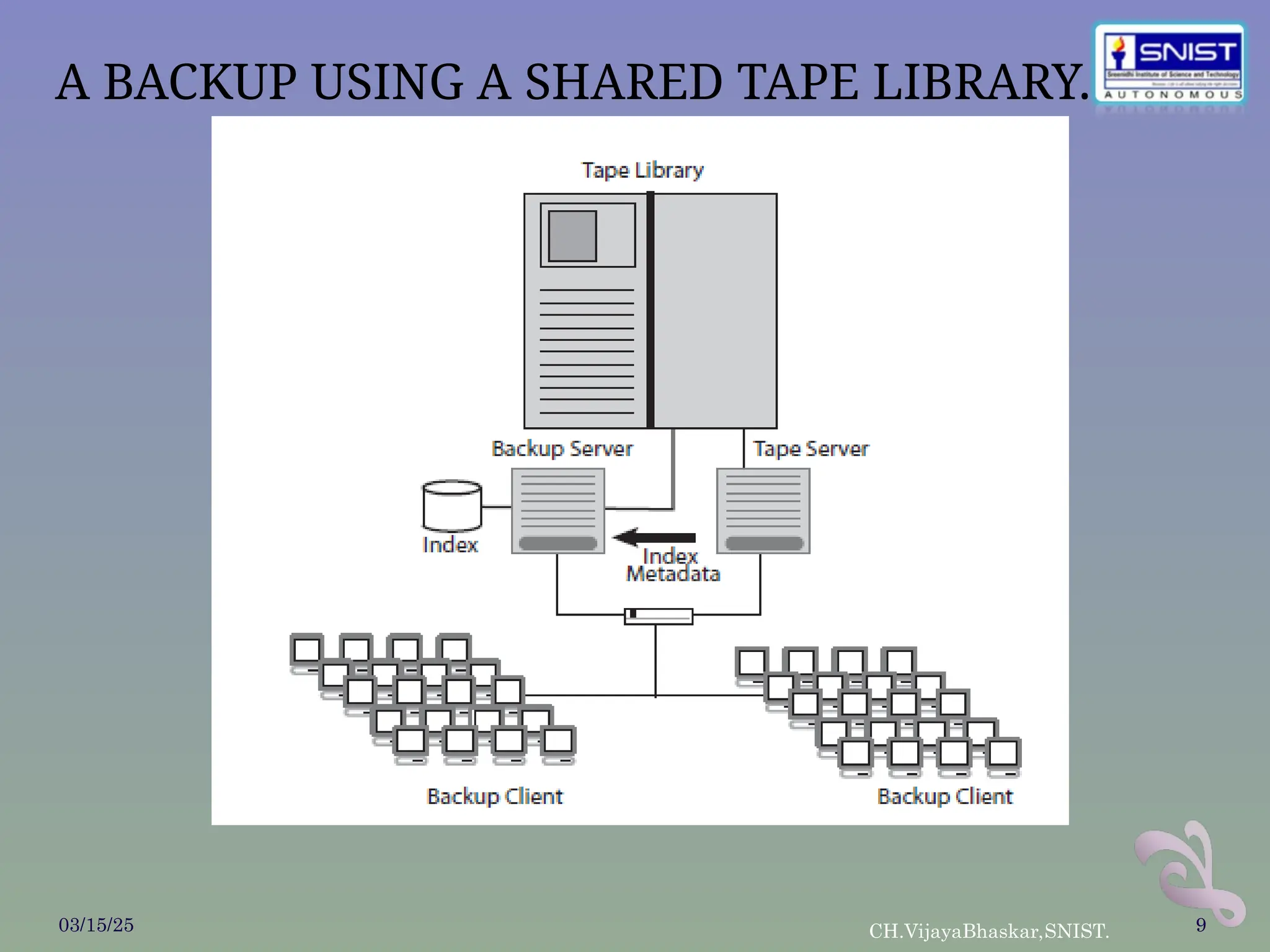
The BackupServer : The backup server is responsible for managing the policies,
schedules, media catalogs, and indexes associated with the systems it is configured to
back up.
The systems being backed up are called clients.
All managed data that was being backed up had to be processed through the backup
server.
All data that needed to be restored had to be accessed through the backup server as
well.
In the past, the only way to overcome a backup server bottleneck was to investing
larger, more powerful backup servers or data backup and recovery and divide the
backup network into smaller, independent groups. The most common workaround is to
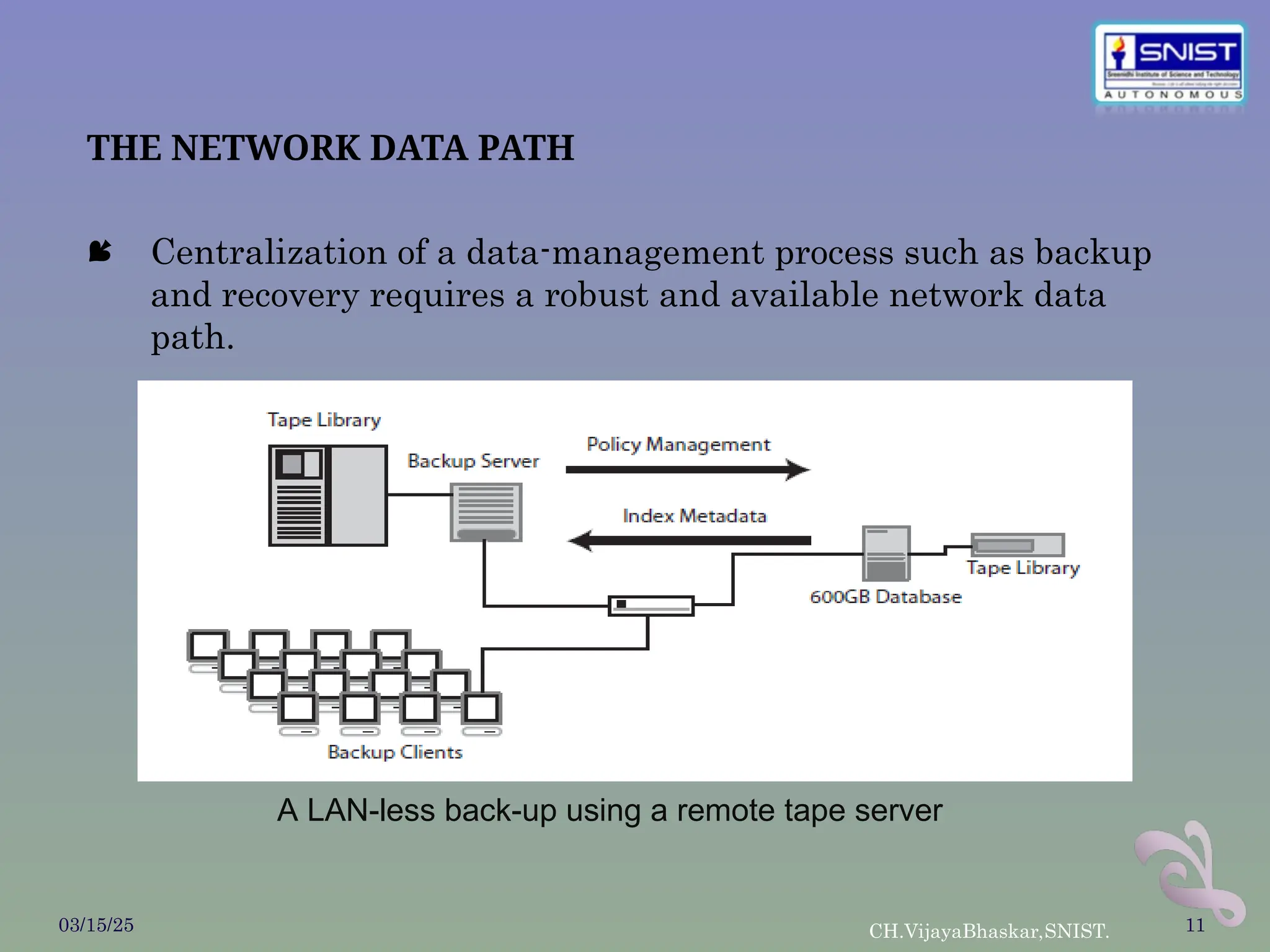
create tape servers that allow administrators to divide the backup tasks across
multiple systems.
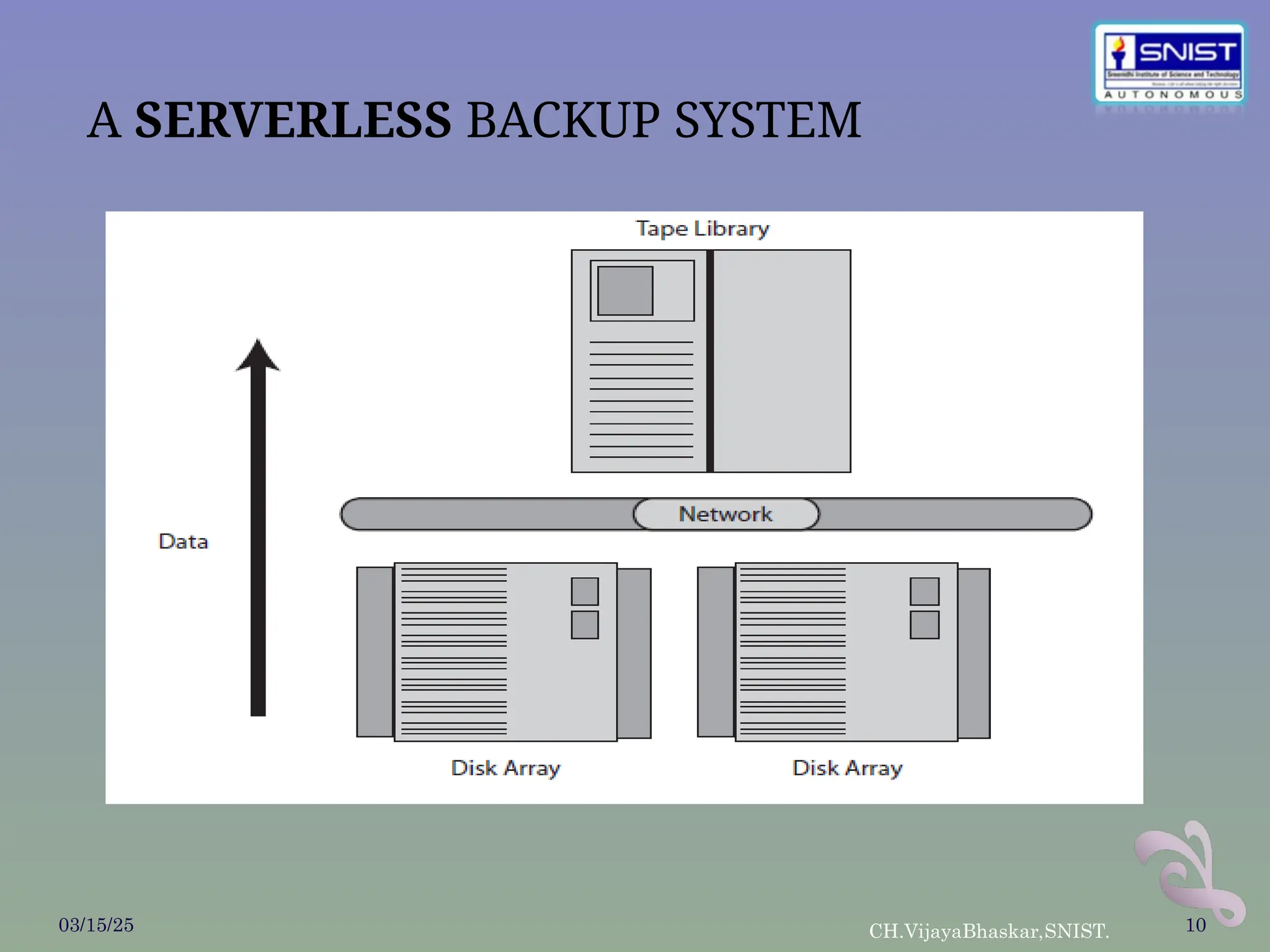
The newest backup architecture implements a serverless backup solution that allows
data to be moved directly from disk to tape, bypassing the backup server altogether.
This method of data backup removes the bottleneck of the backup server completely.
03/15/25 CH.VijayaBhaskar,SNIST. 8
THE NETWORK DATAPATH
Centralization of a data-management process such as backup
and recovery requires a robust and available network data
path.
03/15/25 CH.VijayaBhaskar,SNIST. 11
A LAN-less back-up using a remote tape server
12.
03/15/25 CH.VijayaBhaskar,SNIST. 12
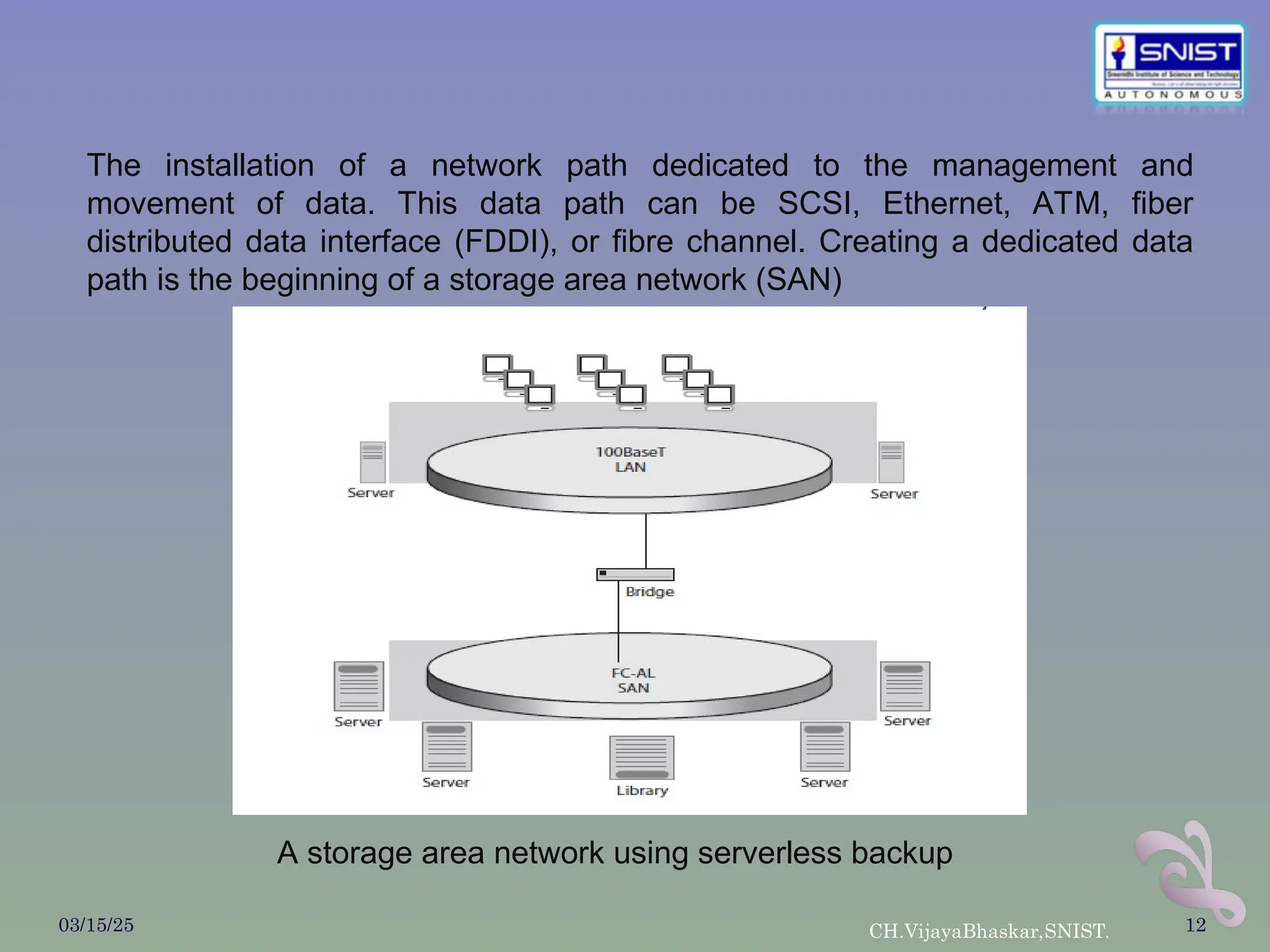
Astorage area network using serverless backup
The installation of a network path dedicated to the management and
movement of data. This data path can be SCSI, Ethernet, ATM, fiber
distributed data interface (FDDI), or fibre channel. Creating a dedicated data
path is the beginning of a storage area network (SAN)
13.
THE BACKUP WINDOW
A backup window defines how much time is available to back
up the network.
Time plays an important role in choosing how much server,
network, and resource support needs to be deployed.
However, the backup-software community has once again
developed a way to overcome the element of time by using
incremental backup, block-level backup, image backups, and
data archiving.
… Incremental Backup : Incremental backups only transfer data that
has changed since the last backup. thereby creating a virtual
complete backup every night without necessitating a full backup
during the limited backup window.
03/15/25 CH.VijayaBhaskar,SNIST. 13
14.
… Block-Level IncrementalBackup : Block-level incremental
backups provide similar benefits as incremental backups, but with
even more efficiency. only the blocks that have changed since the
last backup are marked for backup.
… Image Backups : Image backups are quickly gaining favor among
storage administrators.
This type of backup creates copies, or snapshots, of a file system at
a particular point in time.
Image backups are much faster than incremental backups and
provide the ability to easily perform a bare bones recovery of a
server without loading the operating systems, applications, and
the like.
03/15/25 CH.VijayaBhaskar,SNIST. 14
15.
… Data Archiving: Removing infrequently accessed data from a disk
drive can reduce the size of a scheduled backup by up to 80%.
… Backup Storage Devices : it is important that the technical
specifications of the storage device provide adequate capacity and
performance to accommodate existing and planned data. the
single most expensive item in a backup project is the backup
storage device itself.
… Recommended Backup Features : A backup vendor should provide
agents for the most common database and email applications that
allow these databases to be backed up without shutting down
applications.
03/15/25 CH.VijayaBhaskar,SNIST. 15
16.
… Data Interleaving: To back up multiple systems concurrently, the
backup application must be able to write data from multiple
clients to tape in an interleaved manner.
… Remote Backup : Many remote systems are exposed to
unrecoverable data loss. A backup application should have a
method to back up systems across a WAN or over dial-up
connections.
… Global Monitoring : Companies are deploying applications that
can be managed and monitored from any location in the
enterprise. Backup applications also need to be able to be accessed
and administered from multiple locations.
… Performance : An enterprise backup application should be able -
backup data rates , fast recovery . the role of backup in data
recovery and some of the technologies that are available today
03/15/25 CH.VijayaBhaskar,SNIST. 16
17.
THE ROLE OFBACKUP IN DATA RECOVERY
Many factors affect back-up:
… Storage costs are decreasing.
… Systems have to be online continuously.
… The role of backup has changed.
03/15/25 CH.VijayaBhaskar,SNIST. 17
18.
THE DATA-RECOVERY SOLUTION
Shrinking Expertise, Growing Complexity : Increased availability is good,
except for one fact: many systems programmers, database administrators
(DBAs), and other mainframe experts are maturing. It takes a lot of care
and feeding to keep applications ready for work.
Budgets and Downtime : Does anyone need a reminder that budgets are
tight? You have fewer resources (people, processing power, time, and
money) to do more work than ever before, and you must keep your expenses
under control.
Recovery: Think Before You Back Up : You must evaluate your
preparations, make sure that all resources are available in usable
condition, automate processes as much as possible, and make sure you have
the right kind of resources.
Evaluate Your Preparations : They may or may not have had care and
feeding through the years to ensure that preparations are still sufficient to
allow for recovery in the manner required today.
03/15/25 CH.VijayaBhaskar,SNIST. 18