Backup, Archive, and Replication
Introduction to Back & Restore
• The purpose of backup is to protect data from loss.
• The purpose of restore is to recover data that is temporarily
unavailable due to some unexpected event.
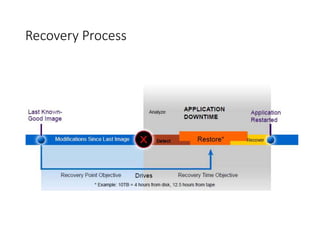
Recovery Process
Why back is needed? Case Study
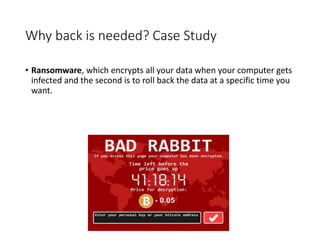
• Ransomware, which encrypts all your data when your computer gets
infected and the second is to roll back the data at a specific time you
want.
Importance of Backup
• Determine which data is static and which is dynamic
• Some OS installations are changed infrequently; few backups required
• E-commerce may require continuous backups.
• Understand the changing state of your client’s data to determine an
appropriate backup sched.
• Organize with partitions
Importance of Backup
• Which Files Should Be Backed Up?
• OS Binaries
• Applications
• Configuration Files
• User files
• Log files
• Backup of just user files is not enough.
• Should dump the log files, and configuration information
Proper Backup Procedure
• Choose your application
• Scheduling
• Implementation
• Inventory (content and media)
• Verify
• Automate
• Secure
Choose your Backup App
• Mac OS X :
• Time Machine
• Linux/Unix :
• tar (tape archive), cpio, dump
• MS Windows :
• MS Windows XP & 7 includes Backup & Restore capability
• Many commercial apps are available
Enterprise Level Backup Apps
• Paragon Backup & Recovery includes customer support
• Backup4All Professional
• GRBackPro7
Types of Backups
• Full Backup
• Partial backup
• Differential Backup
• Incremental Backup
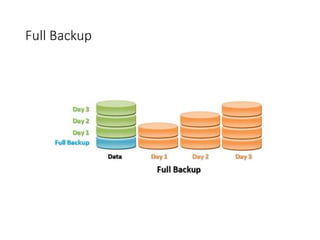
Full Backup
• A complete backup means full backup of the entire server or
computer system.
• If you are backing up of an entire server, then it includes all the
volumes, directories and files.
• And if you are backing up your computer system, then it includes all
the drives, directories and files.
Full Backup
Full Backup (Pros)
Pros
• Provides a complete copy of data
• Easy to manage:
• Done less frequently than other types of backups due to cost and resource
requirements:
Monthly, Quarterly, semi-annually, annually.
Full Backup (Pros)
Cons
• Usually requires more media space than either differential or
incremental.
• Takes a long time to recover the full backup to a new disk.
Differential backup
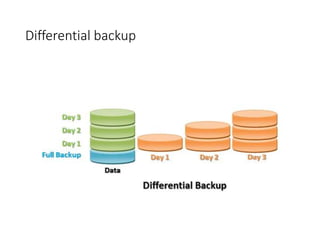
• In a differential backup only those files are backed which have
changed or modified since the last full backup.
• This backup method is very useful when you require the latest
updated data.
• If you are using the same media for consecutive differential backups,
the files which are backed up earlier can be overwritten by their
updated versions.
Differential backup
Differential Backup (Pros)
• Redundancy
• Usually takes up less time and space than a full backup.
• If the differential backup grows to the size of the last full backup,
then schedule a new full backup.
Differential Backup (Cons)
• Redundancy – potentially many unneeded copies of the same data.
• Subsequent differentials take longer and use more media space
Incremental backup
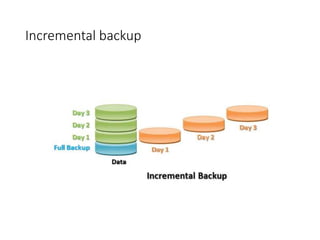
• In an incremental backup only those files are backed up which have
changed or modified as well as those which are new since the last
incremental backup.
• If you are using the same media for consecutive incremental backups,
the files which are backed up earlier cannot be overwritten by their
updated versions.
Incremental backup
Incremental backup
• Pros
• Keeps a revision history of actively changing files
• Fastest backup type
• Uses the least amount of media to complete a single backup
• Cons
• Much more difficult to manage
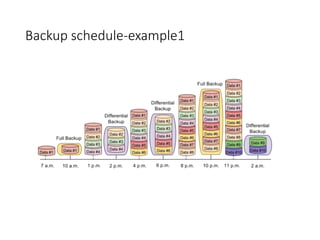
Backup schedule-example1
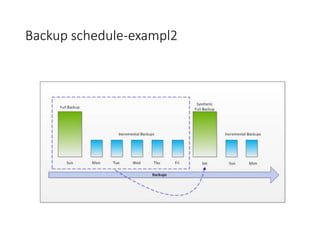
Backup schedule-exampl2
Schedule Example-3
• Full backup twice per year
• Differential each first Saturday morning of each month that is not
scheduled for a full backup
• Incremental each Saturday morning that is not scheduled for a Full or
Differential
Backup Devices
• Tape Backup Devices
• Cartridge Tape Drive
• 8-mm Tape Drive
• Digital Audio Tape Drive
• Linear Tape Open
• Digital Linear Tape
• Jukebox/Stacker Systems
• Optical Backup Devices
• Magneto-optical Backup Devices
• Disk Systems As Backup Devices
• RAID Disk Arrays
• Problems with Disks As Backup Devices
• High-Density Removable Media Backups
Tape Backup
• Tape historically has been the preferred backup media for very large
data storage environments.
• Tape has a useful life span.
• Tape can be very robust for storage
• Easy to transport
• Some tape formats are more reliable than others.
Backup Inventory
• The media label information:
• Date
• System identifier
• Partition name(s)
• Backup category: full, differential, incremental
Restore
• Common reasons for restores
• Accidental file deletion
• Disk failure
• Disaster recovery
• Fire, flood, earthquake, hacker attack, sabotage, terrorist attack, etc.
Replication
• Remote data replication is sometimes assumed to be equivalent to
backup, but this is not the case.
• Replication solutions can be either synchronous or asynchronous,
meaning transfer of data to a remote copy is achieved either
immediately or with a short time delay. Both methods create a
secondary copy of data identical to the primary copy, with
synchronous solutions achieving this in real time.
• This means that any data corruption or user file deletion is
immediately (or very quickly) replicated to the secondary copy,
therefore making it ineffective as a backup method.
• Another point to remember with replication is that only one copy of
the data is kept at the secondary location. This means that the
replicated copy doesn’t include historical versions of data from
preceding days, weeks and months, unlike a backup.
Archiving
• Archiving, on the other hand, is the retention of data for lengthy periods, usually years,
sometimes decades, and moves the data from its primary location.
• “Backup is for restoring a file, object, database, volume or system based on some recovery time
objective and recovery point objective, whereas the archive is a picture of the data and its state
at a point in time.”
• key characteristics of archiving systems. These include: “Indexing and metadata management for
search, replication, cloning, secure shred, Worm (write-once read-many), along with compliance
or regulatory items.”
• In addition, archiving includes movement of data off production storage systems onto the archive
medium, driven by retention policies. “Data mover tools may be tightly or loosely integrated with
the destination or target devices and in some cases even have overlapping features.
• The third component which does not attract as much awareness is the most important, however
– how the data mover tools integrate with different applications, which need to be configured to
use rules or policies to archive the data, or present it to the data mover.
• Another element of the distinction can also be the medium. Media used for backup need to be
able to ingest vast quantities of data quickly during a limited time window. As a result, disk rather
than tape has increasingly been used for the added performance it provides, as well as providing
faster access times to recently backed-up data.
• Archives, on the other hand, have increasingly become tape-based, which offers the advantage of
being cheap and robust over long periods of time, while the fairly slow speed of recovery is rarely
a problem as occurrences are rare.

Backups in computer programming and.pptx

  • 1.
  • 2.
    Introduction to Back& Restore • The purpose of backup is to protect data from loss. • The purpose of restore is to recover data that is temporarily unavailable due to some unexpected event.
  • 3.
  • 4.
    Why back isneeded? Case Study • Ransomware, which encrypts all your data when your computer gets infected and the second is to roll back the data at a specific time you want.
  • 5.
    Importance of Backup •Determine which data is static and which is dynamic • Some OS installations are changed infrequently; few backups required • E-commerce may require continuous backups. • Understand the changing state of your client’s data to determine an appropriate backup sched. • Organize with partitions
  • 6.
    Importance of Backup •Which Files Should Be Backed Up? • OS Binaries • Applications • Configuration Files • User files • Log files • Backup of just user files is not enough. • Should dump the log files, and configuration information
  • 7.
    Proper Backup Procedure •Choose your application • Scheduling • Implementation • Inventory (content and media) • Verify • Automate • Secure
  • 8.
    Choose your BackupApp • Mac OS X : • Time Machine • Linux/Unix : • tar (tape archive), cpio, dump • MS Windows : • MS Windows XP & 7 includes Backup & Restore capability • Many commercial apps are available
  • 9.
    Enterprise Level BackupApps • Paragon Backup & Recovery includes customer support • Backup4All Professional • GRBackPro7
  • 10.
    Types of Backups •Full Backup • Partial backup • Differential Backup • Incremental Backup
  • 11.
    Full Backup • Acomplete backup means full backup of the entire server or computer system. • If you are backing up of an entire server, then it includes all the volumes, directories and files. • And if you are backing up your computer system, then it includes all the drives, directories and files.
  • 12.
  • 13.
    Full Backup (Pros) Pros •Provides a complete copy of data • Easy to manage: • Done less frequently than other types of backups due to cost and resource requirements: Monthly, Quarterly, semi-annually, annually.
  • 14.
    Full Backup (Pros) Cons •Usually requires more media space than either differential or incremental. • Takes a long time to recover the full backup to a new disk.
  • 15.
    Differential backup • Ina differential backup only those files are backed which have changed or modified since the last full backup. • This backup method is very useful when you require the latest updated data. • If you are using the same media for consecutive differential backups, the files which are backed up earlier can be overwritten by their updated versions.
  • 16.
  • 17.
    Differential Backup (Pros) •Redundancy • Usually takes up less time and space than a full backup. • If the differential backup grows to the size of the last full backup, then schedule a new full backup.
  • 18.
    Differential Backup (Cons) •Redundancy – potentially many unneeded copies of the same data. • Subsequent differentials take longer and use more media space
  • 19.
    Incremental backup • Inan incremental backup only those files are backed up which have changed or modified as well as those which are new since the last incremental backup. • If you are using the same media for consecutive incremental backups, the files which are backed up earlier cannot be overwritten by their updated versions.
  • 20.
  • 21.
    Incremental backup • Pros •Keeps a revision history of actively changing files • Fastest backup type • Uses the least amount of media to complete a single backup • Cons • Much more difficult to manage
  • 22.
  • 23.
  • 24.
    Schedule Example-3 • Fullbackup twice per year • Differential each first Saturday morning of each month that is not scheduled for a full backup • Incremental each Saturday morning that is not scheduled for a Full or Differential
  • 25.
    Backup Devices • TapeBackup Devices • Cartridge Tape Drive • 8-mm Tape Drive • Digital Audio Tape Drive • Linear Tape Open • Digital Linear Tape • Jukebox/Stacker Systems • Optical Backup Devices • Magneto-optical Backup Devices • Disk Systems As Backup Devices • RAID Disk Arrays • Problems with Disks As Backup Devices • High-Density Removable Media Backups
  • 26.
    Tape Backup • Tapehistorically has been the preferred backup media for very large data storage environments. • Tape has a useful life span. • Tape can be very robust for storage • Easy to transport • Some tape formats are more reliable than others.
  • 27.
    Backup Inventory • Themedia label information: • Date • System identifier • Partition name(s) • Backup category: full, differential, incremental
  • 28.
    Restore • Common reasonsfor restores • Accidental file deletion • Disk failure • Disaster recovery • Fire, flood, earthquake, hacker attack, sabotage, terrorist attack, etc.
  • 29.
    Replication • Remote datareplication is sometimes assumed to be equivalent to backup, but this is not the case. • Replication solutions can be either synchronous or asynchronous, meaning transfer of data to a remote copy is achieved either immediately or with a short time delay. Both methods create a secondary copy of data identical to the primary copy, with synchronous solutions achieving this in real time. • This means that any data corruption or user file deletion is immediately (or very quickly) replicated to the secondary copy, therefore making it ineffective as a backup method. • Another point to remember with replication is that only one copy of the data is kept at the secondary location. This means that the replicated copy doesn’t include historical versions of data from preceding days, weeks and months, unlike a backup.
  • 30.
    Archiving • Archiving, onthe other hand, is the retention of data for lengthy periods, usually years, sometimes decades, and moves the data from its primary location. • “Backup is for restoring a file, object, database, volume or system based on some recovery time objective and recovery point objective, whereas the archive is a picture of the data and its state at a point in time.” • key characteristics of archiving systems. These include: “Indexing and metadata management for search, replication, cloning, secure shred, Worm (write-once read-many), along with compliance or regulatory items.” • In addition, archiving includes movement of data off production storage systems onto the archive medium, driven by retention policies. “Data mover tools may be tightly or loosely integrated with the destination or target devices and in some cases even have overlapping features. • The third component which does not attract as much awareness is the most important, however – how the data mover tools integrate with different applications, which need to be configured to use rules or policies to archive the data, or present it to the data mover. • Another element of the distinction can also be the medium. Media used for backup need to be able to ingest vast quantities of data quickly during a limited time window. As a result, disk rather than tape has increasingly been used for the added performance it provides, as well as providing faster access times to recently backed-up data. • Archives, on the other hand, have increasingly become tape-based, which offers the advantage of being cheap and robust over long periods of time, while the fairly slow speed of recovery is rarely a problem as occurrences are rare.