Value Delivery through
PRIL’s Retail Application
1   PRIL Overview

    Polaris Retail Infotech Ltd. (PRIL) is one of the leading Indian Retail Product &
    Solutions Companies with an extensive experience of 10 years in the global Retail
    Space. PRIL is a 100% owned subsidiary of Polaris Software Labs Ltd., a leading
    software player in banking and financial domain.

    PRIL is focused in providing end-to-end solutions across retail industry verticals. It
    offers Products & Services, Consulting & Outsourcing, addressing the overall retailer’s
    needs ranging from building efficient check out system, Merchandise & Planning
    Systems, Supply chain Management system to specialized offering like Quebusting, RIFD
    & E-tailing. PRIL is also a channel Partner to SAP & its flagship Product Retail Excel is
    powered with NetWeaver.

    PRIL has emerged as a one stop shop for all the Technical requirements in Retail
    Vertical. The Prime focus is Superior Technology which spells “Simple, Scalable &
    Customized”!

    The PRIL Basket of offerings

    PRODUCTS                           SERVICES                       CONSULTING

• Retail Excel                    • Implementation                 • Resource
                                                                      Augmentation
• Smart Store                     • Customization
• SAP IS-Retail                   • Integration                    • Outsourcing
                                  • Maintenance                    • Insourcing
                                  • Training


    Today PRIL operates in the global retail space, with operations in UK, MEA and SEA.


    2. RETAIL EXCEL – END-TO-END RETAIL SOLUTION FOR SMALL & MID-
    SIZED RETAILERS

    With changing scenario in the Retail industry and the dynamic nature of the business,
    complexity is also increasing. To maximize business potential in this very competitive
    market, Retailer opt for different innovations to be successful.

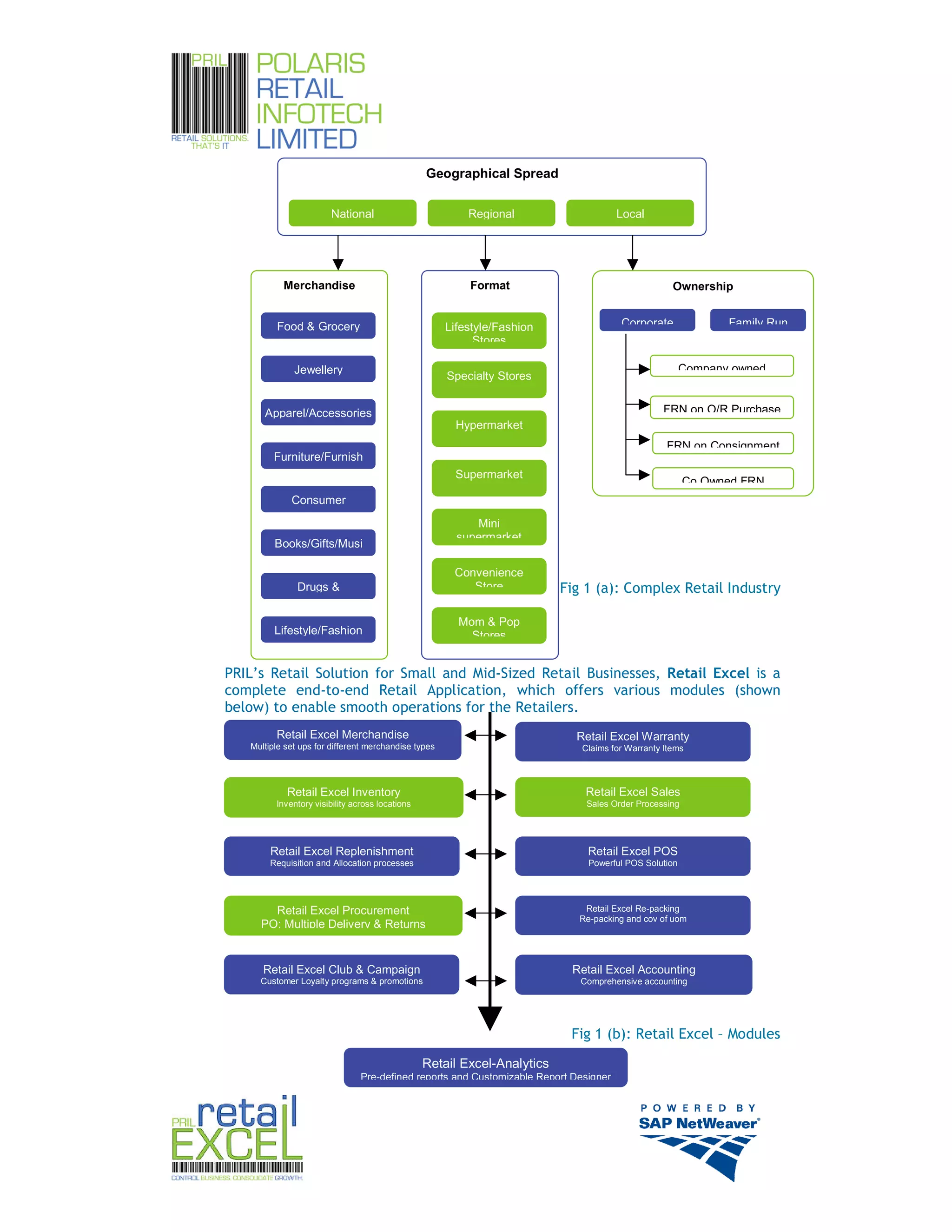
    With such increased complexity, as shown below, Retailers expect their solution
    provider to be efficient so as to handle these diverse business processes. And, if the
    solution is given in the form of a product, the product should be flexible enough to
    manage these functionalities.


                                                                                                2
Geographical Spread


                        National                          Regional                     Local


           Merchandise                                    Format                                    Ownership


         Food & Grocery                               Lifestyle/Fashion                Corporate              Family Run
                                                            Stores

              Jewellery                                                                                Company owned
                                                      Specialty Stores


      Apparel/Accessories                                                                         FRN on O/R Purchase
                                                        Hypermarket
                                                                                                  FRN on Consignment
         Furniture/Furnish
                                                       Supermarket
                                                                                                        Co Owned FRN
             Consumer
                                                           Mini
                                                        supermarket
         Books/Gifts/Musi

                                                       Convenience
               Drugs &                                    Store           Fig 1 (a): Complex Retail Industry

                                                        Mom & Pop
         Lifestyle/Fashion                                Stores


PRIL’s Retail Solution for Small and Mid-Sized Retail Businesses, Retail Excel is a
complete end-to-end Retail Application, which offers various modules (shown
below) to enable smooth operations for the Retailers.
         Retail Excel Merchandise                                           Retail Excel Warranty
   Multiple set ups for different merchandise types                           Claims for Warranty Items


            Retail Excel Inventory                                            Retail Excel Sales
         Inventory visibility across locations                                 Sales Order Processing


        Retail Excel Replenishment                                             Retail Excel POS
        Requisition and Allocation processes                                   Powerful POS Solution


       Retail Excel Procurement                                               Retail Excel Re-packing
                                                                             Re-packing and cov of uom
     PO; Multiple Delivery & Returns


      Retail Excel Club & Campaign                                         Retail Excel Accounting
     Customer Loyalty programs & promotions                                  Comprehensive accounting


                                                                           Fig 1 (b): Retail Excel – Modules
                                                 Retail Excel-Analytics
                                Pre-defined reports and Customizable Report Designer


                                                                                                                           3
Retail Excel Base
Customer expectations and demands are unlimited in today’s Retail World, to make them
happy and make them as customers for life, no doubt it requires a revolutionary concept in
Retail systems, PRIL-retail excel provides the advanced features to drive the business
competitive, cost effective and customer centric.

retailexcel as a Retail solution with its Unparalleled Flexibility, Total Control, Greater
Productivity, Higher Profitability, and Higher Customer Satisfaction supports various
functions of different format of stores.

retailexcel is capable to handle the various retail segments like Supermarkets and
Hypermarkets, Apparel, Footwear, Pharmacy, Specialty Stores, Consumer Durable
Chains, Rural Retail Formats etc.


Know your Business Rules

RetailExcel provides you the flexibility of setting up of your business rules as it functions in
your business.

        Supports five level of business location hierarchy
        User defined code length and mode of code generation for different masters in
        RetailExcel
        Enable or Disable Modules/functions as desired
        Supports 99 Line of business in one roof (Division)
        Supports 20 attributes for one division
        Item code generation logic division wise.
        Pricing centralized or Decentralized to locations
        Campaign centralized or Decentralized to locations
        Business preferences module wise.
        Enable Variant matrix for apparel and footwear
        User defined row and column attribute for variant matrix
        Enable Grouping of attributes for apparel and footwear.
        Nesting of Attributes for ease of use.


Get your Business Secured

It is very important in any business to have an effective security system on data
manipulation and information.

retailexcel provides the robust security module to administer your users.

        Capture Application users, Salesman and Employee details
        Attach Department to the users.
        Set Levels of Authorization of documents
        Create user Groups and specify rights and permissions to users and groups module
        and screen wise.
        Create Users centrally in Level one organization.
        Do fiscal year open and close operations.

Go Global

retailexcel helps you to go global by supporting multi country, multi currency functions.


                                                                                                   4
It has the Capability of handling stores setup in other countries where you have presence.

        Create multiple countries in which you do business
        Create Multiple currencies in which you do transactions
        Categorize your locations, E.g. “Own Store”,”Franchisee”,”Warehouse” etc.
        Create Organization (Stores/Warehouse) as and when a new establishment takes
        place in different locations.
        Attach Line of business (Division) to Organization
        Attach Parent location for data flow
        Create site groups (Combination of two or more organization is made as site group
        for ease of use in defining selling price and promotions)
        Set Exchange Rates


Manage your Merchandise

Merchandise Setup module in Retailexcel provides a complete merchandise management
system that is required for a Retailer of any form.

        Create attribute values
        Create Style Groups
        Create SKUs and attach attributes
        Categorization of the items as “Merchandise” / “Serialized” / “Set Item”
        Predefine the item parameters and create items in easy go using quick item
        creation.
        Subcategorize the items as MRP Based, Weight Based, Free of Cost, Batch Item and
        Perishable Etc.
        Supports LIFO and FIFO Item Movement method
        Facility to capture multiple barcodes for single item
        Maintain item codes of legacy system if any.
        Create SKUs of all size and color of a particular style group in one go using Variant
        matrix for apparel and footwear (Variant matrix is a screen where it allows the user
        to enter the values in matrix grid, based on the row and column attribute
        configured in retailexcel)
        User defined Unit of Measurement
        Attach multiple UOMs for Single item
        Purchase in One UOM and Stock/Sell in Different UOM (Buy in Dozens and sell in
        PCs)
        Block items in Purchase and Stock movement
        Information on Last Transaction and Purchase date of items in item configuration
        screen
        Define Organization wise Safety, Reorder-Level and Maximum quantity of SKUs.
        Easy Master Management to change the status of a Vendor and Item.
        Customer Category wise Pricing
        Location (Organization) wise Pricing
        Define selling price to get effective in future date. (Forward Pricing)
        Pricing on different methods like Fixed, Mark Down % on MRP, Mark UP % on Cost
        Price and Mark UP % on Landed Cost Price
        Information on current CP and SP.
        Repack items into smaller units (Buy in Gunny Bags and sell in Pcs)
        Set making and breaking.(Buy Cup separately and saucer separately and make it as
        a single item “Cup and Saucer” and vice versa)


                                                                                                5
Give your Customers the best by Procuring the Best

    Vendor Management

It is very important in the business to maintain the suppliers as we do our customers;
retailexcel helps you to manage your vendor in many ways.

        Capture Vendor Details
        Predefine the items supplied by the vendor with his cost.
        Mark your vendor as a Registered or Un registered vendor
        Attach user defined additional charges
        Attach payment terms
        Create foreign vendors and attach their currencies
        Classify Vendor as Job order/Distributor/Manufacturer/Normal
        Attach Delivery Terms
        Blacklist the vendor with reason.
        Predefine the Discounts negotiated with the vendor.
        Fix tolerance for the quantity and days for the delivery.
        Storewise-Vendorwise Cost Management


Make your Taxman Happy

retailexcel is designed with the high flexibility to handle the tax complications that are
prevailing in different countries.

        Create multiple tax Component by specifying the percentage or fixed amount (Tax
        master)
        Create Tax Plan based on the formula
        Can attach multiple tax components in one plan (E.g. Sales Tax + Surcharge)
        Specify period for every plan
        Create both Purchase and Sales tax plan
        Create both header and item level plans
        Can handle Excise duty based on MRP
        Supports Different tax plan for different locations.
        Tax plan based on Delivery jurisdiction (E.g. CST applicable in case of outside
        states sale in India)

Procure the Best

Comprehensive purchasing solution that includes centralized procurement and direct-to-
store delivery. The module manages retailers’ complex network of suppliers for smooth
purchasing and delivery. It simplifies transactions and provides access to relevant
information at the right time, enabling better buying decision.

        Multiple types of Purchase Orders – Normal PO/Consignment PO/Drop-Ship PO/Non-
        merchandise PO
        Supports Domestic and Import PO
        Supports multiple delivery schedules
        Supports centralized Purchasing with multi-location delivery
        Four levels of authorization for Purchase Order
        Grid based purchase order for handling color-size (Variant Matrix)
        Carton receipts against Purchase orders
        Purchase Invoice booking for accounting entry


                                                                                             6
Tolerance control on Quantity and Date of delivery
        Stock Return to Vendor

Replenish the Stocks what you Sell and also What you don’t Sell

The requisition and the allocation process simplify decision making of what and how much
to replenish, thus optimizing inventory levels at all locations. View of inventory across
various locations while allocating, lets you efficiently re-deploy slow-moving stocks leading
to higher GMROI.

        Stock request and allocate
        Auto stock request based on ROL
        Consolidation of Requisitions from multiple locations
        Allocation of stocks against – particular requisition number/particular SKU
        Stock movement between locations
        Attach Transfer cost factor
        Stock movement to temporary units (Exhibition, Customer Stock Approval etc)

Invoicing and Franchisee Operation

Streamlines sales order processing with multi-departmental workflow, offering tight
interfaces to credit management, receivables and inventory. Consignment and franchisee
Sales support offers the flexibility of using the franchisee route to expand market reach.
retailexcel gives the benefit of dataflow of invoice documents electronically which results
in time saving and accuracy.

        Sales Order Processing
        Supports multiple delivery schedule
        Supports Domestic and Export Sales
        Delivery from the same location or from multiple locations
        Single Sales order multiple customer delivery locations
        Book the consignment order
        Create a delivery note before invoicing
        Direct Sales Invoice or with reference to Delivery Note/SO
        Capture the Sales Returns.
        Customer Credit Control
        Data flow of Documents to Retailexcel Users electronically.

Improve your Operational Efficiency

Retail Excel's administrative and operational facilities help you to manage the day-to-day
operations in an effective manner.

        User defined Reason code for un usual transactions (E.g. Stock Adjustment)
        Multiple authorization level for documents


                                                                                                7
Support your Customer Needs

Supports Customer Loyalty Programs and Promotions that increase customer base, visits per
customer and sales per visit. The module captures customer information, analyses buyer
behavior to help effective to help devise effective loyalty programs for increased ROI.

retailexcel back office module offers the user to capture the required information for the
various functions at the Point Of Sale level.

       Centralized Gift voucher Creation, distribution and tracking.
       Facility of centralizing or de-centralizing the rights of defining promotion and
       loyalty schemes
       Supports control of promotion and loyalty scheme definition set-up through settings
       in organization master
       Loyalty Features-Program definition/New member processing/Membership
       suspension & closure/Membership upgrade/Membership renewal
       Reward Points Administration-Issue/Redemption/Transfer
       Facility of defining a promotion for a group of SKUs for example “Buy 2 and get 1
       free”
       Facility to set-up non-item promotions for example “Shop between 12:00 to 16:00
       hrs and get 10% discount”
       Facility to set-up bill level promotion for example “Buy goods worth more than
       $200 and get 5% off”
       Facility of defining promotion for a particular customer category, for example
       “Special discount of 10% for Gold club customers on ladies wear merchandise
       Facility of setting up a future dated promotion
       Facility of having store specific gift vouchers
       Facility of having pre-defined discounts
       Customer specific discounts
       Print Loyalty card statements

Support accounting functions of a Retailer

Comprehensive, easy to use account solution with strong accounting control features.
The module offers online integration with other business processes and eliminates
duplication of entries.

       Financial Data consolidation
       Control on fiscal year opening and closing
       Group, Sub-Group, Ledger & Sub Ledger maintenance
       Mapping of ledgers based on transactions
       Supports TDS functions
       Supports Cheque printing
       On-line posting using posting keys
       Supports Final accounts
       Financial Reports
       Tracking of Receivables and Payables and
       Supports various accounting transactions like Contra, Debit Note, Credit Note,
       Receipts, Payments and invoice entries.
       Bank Reconciliation
       Voucher Authorization
       Period opening-Day open/Month open/Year open
       Ability to book back-dated entries for immediate past period


                                                                                             8
Reports & Analysis

Delivers more than 80 pre-defined reports for a clear insight into all aspects of the business
to effectively manage operations and take informed decisions for competitive advantage.
An optional report-writer, IYFT (Information at Your Finger Tips) gives freedom to design
customized reports as per business needs.

        Predefined Reports module-wise
        Stock Ageing Analysis
        Stock Ledger
        Attribute Wise Stock Status
        Stock Status as on Date
        Re order analysis
        Vendor wise stock analysis
        Stock Reconciliation Transfer In –Transfer Out
        Item Movement
        Style Code Wise Stock on Hand
        Vendor Wise Stock Analysis
        Item Wise Stock Status
        Sales Performance
        Attribute Wise Net Sales Report
        Item Wise Sales Analysis
        Vendor Wise Sales Analysis
        Sales Man Performance Analysis
        Tax to be Deposited/Returned
        Gift Voucher Sales
        Accounting Reports
        Payables and Receivables
        Loyalty Reports
        User defined reports in IYFT
        Write a SQL query and convert them as a report using IYFT Report Designer

Retail Excel PoS

retailexcel Point of Sale (PoS) enables you to deliver the best shopping experience to your
customers with its advanced functionality.

retailexcel is a new generation retail business application that is produced by
understanding the needs of the Retail and it’s customers.

Simple and easy-to-use PoS makes it a user's delight. The features are drawn from the best
retail practices from around the world and are set atop a state-of-the-art technology
development framework that understands the art of merging business and technology
together to achieve maximum result.

retailexcel Point of Sale provides the Retailer to customize his business settings according
to the need.

Know your business rules

                Enable tax
                Fix No of Decimal
                Configure No of Sessions for a counter in a day


                                                                                                 9
retailexcel PoS Features include special functionality like printing of bills category wise
and again category of choice.

The Preference setting in retailexcel PoS gives a higher degree of flexibility to the retailer
to improve the operation efficiency.

retailexcel Point of Sale is capable of integrating with different Point of Sale machine
brands that comes with various features like Cash drawer, Pole Display & Card Reader.

        Create different PoS Types
        Configure control codes for each PoS type.

Control your Counters

Retailers face lot of challenges in today’s competitive world, towards that setting up of
specific tills for fast check out, multiple department slip entries finally made as single bill,
setup counter specific tenders etc

        Setup rules counter wise
        User defined tender types
        Attach acceptable tenders counter wise
        Attach PoS type to a counter to function depending on the machine
        Setup minimum and maximum counter values
        Set counter specific header and footer messages.

Handle the day operations efficiently

retailexcel PoS helps the retailer to manage the day-to-day counter operations very
effectively with trouble free and accountability.

        Control your store’s day open and day close functions
        Session Open with counter wise opening balance of cash
        Close session after proper accounting by cashiers
        Add cashier to the Session
        Counter View for the supervisors to see the liability of the counter.
        Blind counter handover.
        Tender Audit
        Sales Audit function for the Accounting process
        Payment in and Payment out to manage cash in the counter.
        Footfall Analysis; which allows you to analyze your sales against footfalls entering
        the store. This can also be integrated with any hardware.


Support your Customer Needs

retailexcel Point of Sale billing function is simple, secure and powerful with a fast four-
click-a-bill process. Advanced features like Packing Slip, GV sales, Hold the Bill and
Refresh, Layaway, Purchase History on the click of a button; etc enables the retailer to
deliver a value added service to the customers and make them happy and customer forever

Transaction types

        Cash and Credit Sales
        Sale, Exchange, Cancel, Refund and issue Credit note for refund


                                                                                                   10
Support GV sale and tracking
       Layaway

retailexcel with its unique functionality gives the customer an advantage of payment on
their choice.

       Accept multiple tender types in one bill
          o Cash
          o Accepts Single or multiple debit/credit card
          o Gift voucher
          o Foreign currency
          o Loyalty Redemption
          o Multiple Credit Note and
          o Bank Payment

Customer Profile

       Capture customer profile on the fly
           o Name, Address and Email id.
           o Gender, Marital status, Birthday and anniversary
       View customer purchase history on the fly
       View loyalty points earned by the customer
       Apply customer category wise pricing
       Search on code/name/birth date etc for repeat customers.

Promotion

retailexcel support the promotion functions that are defined in the retailexcel back office
module

       Buy X quantity get Y quantity free
       Setup item level and bill level discounts
       Time based promotions


Stock-Take (Cycle Counting)

retailexcel provides offerings such as Stock take integrated with PDA device.

       Freeze items for transaction during stock take
       You can have multiple Physical counts, freeze any of the counts and authorize
       accordingly


Queue Busting

retailexcel will offer advance module called Queue Busting, which is built to work on
mobile device. This helps in speeding the process of billing

       Scan and load items on the mobile PoS
       Generate RXL QB Slip for the customer
       Customer presents RXL QB Slip at the Collection counter and gets the final bill


                                                                                              11
Off-Line Billing

retailexcel will be offering offline billing to enable trouble free billing in case of server
going down

        Continue billing in case of server breakdown
        Automatically restore database to the server once it is back to normalcy


Void Options

        Void an item with/without authorization
        Clear the bill without saving, with or without authorization
        Cancel the bill

How does the Salesmen Perform?

        Capture sales man bill wise or item wise.
        Attach Salesman to the customer

Value added Features

        View quantity on hand on the fly
        Optional automatic round off feature
        Duplicate bill printing with or without authorization
        Convert multiple packing slip in to one bill in large format stores
        Support barcode scanning
        Customized bill printing
        Standard 40 and 80 column bill printing
        O-PoS Compatible: Retail Excel is compatible with all O-PoS compatible hardware
        devices such as barcode scanner, thermal printers, dot matrix printer, weighing
        scale, pole displays, cash drawer etc.

Security and Administration

        Create user groups
        User/Group Specific rights
        Create user and salesman separately


DT Nterprise (Completely Automated Data Consolidation Engine)

Set Up Data Transfer Process

Retail Excel allows you to set profile for DT where you would select all the organization
with which you have to do a pull or push procedure. User will define the Push and Pull Data
Profile, which will allow him to send and receive data to and from these organizations.
These settings are one time setting and will instruct the engine to automatically start
execution on defined organizations. DT Nterprise also allows user to do Manual Push and
Pulls. DT Nterprise works on a very low bandwidth requirement and even a dial-up
connection is sufficient for the operation.


                                                                                                12
DT Nterprise new task

You can schedule your own new task as desired by you.

Enter a unique name for identifying the task. Then select task type i.e. Pull / Push, you can
also make a task enable or disable as and when required.

Owner of the task would be the login id from which you have logged into DT Nterprise,
enter password for security reason to verify users identity.

You can set the schedule as per your requirement; schedule can be broadly of three types:
       a. One time occurrence task, where we can define a task to occur only once.
       Here we can set the time when we want this task to be executed next time.
       b. Weekly task to be occurred on some day of week e.g. Monday, Wednesday and
       Saturday.
       b. Monthly Task, we can set task for monthly activity of pull – push of data.

Based on the above definitions, which again is to be done once, DT Nterprise will
automatically start execution of the defined process. You just have to ensure that the
machine is connected to the Internet. It is not required to stop any transaction process
during data transfer process.


                                                                                                13

White paper retail excel

  • 1.
  • 2.
    1 PRIL Overview Polaris Retail Infotech Ltd. (PRIL) is one of the leading Indian Retail Product & Solutions Companies with an extensive experience of 10 years in the global Retail Space. PRIL is a 100% owned subsidiary of Polaris Software Labs Ltd., a leading software player in banking and financial domain. PRIL is focused in providing end-to-end solutions across retail industry verticals. It offers Products & Services, Consulting & Outsourcing, addressing the overall retailer’s needs ranging from building efficient check out system, Merchandise & Planning Systems, Supply chain Management system to specialized offering like Quebusting, RIFD & E-tailing. PRIL is also a channel Partner to SAP & its flagship Product Retail Excel is powered with NetWeaver. PRIL has emerged as a one stop shop for all the Technical requirements in Retail Vertical. The Prime focus is Superior Technology which spells “Simple, Scalable & Customized”! The PRIL Basket of offerings PRODUCTS SERVICES CONSULTING • Retail Excel • Implementation • Resource Augmentation • Smart Store • Customization • SAP IS-Retail • Integration • Outsourcing • Maintenance • Insourcing • Training Today PRIL operates in the global retail space, with operations in UK, MEA and SEA. 2. RETAIL EXCEL – END-TO-END RETAIL SOLUTION FOR SMALL & MID- SIZED RETAILERS With changing scenario in the Retail industry and the dynamic nature of the business, complexity is also increasing. To maximize business potential in this very competitive market, Retailer opt for different innovations to be successful. With such increased complexity, as shown below, Retailers expect their solution provider to be efficient so as to handle these diverse business processes. And, if the solution is given in the form of a product, the product should be flexible enough to manage these functionalities. 2
  • 3.
    Geographical Spread National Regional Local Merchandise Format Ownership Food & Grocery Lifestyle/Fashion Corporate Family Run Stores Jewellery Company owned Specialty Stores Apparel/Accessories FRN on O/R Purchase Hypermarket FRN on Consignment Furniture/Furnish Supermarket Co Owned FRN Consumer Mini supermarket Books/Gifts/Musi Convenience Drugs & Store Fig 1 (a): Complex Retail Industry Mom & Pop Lifestyle/Fashion Stores PRIL’s Retail Solution for Small and Mid-Sized Retail Businesses, Retail Excel is a complete end-to-end Retail Application, which offers various modules (shown below) to enable smooth operations for the Retailers. Retail Excel Merchandise Retail Excel Warranty Multiple set ups for different merchandise types Claims for Warranty Items Retail Excel Inventory Retail Excel Sales Inventory visibility across locations Sales Order Processing Retail Excel Replenishment Retail Excel POS Requisition and Allocation processes Powerful POS Solution Retail Excel Procurement Retail Excel Re-packing Re-packing and cov of uom PO; Multiple Delivery & Returns Retail Excel Club & Campaign Retail Excel Accounting Customer Loyalty programs & promotions Comprehensive accounting Fig 1 (b): Retail Excel – Modules Retail Excel-Analytics Pre-defined reports and Customizable Report Designer 3
  • 4.
    Retail Excel Base Customerexpectations and demands are unlimited in today’s Retail World, to make them happy and make them as customers for life, no doubt it requires a revolutionary concept in Retail systems, PRIL-retail excel provides the advanced features to drive the business competitive, cost effective and customer centric. retailexcel as a Retail solution with its Unparalleled Flexibility, Total Control, Greater Productivity, Higher Profitability, and Higher Customer Satisfaction supports various functions of different format of stores. retailexcel is capable to handle the various retail segments like Supermarkets and Hypermarkets, Apparel, Footwear, Pharmacy, Specialty Stores, Consumer Durable Chains, Rural Retail Formats etc. Know your Business Rules RetailExcel provides you the flexibility of setting up of your business rules as it functions in your business. Supports five level of business location hierarchy User defined code length and mode of code generation for different masters in RetailExcel Enable or Disable Modules/functions as desired Supports 99 Line of business in one roof (Division) Supports 20 attributes for one division Item code generation logic division wise. Pricing centralized or Decentralized to locations Campaign centralized or Decentralized to locations Business preferences module wise. Enable Variant matrix for apparel and footwear User defined row and column attribute for variant matrix Enable Grouping of attributes for apparel and footwear. Nesting of Attributes for ease of use. Get your Business Secured It is very important in any business to have an effective security system on data manipulation and information. retailexcel provides the robust security module to administer your users. Capture Application users, Salesman and Employee details Attach Department to the users. Set Levels of Authorization of documents Create user Groups and specify rights and permissions to users and groups module and screen wise. Create Users centrally in Level one organization. Do fiscal year open and close operations. Go Global retailexcel helps you to go global by supporting multi country, multi currency functions. 4
  • 5.
    It has theCapability of handling stores setup in other countries where you have presence. Create multiple countries in which you do business Create Multiple currencies in which you do transactions Categorize your locations, E.g. “Own Store”,”Franchisee”,”Warehouse” etc. Create Organization (Stores/Warehouse) as and when a new establishment takes place in different locations. Attach Line of business (Division) to Organization Attach Parent location for data flow Create site groups (Combination of two or more organization is made as site group for ease of use in defining selling price and promotions) Set Exchange Rates Manage your Merchandise Merchandise Setup module in Retailexcel provides a complete merchandise management system that is required for a Retailer of any form. Create attribute values Create Style Groups Create SKUs and attach attributes Categorization of the items as “Merchandise” / “Serialized” / “Set Item” Predefine the item parameters and create items in easy go using quick item creation. Subcategorize the items as MRP Based, Weight Based, Free of Cost, Batch Item and Perishable Etc. Supports LIFO and FIFO Item Movement method Facility to capture multiple barcodes for single item Maintain item codes of legacy system if any. Create SKUs of all size and color of a particular style group in one go using Variant matrix for apparel and footwear (Variant matrix is a screen where it allows the user to enter the values in matrix grid, based on the row and column attribute configured in retailexcel) User defined Unit of Measurement Attach multiple UOMs for Single item Purchase in One UOM and Stock/Sell in Different UOM (Buy in Dozens and sell in PCs) Block items in Purchase and Stock movement Information on Last Transaction and Purchase date of items in item configuration screen Define Organization wise Safety, Reorder-Level and Maximum quantity of SKUs. Easy Master Management to change the status of a Vendor and Item. Customer Category wise Pricing Location (Organization) wise Pricing Define selling price to get effective in future date. (Forward Pricing) Pricing on different methods like Fixed, Mark Down % on MRP, Mark UP % on Cost Price and Mark UP % on Landed Cost Price Information on current CP and SP. Repack items into smaller units (Buy in Gunny Bags and sell in Pcs) Set making and breaking.(Buy Cup separately and saucer separately and make it as a single item “Cup and Saucer” and vice versa) 5
  • 6.
    Give your Customersthe best by Procuring the Best Vendor Management It is very important in the business to maintain the suppliers as we do our customers; retailexcel helps you to manage your vendor in many ways. Capture Vendor Details Predefine the items supplied by the vendor with his cost. Mark your vendor as a Registered or Un registered vendor Attach user defined additional charges Attach payment terms Create foreign vendors and attach their currencies Classify Vendor as Job order/Distributor/Manufacturer/Normal Attach Delivery Terms Blacklist the vendor with reason. Predefine the Discounts negotiated with the vendor. Fix tolerance for the quantity and days for the delivery. Storewise-Vendorwise Cost Management Make your Taxman Happy retailexcel is designed with the high flexibility to handle the tax complications that are prevailing in different countries. Create multiple tax Component by specifying the percentage or fixed amount (Tax master) Create Tax Plan based on the formula Can attach multiple tax components in one plan (E.g. Sales Tax + Surcharge) Specify period for every plan Create both Purchase and Sales tax plan Create both header and item level plans Can handle Excise duty based on MRP Supports Different tax plan for different locations. Tax plan based on Delivery jurisdiction (E.g. CST applicable in case of outside states sale in India) Procure the Best Comprehensive purchasing solution that includes centralized procurement and direct-to- store delivery. The module manages retailers’ complex network of suppliers for smooth purchasing and delivery. It simplifies transactions and provides access to relevant information at the right time, enabling better buying decision. Multiple types of Purchase Orders – Normal PO/Consignment PO/Drop-Ship PO/Non- merchandise PO Supports Domestic and Import PO Supports multiple delivery schedules Supports centralized Purchasing with multi-location delivery Four levels of authorization for Purchase Order Grid based purchase order for handling color-size (Variant Matrix) Carton receipts against Purchase orders Purchase Invoice booking for accounting entry 6
  • 7.
    Tolerance control onQuantity and Date of delivery Stock Return to Vendor Replenish the Stocks what you Sell and also What you don’t Sell The requisition and the allocation process simplify decision making of what and how much to replenish, thus optimizing inventory levels at all locations. View of inventory across various locations while allocating, lets you efficiently re-deploy slow-moving stocks leading to higher GMROI. Stock request and allocate Auto stock request based on ROL Consolidation of Requisitions from multiple locations Allocation of stocks against – particular requisition number/particular SKU Stock movement between locations Attach Transfer cost factor Stock movement to temporary units (Exhibition, Customer Stock Approval etc) Invoicing and Franchisee Operation Streamlines sales order processing with multi-departmental workflow, offering tight interfaces to credit management, receivables and inventory. Consignment and franchisee Sales support offers the flexibility of using the franchisee route to expand market reach. retailexcel gives the benefit of dataflow of invoice documents electronically which results in time saving and accuracy. Sales Order Processing Supports multiple delivery schedule Supports Domestic and Export Sales Delivery from the same location or from multiple locations Single Sales order multiple customer delivery locations Book the consignment order Create a delivery note before invoicing Direct Sales Invoice or with reference to Delivery Note/SO Capture the Sales Returns. Customer Credit Control Data flow of Documents to Retailexcel Users electronically. Improve your Operational Efficiency Retail Excel's administrative and operational facilities help you to manage the day-to-day operations in an effective manner. User defined Reason code for un usual transactions (E.g. Stock Adjustment) Multiple authorization level for documents 7
  • 8.
    Support your CustomerNeeds Supports Customer Loyalty Programs and Promotions that increase customer base, visits per customer and sales per visit. The module captures customer information, analyses buyer behavior to help effective to help devise effective loyalty programs for increased ROI. retailexcel back office module offers the user to capture the required information for the various functions at the Point Of Sale level. Centralized Gift voucher Creation, distribution and tracking. Facility of centralizing or de-centralizing the rights of defining promotion and loyalty schemes Supports control of promotion and loyalty scheme definition set-up through settings in organization master Loyalty Features-Program definition/New member processing/Membership suspension & closure/Membership upgrade/Membership renewal Reward Points Administration-Issue/Redemption/Transfer Facility of defining a promotion for a group of SKUs for example “Buy 2 and get 1 free” Facility to set-up non-item promotions for example “Shop between 12:00 to 16:00 hrs and get 10% discount” Facility to set-up bill level promotion for example “Buy goods worth more than $200 and get 5% off” Facility of defining promotion for a particular customer category, for example “Special discount of 10% for Gold club customers on ladies wear merchandise Facility of setting up a future dated promotion Facility of having store specific gift vouchers Facility of having pre-defined discounts Customer specific discounts Print Loyalty card statements Support accounting functions of a Retailer Comprehensive, easy to use account solution with strong accounting control features. The module offers online integration with other business processes and eliminates duplication of entries. Financial Data consolidation Control on fiscal year opening and closing Group, Sub-Group, Ledger & Sub Ledger maintenance Mapping of ledgers based on transactions Supports TDS functions Supports Cheque printing On-line posting using posting keys Supports Final accounts Financial Reports Tracking of Receivables and Payables and Supports various accounting transactions like Contra, Debit Note, Credit Note, Receipts, Payments and invoice entries. Bank Reconciliation Voucher Authorization Period opening-Day open/Month open/Year open Ability to book back-dated entries for immediate past period 8
  • 9.
    Reports & Analysis Deliversmore than 80 pre-defined reports for a clear insight into all aspects of the business to effectively manage operations and take informed decisions for competitive advantage. An optional report-writer, IYFT (Information at Your Finger Tips) gives freedom to design customized reports as per business needs. Predefined Reports module-wise Stock Ageing Analysis Stock Ledger Attribute Wise Stock Status Stock Status as on Date Re order analysis Vendor wise stock analysis Stock Reconciliation Transfer In –Transfer Out Item Movement Style Code Wise Stock on Hand Vendor Wise Stock Analysis Item Wise Stock Status Sales Performance Attribute Wise Net Sales Report Item Wise Sales Analysis Vendor Wise Sales Analysis Sales Man Performance Analysis Tax to be Deposited/Returned Gift Voucher Sales Accounting Reports Payables and Receivables Loyalty Reports User defined reports in IYFT Write a SQL query and convert them as a report using IYFT Report Designer Retail Excel PoS retailexcel Point of Sale (PoS) enables you to deliver the best shopping experience to your customers with its advanced functionality. retailexcel is a new generation retail business application that is produced by understanding the needs of the Retail and it’s customers. Simple and easy-to-use PoS makes it a user's delight. The features are drawn from the best retail practices from around the world and are set atop a state-of-the-art technology development framework that understands the art of merging business and technology together to achieve maximum result. retailexcel Point of Sale provides the Retailer to customize his business settings according to the need. Know your business rules Enable tax Fix No of Decimal Configure No of Sessions for a counter in a day 9
  • 10.
    retailexcel PoS Featuresinclude special functionality like printing of bills category wise and again category of choice. The Preference setting in retailexcel PoS gives a higher degree of flexibility to the retailer to improve the operation efficiency. retailexcel Point of Sale is capable of integrating with different Point of Sale machine brands that comes with various features like Cash drawer, Pole Display & Card Reader. Create different PoS Types Configure control codes for each PoS type. Control your Counters Retailers face lot of challenges in today’s competitive world, towards that setting up of specific tills for fast check out, multiple department slip entries finally made as single bill, setup counter specific tenders etc Setup rules counter wise User defined tender types Attach acceptable tenders counter wise Attach PoS type to a counter to function depending on the machine Setup minimum and maximum counter values Set counter specific header and footer messages. Handle the day operations efficiently retailexcel PoS helps the retailer to manage the day-to-day counter operations very effectively with trouble free and accountability. Control your store’s day open and day close functions Session Open with counter wise opening balance of cash Close session after proper accounting by cashiers Add cashier to the Session Counter View for the supervisors to see the liability of the counter. Blind counter handover. Tender Audit Sales Audit function for the Accounting process Payment in and Payment out to manage cash in the counter. Footfall Analysis; which allows you to analyze your sales against footfalls entering the store. This can also be integrated with any hardware. Support your Customer Needs retailexcel Point of Sale billing function is simple, secure and powerful with a fast four- click-a-bill process. Advanced features like Packing Slip, GV sales, Hold the Bill and Refresh, Layaway, Purchase History on the click of a button; etc enables the retailer to deliver a value added service to the customers and make them happy and customer forever Transaction types Cash and Credit Sales Sale, Exchange, Cancel, Refund and issue Credit note for refund 10
  • 11.
    Support GV saleand tracking Layaway retailexcel with its unique functionality gives the customer an advantage of payment on their choice. Accept multiple tender types in one bill o Cash o Accepts Single or multiple debit/credit card o Gift voucher o Foreign currency o Loyalty Redemption o Multiple Credit Note and o Bank Payment Customer Profile Capture customer profile on the fly o Name, Address and Email id. o Gender, Marital status, Birthday and anniversary View customer purchase history on the fly View loyalty points earned by the customer Apply customer category wise pricing Search on code/name/birth date etc for repeat customers. Promotion retailexcel support the promotion functions that are defined in the retailexcel back office module Buy X quantity get Y quantity free Setup item level and bill level discounts Time based promotions Stock-Take (Cycle Counting) retailexcel provides offerings such as Stock take integrated with PDA device. Freeze items for transaction during stock take You can have multiple Physical counts, freeze any of the counts and authorize accordingly Queue Busting retailexcel will offer advance module called Queue Busting, which is built to work on mobile device. This helps in speeding the process of billing Scan and load items on the mobile PoS Generate RXL QB Slip for the customer Customer presents RXL QB Slip at the Collection counter and gets the final bill 11
  • 12.
    Off-Line Billing retailexcel willbe offering offline billing to enable trouble free billing in case of server going down Continue billing in case of server breakdown Automatically restore database to the server once it is back to normalcy Void Options Void an item with/without authorization Clear the bill without saving, with or without authorization Cancel the bill How does the Salesmen Perform? Capture sales man bill wise or item wise. Attach Salesman to the customer Value added Features View quantity on hand on the fly Optional automatic round off feature Duplicate bill printing with or without authorization Convert multiple packing slip in to one bill in large format stores Support barcode scanning Customized bill printing Standard 40 and 80 column bill printing O-PoS Compatible: Retail Excel is compatible with all O-PoS compatible hardware devices such as barcode scanner, thermal printers, dot matrix printer, weighing scale, pole displays, cash drawer etc. Security and Administration Create user groups User/Group Specific rights Create user and salesman separately DT Nterprise (Completely Automated Data Consolidation Engine) Set Up Data Transfer Process Retail Excel allows you to set profile for DT where you would select all the organization with which you have to do a pull or push procedure. User will define the Push and Pull Data Profile, which will allow him to send and receive data to and from these organizations. These settings are one time setting and will instruct the engine to automatically start execution on defined organizations. DT Nterprise also allows user to do Manual Push and Pulls. DT Nterprise works on a very low bandwidth requirement and even a dial-up connection is sufficient for the operation. 12
  • 13.
    DT Nterprise newtask You can schedule your own new task as desired by you. Enter a unique name for identifying the task. Then select task type i.e. Pull / Push, you can also make a task enable or disable as and when required. Owner of the task would be the login id from which you have logged into DT Nterprise, enter password for security reason to verify users identity. You can set the schedule as per your requirement; schedule can be broadly of three types: a. One time occurrence task, where we can define a task to occur only once. Here we can set the time when we want this task to be executed next time. b. Weekly task to be occurred on some day of week e.g. Monday, Wednesday and Saturday. b. Monthly Task, we can set task for monthly activity of pull – push of data. Based on the above definitions, which again is to be done once, DT Nterprise will automatically start execution of the defined process. You just have to ensure that the machine is connected to the Internet. It is not required to stop any transaction process during data transfer process. 13