

Jean Vanderdonckt,Thanh-Diane NguyenWhen User Interface Patternsbecome Mobile –IntegraNova MES goesinto the wild
AboutthepresentersProf. Jean VanderdoncktHead of Louvain Interaction Lab (LiLab)Louvain School of ManagementUniversité catholique de LouvainLouvain-la-Neuve, Belgiumjean.vanderdonckt@uclouvain.bewww.lilab.eu, www.lilab.beThanh-Diane NguyenResearch and Teaching AssistantPhD studentthanh-diane.nguyen@uclouvain.beThese slides are freely available at: www.slideshare.net/jeanvdd/when-user-interface-patterns-become-mobile
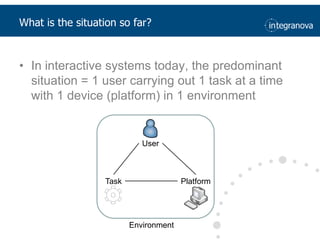
Whatis the situation so far?In interactive systemstoday, the predominant situation = 1 user carrying out 1 taskat a time with 1 device (platform) in 1 environmentUserTaskPlatformEnvironment
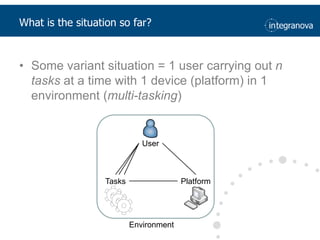
Whatis the situation so far?Some variant situation = 1 user carrying out n tasksat a time with 1 device (platform) in 1 environment (multi-tasking)UserTasksPlatformEnvironment
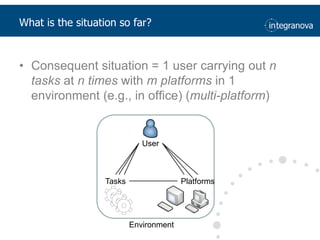
Whatis the situation so far?Consequent situation = 1 user carrying out n tasksatn timeswithm platforms in 1 environment (e.g., in office) (multi-platform)UserTasksPlatformsEnvironment
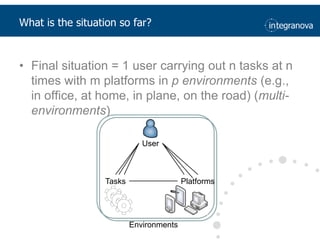
Whatis the situation so far?Final situation = 1 user carrying out n tasksat n times with m platforms in p environments (e.g., in office, at home, in plane, on the road) (multi-environments) UserTasksPlatformsEnvironments
Why multiple monitors?DevicesideMonitor surface increases, whilepricedecreases[Harris,2002]
Why multiple monitors?User sideUsersprefer more display surfaceUser’sproductivityincreasesfrom 10% to 30% (althoughsomeusabilityproblems are raised) [Harris,2002]
Why multiple monitors?User sideUsersprefer more display surfaceUser’sproductivityincreasesfrom 10% to 30%Effects of Display Size on Task Times160140120100SmallAverage Task Time (Seconds)80Large6040200[Czerwinsky,2005]
Why multiple monitors?User sideUsersprefer more display surfaceUser’sproductivityincreasesfrom 10% to 30%The tasks were easy to perform543Average Rating (1=Disagree, 5=Agree)210SmallLarge[Czerwinsky,2005]Display Size
Why multiple monitors?User sideUsersprefer more display surfaceUser’sproductivityincreasesfrom 10% to 30%[Czerwinsky,2005]
(Amount of interactive systems)(Amount of end users)10 to 50 systemsfor 1 user10000500002 or 3 systemsfor 1 user1 system for 1 user100050001005001 system for 100 users1050[Weiser, 1998]197019801990200020102020[ForresterResearch, 2002]Why multiple platforms?
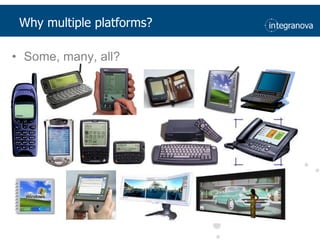
Why multiple platforms?Some, many, all?
[Pierce et al.,2004]Whichplatformsshouldbesupported?SomereasonsSales increaseCapabilitiesincrease
Whichplatformsshouldbesupported?Break-even point before 2014[MEE 2010]
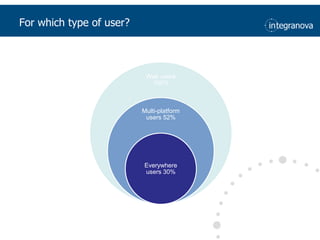
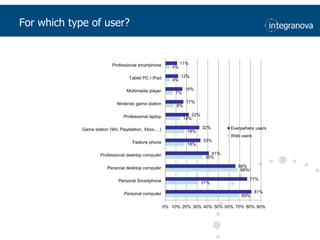
For which type of user?
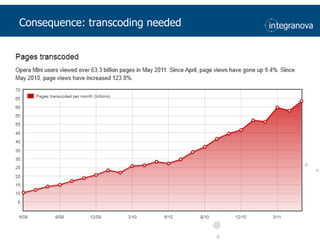
Consequence: transcodingneeded
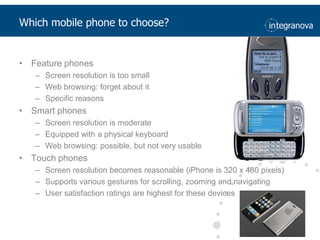
Which mobile phone to choose?Feature phonesScreen resolution is too smallWeb browsing: forget about itSpecific reasonsSmart phonesScreen resolution is moderateEquipped with a physical keyboardWeb browsing: possible, but not very usableTouch phonesScreen resolution becomes reasonable (iPhone is 320 x 480 pixels)Supports various gestures for scrolling, zooming and navigatingUser satisfaction ratings are highest for these devices
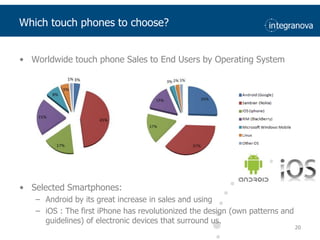
Worldwide touch phone Sales to End Users by Operating System 2009 year			              2010 yearSelected Smartphones: Android by its great increase in sales and usingiOS : The first iPhone has revolutionized the design (own patterns and guidelines) of electronic devices that surround us.20Whichtouch phones to choose?
First recommendationDevelop User Interface Patterns for both smart phones and touch phonesNo otherprioritydevicesUnlessyou have a good reason to support a specialdevice"Mobile sites beat full web sites", surprisingly (Nielsen Norman Group)Better phones perform better in terms of average success rates (task completion):Feature phones: 38%Smartphones: 55%Touch phones: 75%
First recommendationConsequence: dilemmabetweentwoapproachesSingle universaldevelopment: one for allMultiple optimiseddevelopment: one for each
First recommendationHow to revisit UI Patterns for IntegraNova MES?What information shouldbeincluded?Deducefrom the object modelWhat to gracefuldegrade?Deducefrom types of contents and tasksthatAre time-critical (e.g., deadline-based, emergency)Manipulate constantly-updating informationInvolvefrequently-used informationRequire privacyAre intrinsically based on communication with others (social networks, forums, twitter).Platform considerations (layout)Whatusability guidelines to consider?General purpose vs platformspecific
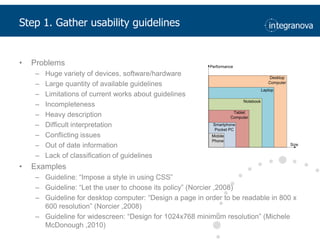
Step 1. Gatherusability guidelinesProblemsHuge variety of devices, software/hardwareLarge quantity of available guidelinesLimitations of current works about guidelinesIncompletenessHeavy descriptionDifficult interpretationConflicting issuesOut of date informationLack of classification of guidelinesExamplesGuideline: “Impose a style in using CSS”Guideline: “Let the user to choose its policy” (Norcier ,2008)Guideline for desktop computer: “Design a page in order to be readable in 800 x 600 resolution” (Norcier ,2008)Guideline for widescreen: “Design for 1024x768 minimum resolution” (Michele McDonough ,2010)
GoalProvide user interface designers and developers with support for designing multi-platform user interfacesSub-GoalsKnow the state of the art related to guidelines for multi-platform interfaces.Create the ergonomic guideDisseminate the ergonomic guide among research groups devoted to improve usability of software systems.Verify the usefulness of guidelines by an application25Step 1. Gatherusability guidelines
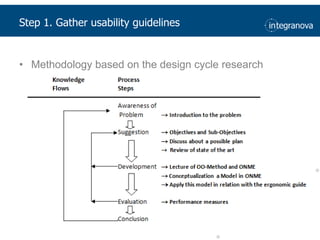
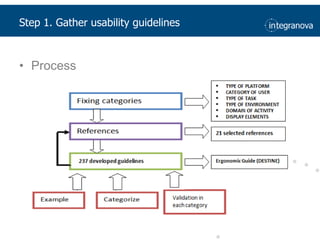
Step 1. Gatherusability guidelinesMethodology based on the design cycle research
Step 1. Gatherusability guidelinesProcess
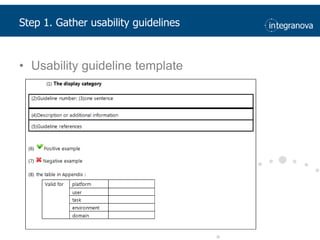
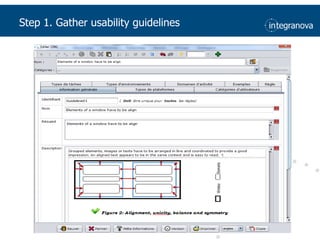
Step 1. Gatherusability guidelinesUsability guideline template
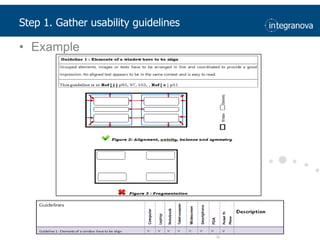
Step 1. Gatherusability guidelinesExample
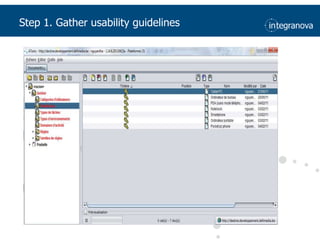
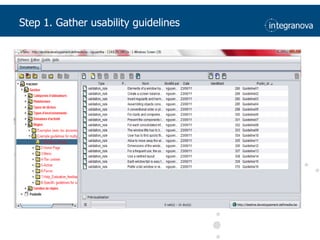
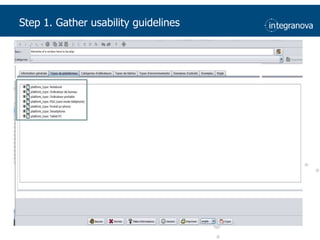
Step 1. Gatherusability guidelinesDESTINE : Design & Evaluation STudio for INtent-based Ergonomic web sitesCompatible XML language called GDLDescription of categories237 available ergonomic guidelines for multi-plaforms in the database.List, name, description, resume, illustration of each guidelineStructured and complete view on each guideline related to own categories
Step 1. Gatherusability guidelines
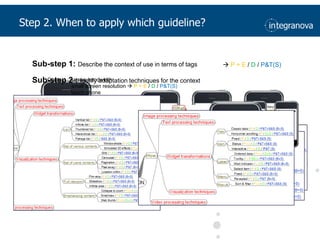
Sub-step 1: Describe the context of use in terms of tags P + E / D / P&T(S)Sub-step 2 : Idetify adaptation techniques for the contextContext : narrowbandwidthsmallscreenresolution P + E / D / P&T(S)touch phoneStep 2. When to applywhich guideline?
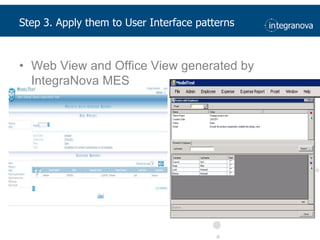
Step 3. Apply them to User Interface patternsWeb View and Office View generated by IntegraNova MES
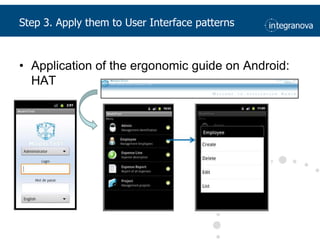
Step 3. Apply them to User Interface patternsApplication of the ergonomic guide on Android: HAT
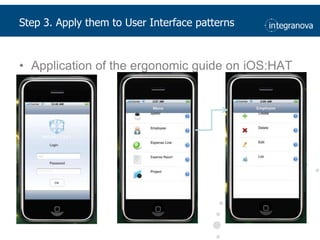
Step 3. Apply them to User Interface patternsApplication of the ergonomic guide on iOS:HAT
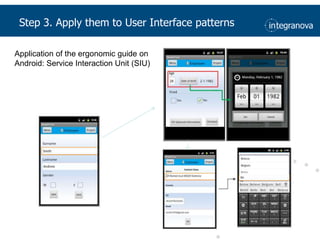
Step 3. Apply them to User Interface patternsApplication of the ergonomic guide on Android: Service Interaction Unit (SIU)
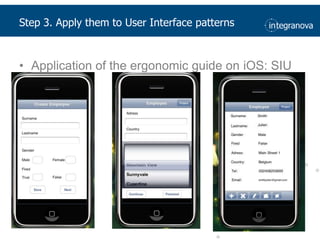
Step 3. Apply them to User Interface patternsApplication of the ergonomic guide on iOS: SIU40
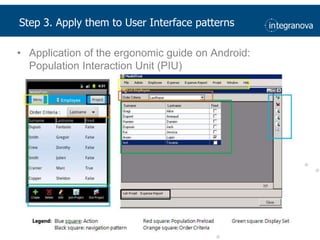
Step 3. Apply them to User Interface patternsApplication of the ergonomic guide on Android: Population Interaction Unit (PIU)
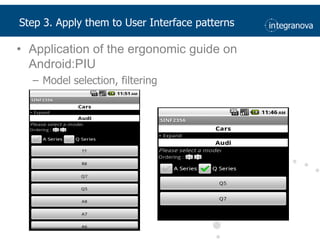
Step 3. Apply them to User Interface patternsApplication of the ergonomic guide on Android:PIUModel selection, filtering
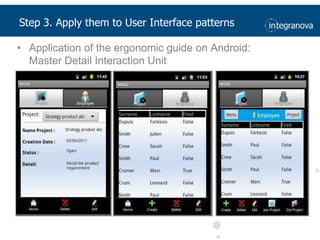
Application of the ergonomic guide on Android:Master Detail Interaction UnitStep 3. Apply them to User Interface patterns
Step 4. Which User Interface pattern is usable?For eachIntegraNova MES User Interface PatternTwoplatforms (iOS vs Android)Threealternate user interfaces based onUsability guidelinesAdaptation techniquesAsk end user which one do theyprefer44
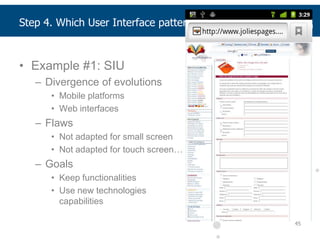
Example #1: SIUDivergence of evolutionsMobile platforms Web interfacesFlawsNot adapted for small screenNot adapted for touch screen…GoalsKeepfunctionalitiesUse new technologiescapabilities45Step 4. Which User Interface pattern is usable?
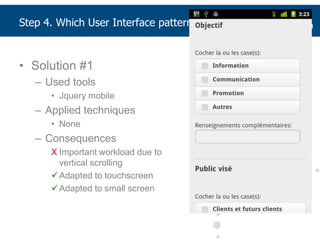
Solution #1Used toolsJquerymobileApplied techniquesNoneConsequencesImportant workload due tovertical scrolling
Adapted to touchscreen
Adapted to small screenStep 4. Which User Interface pattern is usable?
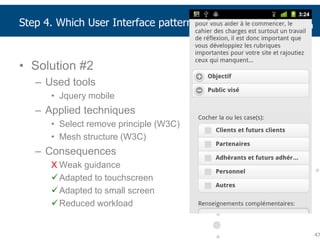
Solution #2Used toolsJquery mobileApplied techniquesSelect remove principle (W3C)Mesh structure (W3C)ConsequencesWeak guidance
Adapted to touchscreen
Adapted to small screen
Reduced workload47Step 4. Which User Interface pattern is usable?
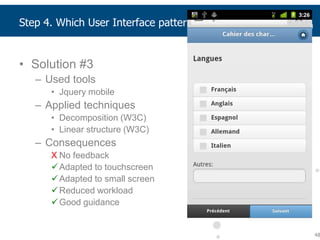
Solution #3Used toolsJquery mobileApplied techniquesDecomposition (W3C)Linear structure (W3C)ConsequencesNo feedback
Adapted to touchscreen
Adapted to small screen
Reduced workload
Good guidance48Step 4. Which User Interface pattern is usable?
Different versions exhibitdifferentbehaviorsWhich version is the mostpreferred by end users on the targetplatform and why?For thispurpose, weconducted an experimentIBM CSUQ questionnaire with 19 questionsEach question on a 5-point Likertscale4 resultingmetricsCorrelation: r=0.94 (!)49Step 4. Which User Interface pattern is usable?
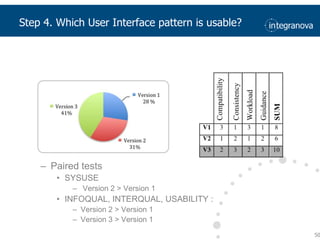
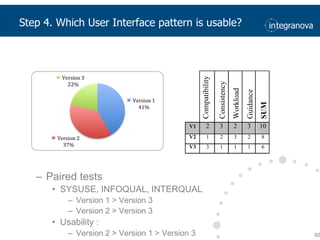
Paired testsSYSUSE Version 2 > Version 1INFOQUAL, INTERQUAL, USABILITY : Version 2 > Version 1Version 3 > Version 150Step 4. Which User Interface pattern is usable?
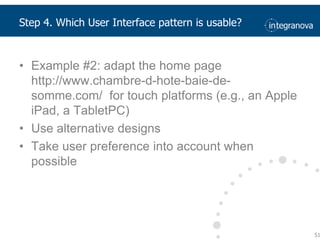
Example #2: adaptthe home page  http://www.chambre-d-hote-baie-de-somme.com/  for touchplatforms(e.g., an Apple iPad, a TabletPC)Use alternative designsTake user preferenceintoaccountwhen possible51Step 4. Which User Interface pattern is usable?
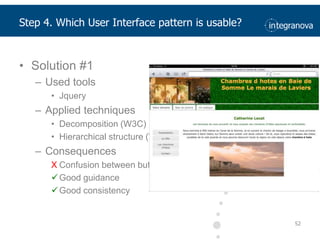
Step 4. Which User Interface pattern is usable?Solution #1Used toolsJqueryApplied techniquesDecomposition (W3C)Hierarchical structure (W3C)ConsequencesConfusion between buttons
Good guidance
Good consistency52
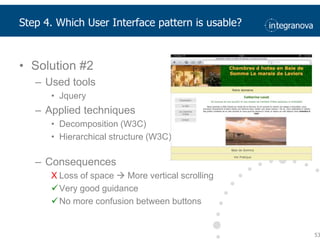
Solution #2Used toolsJqueryApplied techniquesDecomposition (W3C)Hierarchical structure (W3C)ConsequencesLoss of space  More vertical scrolling
Very good guidance
No more confusion between buttons53Step 4. Which User Interface pattern is usable?
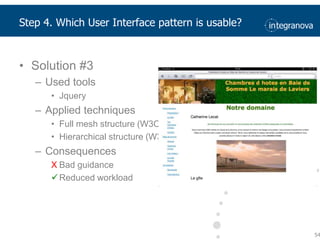
Solution #3Used toolsJqueryApplied techniquesFull mesh structure (W3C)Hierarchical structure (W3C)ConsequencesBad guidance
Reduced workload54Step 4. Which User Interface pattern is usable?
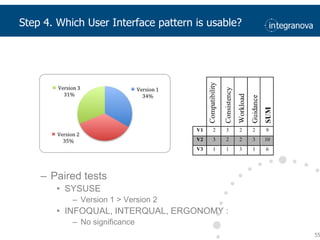
Paired testsSYSUSEVersion 1 > Version 2INFOQUAL, INTERQUAL, ERGONOMY : No significance55Step 4. Which User Interface pattern is usable?
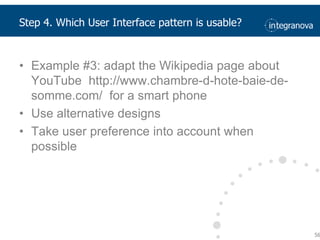
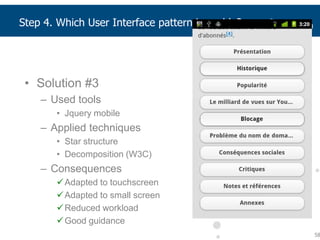
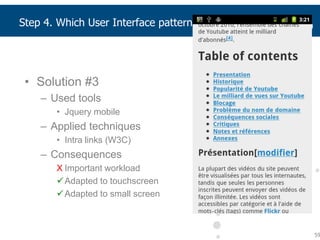
Example #3: adapt the Wikipedia page about YouTube  http://www.chambre-d-hote-baie-de-somme.com/  for a smartphoneUse alternative designsTake user preferenceintoaccountwhen possible56Step 4. Which User Interface pattern is usable?
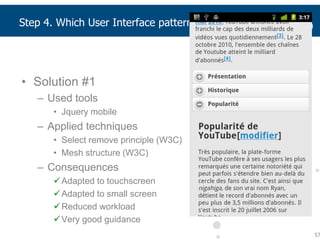
Solution #1Used toolsJquery mobileApplied techniquesSelect remove principle (W3C)Mesh structure (W3C)ConsequencesAdapted to touchscreen

When User Interface Patterns Become Mobile

  • 1.
    Jean Vanderdonckt,Thanh-Diane NguyenWhenUser Interface Patternsbecome Mobile –IntegraNova MES goesinto the wild
  • 2.
    AboutthepresentersProf. Jean VanderdoncktHeadof Louvain Interaction Lab (LiLab)Louvain School of ManagementUniversité catholique de LouvainLouvain-la-Neuve, Belgiumjean.vanderdonckt@uclouvain.bewww.lilab.eu, www.lilab.beThanh-Diane NguyenResearch and Teaching AssistantPhD studentthanh-diane.nguyen@uclouvain.beThese slides are freely available at: www.slideshare.net/jeanvdd/when-user-interface-patterns-become-mobile
  • 3.
    Whatis the situationso far?In interactive systemstoday, the predominant situation = 1 user carrying out 1 taskat a time with 1 device (platform) in 1 environmentUserTaskPlatformEnvironment
  • 4.
    Whatis the situationso far?Some variant situation = 1 user carrying out n tasksat a time with 1 device (platform) in 1 environment (multi-tasking)UserTasksPlatformEnvironment
  • 5.
    Whatis the situationso far?Consequent situation = 1 user carrying out n tasksatn timeswithm platforms in 1 environment (e.g., in office) (multi-platform)UserTasksPlatformsEnvironment
  • 6.
    Whatis the situationso far?Final situation = 1 user carrying out n tasksat n times with m platforms in p environments (e.g., in office, at home, in plane, on the road) (multi-environments) UserTasksPlatformsEnvironments
  • 7.
    Why multiple monitors?DevicesideMonitorsurface increases, whilepricedecreases[Harris,2002]
  • 8.
    Why multiple monitors?UsersideUsersprefer more display surfaceUser’sproductivityincreasesfrom 10% to 30% (althoughsomeusabilityproblems are raised) [Harris,2002]
  • 9.
    Why multiple monitors?UsersideUsersprefer more display surfaceUser’sproductivityincreasesfrom 10% to 30%Effects of Display Size on Task Times160140120100SmallAverage Task Time (Seconds)80Large6040200[Czerwinsky,2005]
  • 10.
    Why multiple monitors?UsersideUsersprefer more display surfaceUser’sproductivityincreasesfrom 10% to 30%The tasks were easy to perform543Average Rating (1=Disagree, 5=Agree)210SmallLarge[Czerwinsky,2005]Display Size
  • 11.
    Why multiple monitors?UsersideUsersprefer more display surfaceUser’sproductivityincreasesfrom 10% to 30%[Czerwinsky,2005]
  • 12.
    (Amount of interactivesystems)(Amount of end users)10 to 50 systemsfor 1 user10000500002 or 3 systemsfor 1 user1 system for 1 user100050001005001 system for 100 users1050[Weiser, 1998]197019801990200020102020[ForresterResearch, 2002]Why multiple platforms?
  • 13.
  • 14.
  • 15.
  • 16.
  • 17.
  • 18.
  • 19.
    Which mobile phoneto choose?Feature phonesScreen resolution is too smallWeb browsing: forget about itSpecific reasonsSmart phonesScreen resolution is moderateEquipped with a physical keyboardWeb browsing: possible, but not very usableTouch phonesScreen resolution becomes reasonable (iPhone is 320 x 480 pixels)Supports various gestures for scrolling, zooming and navigatingUser satisfaction ratings are highest for these devices
  • 20.
    Worldwide touch phoneSales to End Users by Operating System 2009 year 2010 yearSelected Smartphones: Android by its great increase in sales and usingiOS : The first iPhone has revolutionized the design (own patterns and guidelines) of electronic devices that surround us.20Whichtouch phones to choose?
  • 21.
    First recommendationDevelop UserInterface Patterns for both smart phones and touch phonesNo otherprioritydevicesUnlessyou have a good reason to support a specialdevice"Mobile sites beat full web sites", surprisingly (Nielsen Norman Group)Better phones perform better in terms of average success rates (task completion):Feature phones: 38%Smartphones: 55%Touch phones: 75%
  • 22.
    First recommendationConsequence: dilemmabetweentwoapproachesSingleuniversaldevelopment: one for allMultiple optimiseddevelopment: one for each
  • 23.
    First recommendationHow torevisit UI Patterns for IntegraNova MES?What information shouldbeincluded?Deducefrom the object modelWhat to gracefuldegrade?Deducefrom types of contents and tasksthatAre time-critical (e.g., deadline-based, emergency)Manipulate constantly-updating informationInvolvefrequently-used informationRequire privacyAre intrinsically based on communication with others (social networks, forums, twitter).Platform considerations (layout)Whatusability guidelines to consider?General purpose vs platformspecific
  • 24.
    Step 1. GatherusabilityguidelinesProblemsHuge variety of devices, software/hardwareLarge quantity of available guidelinesLimitations of current works about guidelinesIncompletenessHeavy descriptionDifficult interpretationConflicting issuesOut of date informationLack of classification of guidelinesExamplesGuideline: “Impose a style in using CSS”Guideline: “Let the user to choose its policy” (Norcier ,2008)Guideline for desktop computer: “Design a page in order to be readable in 800 x 600 resolution” (Norcier ,2008)Guideline for widescreen: “Design for 1024x768 minimum resolution” (Michele McDonough ,2010)
  • 25.
    GoalProvide user interfacedesigners and developers with support for designing multi-platform user interfacesSub-GoalsKnow the state of the art related to guidelines for multi-platform interfaces.Create the ergonomic guideDisseminate the ergonomic guide among research groups devoted to improve usability of software systems.Verify the usefulness of guidelines by an application25Step 1. Gatherusability guidelines
  • 26.
    Step 1. GatherusabilityguidelinesMethodology based on the design cycle research
  • 27.
    Step 1. GatherusabilityguidelinesProcess
  • 28.
    Step 1. GatherusabilityguidelinesUsability guideline template
  • 29.
    Step 1. GatherusabilityguidelinesExample
  • 30.
    Step 1. GatherusabilityguidelinesDESTINE : Design & Evaluation STudio for INtent-based Ergonomic web sitesCompatible XML language called GDLDescription of categories237 available ergonomic guidelines for multi-plaforms in the database.List, name, description, resume, illustration of each guidelineStructured and complete view on each guideline related to own categories
  • 31.
  • 32.
  • 33.
  • 34.
  • 35.
    Sub-step 1: Describethe context of use in terms of tags P + E / D / P&T(S)Sub-step 2 : Idetify adaptation techniques for the contextContext : narrowbandwidthsmallscreenresolution P + E / D / P&T(S)touch phoneStep 2. When to applywhich guideline?
  • 36.
    Step 3. Applythem to User Interface patternsWeb View and Office View generated by IntegraNova MES
  • 37.
    Step 3. Applythem to User Interface patternsApplication of the ergonomic guide on Android: HAT
  • 38.
    Step 3. Applythem to User Interface patternsApplication of the ergonomic guide on iOS:HAT
  • 39.
    Step 3. Applythem to User Interface patternsApplication of the ergonomic guide on Android: Service Interaction Unit (SIU)
  • 40.
    Step 3. Applythem to User Interface patternsApplication of the ergonomic guide on iOS: SIU40
  • 41.
    Step 3. Applythem to User Interface patternsApplication of the ergonomic guide on Android: Population Interaction Unit (PIU)
  • 42.
    Step 3. Applythem to User Interface patternsApplication of the ergonomic guide on Android:PIUModel selection, filtering
  • 43.
    Application of theergonomic guide on Android:Master Detail Interaction UnitStep 3. Apply them to User Interface patterns
  • 44.
    Step 4. WhichUser Interface pattern is usable?For eachIntegraNova MES User Interface PatternTwoplatforms (iOS vs Android)Threealternate user interfaces based onUsability guidelinesAdaptation techniquesAsk end user which one do theyprefer44
  • 45.
    Example #1: SIUDivergenceof evolutionsMobile platforms Web interfacesFlawsNot adapted for small screenNot adapted for touch screen…GoalsKeepfunctionalitiesUse new technologiescapabilities45Step 4. Which User Interface pattern is usable?
  • 46.
    Solution #1Used toolsJquerymobileAppliedtechniquesNoneConsequencesImportant workload due tovertical scrolling
  • 47.
  • 48.
    Adapted to smallscreenStep 4. Which User Interface pattern is usable?
  • 49.
    Solution #2Used toolsJquerymobileApplied techniquesSelect remove principle (W3C)Mesh structure (W3C)ConsequencesWeak guidance
  • 50.
  • 51.
  • 52.
    Reduced workload47Step 4.Which User Interface pattern is usable?
  • 53.
    Solution #3Used toolsJquerymobileApplied techniquesDecomposition (W3C)Linear structure (W3C)ConsequencesNo feedback
  • 54.
  • 55.
  • 56.
  • 57.
    Good guidance48Step 4.Which User Interface pattern is usable?
  • 58.
    Different versions exhibitdifferentbehaviorsWhichversion is the mostpreferred by end users on the targetplatform and why?For thispurpose, weconducted an experimentIBM CSUQ questionnaire with 19 questionsEach question on a 5-point Likertscale4 resultingmetricsCorrelation: r=0.94 (!)49Step 4. Which User Interface pattern is usable?
  • 59.
    Paired testsSYSUSE Version2 > Version 1INFOQUAL, INTERQUAL, USABILITY : Version 2 > Version 1Version 3 > Version 150Step 4. Which User Interface pattern is usable?
  • 60.
    Example #2: adaptthehome page http://www.chambre-d-hote-baie-de-somme.com/ for touchplatforms(e.g., an Apple iPad, a TabletPC)Use alternative designsTake user preferenceintoaccountwhen possible51Step 4. Which User Interface pattern is usable?
  • 61.
    Step 4. WhichUser Interface pattern is usable?Solution #1Used toolsJqueryApplied techniquesDecomposition (W3C)Hierarchical structure (W3C)ConsequencesConfusion between buttons
  • 62.
  • 63.
  • 64.
    Solution #2Used toolsJqueryAppliedtechniquesDecomposition (W3C)Hierarchical structure (W3C)ConsequencesLoss of space  More vertical scrolling
  • 65.
  • 66.
    No more confusionbetween buttons53Step 4. Which User Interface pattern is usable?
  • 67.
    Solution #3Used toolsJqueryAppliedtechniquesFull mesh structure (W3C)Hierarchical structure (W3C)ConsequencesBad guidance
  • 68.
    Reduced workload54Step 4.Which User Interface pattern is usable?
  • 69.
    Paired testsSYSUSEVersion 1> Version 2INFOQUAL, INTERQUAL, ERGONOMY : No significance55Step 4. Which User Interface pattern is usable?
  • 70.
    Example #3: adaptthe Wikipedia page about YouTube http://www.chambre-d-hote-baie-de-somme.com/ for a smartphoneUse alternative designsTake user preferenceintoaccountwhen possible56Step 4. Which User Interface pattern is usable?
  • 71.
    Solution #1Used toolsJquerymobileApplied techniquesSelect remove principle (W3C)Mesh structure (W3C)ConsequencesAdapted to touchscreen