UsyBus: A Communication Framework
among Reusable Agents integrating
Eye-Tracking in Interactive Applications
Francis JAMBON
Univ. Grenoble Alpes, LIG, France
Jean VANDERDONCKT
Univ. catholique de Louvain, LouRIM, Belgium
& Univ. Grenoble Alpes, LIG, France (Jan-Jun 2016)
Motivations
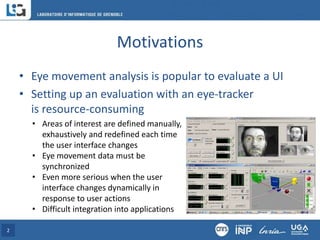
• Eye movement analysis is popular to evaluate a UI
• Setting up an evaluation with an eye-tracker
is resource-consuming
2
• Areas of interest are defined manually,
exhaustively and redefined each time
the user interface changes
• Eye movement data must be
synchronized
• Even more serious when the user
interface changes dynamically in
response to user actions
• Difficult integration into applications
Introductory Example
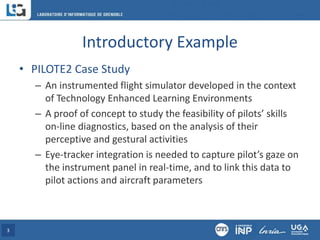
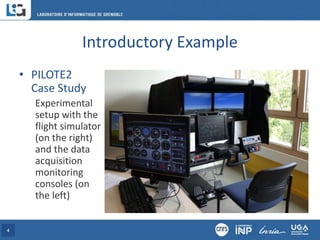
• PILOTE2 Case Study
– An instrumented flight simulator developed in the context
of Technology Enhanced Learning Environments
– A proof of concept to study the feasibility of pilots’ skills
on-line diagnostics, based on the analysis of their
perceptive and gestural activities
– Eye-tracker integration is needed to capture pilot’s gaze on
the instrument panel in real-time, and to link this data to
pilot actions and aircraft parameters
3
Introductory Example
• PILOTE2
Case Study
Experimental
setup with the
flight simulator
(on the right)
and the data
acquisition
monitoring
consoles (on
the left)
4
Introductory Example
• PILOTE2 video…
5
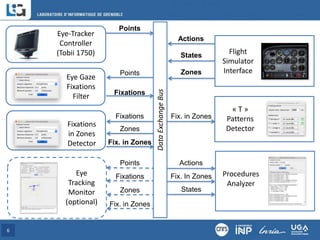
6
Data
Exchange
Bus
Fix. in Zones
Fixations
Points
Eye Gaze
Fixations
Filter
Fixations
Zones
Fixations
in Zones
Detector
Actions
States
Flight
Simulator
Interface
Zones
Fix. In Zones Procedures
Analyzer
Actions
States
Eye-Tracker
Controller
(Tobii 1750)
Points
« T »
Patterns
Detector
Fix. in Zones
Points
Zones
Fixations
Eye
Tracking
Monitor
(optional) Fix. in Zones
Use Case: Simple Interactive Application
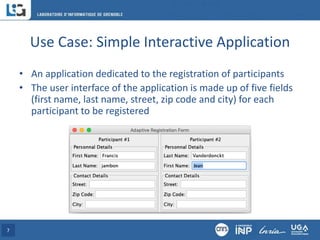
• An application dedicated to the registration of participants
• The user interface of the application is made up of five fields
(first name, last name, street, zip code and city) for each
participant to be registered
7
Use Case: Simple Interactive Application
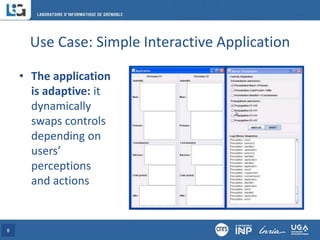
• The application
is adaptive: it
dynamically
swaps controls
depending on
users’
perceptions
and actions
8
Use Case: Simple Interactive Application
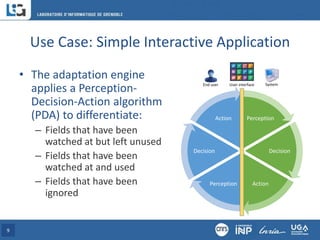
• The adaptation engine
applies a Perception-
Decision-Action algorithm
(PDA) to differentiate:
– Fields that have been
watched at but left unused
– Fields that have been
watched at and used
– Fields that have been
ignored
9
Perception
Decision
Action
Perception
Decision
Action
End user System
User interface
Use Case: Simple Interactive Application
• At run-time, the adaptation engine suggests to the
application a new user interface layout, minimizing
the time required to complete the actual user
interaction path
• This application is intended to test the acceptability
of the dynamic adaptation feature to end-users
10
Use Case: Simple Interactive Application
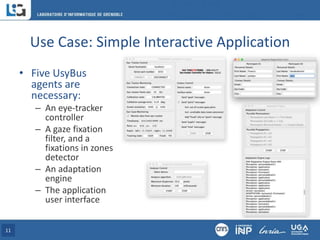
• Five UsyBus
agents are
necessary:
– An eye-tracker
controller
– A gaze fixation
filter, and a
fixations in zones
detector
– An adaptation
engine
– The application
user interface
11
Use Case: Simple Interactive Application
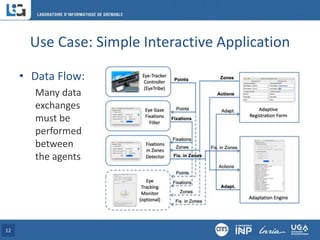
• Data Flow:
Many data
exchanges
must be
performed
between
the agents
12
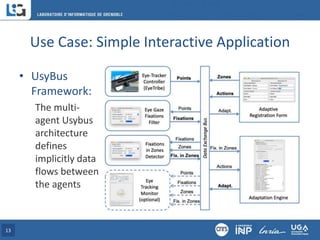
Use Case: Simple Interactive Application
• UsyBus
Framework:
The multi-
agent Usybus
architecture
defines
implicitly data
flows between
the agents
13
Usybus Multi-Agent Framework
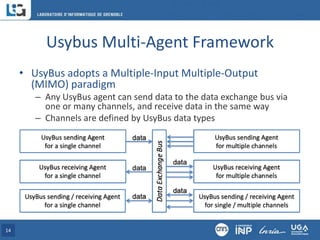
• UsyBus adopts a Multiple-Input Multiple-Output
(MIMO) paradigm
– Any UsyBus agent can send data to the data exchange bus via
one or many channels, and receive data in the same way
– Channels are defined by UsyBus data types
14
Usybus Multi-Agent Framework
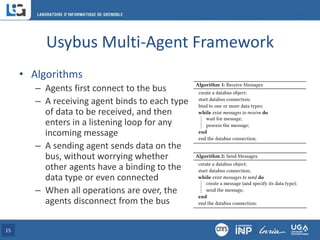
• Algorithms
– Agents first connect to the bus
– A receiving agent binds to each type
of data to be received, and then
enters in a listening loop for any
incoming message
– A sending agent sends data on the
bus, without worrying whether
other agents have a binding to the
data type or even connected
– When all operations are over, the
agents disconnect from the bus
15
Usybus Multi-Agent Framework
• The UsyBus datagram format define the syntax of
messages that are exchanged between UsyBus agents
• The datagram is structured into two parts:
– the header that contains metadata, such as the version of the
bus, the type of data and the origin of the data
– the payload that contains the data to be processed by the
receiving agent(s).
• The POSIX regular expression used to recognize a
syntactically valid UsyBus datagram is:
UB2;type=[^;]+;from=[^;]+(;[^;]+=[^;]+)+
16
Usybus Multi-Agent Framework
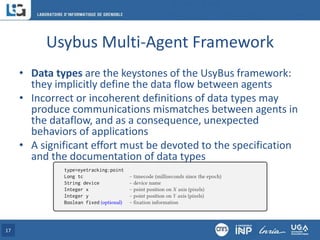
• Data types are the keystones of the UsyBus framework:
they implicitly define the data flow between agents
• Incorrect or incoherent definitions of data types may
produce communications mismatches between agents in
the dataflow, and as a consequence, unexpected
behaviors of applications
• A significant effort must be devoted to the specification
and the documentation of data types
17
Usybus Multi-Agent Framework
• Currently, UsyBus agents use the open-source Ivy
software library as messaging library
• Ivy is “a simple protocol and a set of open-source (LGPL)
libraries and programs that allows applications to
broadcast information through text messages, with a
subscription mechanism based on regular expressions”
• The implementation of UsyBus uses the binding
mechanism of Ivy, limiting it to the header part of
messages defining their type
• Any UsyBus agent could be implemented directly with
the Ivy library while respecting the UsyBus framework
18
Reusable agents (examples)
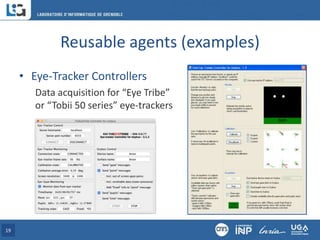
• Eye-Tracker Controllers
Data acquisition for “Eye Tribe”
or “Tobii 50 series” eye-trackers
19
Reusable agents (examples)
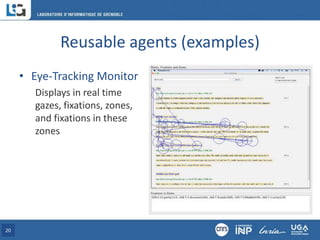
• Eye-Tracking Monitor
Displays in real time
gazes, fixations, zones,
and fixations in these
zones
20
Reusable agents (examples)
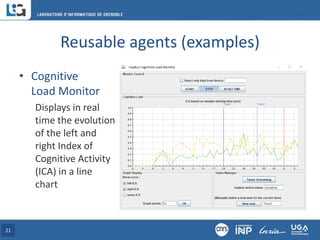
• Cognitive
Load Monitor
Displays in real
time the evolution
of the left and
right Index of
Cognitive Activity
(ICA) in a line
chart
21
Conclusion
• UsyBus framework
– A multi-agent architecture implicitly and dynamically
organized by types of data that agents send or receive
– A simplified agent definition based primarily on an easy-to-
implement “UsyBus datagram”
– Addresses three important ISO 25010 software quality
properties: compatibility, maintainability and portability
– Supports eye-tracking studies in a wide variety of contexts
of use (e.g. user interface evaluation, gaze interaction, …)
– Provides a portfolio of reusable agents (e.g. gaze capture,
fixation filtering, …)
22
Perspectives
• Implementation of controller agents for new eye-
trackers, especially for mobile eye-trackers (e.g. glasses)
• Solving time synchronization issues that remain when
different real-time clocks are used for gaze and zone (for
instance with an implementation of the NTP protocol)
• Implementation of Usybus on ZeroMQ (alternative to Ivy)
• Diffusion of the UsyBus framework and reusable agents:
https://usybus.imag.fr (the link is also in the article)
23
Acknowledgments
• Funding orgaznizations
– Wallonie Bruxelles International (WBI)
Grant No. 267168 (2016)
– EU Pathfinder “Symbiotik” project
– Agence Nationale de la Recherche (ANR)
TELEOS project (ANR-06-BLAN-0243)
– Laboratoire d’Informatique de Grenoble (LIG)
PILOTE2 and GELATI “Emergence” projects
24

UsyBus: A Communication Framework among Reusable Agents integrating Eye-Tracking in Interactive Applications

  • 1.
    UsyBus: A CommunicationFramework among Reusable Agents integrating Eye-Tracking in Interactive Applications Francis JAMBON Univ. Grenoble Alpes, LIG, France Jean VANDERDONCKT Univ. catholique de Louvain, LouRIM, Belgium & Univ. Grenoble Alpes, LIG, France (Jan-Jun 2016)
  • 2.
    Motivations • Eye movementanalysis is popular to evaluate a UI • Setting up an evaluation with an eye-tracker is resource-consuming 2 • Areas of interest are defined manually, exhaustively and redefined each time the user interface changes • Eye movement data must be synchronized • Even more serious when the user interface changes dynamically in response to user actions • Difficult integration into applications
  • 3.
    Introductory Example • PILOTE2Case Study – An instrumented flight simulator developed in the context of Technology Enhanced Learning Environments – A proof of concept to study the feasibility of pilots’ skills on-line diagnostics, based on the analysis of their perceptive and gestural activities – Eye-tracker integration is needed to capture pilot’s gaze on the instrument panel in real-time, and to link this data to pilot actions and aircraft parameters 3
  • 4.
    Introductory Example • PILOTE2 CaseStudy Experimental setup with the flight simulator (on the right) and the data acquisition monitoring consoles (on the left) 4
  • 5.
  • 6.
    6 Data Exchange Bus Fix. in Zones Fixations Points EyeGaze Fixations Filter Fixations Zones Fixations in Zones Detector Actions States Flight Simulator Interface Zones Fix. In Zones Procedures Analyzer Actions States Eye-Tracker Controller (Tobii 1750) Points « T » Patterns Detector Fix. in Zones Points Zones Fixations Eye Tracking Monitor (optional) Fix. in Zones
  • 7.
    Use Case: SimpleInteractive Application • An application dedicated to the registration of participants • The user interface of the application is made up of five fields (first name, last name, street, zip code and city) for each participant to be registered 7
  • 8.
    Use Case: SimpleInteractive Application • The application is adaptive: it dynamically swaps controls depending on users’ perceptions and actions 8
  • 9.
    Use Case: SimpleInteractive Application • The adaptation engine applies a Perception- Decision-Action algorithm (PDA) to differentiate: – Fields that have been watched at but left unused – Fields that have been watched at and used – Fields that have been ignored 9 Perception Decision Action Perception Decision Action End user System User interface
  • 10.
    Use Case: SimpleInteractive Application • At run-time, the adaptation engine suggests to the application a new user interface layout, minimizing the time required to complete the actual user interaction path • This application is intended to test the acceptability of the dynamic adaptation feature to end-users 10
  • 11.
    Use Case: SimpleInteractive Application • Five UsyBus agents are necessary: – An eye-tracker controller – A gaze fixation filter, and a fixations in zones detector – An adaptation engine – The application user interface 11
  • 12.
    Use Case: SimpleInteractive Application • Data Flow: Many data exchanges must be performed between the agents 12
  • 13.
    Use Case: SimpleInteractive Application • UsyBus Framework: The multi- agent Usybus architecture defines implicitly data flows between the agents 13
  • 14.
    Usybus Multi-Agent Framework •UsyBus adopts a Multiple-Input Multiple-Output (MIMO) paradigm – Any UsyBus agent can send data to the data exchange bus via one or many channels, and receive data in the same way – Channels are defined by UsyBus data types 14
  • 15.
    Usybus Multi-Agent Framework •Algorithms – Agents first connect to the bus – A receiving agent binds to each type of data to be received, and then enters in a listening loop for any incoming message – A sending agent sends data on the bus, without worrying whether other agents have a binding to the data type or even connected – When all operations are over, the agents disconnect from the bus 15
  • 16.
    Usybus Multi-Agent Framework •The UsyBus datagram format define the syntax of messages that are exchanged between UsyBus agents • The datagram is structured into two parts: – the header that contains metadata, such as the version of the bus, the type of data and the origin of the data – the payload that contains the data to be processed by the receiving agent(s). • The POSIX regular expression used to recognize a syntactically valid UsyBus datagram is: UB2;type=[^;]+;from=[^;]+(;[^;]+=[^;]+)+ 16
  • 17.
    Usybus Multi-Agent Framework •Data types are the keystones of the UsyBus framework: they implicitly define the data flow between agents • Incorrect or incoherent definitions of data types may produce communications mismatches between agents in the dataflow, and as a consequence, unexpected behaviors of applications • A significant effort must be devoted to the specification and the documentation of data types 17
  • 18.
    Usybus Multi-Agent Framework •Currently, UsyBus agents use the open-source Ivy software library as messaging library • Ivy is “a simple protocol and a set of open-source (LGPL) libraries and programs that allows applications to broadcast information through text messages, with a subscription mechanism based on regular expressions” • The implementation of UsyBus uses the binding mechanism of Ivy, limiting it to the header part of messages defining their type • Any UsyBus agent could be implemented directly with the Ivy library while respecting the UsyBus framework 18
  • 19.
    Reusable agents (examples) •Eye-Tracker Controllers Data acquisition for “Eye Tribe” or “Tobii 50 series” eye-trackers 19
  • 20.
    Reusable agents (examples) •Eye-Tracking Monitor Displays in real time gazes, fixations, zones, and fixations in these zones 20
  • 21.
    Reusable agents (examples) •Cognitive Load Monitor Displays in real time the evolution of the left and right Index of Cognitive Activity (ICA) in a line chart 21
  • 22.
    Conclusion • UsyBus framework –A multi-agent architecture implicitly and dynamically organized by types of data that agents send or receive – A simplified agent definition based primarily on an easy-to- implement “UsyBus datagram” – Addresses three important ISO 25010 software quality properties: compatibility, maintainability and portability – Supports eye-tracking studies in a wide variety of contexts of use (e.g. user interface evaluation, gaze interaction, …) – Provides a portfolio of reusable agents (e.g. gaze capture, fixation filtering, …) 22
  • 23.
    Perspectives • Implementation ofcontroller agents for new eye- trackers, especially for mobile eye-trackers (e.g. glasses) • Solving time synchronization issues that remain when different real-time clocks are used for gaze and zone (for instance with an implementation of the NTP protocol) • Implementation of Usybus on ZeroMQ (alternative to Ivy) • Diffusion of the UsyBus framework and reusable agents: https://usybus.imag.fr (the link is also in the article) 23
  • 24.
    Acknowledgments • Funding orgaznizations –Wallonie Bruxelles International (WBI) Grant No. 267168 (2016) – EU Pathfinder “Symbiotik” project – Agence Nationale de la Recherche (ANR) TELEOS project (ANR-06-BLAN-0243) – Laboratoire d’Informatique de Grenoble (LIG) PILOTE2 and GELATI “Emergence” projects 24