User Interface Design for the Web Lawrence Najjar [email_address]
Outline Why usability is important Challenges for designing Web-based user interfaces Web user interface design process
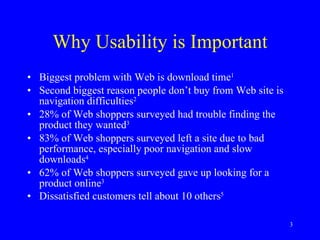
Why Usability is Important Biggest problem with Web is download time 1   Second biggest reason people don’t buy from Web site is navigation difficulties 2   28% of Web shoppers surveyed had trouble finding the product they wanted 3   83% of Web shoppers surveyed left a site due to bad performance, especially poor navigation and slow downloads 4   62% of Web shoppers surveyed gave up looking for a product online 3   Dissatisfied customers tell about 10 others 5
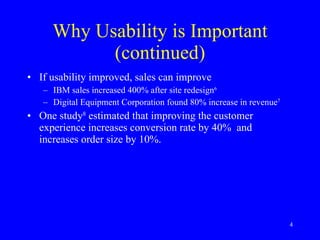
Why Usability is Important (continued) If usability improved, sales can improve  IBM sales increased 400% after site redesign 6 Digital Equipment Corporation found 80% increase in revenue 7 One study 8  estimated that improving the customer experience increases conversion rate by 40%  and increases order size by 10%.
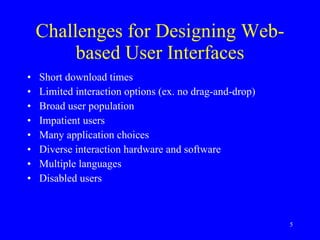
Challenges for Designing Web-based User Interfaces Short download times Limited interaction options (ex. no drag-and-drop) Broad user population Impatient users Many application choices Diverse interaction hardware and software Multiple languages Disabled users
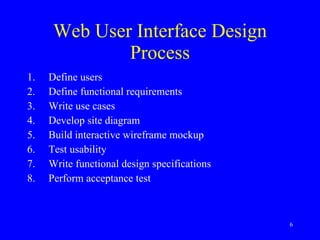
Web User Interface Design Process Define users Define functional requirements Write use cases Develop site diagram Build interactive wireframe mockup Test usability Write functional design specifications Perform acceptance test
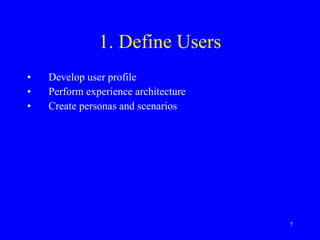
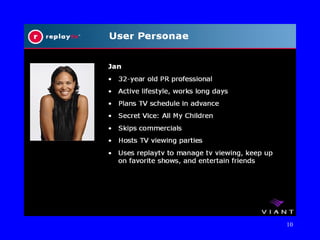
1. Define Users Develop user profile Perform experience architecture Create personas and scenarios
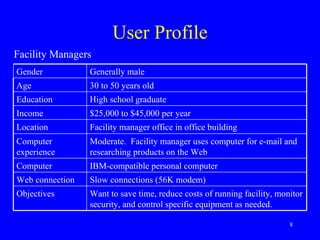
User Profile Facility Managers Gender Generally male Age 30 to 50 years old Education High school graduate Income $25,000 to $45,000 per year Location Facility manager office in office building Computer experience Moderate.  Facility manager uses computer for e-mail and researching products on the Web Computer IBM-compatible personal computer Web connection Slow connections (56K modem)   Objectives Want to save time, reduce costs of running facility, monitor security, and control specific equipment as needed.
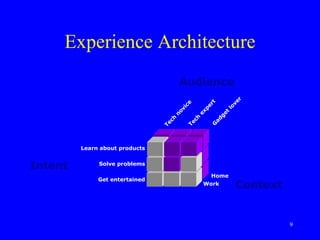
Experience Architecture Intent Audience Context Learn about products Solve problems Get entertained Home Work Tech expert Tech novice Gadget lover
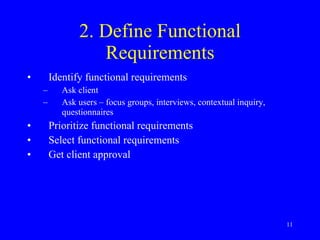
2. Define Functional Requirements Identify functional requirements Ask client Ask users – focus groups, interviews, contextual inquiry, questionnaires Prioritize functional requirements Select functional requirements Get client approval
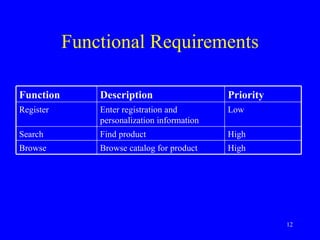
Functional Requirements Function Description Priority Register Enter registration and personalization information Low Search Find product High Browse Browse catalog for product High
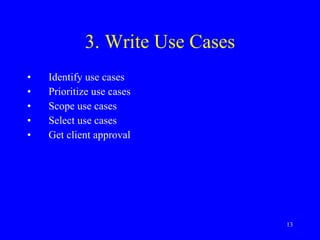
3. Write Use Cases Identify use cases Prioritize use cases Scope use cases Select use cases Get client approval
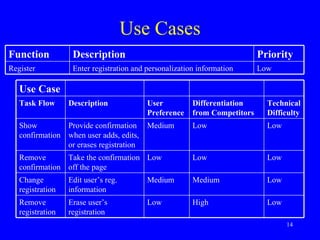
Use Cases Use Case Task Flow Description User Preference Differentiation from Competitors Technical Difficulty Show confirmation Provide confirmation when user adds, edits, or erases registration Medium Low Low Remove confirmation Take the confirmation off the page Low Low Low Change registration Edit user’s reg. information Medium Medium Low Remove registration Erase user’s registration Low High Low Function Description Priority Register Enter registration and personalization information Low
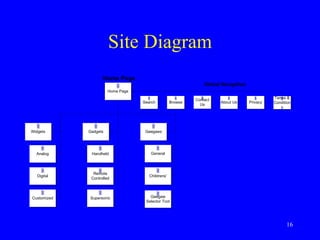
4. Develop Site Diagram Identify sections and subsections Name sections Iterate with client
Site Diagram
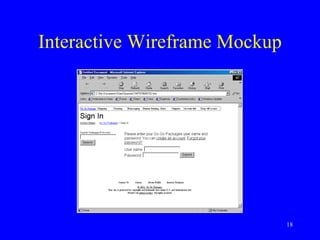
5. Build Interactive Wireframe Mockup Show how functions may work 9   Don’t show graphics Don’t use raw HTML Don’t connect to databases or other tools Iterate with client Make changes quickly and cheaply
Interactive Wireframe Mockup
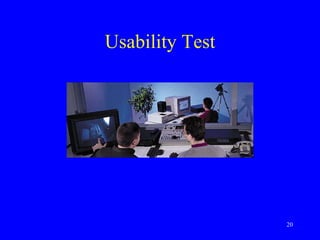
6. Test Usability Add graphics to several typical task pathways Recruit five representative users Ask users to try to perform typical tasks Record problems Ask participants to complete questionnaires Fix interactive wireframe mockup Repeat
Usability Test
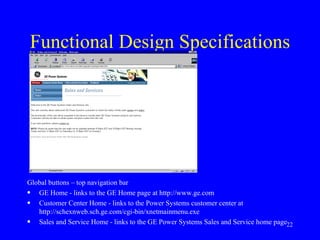
7. Write Functional Design Specifications Capture image of functional design of each page List each control Describe how each control works
Functional Design Specifications Global buttons – top navigation bar GE Home - links to the GE Home page at http://www.ge.com Customer Center Home - links to the Power Systems customer center at http://schexnweb.sch.ge.com/cgi-bin/xnetmainmenu.exe Sales and Service Home - links to the GE Power Systems Sales and Service home page
8. Perform User Acceptance Test Use actual pre-launch site Ask representative users to perform typical tasks
Conclusion Web usability is important A user interface design methodology can help improve usability The real world is different from the academic world
References 1  Graphics, Visualization, and Usability Center (1998).  GVU’s 9th WWW User Survey.  Atlanta: Georgia Institute of Technology, College of Computing, Graphics, Visualization, and Usability Center. Available:  http://www.gvu.gatech.edu/user_surveys/survey-1998-04 2  Kadison, M. L., Weisman, D. E., Modahl, M., Lieu, K. C., and Levin, K. (1998, April).  On-line Research Strategies: The Look to Buy Imperative.  Forrester Report,  1 (1). Available:  http://www. forrester.com 3  Seminerio, M. (1998, September 10). Study: One In Three Experienced Surfers Find Online Shopping Difficult.  Inter@ctive Week.  Available:  http://www.zdnet.com/intweek/quickpoll/981007/ 981007b.html 4   Thompson, M. J. (1999, August 9). How to frustrate Web surfers.  Industry Standard  [On-line]. Available:  http://www.thestandard.com/metrics/display/0,1283,956,00.html 5  Albrecht, K. & Zembre, R. E. (1985).  Service America.  New York: Warner. 6  Tedeschi, B. (1999, August 30). Good Web site design can lead to healthy sales.  New York Times e-commerce report  [On-line]. Available:  http://www.nytimes.com/library/tech/99/08/cyber/commerce/30commerce.html  7   Wixon, D., & Jones, S. (1992).  Usability for fun and profit: A case study of the design of DEC RALLY version 2.  Internal report, Digital Equipment Corporation. Cited in Karat, C., A business case approach to usability cost justification. In Bias, R. G., & Mayhew, D. J. (1994).  Cost-justifying usability.  San Diego: Academic Press.   8   Creative Good (2000, June 12).  The dotcom survival guide.  Creative Good [On-line]. Available:  http://www.creativegood.com/survival/
References (continued) 9  Najjar, L. J. (2000).  Conceptual User Interface: A new tool for designing e-commerce user interfaces . Internetworking, 3.3 [On-line]. Available:  http://www.internettg.org/newsletter/dec00/article_cui.html
Additional Readings Najjar, L. J. (1990). Using color effectively (TR 52.0018). Atlanta, GA: IBM Corporation. Available:  http://mime1.gtri.gatech.edu/mime/papers/colorTR.html Najjar, L. J. (1999, June).  Beyond Web usability . Internetworking, 2.2 [On-line]. Available:  http://www.InternetTG.org/newsletter/jun99/beyond_web_usability.html   Najjar, L. J. (in press). E-commerce user interface design for the Web. In Proceedings of 9 th  International Conference on Human-Computer Interaction. Mahwah, NJ: Lawrence Erlbaum. Available:  http://mime1.gtri.gatech.edu/mime/papers/e-commerce%20user%20interface%20design%20for%20the%20Web.html Nielsen, J. Useit.com  http://www.useit.com Nielsen, J. (2000). Designing Web usability. Indianapolis: New Riders.

User interface design for the Web Engineering Psychology

  • 1.
    User Interface Designfor the Web Lawrence Najjar [email_address]
  • 2.
    Outline Why usabilityis important Challenges for designing Web-based user interfaces Web user interface design process
  • 3.
    Why Usability isImportant Biggest problem with Web is download time 1 Second biggest reason people don’t buy from Web site is navigation difficulties 2 28% of Web shoppers surveyed had trouble finding the product they wanted 3 83% of Web shoppers surveyed left a site due to bad performance, especially poor navigation and slow downloads 4 62% of Web shoppers surveyed gave up looking for a product online 3 Dissatisfied customers tell about 10 others 5
  • 4.
    Why Usability isImportant (continued) If usability improved, sales can improve IBM sales increased 400% after site redesign 6 Digital Equipment Corporation found 80% increase in revenue 7 One study 8 estimated that improving the customer experience increases conversion rate by 40% and increases order size by 10%.
  • 5.
    Challenges for DesigningWeb-based User Interfaces Short download times Limited interaction options (ex. no drag-and-drop) Broad user population Impatient users Many application choices Diverse interaction hardware and software Multiple languages Disabled users
  • 6.
    Web User InterfaceDesign Process Define users Define functional requirements Write use cases Develop site diagram Build interactive wireframe mockup Test usability Write functional design specifications Perform acceptance test
  • 7.
    1. Define UsersDevelop user profile Perform experience architecture Create personas and scenarios
  • 8.
    User Profile FacilityManagers Gender Generally male Age 30 to 50 years old Education High school graduate Income $25,000 to $45,000 per year Location Facility manager office in office building Computer experience Moderate. Facility manager uses computer for e-mail and researching products on the Web Computer IBM-compatible personal computer Web connection Slow connections (56K modem) Objectives Want to save time, reduce costs of running facility, monitor security, and control specific equipment as needed.
  • 9.
    Experience Architecture IntentAudience Context Learn about products Solve problems Get entertained Home Work Tech expert Tech novice Gadget lover
  • 11.
    2. Define FunctionalRequirements Identify functional requirements Ask client Ask users – focus groups, interviews, contextual inquiry, questionnaires Prioritize functional requirements Select functional requirements Get client approval
  • 12.
    Functional Requirements FunctionDescription Priority Register Enter registration and personalization information Low Search Find product High Browse Browse catalog for product High
  • 13.
    3. Write UseCases Identify use cases Prioritize use cases Scope use cases Select use cases Get client approval
  • 14.
    Use Cases UseCase Task Flow Description User Preference Differentiation from Competitors Technical Difficulty Show confirmation Provide confirmation when user adds, edits, or erases registration Medium Low Low Remove confirmation Take the confirmation off the page Low Low Low Change registration Edit user’s reg. information Medium Medium Low Remove registration Erase user’s registration Low High Low Function Description Priority Register Enter registration and personalization information Low
  • 15.
    4. Develop SiteDiagram Identify sections and subsections Name sections Iterate with client
  • 16.
  • 17.
    5. Build InteractiveWireframe Mockup Show how functions may work 9 Don’t show graphics Don’t use raw HTML Don’t connect to databases or other tools Iterate with client Make changes quickly and cheaply
  • 18.
  • 19.
    6. Test UsabilityAdd graphics to several typical task pathways Recruit five representative users Ask users to try to perform typical tasks Record problems Ask participants to complete questionnaires Fix interactive wireframe mockup Repeat
  • 20.
  • 21.
    7. Write FunctionalDesign Specifications Capture image of functional design of each page List each control Describe how each control works
  • 22.
    Functional Design SpecificationsGlobal buttons – top navigation bar GE Home - links to the GE Home page at http://www.ge.com Customer Center Home - links to the Power Systems customer center at http://schexnweb.sch.ge.com/cgi-bin/xnetmainmenu.exe Sales and Service Home - links to the GE Power Systems Sales and Service home page
  • 23.
    8. Perform UserAcceptance Test Use actual pre-launch site Ask representative users to perform typical tasks
  • 24.
    Conclusion Web usabilityis important A user interface design methodology can help improve usability The real world is different from the academic world
  • 25.
    References 1 Graphics, Visualization, and Usability Center (1998). GVU’s 9th WWW User Survey. Atlanta: Georgia Institute of Technology, College of Computing, Graphics, Visualization, and Usability Center. Available: http://www.gvu.gatech.edu/user_surveys/survey-1998-04 2 Kadison, M. L., Weisman, D. E., Modahl, M., Lieu, K. C., and Levin, K. (1998, April). On-line Research Strategies: The Look to Buy Imperative. Forrester Report, 1 (1). Available: http://www. forrester.com 3 Seminerio, M. (1998, September 10). Study: One In Three Experienced Surfers Find Online Shopping Difficult. Inter@ctive Week. Available: http://www.zdnet.com/intweek/quickpoll/981007/ 981007b.html 4 Thompson, M. J. (1999, August 9). How to frustrate Web surfers. Industry Standard [On-line]. Available: http://www.thestandard.com/metrics/display/0,1283,956,00.html 5 Albrecht, K. & Zembre, R. E. (1985). Service America. New York: Warner. 6 Tedeschi, B. (1999, August 30). Good Web site design can lead to healthy sales. New York Times e-commerce report [On-line]. Available: http://www.nytimes.com/library/tech/99/08/cyber/commerce/30commerce.html 7 Wixon, D., & Jones, S. (1992). Usability for fun and profit: A case study of the design of DEC RALLY version 2. Internal report, Digital Equipment Corporation. Cited in Karat, C., A business case approach to usability cost justification. In Bias, R. G., & Mayhew, D. J. (1994). Cost-justifying usability. San Diego: Academic Press. 8 Creative Good (2000, June 12). The dotcom survival guide. Creative Good [On-line]. Available: http://www.creativegood.com/survival/
  • 26.
    References (continued) 9 Najjar, L. J. (2000). Conceptual User Interface: A new tool for designing e-commerce user interfaces . Internetworking, 3.3 [On-line]. Available: http://www.internettg.org/newsletter/dec00/article_cui.html
  • 27.
    Additional Readings Najjar,L. J. (1990). Using color effectively (TR 52.0018). Atlanta, GA: IBM Corporation. Available: http://mime1.gtri.gatech.edu/mime/papers/colorTR.html Najjar, L. J. (1999, June). Beyond Web usability . Internetworking, 2.2 [On-line]. Available: http://www.InternetTG.org/newsletter/jun99/beyond_web_usability.html Najjar, L. J. (in press). E-commerce user interface design for the Web. In Proceedings of 9 th International Conference on Human-Computer Interaction. Mahwah, NJ: Lawrence Erlbaum. Available: http://mime1.gtri.gatech.edu/mime/papers/e-commerce%20user%20interface%20design%20for%20the%20Web.html Nielsen, J. Useit.com http://www.useit.com Nielsen, J. (2000). Designing Web usability. Indianapolis: New Riders.