HUMAN COMPUTER INTERACTION
NAME: SAYAN GHOSH
ROLL: 14400120032
SEMESTER: 6
YEAR: 2020 – 2024
COLLEGE: NEOTIA INSTITUTE OF
TECHNOLOGY MANAGEMENT AND SCIENCE
30-07-2023
1
INTRODUCTION
 Human-computer interaction (HCI) is a multidisciplinary field of study
focusing on the design of computer technology and, in particular, the
interaction between humans (the users) and computers.
2
30-07-2023
INTERACTIVE DESIGN BASICS
 Design: what it is, interventions, goals, constraints
 Process: what happens when
 Scenarios: rich stories of design
 Navigation: finding your way around a system
 Iteration and prototypes: never get it right first time!
3
30-07-2023
WHAT IS DESIGN
 A design is a plan or specification for the construction of an object or
system or for the implementation of an activity or process or the result
of that plan or specification in the form of a prototype, product, or
process.
4
30-07-2023
PROCESS
5
30-07-2023
PROCESS(CONT.)
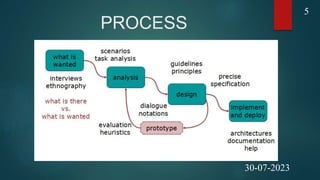
 Requirements: what is there and what is wanted …
 Analysis: ordering and understanding
 Design: what to do and how to decide
 Iteration and prototyping: getting it right … and finding what is really
needed!
 Implementation and deployment: making it and getting it out there
6
30-07-2023
PERSONA
 A persona is a prototypical user:
 An imaginary, but very specific, example of a particular
type of user.
 Not “real”, but hypothetical.
 A persona is used to role-play through an interface
design and check if the design would meet the needs
of such a user.
7
30-07-2023
SCENARIO
 A scenario is a precise description of a persona using an interface
to achieve a goal:
 Daily Use Scenarios: The actions users perform regularly and frequently.
These need the most robust
 design.
 Necessary Use Scenarios: More occasional, infrequent actions, but
which are necessary from time to
 time.
 Edge Case Scenarios: Loved by programmers, these can usually be
ignored during the design process.
8
30-07-2023
SCENARIO – PROS AND CONS
 Pros
 life and time are linear
 easy to understand (stories and narrative are natural)
 concrete (errors less likely)
 Cons
 no choice, no branches, no special conditions
 miss the unintended
9
30-07-2023
NAVIGATION DESIGN
 Navigation design is the discipline of creating, analyzing and
implementing ways for users to navigate through a website or
app.
 Navigation plays an integral role in how users interact with and
use your products. It is how your user can get from point A to
point B and even point C in the least frustrating way possible.
 To make these delightful interactions, designers employ a
combination of UI patterns including links, labels and other UI
elements. These patterns provide relevant information and
make interacting with products easier.
10
30-07-2023
Four Golden Rules
 knowing where you are
 knowing what you can do
 knowing where you are going or what will happen
 knowing where you’ve been or what you’ve done
11
30-07-2023
COMMON NAVIGATION DESIGN
PATTERNS
 Hamburger Menu-The hamburger menu is often found on mobile, although it is
increasingly becoming popular with desktop. The hamburger menu icon is 3 lines and can
be clicked or tapped to reveal more navigation options.
 Tabs - Tabs are a popular navigation pattern and are commonly found on mobile devices.
They’re can be found on the bottom or top of the screen.
 Vertical Navigation - Usually found on the left-hand side of screens, vertical navigation
takes up generous screen space but displays a list of global navigation links and can
include primary, secondary and tertiary navigation levels.
 Call-to-action button - Call to action buttons are used to persuade, motivate and move
your audience into an action whether it’s a sign up, a purchase or a download.
 Breadcrumbs - Inspired by the story of Hansel and Gretel, breadcrumb navigation (or
breadcrumb trail), is a secondary navigation system that shows the user where they are in
the system.
12
30-07-2023
SCREEN DESIGN
 Screen design can be understood to be the conceiving and
creating of the graphical user interface (GUI). The arrangement of
the elements which can be seen on the screen is of greatest
importance. This concerns primarily the layout.
 Screen design is not only used for websites, mobile websites or
apps for smartphones, but also in many other applications or
devices which have user interaction on different screen sizes as
their central element. These various formats or devices are
challenging for screen designers, because content will be shown
on different screens. This also means that certain restrictions on
layout must be taken into account and exploited.
13
30-07-2023
8 PRINCIPLES OF SCREEN
DESIGN
 Eight basic principles of screen design:
 The three questions all screens need to give an answer to
 The importance of visual hierarchy
 The copy is part of the design
 Conventions are important, we should use them
 When designing for the mobile phone, we design for our hands, too
 Pay attention to the effective surface area ratio
 Aim at simplicity and transparency
 Be careful with animations and motion
14
30-07-2023
LAYOUT
 The Layout is the master plan or a blueprint of the printed/published work that lays out the order of its various graphic elements.
 The layout may refer to:
 Page Layout means the arrangement of visual elements on a page.
 Comprehensive Layout means a proposed page layout that a designer presents to their customers.
 Layout (computing) means the process used to calculate the position of the objects in the space.
 Integrated circuit layout signifies the geometric depiction of an integrated circuit.
 Auto-mobile layout signifies the description of a vehicle's engine and driving wheels positions.
 Keyboard layout refers to the layout of keys on a typographic keyboard.
 Layout engine is another name of the web browser engine, the main software that displays the content in a web browser.
 Process layout a plant's floor plan, which arranges equipment based on its function.
 Product layout means a plant floor design in which workstations and equipment are arranged according to assembly sequence.
15
30-07-2023
CHARACTERISTICS OF LAYOUT
 The following are the characteristics or features of a good layout:
 Efficient Space Utilization
 Economy in Handling
 Minimum Movement
 Accessibility
 Flexibility
 Preservation of Materials and Equipment
 Reduction Discomfort
 Visibility
 Ensuring Co-ordination
 Adherence to Statutory Regulations
16
30-07-2023
TYPES OF LAYOUT
 There are 5 basic types of layouts:
 Process Layout
 Product Layout
 Combination Layout
 Fixed Layout
 Group Technology or Cellular Layout
17
30-07-2023
ITERATIVE DESIGN AND
PROTOTYPING
 Iterative design overcomes inherent problems of incomplete requirements
 Prototypes
 simulate or animate some features of intended system
 different types of prototypes
 throw-away
 incremental
 evolutionary

 Management issues
 time
 planning
 non-functional features
 contracts
18
30-07-2023
PROTOTYPING
 Prototyping is another type of software engineering models that can have a
complete range of functionalities of the projected system.
 In HCI, prototyping is a trial and partial design that helps users in testing
design ideas without executing a complete system.
 Example of a prototype can be Sketches. Sketches of interactive design can
later be produced into graphical interface. See the following diagram.
 A Low Fidelity Prototype uses manual procedures like sketching in a paper.
 A Medium Fidelity Prototype involves some but not all procedures of the
system. E.g., first screen of a GUI.
 Finally, a Hi Fidelity Prototype simulates all the functionalities of the system
in a design. This prototype requires, time, money and work force
19
30-07-2023
HCI IN SOFTWARE PROCESS
 The term software engineering is the product of two words, software, and
engineering.
 The software is a collection of integrated programs.
 Software subsists of carefully-organized instructions and code written by
developers on any of various particular computer languages.
 Computer programs and related documentation such as requirements,
design models and user manuals.
 Engineering is the application of scientific and practical knowledge to
invent, design, build, maintain, and improve frameworks, processes, etc.
20
30-07-2023
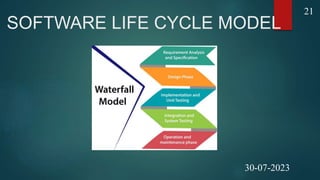
SOFTWARE LIFE CYCLE MODEL
21
30-07-2023
WATERFALL MODEL
 Requirements analysis and specification phase: The aim of this
phase is to understand the exact requirements of the customer and to
document them properly.
 Design Phase: This phase aims to transform the requirements
gathered in the SRS into a suitable form which permits further coding
in a programming language.
 Implementation and unit testing: During this phase, design is
implemented. If the SDD is complete, the implementation or coding
phase proceeds smoothly, because all the information needed by
software developers is contained in the SDD.
22
30-07-2023
WATERFALL MODEL(CONT.)
 Integration and System Testing: This phase is highly
crucial as the quality of the end product is determined by
the effectiveness of the testing carried out. The better
output will lead to satisfied customers, lower maintenance
costs, and accurate results. Unit testing determines the
efficiency of individual modules.
 Operation and maintenance phase: Maintenance is the
task performed by every user once the software has been
delivered to the customer, installed, and operational.
23
30-07-2023
USABILITY ENGINEERING
 The ultimate test of usability based on measurement of user experience
 Usability engineering demands that specific usability measures be made explicit as
requirements
 Usability specification
 usability attribute/principle
 measuring concept
 measuring method
 now level/ worst case/ planned level/ best case
 Problems
 usability specification requires level of detail that may not be
 possible early in design satisfying a usability specification
 does not necessarily satisfy usability
24
30-07-2023
DESIGN RATIONALE
 Design rationale is information that explains why a computer
system is the way it is.
 Benefits of design rationale
 communication throughout life cycle
 reuse of design knowledge across products
 enforces design discipline
 presents arguments for design trade-offs
 organizes potentially large design space
 capturing contextual information
25
25
30-07-2023
DESIGN RULES IN HCI
 Design rules- (or usability rules) are rules that a
designer can follow in order to increase the
usability of the system/product e.g., principles,
standards, guidelines.
 Design rules should be used early in the lifecycle
[e.g., during the design; note that they can also
be used to evaluate the usability of the system].
26
30-07-2023
OBJECTIVES OF DESIGN RULES
 Designing for maximum usability
 The goal of interaction design
 Principles of usability
 General understanding
 Standards and guidelines
 Direction for design
 Design patterns
 Capture and reuse design knowledge
27
30-07-2023
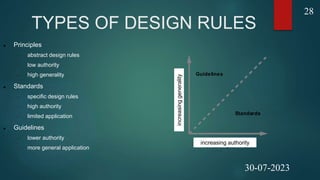
TYPES OF DESIGN RULES
 Principles
 abstract design rules
 low authority
 high generality
 Standards
 specific design rules
 high authority
 limited application
 Guidelines
 lower authority
 more general application increasing authority
increasing
generality
Standards
Guidelines
increasing authority
increasing
generality
28
30-07-2023
GOLDEN RULES AND
HEURISTICS
 “Broad brush” design rules
 Useful check list for good design
 Better design using these than using nothing!
 Different collections e.g.
 Nielsen’s 10 Heuristics (see Chapter 9)
 Shneiderman’s 8 Golden Rules
 Norman’s 7 Principles
29
30-07-2023
SHNEIDERMAN’S 8 GOLDEN
RULES
 Strive for consistency
 Enable frequent users to use shortcuts
 Offer informative feedback
 Design dialogues to yield closure
 Offer error prevention and simple error handling
 Permit easy reversal of actions
 Support internal locus of control
 Reduce short-term memory load
30
30-07-2023
NORMAN’S 7 PRINCIPLES
 Use both knowledge in the world and knowledge in the head.
 Simplify the structure of tasks.
 Make things visible: bridge the gulfs of Execution and
Evaluation.
 Get the mappings right.
 Exploit the power of constraints, both natural and artificial.
 Design for error.
 When all else fails, standardize.
31
30-07-2023
UNIVERSAL DESIGN
 According to the Center for Universal Design, UD is "the design of
products and environments to be usable by all people, to the greatest
extent possible, without the need for adaptation or specialized
design."
 Characteristics of any UD product or environment are that it is
accessible, usable, and inclusive.
32
30-07-2023
PRINCIPLES OF UNIVERSAL
DESIGN
 The seven principles of universal design established by the Center for Universal
Design at North Carolina State were developed to guide the design of any product,
service, or environment. They follow along with an example of the application of
each.
 Equitable use. The design is useful and marketable to people with diverse abilities. A website that
is designed so that it is accessible to everyone, including people who are blind, employs this
principle.
 Flexibility in use. The design accommodates a wide range of individual preferences and abilities.
A museum that allows a visitor to choose to read or listen to a description of the contents of a
display case employs this principle.
 Simple and intuitive. Use of the design is easy to understand, regardless of the user's
experience, knowledge, language skills, or current concentration level. Science lab equipment
with control buttons that are clear and intuitive employs this principle.
33
30-07-2023
PRINCIPLES OF UNIVERSAL
DESIGN(CONT.)
 Perceptible information. The design communicates necessary information
effectively to the user, regardless of ambient conditions or the user's sensory
abilities. Video captioning employs this principle.
 Tolerance for error. The design minimizes hazards and the adverse
consequences of accidental or unintended actions. An educational software
program that provides guidance when the user makes an inappropriate selection
employs this principle.
 Low physical effort. The design can be used efficiently and comfortably, and with
a minimum of fatigue. Doors that open automatically employ this principle.
 Size and space for approach and use. The design provides appropriate size and
space for approach, reach, manipulation, and use, regardless of the user's body
size, posture, or mobility. A science lab with adjustable tables employs this
principle.
34
30-07-2023
REFERENCES
 https://hcibook.com/e3/plain/chaps/ch9
 https://www.javatpoint.com
 Human-Computer Interaction(Ao.Univ.-Prof. Dr. Keith
Andrews)
 https://uxstudioteam.com/ux-blog/screen-design/
 https://www.washington.edu/doit/universal-design-
process-principles-and-applications
35
30-07-2023

SAYAN14_HCI PDF.pptx

  • 1.
    HUMAN COMPUTER INTERACTION NAME:SAYAN GHOSH ROLL: 14400120032 SEMESTER: 6 YEAR: 2020 – 2024 COLLEGE: NEOTIA INSTITUTE OF TECHNOLOGY MANAGEMENT AND SCIENCE 30-07-2023 1
  • 2.
    INTRODUCTION  Human-computer interaction(HCI) is a multidisciplinary field of study focusing on the design of computer technology and, in particular, the interaction between humans (the users) and computers. 2 30-07-2023
  • 3.
    INTERACTIVE DESIGN BASICS Design: what it is, interventions, goals, constraints  Process: what happens when  Scenarios: rich stories of design  Navigation: finding your way around a system  Iteration and prototypes: never get it right first time! 3 30-07-2023
  • 4.
    WHAT IS DESIGN A design is a plan or specification for the construction of an object or system or for the implementation of an activity or process or the result of that plan or specification in the form of a prototype, product, or process. 4 30-07-2023
  • 5.
  • 6.
    PROCESS(CONT.)  Requirements: whatis there and what is wanted …  Analysis: ordering and understanding  Design: what to do and how to decide  Iteration and prototyping: getting it right … and finding what is really needed!  Implementation and deployment: making it and getting it out there 6 30-07-2023
  • 7.
    PERSONA  A personais a prototypical user:  An imaginary, but very specific, example of a particular type of user.  Not “real”, but hypothetical.  A persona is used to role-play through an interface design and check if the design would meet the needs of such a user. 7 30-07-2023
  • 8.
    SCENARIO  A scenariois a precise description of a persona using an interface to achieve a goal:  Daily Use Scenarios: The actions users perform regularly and frequently. These need the most robust  design.  Necessary Use Scenarios: More occasional, infrequent actions, but which are necessary from time to  time.  Edge Case Scenarios: Loved by programmers, these can usually be ignored during the design process. 8 30-07-2023
  • 9.
    SCENARIO – PROSAND CONS  Pros  life and time are linear  easy to understand (stories and narrative are natural)  concrete (errors less likely)  Cons  no choice, no branches, no special conditions  miss the unintended 9 30-07-2023
  • 10.
    NAVIGATION DESIGN  Navigationdesign is the discipline of creating, analyzing and implementing ways for users to navigate through a website or app.  Navigation plays an integral role in how users interact with and use your products. It is how your user can get from point A to point B and even point C in the least frustrating way possible.  To make these delightful interactions, designers employ a combination of UI patterns including links, labels and other UI elements. These patterns provide relevant information and make interacting with products easier. 10 30-07-2023
  • 11.
    Four Golden Rules knowing where you are  knowing what you can do  knowing where you are going or what will happen  knowing where you’ve been or what you’ve done 11 30-07-2023
  • 12.
    COMMON NAVIGATION DESIGN PATTERNS Hamburger Menu-The hamburger menu is often found on mobile, although it is increasingly becoming popular with desktop. The hamburger menu icon is 3 lines and can be clicked or tapped to reveal more navigation options.  Tabs - Tabs are a popular navigation pattern and are commonly found on mobile devices. They’re can be found on the bottom or top of the screen.  Vertical Navigation - Usually found on the left-hand side of screens, vertical navigation takes up generous screen space but displays a list of global navigation links and can include primary, secondary and tertiary navigation levels.  Call-to-action button - Call to action buttons are used to persuade, motivate and move your audience into an action whether it’s a sign up, a purchase or a download.  Breadcrumbs - Inspired by the story of Hansel and Gretel, breadcrumb navigation (or breadcrumb trail), is a secondary navigation system that shows the user where they are in the system. 12 30-07-2023
  • 13.
    SCREEN DESIGN  Screendesign can be understood to be the conceiving and creating of the graphical user interface (GUI). The arrangement of the elements which can be seen on the screen is of greatest importance. This concerns primarily the layout.  Screen design is not only used for websites, mobile websites or apps for smartphones, but also in many other applications or devices which have user interaction on different screen sizes as their central element. These various formats or devices are challenging for screen designers, because content will be shown on different screens. This also means that certain restrictions on layout must be taken into account and exploited. 13 30-07-2023
  • 14.
    8 PRINCIPLES OFSCREEN DESIGN  Eight basic principles of screen design:  The three questions all screens need to give an answer to  The importance of visual hierarchy  The copy is part of the design  Conventions are important, we should use them  When designing for the mobile phone, we design for our hands, too  Pay attention to the effective surface area ratio  Aim at simplicity and transparency  Be careful with animations and motion 14 30-07-2023
  • 15.
    LAYOUT  The Layoutis the master plan or a blueprint of the printed/published work that lays out the order of its various graphic elements.  The layout may refer to:  Page Layout means the arrangement of visual elements on a page.  Comprehensive Layout means a proposed page layout that a designer presents to their customers.  Layout (computing) means the process used to calculate the position of the objects in the space.  Integrated circuit layout signifies the geometric depiction of an integrated circuit.  Auto-mobile layout signifies the description of a vehicle's engine and driving wheels positions.  Keyboard layout refers to the layout of keys on a typographic keyboard.  Layout engine is another name of the web browser engine, the main software that displays the content in a web browser.  Process layout a plant's floor plan, which arranges equipment based on its function.  Product layout means a plant floor design in which workstations and equipment are arranged according to assembly sequence. 15 30-07-2023
  • 16.
    CHARACTERISTICS OF LAYOUT The following are the characteristics or features of a good layout:  Efficient Space Utilization  Economy in Handling  Minimum Movement  Accessibility  Flexibility  Preservation of Materials and Equipment  Reduction Discomfort  Visibility  Ensuring Co-ordination  Adherence to Statutory Regulations 16 30-07-2023
  • 17.
    TYPES OF LAYOUT There are 5 basic types of layouts:  Process Layout  Product Layout  Combination Layout  Fixed Layout  Group Technology or Cellular Layout 17 30-07-2023
  • 18.
    ITERATIVE DESIGN AND PROTOTYPING Iterative design overcomes inherent problems of incomplete requirements  Prototypes  simulate or animate some features of intended system  different types of prototypes  throw-away  incremental  evolutionary   Management issues  time  planning  non-functional features  contracts 18 30-07-2023
  • 19.
    PROTOTYPING  Prototyping isanother type of software engineering models that can have a complete range of functionalities of the projected system.  In HCI, prototyping is a trial and partial design that helps users in testing design ideas without executing a complete system.  Example of a prototype can be Sketches. Sketches of interactive design can later be produced into graphical interface. See the following diagram.  A Low Fidelity Prototype uses manual procedures like sketching in a paper.  A Medium Fidelity Prototype involves some but not all procedures of the system. E.g., first screen of a GUI.  Finally, a Hi Fidelity Prototype simulates all the functionalities of the system in a design. This prototype requires, time, money and work force 19 30-07-2023
  • 20.
    HCI IN SOFTWAREPROCESS  The term software engineering is the product of two words, software, and engineering.  The software is a collection of integrated programs.  Software subsists of carefully-organized instructions and code written by developers on any of various particular computer languages.  Computer programs and related documentation such as requirements, design models and user manuals.  Engineering is the application of scientific and practical knowledge to invent, design, build, maintain, and improve frameworks, processes, etc. 20 30-07-2023
  • 21.
    SOFTWARE LIFE CYCLEMODEL 21 30-07-2023
  • 22.
    WATERFALL MODEL  Requirementsanalysis and specification phase: The aim of this phase is to understand the exact requirements of the customer and to document them properly.  Design Phase: This phase aims to transform the requirements gathered in the SRS into a suitable form which permits further coding in a programming language.  Implementation and unit testing: During this phase, design is implemented. If the SDD is complete, the implementation or coding phase proceeds smoothly, because all the information needed by software developers is contained in the SDD. 22 30-07-2023
  • 23.
    WATERFALL MODEL(CONT.)  Integrationand System Testing: This phase is highly crucial as the quality of the end product is determined by the effectiveness of the testing carried out. The better output will lead to satisfied customers, lower maintenance costs, and accurate results. Unit testing determines the efficiency of individual modules.  Operation and maintenance phase: Maintenance is the task performed by every user once the software has been delivered to the customer, installed, and operational. 23 30-07-2023
  • 24.
    USABILITY ENGINEERING  Theultimate test of usability based on measurement of user experience  Usability engineering demands that specific usability measures be made explicit as requirements  Usability specification  usability attribute/principle  measuring concept  measuring method  now level/ worst case/ planned level/ best case  Problems  usability specification requires level of detail that may not be  possible early in design satisfying a usability specification  does not necessarily satisfy usability 24 30-07-2023
  • 25.
    DESIGN RATIONALE  Designrationale is information that explains why a computer system is the way it is.  Benefits of design rationale  communication throughout life cycle  reuse of design knowledge across products  enforces design discipline  presents arguments for design trade-offs  organizes potentially large design space  capturing contextual information 25 25 30-07-2023
  • 26.
    DESIGN RULES INHCI  Design rules- (or usability rules) are rules that a designer can follow in order to increase the usability of the system/product e.g., principles, standards, guidelines.  Design rules should be used early in the lifecycle [e.g., during the design; note that they can also be used to evaluate the usability of the system]. 26 30-07-2023
  • 27.
    OBJECTIVES OF DESIGNRULES  Designing for maximum usability  The goal of interaction design  Principles of usability  General understanding  Standards and guidelines  Direction for design  Design patterns  Capture and reuse design knowledge 27 30-07-2023
  • 28.
    TYPES OF DESIGNRULES  Principles  abstract design rules  low authority  high generality  Standards  specific design rules  high authority  limited application  Guidelines  lower authority  more general application increasing authority increasing generality Standards Guidelines increasing authority increasing generality 28 30-07-2023
  • 29.
    GOLDEN RULES AND HEURISTICS “Broad brush” design rules  Useful check list for good design  Better design using these than using nothing!  Different collections e.g.  Nielsen’s 10 Heuristics (see Chapter 9)  Shneiderman’s 8 Golden Rules  Norman’s 7 Principles 29 30-07-2023
  • 30.
    SHNEIDERMAN’S 8 GOLDEN RULES Strive for consistency  Enable frequent users to use shortcuts  Offer informative feedback  Design dialogues to yield closure  Offer error prevention and simple error handling  Permit easy reversal of actions  Support internal locus of control  Reduce short-term memory load 30 30-07-2023
  • 31.
    NORMAN’S 7 PRINCIPLES Use both knowledge in the world and knowledge in the head.  Simplify the structure of tasks.  Make things visible: bridge the gulfs of Execution and Evaluation.  Get the mappings right.  Exploit the power of constraints, both natural and artificial.  Design for error.  When all else fails, standardize. 31 30-07-2023
  • 32.
    UNIVERSAL DESIGN  Accordingto the Center for Universal Design, UD is "the design of products and environments to be usable by all people, to the greatest extent possible, without the need for adaptation or specialized design."  Characteristics of any UD product or environment are that it is accessible, usable, and inclusive. 32 30-07-2023
  • 33.
    PRINCIPLES OF UNIVERSAL DESIGN The seven principles of universal design established by the Center for Universal Design at North Carolina State were developed to guide the design of any product, service, or environment. They follow along with an example of the application of each.  Equitable use. The design is useful and marketable to people with diverse abilities. A website that is designed so that it is accessible to everyone, including people who are blind, employs this principle.  Flexibility in use. The design accommodates a wide range of individual preferences and abilities. A museum that allows a visitor to choose to read or listen to a description of the contents of a display case employs this principle.  Simple and intuitive. Use of the design is easy to understand, regardless of the user's experience, knowledge, language skills, or current concentration level. Science lab equipment with control buttons that are clear and intuitive employs this principle. 33 30-07-2023
  • 34.
    PRINCIPLES OF UNIVERSAL DESIGN(CONT.) Perceptible information. The design communicates necessary information effectively to the user, regardless of ambient conditions or the user's sensory abilities. Video captioning employs this principle.  Tolerance for error. The design minimizes hazards and the adverse consequences of accidental or unintended actions. An educational software program that provides guidance when the user makes an inappropriate selection employs this principle.  Low physical effort. The design can be used efficiently and comfortably, and with a minimum of fatigue. Doors that open automatically employ this principle.  Size and space for approach and use. The design provides appropriate size and space for approach, reach, manipulation, and use, regardless of the user's body size, posture, or mobility. A science lab with adjustable tables employs this principle. 34 30-07-2023
  • 35.
    REFERENCES  https://hcibook.com/e3/plain/chaps/ch9  https://www.javatpoint.com Human-Computer Interaction(Ao.Univ.-Prof. Dr. Keith Andrews)  https://uxstudioteam.com/ux-blog/screen-design/  https://www.washington.edu/doit/universal-design- process-principles-and-applications 35 30-07-2023