ACCESSIBILITY
In the classroom, on the web, and beyond.
What is accessibility?
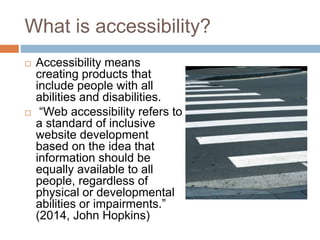
 Accessibility means
creating products that
include people with all
abilities and disabilities.
 “Web accessibility refers to
a standard of inclusive
website development
based on the idea that
information should be
equally available to all
people, regardless of
physical or developmental
abilities or impairments.”
(2014, John Hopkins)
Web 2.0 & Accessibility
 Website interaction has changed significantly
over the past decade or so.
 Instead of a website delivering you content, we
are now responsible for writing and driving the
narrative online.
 How do people with disabilities interact with a
website this way?
Web Content Accessibility Guidelines
 The Web Content Accessibility Guidelines (WCAG
2.0) was developed by a group of people (World
Wide Web Consortium, WC3) in 2008 who
understood the importance of making a website
accessible.
 The Web Accessibility Initiative Website provides
the guidelines and other resources to make sure
your website is accessible.
Why is accessibility important?
 The internet is how most people receive their
information today.
 If we are not making our website accessible,
we are excluding a significant portion of our
population.
 The American with Disabilities Act and
Individuals with Disabilities Education Act are
laws that ensure everyone has equal access
to their education and the world.
IDEA
 This act was put into place in 1975 and has
seen many revisions.
 This act is, “to ensure that children with
disabilities have the opportunity to receive a
free appropriate public education, just like
other children.” (2014)
Technology Devices
 Technology has rapidly advanced over the last
several years.
 There are many technology devices that have
helped children get access to information in
the classroom.
Assistive Technology
 Assistive technology is any kind of technology
that enhances the functional independence of a
person with a disability.
 These technologies can be high tech devices
(iPads) or low tech devices (magnifying glass).
Source: Family Center on Technology and Disability, no date
AT in the Classroom
 Some of these devices can be used to magnify
books or assignments for the child to read
better.
 Some of the devices provide interactive
activities on an iPad.
 Some even serve as a students’ communicator
if they have no language skills.
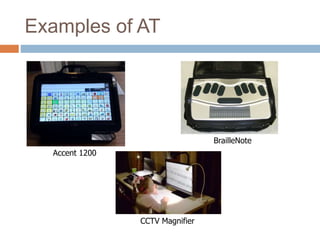
Examples of AT
Accent 1200
BrailleNote
CCTV Magnifier
References
 http://www.adobe.com/accessibility/gettingstart
ed.html
 http://www.ibm.com/developerworks/library/wa
-aj-web20
 http://www.w3.org/WAI/intro/wcag
 http://webaim.org/
 http://www.parentcenterhub.org/repository/idea
/#exact
Creative Commons
 Unknown,
http://creativity103.com/collections/Metropolis/
slides/road_crossing_DSC0173.html
 Beth Knittle,
https://www.flickr.com/photos/bknittle/3235458
902/in/photolist-5ocAiM-5VUzdb
 https://en.wikipedia.org/wiki/World_Wide_Web
_Consortium
 http://www2.ed.gov/offices/OSERS/Policy/IDE
A/index.html

Accessibility

  • 1.
    ACCESSIBILITY In the classroom,on the web, and beyond.
  • 2.
    What is accessibility? Accessibility means creating products that include people with all abilities and disabilities.  “Web accessibility refers to a standard of inclusive website development based on the idea that information should be equally available to all people, regardless of physical or developmental abilities or impairments.” (2014, John Hopkins)
  • 3.
    Web 2.0 &Accessibility  Website interaction has changed significantly over the past decade or so.  Instead of a website delivering you content, we are now responsible for writing and driving the narrative online.  How do people with disabilities interact with a website this way?
  • 4.
    Web Content AccessibilityGuidelines  The Web Content Accessibility Guidelines (WCAG 2.0) was developed by a group of people (World Wide Web Consortium, WC3) in 2008 who understood the importance of making a website accessible.  The Web Accessibility Initiative Website provides the guidelines and other resources to make sure your website is accessible.
  • 5.
    Why is accessibilityimportant?  The internet is how most people receive their information today.  If we are not making our website accessible, we are excluding a significant portion of our population.  The American with Disabilities Act and Individuals with Disabilities Education Act are laws that ensure everyone has equal access to their education and the world.
  • 6.
    IDEA  This actwas put into place in 1975 and has seen many revisions.  This act is, “to ensure that children with disabilities have the opportunity to receive a free appropriate public education, just like other children.” (2014)
  • 7.
    Technology Devices  Technologyhas rapidly advanced over the last several years.  There are many technology devices that have helped children get access to information in the classroom.
  • 8.
    Assistive Technology  Assistivetechnology is any kind of technology that enhances the functional independence of a person with a disability.  These technologies can be high tech devices (iPads) or low tech devices (magnifying glass). Source: Family Center on Technology and Disability, no date
  • 9.
    AT in theClassroom  Some of these devices can be used to magnify books or assignments for the child to read better.  Some of the devices provide interactive activities on an iPad.  Some even serve as a students’ communicator if they have no language skills.
  • 10.
    Examples of AT Accent1200 BrailleNote CCTV Magnifier
  • 11.
    References  http://www.adobe.com/accessibility/gettingstart ed.html  http://www.ibm.com/developerworks/library/wa -aj-web20 http://www.w3.org/WAI/intro/wcag  http://webaim.org/  http://www.parentcenterhub.org/repository/idea /#exact
  • 12.
    Creative Commons  Unknown, http://creativity103.com/collections/Metropolis/ slides/road_crossing_DSC0173.html Beth Knittle, https://www.flickr.com/photos/bknittle/3235458 902/in/photolist-5ocAiM-5VUzdb  https://en.wikipedia.org/wiki/World_Wide_Web _Consortium  http://www2.ed.gov/offices/OSERS/Policy/IDE A/index.html