Q1 2013
XenDesktop &
Windows Server 2012
Value Add – RDS & VDI
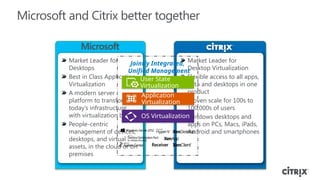
Microsoft and Citrix better together
Market Leader for
Desktop Virtualization
Flexible access to all apps,
data and desktops in one
product
Proven scale for 100s to
100,000s of users
Windows desktops and
apps on PCs, Macs, iPads,
Android and smartphones
Market Leader for
Desktops
Best in Class Application
Virtualization
A modern server
platform to transform
today’s infrastructure
with virtualization built-in
People-centric
management of devices,
desktops, and virtual
assets, in the cloud or on
premises
User State
Virtualization
Application
Virtualization
OS Virtualization
Jointly Integrated,
Unified Management
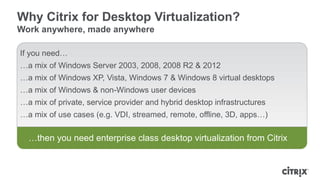
Why Citrix for Desktop Virtualization?
Work anywhere, made anywhere
If you need…
…a mix of Windows Server 2003, 2008, 2008 R2 & 2012
…a mix of Windows XP, Vista, Windows 7 & Windows 8 virtual desktops
…a mix of Windows & non-Windows user devices
…a mix of private, service provider and hybrid desktop infrastructures
…a mix of use cases (e.g. VDI, streamed, remote, offline, 3D, apps…)
…then you need enterprise class desktop virtualization from Citrix
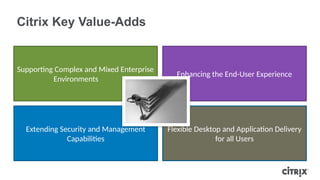
Citrix Key Value-Adds
Supporting Complex and Mixed Enterprise
Environments
Enhancing the End-User Experience
Extending Security and Management
Capabilities
Flexible Desktop and Application Delivery
for all Users
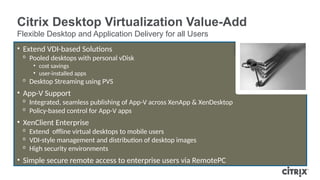
Citrix Desktop Virtualization Value-Add
Supporting Complex and Mixed Enterprise Environments with Simplified Management
• Simplified, GUI-based management from hundreds to thousands of desktops
• Mixed Server Environments
ᵒ WS 2012
ᵒ WS 2008 R2
ᵒ WS 2008
ᵒ UNIX
• Mixed Desktop Environments
ᵒ Windows 8
ᵒ Windows 7 SP1
ᵒ Windows 7
ᵒ Vista
ᵒ Windows XP
• Multiple Hypervisors
• Multiple Management Solutions
• Multiple Clients
Citrix Desktop Virtualization Value-Add
Flexible Desktop and Application Delivery for all Users
• Extend VDI-based Solutions
ᵒ Pooled desktops with personal vDisk
• cost savings
• user-installed apps
ᵒ Desktop Streaming using PVS
• App-V Support
ᵒ Integrated, seamless publishing of App-V across XenApp & XenDesktop
ᵒ Policy-based control for App-V apps
• XenClient Enterprise
ᵒ Extend offline virtual desktops to mobile users
ᵒ VDI-style management and distribution of desktop images
ᵒ High security environments
• Simple secure remote access to enterprise users via RemotePC
Citrix Desktop Virtualization Value-Add
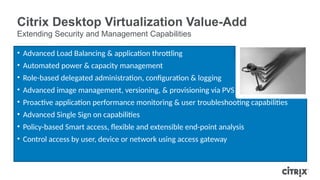
Extending Security and Management Capabilities
• Advanced Load Balancing & application throttling
• Automated power & capacity management
• Role-based delegated administration, configuration & logging
• Advanced image management, versioning, & provisioning via PVS
• Proactive application performance monitoring & user troubleshooting capabilities
• Advanced Single Sign on capabilities
• Policy-based Smart access, flexible and extensible end-point analysis
• Control access by user, device or network using access gateway
Citrix Desktop Virtualization Value-Add
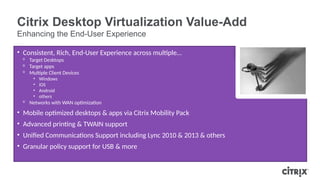
Enhancing the End-User Experience
• Consistent, Rich, End-User Experience across multiple…
ᵒ Target Desktops
ᵒ Target apps
ᵒ Multiple Client Devices
• Windows
• iOS
• Android
• others
ᵒ Networks with WAN optimization
• Mobile optimized desktops & apps via Citrix Mobility Pack
• Advanced printing & TWAIN support
• Unified Communications Support including Lync 2010 & 2013 & others
• Granular policy support for USB & more
Windows 7/Vista/XP
Any OS running Java Engine
Unix/Linux
Symbian
Wyse Thin OS
Wyse Xenith zero client
Apple MAC/iOS (iPhone/iPad)
Google Android/Chromebook
RIM Blackberry
HTML5 Browser
Hyper-V 3.0
Hyper-V 2.0
XenServer
vSphere
Dynamic Color Compression
Multi-stream protocol
Network latency masking/reduction
WAN Optimization
VOIP on WAN
Webcam on the WAN
Universal Print Server
Local App Access (reverse seamless)
Session Reliability
User initiated desktop reset
Flash redirection
Desktop composition redirection
Remote touch optimization
TWAIN device support
Server Support for 20,000 sessions
Multiple sites
Multiple forests
Multiple domains
Role-based delegation &
administration
Integrated Load balancing
Virtual Machine power policy
User session management
User s
Multiple active sessions per user
Restrict Access based on
time/location/device
Session disconnect policy
RemotePC
XenClient
Streamed XenApp servers
Streamed physical desktops
VM isolation
Full disk encryption
USB filtering
Personal vDisk technology
Extending Security & Management Capabilities
Supporting Complex & Mixed Environments
Flexible Desktop & Application Delivery for all Users
Enhancing the End-User Experience
GUI-based management from
hundreds to thousands of
desktops
Mixed Server Environments
WS 2012
WS 2008 R2
WS 2008
UNIX
Mixed Desktop Environments
Windows 8
Windows 7 SP1
Windows 7
Vista
Windows XP
Auto-resize user desktop
Printing bandwidth optimizations
Broad UCS support
Session pre-launch
User installed applications
(XenDesktop)
Single Sign-On Support
GPU compression
OpenGL Support
Client-to-server Folder redirection
Smooth Roaming
Client time zone redirection
Regional settings redirection
OpenGL support
GUI-based management for
complex tasks
Single Sign On
Client endpoint detection
Multiple desktops from same
group
Image delivery through LAN
(PVS)
Two-factor: SMS passcode
Auditing for admin actions
Client device location awareness
Smartcard pass-through support
Apply granular QoS policies
Centralized Management
Images
Applications
User Data
Access Policies
Multiple hosted VDI options
VDI Power Control
Session-based desktops
Physical PCs as VDI targets
Provision across multiple
hypervisor pools
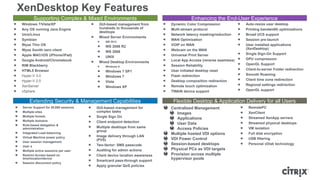
XenDesktop Key Features
VDI-Citrix Solution comparison Presentation.pptx

VDI-Citrix Solution comparison Presentation.pptx

  • 1.
    Q1 2013 XenDesktop & WindowsServer 2012 Value Add – RDS & VDI
  • 2.
    Microsoft and Citrixbetter together Market Leader for Desktop Virtualization Flexible access to all apps, data and desktops in one product Proven scale for 100s to 100,000s of users Windows desktops and apps on PCs, Macs, iPads, Android and smartphones Market Leader for Desktops Best in Class Application Virtualization A modern server platform to transform today’s infrastructure with virtualization built-in People-centric management of devices, desktops, and virtual assets, in the cloud or on premises User State Virtualization Application Virtualization OS Virtualization Jointly Integrated, Unified Management
  • 3.
    Why Citrix forDesktop Virtualization? Work anywhere, made anywhere If you need… …a mix of Windows Server 2003, 2008, 2008 R2 & 2012 …a mix of Windows XP, Vista, Windows 7 & Windows 8 virtual desktops …a mix of Windows & non-Windows user devices …a mix of private, service provider and hybrid desktop infrastructures …a mix of use cases (e.g. VDI, streamed, remote, offline, 3D, apps…) …then you need enterprise class desktop virtualization from Citrix
  • 4.
    Citrix Key Value-Adds SupportingComplex and Mixed Enterprise Environments Enhancing the End-User Experience Extending Security and Management Capabilities Flexible Desktop and Application Delivery for all Users
  • 5.
    Citrix Desktop VirtualizationValue-Add Supporting Complex and Mixed Enterprise Environments with Simplified Management • Simplified, GUI-based management from hundreds to thousands of desktops • Mixed Server Environments ᵒ WS 2012 ᵒ WS 2008 R2 ᵒ WS 2008 ᵒ UNIX • Mixed Desktop Environments ᵒ Windows 8 ᵒ Windows 7 SP1 ᵒ Windows 7 ᵒ Vista ᵒ Windows XP • Multiple Hypervisors • Multiple Management Solutions • Multiple Clients
  • 6.
    Citrix Desktop VirtualizationValue-Add Flexible Desktop and Application Delivery for all Users • Extend VDI-based Solutions ᵒ Pooled desktops with personal vDisk • cost savings • user-installed apps ᵒ Desktop Streaming using PVS • App-V Support ᵒ Integrated, seamless publishing of App-V across XenApp & XenDesktop ᵒ Policy-based control for App-V apps • XenClient Enterprise ᵒ Extend offline virtual desktops to mobile users ᵒ VDI-style management and distribution of desktop images ᵒ High security environments • Simple secure remote access to enterprise users via RemotePC
  • 7.
    Citrix Desktop VirtualizationValue-Add Extending Security and Management Capabilities • Advanced Load Balancing & application throttling • Automated power & capacity management • Role-based delegated administration, configuration & logging • Advanced image management, versioning, & provisioning via PVS • Proactive application performance monitoring & user troubleshooting capabilities • Advanced Single Sign on capabilities • Policy-based Smart access, flexible and extensible end-point analysis • Control access by user, device or network using access gateway
  • 8.
    Citrix Desktop VirtualizationValue-Add Enhancing the End-User Experience • Consistent, Rich, End-User Experience across multiple… ᵒ Target Desktops ᵒ Target apps ᵒ Multiple Client Devices • Windows • iOS • Android • others ᵒ Networks with WAN optimization • Mobile optimized desktops & apps via Citrix Mobility Pack • Advanced printing & TWAIN support • Unified Communications Support including Lync 2010 & 2013 & others • Granular policy support for USB & more
  • 9.
    Windows 7/Vista/XP Any OSrunning Java Engine Unix/Linux Symbian Wyse Thin OS Wyse Xenith zero client Apple MAC/iOS (iPhone/iPad) Google Android/Chromebook RIM Blackberry HTML5 Browser Hyper-V 3.0 Hyper-V 2.0 XenServer vSphere Dynamic Color Compression Multi-stream protocol Network latency masking/reduction WAN Optimization VOIP on WAN Webcam on the WAN Universal Print Server Local App Access (reverse seamless) Session Reliability User initiated desktop reset Flash redirection Desktop composition redirection Remote touch optimization TWAIN device support Server Support for 20,000 sessions Multiple sites Multiple forests Multiple domains Role-based delegation & administration Integrated Load balancing Virtual Machine power policy User session management User s Multiple active sessions per user Restrict Access based on time/location/device Session disconnect policy RemotePC XenClient Streamed XenApp servers Streamed physical desktops VM isolation Full disk encryption USB filtering Personal vDisk technology Extending Security & Management Capabilities Supporting Complex & Mixed Environments Flexible Desktop & Application Delivery for all Users Enhancing the End-User Experience GUI-based management from hundreds to thousands of desktops Mixed Server Environments WS 2012 WS 2008 R2 WS 2008 UNIX Mixed Desktop Environments Windows 8 Windows 7 SP1 Windows 7 Vista Windows XP Auto-resize user desktop Printing bandwidth optimizations Broad UCS support Session pre-launch User installed applications (XenDesktop) Single Sign-On Support GPU compression OpenGL Support Client-to-server Folder redirection Smooth Roaming Client time zone redirection Regional settings redirection OpenGL support GUI-based management for complex tasks Single Sign On Client endpoint detection Multiple desktops from same group Image delivery through LAN (PVS) Two-factor: SMS passcode Auditing for admin actions Client device location awareness Smartcard pass-through support Apply granular QoS policies Centralized Management Images Applications User Data Access Policies Multiple hosted VDI options VDI Power Control Session-based desktops Physical PCs as VDI targets Provision across multiple hypervisor pools XenDesktop Key Features

Editor's Notes

  • #2 [Initial Build] Microsoft and Citrix are better together in delivering the best complete Desktop Virtualization solution in market: Microsoft…is the Market Leader for Desktops Best in class Application Virtualization Over 45m MDOP licenses sold and more than 100 cases studies of global companies using App-V and many together in partnership with Citrix technologies Citrix XenApp and XenDesktop provide full support for App-V integrated the delivery of virtual applications to the Citrix Receiver or surfaced within Cloud Gateway for self service. Customers can get the best of both virtual application and virtual desktops by combining Microsoft and Citrix. With UE-V, customers can be confident their personalized settings for the OS and applications will be with them no matter how they access Windows 7 or Windows 8. If they are using XenDesktop for their virtual desktops or XenApp for application access, UE-V will keep their experience consistent in both cases. Modern Server Platform Microsoft Cloud OS vision delivers a modern platform of products and services that helps enterprises transform their current infrastructure. The Cloud OS delivers Integrated Virtualization via Hyper-V and VDI to help enterprises achieve the modern datacenter, which includes an infrastructure that provides a generational leap in agility, leveraging virtualization to deliver a highly scalable and elastic infrastructure with always-on, always-up services across shared resources and supporting cloud service delivery models with more automated management and self- service provisioning. With Windows Server 2012, the Microsoft Cloud OS is engineered for the cloud from the metal up with virtualization built as an integrated element of the operating system, not layered onto the operating system. Citrix technologies are built to run on Microsoft. XenDesktop and XenApp can be run on top of Windows Server 2012 and Hyper-V and if desirable HDX and RemoteFX can be used together. Microsoft Hyper-V is the Hypervisor optimized for VDI (with a 40% higher VM density) Microsoft System Center offers People-centric management of Devices, Desktops and virtual assets, from hardware to apps, data and OS, in the cloud or on premises Is integrated with Citrix via the XenApp Connector allowing XenApp apps to be managed and delivered through SCCM. Together, Microsoft System Center Configuration Manager and Citrix XenDesktop ensures IT organization  have a more accurate inventory of virtual desktops, improved enforcement of configuration policies, greatly enhanced reporting to meet business and technical demands, and complete automation of virtual disk patching. Citrix XenApp and System Center Configuration Manager in combination facilitate a broad range of application and desktop delivery mechanisms demanded by today’s business needs.  This also enables a single pane of glass to deliver any Windows application to any user on any device through the broad footprint of Citrix Receiver. Citrix XenDesktop and System Center Virtual Machine Manager pairing enables delivery of high-availability and load balancing services for XenDesktop virtual machines while leveraging Citrix Provisioning Services to extend scalability to thousands of concurrent virtual desktops in a single infrastructure. By integrating the XenApp’s robust provisioning features with the hypervisor management features in Virtual Machine Manager, administrators can  add (or remove) computing horsepower to meet growing and/or flexible demands. Microsoft’s Virtual Machine Manager in combination with Citrix XenServer facilitates unified virtual machine management across both XenServer and Hyper-V hypervisors with the same levels of parity for deployment, migration and a variety of host management functions.  Citrix in cooperation with ComTrade has developed a Management Pack that extends Operations Manager’s vision deeply into a XenDesktop infrastructure.  This added visibility greatly enhances the efficacy of Operations Manager’s behavioral, logging, and performance monitoring, and aids IT administrators in quickly tracking down problems and implementing resolutions. Citrix is…the market Leader for Virtual Desktops with XenDesktop which provides a solution that supports all FlexCast models to deliver virtualization scenarios on any device type. Here are some examples on where Citrix brings additional value on top of the Microsoft platform. Receiver, XenDesktop and XenApp help customers when they have needs in the following areas:    Many devices types accessing Windows applications or desktops in the datacenter A consistent rich experience across ALL - Windows XP, Windows Vista, Windows 7 & 8 over LAN/WAN Non-Windows devices accessing Windows applications or desktops in the datacenter over LAN or WAN Hosted Application compatibility for Windows Server 2012, Windows 8 and down level operating systems - i.e. Windows Server 2008, Windows 7 or below Customers need to mix & manage multiple Windows Server versions WAN support for sessions running on Servers other than Windows 2012 Need enterprise scale VDI administration tools that integrate with system center Extend VDI solutions beyond sessions and VMs to include Desktop Streaming using PVS Need to embrace both private and public clouds XA solutions on common IaaS clouds powered by Citrix CloudPortal Service Manager Citrix provides the only certified workload on MS Private Cloud Support customers with heterogeneous hypervisors in the datacenter XenClient provides an enterprise client hypervisor solutions for all users that enables: Efficient image management and update via the XenClient Synchronizer that can deliver images to clients both on the LAN and WAN. Provide the ability for everyday users to leverage their Windows Enterprise license by simply being able to use multiple local VMs with all their USB devices and rich graphics capabilities Enable high security scenarios by leveraging a ‘kill pill’ feature to automatically suspend the use of VMs that have not contacted home frequently enough Together, Microsoft and Citrix offer best of breed solutions for all Desktop Virtualization Scenarios. We’ll talk about each of these in turn over the next few slides
  • #3 Customers will find that in a world of mixed Windows Server platform, mixed virtual desktop environments, mixed end-user devices, mixed clouds and mixed desktop use cases, they will need a Citrix solution to help bring it all together and make coherent sense out of it all. With the introduction of Windows Server 2012 and Windows 8 Microsoft has made a number of investments in VDI and customers often ask why Citrix?  The market is evolving, technology is moving fast. Microsoft and Citrix continue to work together to ensure a great experience for are shared customers. We have a longstanding partnership in helping customers in virtualization and access, and both technologies build on and expand the Microsoft platform to deliver significant value to our joint customers. We continue to work closely with Citrix to ensure a high level of integration with our products and look forward to this partnership continuing as Windows 8 and Windows Server 2012 bring new opportunities for innovation. Let’s take a closer look.
  • #4 Transition this slide into each square with supporting bullets for each section. One section per transition.
  • #5 XenDesktop adds value to Windows Server 2012 by supporting complex & mixed enterprise environments and simplifying management.
  • #6 XenDesktop adds value to Windows Server 2012 by increasing the flexibility of desktop and application delivery models for all users.
  • #7 XenDesktop adds value to Windows Server 2012 by extending the security & management capabilities.
  • #8 XenDesktop adds value to Windows Server 2012 by enhancing the end-user experience over diverse networks, multiple client devices, optimizing mobile device interfaces, printing & scanning, broad UCS support, granular policies and more.