Virtual Desktop Battle of the Giants Xen Desktop VS VMware VDI
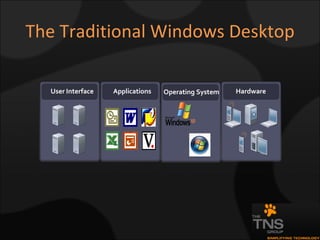
The Traditional Windows Desktop Applications Hardware User Interface Operating System
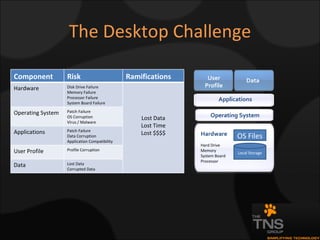
The Desktop Challenge Hardware Operating System User Profile Data OS Files Local Storage Applications Hard Drive Memory System Board Processor Component Risk Ramifications Hardware Disk Drive Failure Memory Failure Processor Failure System Board Failure Lost Data Lost Time Lost $$$$ Operating System Patch Failure OS Corruption Virus / Malware Applications Patch Failure Data Corruption Application Compatibility User Profile Profile Corruption Data Lost Data Corrupted Data
What is Virtual Desktop Technology? Similar to Virtual Servers in that desktops are hosted as virtual devices on a virtual delivery platform Allows easy replication and deployment of a standard image Enforces platform standardization Extends the useful life of existing desktop infrastructure
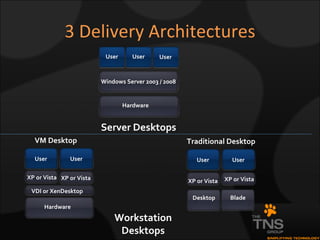
3 Delivery Architectures VM Desktop Server Desktops Hardware Windows Server 2003 / 2008 User User User Workstation Desktops XP or Vista XP or Vista Traditional Desktop Desktop User User Blade Hardware VDI or XenDesktop XP or Vista User User XP or Vista
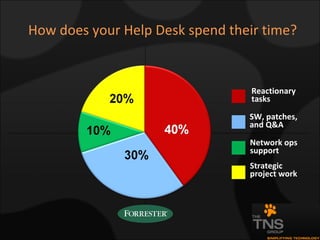
How does your Help Desk spend their time? Reactionary tasks SW, patches, and Q&A Network ops support Strategic project work
Why Do Something Different? The Traditional Approach Desktop administrators  DEPLOY  their Windows desktops. Provision and manage every desktop.  Create and manage a unique image for every device or user role. Secure every endpoint to prevent data loss and malware.  Constantly rollout patches. Support users at every remote location, including those using “untrusted” desktops. Perform hardware refreshes or retire desktops to support growing application needs for more computing power. Traditional desktop deployment is slow, expensive, and not secure.  It provides low visibility into user experience and limits operational flexibility.
Why Do Something Now? A Better Approach DELIVER  Windows desktops as a managed and secure service. Provision, manage, and refresh desktops centrally. Secure desktops within the data center. Deliver virtual desktops on-demand, providing each type of user the exact resources they need, when they need them. Proactively monitor and measure the end-user experience. Desktop delivery reduces the cost and complexity of desktop management, enhances security, increases flexibility, and improves end-user productivity and satisfaction.
Why do we actually want to control end-user devices? Reason #1: Productivity Deliver users consistent, reliable access to corporate applications and specific data  The device is part of that equation Reason #2: Network Security Risks Environments with missing patches, out of date anti-virus signatures, and missing  firewalls can introduce infections or breaches Reason #3: Software Licensing Compliance Installations on unmanaged devices can be a violation of commercial licenses Reason #4: Corporate Data Risk Accidental loss or theft via Email Theft from infections or key loggers  Theft from lost/discarded personal hard drives or portable media  Reason #5: Employee Risk Employees quit (or are fired) all the time Reason #6: Keep costs as low as possible Supporting more, varied, unknown devices presents likely increases in costs
Citrix XEN Desktop or VMware VDI ?
Why VMware VDI? VMware has been virtualizing operating systems for over 10 years Integrated Application Steaming Enterprise-class, scalable connection broker Automatic desktop provisioning with optional “smart pooling” Desktop persistence and secure tunneling options Microsoft AD integration Usability enhancements (such as USB redirection) End-to-end enterprise-class desktop control and manageability Familiar end user experience Tightly integrated with VMware’s proven virtualization platform (VI3) Scalability, security and availability suitable for organizations of all sizes
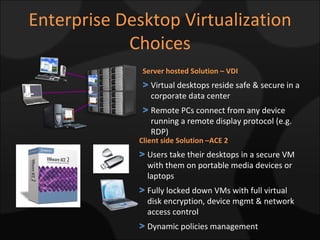
Enterprise Desktop Virtualization Choices Client side Solution –ACE 2 Users take their desktops in a secure VM with them on portable media devices or laptops Fully locked down VMs with full virtual disk encryption, device mgmt & network access control Dynamic policies management Server hosted Solution – VDI Virtual desktops reside safe & secure in a corporate data center  Remote PCs connect from any device running a remote display protocol (e.g. RDP)
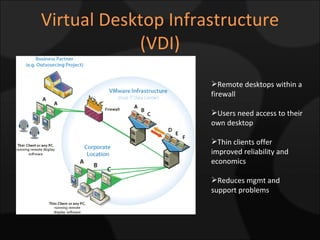
Virtual Desktop Infrastructure (VDI) Remote desktops within a firewall Users need access to their own desktop Thin clients offer improved reliability and economics Reduces mgmt and support problems
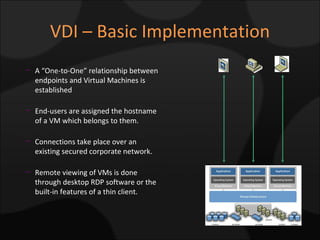
VDI – Basic Implementation A “One-to-One” relationship between endpoints and Virtual Machines is established End-users are assigned the hostname of a VM which belongs to them. Connections take place over an existing secured corporate network. Remote viewing of VMs is done through desktop RDP software or the built-in features of a thin client.
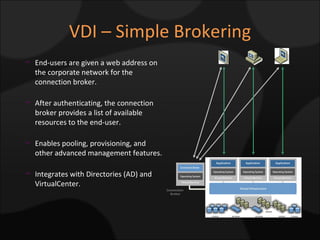
VDI – Simple Brokering Connection Broker End-users are given a web address on the corporate network for the connection broker. After authenticating, the connection broker provides a list of available resources to the end-user. Enables pooling, provisioning, and other advanced management features. Integrates with Directories (AD) and VirtualCenter.
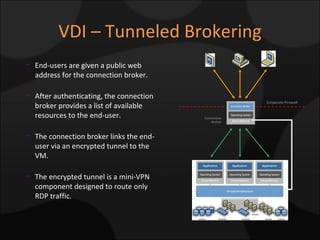
VDI – Tunneled Brokering Connection Broker Corporate Firewall End-users are given a public web address for the connection broker. After authenticating, the connection broker provides a list of available resources to the end-user. The connection broker links the end-user via an encrypted tunnel to the VM. The encrypted tunnel is a mini-VPN component designed to route only RDP traffic.
VDI – Key Components VMware VI3 Platform  Hosted virtual desktops VMware Virtual Desktop Manager Manages connection from client to hosted desktop. Active Directory User authentication VMware VirtualCenter Manages the VI3 platform Clients
Application Virtualization Need for more secure desktops Downtime and support too expensive Increasing cost of Application Deployment and Desktop Management with higher security requirements Pressure to reduce infrastructure cost by centralizing IT Migration to XP, Vista, and .NET Business Continuity and Disaster Recovery
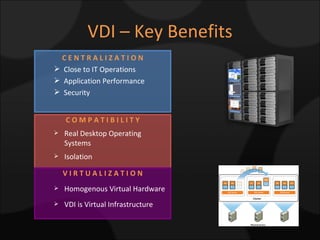
VDI – Key Benefits C O M P A T I B I L I T Y Real Desktop Operating Systems Isolation V I R T U A L I Z A T I O N Homogenous Virtual Hardware VDI is Virtual Infrastructure C E N T R A L I Z A T I O N Close to IT Operations Application Performance Security
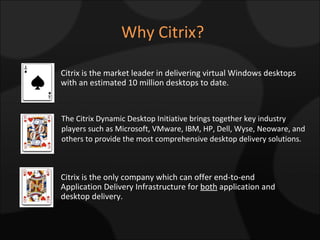
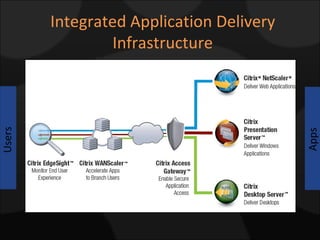
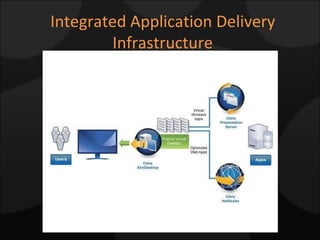
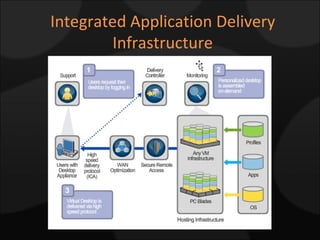
Why Citrix? The Citrix Dynamic Desktop Initiative brings together key industry players such as Microsoft, VMware, IBM, HP, Dell, Wyse, Neoware, and others to provide the most comprehensive desktop delivery solutions. Citrix is the market leader in delivering virtual Windows desktops with an estimated 10 million desktops to date. Citrix is the only company which can offer end-to-end Application Delivery Infrastructure for  both  application and desktop delivery.
Integrated Application Delivery Infrastructure Users Apps Users
Integrated Application Delivery Infrastructure

Virtual Desktop Battle Of The Giants

  • 1.
    Virtual Desktop Battleof the Giants Xen Desktop VS VMware VDI
  • 2.
    The Traditional WindowsDesktop Applications Hardware User Interface Operating System
  • 3.
    The Desktop ChallengeHardware Operating System User Profile Data OS Files Local Storage Applications Hard Drive Memory System Board Processor Component Risk Ramifications Hardware Disk Drive Failure Memory Failure Processor Failure System Board Failure Lost Data Lost Time Lost $$$$ Operating System Patch Failure OS Corruption Virus / Malware Applications Patch Failure Data Corruption Application Compatibility User Profile Profile Corruption Data Lost Data Corrupted Data
  • 4.
    What is VirtualDesktop Technology? Similar to Virtual Servers in that desktops are hosted as virtual devices on a virtual delivery platform Allows easy replication and deployment of a standard image Enforces platform standardization Extends the useful life of existing desktop infrastructure
  • 5.
    3 Delivery ArchitecturesVM Desktop Server Desktops Hardware Windows Server 2003 / 2008 User User User Workstation Desktops XP or Vista XP or Vista Traditional Desktop Desktop User User Blade Hardware VDI or XenDesktop XP or Vista User User XP or Vista
  • 6.
    How does yourHelp Desk spend their time? Reactionary tasks SW, patches, and Q&A Network ops support Strategic project work
  • 7.
    Why Do SomethingDifferent? The Traditional Approach Desktop administrators DEPLOY their Windows desktops. Provision and manage every desktop. Create and manage a unique image for every device or user role. Secure every endpoint to prevent data loss and malware. Constantly rollout patches. Support users at every remote location, including those using “untrusted” desktops. Perform hardware refreshes or retire desktops to support growing application needs for more computing power. Traditional desktop deployment is slow, expensive, and not secure. It provides low visibility into user experience and limits operational flexibility.
  • 8.
    Why Do SomethingNow? A Better Approach DELIVER Windows desktops as a managed and secure service. Provision, manage, and refresh desktops centrally. Secure desktops within the data center. Deliver virtual desktops on-demand, providing each type of user the exact resources they need, when they need them. Proactively monitor and measure the end-user experience. Desktop delivery reduces the cost and complexity of desktop management, enhances security, increases flexibility, and improves end-user productivity and satisfaction.
  • 9.
    Why do weactually want to control end-user devices? Reason #1: Productivity Deliver users consistent, reliable access to corporate applications and specific data The device is part of that equation Reason #2: Network Security Risks Environments with missing patches, out of date anti-virus signatures, and missing firewalls can introduce infections or breaches Reason #3: Software Licensing Compliance Installations on unmanaged devices can be a violation of commercial licenses Reason #4: Corporate Data Risk Accidental loss or theft via Email Theft from infections or key loggers Theft from lost/discarded personal hard drives or portable media Reason #5: Employee Risk Employees quit (or are fired) all the time Reason #6: Keep costs as low as possible Supporting more, varied, unknown devices presents likely increases in costs
  • 10.
    Citrix XEN Desktopor VMware VDI ?
  • 11.
    Why VMware VDI?VMware has been virtualizing operating systems for over 10 years Integrated Application Steaming Enterprise-class, scalable connection broker Automatic desktop provisioning with optional “smart pooling” Desktop persistence and secure tunneling options Microsoft AD integration Usability enhancements (such as USB redirection) End-to-end enterprise-class desktop control and manageability Familiar end user experience Tightly integrated with VMware’s proven virtualization platform (VI3) Scalability, security and availability suitable for organizations of all sizes
  • 12.
    Enterprise Desktop VirtualizationChoices Client side Solution –ACE 2 Users take their desktops in a secure VM with them on portable media devices or laptops Fully locked down VMs with full virtual disk encryption, device mgmt & network access control Dynamic policies management Server hosted Solution – VDI Virtual desktops reside safe & secure in a corporate data center Remote PCs connect from any device running a remote display protocol (e.g. RDP)
  • 13.
    Virtual Desktop Infrastructure(VDI) Remote desktops within a firewall Users need access to their own desktop Thin clients offer improved reliability and economics Reduces mgmt and support problems
  • 14.
    VDI – BasicImplementation A “One-to-One” relationship between endpoints and Virtual Machines is established End-users are assigned the hostname of a VM which belongs to them. Connections take place over an existing secured corporate network. Remote viewing of VMs is done through desktop RDP software or the built-in features of a thin client.
  • 15.
    VDI – SimpleBrokering Connection Broker End-users are given a web address on the corporate network for the connection broker. After authenticating, the connection broker provides a list of available resources to the end-user. Enables pooling, provisioning, and other advanced management features. Integrates with Directories (AD) and VirtualCenter.
  • 16.
    VDI – TunneledBrokering Connection Broker Corporate Firewall End-users are given a public web address for the connection broker. After authenticating, the connection broker provides a list of available resources to the end-user. The connection broker links the end-user via an encrypted tunnel to the VM. The encrypted tunnel is a mini-VPN component designed to route only RDP traffic.
  • 17.
    VDI – KeyComponents VMware VI3 Platform Hosted virtual desktops VMware Virtual Desktop Manager Manages connection from client to hosted desktop. Active Directory User authentication VMware VirtualCenter Manages the VI3 platform Clients
  • 18.
    Application Virtualization Needfor more secure desktops Downtime and support too expensive Increasing cost of Application Deployment and Desktop Management with higher security requirements Pressure to reduce infrastructure cost by centralizing IT Migration to XP, Vista, and .NET Business Continuity and Disaster Recovery
  • 19.
    VDI – KeyBenefits C O M P A T I B I L I T Y Real Desktop Operating Systems Isolation V I R T U A L I Z A T I O N Homogenous Virtual Hardware VDI is Virtual Infrastructure C E N T R A L I Z A T I O N Close to IT Operations Application Performance Security
  • 20.
    Why Citrix? TheCitrix Dynamic Desktop Initiative brings together key industry players such as Microsoft, VMware, IBM, HP, Dell, Wyse, Neoware, and others to provide the most comprehensive desktop delivery solutions. Citrix is the market leader in delivering virtual Windows desktops with an estimated 10 million desktops to date. Citrix is the only company which can offer end-to-end Application Delivery Infrastructure for both application and desktop delivery.
  • 21.
    Integrated Application DeliveryInfrastructure Users Apps Users
  • 22.
  • 23.

Editor's Notes

  • #2 Welcome to our Executive Technology Exchange. This morning we are talking about the Virtual Desktop Technology solutions that are available. We hope that you find our presentation informative and please feel free to provide us with your feedback.