Peripheral Devices (I/O devices)
What is Peripheral Devices ?
 A computer peripheral, or peripheral device, is
an external object that provides input and
output for the computer.
 An input device is a peripheral used to transfer
data from the outside world into a computer
system.
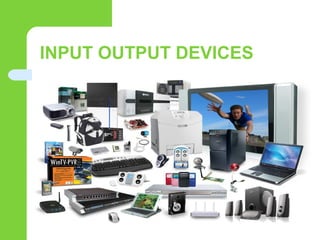
INPUT OUTPUT DEVICES
TYPES OF INPUT DEVICES
 Keyboard
 Mouse
 Scanner
 Barcode reader.
 Light pen
 Microphone
 Magnetic-stripe reader
All the devices above feed data or instruction into a computer for display,
processing, storage, or outputting.
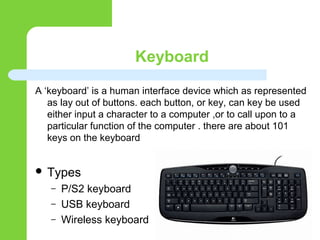
Keyboard
A ‘keyboard’ is a human interface device which as represented
as lay out of buttons. each button, or key, can key be used
either input a character to a computer ,or to call upon to a
particular function of the computer . there are about 101
keys on the keyboard
 Types
– P/S2 keyboard
– USB keyboard
– Wireless keyboard
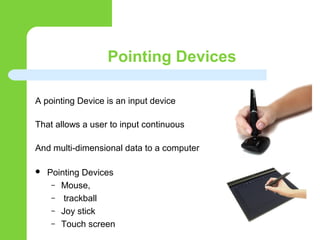
Pointing Devices
A pointing Device is an input device
That allows a user to input continuous
And multi-dimensional data to a computer
 Pointing Devices
– Mouse,
– trackball
– Joy stick
– Touch screen
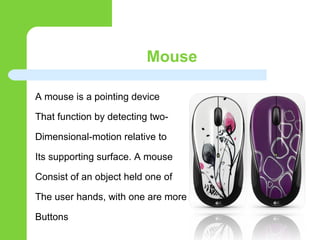
Mouse
A mouse is a pointing device
That function by detecting two-
Dimensional-motion relative to
Its supporting surface. A mouse
Consist of an object held one of
The user hands, with one are more
Buttons
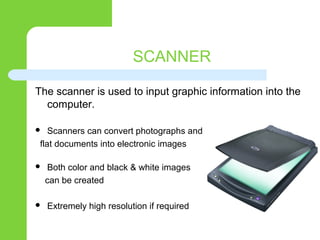
SCANNER
The scanner is used to input graphic information into the
computer.
 Scanners can convert photographs and
flat documents into electronic images
 Both color and black & white images
can be created
 Extremely high resolution if required
Light pen
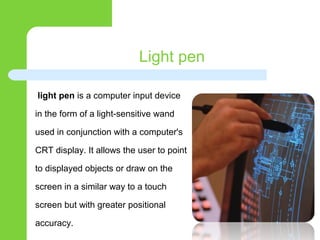
light pen is a computer input device
in the form of a light-sensitive wand
used in conjunction with a computer's
CRT display. It allows the user to point
to displayed objects or draw on the
screen in a similar way to a touch
screen but with greater positional
accuracy.
Voice Input Device
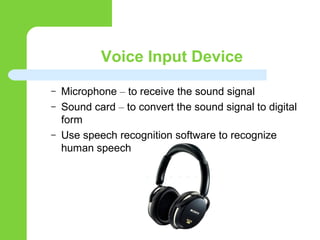
– Microphone – to receive the sound signal
– Sound card – to convert the sound signal to digital
form
– Use speech recognition software to recognize
human speech
speech recognition Device
A voice command device controlled by mean of
human voice . Speech recognition convert spoken
words to text
MONITOR(O/P) DEVICE
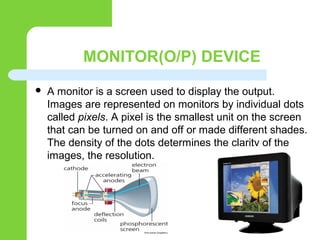
 A monitor is a screen used to display the output.
Images are represented on monitors by individual dots
called pixels. A pixel is the smallest unit on the screen
that can be turned on and off or made different shades.
The density of the dots determines the clarity of the
images, the resolution.
Printer
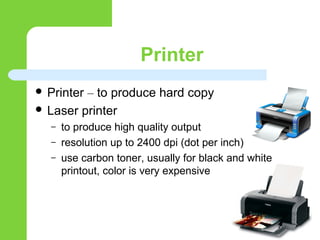
 Printer – to produce hard copy
 Laser printer
– to produce high quality output
– resolution up to 2400 dpi (dot per inch)
– use carbon toner, usually for black and white
printout, color is very expensive
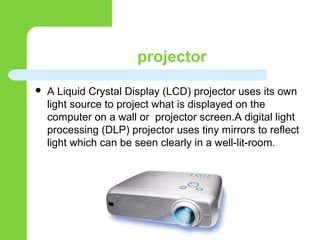
projector
 A Liquid Crystal Display (LCD) projector uses its own
light source to project what is displayed on the
computer on a wall or projector screen.A digital light
processing (DLP) projector uses tiny mirrors to reflect
light which can be seen clearly in a well-lit-room.
LSI DEVICES EXPLANIATION
 Speed and characteristics of these devices are
very different from that of CPU so they cannot
be connected directly
 Interface chips are needed to resolve this
problem
 Main function of an
interface chip is to
synchronize data
transfer between CPU and I/O
device
Multiple I/O devices
 Data pins of interface chip are connected to
CPU data bus and I/O port pins are connected
to I/O device
 Since a CPU may have multiple I/O devices,
CPU data bus may be connected to data buses
of multiple interface
 A decoder is a function
to restore information
that has been compressed
by encoding.
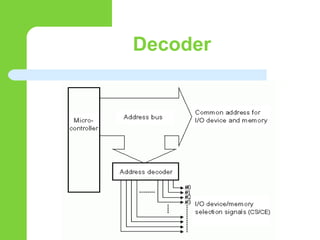
Decoder
DECODER
 An address decoder is used to select one
device to respond to the CPU I/O request
 Different CPUs deal with I/O devices differently
 Some CPUs have dedicated instructions for
performing input and output operations
(isolated I/O)
 Other CPUs use the same instruction for reading from
memory and reading from input devices, as well as
writing data into memory and writing data into output
devices (memory-mapped I/O)
Synchronization of CPU
and interface chip
 Input synchronization: Two ways of doing this
 There must be a mechanism to make sure that there are valid data in the
interface chip when CPU reads them
 Input synchronization: two ways of doing this
1. Polling method
– interface chip uses a status bit to indicate if it has valid data for
CPU
– CPU keeps checking status bit until it is set, and then reads
data from interface chip
– Simple method, used when CPU has nothing else to do
1. Interrupt driven method: interface chip interrupts the CPU when it
has new data. CPU executes the ISR
Synchronization of CPU
and interface chip
 Output synchronization: Two ways of doing this
1. Polling method
– interface chip uses a status bit to indicate that the data register
is empty
– CPU keeps checking status bit until it is set, and then writes
data into interface chip
 Interrupt driven method: interface chip
interrupts the CPU when it data register is
empty. CPU executes the ISR
What is Peripheral devies

What is Peripheral devies

  • 2.
  • 3.
    What is PeripheralDevices ?  A computer peripheral, or peripheral device, is an external object that provides input and output for the computer.  An input device is a peripheral used to transfer data from the outside world into a computer system.
  • 4.
  • 5.
    TYPES OF INPUTDEVICES  Keyboard  Mouse  Scanner  Barcode reader.  Light pen  Microphone  Magnetic-stripe reader All the devices above feed data or instruction into a computer for display, processing, storage, or outputting.
  • 6.
    Keyboard A ‘keyboard’ isa human interface device which as represented as lay out of buttons. each button, or key, can key be used either input a character to a computer ,or to call upon to a particular function of the computer . there are about 101 keys on the keyboard  Types – P/S2 keyboard – USB keyboard – Wireless keyboard
  • 7.
    Pointing Devices A pointingDevice is an input device That allows a user to input continuous And multi-dimensional data to a computer  Pointing Devices – Mouse, – trackball – Joy stick – Touch screen
  • 8.
    Mouse A mouse isa pointing device That function by detecting two- Dimensional-motion relative to Its supporting surface. A mouse Consist of an object held one of The user hands, with one are more Buttons
  • 9.
    SCANNER The scanner isused to input graphic information into the computer.  Scanners can convert photographs and flat documents into electronic images  Both color and black & white images can be created  Extremely high resolution if required
  • 10.
    Light pen light penis a computer input device in the form of a light-sensitive wand used in conjunction with a computer's CRT display. It allows the user to point to displayed objects or draw on the screen in a similar way to a touch screen but with greater positional accuracy.
  • 11.
    Voice Input Device –Microphone – to receive the sound signal – Sound card – to convert the sound signal to digital form – Use speech recognition software to recognize human speech
  • 12.
    speech recognition Device Avoice command device controlled by mean of human voice . Speech recognition convert spoken words to text
  • 13.
    MONITOR(O/P) DEVICE  Amonitor is a screen used to display the output. Images are represented on monitors by individual dots called pixels. A pixel is the smallest unit on the screen that can be turned on and off or made different shades. The density of the dots determines the clarity of the images, the resolution.
  • 14.
    Printer  Printer –to produce hard copy  Laser printer – to produce high quality output – resolution up to 2400 dpi (dot per inch) – use carbon toner, usually for black and white printout, color is very expensive
  • 15.
    projector  A LiquidCrystal Display (LCD) projector uses its own light source to project what is displayed on the computer on a wall or projector screen.A digital light processing (DLP) projector uses tiny mirrors to reflect light which can be seen clearly in a well-lit-room.
  • 16.
    LSI DEVICES EXPLANIATION Speed and characteristics of these devices are very different from that of CPU so they cannot be connected directly  Interface chips are needed to resolve this problem  Main function of an interface chip is to synchronize data transfer between CPU and I/O device
  • 17.
    Multiple I/O devices Data pins of interface chip are connected to CPU data bus and I/O port pins are connected to I/O device  Since a CPU may have multiple I/O devices, CPU data bus may be connected to data buses of multiple interface  A decoder is a function to restore information that has been compressed by encoding.
  • 18.
  • 19.
    DECODER  An addressdecoder is used to select one device to respond to the CPU I/O request  Different CPUs deal with I/O devices differently  Some CPUs have dedicated instructions for performing input and output operations (isolated I/O)  Other CPUs use the same instruction for reading from memory and reading from input devices, as well as writing data into memory and writing data into output devices (memory-mapped I/O)
  • 20.
    Synchronization of CPU andinterface chip  Input synchronization: Two ways of doing this  There must be a mechanism to make sure that there are valid data in the interface chip when CPU reads them  Input synchronization: two ways of doing this 1. Polling method – interface chip uses a status bit to indicate if it has valid data for CPU – CPU keeps checking status bit until it is set, and then reads data from interface chip – Simple method, used when CPU has nothing else to do 1. Interrupt driven method: interface chip interrupts the CPU when it has new data. CPU executes the ISR
  • 21.
    Synchronization of CPU andinterface chip  Output synchronization: Two ways of doing this 1. Polling method – interface chip uses a status bit to indicate that the data register is empty – CPU keeps checking status bit until it is set, and then writes data into interface chip  Interrupt driven method: interface chip interrupts the CPU when it data register is empty. CPU executes the ISR