A computer like human brain receives data and
instructions, stores them and processes the data according
to the instructions given to it. It receives data from input
devices, stores them in memory and displays them through
an output device. The physical devices that make up a
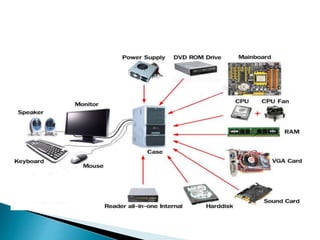
computer are referred to as hardware. Computer hardware
includes all the electrical, mechanical, and the
electronic parts of a computer. Any part that we can see or
touch is the hard ware.
Computer hardware can be classified into two categories :
1. CPU (Central Processing Unit)
2. Computer Peripherals
CPU is the brain of a computer. It has an arithmetic
logic unit (ALU) to perform arithmetical and logical
operations. It has a control unit to co-ordinate the.
aclivities of the CPU and main memoryfor primary
storage.
The input/output and storage devices surround the central processing unit
(CPU). Hence, they are called the peripheral devices. They are usually the
electromechanical devices connected to the CPU that exchange data and
programs with the CPU. The users interact with the CPU through these
devices. Thus, they act as interface between users and the CPU. The
interaction is difficult because of the language barrier. The CPU uses
machine language, which is difficult for most users. The input- output (1/0)
devices help in taking the translated version of the input to the machine's
memory and similarly, to render the processed symbols into the language
of the user.
Computer needs to be given instructions to perform any task. A set
of instructions for a specific task is termed a routine and a
complete set of instructions to execute a related set of tasks is a
program. Software refers to the set of computer programs,
procedures that describe the programs, how they are to be used.
We can say that it is the collection of programs, which increase
the capabilities of the hardware. Software guides the computer at
every step where to start and stop during a particular job. The
process of software development is called programming.
Computer software can be divided into two major categories :
1.SystemsSoftware
2. Applications Software
System software are general programs designed for
performing tasks such as controlling all operations required
to move data into and out of the computer. It communicates
with printers, card reader, disk, tapes etc. monitor the use of
various hardware like memory, CPU etc. Also system
software are essential for the development of applications
software. System Software allows application packages to
be run on the computer with less time and effort. Remember
that it is not possible to run application software without
system software.
System Software are three types :
1. System Management Programs
2. System Support Programs
3. System Development Programs
Application Software is a set of programs to carry out
operations for a specific application. For example,
payroll is an application software for an organization to
produce pay slips as an output. Application software is
useful for word processing, billing system, accounting,
producing statistical report, analysis of numerous data
in research, weather forecasting, etc. In later modules
you will learn about MS WORD, Lotus 1-2-3 and
BASE III Plus. All these are application softwares.
The input, output and storage devices surround the central processing unit
(CPU) are called the peripheral devices. They are usually the
electromechanical devices connected to the CPU that exchange data
and programs with the CPU. The users interact with the CPU through
these devices. Thus, they act as interface between users and the CPU.
The interaction is difficult because of the language barrier. The CPU
uses machine language, which is difficult for most users. The input-
output (1/0) devices help in taking the translated version of the input to
the machine's memory and similarly, to render the processed symbols
into the language of the user.
During the first two decades of commercial use of computers, 110
operation was performed mostly by punching holes on cards and paper
tape with a special device. More direct and convenient 1/0 devices have
been developed since then. The peripherals connected directly to the
CPU are called online devices and devices not directly connected are
called offline devices.
 The peripherals can be further divided into :
1. Input Devices
2. Output Devices
3. Computer Memory
 Input Devices
Input devices allow the user to input data and instructions to the
computer.
Output Devices
Output devices help us to get the information from computer.
This devices is a link between computer and users.

Computer Memory
Computer memory is just like a human brain. It is used to store
data and instructions. Computer memory is the storage space in
computer where data is to be processed and instructions required
for processing are stored.
 All computer peripheral devices which use to input data
and instructions to the computer are called Input
Devices.A Input devices accept data and instructions
from the user and convert information or data in to a
form which can be understood by the computer.
A good input device should provide accurate, timely
and useful data to the main memory of the computer for
processing.
 Following are few of the important input devices which are used in a
computer:
1. Keyboard
2. Mouse
3. Light Pen
4. Trackball
5. Joystick
6. Scanners
7. Optical Mark Reader
8. Optical Character Reader
9. Barcode Reader
10. Magnetic Ink Character Recognition
11. Voice Recognition Systems
12. Digital Cameras

 Keyboard is the most popular input device for direct
entry of data and instructions into computer
 Keyboards are of two sizes 84 keys or 101/102 keys,
but now keyboards with 104 keys or 108 keys are also
available for Windows and Internet.
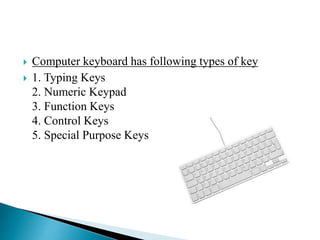
 Computer keyboard has following types of key
 1. Typing Keys
2. Numeric Keypad
3. Function Keys
4. Control Keys
5. Special Purpose Keys
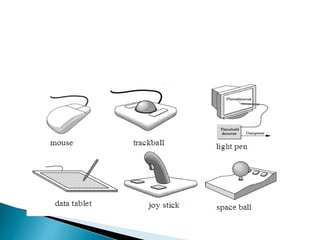
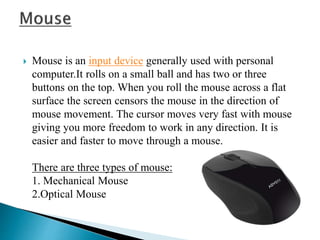
 Mouse is an input device generally used with personal
computer.It rolls on a small ball and has two or three
buttons on the top. When you roll the mouse across a flat
surface the screen censors the mouse in the direction of
mouse movement. The cursor moves very fast with mouse
giving you more freedom to work in any direction. It is
easier and faster to move through a mouse.
There are three types of mouse:
1. Mechanical Mouse
2.Optical Mouse
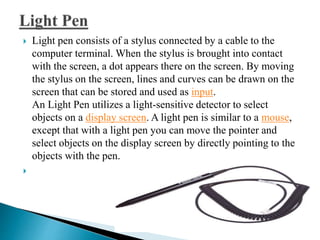
 Light pen consists of a stylus connected by a cable to the
computer terminal. When the stylus is brought into contact
with the screen, a dot appears there on the screen. By moving
the stylus on the screen, lines and curves can be drawn on the
screen that can be stored and used as input.
An Light Pen utilizes a light-sensitive detector to select
objects on a display screen. A light pen is similar to a mouse,
except that with a light pen you can move the pointer and
select objects on the display screen by directly pointing to the
objects with the pen.

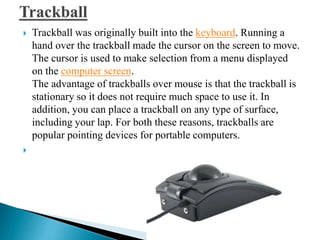
 Trackball was originally built into the keyboard. Running a
hand over the trackball made the cursor on the screen to move.
The cursor is used to make selection from a menu displayed
on the computer screen.
The advantage of trackballs over mouse is that the trackball is
stationary so it does not require much space to use it. In
addition, you can place a trackball on any type of surface,
including your lap. For both these reasons, trackballs are
popular pointing devices for portable computers.

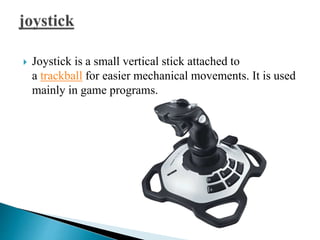
 Joystick is a small vertical stick attached to
a trackball for easier mechanical movements. It is used
mainly in game programs.
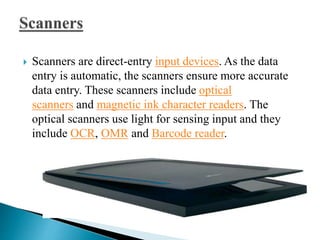
 Scanners are direct-entry input devices. As the data
entry is automatic, the scanners ensure more accurate
data entry. These scanners include optical
scanners and magnetic ink character readers. The
optical scanners use light for sensing input and they
include OCR, OMR and Barcode reader.
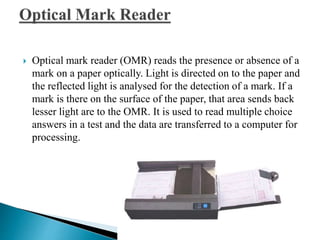
 Optical mark reader (OMR) reads the presence or absence of a
mark on a paper optically. Light is directed on to the paper and
the reflected light is analysed for the detection of a mark. If a
mark is there on the surface of the paper, that area sends back
lesser light are to the OMR. It is used to read multiple choice
answers in a test and the data are transferred to a computer for
processing.
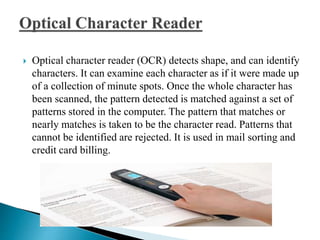
 Optical character reader (OCR) detects shape, and can identify
characters. It can examine each character as if it were made up
of a collection of minute spots. Once the whole character has
been scanned, the pattern detected is matched against a set of
patterns stored in the computer. The pattern that matches or
nearly matches is taken to be the character read. Patterns that
cannot be identified are rejected. It is used in mail sorting and
credit card billing.
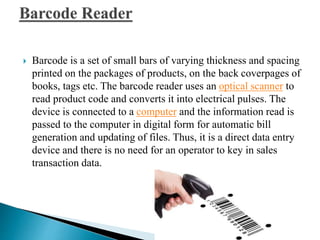
 Barcode is a set of small bars of varying thickness and spacing
printed on the packages of products, on the back coverpages of
books, tags etc. The barcode reader uses an optical scanner to
read product code and converts it into electrical pulses. The
device is connected to a computer and the information read is
passed to the computer in digital form for automatic bill
generation and updating of files. Thus, it is a direct data entry
device and there is no need for an operator to key in sales
transaction data.
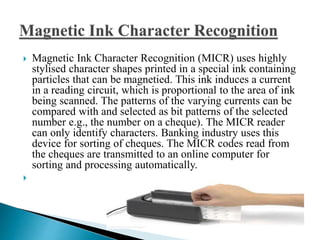
 Magnetic Ink Character Recognition (MICR) uses highly
stylised character shapes printed in a special ink containing
particles that can be magnetied. This ink induces a current
in a reading circuit, which is proportional to the area of ink
being scanned. The patterns of the varying currents can be
compared with and selected as bit patterns of the selected
number e.g., the number on a cheque). The MICR reader
can only identify characters. Banking industry uses this
device for sorting of cheques. The MICR codes read from
the cheques are transmitted to an online computer for
sorting and processing automatically.

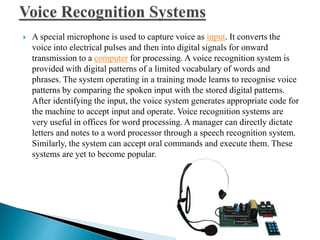
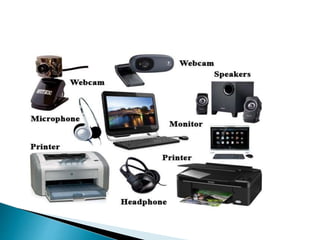
 A special microphone is used to capture voice as input. It converts the
voice into electrical pulses and then into digital signals for onward
transmission to a computer for processing. A voice recognition system is
provided with digital patterns of a limited vocabulary of words and
phrases. The system operating in a training mode learns to recognise voice
patterns by comparing the spoken input with the stored digital patterns.
After identifying the input, the voice system generates appropriate code for
the machine to accept input and operate. Voice recognition systems are
very useful in offices for word processing. A manager can directly dictate
letters and notes to a word processor through a speech recognition system.
Similarly, the system can accept oral commands and execute them. These
systems are yet to become popular.
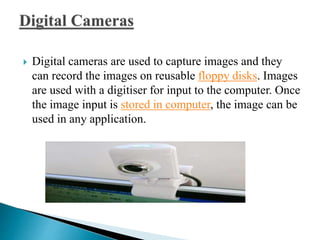
 Digital cameras are used to capture images and they
can record the images on reusable floppy disks. Images
are used with a digitiser for input to the computer. Once
the image input is stored in computer, the image can be
used in any application.
 Output device displays result of the computer processing. A
Output devices return processed data that is information,
back to the user.
Some of the commonly used output devices are :
1. Monitor (Visual Display Unit)
2. Printers
3. Plotter
4. Speakers

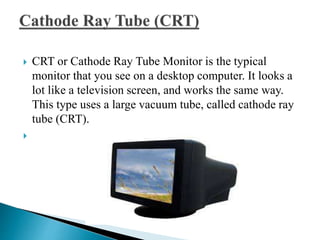
 CRT or Cathode Ray Tube Monitor is the typical
monitor that you see on a desktop computer. It looks a
lot like a television screen, and works the same way.
This type uses a large vacuum tube, called cathode ray
tube (CRT).

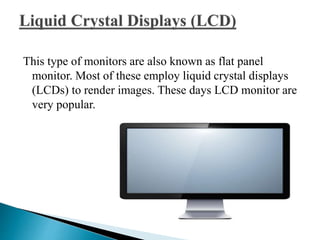
This type of monitors are also known as flat panel
monitor. Most of these employ liquid crystal displays
(LCDs) to render images. These days LCD monitor are
very popular.
 Printers are purely output devices. They produce hard copy
output. Computer printers vary widely in their technologies and
capabilities. They can be classified in a number of ways. First,
they can be classified into three broad groups: character printers,
line printers and page printers. The character printers print one
character at a time. Dot matrix printer (DMP), daisy wheel
printer, thermal printer and inkjet printer are the various types of
character printers. Drum printer and chain printer are line
printers. Laser printer and magnetic printer are page printers.
Some of the most commonly used printers are :
1. Laser Printer
2. Ink Jet Printer
3. Dot Matrix Printer
4. Line Printer
 A laser printer produces high quality print that one
normally finds in publishing. It is extremely fast and
quiet. Moreover, the operation of a laser printer is easy
with automatic paper loading and no smudging or
messing up of ink ribbons. The fastest laser printer can
print up to 200 pages per minute in monochrome (black
and white) and up to 100 pages per minute in colour.
 An ink-jet printer creates an image directly on paper by
spraying ink through as many as 64 tiny nozzles.
Although the image it produces is not generally quite as
sharp as the output of a laser printer, the quality of ink-
jet images is still high.
In general, ink-jet printer offers an excellent middle
ground between dot matrix and laser printer. Like laser
printer, an ink-jet printer is quiet and convenient, but
not particularly fast. Typically, an ink-jet printer is
more expensive than a dot-matrix printer, but costs only
half as much as a laser printer.
 The dot matrix printer was very popular at one point of
time. It is a very versatile and inexpensive output
device. In dot matrix printer the print head physically
"hits" the paper through the ribbon and produces text
(or images) by combinations of dots; hence the name
dot matrix printer. Its speed is measured in characters
per second (CPS). Although it is less expensive, it is
louder, slower and produces lower print quality.
 A line printer is generally used with large computer
systems to produce text based data processing reports.
Line printers are high-speed printers with speeds
ranging anywhere from 100 to about 3800 lines per
minute. In the past, print quality on line printers was
not high. Developments in technology are improving
the print quality on line printers. These are in the cost
range of lacs of Rupees.
 A plotter is a special kind of output device that like
a printer produces images on paper but does so in a
different way. Plotters are designed to produce large
drawings or images, such as construction plans for
buildings or blueprints for mechanical objects. A plotter
can be connected to the port normally used by
a printer.
 Plotters usually come in two designs :
1. Flat Bed
2. Drum
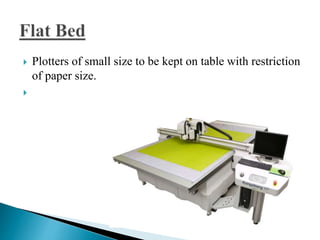
 Plotters of small size to be kept on table with restriction
of paper size.

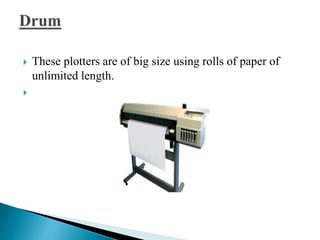
 These plotters are of big size using rolls of paper of
unlimited length.

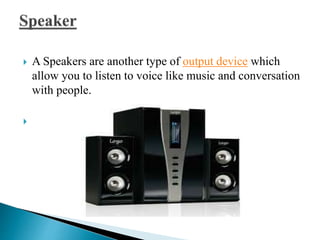
 A Speakers are another type of output device which
allow you to listen to voice like music and conversation
with people.


Hardware software

  • 1.
    A computer likehuman brain receives data and instructions, stores them and processes the data according to the instructions given to it. It receives data from input devices, stores them in memory and displays them through an output device. The physical devices that make up a computer are referred to as hardware. Computer hardware includes all the electrical, mechanical, and the electronic parts of a computer. Any part that we can see or touch is the hard ware. Computer hardware can be classified into two categories : 1. CPU (Central Processing Unit) 2. Computer Peripherals
  • 3.
    CPU is thebrain of a computer. It has an arithmetic logic unit (ALU) to perform arithmetical and logical operations. It has a control unit to co-ordinate the. aclivities of the CPU and main memoryfor primary storage.
  • 4.
    The input/output andstorage devices surround the central processing unit (CPU). Hence, they are called the peripheral devices. They are usually the electromechanical devices connected to the CPU that exchange data and programs with the CPU. The users interact with the CPU through these devices. Thus, they act as interface between users and the CPU. The interaction is difficult because of the language barrier. The CPU uses machine language, which is difficult for most users. The input- output (1/0) devices help in taking the translated version of the input to the machine's memory and similarly, to render the processed symbols into the language of the user.
  • 5.
    Computer needs tobe given instructions to perform any task. A set of instructions for a specific task is termed a routine and a complete set of instructions to execute a related set of tasks is a program. Software refers to the set of computer programs, procedures that describe the programs, how they are to be used. We can say that it is the collection of programs, which increase the capabilities of the hardware. Software guides the computer at every step where to start and stop during a particular job. The process of software development is called programming. Computer software can be divided into two major categories : 1.SystemsSoftware 2. Applications Software
  • 6.
    System software aregeneral programs designed for performing tasks such as controlling all operations required to move data into and out of the computer. It communicates with printers, card reader, disk, tapes etc. monitor the use of various hardware like memory, CPU etc. Also system software are essential for the development of applications software. System Software allows application packages to be run on the computer with less time and effort. Remember that it is not possible to run application software without system software. System Software are three types : 1. System Management Programs 2. System Support Programs 3. System Development Programs
  • 7.
    Application Software isa set of programs to carry out operations for a specific application. For example, payroll is an application software for an organization to produce pay slips as an output. Application software is useful for word processing, billing system, accounting, producing statistical report, analysis of numerous data in research, weather forecasting, etc. In later modules you will learn about MS WORD, Lotus 1-2-3 and BASE III Plus. All these are application softwares.
  • 8.
    The input, outputand storage devices surround the central processing unit (CPU) are called the peripheral devices. They are usually the electromechanical devices connected to the CPU that exchange data and programs with the CPU. The users interact with the CPU through these devices. Thus, they act as interface between users and the CPU. The interaction is difficult because of the language barrier. The CPU uses machine language, which is difficult for most users. The input- output (1/0) devices help in taking the translated version of the input to the machine's memory and similarly, to render the processed symbols into the language of the user. During the first two decades of commercial use of computers, 110 operation was performed mostly by punching holes on cards and paper tape with a special device. More direct and convenient 1/0 devices have been developed since then. The peripherals connected directly to the CPU are called online devices and devices not directly connected are called offline devices.
  • 9.
     The peripheralscan be further divided into : 1. Input Devices 2. Output Devices 3. Computer Memory
  • 10.
     Input Devices Inputdevices allow the user to input data and instructions to the computer. Output Devices Output devices help us to get the information from computer. This devices is a link between computer and users.  Computer Memory Computer memory is just like a human brain. It is used to store data and instructions. Computer memory is the storage space in computer where data is to be processed and instructions required for processing are stored.
  • 11.
     All computerperipheral devices which use to input data and instructions to the computer are called Input Devices.A Input devices accept data and instructions from the user and convert information or data in to a form which can be understood by the computer. A good input device should provide accurate, timely and useful data to the main memory of the computer for processing.
  • 12.
     Following arefew of the important input devices which are used in a computer: 1. Keyboard 2. Mouse 3. Light Pen 4. Trackball 5. Joystick 6. Scanners 7. Optical Mark Reader 8. Optical Character Reader 9. Barcode Reader 10. Magnetic Ink Character Recognition 11. Voice Recognition Systems 12. Digital Cameras 
  • 14.
     Keyboard isthe most popular input device for direct entry of data and instructions into computer  Keyboards are of two sizes 84 keys or 101/102 keys, but now keyboards with 104 keys or 108 keys are also available for Windows and Internet.
  • 15.
     Computer keyboardhas following types of key  1. Typing Keys 2. Numeric Keypad 3. Function Keys 4. Control Keys 5. Special Purpose Keys
  • 16.
     Mouse isan input device generally used with personal computer.It rolls on a small ball and has two or three buttons on the top. When you roll the mouse across a flat surface the screen censors the mouse in the direction of mouse movement. The cursor moves very fast with mouse giving you more freedom to work in any direction. It is easier and faster to move through a mouse. There are three types of mouse: 1. Mechanical Mouse 2.Optical Mouse
  • 17.
     Light penconsists of a stylus connected by a cable to the computer terminal. When the stylus is brought into contact with the screen, a dot appears there on the screen. By moving the stylus on the screen, lines and curves can be drawn on the screen that can be stored and used as input. An Light Pen utilizes a light-sensitive detector to select objects on a display screen. A light pen is similar to a mouse, except that with a light pen you can move the pointer and select objects on the display screen by directly pointing to the objects with the pen. 
  • 18.
     Trackball wasoriginally built into the keyboard. Running a hand over the trackball made the cursor on the screen to move. The cursor is used to make selection from a menu displayed on the computer screen. The advantage of trackballs over mouse is that the trackball is stationary so it does not require much space to use it. In addition, you can place a trackball on any type of surface, including your lap. For both these reasons, trackballs are popular pointing devices for portable computers. 
  • 19.
     Joystick isa small vertical stick attached to a trackball for easier mechanical movements. It is used mainly in game programs.
  • 20.
     Scanners aredirect-entry input devices. As the data entry is automatic, the scanners ensure more accurate data entry. These scanners include optical scanners and magnetic ink character readers. The optical scanners use light for sensing input and they include OCR, OMR and Barcode reader.
  • 21.
     Optical markreader (OMR) reads the presence or absence of a mark on a paper optically. Light is directed on to the paper and the reflected light is analysed for the detection of a mark. If a mark is there on the surface of the paper, that area sends back lesser light are to the OMR. It is used to read multiple choice answers in a test and the data are transferred to a computer for processing.
  • 22.
     Optical characterreader (OCR) detects shape, and can identify characters. It can examine each character as if it were made up of a collection of minute spots. Once the whole character has been scanned, the pattern detected is matched against a set of patterns stored in the computer. The pattern that matches or nearly matches is taken to be the character read. Patterns that cannot be identified are rejected. It is used in mail sorting and credit card billing.
  • 23.
     Barcode isa set of small bars of varying thickness and spacing printed on the packages of products, on the back coverpages of books, tags etc. The barcode reader uses an optical scanner to read product code and converts it into electrical pulses. The device is connected to a computer and the information read is passed to the computer in digital form for automatic bill generation and updating of files. Thus, it is a direct data entry device and there is no need for an operator to key in sales transaction data.
  • 24.
     Magnetic InkCharacter Recognition (MICR) uses highly stylised character shapes printed in a special ink containing particles that can be magnetied. This ink induces a current in a reading circuit, which is proportional to the area of ink being scanned. The patterns of the varying currents can be compared with and selected as bit patterns of the selected number e.g., the number on a cheque). The MICR reader can only identify characters. Banking industry uses this device for sorting of cheques. The MICR codes read from the cheques are transmitted to an online computer for sorting and processing automatically. 
  • 25.
     A specialmicrophone is used to capture voice as input. It converts the voice into electrical pulses and then into digital signals for onward transmission to a computer for processing. A voice recognition system is provided with digital patterns of a limited vocabulary of words and phrases. The system operating in a training mode learns to recognise voice patterns by comparing the spoken input with the stored digital patterns. After identifying the input, the voice system generates appropriate code for the machine to accept input and operate. Voice recognition systems are very useful in offices for word processing. A manager can directly dictate letters and notes to a word processor through a speech recognition system. Similarly, the system can accept oral commands and execute them. These systems are yet to become popular.
  • 26.
     Digital camerasare used to capture images and they can record the images on reusable floppy disks. Images are used with a digitiser for input to the computer. Once the image input is stored in computer, the image can be used in any application.
  • 27.
     Output devicedisplays result of the computer processing. A Output devices return processed data that is information, back to the user. Some of the commonly used output devices are : 1. Monitor (Visual Display Unit) 2. Printers 3. Plotter 4. Speakers 
  • 30.
     CRT orCathode Ray Tube Monitor is the typical monitor that you see on a desktop computer. It looks a lot like a television screen, and works the same way. This type uses a large vacuum tube, called cathode ray tube (CRT). 
  • 31.
    This type ofmonitors are also known as flat panel monitor. Most of these employ liquid crystal displays (LCDs) to render images. These days LCD monitor are very popular.
  • 32.
     Printers arepurely output devices. They produce hard copy output. Computer printers vary widely in their technologies and capabilities. They can be classified in a number of ways. First, they can be classified into three broad groups: character printers, line printers and page printers. The character printers print one character at a time. Dot matrix printer (DMP), daisy wheel printer, thermal printer and inkjet printer are the various types of character printers. Drum printer and chain printer are line printers. Laser printer and magnetic printer are page printers. Some of the most commonly used printers are : 1. Laser Printer 2. Ink Jet Printer 3. Dot Matrix Printer 4. Line Printer
  • 33.
     A laserprinter produces high quality print that one normally finds in publishing. It is extremely fast and quiet. Moreover, the operation of a laser printer is easy with automatic paper loading and no smudging or messing up of ink ribbons. The fastest laser printer can print up to 200 pages per minute in monochrome (black and white) and up to 100 pages per minute in colour.
  • 34.
     An ink-jetprinter creates an image directly on paper by spraying ink through as many as 64 tiny nozzles. Although the image it produces is not generally quite as sharp as the output of a laser printer, the quality of ink- jet images is still high. In general, ink-jet printer offers an excellent middle ground between dot matrix and laser printer. Like laser printer, an ink-jet printer is quiet and convenient, but not particularly fast. Typically, an ink-jet printer is more expensive than a dot-matrix printer, but costs only half as much as a laser printer.
  • 35.
     The dotmatrix printer was very popular at one point of time. It is a very versatile and inexpensive output device. In dot matrix printer the print head physically "hits" the paper through the ribbon and produces text (or images) by combinations of dots; hence the name dot matrix printer. Its speed is measured in characters per second (CPS). Although it is less expensive, it is louder, slower and produces lower print quality.
  • 36.
     A lineprinter is generally used with large computer systems to produce text based data processing reports. Line printers are high-speed printers with speeds ranging anywhere from 100 to about 3800 lines per minute. In the past, print quality on line printers was not high. Developments in technology are improving the print quality on line printers. These are in the cost range of lacs of Rupees.
  • 37.
     A plotteris a special kind of output device that like a printer produces images on paper but does so in a different way. Plotters are designed to produce large drawings or images, such as construction plans for buildings or blueprints for mechanical objects. A plotter can be connected to the port normally used by a printer.  Plotters usually come in two designs : 1. Flat Bed 2. Drum
  • 38.
     Plotters ofsmall size to be kept on table with restriction of paper size. 
  • 39.
     These plottersare of big size using rolls of paper of unlimited length. 
  • 40.
     A Speakersare another type of output device which allow you to listen to voice like music and conversation with people. 