E-
RESOURCES
OVERVIEW
WHAT IS E-RESOURCE?
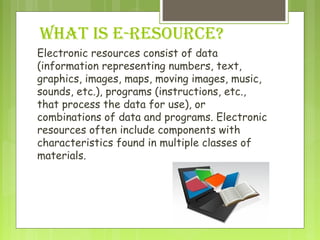
Electronic resources consist of data
(information representing numbers, text,
graphics, images, maps, moving images, music,
sounds, etc.), programs (instructions, etc.,
that process the data for use), or
combinations of data and programs. Electronic
resources often include components with
characteristics found in multiple classes of
materials.
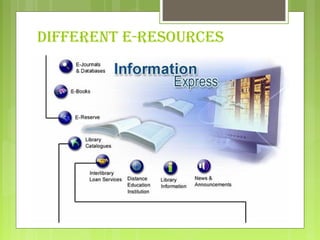
DIFFERENT E-RESOURCES
DIFFERENT TYPES OF E-
RESOURCES
 Research Guides by Subject: Subject guides are web resources
designed by University of Chicago Librarians which provide an
overview of resources in a subject area. They include staff
contacts, print collections, electronic resources, as well as links
to other relevant Web sites. Subject guides are a good place to
start when you are beginning research on a specific topic.
 Electronic Books and Texts: The Library provides access to a
variety of electronic books, as well as the other printed works
(such as essays, poems, or historical doocuments). Some of these
electronic books and texts are part of large, searchable
databases.
 Electronic Journals: The Library has an E-Journals Database to
help you find online versions of journals.
 Library Catalogs: Most libraries now provide
access to their catalogs from their web sites.
Many others provide information about their
holdings into larger databases such as 
World Cat or the RLG Union Catalog.
 Reference Sources: Many dictionaries,
almanacs, encyclopedias, and other reference
sources are now available online in full-text.
 Image Databases (Art, Maps, Medical,
etc.): Some databases include graphics or
images, such as photos, paintings or maps.
ADVANTAGES OF E-RESOURCE
 Huge range of information available
 >8 billion web pages
 >20,000 journals
 Timely, up-to-date information sources
 ‘Value added’ functionality (e.g. searching)
 Additional skills development – ICT skills
 Large volume of quality, free information
DISADVANTAGES OF E-
RESOURCES
 Technical barriers to use
 need computers, network connection, software,
etc
 Infrastructural problems
 bandwidth and telecommunications issues
 unreliable electricity supplies, etc
 Skills and training requirements
 Costs can be high: technology and content
 Variable quality of information
WHAT IS DATABASE?
 A database is an organized collection of data. The data
are typically organized to model relevant aspects of
reality in a way that supports processes requiring this
information. For example, modeling the availability of
rooms in hotels in a way that supports finding a hotel
with vacancies.
 Database management systems (DBMSs) are specially
designed applications that interact with the user, other
applications, and the database itself to capture and
analyze data. A general-purpose database management
system (DBMS) is a software system designed to allow
the definition, creation, querying, update, and
administration of databases. Well-known DBMSs
include
EXAMPLES OF DATABASE
  MySQL
  SQLite
  Microsoft SQL Server  
 SAP
 Dbase
  FoxPro
  IBM DB2
  FileMaker Pro
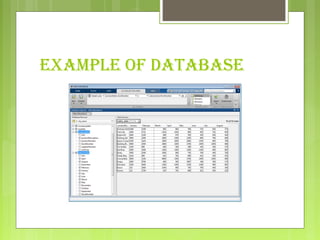
EXAMPLE OF DATABASE
ONLINE DATABASE
 An online database is a database accessible from a network,
including from the Internet.
 It differs from a local database, held in an individual
computer or its attached storage, such as a CD.
 For the system or software designed to Currently, there are
several database products designed specifically as hosted
databases delivered as software as a service products. These
differ from typical traditional databases such as Oracle,
Microsoft SQL Server, Sybase, etc. Some of the differences
are:
 These online databases are delivered primarily via a web
browser
 They are often purchased by a monthly subscription
 They embed common collaboration features such as sharing,
email notifications, etc.
THANK YOU
 PRESENTED BY-
 KAJAL AGGARWAL- 132197
 ANCHAL SINGHAL- 132117

What is e resource

  • 1.
  • 2.
  • 3.
    WHAT IS E-RESOURCE? Electronicresources consist of data (information representing numbers, text, graphics, images, maps, moving images, music, sounds, etc.), programs (instructions, etc., that process the data for use), or combinations of data and programs. Electronic resources often include components with characteristics found in multiple classes of materials.
  • 4.
  • 5.
    DIFFERENT TYPES OFE- RESOURCES  Research Guides by Subject: Subject guides are web resources designed by University of Chicago Librarians which provide an overview of resources in a subject area. They include staff contacts, print collections, electronic resources, as well as links to other relevant Web sites. Subject guides are a good place to start when you are beginning research on a specific topic.  Electronic Books and Texts: The Library provides access to a variety of electronic books, as well as the other printed works (such as essays, poems, or historical doocuments). Some of these electronic books and texts are part of large, searchable databases.  Electronic Journals: The Library has an E-Journals Database to help you find online versions of journals.
  • 6.
     Library Catalogs: Mostlibraries now provide access to their catalogs from their web sites. Many others provide information about their holdings into larger databases such as  World Cat or the RLG Union Catalog.  Reference Sources: Many dictionaries, almanacs, encyclopedias, and other reference sources are now available online in full-text.  Image Databases (Art, Maps, Medical, etc.): Some databases include graphics or images, such as photos, paintings or maps.
  • 7.
    ADVANTAGES OF E-RESOURCE Huge range of information available  >8 billion web pages  >20,000 journals  Timely, up-to-date information sources  ‘Value added’ functionality (e.g. searching)  Additional skills development – ICT skills  Large volume of quality, free information
  • 8.
    DISADVANTAGES OF E- RESOURCES Technical barriers to use  need computers, network connection, software, etc  Infrastructural problems  bandwidth and telecommunications issues  unreliable electricity supplies, etc  Skills and training requirements  Costs can be high: technology and content  Variable quality of information
  • 9.
    WHAT IS DATABASE? A database is an organized collection of data. The data are typically organized to model relevant aspects of reality in a way that supports processes requiring this information. For example, modeling the availability of rooms in hotels in a way that supports finding a hotel with vacancies.  Database management systems (DBMSs) are specially designed applications that interact with the user, other applications, and the database itself to capture and analyze data. A general-purpose database management system (DBMS) is a software system designed to allow the definition, creation, querying, update, and administration of databases. Well-known DBMSs include
  • 10.
    EXAMPLES OF DATABASE  MySQL   SQLite   Microsoft SQL Server    SAP  Dbase   FoxPro   IBM DB2   FileMaker Pro
  • 11.
  • 12.
    ONLINE DATABASE  An onlinedatabase is a database accessible from a network, including from the Internet.  It differs from a local database, held in an individual computer or its attached storage, such as a CD.  For the system or software designed to Currently, there are several database products designed specifically as hosted databases delivered as software as a service products. These differ from typical traditional databases such as Oracle, Microsoft SQL Server, Sybase, etc. Some of the differences are:  These online databases are delivered primarily via a web browser  They are often purchased by a monthly subscription  They embed common collaboration features such as sharing, email notifications, etc.
  • 13.
    THANK YOU  PRESENTEDBY-  KAJAL AGGARWAL- 132197  ANCHAL SINGHAL- 132117