Electronic Resource
Management (ERM) from
Libraries
Dr. Jayant M. Nandagaoli
Head, Department of Library & Information Science,
HPT Arts and RYK Science College, Nashik
Outline
2
 Introduction
 Electronic Resources
Concept, Brief Historical Development, Features & Challenges
 What we need to do with e-Resources?
 Electronic Resource Management (ERM): A Concept
Lifecycle of ERM
 Electronic Resource Management System (ERMS)
Available Software Solutions.
 COREL ERM – An Open Source ERM Product
Introduction
3
 Integrated Library System - Library Manager Software and
our Hybrid Libraries.
 Library Collection – current scenario.
(* The great shift: More than 96% of science & technology (S&T) and 86% humanities and
social sciences (HUSS) journals are published online.
* Sift in Acquisition policy in India.
* it's been predicted that, by 2025, 65% of academic library expenditures will be on e-
resources. (OCLC 2020)
 Electronic Resources – e-Contents and its Management.
 New solution – Electronic Resource Management.
Electronic Resource Management (ERM) covers practices and techniques to track the selection,
acquisition, licensing, access, maintenance, usage, evaluation, retention/cancellation and preservation
of electronic information resources of a library.
Electronic Resources
4
 International Standard Bibliographic Description for Electronic
Resources (ISBD (ER) defined electronic resources as the
materials which are codified for computer elaboration, including
those materials that require the use of computer peripherals
(IFLA, 1999).
 An e-resource is a collection of digital content deliver to the user
via the internet (Sukula, 2010)
 e-Resources are the digitized data which processed with the help
of Computer and Internet, it contents- Textual, Numerical,
Graphical, Audio, Video, Audio-visual, Images, Animation etc.
 Example – Born digital, e-Documents, e-Database, Mailing list,
e-Contents - Multimedia, Computer programme & Files,
Unstructured Data, Web resources
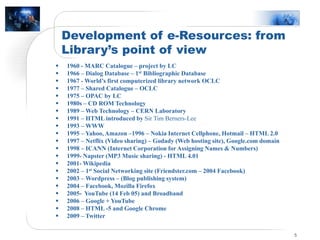
Development of e-Resources: from
Library’s point of view
5
 1960 - MARC Catalogue – project by LC
 1966 – Dialog Database – 1st Bibliographic Database
 1967 - World’s first computerized library network OCLC
 1977 – Shared Catalogue – OCLC
 1975 – OPAC by LC
 1980s – CD ROM Technology
 1989 – Web Technology – CERN Laboratory
 1991 – HTML introduced by Sir Tim Berners-Lee
 1993 – WWW
 1995 – Yahoo, Amazon –1996 – Nokia Internet Cellphone, Hotmail – HTML 2.0
 1997 – Netflix (Video sharing) – Godady (Web hosting site), Google.com domain
 1998 – ICANN (Internet Corporation for Assigning Names & Numbers)
 1999- Napster (MP3 Music sharing) - HTML 4.01
 2001- Wikipedia
 2002 – 1st Social Networking site (Friendster.com – 2004 Facebook)
 2003 – Wordpress – (Blog publishing system)
 2004 – Facebook, Mozilla Firefox
 2005- YouTube (14 Feb 05) and Broadband
 2006 – Google + YouTube
 2008 – HTML -5 and Google Chrome
 2009 – Twitter
E-Resource: Advantages over Print
6
 Effective processing, modification & easy upgradation with
greater ease.
 Knowledge sharing and collaborative facility.
 Influencing with ever lasting impact.
 24×7, any where Access.
 Dynamic Searching inability.
 Easy Duplication and reproduction of Multiple copies.
 Effective mobilization, broadcasting and dissemination.
 Space Economical, Portability & Time saving
E- Resource Challenges
7
 Different Digital Right Management (DRM) System of every
e-resource provider. (Controlling, restriction & access policy)
 Vender Policy – Licensing and Agreement.
 Subscription mode- (Single subscription, Print against subscription, Bulk
Subscription or consortia)
 Access Permission – (Copy, Downloading, Paste, Sharing, multiple access / IP Based,
ID –Password Authentication)
 Infrastructure Requirement – (HW & SW, Speed & Bandwidth)
 Security Maintenance – Virus, Spam, Phising, Backup, Preservation & Archiving
 Pricing model
 Auditing Challenges-
 Use Statistics
What we need to do with e-Resources?
8
 Acquisition –
Selection, Trail
Budgeting & Purchasing
Invoicing
Subscription Period
Terms and Conditions
 Holding List of Databases –
Creating Metadata (tile, issues, subscription, link, availability etc
Format of e-resources –pdf, word, HTML, Audio-Video, images
Search Functionability,
Link Resolver – Citation accessible or not, Error- Not Available, Link expire.
Updating Regularly.
What we need to do with e-Resources?
9
 Licensing –
Defining authorize User & Usage,
Access Site, IPAddress,
No. of downloading,
Rights and restrictions, Jurisdiction, Warranty
Renewal – mode & time period
 Administration & Communication–
Accounting & Uploading,
Access Management and Monitoring,
Maintenance – Troubleshooting, updating, Link Resolving
Authentication, Searching, Backup & Archival,
Access Control and Authentication
Legal Aspects – Copyright, Digital Right Management & Information Rights Mgmt.
What we need to do with e-Resources?
10
 Reporting and Evaluation –
Use Statistics COUNTER & SUSHI
Cost benefit Analysis and Rational for subscription
Evolution of ERM
11
 ERMS entered in the market in early 2000s.
 Study made by Mr. Jewell in 2001 stated that many libraries
started developing local software to manage e-resources.
 Workshop held in May 2002 in Chicago cosponsored by
National Information Standards Organization (NISO) and
Digital Library Federation (DLF) discussed standards related
to issues of ERMS. This lead to _
 Digital Library Federation (DLF)E-Resource Management
Initiative (ERMI) Launched in 2002 and published a report
knows as ERMI Report in August 2004.
Electronic Resource Management System
(ERMS)
12
 An Integrated software solution designed to assist Librarians
to control and manipulate third party licensed E-Resources.
 A Software solution which enabled Librarians-
- To manage the license
- Rights Management
- Access Management
- Collection Development & Renewal of e-resources
- Handling the Legal Issues
- Information Searching and Services
- Usage Statistic & Analysis
ERMS –Definitions
13
 A system that supports management of the information and
workflows, necessary to efficiently select, evaluate, acquisition,
maintain and provide informed access to electronic resources in
accordance with their business and license terms. – (Anderson et all
2004)
 A system designed to assist librarians with the acquisition and
management of electronic resources. It provide tool to help and
manage the licensing and acquisition process to provide access to
electronic materials. - Watson, 2007
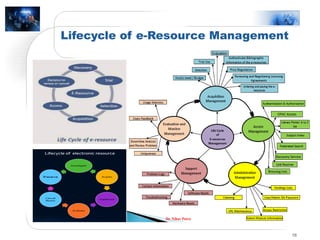
 ERM covers practices and techniques to track the selection,
acquisition, licensing, access, maintenance, usage, evaluation,
retention/cancellation and preservation of electronic information
resources of a library.
 All these practices and techniques are collectively termed as
“Lifecycle” of Electronic Resources.
Need of ERMS For Libraries
14
 Tremendous proliferation of e-resources and in the range of
formats.
 Increasing investment in e-resources by individual, institute,
society and government.
 Libraries are spending significant amount of their budget on
e-resources.
 Need adequate control over the use and access of e-resources
within the Rights, licenses and legal parameters.
 Management of e-content and Lifecycle of e-resources.
 Rationale to access and subscription of e-resources.
 Effective search and Retrieval of desire information.
 Efficient financial management.
Selection Criteria
15
 User friendly
 Well Designed screen (logically arranged)
 Less Technical Knowledge require (Training)
 Unlimited user access
 Help message at every step
 Support system – after sale support
 Easy statistical tool & report facilities
 Multilingual support system (Indigenous)
 Multimedia option
 Compatibility – HW and SW
 It should support international standards for sharing
 Easy and cost-effective maintenance
 Regular Updating
 Cost
Lifecycle of e-Resource Management
16
Dr. Nihar Patra
Some ERM Systems
17
 Commercial ERM
1. Innovative Interface’ Innovative ERM
2. TDNet’ TDNet ERM Solutions
3. Ex Libris’Alma
4. OCLC’ Web-share License Manager
5. Serials Solutions’ 360 Resource Manager
6. Colorado Alliance’ Gold Rush
7. EBSCO’ ERM Essentials
8. SirsiDynix’ E-Resource Central
9. Priory Solution’ Research Monitor
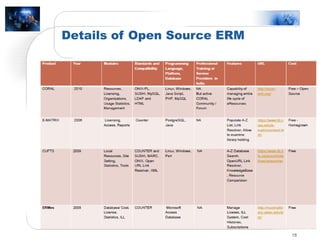
 Open Source ERMS
CORAL (University of Notre Dame)
E-Matrix
CUFTS
ERMes
Details of Open Source ERM
18
Why CORAL (Centralized Online Resources
Acquisitions and Licensing)
19
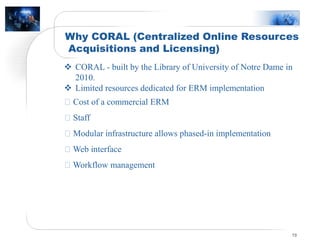
 CORAL - built by the Library of University of Notre Dame in
2010.
 Limited resources dedicated for ERM implementation
Cost of a commercial ERM
Staff
Modular infrastructure allows phased-in implementation
Web interface
Workflow management
Different Modules of CORAL
20
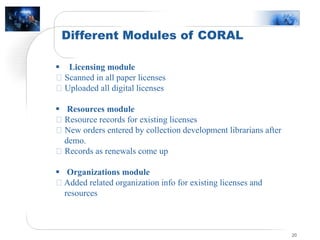
 Licensing module
Scanned in all paper licenses
Uploaded all digital licenses
 Resources module
Resource records for existing licenses
New orders entered by collection development librarians after
demo.
Records as renewals come up
 Organizations module
Added related organization info for existing licenses and
resources
Different Modules of CORAL
21
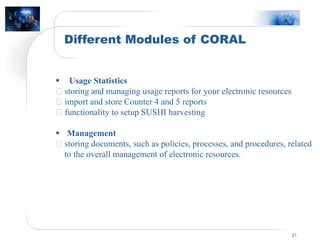
 Usage Statistics
storing and managing usage reports for your electronic resources
import and store Counter 4 and 5 reports
functionality to setup SUSHI harvesting
 Management
storing documents, such as policies, processes, and procedures, related
to the overall management of electronic resources.
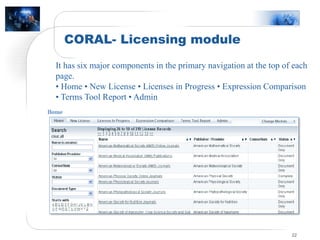
CORAL- Licensing module
22
It has six major components in the primary navigation at the top of each
page.
• Home • New License • Licenses in Progress • Expression Comparison
• Terms Tool Report • Admin
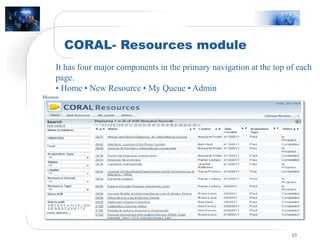
CORAL- Resources module
23
It has four major components in the primary navigation at the top of each
page.
• Home • New Resource • My Queue • Admin
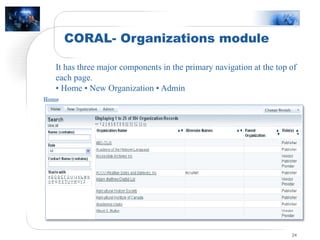
CORAL- Organizations module
24
It has three major components in the primary navigation at the top of
each page.
• Home • New Organization • Admin
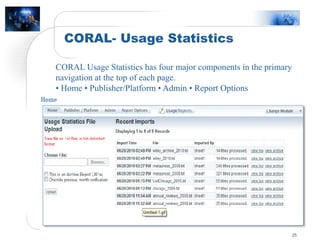
CORAL- Usage Statistics
25
CORAL Usage Statistics has four major components in the primary
navigation at the top of each page.
• Home • Publisher/Platform • Admin • Report Options
Features of CORAL ERM
No annual fees/or subscription fees
Easy installation
Meets my library’s needs
Centralized storage for e-resources contact information
Organized license information
Workflow management
Simple interface
msb.intnet.mu 2004-04-29/ Information Security Seminar 26
Thank you for your attention
Department of Library & Information Science (Since 1984…)
Affiliated to SPPU, Pune
Email – jayantnandagaoli@gmail.com

Electronic resource management system (ERM)

  • 1.
    Electronic Resource Management (ERM)from Libraries Dr. Jayant M. Nandagaoli Head, Department of Library & Information Science, HPT Arts and RYK Science College, Nashik
  • 2.
    Outline 2  Introduction  ElectronicResources Concept, Brief Historical Development, Features & Challenges  What we need to do with e-Resources?  Electronic Resource Management (ERM): A Concept Lifecycle of ERM  Electronic Resource Management System (ERMS) Available Software Solutions.  COREL ERM – An Open Source ERM Product
  • 3.
    Introduction 3  Integrated LibrarySystem - Library Manager Software and our Hybrid Libraries.  Library Collection – current scenario. (* The great shift: More than 96% of science & technology (S&T) and 86% humanities and social sciences (HUSS) journals are published online. * Sift in Acquisition policy in India. * it's been predicted that, by 2025, 65% of academic library expenditures will be on e- resources. (OCLC 2020)  Electronic Resources – e-Contents and its Management.  New solution – Electronic Resource Management. Electronic Resource Management (ERM) covers practices and techniques to track the selection, acquisition, licensing, access, maintenance, usage, evaluation, retention/cancellation and preservation of electronic information resources of a library.
  • 4.
    Electronic Resources 4  InternationalStandard Bibliographic Description for Electronic Resources (ISBD (ER) defined electronic resources as the materials which are codified for computer elaboration, including those materials that require the use of computer peripherals (IFLA, 1999).  An e-resource is a collection of digital content deliver to the user via the internet (Sukula, 2010)  e-Resources are the digitized data which processed with the help of Computer and Internet, it contents- Textual, Numerical, Graphical, Audio, Video, Audio-visual, Images, Animation etc.  Example – Born digital, e-Documents, e-Database, Mailing list, e-Contents - Multimedia, Computer programme & Files, Unstructured Data, Web resources
  • 5.
    Development of e-Resources:from Library’s point of view 5  1960 - MARC Catalogue – project by LC  1966 – Dialog Database – 1st Bibliographic Database  1967 - World’s first computerized library network OCLC  1977 – Shared Catalogue – OCLC  1975 – OPAC by LC  1980s – CD ROM Technology  1989 – Web Technology – CERN Laboratory  1991 – HTML introduced by Sir Tim Berners-Lee  1993 – WWW  1995 – Yahoo, Amazon –1996 – Nokia Internet Cellphone, Hotmail – HTML 2.0  1997 – Netflix (Video sharing) – Godady (Web hosting site), Google.com domain  1998 – ICANN (Internet Corporation for Assigning Names & Numbers)  1999- Napster (MP3 Music sharing) - HTML 4.01  2001- Wikipedia  2002 – 1st Social Networking site (Friendster.com – 2004 Facebook)  2003 – Wordpress – (Blog publishing system)  2004 – Facebook, Mozilla Firefox  2005- YouTube (14 Feb 05) and Broadband  2006 – Google + YouTube  2008 – HTML -5 and Google Chrome  2009 – Twitter
  • 6.
    E-Resource: Advantages overPrint 6  Effective processing, modification & easy upgradation with greater ease.  Knowledge sharing and collaborative facility.  Influencing with ever lasting impact.  24×7, any where Access.  Dynamic Searching inability.  Easy Duplication and reproduction of Multiple copies.  Effective mobilization, broadcasting and dissemination.  Space Economical, Portability & Time saving
  • 7.
    E- Resource Challenges 7 Different Digital Right Management (DRM) System of every e-resource provider. (Controlling, restriction & access policy)  Vender Policy – Licensing and Agreement.  Subscription mode- (Single subscription, Print against subscription, Bulk Subscription or consortia)  Access Permission – (Copy, Downloading, Paste, Sharing, multiple access / IP Based, ID –Password Authentication)  Infrastructure Requirement – (HW & SW, Speed & Bandwidth)  Security Maintenance – Virus, Spam, Phising, Backup, Preservation & Archiving  Pricing model  Auditing Challenges-  Use Statistics
  • 8.
    What we needto do with e-Resources? 8  Acquisition – Selection, Trail Budgeting & Purchasing Invoicing Subscription Period Terms and Conditions  Holding List of Databases – Creating Metadata (tile, issues, subscription, link, availability etc Format of e-resources –pdf, word, HTML, Audio-Video, images Search Functionability, Link Resolver – Citation accessible or not, Error- Not Available, Link expire. Updating Regularly.
  • 9.
    What we needto do with e-Resources? 9  Licensing – Defining authorize User & Usage, Access Site, IPAddress, No. of downloading, Rights and restrictions, Jurisdiction, Warranty Renewal – mode & time period  Administration & Communication– Accounting & Uploading, Access Management and Monitoring, Maintenance – Troubleshooting, updating, Link Resolving Authentication, Searching, Backup & Archival, Access Control and Authentication Legal Aspects – Copyright, Digital Right Management & Information Rights Mgmt.
  • 10.
    What we needto do with e-Resources? 10  Reporting and Evaluation – Use Statistics COUNTER & SUSHI Cost benefit Analysis and Rational for subscription
  • 11.
    Evolution of ERM 11 ERMS entered in the market in early 2000s.  Study made by Mr. Jewell in 2001 stated that many libraries started developing local software to manage e-resources.  Workshop held in May 2002 in Chicago cosponsored by National Information Standards Organization (NISO) and Digital Library Federation (DLF) discussed standards related to issues of ERMS. This lead to _  Digital Library Federation (DLF)E-Resource Management Initiative (ERMI) Launched in 2002 and published a report knows as ERMI Report in August 2004.
  • 12.
    Electronic Resource ManagementSystem (ERMS) 12  An Integrated software solution designed to assist Librarians to control and manipulate third party licensed E-Resources.  A Software solution which enabled Librarians- - To manage the license - Rights Management - Access Management - Collection Development & Renewal of e-resources - Handling the Legal Issues - Information Searching and Services - Usage Statistic & Analysis
  • 13.
    ERMS –Definitions 13  Asystem that supports management of the information and workflows, necessary to efficiently select, evaluate, acquisition, maintain and provide informed access to electronic resources in accordance with their business and license terms. – (Anderson et all 2004)  A system designed to assist librarians with the acquisition and management of electronic resources. It provide tool to help and manage the licensing and acquisition process to provide access to electronic materials. - Watson, 2007  ERM covers practices and techniques to track the selection, acquisition, licensing, access, maintenance, usage, evaluation, retention/cancellation and preservation of electronic information resources of a library.  All these practices and techniques are collectively termed as “Lifecycle” of Electronic Resources.
  • 14.
    Need of ERMSFor Libraries 14  Tremendous proliferation of e-resources and in the range of formats.  Increasing investment in e-resources by individual, institute, society and government.  Libraries are spending significant amount of their budget on e-resources.  Need adequate control over the use and access of e-resources within the Rights, licenses and legal parameters.  Management of e-content and Lifecycle of e-resources.  Rationale to access and subscription of e-resources.  Effective search and Retrieval of desire information.  Efficient financial management.
  • 15.
    Selection Criteria 15  Userfriendly  Well Designed screen (logically arranged)  Less Technical Knowledge require (Training)  Unlimited user access  Help message at every step  Support system – after sale support  Easy statistical tool & report facilities  Multilingual support system (Indigenous)  Multimedia option  Compatibility – HW and SW  It should support international standards for sharing  Easy and cost-effective maintenance  Regular Updating  Cost
  • 16.
    Lifecycle of e-ResourceManagement 16 Dr. Nihar Patra
  • 17.
    Some ERM Systems 17 Commercial ERM 1. Innovative Interface’ Innovative ERM 2. TDNet’ TDNet ERM Solutions 3. Ex Libris’Alma 4. OCLC’ Web-share License Manager 5. Serials Solutions’ 360 Resource Manager 6. Colorado Alliance’ Gold Rush 7. EBSCO’ ERM Essentials 8. SirsiDynix’ E-Resource Central 9. Priory Solution’ Research Monitor  Open Source ERMS CORAL (University of Notre Dame) E-Matrix CUFTS ERMes
  • 18.
    Details of OpenSource ERM 18
  • 19.
    Why CORAL (CentralizedOnline Resources Acquisitions and Licensing) 19  CORAL - built by the Library of University of Notre Dame in 2010.  Limited resources dedicated for ERM implementation Cost of a commercial ERM Staff Modular infrastructure allows phased-in implementation Web interface Workflow management
  • 20.
    Different Modules ofCORAL 20  Licensing module Scanned in all paper licenses Uploaded all digital licenses  Resources module Resource records for existing licenses New orders entered by collection development librarians after demo. Records as renewals come up  Organizations module Added related organization info for existing licenses and resources
  • 21.
    Different Modules ofCORAL 21  Usage Statistics storing and managing usage reports for your electronic resources import and store Counter 4 and 5 reports functionality to setup SUSHI harvesting  Management storing documents, such as policies, processes, and procedures, related to the overall management of electronic resources.
  • 22.
    CORAL- Licensing module 22 Ithas six major components in the primary navigation at the top of each page. • Home • New License • Licenses in Progress • Expression Comparison • Terms Tool Report • Admin
  • 23.
    CORAL- Resources module 23 Ithas four major components in the primary navigation at the top of each page. • Home • New Resource • My Queue • Admin
  • 24.
    CORAL- Organizations module 24 Ithas three major components in the primary navigation at the top of each page. • Home • New Organization • Admin
  • 25.
    CORAL- Usage Statistics 25 CORALUsage Statistics has four major components in the primary navigation at the top of each page. • Home • Publisher/Platform • Admin • Report Options
  • 26.
    Features of CORALERM No annual fees/or subscription fees Easy installation Meets my library’s needs Centralized storage for e-resources contact information Organized license information Workflow management Simple interface msb.intnet.mu 2004-04-29/ Information Security Seminar 26
  • 27.
    Thank you foryour attention Department of Library & Information Science (Since 1984…) Affiliated to SPPU, Pune Email – jayantnandagaoli@gmail.com