
Word Computer
The Word Computer comes from word “Compute”
Computer

The Word Compute mean to calculate
Computer

Def1
 Computer is a calculating device that can perform
Arithmetic Operation at enormous speed.
Computer

Def2
 More accurately, a computer may be defined as
device that operates upon information of data
Computer

Def 3
Computer can be defined as an electronic device that
performs rapid computations and generates desired output
for users based on input data and programs. Computer can
capture, store, retrieve and process data. The data may be
numbers, characters, audio, video, images etc. Basically,
computer can recognize only two states – whether a signal is
present or not. These two states are represented using binary
digits 1 and O. All forms of data are finally converted into
binary digits for the computer to recognize and process.
Instructions are also converted into binary digits. Digital
computer has the capability to manipulate series of binary
digits according to the instructions (software) given to it.
Computer

Def 4
 Computer is an electronic device that input data,
process it, store it , and produce out with high speed
and accuracy that is useful to the human being
Computer

Def
 The Study of computer and what they can do
 The study of Computers, Computer Construction
and what they can do.
Computer Science

 Speed
Modern computers have incredible speed of
processing. Computer speed is measured in units of
millisecond (one thousandth of a second),
microsecond (one millionth of a second),
nanosecond (one billionth of a second),
and picosecond (one trillionth of a second). Advanced
computers, including recent microcomputers called
super microcomputers, operate in nanoseconds and can
carry out millions of instructions per second (MIPS).
Characteristics of Computer

 Accuracy
Computer can ensure consistently very high degree of
accuracy in computations. It processes data according
to the sequence of instructions . Hence, if input data
and procedures are correct, the output will be
consistently accurate.
Characteristics of Computer

 Huge storage and fast retrieval
Computer has huge storage capability. For a personal
computer, 128 MB RAM is almost a standard toady.
The main memory can be upgraded further by inserting
RAM chips that are available in modules of 64 MB, 128
MB and so on. Cache memory is also available in Pc.
Cache memory is faster access memory device and
hence it improves processor performance. Secondary or
auxiliary storage devices are used for permanent
storage. Modern computers have enormous secondary
storage capacity, e.g., a PC hard disk can store more
than 80 GB of data. Pen drives, DVDs, CD-ROMs, CD-
Rs, magnetic tapes etc.
Characteristics of Computer

 Versatility
Though computers are basically designed to carry out
only arithmetic operations, yet they are capable of
performing almost any task that has a series of finite
logical steps. Computers can be used for
communications, process control, research, weather
forecasting, healthcare, online trading, education,
training, defense applications and so on.
Characteristics of Computer

 Free from fatigue
Computer is free from fatigue. It does not get tired of
work and never loses concentration. It can perform
basic arithmetic operations with the same degree of
speed and accuracy for any extent of time continuously,
with the same amount of efficiency as the first
transaction.
Characteristics of Computer

 Programmable
Computer can be programmed to function
automatically and this differentiates it from any other
calculation device. It functions as programmed for any
stretch of time until the condition to terminate is
satisfied.
Characteristics of computer

 Networking capability
Computers can be interconnected into a network.
Network in turn can be connected to other networks.
Networks extend the capability of computers. The
networks provide the basic infrastructure for electronic
communications, electronic commerce, online trading
and information services.
Characteristics of Computer

1. Computer cannot think on its own. It has to be
given instructions to perform any operation.
Research is currently underway to impart artificial
intelligence to computer. Once this becomes
possible computer will be thinking on its own, then
it will be a reasonable replication of human mind.
2. It does not have intuition. It cannot draw a
conclusion without going through all intermediate
steps.
Limitations of Computer

3. It can do a task only if it can be expressed in a series
of finite steps leading to the completion of the task.
4. Similarly, it cannot handle a situation where a finite
number of steps generate an impossibly large
number of computational operations.
5. It cannot learn from experience. It will commit the
same error repeatedly and cannot learn from
experience. But changes are taking place in this area as
research progresses on artificial intelligence.
Limitations of Computer
A complete Computer consists of four parts
1. Hardware
2. Software
3. Data
4. User

1. Hardware
The mechanical devices that make up the computer are
called hardware. Hardware is any part of the computer
you can touch. A computer hardware consists of
interconnected electronic devices that you can use to
control the Computer’s operation, input, and out put
Parts of computer
1. Input hardware
2. Output hardware
3. Storage hardware
4. Communication hardware
5. Processing hardware

1. Input hardware:- A type of hardware that is used to
enter data or commands into Computer. E.g Mouse
Keyboard etc.
2. Output Hardware:- A type of Hardware that is used to
get information from computer and display to the user.
2.1- Softcopy output Hardware:- It is type of
Hardware whose output can only be seen but
can not be touched(Monitor).
2.2- Hardcopy output Hardware:-It is type of
Hardware whose output can only be seen as well
touched(Monitor).
Types of computer Hardware

3. Memory/Storage Hardware:- A device that can accept data, hold
them, and deliver on demand at a later time.
3.1- Primary Memory:- This types of hardware is
used to store data/instruction temporarily . Such
storage devices are volatile i.e. if the power is
interrupted, then the data are lost(RAM).
3.2- Secondary Memory:- Secondary memory is used
store data/instruction permanently. Secondary
storage device are non volatile i.e. if the power is
interrupted, then the data are not lost. Secondary
memory can not be processed directly by the processor.
It must be first copied into main memory(Hard disk).
Types of Computer Hardware

4. Communication hardware:- These types of hardware are
used to transfer data between two computers or between
two units of a computer.
4.1- Internal communication hardware:- it is type of
hardware that is used to transfer data from one unit to
another unit of computer. This communication hardware is
composed of various parallel lines know as bus.
4.2- External Communication hardware:- it used to transfer
data from one computer to another computer
5. Processing hardware:- It is type of hardware used to
process data according to the given instruction to
generate output (microprocessor).
Types of computer hardware

2. Software:
A software is (1)instruction(computer programs) that
when executed provide desired features, function and
performance;(2) data structure that enable the
programs to adequately manipulate information; and(3)
documents that describe the operation and use of
programs.
Parts of Computer
1. System software.
2. Application software.

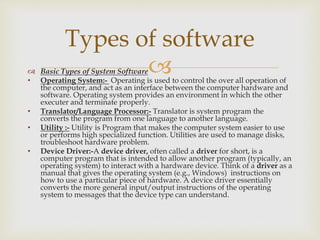
1. System Software:- System software is any program
that controls the computer’s hardware or that can be
used to maintain the computer in some way so that
it runs more efficiently.
Types of software
 Basic Types of System Software
• Operating System:- Operating is used to control the over all operation of
the computer, and act as an interface between the computer hardware and
software. Operating system provides an environment in which the other
executer and terminate properly.
• Translator/Language Processor:- Translator is system program the
converts the program from one language to another language.
• Utility :- Utility is Program that makes the computer system easier to use
or performs high specialized function. Utilities are used to manage disks,
troubleshoot hardware problem.
• Device Driver:-A device driver, often called a driver for short, is a
computer program that is intended to allow another program (typically, an
operating system) to interact with a hardware device. Think of a driver as a
manual that gives the operating system (e.g., Windows) instructions on
how to use a particular piece of hardware. A device driver essentially
converts the more general input/output instructions of the operating
system to messages that the device type can understand.
Types of software

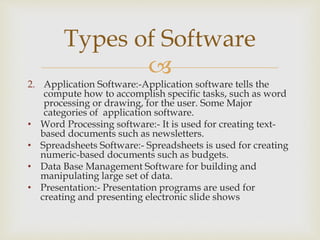
2. Application Software:-Application software tells the
compute how to accomplish specific tasks, such as word
processing or drawing, for the user. Some Major
categories of application software.
• Word Processing software:- It is used for creating text-
based documents such as newsletters.
• Spreadsheets Software:- Spreadsheets is used for creating
numeric-based documents such as budgets.
• Data Base Management Software for building and
manipulating large set of data.
• Presentation:- Presentation programs are used for
creating and presenting electronic slide shows
Types of Software

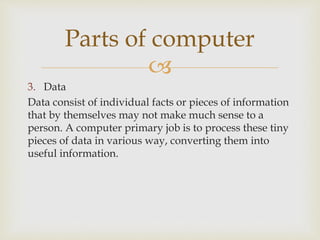
3. Data
Data consist of individual facts or pieces of information
that by themselves may not make much sense to a
person. A computer primary job is to process these tiny
pieces of data in various way, converting them into
useful information.
Parts of computer

4. Users
People are the computer operators, also known as
users.
Parts of Computer
• Using all parts of computer together , a
computer converts data into information by
performing various action on data.
• A set of steps a computer follows to receive
data , process the data according instruction
from program, display the resulting
information to user, and store the result
Figure
Information processing Cycle
Input Processing Output
Storage

 Input:- during this part of the cycle, the computer
accepts data from some source, such as the user or
program, for processing.
 Processing:- During this part of the cycle, the
computer’s processing components perform action
on the data, based on the instruction from the user or
program.
Information Processing Cycle

 Output:- Here the computer may be required to
display the results of its processing. For example ,
the result may as text, number, or graphics on the
computer screen.
 Storage:- In this step, the computer permanently
store the result of its processing on a disk , tape, or
some other kind of storage medium.
Information Processing Cycle

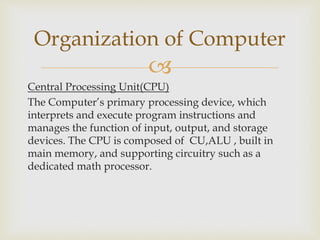
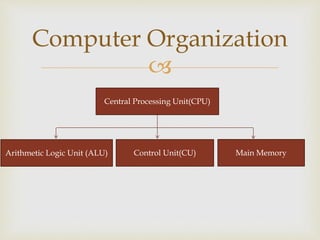
Central Processing Unit(CPU)
The Computer’s primary processing device, which
interprets and execute program instructions and
manages the function of input, output, and storage
devices. The CPU is composed of CU,ALU , built in
main memory, and supporting circuitry such as a
dedicated math processor.
Organization of Computer

Computer Organization
Central Processing Unit(CPU)
Arithmetic Logic Unit (ALU) Control Unit(CU) Main Memory

Primary Memory
A memory or store is required in a computer to store
programs and the data processed by programs. The main
memory is made up of a large number of cells with each cell
capable of storing one bit. The cells may be organized as a set
of addressable words, each word storing a string of bits. The
main memory provides random access. The main memory is
divided into Random Access Memory (RAM) and Read Only
Memory (ROM). RAM is dynamic and volatile. ROM is read
only memory and this memory cannot be erased and
rewritten. That is, ROM is non-volatile.
Organization of Computer

Arithmetic Logic Unit (ALU)
ALU does all the arithmetic and logical operations.
Arithmetical operations involve manipulation of
numerical data such as addition, subtraction, division
and multiplication. Logical operations compare relative
magnitudes of two numeric, alphabetic or alphanumeric
data items such as greater than, less than, and equal to.
Organization of Computer

Control Unit (CU)
The control unit controls and co-ordinates all the
operations of the CPU and peripheral devices. Its
functions are to ensure that the program instructions are
carried out in the desired sequence and to control and
co-ordinate the flow of data between the CPU and the
input-output devices.
Organization of Computer

External Devices:
I/O operations are accomplished through a wide
arrangement of external devices that provides a means
of exchanging data between the external environment
and the computer. An external device attaches to the
computer by a link to an I/O module. The link is used
to exchange control, status, and data between the I/O
Module and the external devices. An external device
connected to an I/O module is often referred to as
Peripheral.
Organization of Computer

I/O Module:- One of the major component of
computer. It is responsible for the control of one or
more external devices and for exchange data between
those devices and main memory and/or CPU registers.
Organization of Computer

External Devices Classification
External device are broadly classified into Three
Categories
1. Human readable:- Suitable for the communication
with computer user e.g. VDT(Video Display
terminals) and Printer(Plug and play , None Plug
and play I/O Devices).
2. Machine Readable:- Suitable for communicating
with equipment e.g. Magnetic Disk.
Organization of Computer

External Devices Classification
3. Communication:- Suitable for communication with
remote devices, which may be a human-readable
device, such as terminal, machine-readable device,
or even another computer
Organization of Computer

Secondary Memory:
Limitation of Primary Memory
 Volatile
 Expensive
 Capacity
Organization of Computer

Secondary memory:-
Memory located outside the computer system itself; that is, it
can not be process directly by the processor. It must be first
copied into main memory. Example includes disk and tape.
Secondary storage is thus supplementary to primary storage.
It is, therefore, also called auxiliary storage. Secondary
storage has larger storage capacity and is cheaper than
primary storage. But access to secondary storage is slower
than that to primary storage. Hence, secondary storage holds
data and programs not currently in use.
Organization of Computer

What is computer 1

  • 2.
     Word Computer The WordComputer comes from word “Compute” Computer
  • 3.
     The Word Computemean to calculate Computer
  • 4.
     Def1  Computer isa calculating device that can perform Arithmetic Operation at enormous speed. Computer
  • 5.
     Def2  More accurately,a computer may be defined as device that operates upon information of data Computer
  • 6.
     Def 3 Computer canbe defined as an electronic device that performs rapid computations and generates desired output for users based on input data and programs. Computer can capture, store, retrieve and process data. The data may be numbers, characters, audio, video, images etc. Basically, computer can recognize only two states – whether a signal is present or not. These two states are represented using binary digits 1 and O. All forms of data are finally converted into binary digits for the computer to recognize and process. Instructions are also converted into binary digits. Digital computer has the capability to manipulate series of binary digits according to the instructions (software) given to it. Computer
  • 7.
     Def 4  Computeris an electronic device that input data, process it, store it , and produce out with high speed and accuracy that is useful to the human being Computer
  • 8.
     Def  The Studyof computer and what they can do  The study of Computers, Computer Construction and what they can do. Computer Science
  • 10.
      Speed Modern computershave incredible speed of processing. Computer speed is measured in units of millisecond (one thousandth of a second), microsecond (one millionth of a second), nanosecond (one billionth of a second), and picosecond (one trillionth of a second). Advanced computers, including recent microcomputers called super microcomputers, operate in nanoseconds and can carry out millions of instructions per second (MIPS). Characteristics of Computer
  • 11.
      Accuracy Computer canensure consistently very high degree of accuracy in computations. It processes data according to the sequence of instructions . Hence, if input data and procedures are correct, the output will be consistently accurate. Characteristics of Computer
  • 12.
      Huge storageand fast retrieval Computer has huge storage capability. For a personal computer, 128 MB RAM is almost a standard toady. The main memory can be upgraded further by inserting RAM chips that are available in modules of 64 MB, 128 MB and so on. Cache memory is also available in Pc. Cache memory is faster access memory device and hence it improves processor performance. Secondary or auxiliary storage devices are used for permanent storage. Modern computers have enormous secondary storage capacity, e.g., a PC hard disk can store more than 80 GB of data. Pen drives, DVDs, CD-ROMs, CD- Rs, magnetic tapes etc. Characteristics of Computer
  • 13.
      Versatility Though computersare basically designed to carry out only arithmetic operations, yet they are capable of performing almost any task that has a series of finite logical steps. Computers can be used for communications, process control, research, weather forecasting, healthcare, online trading, education, training, defense applications and so on. Characteristics of Computer
  • 14.
      Free fromfatigue Computer is free from fatigue. It does not get tired of work and never loses concentration. It can perform basic arithmetic operations with the same degree of speed and accuracy for any extent of time continuously, with the same amount of efficiency as the first transaction. Characteristics of Computer
  • 15.
      Programmable Computer canbe programmed to function automatically and this differentiates it from any other calculation device. It functions as programmed for any stretch of time until the condition to terminate is satisfied. Characteristics of computer
  • 16.
      Networking capability Computerscan be interconnected into a network. Network in turn can be connected to other networks. Networks extend the capability of computers. The networks provide the basic infrastructure for electronic communications, electronic commerce, online trading and information services. Characteristics of Computer
  • 18.
     1. Computer cannotthink on its own. It has to be given instructions to perform any operation. Research is currently underway to impart artificial intelligence to computer. Once this becomes possible computer will be thinking on its own, then it will be a reasonable replication of human mind. 2. It does not have intuition. It cannot draw a conclusion without going through all intermediate steps. Limitations of Computer
  • 19.
     3. It cando a task only if it can be expressed in a series of finite steps leading to the completion of the task. 4. Similarly, it cannot handle a situation where a finite number of steps generate an impossibly large number of computational operations. 5. It cannot learn from experience. It will commit the same error repeatedly and cannot learn from experience. But changes are taking place in this area as research progresses on artificial intelligence. Limitations of Computer
  • 20.
    A complete Computerconsists of four parts 1. Hardware 2. Software 3. Data 4. User
  • 21.
     1. Hardware The mechanicaldevices that make up the computer are called hardware. Hardware is any part of the computer you can touch. A computer hardware consists of interconnected electronic devices that you can use to control the Computer’s operation, input, and out put Parts of computer
  • 22.
    1. Input hardware 2.Output hardware 3. Storage hardware 4. Communication hardware 5. Processing hardware
  • 23.
     1. Input hardware:-A type of hardware that is used to enter data or commands into Computer. E.g Mouse Keyboard etc. 2. Output Hardware:- A type of Hardware that is used to get information from computer and display to the user. 2.1- Softcopy output Hardware:- It is type of Hardware whose output can only be seen but can not be touched(Monitor). 2.2- Hardcopy output Hardware:-It is type of Hardware whose output can only be seen as well touched(Monitor). Types of computer Hardware
  • 24.
     3. Memory/Storage Hardware:-A device that can accept data, hold them, and deliver on demand at a later time. 3.1- Primary Memory:- This types of hardware is used to store data/instruction temporarily . Such storage devices are volatile i.e. if the power is interrupted, then the data are lost(RAM). 3.2- Secondary Memory:- Secondary memory is used store data/instruction permanently. Secondary storage device are non volatile i.e. if the power is interrupted, then the data are not lost. Secondary memory can not be processed directly by the processor. It must be first copied into main memory(Hard disk). Types of Computer Hardware
  • 25.
     4. Communication hardware:-These types of hardware are used to transfer data between two computers or between two units of a computer. 4.1- Internal communication hardware:- it is type of hardware that is used to transfer data from one unit to another unit of computer. This communication hardware is composed of various parallel lines know as bus. 4.2- External Communication hardware:- it used to transfer data from one computer to another computer 5. Processing hardware:- It is type of hardware used to process data according to the given instruction to generate output (microprocessor). Types of computer hardware
  • 26.
     2. Software: A softwareis (1)instruction(computer programs) that when executed provide desired features, function and performance;(2) data structure that enable the programs to adequately manipulate information; and(3) documents that describe the operation and use of programs. Parts of Computer
  • 27.
    1. System software. 2.Application software.
  • 28.
     1. System Software:-System software is any program that controls the computer’s hardware or that can be used to maintain the computer in some way so that it runs more efficiently. Types of software
  • 29.
     Basic Typesof System Software • Operating System:- Operating is used to control the over all operation of the computer, and act as an interface between the computer hardware and software. Operating system provides an environment in which the other executer and terminate properly. • Translator/Language Processor:- Translator is system program the converts the program from one language to another language. • Utility :- Utility is Program that makes the computer system easier to use or performs high specialized function. Utilities are used to manage disks, troubleshoot hardware problem. • Device Driver:-A device driver, often called a driver for short, is a computer program that is intended to allow another program (typically, an operating system) to interact with a hardware device. Think of a driver as a manual that gives the operating system (e.g., Windows) instructions on how to use a particular piece of hardware. A device driver essentially converts the more general input/output instructions of the operating system to messages that the device type can understand. Types of software
  • 30.
     2. Application Software:-Applicationsoftware tells the compute how to accomplish specific tasks, such as word processing or drawing, for the user. Some Major categories of application software. • Word Processing software:- It is used for creating text- based documents such as newsletters. • Spreadsheets Software:- Spreadsheets is used for creating numeric-based documents such as budgets. • Data Base Management Software for building and manipulating large set of data. • Presentation:- Presentation programs are used for creating and presenting electronic slide shows Types of Software
  • 31.
     3. Data Data consistof individual facts or pieces of information that by themselves may not make much sense to a person. A computer primary job is to process these tiny pieces of data in various way, converting them into useful information. Parts of computer
  • 32.
     4. Users People arethe computer operators, also known as users. Parts of Computer
  • 33.
    • Using allparts of computer together , a computer converts data into information by performing various action on data. • A set of steps a computer follows to receive data , process the data according instruction from program, display the resulting information to user, and store the result
  • 34.
  • 35.
      Input:- duringthis part of the cycle, the computer accepts data from some source, such as the user or program, for processing.  Processing:- During this part of the cycle, the computer’s processing components perform action on the data, based on the instruction from the user or program. Information Processing Cycle
  • 36.
      Output:- Herethe computer may be required to display the results of its processing. For example , the result may as text, number, or graphics on the computer screen.  Storage:- In this step, the computer permanently store the result of its processing on a disk , tape, or some other kind of storage medium. Information Processing Cycle
  • 38.
     Central Processing Unit(CPU) TheComputer’s primary processing device, which interprets and execute program instructions and manages the function of input, output, and storage devices. The CPU is composed of CU,ALU , built in main memory, and supporting circuitry such as a dedicated math processor. Organization of Computer
  • 39.
     Computer Organization Central ProcessingUnit(CPU) Arithmetic Logic Unit (ALU) Control Unit(CU) Main Memory
  • 40.
     Primary Memory A memoryor store is required in a computer to store programs and the data processed by programs. The main memory is made up of a large number of cells with each cell capable of storing one bit. The cells may be organized as a set of addressable words, each word storing a string of bits. The main memory provides random access. The main memory is divided into Random Access Memory (RAM) and Read Only Memory (ROM). RAM is dynamic and volatile. ROM is read only memory and this memory cannot be erased and rewritten. That is, ROM is non-volatile. Organization of Computer
  • 41.
     Arithmetic Logic Unit(ALU) ALU does all the arithmetic and logical operations. Arithmetical operations involve manipulation of numerical data such as addition, subtraction, division and multiplication. Logical operations compare relative magnitudes of two numeric, alphabetic or alphanumeric data items such as greater than, less than, and equal to. Organization of Computer
  • 42.
     Control Unit (CU) Thecontrol unit controls and co-ordinates all the operations of the CPU and peripheral devices. Its functions are to ensure that the program instructions are carried out in the desired sequence and to control and co-ordinate the flow of data between the CPU and the input-output devices. Organization of Computer
  • 43.
     External Devices: I/O operationsare accomplished through a wide arrangement of external devices that provides a means of exchanging data between the external environment and the computer. An external device attaches to the computer by a link to an I/O module. The link is used to exchange control, status, and data between the I/O Module and the external devices. An external device connected to an I/O module is often referred to as Peripheral. Organization of Computer
  • 44.
     I/O Module:- Oneof the major component of computer. It is responsible for the control of one or more external devices and for exchange data between those devices and main memory and/or CPU registers. Organization of Computer
  • 45.
     External Devices Classification Externaldevice are broadly classified into Three Categories 1. Human readable:- Suitable for the communication with computer user e.g. VDT(Video Display terminals) and Printer(Plug and play , None Plug and play I/O Devices). 2. Machine Readable:- Suitable for communicating with equipment e.g. Magnetic Disk. Organization of Computer
  • 46.
     External Devices Classification 3.Communication:- Suitable for communication with remote devices, which may be a human-readable device, such as terminal, machine-readable device, or even another computer Organization of Computer
  • 47.
     Secondary Memory: Limitation ofPrimary Memory  Volatile  Expensive  Capacity Organization of Computer
  • 48.
     Secondary memory:- Memory locatedoutside the computer system itself; that is, it can not be process directly by the processor. It must be first copied into main memory. Example includes disk and tape. Secondary storage is thus supplementary to primary storage. It is, therefore, also called auxiliary storage. Secondary storage has larger storage capacity and is cheaper than primary storage. But access to secondary storage is slower than that to primary storage. Hence, secondary storage holds data and programs not currently in use. Organization of Computer