CHAPTER ONE
INTRODUCTION TO COMPUTER
Prepared by Kenbon A.
10/19/2024 1
Definition
An electronic device for storing and processing data, typically in binary
form, according to instructions given to it in a variable program.
It is a collection of hardware and software components.
Device or machine for making calculations or controlling operations that
are expressible in numerical and logical terms. But today’s computers not
only process numbers, they process texts, pictures, multimedia and so on.
Generally, Computer is an electronic device; operating under the control of
instructions stored in its own memory unit and that can accept data,
process data, produce output and store the results for future use.
10/19/2024 2
10/19/2024 3
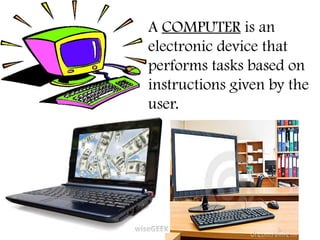
A COMPUTER is an
electronic device that
performs tasks based on
instructions given by the
user.
Characteristics of computers
Automatic: once a program is in the computer’s memory, it continues
without the need for human intervention until completion.
Speed: a computer is a very fast device.
A powerful computer is capable of performing billion (109
) simple
arithmetic operations per second.
Accuracy: The computer’s accuracy is consistently high.
Storage capacity: computers help to save space and economy by storing
very large amount of data.
Diligence: unlike human beings, a computer is free from boredom,
tiredness, lack of concentration.
10/19/2024 4
Versatility:
It is the capability of a computer to perform different kinds
of works with same accuracy and efficiency.
Power of remembering:
A computer can store and recall huge amount of
information because of its secondary storage capability.
No IQ: Intelligent Quotient is zero.
It works only within the limits of what it has been
instructed to do.
No feeling:
They have no feelings and no instincts because they are
machines.
10/19/2024 5
Application of computers
• Today, every company is now directly or
indirectly dependent on computers for
information processing.
Science: scientists have been using computers
to develop theories, to analysis, and test the data.
E.g. detail study of how earthquakes affect
buildings or population affect weather pattern,
satellite based application.
Medicine and health care: now doctors are
using computers right from diagnosing the
illness to monitoring a patient’s status during
complex surgery.
10/19/2024 6
Engineering (architectures): the architects and engineering
are extremely using computers in designing and drawings.
Entertainment: computers are used to control the images
and sounds.
Communication: E-mail or electronic mail is one of the
communication media in which computer is used.
Business application: There are various concerns for which
computer are used such as in business applications (like at
the sale counter) that requires immediate response from
computer.
10/19/2024 7
Banking: in the field of banking and insurance computers
are extensively used. People can use the ATM (Automatic
Teller Machine) services 24 hours of the day in order to
deposit and withdraw cash.
Industries: - it is used for designing products, assisting
labors, controlling the work of the machineries in factory
e.t.c.
10/19/2024 8
Limitation of computers
Computers are programmed by Humans
Computers are dependent on humans
No Emotions and No Feelings
No thinking
No self care
Lack of Decision Making
Retrieval of memory
Dependency on power/electricity
Not able to express ideas
No IQ
10/19/2024 9
Generation of computers
All modern computers can be categorized in to five
generation:-
 First generation
 Second generation
 Third generation
 Fourth generation
 Fifth generation
10/19/2024 10
First generation(1940s-1950s)
It uses vacuum tubes as main component
It is very big ,expensive & slow
It required extensive air condition
It generates large heat
It uses magnetic drums for memory
It uses punched cards and paper tape for input purpose.
Output was displayed on printouts.
10/19/2024 11
Second generation(1950s-1960s)
It uses Transistors replaced vacuum tubes
B/c of the transistors, the computer becomes smaller in size,
fast in speed & more reliable than 1st
generation.
It uses punched cards for input and printouts for output
It controls by Assembly programming language
Magnetic tape is introduced for store data
10/19/2024 12
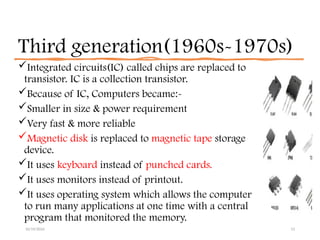
Third generation(1960s-1970s)
Integrated circuits(IC) called chips are replaced to
transistor. IC is a collection transistor.
Because of IC, Computers became:-
Smaller in size & power requirement
Very fast & more reliable
Magnetic disk is replaced to magnetic tape storage
device.
It uses keyboard instead of punched cards.
It uses monitors instead of printout.
It uses operating system which allows the computer
to run many applications at one time with a central
program that monitored the memory.
10/19/2024 13
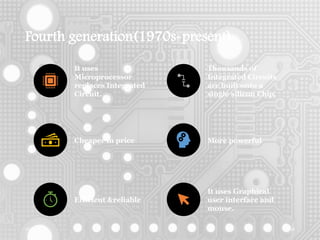
Fourth generation(1970s-present)
10/19/2024 14
It uses
Microprocessor
replaces Integrated
Circuit.
Thousands of
Integrated Circuits
are built onto a
single silicon Chip.
Cheaper in price More powerful
Efficient &reliable
It uses Graphical
user interface and
mouse.
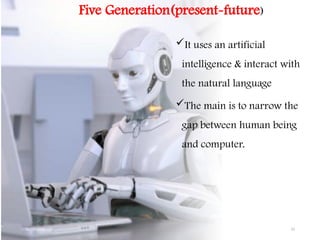
Five Generation(present-future)
It uses an artificial
intelligence & interact with
the natural language
The main is to narrow the
gap between human being
and computer.
10/19/2024 15
10/19/2024 16
Elements of Computer system
1. Hardware
2. Software
3. People
4. Data
5. Connectivity
6. Procedure
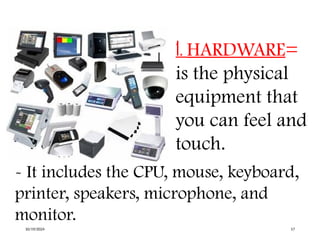
1. HARDWARE=
is the physical
equipment that
you can feel and
touch.
- It includes the CPU, mouse, keyboard,
printer, speakers, microphone, and
monitor.
10/19/2024 17
10/19/2024 18
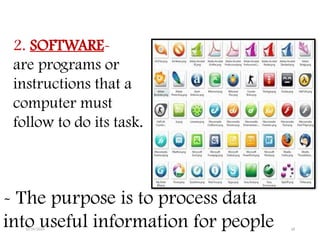
2. SOFTWARE-
are programs or
instructions that a
computer must
follow to do its task.
- The purpose is to process data
into useful information for people
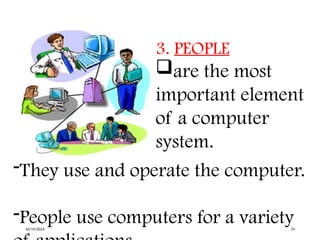
3. PEOPLE
are the most
important element
of a computer
system.
-They use and operate the computer.
-People use computers for a variety
10/19/2024 19
4. DATA
include texts and
numbers, sounds,
images, and video
that you input into
the computer for
processing.
-Raw data are normal inputs entered
into the computer.
10/19/2024 20
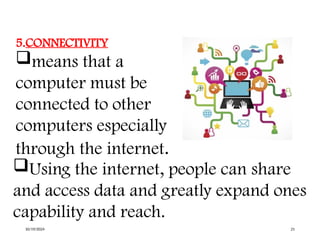
5.CONNECTIVITY
means that a
computer must be
connected to other
computers especially
through the internet.
Using the internet, people can share
and access data and greatly expand ones
capability and reach.
10/19/2024 21
10/19/2024 22
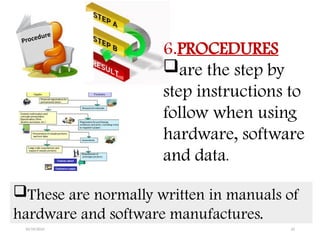
6.PROCEDURES
are the step by
step instructions to
follow when using
hardware, software
and data.
These are normally written in manuals of
hardware and software manufactures.
10/19/2024 23
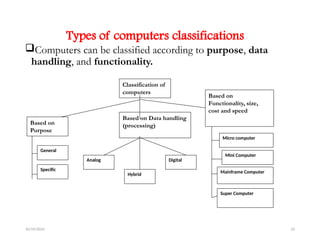
Types of computers classifications
Computers can be classified according to purpose, data
handling, and functionality.
Classification of
computers
Based on Data handling
(processing)
Based on
Functionality, size,
cost and speed
Micro computer
Mini Computer
Mainframe Computer
Super Computer
Digital
Analog
Hybrid
Based on
Purpose
General
Specific
Computers classification according to purpose
1. General purpose
 These machines can be used for various applications, ranging from
scientific as well as business applications.
 Even though such computers are versatile, they generally lack in
speed and efficiency.
Computers that you use home and schools are general purpose
computers.
10/19/2024 24
2. Specific purpose
Designed to handle a specific problem or to perform a
single specific task built into the machine.
They can be providing the result very quickly and
effectively.
These computers are used for airline reservation,
satellite tracking, and air traffic control.
10/19/2024 25
Classification of computers according to
the method of operation (data handling)
Computers are classified into three by the way they
process data:-
1. Analog computers
2. Digital computers
3. Hybrid computers
10/19/2024 26
Analog computers
Analog computers which are operate by measuring.
They deal with continues variable.
They do not compute directly with numbers, rather, they
operate by measuring physical magnitude such as pressure
temperature, voltage, current and etc.
 E.g. Thermometer, voltmeter, speedometer
Analog computer has very low or limited memory
It can store less amount of data
10/19/2024 27
Digital computers
They operate by counting rather than measuring.
They operate directly upon numbers (or digits) that represent
numbers, letters, or other special symbols.
Digital computer is a computing device in which data is represented
by discrete numerical quantities.
It is represented by discrete numerical states (0s and 1s)
 E.g. Personal Computers
They have very high accuracy and speed than analog one
10/19/2024 28
Hybrid Computers
The best features of analog and digital computers can be combined
into a single device to form a hybrid computer.
It processes the information by collecting input data with analog
method, converts it into digital quantities, processes the digital values
and converts the output from digital to analog form.
Example:
Gasoline station: fuel vending machine measure the amount of fuel
via analog and display the result in digital form.
Ultrasound machine
10/19/2024 29
CLASSIFICATIONS OF COMPUTERS
ACCORDING TO CAPACITY
MICROCOMPUTER
MINICOMPUTER
MAINFRAME COMPUTER
SUPERCOMPUTER
10/19/2024 30
10/19/2024 31
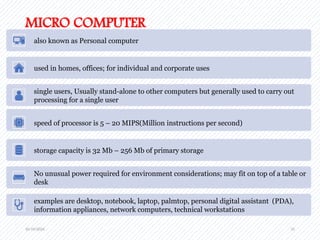
MICRO COMPUTER
also known as Personal computer
used in homes, offices; for individual and corporate uses
single users, Usually stand-alone to other computers but generally used to carry out
processing for a single user
speed of processor is 5 – 20 MIPS(Million instructions per second)
storage capacity is 32 Mb – 256 Mb of primary storage
No unusual power required for environment considerations; may fit on top of a table or
desk
examples are desktop, notebook, laptop, palmtop, personal digital assistant (PDA),
information appliances, network computers, technical workstations
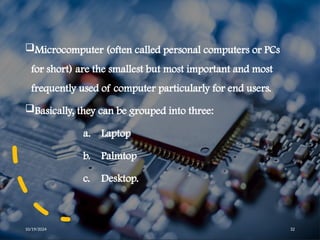
Microcomputer (often called personal computers or PCs
for short) are the smallest but most important and most
frequently used of computer particularly for end users.
Basically, they can be grouped into three:
a. Laptop
b. Palmtop
c. Desktop.
10/19/2024 32
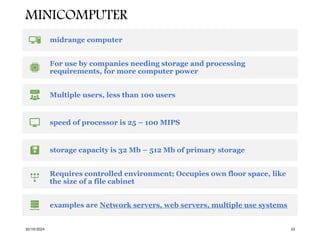
MINICOMPUTER
10/19/2024 33
midrange computer
For use by companies needing storage and processing
requirements, for more computer power
Multiple users, less than 100 users
speed of processor is 25 – 100 MIPS
storage capacity is 32 Mb – 512 Mb of primary storage
Requires controlled environment; Occupies own floor space, like
the size of a file cabinet
examples are Network servers, web servers, multiple use systems
10/19/2024 34
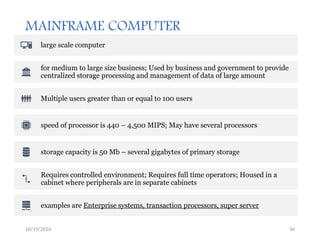
MAINFRAME COMPUTER
large scale computer
for medium to large size business; Used by business and government to provide
centralized storage processing and management of data of large amount
Multiple users greater than or equal to 100 users
speed of processor is 440 – 4,500 MIPS; May have several processors
storage capacity is 50 Mb – several gigabytes of primary storage
Requires controlled environment; Requires full time operators; Housed in a
cabinet where peripherals are in separate cabinets
examples are Enterprise systems, transaction processors, super server
10/19/2024 35
SUPERCOMPUTER
Used to compute intensive tasks
Designed for large-scale complex and scientific applications
Multiple users
speed of processor is 4 – 10 times faster than mainframes, Several processors,
60 Billion – 3 Trillion , Fastest, most processing power
storage capacity is 8,000 Mb+ +
Requires controlled environment; Space needed may be the size of a car
examples are Scalable servers, and Cray Computer
10/19/2024 36
Thank you🙏

Introduction to computer In business Management

  • 1.
    CHAPTER ONE INTRODUCTION TOCOMPUTER Prepared by Kenbon A. 10/19/2024 1
  • 2.
    Definition An electronic devicefor storing and processing data, typically in binary form, according to instructions given to it in a variable program. It is a collection of hardware and software components. Device or machine for making calculations or controlling operations that are expressible in numerical and logical terms. But today’s computers not only process numbers, they process texts, pictures, multimedia and so on. Generally, Computer is an electronic device; operating under the control of instructions stored in its own memory unit and that can accept data, process data, produce output and store the results for future use. 10/19/2024 2
  • 3.
    10/19/2024 3 A COMPUTERis an electronic device that performs tasks based on instructions given by the user.
  • 4.
    Characteristics of computers Automatic:once a program is in the computer’s memory, it continues without the need for human intervention until completion. Speed: a computer is a very fast device. A powerful computer is capable of performing billion (109 ) simple arithmetic operations per second. Accuracy: The computer’s accuracy is consistently high. Storage capacity: computers help to save space and economy by storing very large amount of data. Diligence: unlike human beings, a computer is free from boredom, tiredness, lack of concentration. 10/19/2024 4
  • 5.
    Versatility: It is thecapability of a computer to perform different kinds of works with same accuracy and efficiency. Power of remembering: A computer can store and recall huge amount of information because of its secondary storage capability. No IQ: Intelligent Quotient is zero. It works only within the limits of what it has been instructed to do. No feeling: They have no feelings and no instincts because they are machines. 10/19/2024 5
  • 6.
    Application of computers •Today, every company is now directly or indirectly dependent on computers for information processing. Science: scientists have been using computers to develop theories, to analysis, and test the data. E.g. detail study of how earthquakes affect buildings or population affect weather pattern, satellite based application. Medicine and health care: now doctors are using computers right from diagnosing the illness to monitoring a patient’s status during complex surgery. 10/19/2024 6
  • 7.
    Engineering (architectures): thearchitects and engineering are extremely using computers in designing and drawings. Entertainment: computers are used to control the images and sounds. Communication: E-mail or electronic mail is one of the communication media in which computer is used. Business application: There are various concerns for which computer are used such as in business applications (like at the sale counter) that requires immediate response from computer. 10/19/2024 7
  • 8.
    Banking: in thefield of banking and insurance computers are extensively used. People can use the ATM (Automatic Teller Machine) services 24 hours of the day in order to deposit and withdraw cash. Industries: - it is used for designing products, assisting labors, controlling the work of the machineries in factory e.t.c. 10/19/2024 8
  • 9.
    Limitation of computers Computersare programmed by Humans Computers are dependent on humans No Emotions and No Feelings No thinking No self care Lack of Decision Making Retrieval of memory Dependency on power/electricity Not able to express ideas No IQ 10/19/2024 9
  • 10.
    Generation of computers Allmodern computers can be categorized in to five generation:-  First generation  Second generation  Third generation  Fourth generation  Fifth generation 10/19/2024 10
  • 11.
    First generation(1940s-1950s) It usesvacuum tubes as main component It is very big ,expensive & slow It required extensive air condition It generates large heat It uses magnetic drums for memory It uses punched cards and paper tape for input purpose. Output was displayed on printouts. 10/19/2024 11
  • 12.
    Second generation(1950s-1960s) It usesTransistors replaced vacuum tubes B/c of the transistors, the computer becomes smaller in size, fast in speed & more reliable than 1st generation. It uses punched cards for input and printouts for output It controls by Assembly programming language Magnetic tape is introduced for store data 10/19/2024 12
  • 13.
    Third generation(1960s-1970s) Integrated circuits(IC)called chips are replaced to transistor. IC is a collection transistor. Because of IC, Computers became:- Smaller in size & power requirement Very fast & more reliable Magnetic disk is replaced to magnetic tape storage device. It uses keyboard instead of punched cards. It uses monitors instead of printout. It uses operating system which allows the computer to run many applications at one time with a central program that monitored the memory. 10/19/2024 13
  • 14.
    Fourth generation(1970s-present) 10/19/2024 14 Ituses Microprocessor replaces Integrated Circuit. Thousands of Integrated Circuits are built onto a single silicon Chip. Cheaper in price More powerful Efficient &reliable It uses Graphical user interface and mouse.
  • 15.
    Five Generation(present-future) It usesan artificial intelligence & interact with the natural language The main is to narrow the gap between human being and computer. 10/19/2024 15
  • 16.
    10/19/2024 16 Elements ofComputer system 1. Hardware 2. Software 3. People 4. Data 5. Connectivity 6. Procedure
  • 17.
    1. HARDWARE= is thephysical equipment that you can feel and touch. - It includes the CPU, mouse, keyboard, printer, speakers, microphone, and monitor. 10/19/2024 17
  • 18.
    10/19/2024 18 2. SOFTWARE- areprograms or instructions that a computer must follow to do its task. - The purpose is to process data into useful information for people
  • 19.
    3. PEOPLE are themost important element of a computer system. -They use and operate the computer. -People use computers for a variety 10/19/2024 19
  • 20.
    4. DATA include textsand numbers, sounds, images, and video that you input into the computer for processing. -Raw data are normal inputs entered into the computer. 10/19/2024 20
  • 21.
    5.CONNECTIVITY means that a computermust be connected to other computers especially through the internet. Using the internet, people can share and access data and greatly expand ones capability and reach. 10/19/2024 21
  • 22.
    10/19/2024 22 6.PROCEDURES are thestep by step instructions to follow when using hardware, software and data. These are normally written in manuals of hardware and software manufactures.
  • 23.
    10/19/2024 23 Types ofcomputers classifications Computers can be classified according to purpose, data handling, and functionality. Classification of computers Based on Data handling (processing) Based on Functionality, size, cost and speed Micro computer Mini Computer Mainframe Computer Super Computer Digital Analog Hybrid Based on Purpose General Specific
  • 24.
    Computers classification accordingto purpose 1. General purpose  These machines can be used for various applications, ranging from scientific as well as business applications.  Even though such computers are versatile, they generally lack in speed and efficiency. Computers that you use home and schools are general purpose computers. 10/19/2024 24
  • 25.
    2. Specific purpose Designedto handle a specific problem or to perform a single specific task built into the machine. They can be providing the result very quickly and effectively. These computers are used for airline reservation, satellite tracking, and air traffic control. 10/19/2024 25
  • 26.
    Classification of computersaccording to the method of operation (data handling) Computers are classified into three by the way they process data:- 1. Analog computers 2. Digital computers 3. Hybrid computers 10/19/2024 26
  • 27.
    Analog computers Analog computerswhich are operate by measuring. They deal with continues variable. They do not compute directly with numbers, rather, they operate by measuring physical magnitude such as pressure temperature, voltage, current and etc.  E.g. Thermometer, voltmeter, speedometer Analog computer has very low or limited memory It can store less amount of data 10/19/2024 27
  • 28.
    Digital computers They operateby counting rather than measuring. They operate directly upon numbers (or digits) that represent numbers, letters, or other special symbols. Digital computer is a computing device in which data is represented by discrete numerical quantities. It is represented by discrete numerical states (0s and 1s)  E.g. Personal Computers They have very high accuracy and speed than analog one 10/19/2024 28
  • 29.
    Hybrid Computers The bestfeatures of analog and digital computers can be combined into a single device to form a hybrid computer. It processes the information by collecting input data with analog method, converts it into digital quantities, processes the digital values and converts the output from digital to analog form. Example: Gasoline station: fuel vending machine measure the amount of fuel via analog and display the result in digital form. Ultrasound machine 10/19/2024 29
  • 30.
    CLASSIFICATIONS OF COMPUTERS ACCORDINGTO CAPACITY MICROCOMPUTER MINICOMPUTER MAINFRAME COMPUTER SUPERCOMPUTER 10/19/2024 30
  • 31.
    10/19/2024 31 MICRO COMPUTER alsoknown as Personal computer used in homes, offices; for individual and corporate uses single users, Usually stand-alone to other computers but generally used to carry out processing for a single user speed of processor is 5 – 20 MIPS(Million instructions per second) storage capacity is 32 Mb – 256 Mb of primary storage No unusual power required for environment considerations; may fit on top of a table or desk examples are desktop, notebook, laptop, palmtop, personal digital assistant (PDA), information appliances, network computers, technical workstations
  • 32.
    Microcomputer (often calledpersonal computers or PCs for short) are the smallest but most important and most frequently used of computer particularly for end users. Basically, they can be grouped into three: a. Laptop b. Palmtop c. Desktop. 10/19/2024 32
  • 33.
    MINICOMPUTER 10/19/2024 33 midrange computer Foruse by companies needing storage and processing requirements, for more computer power Multiple users, less than 100 users speed of processor is 25 – 100 MIPS storage capacity is 32 Mb – 512 Mb of primary storage Requires controlled environment; Occupies own floor space, like the size of a file cabinet examples are Network servers, web servers, multiple use systems
  • 34.
    10/19/2024 34 MAINFRAME COMPUTER largescale computer for medium to large size business; Used by business and government to provide centralized storage processing and management of data of large amount Multiple users greater than or equal to 100 users speed of processor is 440 – 4,500 MIPS; May have several processors storage capacity is 50 Mb – several gigabytes of primary storage Requires controlled environment; Requires full time operators; Housed in a cabinet where peripherals are in separate cabinets examples are Enterprise systems, transaction processors, super server
  • 35.
    10/19/2024 35 SUPERCOMPUTER Used tocompute intensive tasks Designed for large-scale complex and scientific applications Multiple users speed of processor is 4 – 10 times faster than mainframes, Several processors, 60 Billion – 3 Trillion , Fastest, most processing power storage capacity is 8,000 Mb+ + Requires controlled environment; Space needed may be the size of a car examples are Scalable servers, and Cray Computer
  • 36.