Welcome to the Computer Lab at   Centreville   School
I am  Mrs. Jarrell  the Computer Teacher
My Pledge to   Students I will trust you until you give me reason to do otherwise. I will respect you and work with you to solve problems. I will promptly correct and offer feedback on your work. I will work with you to meet learning goals. I will offer extra help and alternative assessments should you require them.
 
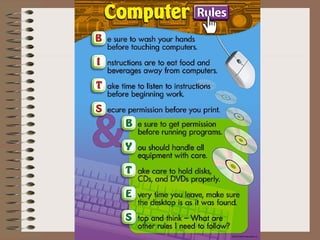
More Rules Don’t touch the  monitor screen. 2. No shadows in the projector. 3. Wrist rests are for   resting your wrists.
Student Expectations Be prompt Be ready to learn when class begins. Be prepared Have materials with you and know due dates. Be a polite and positive participant Speak in a normal tone of voice, and listen attentively. Be productive Turn in work on time, and always do your best. Be a problem solver Correct problems quickly and peacefully before they escalate.
Student   Behavior Respect and be kind to others. Listen carefully to directions, and follow them.  Do not touch others or their computers. Work quietly.  Work and play safely. Raise your hand before you ask a question. Listen quietly while others are speaking. Do not bring toys or gum to class.
Behavior Program If the class behavior is  GREAT  then the class gets  3  points. If the class behavior is  GOOD  then the class gets   2  points. If the class behavior is  OKAY  then the class gets  1  point. After the class gets 30 points they will earn “free time” in the computer lab to work on or complete an  educational activity .
Behavior Program If the class behavior is  GREAT  then the class gets a  “happy face” (  ) . If the class behavior is  GOOD  then the class gets   a  star (  ) . If the class behavior is  OKAY  then the class gets a  question mark (?) . After the class gets 10 “happy faces” they will earn “free time” in the computer lab to work on or complete an  educational activity .
Power  and the computer
How to use the computers and their parts.
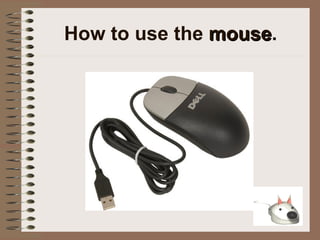
How to use the  mouse .
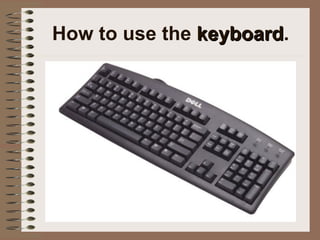
How to use the  keyboard .
Logging onto the network User Name  = jdoe Password  = jdoe Domain  = CENTREVILLE
How to use the  floppy disk and drive .
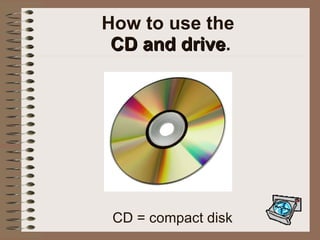
How to use the  CD and drive . CD = compact disk
How to use the  USB Flash Drives
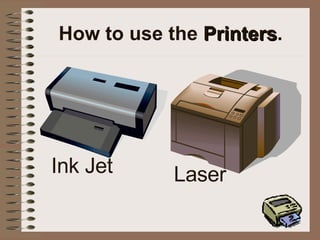
How to use the  Printers . Ink Jet Laser
Network Drives There are many network drives set-up Academics on ‘Cs-dc’ (F:) Public on ‘Cs-dc’ (G:) Students on ‘Cs-dc’(H:)
 
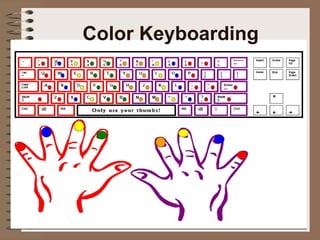
Color Keyboarding
Keyboarding Rewards If you are caught keyboarding properly outside the computer lab, like on your AlphaSmart, you could be given a keyboarding certificate.  If you earn 3 keyboarding certificates  you will get to spend the first 20 minutes of 1 class playing keyboarding games or you can type in Word (or some other way of fun keyboarding rather than your normal Type to Learn lessons).
 

Welcome To The Computer Lab

  • 1.
    Welcome to theComputer Lab at Centreville School
  • 2.
    I am Mrs. Jarrell the Computer Teacher
  • 3.
    My Pledge to Students I will trust you until you give me reason to do otherwise. I will respect you and work with you to solve problems. I will promptly correct and offer feedback on your work. I will work with you to meet learning goals. I will offer extra help and alternative assessments should you require them.
  • 4.
  • 5.
    More Rules Don’ttouch the monitor screen. 2. No shadows in the projector. 3. Wrist rests are for resting your wrists.
  • 6.
    Student Expectations Beprompt Be ready to learn when class begins. Be prepared Have materials with you and know due dates. Be a polite and positive participant Speak in a normal tone of voice, and listen attentively. Be productive Turn in work on time, and always do your best. Be a problem solver Correct problems quickly and peacefully before they escalate.
  • 7.
    Student Behavior Respect and be kind to others. Listen carefully to directions, and follow them. Do not touch others or their computers. Work quietly. Work and play safely. Raise your hand before you ask a question. Listen quietly while others are speaking. Do not bring toys or gum to class.
  • 8.
    Behavior Program Ifthe class behavior is GREAT then the class gets 3 points. If the class behavior is GOOD then the class gets 2 points. If the class behavior is OKAY then the class gets 1 point. After the class gets 30 points they will earn “free time” in the computer lab to work on or complete an educational activity .
  • 9.
    Behavior Program Ifthe class behavior is GREAT then the class gets a “happy face” (  ) . If the class behavior is GOOD then the class gets a star (  ) . If the class behavior is OKAY then the class gets a question mark (?) . After the class gets 10 “happy faces” they will earn “free time” in the computer lab to work on or complete an educational activity .
  • 10.
    Power andthe computer
  • 11.
    How to usethe computers and their parts.
  • 12.
    How to usethe mouse .
  • 13.
    How to usethe keyboard .
  • 14.
    Logging onto thenetwork User Name = jdoe Password = jdoe Domain = CENTREVILLE
  • 15.
    How to usethe floppy disk and drive .
  • 16.
    How to usethe CD and drive . CD = compact disk
  • 17.
    How to usethe USB Flash Drives
  • 18.
    How to usethe Printers . Ink Jet Laser
  • 19.
    Network Drives Thereare many network drives set-up Academics on ‘Cs-dc’ (F:) Public on ‘Cs-dc’ (G:) Students on ‘Cs-dc’(H:)
  • 20.
  • 21.
  • 22.
    Keyboarding Rewards Ifyou are caught keyboarding properly outside the computer lab, like on your AlphaSmart, you could be given a keyboarding certificate. If you earn 3 keyboarding certificates you will get to spend the first 20 minutes of 1 class playing keyboarding games or you can type in Word (or some other way of fun keyboarding rather than your normal Type to Learn lessons).
  • 23.