The greatest opportunity in a decade
Windows Server 2003
End of Support
February 2015
James Fox
Head of Pre-Sales
› Welcome & housekeeping
› End of Support – the impact
› Your options
› Hybrid IT – the sensible choice
› Zynstra’s Hybrid Cloud technology
› Migration planning
› Benefits for SMBs and IT Service Providers
› Q&A
Welcome & Housekeeping
• Today’s webinar will last 30 minutes + Q&A
• All participants will be muted to prevent
interruptions
• Questions can be submitted via the question box
– We’ll have Q&A at the end of the session
• The webinar will be recorded and available on-
demand on the Zynstra YouTube channel
© Zynstra Ltd 2014. Commercial-in-confidence. Slide 3
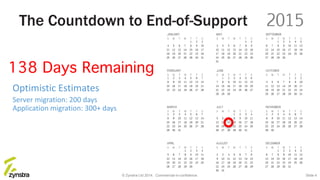
Optimistic Estimates
Server migration: 200 days
Application migration: 300+ days
The Countdown to End-of-Support
© Zynstra Ltd 2014. Commercial-in-confidence. Slide 4
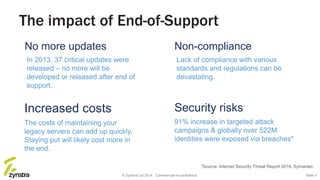
The impact of End-of-Support
Increased costs
The costs of maintaining your
legacy servers can add up quickly.
Staying put will likely cost more in
the end.
No more updates
In 2013, 37 critical updates were
released – no more will be
developed or released after end of
support.
Security risks
91% increase in targeted attack
campaigns & globally over 522M
identities were exposed via breaches*
Non-compliance
Lack of compliance with various
standards and regulations can be
devastating.
*Source: Internet Security Threat Report 2014, Symantec
© Zynstra Ltd 2014. Commercial-in-confidence. Slide 5
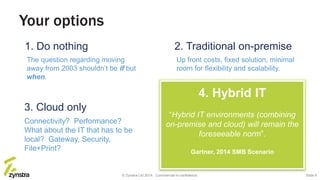
Your options
3. Cloud only
Connectivity? Performance?
What about the IT that has to be
local? Gateway, Security,
File+Print?
1. Do nothing
The question regarding moving
away from 2003 shouldn’t be if but
when.
2. Traditional on-premise
Up front costs, fixed solution, minimal
room for flexibility and scalability.
4. Hybrid IT
“Hybrid IT environments (combining
on-premise and cloud) will remain the
foreseeable norm”.
Gartner, 2014 SMB Scenario
© Zynstra Ltd 2014. Commercial-in-confidence. Slide 6
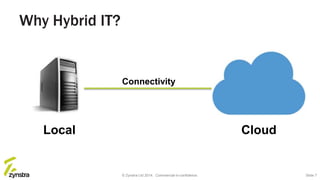
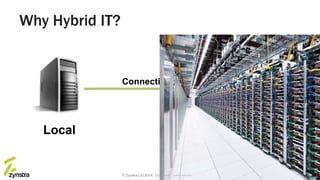
Local Cloud
Connectivity
© Zynstra Ltd 2014. Commercial-in-confidence.
Why Hybrid IT?
Slide 7
Local Cloud
Connectivity
© Zynstra Ltd 2014. Commercial-in-confidence.
Why Hybrid IT?
Slide 8
Cloud
Local Cloud
Connectivity
© Zynstra Ltd 2014. Commercial-in-confidence.
Why Hybrid IT?
Slide 9
Cloud
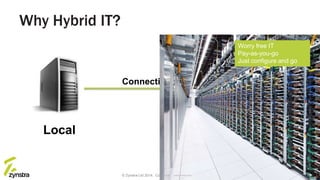
Worry free IT
Pay-as-you-go
Just configure and go
Local Cloud
Connectivity
© Zynstra Ltd 2014. Commercial-in-confidence.
Why Hybrid IT?
Slide 10
Cloud
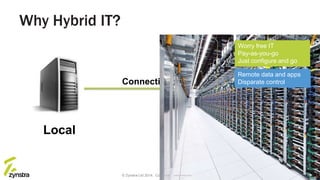
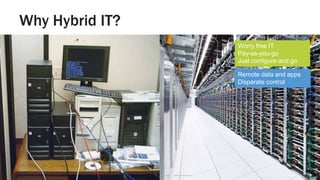
Remote data and apps
Disparate control
Worry free IT
Pay-as-you-go
Just configure and go
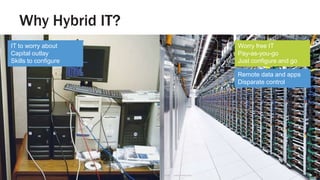
Why Hybrid IT?
Slide 11© Zynstra Ltd 2013. Commercial-in-confidence. Not for disclosure to third parties.
?Local Cloud
Remote data and apps
Disparate control
Worry free IT
Pay-as-you-go
Just configure and go
Why Hybrid IT?
Slide 12© Zynstra Ltd 2013. Commercial-in-confidence. Not for disclosure to third parties.
?Local Cloud
Remote data and apps
Disparate control
Worry free IT
Pay-as-you-go
Just configure and go
IT to worry about
Capital outlay
Skills to configure
Why Hybrid IT?
Slide 13© Zynstra Ltd 2013. Commercial-in-confidence. Not for disclosure to third parties.
?Local Cloud
Remote data and apps
Disparate control
Worry free IT
Pay-as-you-go
Just configure and go
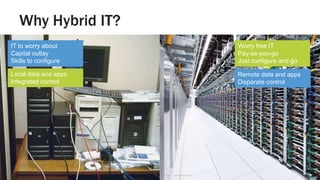
Local data and apps
Integrated control
IT to worry about
Capital outlay
Skills to configure
Why Hybrid IT?
Slide 14© Zynstra Ltd 2013. Commercial-in-confidence. Not for disclosure to third parties.
?Local Cloud
Remote data and apps
Disparate control
Worry free IT
Pay-as-you-go
Just configure and go
Local data and apps
Integrated control
IT to worry about
Capital outlay
Skills to configure
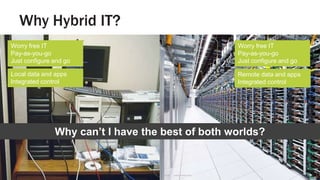
Why can’t I have the best of both worlds?
Worry free IT
Pay-as-you-go
Just configure and go
Remote data and apps
Integrated control
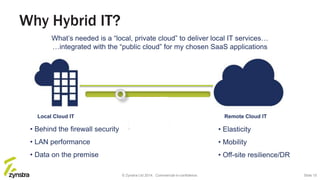
Local Cloud IT Remote Cloud IT
• Behind the firewall security
• LAN performance
• Data on the premise
• Elasticity
• Mobility
• Off-site resilience/DR
Why Hybrid IT?
What’s needed is a “local, private cloud” to deliver local IT services…
…integrated with the “public cloud” for my chosen SaaS applications
© Zynstra Ltd 2014. Commercial-in-confidence. Slide 15
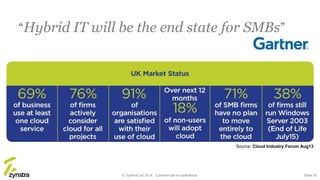
“Hybrid IT will be the end state for SMBs”
Source: Cloud Industry Forum Aug13
© Zynstra Ltd 2014. Commercial-in-confidence. Slide 16
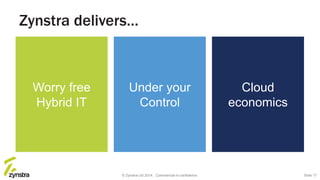
Zynstra delivers…
Under your
Control
Cloud
economics
Worry free
Hybrid IT
© Zynstra Ltd 2014. Commercial-in-confidence. Slide 17
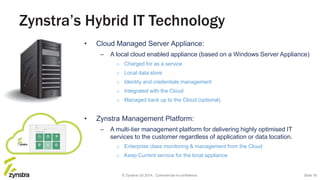
Zynstra’s Hybrid IT Technology
• Cloud Managed Server Appliance:
– A local cloud enabled appliance (based on a Windows Server Appliance)
o Charged for as a service
o Local data store
o Identity and credentials management
o Integrated with the Cloud
o Managed back up to the Cloud (optional)
• Zynstra Management Platform:
– A multi-tier management platform for delivering highly optimised IT
services to the customer regardless of application or data location.
o Enterprise class monitoring & management from the Cloud
o Keep Current service for the local appliance
Slide 18© Zynstra Ltd 2014. Commercial-in-confidence.
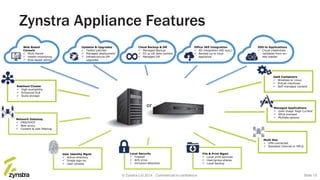
Zynstra Appliance Features
Web Based
Console
 Multi-tiered
 Health monitoring
 Role based admin
Office 365 Integration
 AD integration (AD sync)
 Backed up to local
appliance
SSO to Applications
 Cloud credentials
validated from on-
site master
Updates & Upgrades
 Tested patches
 Managed deployment
 Infrastructure VM
upgrades
Cloud Backup & DR
 Managed Backup
 EU or US data-centers
 Managed DR
File & Print Mgmt
 Local print services
 User/group shares
 Local backup
Local Security
 Firewall
 Anti virus
 Intrusion detection
User Identity Mgmt
 Active directory
 Single sign-on
 User console
Network Gateway
 DNS/DHCP
 Web proxy
 Content & web filtering
Resilient Cluster
 High availability
 Enhanced SLA
 Scale storage
IaaS Containers
 Windows or Linux
 Virtual machines
 Self managed content
Multi Site
 VPN connected
 Standard internet or MPLS
Managed Applications
 Gold image ‘Kept Current’
 SPLA licensed
 Multiple options
or
© Zynstra Ltd 2014. Commercial-in-confidence. Slide 19
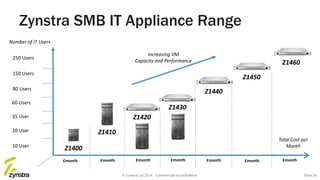
Zynstra SMB IT Appliance Range
10 User
20 User
35 User
60 Users
80 Users
150 Users
250 Users
£month
Total Cost per
Month
£month £month £month £month £month
Z1420
Z1430
Z1450
Z1410
Z1400
Number of IT Users
£month
Z1440
Z1460
Increasing VM
Capacity and Performance
© Zynstra Ltd 2014. Commercial-in-confidence. Slide 20
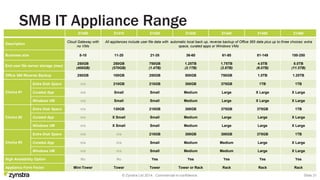
SMB IT Appliance Range
Z1400 Z1410 Z1420 Z1430 Z1440 Z1450 Z1460
Description
Cloud Gateway with
no VMs
All appliances include user file data with automatic local back up, reverse backup of Office 365 data plus up to three choices: extra
space, curated apps or Windows VMs
Business size 5-10 11-20 21-35 36-60 61-80 81-149 150-250
End user file server storage (max)
250GB
(400GB)
250GB
(570GB)
750GB
(1.4TB)
1.25TB
(2.1TB)
1.75TB
(2.8TB)
4.0TB
(6.0TB)
8.0TB
(11.5TB)
Office 365 Reverse Backup 250GB 100GB 250GB 500GB 750GB 1.0TB 1.25TB
Choice #1
Extra Disk Space n/a 210GB 210GB 300GB 375GB 1TB 1TB
Curated App n/a Small Small Medium Large X Large X Large
Windows VM n/a Small Small Medium Large X Large X Large
Choice #2
Extra Disk Space n/a 130GB 210GB 300GB 375GB 375GB 1TB
Curated App n/a X Small Small Medium Large Large X Large
Windows VM n/a X Small Small Medium Large Large X Large
Choice #3
Extra Disk Space n/a n/a 210GB 300GB 300GB 375GB 1TB
Curated App n/a n/a Small Medium Medium Large X Large
Windows VM n/a n/a Small Medium Medium Large X Large
High Availability Option No No Yes Yes Yes Yes Yes
Appliance Form Factor Mini-Tower Tower Tower Tower or Rack Rack Rack Rack
© Zynstra Ltd 2014. Commercial-in-confidence. Slide 21
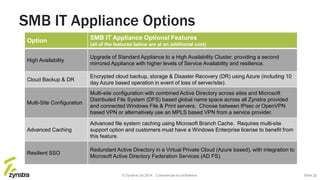
SMB IT Appliance Options
Option SMB IT Appliance Optional Features
(all of the features below are at an additional cost)
High Availability
Upgrade of Standard Appliance to a High Availability Cluster, providing a second
mirrored Appliance with higher levels of Service Availability and resilience.
Cloud Backup & DR
Encrypted cloud backup, storage & Disaster Recovery (DR) using Azure (including 10
day Azure based operation in event of loss of server/site).
Multi-Site Configuration
Multi-site configuration with combined Active Directory across sites and Microsoft
Distributed File System (DFS) based global name space across all Zynstra provided
and connected Windows File & Print servers. Choose between IPsec or OpenVPN
based VPN or alternatively use an MPLS based VPN from a service provider.
Advanced Caching
Advanced file system caching using Microsoft Branch Cache. Requires multi-site
support option and customers must have a Windows Enterprise license to benefit from
this feature.
Resilient SSO
Redundant Active Directory in a Virtual Private Cloud (Azure based), with integration to
Microsoft Active Directory Federation Services (AD FS).
© Zynstra Ltd 2014. Commercial-in-confidence. Slide 22
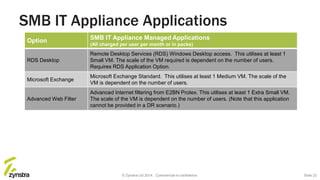
SMB IT Appliance Applications
Option SMB IT Appliance Managed Applications
(All charged per user per month or in packs)
RDS Desktop
Remote Desktop Services (RDS) Windows Desktop access. This utilises at least 1
Small VM. The scale of the VM required is dependent on the number of users.
Requires RDS Application Option.
Microsoft Exchange
Microsoft Exchange Standard. This utilises at least 1 Medium VM. The scale of the
VM is dependent on the number of users.
Advanced Web Filter
Advanced Internet filtering from E2BN Protex. This utilises at least 1 Extra Small VM.
The scale of the VM is dependent on the number of users. (Note that this application
cannot be provided in a DR scenario.)
© Zynstra Ltd 2014. Commercial-in-confidence. Slide 23
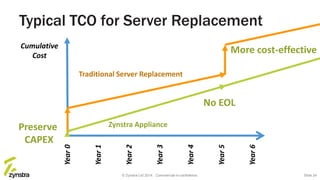
Typical TCO for Server Replacement
Year0
Cumulative
Cost
Year1
Year2
Year3
Year4
Year5
Year6
Preserve
CAPEX
More cost-effective
No EOL
Traditional Server Replacement
Zynstra Appliance
© Zynstra Ltd 2014. Commercial-in-confidence. Slide 24
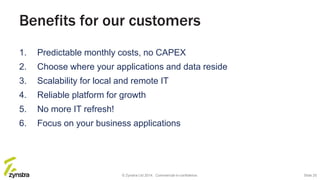
Benefits for our customers
1. Predictable monthly costs, no CAPEX
2. Choose where your applications and data reside
3. Scalability for local and remote IT
4. Reliable platform for growth
5. No more IT refresh!
6. Focus on your business applications
© Zynstra Ltd 2014. Commercial-in-confidence. Slide 25
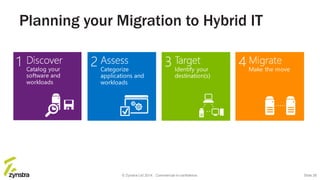
Planning your Migration to Hybrid IT
© Zynstra Ltd 2014. Commercial-in-confidence. Slide 26
© Zynstra Ltd 2014. Commercial-in-confidence.
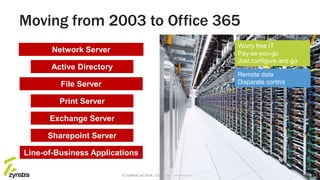
Worry free IT
Pay-as-you-go
Just configure and go
Sharepoint Server
Exchange Server
Moving from 2003 to Office 365
Slide 27
Active Directory
File Server
Network Server
Print Server
Line-of-Business Applications
Remote data
Disparate controlFile Server
© Zynstra Ltd 2014. Commercial-in-confidence. Slide 28
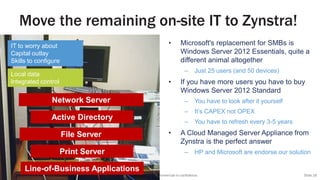
Move the remaining on-site IT to Zynstra!
• Microsoft's replacement for SMBs is
Windows Server 2012 Essentials, quite a
different animal altogether
– Just 25 users (and 50 devices)
• If you have more users you have to buy
Windows Server 2012 Standard
– You have to look after it yourself
– It’s CAPEX not OPEX
– You have to refresh every 3-5 years
• A Cloud Managed Server Appliance from
Zynstra is the perfect answer
– HP and Microsoft are endorse our solution
Local data
Integrated control
IT to worry about
Capital outlay
Skills to configure
Active Directory
Network Server
Print Server
File Server
Line-of-Business Applications
Server 2003
DC and File
Server
Secure Remote
Access
Hosted
E-Mail
Platform
Secure
Local IT
The
Internet
Server 2003
Printer Server
+ Web Sense
Server 2008
App Sever
Test VM’s
Server 2003
Document
Management
Server
Firewall/CPE
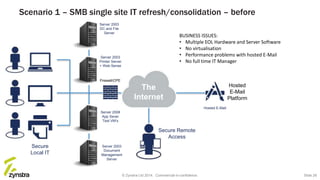
Scenario 1 – SMB single site IT refresh/consolidation – before
BUSINESS ISSUES:
• Multiple EOL Hardware and Server Software
• No virtualisation
• Performance problems with hosted E-Mail
• No full time IT Manager
Hosted E-Mail
© Zynstra Ltd 2014. Commercial-in-confidence. Slide 29
Zynstra
Cloud Management
Platform
Monitoring
Tools
Update
Service
Secure
Local IT
Management
Console
Server 2008
App Server,
Test VM’s
Secure Remote
Access
Zynstra Cloud
Managed
Server Cluster
The
Internet
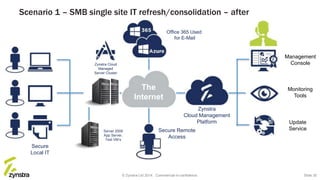
Scenario 1 – SMB single site IT refresh/consolidation – after
Office 365 Used
for E-Mail
© Zynstra Ltd 2014. Commercial-in-confidence. Slide 30
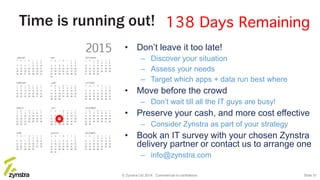
Time is running out!
• Don’t leave it too late!
– Discover your situation
– Assess your needs
– Target which apps + data run best where
• Move before the crowd
– Don’t wait till all the IT guys are busy!
• Preserve your cash, and more cost effective
– Consider Zynstra as part of your strategy
• Book an IT survey with your chosen Zynstra
delivery partner or contact us to arrange one
– info@zynstra.com
© Zynstra Ltd 2014. Commercial-in-confidence. Slide 31
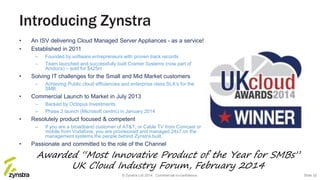
Introducing Zynstra
• An ISV delivering Cloud Managed Server Appliances - as a service!
• Established in 2011
– Founded by software entrepreneurs with proven track records
– Team launched and successfully built Cramer Systems (now part of
Amdocs) – sold for $425m
• Solving IT challenges for the Small and Mid Market customers
– Achieving Public cloud efficiencies and enterprise class SLA’s for the
SMB.
• Commercial Launch to Market in July 2013
– Backed by Octopus Investments
– Phase 2 launch (Microsoft centric) in January 2014
• Resolutely product focused & competent
– If you are a broadband customer of AT&T, or Cable TV from Comcast or
mobile from Vodafone, you are provisioned and managed 24x7 on the
management systems the people behind Zynstra built.
• Passionate and committed to the role of the Channel
Awarded “Most Innovative Product of the Year for SMBs”
UK Cloud Industry Forum, February 2014
© Zynstra Ltd 2014. Commercial-in-confidence. Slide 32
Thanks for listening
Like what you’ve heard?
info@zynstra.com
© Zynstra Ltd 2014. Commercial-in-confidence. Slide 33

Webinar: Windows Server 2003 End of Support

  • 1.
    The greatest opportunityin a decade Windows Server 2003 End of Support February 2015 James Fox Head of Pre-Sales
  • 2.
    › Welcome &housekeeping › End of Support – the impact › Your options › Hybrid IT – the sensible choice › Zynstra’s Hybrid Cloud technology › Migration planning › Benefits for SMBs and IT Service Providers › Q&A
  • 3.
    Welcome & Housekeeping •Today’s webinar will last 30 minutes + Q&A • All participants will be muted to prevent interruptions • Questions can be submitted via the question box – We’ll have Q&A at the end of the session • The webinar will be recorded and available on- demand on the Zynstra YouTube channel © Zynstra Ltd 2014. Commercial-in-confidence. Slide 3
  • 4.
    Optimistic Estimates Server migration:200 days Application migration: 300+ days The Countdown to End-of-Support © Zynstra Ltd 2014. Commercial-in-confidence. Slide 4
  • 5.
    The impact ofEnd-of-Support Increased costs The costs of maintaining your legacy servers can add up quickly. Staying put will likely cost more in the end. No more updates In 2013, 37 critical updates were released – no more will be developed or released after end of support. Security risks 91% increase in targeted attack campaigns & globally over 522M identities were exposed via breaches* Non-compliance Lack of compliance with various standards and regulations can be devastating. *Source: Internet Security Threat Report 2014, Symantec © Zynstra Ltd 2014. Commercial-in-confidence. Slide 5
  • 6.
    Your options 3. Cloudonly Connectivity? Performance? What about the IT that has to be local? Gateway, Security, File+Print? 1. Do nothing The question regarding moving away from 2003 shouldn’t be if but when. 2. Traditional on-premise Up front costs, fixed solution, minimal room for flexibility and scalability. 4. Hybrid IT “Hybrid IT environments (combining on-premise and cloud) will remain the foreseeable norm”. Gartner, 2014 SMB Scenario © Zynstra Ltd 2014. Commercial-in-confidence. Slide 6
  • 7.
    Local Cloud Connectivity © ZynstraLtd 2014. Commercial-in-confidence. Why Hybrid IT? Slide 7
  • 8.
    Local Cloud Connectivity © ZynstraLtd 2014. Commercial-in-confidence. Why Hybrid IT? Slide 8 Cloud
  • 9.
    Local Cloud Connectivity © ZynstraLtd 2014. Commercial-in-confidence. Why Hybrid IT? Slide 9 Cloud Worry free IT Pay-as-you-go Just configure and go
  • 10.
    Local Cloud Connectivity © ZynstraLtd 2014. Commercial-in-confidence. Why Hybrid IT? Slide 10 Cloud Remote data and apps Disparate control Worry free IT Pay-as-you-go Just configure and go
  • 11.
    Why Hybrid IT? Slide11© Zynstra Ltd 2013. Commercial-in-confidence. Not for disclosure to third parties. ?Local Cloud Remote data and apps Disparate control Worry free IT Pay-as-you-go Just configure and go
  • 12.
    Why Hybrid IT? Slide12© Zynstra Ltd 2013. Commercial-in-confidence. Not for disclosure to third parties. ?Local Cloud Remote data and apps Disparate control Worry free IT Pay-as-you-go Just configure and go IT to worry about Capital outlay Skills to configure
  • 13.
    Why Hybrid IT? Slide13© Zynstra Ltd 2013. Commercial-in-confidence. Not for disclosure to third parties. ?Local Cloud Remote data and apps Disparate control Worry free IT Pay-as-you-go Just configure and go Local data and apps Integrated control IT to worry about Capital outlay Skills to configure
  • 14.
    Why Hybrid IT? Slide14© Zynstra Ltd 2013. Commercial-in-confidence. Not for disclosure to third parties. ?Local Cloud Remote data and apps Disparate control Worry free IT Pay-as-you-go Just configure and go Local data and apps Integrated control IT to worry about Capital outlay Skills to configure Why can’t I have the best of both worlds? Worry free IT Pay-as-you-go Just configure and go Remote data and apps Integrated control
  • 15.
    Local Cloud ITRemote Cloud IT • Behind the firewall security • LAN performance • Data on the premise • Elasticity • Mobility • Off-site resilience/DR Why Hybrid IT? What’s needed is a “local, private cloud” to deliver local IT services… …integrated with the “public cloud” for my chosen SaaS applications © Zynstra Ltd 2014. Commercial-in-confidence. Slide 15
  • 16.
    “Hybrid IT willbe the end state for SMBs” Source: Cloud Industry Forum Aug13 © Zynstra Ltd 2014. Commercial-in-confidence. Slide 16
  • 17.
    Zynstra delivers… Under your Control Cloud economics Worryfree Hybrid IT © Zynstra Ltd 2014. Commercial-in-confidence. Slide 17
  • 18.
    Zynstra’s Hybrid ITTechnology • Cloud Managed Server Appliance: – A local cloud enabled appliance (based on a Windows Server Appliance) o Charged for as a service o Local data store o Identity and credentials management o Integrated with the Cloud o Managed back up to the Cloud (optional) • Zynstra Management Platform: – A multi-tier management platform for delivering highly optimised IT services to the customer regardless of application or data location. o Enterprise class monitoring & management from the Cloud o Keep Current service for the local appliance Slide 18© Zynstra Ltd 2014. Commercial-in-confidence.
  • 19.
    Zynstra Appliance Features WebBased Console  Multi-tiered  Health monitoring  Role based admin Office 365 Integration  AD integration (AD sync)  Backed up to local appliance SSO to Applications  Cloud credentials validated from on- site master Updates & Upgrades  Tested patches  Managed deployment  Infrastructure VM upgrades Cloud Backup & DR  Managed Backup  EU or US data-centers  Managed DR File & Print Mgmt  Local print services  User/group shares  Local backup Local Security  Firewall  Anti virus  Intrusion detection User Identity Mgmt  Active directory  Single sign-on  User console Network Gateway  DNS/DHCP  Web proxy  Content & web filtering Resilient Cluster  High availability  Enhanced SLA  Scale storage IaaS Containers  Windows or Linux  Virtual machines  Self managed content Multi Site  VPN connected  Standard internet or MPLS Managed Applications  Gold image ‘Kept Current’  SPLA licensed  Multiple options or © Zynstra Ltd 2014. Commercial-in-confidence. Slide 19
  • 20.
    Zynstra SMB ITAppliance Range 10 User 20 User 35 User 60 Users 80 Users 150 Users 250 Users £month Total Cost per Month £month £month £month £month £month Z1420 Z1430 Z1450 Z1410 Z1400 Number of IT Users £month Z1440 Z1460 Increasing VM Capacity and Performance © Zynstra Ltd 2014. Commercial-in-confidence. Slide 20
  • 21.
    SMB IT ApplianceRange Z1400 Z1410 Z1420 Z1430 Z1440 Z1450 Z1460 Description Cloud Gateway with no VMs All appliances include user file data with automatic local back up, reverse backup of Office 365 data plus up to three choices: extra space, curated apps or Windows VMs Business size 5-10 11-20 21-35 36-60 61-80 81-149 150-250 End user file server storage (max) 250GB (400GB) 250GB (570GB) 750GB (1.4TB) 1.25TB (2.1TB) 1.75TB (2.8TB) 4.0TB (6.0TB) 8.0TB (11.5TB) Office 365 Reverse Backup 250GB 100GB 250GB 500GB 750GB 1.0TB 1.25TB Choice #1 Extra Disk Space n/a 210GB 210GB 300GB 375GB 1TB 1TB Curated App n/a Small Small Medium Large X Large X Large Windows VM n/a Small Small Medium Large X Large X Large Choice #2 Extra Disk Space n/a 130GB 210GB 300GB 375GB 375GB 1TB Curated App n/a X Small Small Medium Large Large X Large Windows VM n/a X Small Small Medium Large Large X Large Choice #3 Extra Disk Space n/a n/a 210GB 300GB 300GB 375GB 1TB Curated App n/a n/a Small Medium Medium Large X Large Windows VM n/a n/a Small Medium Medium Large X Large High Availability Option No No Yes Yes Yes Yes Yes Appliance Form Factor Mini-Tower Tower Tower Tower or Rack Rack Rack Rack © Zynstra Ltd 2014. Commercial-in-confidence. Slide 21
  • 22.
    SMB IT ApplianceOptions Option SMB IT Appliance Optional Features (all of the features below are at an additional cost) High Availability Upgrade of Standard Appliance to a High Availability Cluster, providing a second mirrored Appliance with higher levels of Service Availability and resilience. Cloud Backup & DR Encrypted cloud backup, storage & Disaster Recovery (DR) using Azure (including 10 day Azure based operation in event of loss of server/site). Multi-Site Configuration Multi-site configuration with combined Active Directory across sites and Microsoft Distributed File System (DFS) based global name space across all Zynstra provided and connected Windows File & Print servers. Choose between IPsec or OpenVPN based VPN or alternatively use an MPLS based VPN from a service provider. Advanced Caching Advanced file system caching using Microsoft Branch Cache. Requires multi-site support option and customers must have a Windows Enterprise license to benefit from this feature. Resilient SSO Redundant Active Directory in a Virtual Private Cloud (Azure based), with integration to Microsoft Active Directory Federation Services (AD FS). © Zynstra Ltd 2014. Commercial-in-confidence. Slide 22
  • 23.
    SMB IT ApplianceApplications Option SMB IT Appliance Managed Applications (All charged per user per month or in packs) RDS Desktop Remote Desktop Services (RDS) Windows Desktop access. This utilises at least 1 Small VM. The scale of the VM required is dependent on the number of users. Requires RDS Application Option. Microsoft Exchange Microsoft Exchange Standard. This utilises at least 1 Medium VM. The scale of the VM is dependent on the number of users. Advanced Web Filter Advanced Internet filtering from E2BN Protex. This utilises at least 1 Extra Small VM. The scale of the VM is dependent on the number of users. (Note that this application cannot be provided in a DR scenario.) © Zynstra Ltd 2014. Commercial-in-confidence. Slide 23
  • 24.
    Typical TCO forServer Replacement Year0 Cumulative Cost Year1 Year2 Year3 Year4 Year5 Year6 Preserve CAPEX More cost-effective No EOL Traditional Server Replacement Zynstra Appliance © Zynstra Ltd 2014. Commercial-in-confidence. Slide 24
  • 25.
    Benefits for ourcustomers 1. Predictable monthly costs, no CAPEX 2. Choose where your applications and data reside 3. Scalability for local and remote IT 4. Reliable platform for growth 5. No more IT refresh! 6. Focus on your business applications © Zynstra Ltd 2014. Commercial-in-confidence. Slide 25
  • 26.
    Planning your Migrationto Hybrid IT © Zynstra Ltd 2014. Commercial-in-confidence. Slide 26
  • 27.
    © Zynstra Ltd2014. Commercial-in-confidence. Worry free IT Pay-as-you-go Just configure and go Sharepoint Server Exchange Server Moving from 2003 to Office 365 Slide 27 Active Directory File Server Network Server Print Server Line-of-Business Applications Remote data Disparate controlFile Server
  • 28.
    © Zynstra Ltd2014. Commercial-in-confidence. Slide 28 Move the remaining on-site IT to Zynstra! • Microsoft's replacement for SMBs is Windows Server 2012 Essentials, quite a different animal altogether – Just 25 users (and 50 devices) • If you have more users you have to buy Windows Server 2012 Standard – You have to look after it yourself – It’s CAPEX not OPEX – You have to refresh every 3-5 years • A Cloud Managed Server Appliance from Zynstra is the perfect answer – HP and Microsoft are endorse our solution Local data Integrated control IT to worry about Capital outlay Skills to configure Active Directory Network Server Print Server File Server Line-of-Business Applications
  • 29.
    Server 2003 DC andFile Server Secure Remote Access Hosted E-Mail Platform Secure Local IT The Internet Server 2003 Printer Server + Web Sense Server 2008 App Sever Test VM’s Server 2003 Document Management Server Firewall/CPE Scenario 1 – SMB single site IT refresh/consolidation – before BUSINESS ISSUES: • Multiple EOL Hardware and Server Software • No virtualisation • Performance problems with hosted E-Mail • No full time IT Manager Hosted E-Mail © Zynstra Ltd 2014. Commercial-in-confidence. Slide 29
  • 30.
    Zynstra Cloud Management Platform Monitoring Tools Update Service Secure Local IT Management Console Server2008 App Server, Test VM’s Secure Remote Access Zynstra Cloud Managed Server Cluster The Internet Scenario 1 – SMB single site IT refresh/consolidation – after Office 365 Used for E-Mail © Zynstra Ltd 2014. Commercial-in-confidence. Slide 30
  • 31.
    Time is runningout! • Don’t leave it too late! – Discover your situation – Assess your needs – Target which apps + data run best where • Move before the crowd – Don’t wait till all the IT guys are busy! • Preserve your cash, and more cost effective – Consider Zynstra as part of your strategy • Book an IT survey with your chosen Zynstra delivery partner or contact us to arrange one – info@zynstra.com © Zynstra Ltd 2014. Commercial-in-confidence. Slide 31
  • 32.
    Introducing Zynstra • AnISV delivering Cloud Managed Server Appliances - as a service! • Established in 2011 – Founded by software entrepreneurs with proven track records – Team launched and successfully built Cramer Systems (now part of Amdocs) – sold for $425m • Solving IT challenges for the Small and Mid Market customers – Achieving Public cloud efficiencies and enterprise class SLA’s for the SMB. • Commercial Launch to Market in July 2013 – Backed by Octopus Investments – Phase 2 launch (Microsoft centric) in January 2014 • Resolutely product focused & competent – If you are a broadband customer of AT&T, or Cable TV from Comcast or mobile from Vodafone, you are provisioned and managed 24x7 on the management systems the people behind Zynstra built. • Passionate and committed to the role of the Channel Awarded “Most Innovative Product of the Year for SMBs” UK Cloud Industry Forum, February 2014 © Zynstra Ltd 2014. Commercial-in-confidence. Slide 32
  • 33.
    Thanks for listening Likewhat you’ve heard? info@zynstra.com © Zynstra Ltd 2014. Commercial-in-confidence. Slide 33

Editor's Notes

  • #5 Mainstream support from Microsoft for Windows Server 2003 ended in July 2010. Windows Server 2003/R2 has been on Extended Support since then, which means only security updates are released. July 14, 2015 is the End of Support for Windows Server 2003/R2.
  • #27 Step one: The first step is to discover and catalog all of the software and workloads that are running on Windows Server 2003/R2. Do you have a good grasp on exactly what is still running on Windows Server 2003/R2? A thorough discovery process is essential because you cannot address the problem if you do not know what the problem is. To help with this, Microsoft have produced a toolkit which you can download for free. Microsoft Assessment and Planning (MAP) Toolkit. Step two: Once you have a catalog, you will need to assess what is in that catalog. This means categorizing your applications and workloads in several ways and doing a thorough analysis of what is there. We suggest you consider categorizing your applications and workloads in four ways: By type, By criticality, By complexity and By risk. With this categorization complete, you can begin to understand the scope of the problem and can prioritize your workloads and applications. The categorization will also reveal some potential opportunities, as well as potential issues. Step three: You must choose a migration destination for each application and workload. Different workloads and applications will logically lead to certain targets. Others could offer the possibility of migration to one or more of these destinations. The choice will be driven by factors such as speed and ease of migration, cost, and desired functionality in the migrated solution. Step four: With an understanding of what is still running on Widows Server 2003, what needs to migrate when, and where to migrate to, you can make a plan and begin to migrate. But arriving at this state (that is, making these choices) may require some additional analysis and perhaps assistance. The migration itself can be facilitated by both third-party products and services.
  • #32 Mainstream support from Microsoft for Windows Server 2003 ended in July 2010. Windows Server 2003/R2 has been on Extended Support since then, which means only security updates are released. July 14, 2015 is the End of Support for Windows Server 2003/R2.