
© 2016 Citrix | Confidential
Looking Beyond Microsoft RDS
An Introduction
Top 3
Contextual & Embedded Security
Delightful and productive user experiences
Simple, scalable management & support
Reasons to look beyond Microsoft RDS
© 2016 Citrix | Confidential
Delightful and productive user experiences
© 2016 Citrix | Confidential
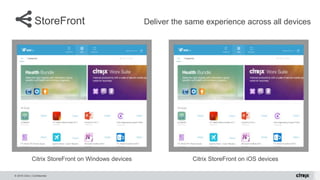
StoreFront Deliver the same experience across all devices
Citrix StoreFront on Windows devices Citrix StoreFront on iOS devices
© 2016 Citrix | Confidential
Self Service Password Reset
• Reduce Helpdesk Calls
• Instantly unlock accounts
• Additional Security Questions
• Aimed at XenApp 6.5
organizations that want to move to
StoreFront while retaining SSPR
© 2016 Citrix | Confidential
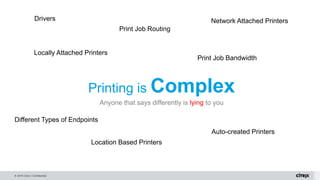
Printing is Complex
Anyone that says differently is lying to you
Print Job Bandwidth
Locally Attached Printers
Network Attached Printers
Location Based Printers
Different Types of Endpoints
Auto-created Printers
Print Job Routing
Drivers
© 2016 Citrix | Confidential
Universal Printing
Optimized printing for all devices
• Universal Print Driver
– Compresses print job across wire
– Simplifies management of XenApp VMs
• Universal Print Server
– Extends universal print driver to network printers
• Combination of UPD/UPS provides universal printing
to any endpoint
– Windows XP, Vista, 7, 8, 10
– Windows Server 2008, 2012
– Mac, Linux, and more
0
10
20
30
40
50
60
70
80
90
PPTX File
MegabytesTransmitted
Native XenDesktop (Lossless)
64% Less!
© 2016 Citrix | Confidential
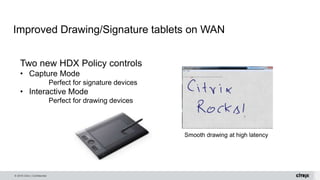
Improved Drawing/Signature tablets on WAN
Smooth drawing at high latency
Two new HDX Policy controls
• Capture Mode
Perfect for signature devices
• Interactive Mode
Perfect for drawing devices
© 2016 Citrix | Confidential
With HDX, users get a rich, High
Definition eXperience allowing
them to utilize:
• Smartcards
• Scanners
• Drawing tablets
• As well as any app, regardless
of graphical requirements and
capabilities
© 2016 Citrix | Confidential
Watch entire video at
https://www.youtube.com/watch?v=IpOSi_FkA7c
Which one is a traditional PC and which is XenDesktop?
© 2016 Citrix | Confidential
Citrix Delivers a “High-Definition” Experience on Any Device
RDP works best only for the latest Windows-based operating systems
• HDX uses less
bandwidth with higher
frame rates
• Enhancements to
Skype/ Lync Server
2010, 2013 and 365
• NVIDIA vGPU GRID
solution for challenging
3D use cases with
customers in production
• Native VDI/RDS
printing provides basic
printing support to
Windows endpoints
• XenDesktop extends
printing with driver-less
printing across a
variety of endpoints
using universal print
server
• Intent-based protocol
for high latency & high
packet loss mobile
networks
• Optimized mobile
experience (inertia-
sensed scrolling, pop-
up keyboards, native
picker controls)
• Optimized for drawing
& signature tablets
• CloudBridge and Multi-
Stream ICA provide a
better experience over
any WAN, Internet or
mobile network
• Get up to twice the
number of users on the
same network as RDS
saving bandwidth cost.
Built-in WAN
Optimization
Best Mobile
Experience
Driver-less and
hassle-free printing
Optimized video &
best 3D experience
© 2016 Citrix | Confidential
Greater density with the latest versions
150
155
160
165
170
175
180
185
190
PVS
XenApp 6.5 XenApp 7.5
60
62
64
66
68
70
72
74
76
78
80
PVS
XenDesktop 7.0 XenDesktop 7.5
10% greater density
with XenApp 7.5
Contextual and embedded security
© 2016 Citrix | Confidential
Improved Security
Worldwide recognition as the industry standard for app security
XenApp &
XenDeskotp has
achieved Common
Criteria evaluation
milestone, first & only
in industry
XenApp &
XenDesktop are FIPS
compliant, simplifying
highly regulated
compliance
FIPS 140-2
Compliant
&
Common Criteria
evaluation
© 2016 Citrix | Confidential
Clipboard Control
Clipboard Restriction Policy Clipboard Content Policy
© 2016 Citrix | Confidential
Denying access from jailbroken iOS devices
Receiver for iOS 6.1
• Receiver for iOS can detect that the device that
is jailbroken
• User can dismiss and continue -OR-
• Administrators can choose to block published
access to apps and desktops
– Administrators have to add a keyword
AllowJailBrokenDevices=False in the default.ica
file on their StoreFront or Web Interface servers.
– Modify the default.ica files on ALL their
StoreFront and Web Interface servers.
– When the application or desktop is blocked the
user will be shown the same Security Alert.
Security Alert
Citrix Receiver detected this device has
been jailbroken and cannot be trusted to
run this app securely.
Dismiss
© 2016 Citrix | Confidential
Session Recording
Session
Recording Server
Session Recording
Policy Console
Session
Recording
Database
Session
Recording Player
XenApp Servers
Session Recording Agent
XenDesktop VMs
Session Recording Agent
© 2016 Citrix | Confidential
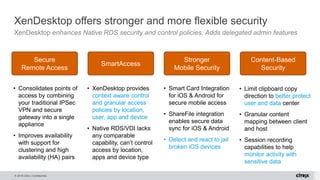
XenDesktop offers stronger and more flexible security
XenDesktop enhances Native RDS security and control policies. Adds delegated admin features
• Consolidates points of
access by combining
your traditional IPSec
VPN and secure
gateway into a single
appliance
• Improves availability
with support for
clustering and high
availability (HA) pairs
• XenDesktop provides
context aware control
and granular access
policies by location,
user, app and device
• Native RDS/VDI lacks
any comparable
capability, can’t control
access by location,
apps and device type
• Smart Card Integration
for iOS & Android for
secure mobile access
• ShareFile integration
enables secure data
sync for iOS & Android
• Detect and react to jail
broken iOS devices
• Limit clipboard copy
direction to better protect
user and data center
• Granular content
mapping between client
and host
• Session recording
capabilities to help
monitor activity with
sensitive data
Content-Based
Security
Stronger
Mobile Security
SmartAccess
Secure
Remote Access
© 2016 Citrix | Confidential
Simple, scalable management and support capabilities
© 2016 Citrix | Confidential
XenDesktop management is easier, faster and more effective
Extends Native RDS/VDI beyond small, simple, single-site deployments
• Native VDI/RDS images
utilize SysPrep for initial
deployment
• Provisioning Services
(PVS) manages entire
image life-cycle across
VDI, RDS and physical.
• PVS decreases
downtime by updating
images via simple reboot
• Advanced Load
Balancing &
application throttling
for more accurate
load balancing across
different hardware
configurations
• Citrix Connector for
SCCM unifies and
simplifies app delivery
• AppDNA technology
(in Platinum) is best-
in-class helping
organizations migrate
to Server 2012R2
with confidence.
• AppDNA leverages
App-V and AppDisk
for integrated
packaging & delivery
to XenDesktop
• XenDesktop helpdesk
tools, in every edition,
built for desktop admins,
multi-site aware and any
sized deployments
• Role-based delegated
administration,
configuration & logging
• Session recording
speeds troubleshooting
Built-in support &
management tools
App migration &
remediation tools
Advanced
Configurations
Faster and simpler
Image Management
© 2015 Citrix | Confidential
Want to explore further?
Contact us at 800.424.8749
© 2016 Citrix | Confidential
Work better. Live better.Work better. Live better.

Looking Beyond Microsoft RDS

  • 1.
    © 2016 Citrix| Confidential Looking Beyond Microsoft RDS An Introduction
  • 2.
    Top 3 Contextual &Embedded Security Delightful and productive user experiences Simple, scalable management & support Reasons to look beyond Microsoft RDS
  • 3.
    © 2016 Citrix| Confidential Delightful and productive user experiences
  • 4.
    © 2016 Citrix| Confidential StoreFront Deliver the same experience across all devices Citrix StoreFront on Windows devices Citrix StoreFront on iOS devices
  • 5.
    © 2016 Citrix| Confidential Self Service Password Reset • Reduce Helpdesk Calls • Instantly unlock accounts • Additional Security Questions • Aimed at XenApp 6.5 organizations that want to move to StoreFront while retaining SSPR
  • 6.
    © 2016 Citrix| Confidential Printing is Complex Anyone that says differently is lying to you Print Job Bandwidth Locally Attached Printers Network Attached Printers Location Based Printers Different Types of Endpoints Auto-created Printers Print Job Routing Drivers
  • 7.
    © 2016 Citrix| Confidential Universal Printing Optimized printing for all devices • Universal Print Driver – Compresses print job across wire – Simplifies management of XenApp VMs • Universal Print Server – Extends universal print driver to network printers • Combination of UPD/UPS provides universal printing to any endpoint – Windows XP, Vista, 7, 8, 10 – Windows Server 2008, 2012 – Mac, Linux, and more 0 10 20 30 40 50 60 70 80 90 PPTX File MegabytesTransmitted Native XenDesktop (Lossless) 64% Less!
  • 8.
    © 2016 Citrix| Confidential Improved Drawing/Signature tablets on WAN Smooth drawing at high latency Two new HDX Policy controls • Capture Mode Perfect for signature devices • Interactive Mode Perfect for drawing devices
  • 9.
    © 2016 Citrix| Confidential With HDX, users get a rich, High Definition eXperience allowing them to utilize: • Smartcards • Scanners • Drawing tablets • As well as any app, regardless of graphical requirements and capabilities
  • 10.
    © 2016 Citrix| Confidential Watch entire video at https://www.youtube.com/watch?v=IpOSi_FkA7c Which one is a traditional PC and which is XenDesktop?
  • 11.
    © 2016 Citrix| Confidential Citrix Delivers a “High-Definition” Experience on Any Device RDP works best only for the latest Windows-based operating systems • HDX uses less bandwidth with higher frame rates • Enhancements to Skype/ Lync Server 2010, 2013 and 365 • NVIDIA vGPU GRID solution for challenging 3D use cases with customers in production • Native VDI/RDS printing provides basic printing support to Windows endpoints • XenDesktop extends printing with driver-less printing across a variety of endpoints using universal print server • Intent-based protocol for high latency & high packet loss mobile networks • Optimized mobile experience (inertia- sensed scrolling, pop- up keyboards, native picker controls) • Optimized for drawing & signature tablets • CloudBridge and Multi- Stream ICA provide a better experience over any WAN, Internet or mobile network • Get up to twice the number of users on the same network as RDS saving bandwidth cost. Built-in WAN Optimization Best Mobile Experience Driver-less and hassle-free printing Optimized video & best 3D experience
  • 12.
    © 2016 Citrix| Confidential Greater density with the latest versions 150 155 160 165 170 175 180 185 190 PVS XenApp 6.5 XenApp 7.5 60 62 64 66 68 70 72 74 76 78 80 PVS XenDesktop 7.0 XenDesktop 7.5 10% greater density with XenApp 7.5 Contextual and embedded security
  • 13.
    © 2016 Citrix| Confidential Improved Security Worldwide recognition as the industry standard for app security XenApp & XenDeskotp has achieved Common Criteria evaluation milestone, first & only in industry XenApp & XenDesktop are FIPS compliant, simplifying highly regulated compliance FIPS 140-2 Compliant & Common Criteria evaluation
  • 14.
    © 2016 Citrix| Confidential Clipboard Control Clipboard Restriction Policy Clipboard Content Policy
  • 15.
    © 2016 Citrix| Confidential Denying access from jailbroken iOS devices Receiver for iOS 6.1 • Receiver for iOS can detect that the device that is jailbroken • User can dismiss and continue -OR- • Administrators can choose to block published access to apps and desktops – Administrators have to add a keyword AllowJailBrokenDevices=False in the default.ica file on their StoreFront or Web Interface servers. – Modify the default.ica files on ALL their StoreFront and Web Interface servers. – When the application or desktop is blocked the user will be shown the same Security Alert. Security Alert Citrix Receiver detected this device has been jailbroken and cannot be trusted to run this app securely. Dismiss
  • 16.
    © 2016 Citrix| Confidential Session Recording Session Recording Server Session Recording Policy Console Session Recording Database Session Recording Player XenApp Servers Session Recording Agent XenDesktop VMs Session Recording Agent
  • 17.
    © 2016 Citrix| Confidential XenDesktop offers stronger and more flexible security XenDesktop enhances Native RDS security and control policies. Adds delegated admin features • Consolidates points of access by combining your traditional IPSec VPN and secure gateway into a single appliance • Improves availability with support for clustering and high availability (HA) pairs • XenDesktop provides context aware control and granular access policies by location, user, app and device • Native RDS/VDI lacks any comparable capability, can’t control access by location, apps and device type • Smart Card Integration for iOS & Android for secure mobile access • ShareFile integration enables secure data sync for iOS & Android • Detect and react to jail broken iOS devices • Limit clipboard copy direction to better protect user and data center • Granular content mapping between client and host • Session recording capabilities to help monitor activity with sensitive data Content-Based Security Stronger Mobile Security SmartAccess Secure Remote Access
  • 18.
    © 2016 Citrix| Confidential Simple, scalable management and support capabilities
  • 19.
    © 2016 Citrix| Confidential XenDesktop management is easier, faster and more effective Extends Native RDS/VDI beyond small, simple, single-site deployments • Native VDI/RDS images utilize SysPrep for initial deployment • Provisioning Services (PVS) manages entire image life-cycle across VDI, RDS and physical. • PVS decreases downtime by updating images via simple reboot • Advanced Load Balancing & application throttling for more accurate load balancing across different hardware configurations • Citrix Connector for SCCM unifies and simplifies app delivery • AppDNA technology (in Platinum) is best- in-class helping organizations migrate to Server 2012R2 with confidence. • AppDNA leverages App-V and AppDisk for integrated packaging & delivery to XenDesktop • XenDesktop helpdesk tools, in every edition, built for desktop admins, multi-site aware and any sized deployments • Role-based delegated administration, configuration & logging • Session recording speeds troubleshooting Built-in support & management tools App migration & remediation tools Advanced Configurations Faster and simpler Image Management
  • 20.
    © 2015 Citrix| Confidential Want to explore further? Contact us at 800.424.8749
  • 21.
    © 2016 Citrix| Confidential Work better. Live better.Work better. Live better.

Editor's Notes

  • #4 It’s our obsessive focus on customer experience that differentiates us and is making our vision at Citrix a reality. This is what drives us…it is our vision and the people behind our vision who get to experience a better way of working and living thanks to Citrix.
  • #5 StoreFront Key Points Unified - Same look and feel on any device Dynamic - smart categories and Device & role context Customizable: Easy to customize and integrate
  • #7 Printing is extremely complex due to the many unique user requirements. Citrix has been developing a complete, printing story for over a decade and it never ends as there is always room for improvement and new capabilities to support the latest functionality So anyone who says printing is easy, is lying.
  • #8 Support for Universal print server continues to expand. It includes Windows, Mac, Linux and more. It helps optimize the print job by reducing bandwidth due to integrated compression. And it simplifies management of XenApp virtual machines as we don’t have to worry about managing hundreds of print drivers across hundreds of VMs. We manage the drivers on a single server, the universal print server.
  • #9 And although this last item might be a unique use case, it is becoming more important as users start utilizing touch-pen-based devices like Microsoft Surface Pro, iPad Pro, etc. Citrix has optimized drawing tablets with XenApp/Xendesktop, even on connections with high latency.
  • #10 Key Points With Citrix Receiver, a user’s session will utilize Citrix HDX. With HDX, users get a rich, High Definition eXperience allowing them to utilize smartcards, scanners, drawing tablets as well as any app, regardless of graphical requirements and capabilities
  • #11 Look at the screenshots taken from a Skype for Business call. One used a traditional PC. The other used the latest Citrix optimization pack. Can you tell the difference? Note: The screen on the left is traditional PC, the one on the right is XenDesktop Watch the entire, 2 minute video with the YouTube URL Link
  • #12 There’s more Granular policy support for USB USB 3.0 support H.264 videos on Mobile devices Instant App launch App Folders Anonymous logins Optimized Scanning and TWAIN support Unified Communications Support including Lync 2010 & 2013 & others (Cisco, Avaya) Google Chrome Book Support Flash Redirection Both OpenGL & DirectX support
  • #13 One of the main reasons organizations opt for a VDI/RDS solution is it keeps the data internal and more secure. This is why Security is a major focus area for XA/XD, whether it is security of the overall architecture or for how users access the environment.
  • #14 In today’s fast paced, high tech world secure access to mission-critical app and data is of the utmost importance. Federal Information Processing Standard 140 (FIPS 140) is a U.S. Federal Government standard that specifies a benchmark for implementing cryptographic software. It provides best practices for using cryptographic algorithms, managing key elements and data buffers, and interacting with the operating system. An evaluation process that is administered by the government that allows encryption product vendors to demonstrate the extent to which they comply with the standard and, thus, the trustworthiness of their implementation. To implement secure access to application servers and to meet the FIPS 140 requirements, Citrix XenApp has been certified. The Common Criteria for Information Technology Security Evaluation is another accreditation process adopted by over 24 different certifying nations through the CCRA (Common Criteria Recognition Agreement).   Under the National Information Assurance Partnership, (NIAP), which is a branch of the Department of Defense, Common Criteria has a much wider review process of overall product design and functionality than FIPS, and covers the product from its inception, to final product and overall use. Common Criteria evaluations can be a very costly and time-consuming process, but the results are a remarkably powerful and secure product. Like FIPS, there are several levels of achievement based on the level of complexity, security and functionality necessary.  Evaluated by levels of intensity of 1 through 7, Common Criteria tests products anywhere from a range of secure, to full-fledged national security standards. http://www.cesg.gov.uk/Finda/Pages/CCITSECResults.aspx?post=1&company=Citrix+Systems+Inc&status=In+Evaluation&sort=name
  • #15 Configration is extremely easy as it is simply a set of policies within XA and XD. You set the restriction policy and the content policy. Assign those to users, catalogs, etc. And if you link this with SmartAccess policies, you can change clipboard functionality based on the user’s endpoint and location.
  • #16 How well do we trust users with jail broken devices? For some, this might be a severe security risk. So, let’s let the admin configure warning messages or even deny access if this situation appears.
  • #17 With 7.8, Session Recording now supports XenDesktop virtual desktops, in addition to XenApp hosts from a previous release. And as we take security one step further, we can also allow organizations to track user actions with session recording. This capability records each configured session to be played back later, if required. Capture screen updates to a video file Configure monitoring of a specific user, app or server Trusted digitally signed recording Faster problem resolution Replay actual screen activity at exact moment of failure Quickly troubleshoot errors through time-stamped visual records Helps address difficult to reproduce errors Enhanced auditing Monitor activity involving sensitive data Record admin screen for change management of critical systems Notify users of recording to help deter potential misdoing
  • #18 There’s more Auditing for Admin Access Role based delegation End Point Scanning (EPA scans)
  • #19 Now we must as ourselves how good will a solution be if we cannot manage and maintain it. How will we manage our apps, our images and our entire system. But Citrix monitoring goes beyond that. As we’ve discussed, user experience is paramount to XenApp and XenDesktop. That is why we also natively monitor the user experience to make sure it is performing as expected.
  • #20 Single Image Management for physical and virtual Windows desktops and servers – Native RDS/VDI only manages Windows desktops and physical devices, NOT physical and virtual servers – requiring more tool$, consoles and training, and reducing administrator productivity and responsiveness XenApp is able to publish apps and desktops from the same server, while RDS can only do one. This will require an RDS-based deployment to host more servers as the resources cannot be consolidated like XenApp. Application Migration and Remediation Tools – Native RDS/VDI can’t do app migration or remediation. Our AppDNA technology (in Platinum) is best in class helping customers go virtual with confidence. Native VDI helpdesk tools limited to simple, single site deployments