How to Solve the Challenge of
Windows Server 2003 End of Life
Greg O’Connor Pablo Sanchez Patrick Pushor
grego@appzero.com pablosp@microsoft.com ppushor@appzero.com
May 29, 2014
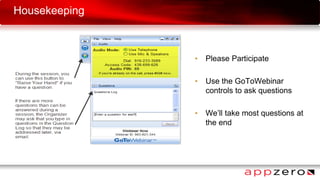
Housekeeping
• Please Participate
• Use the GoToWebinar
controls to ask questions
• We’ll take most questions at
the end
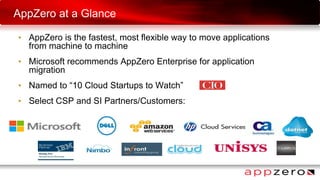
AppZero at a Glance
• AppZero is the fastest, most flexible way to move applications
from machine to machine
• Microsoft recommends AppZero Enterprise for application
migration
• Named to “10 Cloud Startups to Watch”
• Select CSP and SI Partners/Customers:
Windows Server
2003 Migration
Opportunity for transformation
Pablo Sánchez
Enterprise Datacenter Strategy Lead
Agenda
Microsoft Confidential 5
1. Windows Server 2003 end of support
2. Transforming the Datacenter
3. Migration Scenarios
4. Migration Process
6
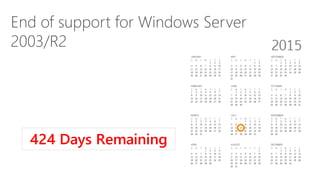
End of support for Windows Server
2003/R2
5/30/2014
424 Days Remaining
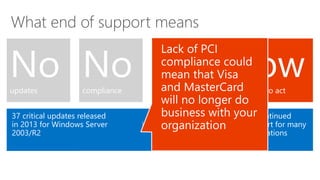
What end of support means
Start planning your migration and transforming your datacenter todayDiscontinued
support for many
applications
Nowis the time to act
Increased
operations costs
Impact on
Microsoft Small
Business Server
2003
Impact on both
physical and
virtualized
servers
Nosafe haven
Nosafe haven
Windows 2003/R2 servers will not pass
a compliance audit
Nocompliance
Nocompliance
37 critical updates released
in 2013 for Windows Server
2003/R2
Noupdates
Noupdates
Transforming the Datacenter
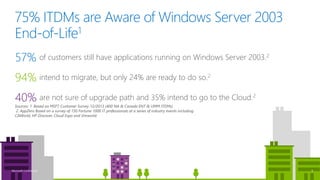
75% ITDMs are Aware of Windows Server 2003
End-of-Life1
Sources: 1. Based on MSFT Customer Survey 12/2013 (400 NA & Canada ENT & UMM ITDMs)
2. AppZero Based on a survey of 150 Fortune 1000 IT professionals at a series of industry events including
CAWorld, HP Discover, Cloud Expo and Vmworld.
intend to migrate, but only 24% are ready to do so.2
94%
of customers still have applications running on Windows Server 2003.2
57%
are not sure of upgrade path and 35% intend to go to the Cloud.2
40%
9Microsoft Confidential
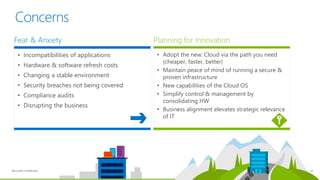
Planning for Innovation
• Adopt the new: Cloud via the path you need
(cheaper, faster, better)
• Maintain peace of mind of running a secure &
proven infrastructure
• New capabilities of the Cloud OS
• Simplify control & management by
consolidating HW
• Business alignment elevates strategic relevance
of IT
Microsoft Confidential 10
Concerns
Fear & Anxiety
• Incompatibilities of applications
• Hardware & software refresh costs
• Changing a stable environment
• Security breaches not being covered
• Compliance audits
• Disrupting the business
Benefits of upgrade
Microsoft Confidential 11
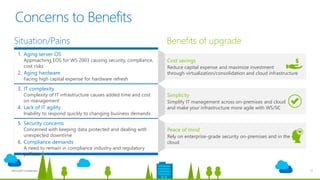
Concerns to Benefits
Cost savings
Reduce capital expense and maximize investment
through virtualization/consolidation and cloud infrastructure
Simplicity
Simplify IT management across on-premises and cloud
and make your infrastructure more agile with WS/SC
Peace of mind
Rely on enterprise-grade security on-premises and in the
cloud
Situation/Pains
1. Aging server OS
Approaching EOS for WS 2003 causing security, compliance,
cost risks
2. Aging hardware
Facing high capital expense for hardware refresh
3. IT complexity
Complexity of IT infrastructure causes added time and cost
on management
4. Lack of IT agility
Inability to respond quickly to changing business demands
5. Security concerns
Concerned with keeping data protected and dealing with
unexpected downtime
6. Compliance demands
A need to remain in compliance industry and regulatory
policies
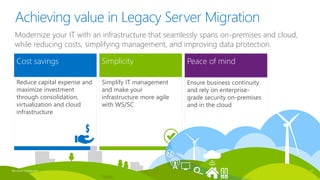
Cost savings
Reduce capital expense and
maximize investment
through consolidation,
virtualization and cloud
infrastructure
Simplicity
Simplify IT management
and make your
infrastructure more agile
with WS/SC
Peace of mind
Ensure business continuity
and rely on enterprise-
grade security on-premises
and in the cloud
Microsoft Confidential 12
Achieving value in Legacy Server Migration
Modernize your IT with an infrastructure that seamlessly spans on-premises and cloud,
while reducing costs, simplifying management, and improving data protection.
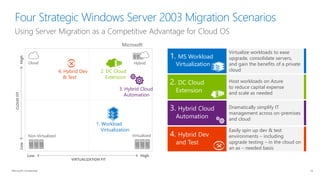
Migration Scenarios
2. DC Cloud
Extension
Host workloads on Azure
to reduce capital expense
and scale as needed
1. MS Workload
Virtualization
Virtualize workloads to ease
upgrade, consolidate servers,
and gain the benefits of a private
cloud
3. Hybrid Cloud
Automation
Dramatically simplify IT
management across on-premises
and cloud
4. Hybrid Dev
and Test
Easily spin up dev & test
environments – including
upgrade testing – in the cloud on
an as – needed basis
Using Server Migration as a Competitive Advantage for Cloud OS
Microsoft Confidential
Four Strategic Windows Server 2003 Migration Scenarios
2. DC Cloud
Extension
3. Hybrid Cloud
Automation
4. Hybrid Dev
& Test
1. Workload
Virtualization
CLOUDFIT
VIRTUALIZATION FIT
HighLow
Low High
Cloud Hybrid
VirtualizedNon-Virtualized
Microsoft
14
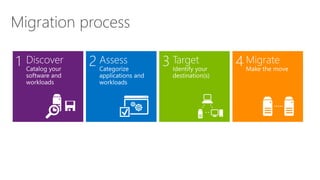
Migration
Migration process
Migrate4Target3Assess2Discover1
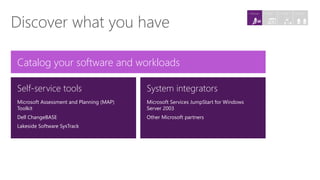
Discover what you have
System integrators
Microsoft Services JumpStart for Windows
Server 2003
Other Microsoft partners
Self-service tools
Microsoft Assessment and Planning (MAP)
Toolkit
Dell ChangeBASE
Lakeside Software SysTrack
Catalog your software and workloads
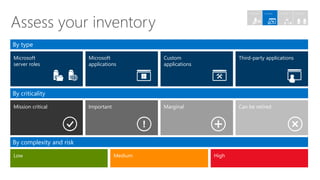
4. Migrate3. Target2. Assess1. Discover
Microsoft
server roles
By type
By criticality
Microsoft
applications
Third-party applicationsCustom
applications
Can be retiredMarginalImportantMission critical
By complexity and risk
Low Medium High
Assess your inventory
4. Migrate3. Target2. Assess1. Discover
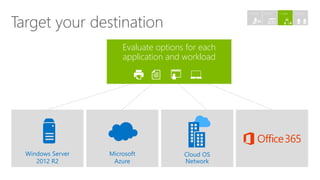
Windows Server
2012 R2
Microsoft
Azure
Cloud OS
Network
Evaluate options for each
application and workload
Target your destination
4. Migrate3. Target2. Assess1. Discover
Microsoft Confidential 20
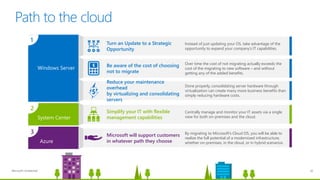
Path to the cloud
Reduce your maintenance
overhead
by virtualizing and consolidating
servers
Done properly, consolidating server hardware through
virtualization can create many more business benefits than
simply reducing hardware costs.
Be aware of the cost of choosing
not to migrate
Over time the cost of not migrating actually exceeds the
cost of the migrating to new software – and without
getting any of the added benefits.
Turn an Update to a Strategic
Opportunity
Instead of just updating your OS, take advantage of the
opportunity to expand your company’s IT capabilities.
Microsoft will support customers
in whatever path they choose
By migrating to Microsoft’s Cloud OS, you will be able to
realize the full potential of a modernized infrastructure,
whether on-premises, in the cloud, or in hybrid scenarios.
Windows Server
1
Simplify your IT with flexible
management capabilities
Centrally manage and monitor your IT assets via a single
view for both on-premises and the cloud.System Center
2
Azure
3
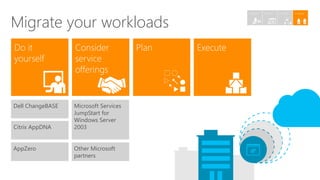
Microsoft Services
JumpStart for
Windows Server
2003
Other Microsoft
partners
Migrate your workloads
Dell ChangeBASE
Citrix AppDNA
AppZero
4. Migrate3. Target2. Assess1. Discover
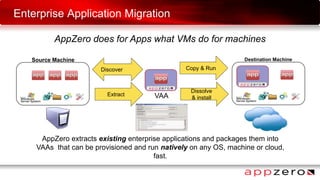
Enterprise Application Migration
AppZero does for Apps what VMs do for machines
VAA
AppZero extracts existing enterprise applications and packages them into
VAAs that can be provisioned and run natively on any OS, machine or cloud,
fast.
Source Machine Destination Machine
Extract
Copy & Run
Dissolve
& install
Discover
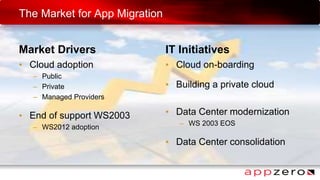
The Market for App Migration
Market Drivers
• Cloud adoption
– Public
– Private
– Managed Providers
• End of support WS2003
– WS2012 adoption
IT Initiatives
• Cloud on-boarding
• Building a private cloud
• Data Center modernization
– WS 2003 EOS
• Data Center consolidation
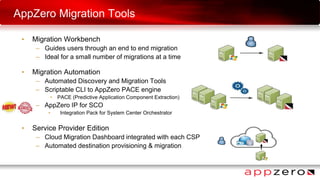
AppZero Migration Tools
• Migration Workbench
– Guides users through an end to end migration
– Ideal for a small number of migrations at a time
• Migration Automation
– Automated Discovery and Migration Tools
– Scriptable CLI to AppZero PACE engine
• PACE (Predictive Application Component Extraction)
– AppZero IP for SCO
• Integration Pack for System Center Orchestrator
• Service Provider Edition
– Cloud Migration Dashboard integrated with each CSP
– Automated destination provisioning & migration
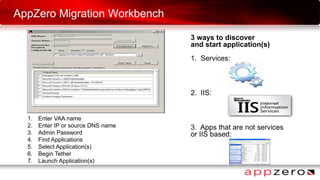
3 ways to discover
and start application(s)
1. Services:
2. IIS:
3. Apps that are not services
or IIS based:
AppZero Migration Workbench
1. Enter VAA name
2. Enter IP or source DNS name
3. Admin Password
4. Find Applications
5. Select Application(s)
6. Begin Tether
7. Launch Application(s)
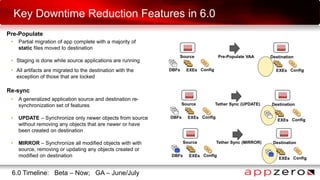
Key Downtime Reduction Features in 6.0
Source
Pre-Populate
Destination
• Partial migration of app complete with a majority of
static files moved to destination
• Staging is done while source applications are running
• All artifacts are migrated to the destination with the
exception of those that are locked
DBFs
Pre-Populate VAA
EXEs Config EXEs Config
• A generalized application source and destination re-
synchronization set of features
• UPDATE – Synchronize only newer objects from source
without removing any objects that are newer or have
been created on destination
• MIRROR – Synchronize all modified objects with with
source, removing or updating any objects created or
modified on destination
Source Destination
DBFs
Tether Sync (UPDATE)
EXEs Config
EXEs Config
Re-sync
6.0 Timeline: Beta – Now; GA – June/July
Source Destination
DBFs
Tether Sync (MIRROR)
EXEs Config
EXEs Config
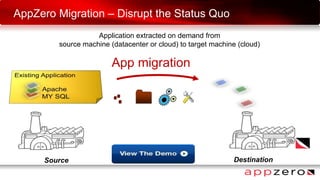
AppZero Migration – Disrupt the Status Quo
Application extracted on demand from
source machine (datacenter or cloud) to target machine (cloud)
App migration
Source Destination
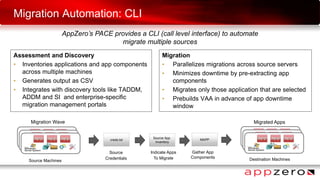
Migration Automation: CLI
AppZero’s PACE provides a CLI (call level interface) to automate
migrate multiple sources
Migration Wave
Source Machines
creds.txt
Source App
Inventory
Source
Credentials
MAPP
Destination Machines
Indicate Apps
To Migrate
Gather App
Components
Migrated Apps
Assessment and Discovery
• Inventories applications and app components
across multiple machines
• Generates output as CSV
• Integrates with discovery tools like TADDM,
ADDM and SI and enterprise-specific
migration management portals
Migration
• Parallelizes migrations across source servers
• Minimizes downtime by pre-extracting app
components
• Migrates only those application that are selected
• Prebuilds VAA in advance of app downtime
window
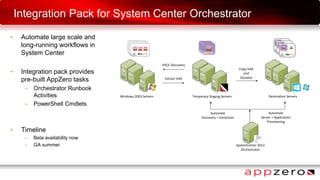
Integration Pack for System Center Orchestrator
SystemCenter 2012
Orchestrator
Windows 2003 Servers
Extract VAA
PACE Discovery
Temporary Staging Servers
Copy VAA
and
Dissolve
Destination Servers
Automate
Discovery + Extraction
Automate
Server + Application
Provisioning
• Automate large scale and
long-running workflows in
System Center
• Integration pack provides
pre-built AppZero tasks
– Orchestrator Runbook
Activities
– PowerShell Cmdlets
• Timeline
– Beta availability now
– GA summer
Limitations, Best Practices and Support
• Apps must be stopped before final migration/re-sync
• Not supported
– AD/LDAP (network services), SharePoint & Exchange
– 16 bit applications
• Pain to do
– Security agents (Kernel driver *.sys)
– Usually pre-provisioned on the destination
• Moving shared DBs will moves all the DBs
– Pruning can be done manually by a DBA
• Good to go
– ISV, homegrown or bespoke application and middleware
– All Hypervisors, physical, virtual and any cloud
• AppZero Support Policy link
– http://www.appzero.com/content/support-policies
• Support Policy for AppZero Products
– Source Windows Server 2003 (32-bit and 64-bit) or higher
– Source Windows Server 2008 (64-bit) or higher
• Support Policy for migration of Third-Party
Applications
– No specific support list from AppZero
• AppZero migration and 3rd party vendor support
policies
– Check ISV’s support version OS combination
– Check ISV support policies
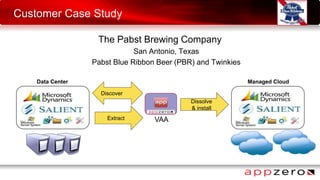
Customer Case Study
The Pabst Brewing Company
San Antonio, Texas
Pabst Blue Ribbon Beer (PBR) and Twinkies
VAA
Data Center Managed Cloud
Extract
Dissolve
& install
Discover
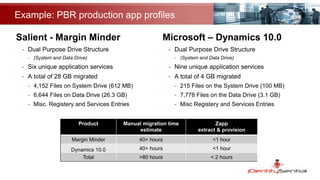
Example: PBR production app profiles
Salient - Margin Minder
- Dual Purpose Drive Structure
- (System and Data Drive)
- Six unique application services
- A total of 28 GB migrated
- 4,152 Files on System Drive (612 MB)
- 6,644 Files on Data Drive (26.3 GB)
- Misc. Registery and Services Entries
Microsoft – Dynamics 10.0
- Dual Purpose Drive Structure
- (System and Data Drive)
- Nine unique application services
- A total of 4 GB migrated
- 215 Files on the System Drive (100 MB)
- 7,778 Files on the Data Drive (3.1 GB)
- Misc Registery and Services Entries
Product Manual migration time
estimate
Zapp
extract & provision
Margin Minder 40+ hours <1 hour
Dynamics 10.0 40+ hours <1 hour
Total >80 hours < 2 hours
Migration w/ AppZero summary points
 Huge time savings – estimated 1-2 weeks/application moved
 AppZero identifies, extracts, and moves app in minutes
- Microsoft Dynamics Great Plains 30 minutes; Margin Minder 40 minutes
 No need to redo permissions, log-ins, security on SQL apps
 AppZero dissolve function removes VAA; option to retain portability
 Source machine left untouched and unchanged
 Applications on Rackspace look like a brand new, clean installation
- AppZero brings over only the application and essentials
- None of the ‘baggage’ accumulated over 6-7 years of production
 AppZero worked as advertised
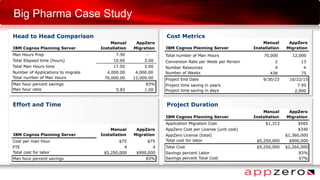
Big Pharma Case Study
Effort and Time Project Duration
Head to Head Comparison Cost Metrics
Summary
The only cloud-independent application extraction,
transformation, and delivery offering in the market
– The best way to move from any machine to any cloud
– Modernize (up-level) your OS & supporting infrastructure
– WS2003 EOS remediation – the clock is ticking
– 10 - 100 times faster moving only the app (not the vm)
– Near zero downtime migration
– MSP and PaaS friendly – Leave the mess behind
Next steps
• Contact info@appzero.com to:
– Try the software for yourself – request a free trial
Or
– Schedule a personalized demo for your team
Q & A

How to Solve the Challenge of Windows Server 2003 End of Life

  • 1.
    How to Solvethe Challenge of Windows Server 2003 End of Life Greg O’Connor Pablo Sanchez Patrick Pushor grego@appzero.com pablosp@microsoft.com ppushor@appzero.com May 29, 2014
  • 2.
    Housekeeping • Please Participate •Use the GoToWebinar controls to ask questions • We’ll take most questions at the end
  • 3.
    AppZero at aGlance • AppZero is the fastest, most flexible way to move applications from machine to machine • Microsoft recommends AppZero Enterprise for application migration • Named to “10 Cloud Startups to Watch” • Select CSP and SI Partners/Customers:
  • 4.
    Windows Server 2003 Migration Opportunityfor transformation Pablo Sánchez Enterprise Datacenter Strategy Lead
  • 5.
    Agenda Microsoft Confidential 5 1.Windows Server 2003 end of support 2. Transforming the Datacenter 3. Migration Scenarios 4. Migration Process
  • 6.
    6 End of supportfor Windows Server 2003/R2 5/30/2014 424 Days Remaining
  • 7.
    What end ofsupport means Start planning your migration and transforming your datacenter todayDiscontinued support for many applications Nowis the time to act Increased operations costs Impact on Microsoft Small Business Server 2003 Impact on both physical and virtualized servers Nosafe haven Nosafe haven Windows 2003/R2 servers will not pass a compliance audit Nocompliance Nocompliance 37 critical updates released in 2013 for Windows Server 2003/R2 Noupdates Noupdates
  • 8.
  • 9.
    75% ITDMs areAware of Windows Server 2003 End-of-Life1 Sources: 1. Based on MSFT Customer Survey 12/2013 (400 NA & Canada ENT & UMM ITDMs) 2. AppZero Based on a survey of 150 Fortune 1000 IT professionals at a series of industry events including CAWorld, HP Discover, Cloud Expo and Vmworld. intend to migrate, but only 24% are ready to do so.2 94% of customers still have applications running on Windows Server 2003.2 57% are not sure of upgrade path and 35% intend to go to the Cloud.2 40% 9Microsoft Confidential
  • 10.
    Planning for Innovation •Adopt the new: Cloud via the path you need (cheaper, faster, better) • Maintain peace of mind of running a secure & proven infrastructure • New capabilities of the Cloud OS • Simplify control & management by consolidating HW • Business alignment elevates strategic relevance of IT Microsoft Confidential 10 Concerns Fear & Anxiety • Incompatibilities of applications • Hardware & software refresh costs • Changing a stable environment • Security breaches not being covered • Compliance audits • Disrupting the business
  • 11.
    Benefits of upgrade MicrosoftConfidential 11 Concerns to Benefits Cost savings Reduce capital expense and maximize investment through virtualization/consolidation and cloud infrastructure Simplicity Simplify IT management across on-premises and cloud and make your infrastructure more agile with WS/SC Peace of mind Rely on enterprise-grade security on-premises and in the cloud Situation/Pains 1. Aging server OS Approaching EOS for WS 2003 causing security, compliance, cost risks 2. Aging hardware Facing high capital expense for hardware refresh 3. IT complexity Complexity of IT infrastructure causes added time and cost on management 4. Lack of IT agility Inability to respond quickly to changing business demands 5. Security concerns Concerned with keeping data protected and dealing with unexpected downtime 6. Compliance demands A need to remain in compliance industry and regulatory policies
  • 12.
    Cost savings Reduce capitalexpense and maximize investment through consolidation, virtualization and cloud infrastructure Simplicity Simplify IT management and make your infrastructure more agile with WS/SC Peace of mind Ensure business continuity and rely on enterprise- grade security on-premises and in the cloud Microsoft Confidential 12 Achieving value in Legacy Server Migration Modernize your IT with an infrastructure that seamlessly spans on-premises and cloud, while reducing costs, simplifying management, and improving data protection.
  • 13.
  • 14.
    2. DC Cloud Extension Hostworkloads on Azure to reduce capital expense and scale as needed 1. MS Workload Virtualization Virtualize workloads to ease upgrade, consolidate servers, and gain the benefits of a private cloud 3. Hybrid Cloud Automation Dramatically simplify IT management across on-premises and cloud 4. Hybrid Dev and Test Easily spin up dev & test environments – including upgrade testing – in the cloud on an as – needed basis Using Server Migration as a Competitive Advantage for Cloud OS Microsoft Confidential Four Strategic Windows Server 2003 Migration Scenarios 2. DC Cloud Extension 3. Hybrid Cloud Automation 4. Hybrid Dev & Test 1. Workload Virtualization CLOUDFIT VIRTUALIZATION FIT HighLow Low High Cloud Hybrid VirtualizedNon-Virtualized Microsoft 14
  • 15.
  • 16.
  • 17.
    Discover what youhave System integrators Microsoft Services JumpStart for Windows Server 2003 Other Microsoft partners Self-service tools Microsoft Assessment and Planning (MAP) Toolkit Dell ChangeBASE Lakeside Software SysTrack Catalog your software and workloads 4. Migrate3. Target2. Assess1. Discover
  • 18.
    Microsoft server roles By type Bycriticality Microsoft applications Third-party applicationsCustom applications Can be retiredMarginalImportantMission critical By complexity and risk Low Medium High Assess your inventory 4. Migrate3. Target2. Assess1. Discover
  • 19.
    Windows Server 2012 R2 Microsoft Azure CloudOS Network Evaluate options for each application and workload Target your destination 4. Migrate3. Target2. Assess1. Discover
  • 20.
    Microsoft Confidential 20 Pathto the cloud Reduce your maintenance overhead by virtualizing and consolidating servers Done properly, consolidating server hardware through virtualization can create many more business benefits than simply reducing hardware costs. Be aware of the cost of choosing not to migrate Over time the cost of not migrating actually exceeds the cost of the migrating to new software – and without getting any of the added benefits. Turn an Update to a Strategic Opportunity Instead of just updating your OS, take advantage of the opportunity to expand your company’s IT capabilities. Microsoft will support customers in whatever path they choose By migrating to Microsoft’s Cloud OS, you will be able to realize the full potential of a modernized infrastructure, whether on-premises, in the cloud, or in hybrid scenarios. Windows Server 1 Simplify your IT with flexible management capabilities Centrally manage and monitor your IT assets via a single view for both on-premises and the cloud.System Center 2 Azure 3
  • 21.
    Microsoft Services JumpStart for WindowsServer 2003 Other Microsoft partners Migrate your workloads Dell ChangeBASE Citrix AppDNA AppZero 4. Migrate3. Target2. Assess1. Discover
  • 22.
    Enterprise Application Migration AppZerodoes for Apps what VMs do for machines VAA AppZero extracts existing enterprise applications and packages them into VAAs that can be provisioned and run natively on any OS, machine or cloud, fast. Source Machine Destination Machine Extract Copy & Run Dissolve & install Discover
  • 23.
    The Market forApp Migration Market Drivers • Cloud adoption – Public – Private – Managed Providers • End of support WS2003 – WS2012 adoption IT Initiatives • Cloud on-boarding • Building a private cloud • Data Center modernization – WS 2003 EOS • Data Center consolidation
  • 24.
    AppZero Migration Tools •Migration Workbench – Guides users through an end to end migration – Ideal for a small number of migrations at a time • Migration Automation – Automated Discovery and Migration Tools – Scriptable CLI to AppZero PACE engine • PACE (Predictive Application Component Extraction) – AppZero IP for SCO • Integration Pack for System Center Orchestrator • Service Provider Edition – Cloud Migration Dashboard integrated with each CSP – Automated destination provisioning & migration
  • 25.
    3 ways todiscover and start application(s) 1. Services: 2. IIS: 3. Apps that are not services or IIS based: AppZero Migration Workbench 1. Enter VAA name 2. Enter IP or source DNS name 3. Admin Password 4. Find Applications 5. Select Application(s) 6. Begin Tether 7. Launch Application(s)
  • 26.
    Key Downtime ReductionFeatures in 6.0 Source Pre-Populate Destination • Partial migration of app complete with a majority of static files moved to destination • Staging is done while source applications are running • All artifacts are migrated to the destination with the exception of those that are locked DBFs Pre-Populate VAA EXEs Config EXEs Config • A generalized application source and destination re- synchronization set of features • UPDATE – Synchronize only newer objects from source without removing any objects that are newer or have been created on destination • MIRROR – Synchronize all modified objects with with source, removing or updating any objects created or modified on destination Source Destination DBFs Tether Sync (UPDATE) EXEs Config EXEs Config Re-sync 6.0 Timeline: Beta – Now; GA – June/July Source Destination DBFs Tether Sync (MIRROR) EXEs Config EXEs Config
  • 27.
    AppZero Migration –Disrupt the Status Quo Application extracted on demand from source machine (datacenter or cloud) to target machine (cloud) App migration Source Destination
  • 28.
    Migration Automation: CLI AppZero’sPACE provides a CLI (call level interface) to automate migrate multiple sources Migration Wave Source Machines creds.txt Source App Inventory Source Credentials MAPP Destination Machines Indicate Apps To Migrate Gather App Components Migrated Apps Assessment and Discovery • Inventories applications and app components across multiple machines • Generates output as CSV • Integrates with discovery tools like TADDM, ADDM and SI and enterprise-specific migration management portals Migration • Parallelizes migrations across source servers • Minimizes downtime by pre-extracting app components • Migrates only those application that are selected • Prebuilds VAA in advance of app downtime window
  • 29.
    Integration Pack forSystem Center Orchestrator SystemCenter 2012 Orchestrator Windows 2003 Servers Extract VAA PACE Discovery Temporary Staging Servers Copy VAA and Dissolve Destination Servers Automate Discovery + Extraction Automate Server + Application Provisioning • Automate large scale and long-running workflows in System Center • Integration pack provides pre-built AppZero tasks – Orchestrator Runbook Activities – PowerShell Cmdlets • Timeline – Beta availability now – GA summer
  • 30.
    Limitations, Best Practicesand Support • Apps must be stopped before final migration/re-sync • Not supported – AD/LDAP (network services), SharePoint & Exchange – 16 bit applications • Pain to do – Security agents (Kernel driver *.sys) – Usually pre-provisioned on the destination • Moving shared DBs will moves all the DBs – Pruning can be done manually by a DBA • Good to go – ISV, homegrown or bespoke application and middleware – All Hypervisors, physical, virtual and any cloud • AppZero Support Policy link – http://www.appzero.com/content/support-policies • Support Policy for AppZero Products – Source Windows Server 2003 (32-bit and 64-bit) or higher – Source Windows Server 2008 (64-bit) or higher • Support Policy for migration of Third-Party Applications – No specific support list from AppZero • AppZero migration and 3rd party vendor support policies – Check ISV’s support version OS combination – Check ISV support policies
  • 31.
    Customer Case Study ThePabst Brewing Company San Antonio, Texas Pabst Blue Ribbon Beer (PBR) and Twinkies VAA Data Center Managed Cloud Extract Dissolve & install Discover
  • 32.
    Example: PBR productionapp profiles Salient - Margin Minder - Dual Purpose Drive Structure - (System and Data Drive) - Six unique application services - A total of 28 GB migrated - 4,152 Files on System Drive (612 MB) - 6,644 Files on Data Drive (26.3 GB) - Misc. Registery and Services Entries Microsoft – Dynamics 10.0 - Dual Purpose Drive Structure - (System and Data Drive) - Nine unique application services - A total of 4 GB migrated - 215 Files on the System Drive (100 MB) - 7,778 Files on the Data Drive (3.1 GB) - Misc Registery and Services Entries Product Manual migration time estimate Zapp extract & provision Margin Minder 40+ hours <1 hour Dynamics 10.0 40+ hours <1 hour Total >80 hours < 2 hours
  • 33.
    Migration w/ AppZerosummary points  Huge time savings – estimated 1-2 weeks/application moved  AppZero identifies, extracts, and moves app in minutes - Microsoft Dynamics Great Plains 30 minutes; Margin Minder 40 minutes  No need to redo permissions, log-ins, security on SQL apps  AppZero dissolve function removes VAA; option to retain portability  Source machine left untouched and unchanged  Applications on Rackspace look like a brand new, clean installation - AppZero brings over only the application and essentials - None of the ‘baggage’ accumulated over 6-7 years of production  AppZero worked as advertised
  • 34.
    Big Pharma CaseStudy Effort and Time Project Duration Head to Head Comparison Cost Metrics
  • 35.
    Summary The only cloud-independentapplication extraction, transformation, and delivery offering in the market – The best way to move from any machine to any cloud – Modernize (up-level) your OS & supporting infrastructure – WS2003 EOS remediation – the clock is ticking – 10 - 100 times faster moving only the app (not the vm) – Near zero downtime migration – MSP and PaaS friendly – Leave the mess behind
  • 36.
    Next steps • Contactinfo@appzero.com to: – Try the software for yourself – request a free trial Or – Schedule a personalized demo for your team
  • 37.