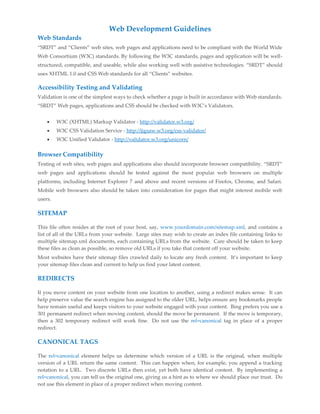
Web Development Guidelines 
Web Standards 
“SRDT” and “Clients” web sites, web pages and applications need to be compliant with the World Wide 
Web Consortium (W3C) standards. By following the W3C standards, pages and application will be well-structured, 
compatible, and useable, while also working well with assistive technologies. “SRDT” should 
uses XHTML 1.0 and CSS Web standards for all “Clients” websites. 
Accessibility Testing and Validating 
Validation is one of the simplest ways to check whether a page is built in accordance with Web standards. 
“SRDT” Web pages, applications and CSS should be checked with W3C’s Validators. 
 W3C (XHTML) Markup Validator - http://validator.w3.org/ 
 W3C CSS Validation Service - http://jigsaw.w3.org/css-validator/ 
 W3C Unified Validator - http://validator.w3.org/unicorn/ 
Browser Compatibility 
Testing of web sites, web pages and applications also should incorporate browser compatibility. “SRDT” 
web pages and applications should be tested against the most popular web browsers on multiple 
platforms, including Internet Explorer 7 and above and recent versions of Firefox, Chrome, and Safari. 
Mobile web browsers also should be taken into consideration for pages that might interest mobile web 
users. 
SITEMAP 
This file often resides at the root of your host, say, www.yourdomain.com/sitemap.xml, and contains a 
list of all of the URLs from your website. Large sites may wish to create an index file containing links to 
multiple sitemap.xml documents, each containing URLs from the website. Care should be taken to keep 
these files as clean as possible, so remove old URLs if you take that content off your website. 
Most websites have their sitemap files crawled daily to locate any fresh content. It’s important to keep 
your sitemap files clean and current to help us find your latest content. 
REDIRECTS 
If you move content on your website from one location to another, using a redirect makes sense. It can 
help preserve value the search engine has assigned to the older URL, helps ensure any bookmarks people 
have remain useful and keeps visitors to your website engaged with your content. Bing prefers you use a 
301 permanent redirect when moving content, should the move be permanent. If the move is temporary, 
then a 302 temporary redirect will work fine. Do not use the rel=canonical tag in place of a proper 
redirect. 
CANONICAL TAGS 
The rel=canonical element helps us determine which version of a URL is the original, when multiple 
version of a URL return the same content. This can happen when, for example, you append a tracking 
notation to a URL. Two discrete URLs then exist, yet both have identical content. By implementing a 
rel=canonical, you can tell us the original one, giving us a hint as to where we should place our trust. Do 
not use this element in place of a proper redirect when moving content.
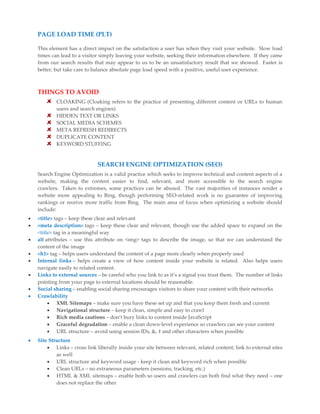
PAGE LOAD TIME (PLT) 
This element has a direct impact on the satisfaction a user has when they visit your website. Slow load 
times can lead to a visitor simply leaving your website, seeking their information elsewhere. If they came 
from our search results that may appear to us to be an unsatisfactory result that we showed. Faster is 
better, but take care to balance absolute page load speed with a positive, useful user experience. 
THINGS TO AVOID 
CLOAKING (Cloaking refers to the practice of presenting different content or URLs to human 
users and search engines) 
HIDDEN TEXT OR LINKS 
SOCIAL MEDIA SCHEMES 
META REFRESH REDIRECTS 
DUPLICATE CONTENT 
KEYWORD STUFFING 
SEARCH ENGINE OPTIMIZATION (SEO) 
Search Engine Optimization is a valid practice which seeks to improve technical and content aspects of a 
website, making the content easier to find, relevant, and more accessible to the search engine 
crawlers. Taken to extremes, some practices can be abused. The vast majorities of instances render a 
website more appealing to Bing, though performing SEO-related work is no guarantee of improving 
rankings or receive more traffic from Bing. The main area of focus when optimizing a website should 
include: 
 <title> tags – keep these clear and relevant 
 <meta description> tags – keep these clear and relevant, though use the added space to expand on the 
<title> tag in a meaningful way 
 alt attributes – use this attribute on <img> tags to describe the image, so that we can understand the 
content of the image 
 <h1> tag – helps users understand the content of a page more clearly when properly used 
 Internal links – helps create a view of how content inside your website is related. Also helps users 
navigate easily to related content. 
 Links to external sources – be careful who you link to as it’s a signal you trust them. The number of links 
pointing from your page to external locations should be reasonable. 
 Social sharing – enabling social sharing encourages visitors to share your content with their networks 
 Crawlability 
 XML Sitemaps – make sure you have these set up and that you keep them fresh and current 
 Navigational structure – keep it clean, simple and easy to crawl 
 Rich media cautions – don’t bury links to content inside JavaScript 
 Graceful degradation – enable a clean down-level experience so crawlers can see your content 
 URL structure – avoid using session IDs, &, # and other characters when possible 
 Site Structure 
 Links – cross link liberally inside your site between relevant, related content; link to external sites 
as well 
 URL structure and keyword usage - keep it clean and keyword rich when possible 
 Clean URLs – no extraneous parameters (sessions, tracking, etc.) 
 HTML & XML sitemaps – enable both so users and crawlers can both find what they need – one 
does not replace the other
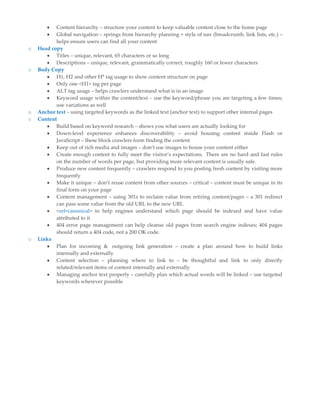
 Content hierarchy – structure your content to keep valuable content close to the home page 
 Global navigation – springs from hierarchy planning + style of nav (breadcrumb, link lists, etc.) – 
helps ensure users can find all your content 
o Head copy 
 Titles – unique, relevant, 65 characters or so long 
 Descriptions – unique, relevant, grammatically correct, roughly 160 or fewer characters 
o Body Copy 
 H1, H2 and other H* tag usage to show content structure on page 
 Only one <H1> tag per page 
 ALT tag usage – helps crawlers understand what is in an image 
 Keyword usage within the content/text – use the keyword/phrase you are targeting a few times; 
use variations as well 
o Anchor text – using targeted keywords as the linked text (anchor text) to support other internal pages 
o Content 
 Build based on keyword research – shows you what users are actually looking for 
 Down-level experience enhances discoverability – avoid housing content inside Flash or 
JavaScript – these block crawlers form finding the content 
 Keep out of rich media and images – don’t use images to house your content either 
 Create enough content to fully meet the visitor’s expectations. There are no hard and fast rules 
on the number of words per page, but providing more relevant content is usually safe. 
 Produce new content frequently – crawlers respond to you posting fresh content by visiting more 
frequently 
 Make it unique – don’t reuse content from other sources – critical – content must be unique in its 
final form on your page 
 Content management – using 301s to reclaim value from retiring content/pages – a 301 redirect 
can pass some value from the old URL to the new URL 
 <rel=canonical> to help engines understand which page should be indexed and have value 
attributed to it 
 404 error page management can help cleanse old pages from search engine indexes; 404 pages 
should return a 404 code, not a 200 OK code. 
o Links 
 Plan for incoming & outgoing link generation – create a plan around how to build links 
internally and externally 
 Content selection – planning where to link to – be thoughtful and link to only directly 
related/relevant items of content internally and externally 
 Managing anchor text properly – carefully plan which actual words will be linked – use targeted 
keywords wherever possible

Web development guidelines

  • 1.
    Web Development Guidelines Web Standards “SRDT” and “Clients” web sites, web pages and applications need to be compliant with the World Wide Web Consortium (W3C) standards. By following the W3C standards, pages and application will be well-structured, compatible, and useable, while also working well with assistive technologies. “SRDT” should uses XHTML 1.0 and CSS Web standards for all “Clients” websites. Accessibility Testing and Validating Validation is one of the simplest ways to check whether a page is built in accordance with Web standards. “SRDT” Web pages, applications and CSS should be checked with W3C’s Validators.  W3C (XHTML) Markup Validator - http://validator.w3.org/  W3C CSS Validation Service - http://jigsaw.w3.org/css-validator/  W3C Unified Validator - http://validator.w3.org/unicorn/ Browser Compatibility Testing of web sites, web pages and applications also should incorporate browser compatibility. “SRDT” web pages and applications should be tested against the most popular web browsers on multiple platforms, including Internet Explorer 7 and above and recent versions of Firefox, Chrome, and Safari. Mobile web browsers also should be taken into consideration for pages that might interest mobile web users. SITEMAP This file often resides at the root of your host, say, www.yourdomain.com/sitemap.xml, and contains a list of all of the URLs from your website. Large sites may wish to create an index file containing links to multiple sitemap.xml documents, each containing URLs from the website. Care should be taken to keep these files as clean as possible, so remove old URLs if you take that content off your website. Most websites have their sitemap files crawled daily to locate any fresh content. It’s important to keep your sitemap files clean and current to help us find your latest content. REDIRECTS If you move content on your website from one location to another, using a redirect makes sense. It can help preserve value the search engine has assigned to the older URL, helps ensure any bookmarks people have remain useful and keeps visitors to your website engaged with your content. Bing prefers you use a 301 permanent redirect when moving content, should the move be permanent. If the move is temporary, then a 302 temporary redirect will work fine. Do not use the rel=canonical tag in place of a proper redirect. CANONICAL TAGS The rel=canonical element helps us determine which version of a URL is the original, when multiple version of a URL return the same content. This can happen when, for example, you append a tracking notation to a URL. Two discrete URLs then exist, yet both have identical content. By implementing a rel=canonical, you can tell us the original one, giving us a hint as to where we should place our trust. Do not use this element in place of a proper redirect when moving content.
  • 2.
    PAGE LOAD TIME(PLT) This element has a direct impact on the satisfaction a user has when they visit your website. Slow load times can lead to a visitor simply leaving your website, seeking their information elsewhere. If they came from our search results that may appear to us to be an unsatisfactory result that we showed. Faster is better, but take care to balance absolute page load speed with a positive, useful user experience. THINGS TO AVOID CLOAKING (Cloaking refers to the practice of presenting different content or URLs to human users and search engines) HIDDEN TEXT OR LINKS SOCIAL MEDIA SCHEMES META REFRESH REDIRECTS DUPLICATE CONTENT KEYWORD STUFFING SEARCH ENGINE OPTIMIZATION (SEO) Search Engine Optimization is a valid practice which seeks to improve technical and content aspects of a website, making the content easier to find, relevant, and more accessible to the search engine crawlers. Taken to extremes, some practices can be abused. The vast majorities of instances render a website more appealing to Bing, though performing SEO-related work is no guarantee of improving rankings or receive more traffic from Bing. The main area of focus when optimizing a website should include:  <title> tags – keep these clear and relevant  <meta description> tags – keep these clear and relevant, though use the added space to expand on the <title> tag in a meaningful way  alt attributes – use this attribute on <img> tags to describe the image, so that we can understand the content of the image  <h1> tag – helps users understand the content of a page more clearly when properly used  Internal links – helps create a view of how content inside your website is related. Also helps users navigate easily to related content.  Links to external sources – be careful who you link to as it’s a signal you trust them. The number of links pointing from your page to external locations should be reasonable.  Social sharing – enabling social sharing encourages visitors to share your content with their networks  Crawlability  XML Sitemaps – make sure you have these set up and that you keep them fresh and current  Navigational structure – keep it clean, simple and easy to crawl  Rich media cautions – don’t bury links to content inside JavaScript  Graceful degradation – enable a clean down-level experience so crawlers can see your content  URL structure – avoid using session IDs, &, # and other characters when possible  Site Structure  Links – cross link liberally inside your site between relevant, related content; link to external sites as well  URL structure and keyword usage - keep it clean and keyword rich when possible  Clean URLs – no extraneous parameters (sessions, tracking, etc.)  HTML & XML sitemaps – enable both so users and crawlers can both find what they need – one does not replace the other
  • 3.
     Content hierarchy– structure your content to keep valuable content close to the home page  Global navigation – springs from hierarchy planning + style of nav (breadcrumb, link lists, etc.) – helps ensure users can find all your content o Head copy  Titles – unique, relevant, 65 characters or so long  Descriptions – unique, relevant, grammatically correct, roughly 160 or fewer characters o Body Copy  H1, H2 and other H* tag usage to show content structure on page  Only one <H1> tag per page  ALT tag usage – helps crawlers understand what is in an image  Keyword usage within the content/text – use the keyword/phrase you are targeting a few times; use variations as well o Anchor text – using targeted keywords as the linked text (anchor text) to support other internal pages o Content  Build based on keyword research – shows you what users are actually looking for  Down-level experience enhances discoverability – avoid housing content inside Flash or JavaScript – these block crawlers form finding the content  Keep out of rich media and images – don’t use images to house your content either  Create enough content to fully meet the visitor’s expectations. There are no hard and fast rules on the number of words per page, but providing more relevant content is usually safe.  Produce new content frequently – crawlers respond to you posting fresh content by visiting more frequently  Make it unique – don’t reuse content from other sources – critical – content must be unique in its final form on your page  Content management – using 301s to reclaim value from retiring content/pages – a 301 redirect can pass some value from the old URL to the new URL  <rel=canonical> to help engines understand which page should be indexed and have value attributed to it  404 error page management can help cleanse old pages from search engine indexes; 404 pages should return a 404 code, not a 200 OK code. o Links  Plan for incoming & outgoing link generation – create a plan around how to build links internally and externally  Content selection – planning where to link to – be thoughtful and link to only directly related/relevant items of content internally and externally  Managing anchor text properly – carefully plan which actual words will be linked – use targeted keywords wherever possible