Duhok Polytechnic University
Technical College of Administration
Electronic Journalism Dept.
Third Year Students
Web Design
Introduction to web design
Lecture-1
Ahmed Sinali Abdulraheem
MSc Computer Science
What is a Web?
• The Web (World Wide Web) consists of information organized into
Web pages containing text and graphic images.
• It contains hypertext links, or highlighted keywords and images that
lead to related information.
• A collection of linked Web pages that has a common theme or focus is
called a Web site.
• The main page that all of the pages on a particular Web site are
organized around and link back to is called the site’s home page.
How to access the Web?
• Once you have your Internet connection, then you need special
software called a browser to access the Web.
• Web browsers are used to connect you to remote computers, open and
transfer files, display text and images.
• Web browsers are specialized programs.
• Examples of Web browser: Netscape Navigator (Navigator) and
Internet Explorer.
Client/Server Structure of the Web
• Web is a collection of files that reside on computers, called Web
servers, that are located all over the world and are connected to each
other through the Internet.
• When you use your Internet connection to become part of the Web,
your computer becomes a Web client in a worldwide client/server
network.
A Web browser is the software that you run on your computer to make it
work as a web client.
Addresses on the Web: IP Addressing
• Each computer on the internet does have a unique identification
number, called an IP (Internet Protocol) address.
• The IP addressing system currently in use on the Internet uses a four-
part number.
• Each part of the address is a number ranging from 0 to 255, and each
part is separated from the previous part by period,
• For example, 106.29.242.17
Domain Name Addressing
• Most web browsers do not use the IP address to locate Web sites and
individual pages.
• They use domain name addressing.
• A domain name is a unique name associated with a specific IP address
by a program that runs on an Internet host computer.
• This program, which coordinates the IP addresses and domain names
for all computers attached to it, is called DNS (Domain Name System )
software.
• The host computer that runs this software is called a domain name
server.
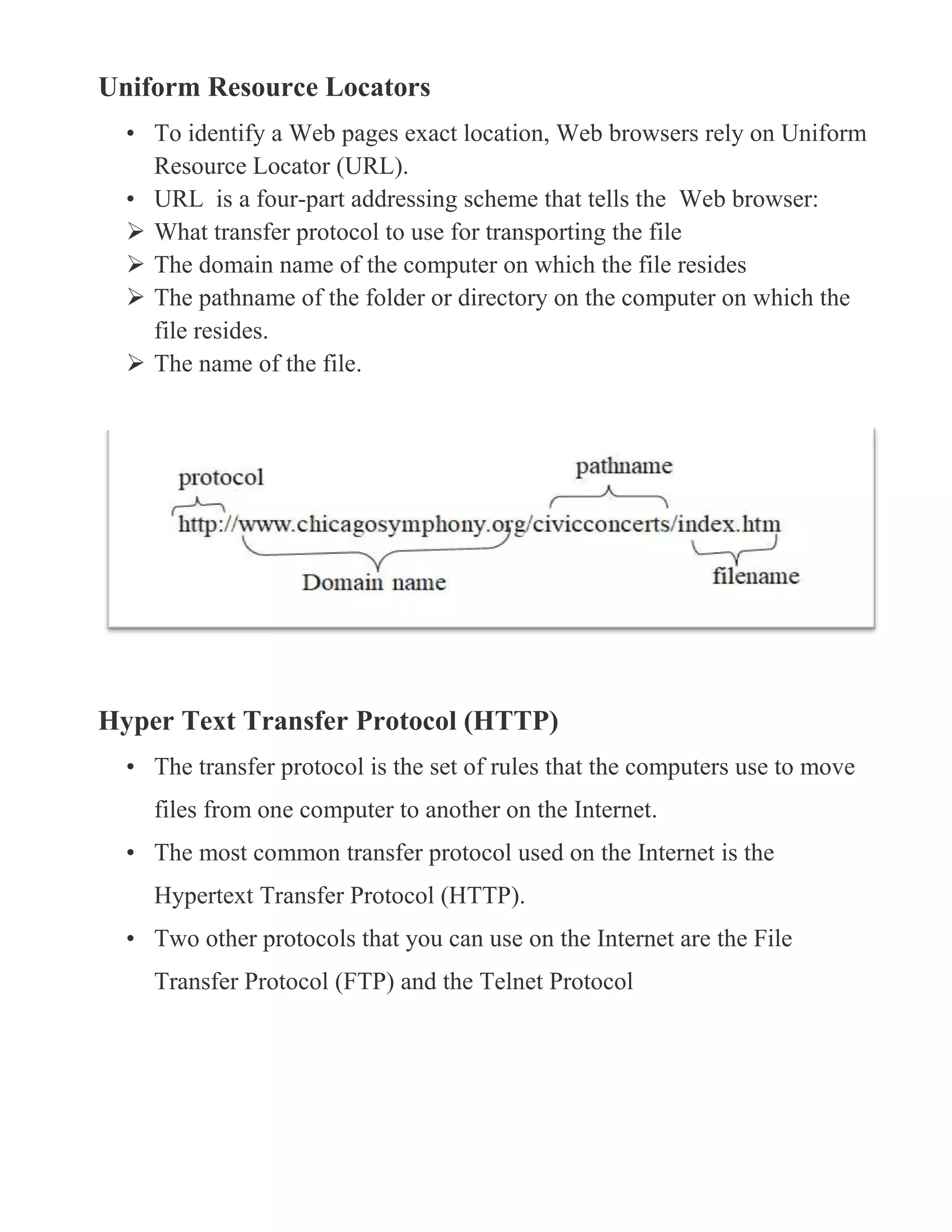
Uniform Resource Locators
• To identify a Web pages exact location, Web browsers rely on Uniform
Resource Locator (URL).
• URL is a four-part addressing scheme that tells the Web browser:
 What transfer protocol to use for transporting the file
 The domain name of the computer on which the file resides
 The pathname of the folder or directory on the computer on which the
file resides.
 The name of the file.
Hyper Text Transfer Protocol (HTTP)
• The transfer protocol is the set of rules that the computers use to move
files from one computer to another on the Internet.
• The most common transfer protocol used on the Internet is the
Hypertext Transfer Protocol (HTTP).
• Two other protocols that you can use on the Internet are the File
Transfer Protocol (FTP) and the Telnet Protocol
What is PHP
Whenever anyone is learning PHP, the most common questions that first
come up are: What is PHP? And how does it work?
What You Should Already Know
Before you continue you should have a basic understanding of the following:
 HTML
 JavaScript
 CSS
What is PHP?
 PHP stands for PHP: Hypertext Preprocessor
 PHP is a widely-used, open source scripting language
 PHP scripts are executed on the server
 PHP is free to download and use
PHP was originally an acronym for Personal Home Pages, but is now a
recursive acronym for PHP: Hypertext Preprocessor.
PHP was originally developed by the Danish Greenlander Rasmus Lerdorf,
and was subsequently developed as open source.
To describe what a PHP page is, you could say that it is a file with the
extension. php that contains a combination of HTML tags and scripts that
run on a web server.
What is a PHP File?
 PHP files can contain text, HTML, JavaScript code, and PHP code
 PHP code are executed on the server, and the result is returned to the
browser as plain HTML
 PHP files have a default file extension of ".php"
What Can PHP Do?
 PHP can generate dynamic page content
 PHP can create, open, read, write, and close files on the server
 PHP can collect form data
 PHP can send and receive cookies
 PHP can add, delete, modify data in your database
 PHP can restrict users to access some pages on your website
 PHP can encrypt data
With PHP you are not limited to output HTML. You can output images, PDF
files, and even Flash movies. You can also output any text, such as XHTML and
XML.
Why PHP?
 PHP runs on different platforms (Windows, Linux, Unix, Mac OS X, etc.)
 PHP is compatible with almost all servers used today (Apache, IIS, etc.)
 PHP has support for a wide range of databases
 PHP is free. Download it from the official PHP resource: www.php.net
 PHP is easy to learn and runs efficiently on the server side
How does PHP work?
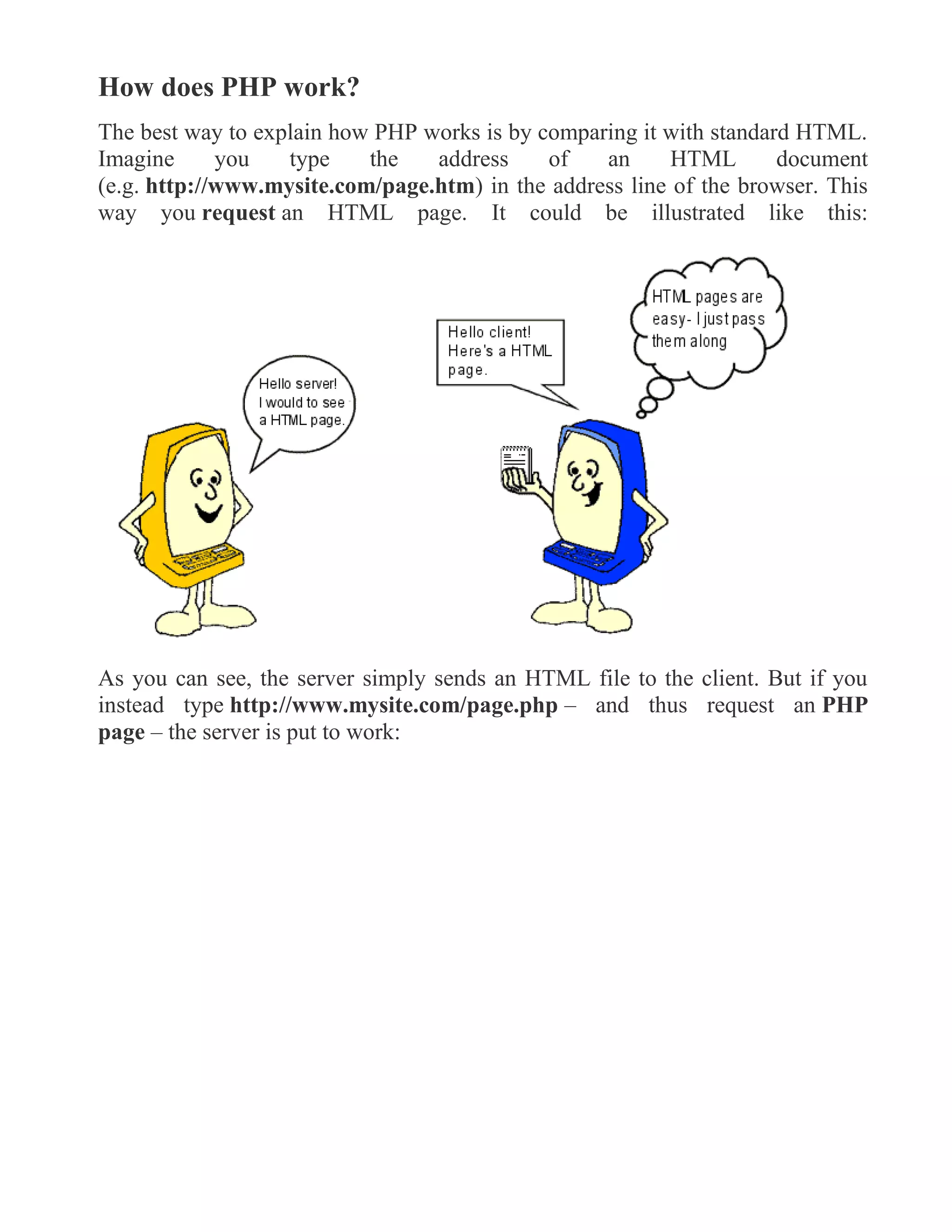
The best way to explain how PHP works is by comparing it with standard HTML.
Imagine you type the address of an HTML document
(e.g. http://www.mysite.com/page.htm) in the address line of the browser. This
way you request an HTML page. It could be illustrated like this:
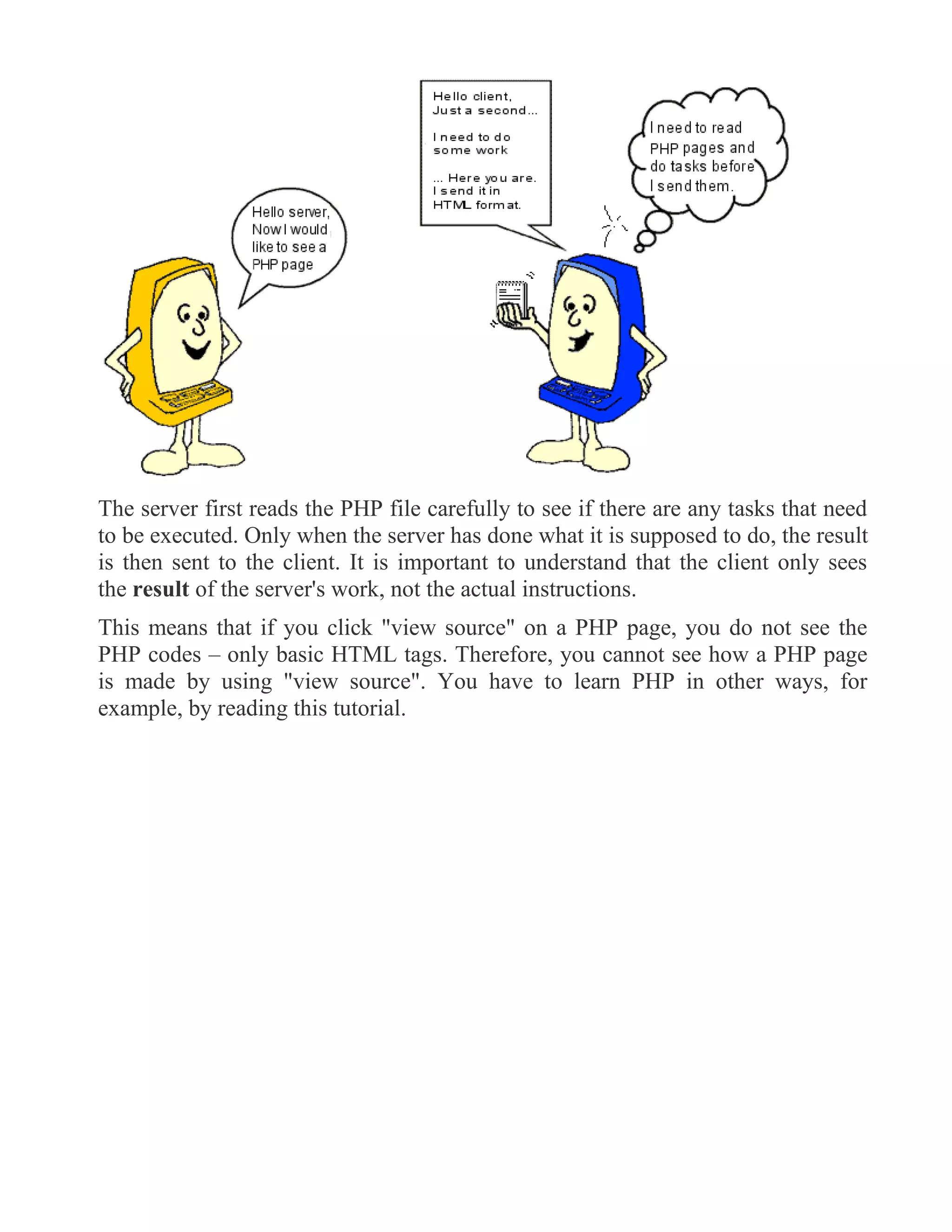
As you can see, the server simply sends an HTML file to the client. But if you
instead type http://www.mysite.com/page.php – and thus request an PHP
page – the server is put to work:
The server first reads the PHP file carefully to see if there are any tasks that need
to be executed. Only when the server has done what it is supposed to do, the result
is then sent to the client. It is important to understand that the client only sees
the result of the server's work, not the actual instructions.
This means that if you click "view source" on a PHP page, you do not see the
PHP codes – only basic HTML tags. Therefore, you cannot see how a PHP page
is made by using "view source". You have to learn PHP in other ways, for
example, by reading this tutorial.

Web design EJ3

  • 1.
    Duhok Polytechnic University TechnicalCollege of Administration Electronic Journalism Dept. Third Year Students Web Design Introduction to web design Lecture-1 Ahmed Sinali Abdulraheem MSc Computer Science
  • 2.
    What is aWeb? • The Web (World Wide Web) consists of information organized into Web pages containing text and graphic images. • It contains hypertext links, or highlighted keywords and images that lead to related information. • A collection of linked Web pages that has a common theme or focus is called a Web site. • The main page that all of the pages on a particular Web site are organized around and link back to is called the site’s home page. How to access the Web? • Once you have your Internet connection, then you need special software called a browser to access the Web. • Web browsers are used to connect you to remote computers, open and transfer files, display text and images. • Web browsers are specialized programs. • Examples of Web browser: Netscape Navigator (Navigator) and Internet Explorer. Client/Server Structure of the Web • Web is a collection of files that reside on computers, called Web servers, that are located all over the world and are connected to each other through the Internet. • When you use your Internet connection to become part of the Web, your computer becomes a Web client in a worldwide client/server network. A Web browser is the software that you run on your computer to make it work as a web client.
  • 3.
    Addresses on theWeb: IP Addressing • Each computer on the internet does have a unique identification number, called an IP (Internet Protocol) address. • The IP addressing system currently in use on the Internet uses a four- part number. • Each part of the address is a number ranging from 0 to 255, and each part is separated from the previous part by period, • For example, 106.29.242.17 Domain Name Addressing • Most web browsers do not use the IP address to locate Web sites and individual pages. • They use domain name addressing. • A domain name is a unique name associated with a specific IP address by a program that runs on an Internet host computer. • This program, which coordinates the IP addresses and domain names for all computers attached to it, is called DNS (Domain Name System ) software. • The host computer that runs this software is called a domain name server.
  • 4.
    Uniform Resource Locators •To identify a Web pages exact location, Web browsers rely on Uniform Resource Locator (URL). • URL is a four-part addressing scheme that tells the Web browser:  What transfer protocol to use for transporting the file  The domain name of the computer on which the file resides  The pathname of the folder or directory on the computer on which the file resides.  The name of the file. Hyper Text Transfer Protocol (HTTP) • The transfer protocol is the set of rules that the computers use to move files from one computer to another on the Internet. • The most common transfer protocol used on the Internet is the Hypertext Transfer Protocol (HTTP). • Two other protocols that you can use on the Internet are the File Transfer Protocol (FTP) and the Telnet Protocol
  • 5.
    What is PHP Wheneveranyone is learning PHP, the most common questions that first come up are: What is PHP? And how does it work? What You Should Already Know Before you continue you should have a basic understanding of the following:  HTML  JavaScript  CSS What is PHP?  PHP stands for PHP: Hypertext Preprocessor  PHP is a widely-used, open source scripting language  PHP scripts are executed on the server  PHP is free to download and use PHP was originally an acronym for Personal Home Pages, but is now a recursive acronym for PHP: Hypertext Preprocessor. PHP was originally developed by the Danish Greenlander Rasmus Lerdorf, and was subsequently developed as open source. To describe what a PHP page is, you could say that it is a file with the extension. php that contains a combination of HTML tags and scripts that run on a web server. What is a PHP File?  PHP files can contain text, HTML, JavaScript code, and PHP code  PHP code are executed on the server, and the result is returned to the browser as plain HTML  PHP files have a default file extension of ".php"
  • 6.
    What Can PHPDo?  PHP can generate dynamic page content  PHP can create, open, read, write, and close files on the server  PHP can collect form data  PHP can send and receive cookies  PHP can add, delete, modify data in your database  PHP can restrict users to access some pages on your website  PHP can encrypt data With PHP you are not limited to output HTML. You can output images, PDF files, and even Flash movies. You can also output any text, such as XHTML and XML. Why PHP?  PHP runs on different platforms (Windows, Linux, Unix, Mac OS X, etc.)  PHP is compatible with almost all servers used today (Apache, IIS, etc.)  PHP has support for a wide range of databases  PHP is free. Download it from the official PHP resource: www.php.net  PHP is easy to learn and runs efficiently on the server side
  • 7.
    How does PHPwork? The best way to explain how PHP works is by comparing it with standard HTML. Imagine you type the address of an HTML document (e.g. http://www.mysite.com/page.htm) in the address line of the browser. This way you request an HTML page. It could be illustrated like this: As you can see, the server simply sends an HTML file to the client. But if you instead type http://www.mysite.com/page.php – and thus request an PHP page – the server is put to work:
  • 8.
    The server firstreads the PHP file carefully to see if there are any tasks that need to be executed. Only when the server has done what it is supposed to do, the result is then sent to the client. It is important to understand that the client only sees the result of the server's work, not the actual instructions. This means that if you click "view source" on a PHP page, you do not see the PHP codes – only basic HTML tags. Therefore, you cannot see how a PHP page is made by using "view source". You have to learn PHP in other ways, for example, by reading this tutorial.