WEB 2.0
Christodoulos Tsiambartas
Overview
   Introduction - What is WEB 2.0
       O Reilly definition
       Criticism
   WEB 1.0
       Dot com Bubble
       Technologies
   WEB 2.0
       Comparison with WEB 1.0 Technology
       Design Patterns
       Design Features/styles
       Technologies and Tools
       Successful Web 2.0 Companies
       Advantages & Disadvantages
   WEB 3.0
       What is coming next
   Summary
   Questions and Discussion
   References
Introduction – What is WEB 2.0
   What do you think WEB 2.0 is ?

     Tim   O‟Reilly


         Definition (2004 Conference)
              Web 2.0 is the business revolution in the computer industry caused by the
              move to the internet as platform, and an attempt to understand the rules
              for success on that new platform.


         WEB 2.0 Conferences (SUMMIT)
What is WEB 2.0 (continued)
 Contradiction
     meaningless marketing buzzword OR the new conventional wisdom

    Buzzword?
        Not clear for average user what WEB 2.0 is
        People are struggling to understand;
          No common architecture
          Multiple definitions
          Contentious
        Attitude not technology
          Links back to the original web
        Quotes from WEB influencers
          Alan Meckler (internet.com): “web 2.0 is just a continuing evolution…”
          Gina Bianchini (Ning): “I think it means a lot of different things to a lot of different
             people”
          Biz Stone (twitter): “the public acceptance of the fact that the web is a highly social
             utility”
          Tim Berners-Lee: “nobody even knows what it means”
What is WEB 2.0 (continued)

    Conventional wisdom?

      Atomization of web
      Quotes fromWEB influencers :
            Eric Engleman (Bloglines): “it is really about end users”
            Max Mancini (ebay): “Atomization of the WEB”
                  “taking all of the components and making them available for combination
                   in unconsidered way, or in ways that are very individual”
            Dorion Carroll (technorati): “its no longer the one-way WEB”
            Rodrigo Madanes (Skype): “web 2.0 is the resurgence in web
             innovation”.
WEB 1.0
There was a Web 1.0…if we assume that there's a Web 2.0


WEB 1.0
   Static pages
                                    Source: http://blog.aysoon.com/le-web20-illustre-en-une-seule-image

   Not interactive
   Applications are proprietary
WEB 1.0 (continued)
Dot com bubble
     Existing businesses realized that needed
      a presence on the internet.
     Strived to make money by reaching
      consumers only over the internet.
     Over optimism about e-commerce
     Problems dealing direct with customer is
      the customer:                              Source: http://www.watblog.com/2008/04/17/the-biggest-bubble-there-ever-was/


        Small orders
                                                  Survivors:
        Returns
                                                      Amazon.com: it is the middleman
        Complaints
                                                      Ebay: brings buyers and sellers and
        Shipping                                     makes profit from it.
        Customer service
WEB 1.0 (continued)
   Companies significant to the bubble
     Boo.com – spent $180 million in online fassion. Went
      bankrupt in May 2000
     Geocities – purchased by Yahoo for $3.57 billion in 1999.
      Yahoo closed Geocities in 2009.
     eToys – share price from $80 (1999) went to $1 (2001)
WEB 1.0 (continued)
   Technologies (design elements)
     Static pages instead of dynamic user-generated content
     The use of framesets

     Proprietary HTML extensions

     Online guestbooks (geocities)

     GIF buttons

     HTML forms sent via email
WEB 2.0
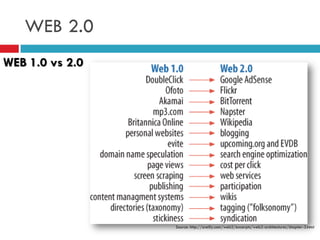
WEB 1.0 vs 2.0


                 Source: http://oreilly.com/web2/excerpts/web2-architectures/chapter-3.html
WEB 2.0 (continued)

   Design patterns
                                             Collaborative Tagging
       Collaborative Tagging (folksonomy)   Tagging refers to the ability of users to add “labels”
                                             (or tags) to link resources
       Synchronized Web
       Single Oriented Architecture (SOA)
       SaaS (cloud computing)
       Persistent Rights Management
       Mashup
       Rich User Experience
       Participation/Collaboration
       Asynchronous Particle Update
       Social Networking
       Semantic Web Grounding
       Structured Information
                                             Source: http://community.bamboosolutions.com/blogs/bambooteamblog/archive/2009/04/15/sharepoint-tag-
                                             cloud-web-part-just-released-to-bamboo-labs.aspx
WEB 2.0 (continued)

   Design elements

       Collaborative Tagging (folksonomy)   Synchronized Web
                                             In this pattern, multiple applications or users
       Synchronized Web                     share the same state or view of the same state.
       Single Oriented Architecture (SOA)
       SaaS (cloud computing)
       Persistent Rights Management
       Mashup
       Rich User Experience
       Participation/Collaboration
       Asynchronous Particle Update
       Social Networking
       Semantic Web Grounding
       Structured Information                      Source: http://www.technobuzz.net/play-free-web-games-online/
WEB 2.0 (continued)

   Design elements
                                             Service Oriented Architecture (SOA)
       Collaborative Tagging (folksonomy)   It's an architectural style of building software
       Synchronized Web                     applications that promotes loose coupling between
                                             components so that you can reuse them
       Single Oriented Architecture (SOA)
       SaaS (cloud computing)
       Persistent Rights Management
       Mashup
       Rich User Experience
       Participation/Collaboration
       Asynchronous Particle Update
       Social Networking
       Semantic Web Grounding
       Structured Information
                                                        http://www.w3.org/2003/Talks/0521-hh-wsa/slide5-0.html
WEB 2.0 (continued)

   Design elements
                                             SaaS
       Collaborative Tagging (folksonomy)   delivers computational functionality to users without
       Synchronized Web                     them having to persist the entire application or system
       Single Oriented Architecture (SOA)   on their computers.
       SaaS (cloud computing)
       Persistent Rights Management
       Mashup
       Rich User Experience
       Participation/Collaboration
       Asynchronous Particle Update
       Social Networking
       Semantic Web Grounding
       Structured Information
                                                    Source: http://www.ekinsystems.com/Home/CloudComputing/tabid/102/Default.aspx
WEB 2.0 (continued)

   Design elements

       Collaborative Tagging (folksonomy)   Persistent Rights Management
                                             users retaining their Create, Read,
       Synchronized Web
                                             Update, Delete (CRUD) rights on every
       Single Oriented Architecture (SOA)   copy of a digital artefact.
       SaaS (cloud computing)
       Persistent Rights Management
       Mashup
       Rich User Experience
       Participation/Collaboration
       Asynchronous Particle Update
       Social Networking
       Semantic Web Grounding
       Structured Information
                                             Source:http://help.adobe.com/en_US/livecycle/9.0/rightsMgmtExt2007Help/index
                                             .htm?content=000006.html
WEB 2.0 (continued)

   Design elements
                                             Mashup
       Collaborative Tagging (folksonomy)   aggregating content or computational resources from
       Synchronized Web                     multiple sources, and mixing them together to create
       Single Oriented Architecture (SOA)   something new.
       SaaS (cloud computing)
       Persistent Rights Management
       Mashup
       Rich User Experience
       Participation/Collaboration
       Asynchronous Particle Update
       Social Networking
       Semantic Web Grounding
       Structured Information
                                             Source:http://webscripts.softpedia.com/scriptScreenshots/Maxmind-and-Google-Maps-Mashup-
                                             Screenshots-42943.html
WEB 2.0 (continued)

   Design elements

       Collaborative Tagging (folksonomy)   Rich user experiences
                                             a combination of GUI -style (Graphical User
       Synchronized Web
                                             Interface) applications and multimedia content.
       Single Oriented Architecture (SOA)
       SaaS (cloud computing)
       Persistent Rights Management
       Mashup
       Rich User Experience
       Participation/Collaboration
       Asynchronous Particle Update
       Social Networking
       Semantic Web Grounding
       Structured Information                     Source:http://www.thedailyslice.com/tag/consumer-engagement/
WEB 2.0 (continued)

   Design elements
                                             Participation/Collaboration
       Collaborative Tagging (folksonomy)   focuses on self-organizing communities and social
       Synchronized Web                     interactions among Web 2.0 participants.
       Single Oriented Architecture (SOA)
       SaaS (cloud computing)
       Persistent Rights Management
       Mashup
       Rich User Experience
       Participation/Collaboration
       Asynchronous Particle Update
       Social Networking
       Semantic Web Grounding
       Structured Information
                                                Source:http://www.ukoln.ac.uk/qa-focus/documents/briefings/briefing-78/html/
WEB 2.0 (continued)

   Design elements
                                             Asynchronous Particle Update
       Collaborative Tagging (folksonomy)   Rather than forcing a complete object (page view)
       Synchronized Web                     update, a smaller part of the whole can be updated
       Single Oriented Architecture (SOA)   asynchronously.
       SaaS (cloud computing)
       Persistent Rights Management
       Mashup
       Rich User Experience
       Participation/Collaboration
       Asynchronous Particle Update
       Social Networking
       Semantic Web Grounding
       Structured Information                    Source:http://www.rhema-webdesign.com/web/web_technologies
WEB 2.0 (continued)

   Design elements

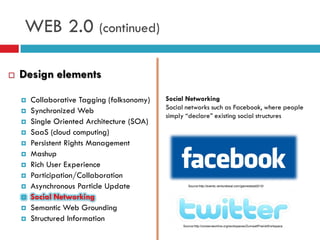
       Collaborative Tagging (folksonomy)   Social Networking
                                             Social networks such as Facebook, where people
       Synchronized Web
                                             simply “declare” existing social structures
       Single Oriented Architecture (SOA)
       SaaS (cloud computing)
       Persistent Rights Management
       Mashup
       Rich User Experience
       Participation/Collaboration
       Asynchronous Particle Update                 Source:http://events.venturebeat.com/gamesbeat2010/


       Social Networking
       Semantic Web Grounding
       Structured Information
                                                  Source:http://conserveonline.org/workspaces/ZumwaltPrairieWorkspace
WEB 2.0 (continued)

   Design elements

       Collaborative Tagging (folksonomy)   Semantic Web grounding
       Synchronized Web                     It facilitates self-learning, self-healing software, as
                                             observing the patterns of interactions can lead to
       Single Oriented Architecture (SOA)   inferences about the relevancy of semantic
       SaaS (cloud computing)               declarations.
       Persistent Rights Management
       Mashup
       Rich User Experience
       Participation/Collaboration
       Asynchronous Particle Update
       Social Networking
       Semantic Web Grounding
       Structured Information
                                                  Source:http://www.velvetblues.com/web-development-blog/google-added-ajax-features-to-search/
WEB 2.0 (continued)

   Design elements

       Collaborative Tagging (folksonomy)   Structured Information
       Synchronized Web                     The advent of XML and the ability to apply
       Single Oriented Architecture (SOA)   customized tagging to specific elements
       SaaS (cloud computing)
       Persistent Rights Management
       Mashup
       Rich User Experience
       Participation/Collaboration
       Asynchronous Particle Update
       Social Networking
       Semantic Web Grounding
                                              Source:http://blog.mozilla.com/faaborg/2006/12/13/microformats-part-2-the-fundamental-types/

       Structured Information
WEB 2.0 (continued)
   Design features/styles
       Simplicity
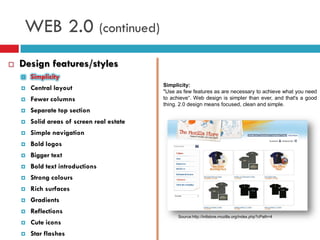
                                            Simplicity:
       Central layout                      "Use as few features as are necessary to achieve what you need
       Fewer columns                       to achieve“. Web design is simpler than ever, and that's a good
                                            thing. 2.0 design means focused, clean and simple.
       Separate top section
       Solid areas of screen real estate
       Simple navigation
       Bold logos
       Bigger text
       Bold text introductions
       Strong colours
       Rich surfaces
       Gradients
       Reflections
                                                  Source:http://intlstore.mozilla.org/index.php?cPath=4
       Cute icons
       Star flashes
WEB 2.0 (continued)
   Design features/styles
       Simplicity
       Central layout
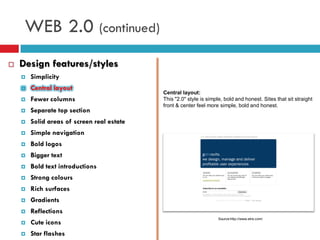
                                            Central layout:
       Fewer columns                       This "2.0" style is simple, bold and honest. Sites that sit straight
                                            front & center feel more simple, bold and honest.
       Separate top section
       Solid areas of screen real estate
       Simple navigation
       Bold logos
       Bigger text
       Bold text introductions
       Strong colours
       Rich surfaces
       Gradients
       Reflections
                                                                     Source:http://www.etre.com/
       Cute icons
       Star flashes
WEB 2.0 (continued)
   Design features/styles
       Simplicity
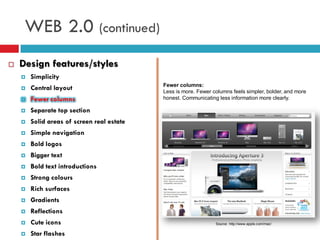
                                            Fewer columns:
       Central layout                      Less is more. Fewer columns feels simpler, bolder, and more
       Fewer columns                       honest. Communicating less information more clearly.

       Separate top section
       Solid areas of screen real estate
       Simple navigation
       Bold logos
       Bigger text
       Bold text introductions
       Strong colours
       Rich surfaces
       Gradients
       Reflections
       Cute icons                                               Source: http://www.apple.com/mac/


       Star flashes
WEB 2.0 (continued)
   Design features/styles
       Simplicity
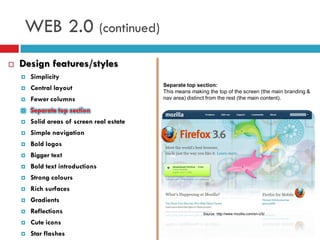
                                            Separate top section:
       Central layout                      This means making the top of the screen (the main branding &
       Fewer columns                       nav area) distinct from the rest (the main content).

       Separate top section
       Solid areas of screen real estate
       Simple navigation
       Bold logos
       Bigger text
       Bold text introductions
       Strong colours
       Rich surfaces
       Gradients
       Reflections                                         Source: http://www.mozilla.com/en-US/

       Cute icons
       Star flashes
WEB 2.0 (continued)
   Design features/styles
       Simplicity
                                            Solid areas of screen real-estate:
       Central layout                      Leading on from the clearly differentiated top area, sites define
       Fewer columns                       the various areas of real-estate boldly and clearly.

       Separate top section
       Solid areas of screen real estate
       Simple navigation
       Bold logos
       Bigger text
       Bold text introductions
       Strong colours
       Rich surfaces
       Gradients
       Reflections                                          Source: http://www.webdesignfromscratch.com

       Cute icons
       Star flashes
WEB 2.0 (continued)
   Design features/styles
       Simplicity
                                            Simple navigation:
       Central layout                      Navigation bar needs to be clearly identifiable as navigation, and
       Fewer columns                       should be easy to interpret, target and select

       Separate top section
       Solid areas of screen real estate
       Simple navigation
       Bold logos
       Bigger text
       Bold text introductions
       Strong colours
       Rich surfaces
       Gradients                                          Source: http://www.webdesignfromscratch.com

       Reflections
       Cute icons
       Star flashes
WEB 2.0 (continued)
   Design features/styles
       Simplicity
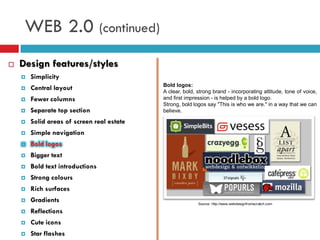
                                            Bold logos:
       Central layout                      A clear, bold, strong brand - incorporating attitude, tone of voice,
       Fewer columns                       and first impression - is helped by a bold logo.
                                            Strong, bold logos say "This is who we are." in a way that we can
       Separate top section                believe.

       Solid areas of screen real estate
       Simple navigation
       Bold logos
       Bigger text
       Bold text introductions
       Strong colours
       Rich surfaces
       Gradients                                          Source: http://www.webdesignfromscratch.com

       Reflections
       Cute icons
       Star flashes
WEB 2.0 (continued)
   Design features/styles
       Simplicity
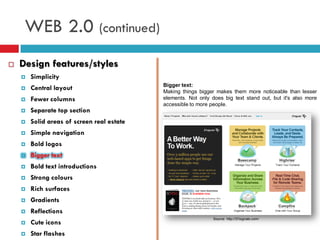
                                            Bigger text:
       Central layout                      Making things bigger makes them more noticeable than lesser
       Fewer columns                       elements. Not only does big text stand out, but it's also more
                                            accessible to more people.
       Separate top section
       Solid areas of screen real estate
       Simple navigation
       Bold logos
       Bigger text
       Bold text introductions
       Strong colours
       Rich surfaces
       Gradients
       Reflections
                                                                Source: http://37signals.com/
       Cute icons
       Star flashes
WEB 2.0 (continued)
   Design features/styles
       Simplicity
                                            Bold text introductions:
       Central layout                      They tend to be graphical, rather than regular text. The reason
       Fewer columns                       for this is that designers want a lot of control over the page's
                                            visual impact, especially early on in a browsing experience.
       Separate top section
       Solid areas of screen real estate
       Simple navigation
       Bold logos
       Bigger text
       Bold text introductions
       Strong colours
       Rich surfaces
       Gradients
       Reflections
                                                                Source: http://37signals.com/
       Cute icons
       Star flashes
WEB 2.0 (continued)
   Design features/styles
       Simplicity
                                            Strong colours:
       Central layout                      Bright, strong colours draw the eye. When you have a simple,
                                            stripped-out design, you can use a bit of intense colour to help
       Fewer columns                       differentiate areas of real-estate and to draw attention to items
       Separate top section                you want the visitor to notice.

       Solid areas of screen real estate
       Simple navigation
       Bold logos
       Bigger text
       Bold text introductions
       Strong colours
       Rich surfaces
       Gradients
       Reflections
       Cute icons                                                Source: http://www.colorschemer.com/


       Star flashes
WEB 2.0 (continued)
   Design features/styles
       Simplicity
                                            Rich surfaces:
       Central layout                      Realistic surface effects (like drop-shadows, gradients and
                                            reflections) help make a visual interface feel more real, solid and
       Fewer columns                       "finished".
       Separate top section
       Solid areas of screen real estate
       Simple navigation
       Bold logos
       Bigger text
       Bold text introductions
       Strong colours
       Rich surfaces                                        Source: http://www.webdesignfromscratch.com


       Gradients
       Reflections
       Cute icons
       Star flashes
WEB 2.0 (continued)
   Design features/styles
       Simplicity
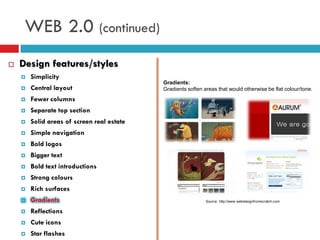
                                            Gradients:
       Central layout                      Gradients soften areas that would otherwise be flat colour/tone.
       Fewer columns
       Separate top section
       Solid areas of screen real estate
       Simple navigation
       Bold logos
       Bigger text
       Bold text introductions
       Strong colours
       Rich surfaces
       Gradients                                             Source: http://www.webdesignfromscratch.com


       Reflections
       Cute icons
       Star flashes
WEB 2.0 (continued)
   Design features/styles
       Simplicity
                                            Reflections:
       Central layout                      The illusion of reflection is one of the most common applications
                                            on gradients.
       Fewer columns
       Separate top section
       Solid areas of screen real estate
       Simple navigation
       Bold logos
       Bigger text
       Bold text introductions
       Strong colours
       Rich surfaces
       Gradients                                             Source: http://www.webdesignfromscratch.com


       Reflections
       Cute icons
       Star flashes
WEB 2.0 (continued)
   Design features/styles
       Simplicity
                                            Cute icons:
       Central layout                      Icons play an important role in Web 2.0 design. Today we use
                                            fewer, better icons that carry more meaning. Icons can be useful
       Fewer columns                       when they're easily recognisable and carry a clear meaning.
       Separate top section
       Solid areas of screen real estate
       Simple navigation
       Bold logos
       Bigger text
       Bold text introductions
       Strong colours
       Rich surfaces
       Gradients                                            Source: http://www.webdesignfromscratch.com


       Reflections
       Cute icons
       Star flashes
WEB 2.0 (continued)
   Design features/styles
       Simplicity
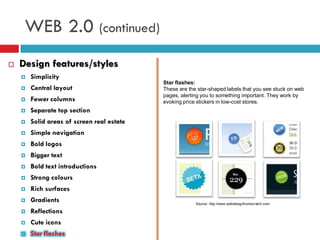
                                            Star flashes:
       Central layout                      These are the star-shaped labels that you see stuck on web
                                            pages, alerting you to something important. They work by
       Fewer columns                       evoking price stickers in low-cost stores.
       Separate top section
       Solid areas of screen real estate
       Simple navigation
       Bold logos
       Bigger text
       Bold text introductions
       Strong colours
       Rich surfaces
       Gradients                                        Source: http://www.webdesignfromscratch.com

       Reflections
       Cute icons
       Star flashes
WEB 2.0 (continued)
   Web 2.0 'neglecting good design„
     Jacob  Nielsen: “Web firms neglect the basics of good
      design, web usability guru”


                                      Source:http://news.bbc.co.uk/1/hi/technology/6653119.stm


       Paying attention on good design but not on usability
       Web firms rush to create websites, making site less usable
       Only few users will make significant use of all tools provided
WEB 2.0 (continued)

   Technologies and Tools
                                                     AJAX:
       AJAX (Asynchronous JavaScript and XML)       Client-side scripting means JavaScript. The major
                                                     advantage to JavaScript is that it doesn’t require page
       Server-side scripting (PHP,Perl,Java,Ruby)   reloading.

       Stylesheets (CSS & XSLT)
       XUL
       XML
       DOM
       Flash Fex
       REST (Representational State Transfer)
       Resource Description Framework (RDF)            Soutce:http://blogs.microsoft.co.il/blogs/justinangel/archive/2007/12.aspx
WEB 2.0 (continued)

   Technologies and Tools

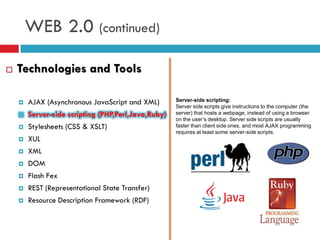
       AJAX (Asynchronous JavaScript and XML)       Server-side scripting:
                                                     Server side scripts give instructions to the computer (the
       Server-side scripting (PHP,Perl,Java,Ruby)   server) that hosts a webpage, instead of using a browser
                                                     on the user’s desktop. Server side scripts are usually
       Stylesheets (CSS & XSLT)                     faster than client side ones, and most AJAX programming
                                                     requires at least some server-side scripts.
       XUL
       XML
       DOM
       Flash Fex
       REST (Representational State Transfer)
       Resource Description Framework (RDF)
WEB 2.0 (continued)

   Technologies and Tools

       AJAX (Asynchronous JavaScript and XML)       Hypertext Transfer Protocol:
                                                     Cascading Style Sheets (CSS) is a style sheet language
       Server-side scripting (PHP,Perl,Java,Ruby)   used to describe the presentation semantics (that is, the
                                                     look and formatting) of a document written in a markup
       Stylesheets (CSS & XSLT)                     language.

       XUL
       XML
       DOM
       Flash Fex
       REST (Representational State Transfer)
       Resource Description Framework (RDF)
WEB 2.0 (continued)

   Technologies and Tools

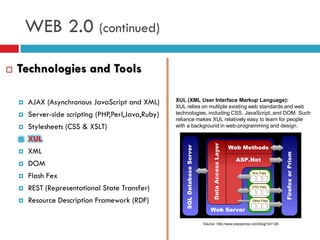
       AJAX (Asynchronous JavaScript and XML)       XUL (XML User Interface Markup Language):
                                                     XUL relies on multiple existing web standards and web
       Server-side scripting (PHP,Perl,Java,Ruby)   technologies, including CSS, JavaScript, and DOM. Such
                                                     reliance makes XUL relatively easy to learn for people
       Stylesheets (CSS & XSLT)                     with a background in web-programming and design.

       XUL
       XML
       DOM
       Flash Fex
       REST (Representational State Transfer)
       Resource Description Framework (RDF)

                                                                Source: http://www.peppertop.com/blog/?p=126
WEB 2.0 (continued)

   Technologies and Tools
                                                     XML (eXtensible Markup Language):
                                                     XML’s design goals emphasize simplicity, generality, and
       AJAX (Asynchronous JavaScript and XML)       usability over the Internet. It is a textual data format, with
                                                     strong support via Unicode for the languages of the
       Server-side scripting (PHP,Perl,Java,Ruby)   world. Although XML’s design focuses on documents, it is
                                                     widely used for the representation of arbitrary data
       Stylesheets (CSS & XSLT)                     structures, for example in web services.

       XUL
       XML
       DOM
       Flash Fex
       REST (Representational State Transfer)
       Resource Description Framework (RDF)
                                                                Source: http://entrecard.com/blog/?p=547
WEB 2.0 (continued)

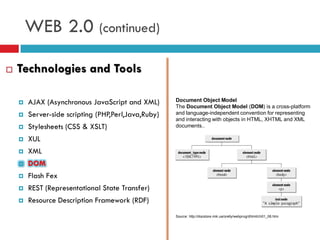
   Technologies and Tools

       AJAX (Asynchronous JavaScript and XML)       Document Object Model
                                                     The Document Object Model (DOM) is a cross-platform
       Server-side scripting (PHP,Perl,Java,Ruby)   and language-independent convention for representing
                                                     and interacting with objects in HTML, XHTML and XML
       Stylesheets (CSS & XSLT)                     documents..

       XUL
       XML
       DOM
       Flash Fex
       REST (Representational State Transfer)
       Resource Description Framework (RDF)
                                                     Source: http://docstore.mik.ua/orelly/webprog/dhtml/ch01_06.htm
WEB 2.0 (continued)

   Technologies and Tools

       AJAX (Asynchronous JavaScript and XML)       Flash Fex:
                                                     Flex is a highly productive, free open source framework
       Server-side scripting (PHP,Perl,Java,Ruby)   for building and maintaining expressive web applications
                                                     that deploy consistently on all major browsers, desktops,
       Stylesheets (CSS & XSLT)                     and operating systems.

       XUL
       XML
       DOM
       Flash Fex
       REST (Representational State Transfer)
       Resource Description Framework (RDF)


                                                     Source:http://upload.wikimedia.org/wikipedia/en/7/70/Flexicon.png
WEB 2.0 (continued)

   Technologies and Tools

       AJAX (Asynchronous JavaScript and XML)        REST (Representational State Transfer):

       Server-side scripting (PHP,Perl,Java,Ruby)    Representational state transfer (REST) is a style of
                                                      software architecture for distributed hypermedia systems
       Stylesheets (CSS & XSLT)                      such as the World Wide Web.

       XUL
       XML
       DOM
       Flash Fex
       REST (Representational State Transfer)
       Resource Description Framework (RDF)         Source:http://ausweb.scu.edu.au/aw06/papers/refereed/wright/paper.html
WEB 2.0 (continued)

   Technologies and Tools

       AJAX (Asynchronous JavaScript and XML)       Resource Description Framework (RDF)

       Server-side scripting (PHP,Perl,Java,Ruby)   RDF is a standard model for data interchange on the
                                                     Web. RDF has features that facilitate data merging even
       Stylesheets (CSS & XSLT)                     if the underlying schemas differ, and it specifically
                                                     supports the evolution of schemas over time without
       XUL                                          requiring all the data consumers to be changed.

       XML
       DOM
       Flash Fex
       REST (Representational State Transfer)
       Resource Description Framework (RDF)
                                                     Source: http://renato.iannella.it/paper/rdf-idiot/
WEB 2.0 (continued)
   Successful e-commerce web 2.0 companies
     Amazon.com

     Ebay

     Google

     Facebook

     Twitter

     Yahoo

     Wikipedia
WEB 2.0 (continued)
   Advantages:
     Information can be gathered from multiple sources
     Mass population communicates and spreads ideas and
      information
     Personalization to meet the needs of a single user

     Greatest communication medium in the world

     Broader perspective for viewing events

     Creativity
WEB 2.0 (continued)
   Disadvantages/Issues
     Dependence
     Bandwidth
     Paperless offices (danger)
     Sharing sensitive data
     Copyrights
     Job opportunities
     Vandalism
     Anonymity
     Credibility
WEB 2.0 (continued)
   How to create a successful WEB 2.0 business:
     Simple Business Idea (e.g. Google)
     Create and Release as Early as Possible (prototypes)

     Use the Network Effect (collaboration, volunteers, feedback)

     Track Your Users & Rankings (business statistic, alexa‟s)

     Marketing (creative and innovative solutions)

     Read about Successful and Unsuccessful e-Companies

     Have a Revenue Model(millions of pageviews but no
      earning)
     Continually Improve Your Business and Develop Improvement
      Metrics
WEB 2.0 (continued)
   Web 2.0 tools for promoting your business:
     Company personality: blogging
     Promote events: Facebook/Twitter (eg Obama)

     Video : YouTube

     Track success: Google Analytics

     Professional growth: Meetup

     Recruitment tool: LinkedIn
WEB 2.0
   The phenomenon of long tail in WEB 2.0
     Why   The Future of Business is Selling Less of More


            Source:http://satyamshot.wordpress.com/2009/04/19/the-long-tail-bollywood-hollywood-hits-and-niches-and-much-more/
WEB 3.0
   What is coming after 2.0?
     Semantic   web?
       Meaning   of data
     Openness
       Open   source API‟s
     3D   virtual worlds
Summary
   Web 2.0 is not a technology
   Web 2.0 is a trend
   Web 2.0 is a collaboration of web tools
   Web 2.0 facilitates various technologies to deliver
    rich user experience
   Web 2.0 is about read and write
   Web 2.0 is not all good
   Web 2.0 is participatory
                    The Machine is US/ing us
Questions and Discussion
 What do you think about the future of WEB?
 Is WEB 2.0 a bubble 2.0?

 What other implications Web 2.0 is causing?

 What is raw data?

       Governments/institutions/organisation to make their
        data openly available on the web
References
1.  CASAREZ, V., CRIPE, B., SINI, J. and WECKERLE, P., 2009. Reshaping your business with WEB 2.0.
    USA: McGraw-Gill
2. DIX, A. and COWEN L., BCS: HCI 2.0? Usability meets Web 2.0 [online]. Available:
    http://www.bcs.org/upload/pdf/ewic_hc07_papaper1.pdf [accessed 20 Feb 2010].
3. Governor J., Hinchcliffe D. and Nickull D., 2009 WEB 2.0 Architectures. Canada: O‟Reilly Media,
    Inc.
4. JONES, B. L., 2008. WEB 2.0 Heroes. Indianapolis: Wiley Publishing Inc.
5. O‟Reilly Media, 2010. Dissecting Web 2.0 Examples: Chapter 3 - Web 2.0 Architectures [online].
    Available: http://oreilly.com/web2/excerpts/web2-architectures/chapter-3.html [accessed 21 Feb
    2010].
6. O‟Reilly Media and TechWeb, 2010. Web2.0 Summit 2009 [online]. Available:
    http://www.web2summit.com/web2009 [accessed 21 Feb 2010].
7. SANKAR, K. and Bouchard A. S., 2009. Enterprise Web 2.0 Fundamentals. Indianapolis: Cisco
    Systems, Inc.
8. Scratchmedia Limited, 2009. Graphic Design for the web [online]. Available:
    http://www.webdesignfromscratch.com/web-design/[accessed 21 Feb 2010].
9. SHUEN, A., 2008. Web 2.0: A Strategy Guide. Canada: O‟Reilly Media, Inc.
10. SITEBOAD, 2010. Creating a successful web 2.0 business [online]. Available:
    http://siteboat.com/creating-a-successful-web-20-business/[accessed 21 Feb 2010].
11. SMITH, C., 2010. Web 2.0 (Videos/PPoints) [online]. Available:
    http://web2videos.blogspot.com/[accessed 20 Feb 2010].
12. BLIP NETWORKS., 2010. Web2Expo [online]. Available: http://web2expo.blip.tv/[accessed 21
    Feb 2010].

Web 2.0

  • 1.
  • 2.
    Overview  Introduction - What is WEB 2.0  O Reilly definition  Criticism  WEB 1.0  Dot com Bubble  Technologies  WEB 2.0  Comparison with WEB 1.0 Technology  Design Patterns  Design Features/styles  Technologies and Tools  Successful Web 2.0 Companies  Advantages & Disadvantages  WEB 3.0  What is coming next  Summary  Questions and Discussion  References
  • 3.
    Introduction – Whatis WEB 2.0  What do you think WEB 2.0 is ?  Tim O‟Reilly  Definition (2004 Conference) Web 2.0 is the business revolution in the computer industry caused by the move to the internet as platform, and an attempt to understand the rules for success on that new platform.  WEB 2.0 Conferences (SUMMIT)
  • 4.
    What is WEB2.0 (continued) Contradiction meaningless marketing buzzword OR the new conventional wisdom  Buzzword?  Not clear for average user what WEB 2.0 is  People are struggling to understand;  No common architecture  Multiple definitions  Contentious  Attitude not technology  Links back to the original web  Quotes from WEB influencers  Alan Meckler (internet.com): “web 2.0 is just a continuing evolution…”  Gina Bianchini (Ning): “I think it means a lot of different things to a lot of different people”  Biz Stone (twitter): “the public acceptance of the fact that the web is a highly social utility”  Tim Berners-Lee: “nobody even knows what it means”
  • 5.
    What is WEB2.0 (continued)  Conventional wisdom?  Atomization of web  Quotes fromWEB influencers :  Eric Engleman (Bloglines): “it is really about end users”  Max Mancini (ebay): “Atomization of the WEB”  “taking all of the components and making them available for combination in unconsidered way, or in ways that are very individual”  Dorion Carroll (technorati): “its no longer the one-way WEB”  Rodrigo Madanes (Skype): “web 2.0 is the resurgence in web innovation”.
  • 7.
    WEB 1.0 There wasa Web 1.0…if we assume that there's a Web 2.0 WEB 1.0  Static pages Source: http://blog.aysoon.com/le-web20-illustre-en-une-seule-image  Not interactive  Applications are proprietary
  • 8.
    WEB 1.0 (continued) Dotcom bubble  Existing businesses realized that needed a presence on the internet.  Strived to make money by reaching consumers only over the internet.  Over optimism about e-commerce  Problems dealing direct with customer is the customer: Source: http://www.watblog.com/2008/04/17/the-biggest-bubble-there-ever-was/  Small orders Survivors:  Returns  Amazon.com: it is the middleman  Complaints  Ebay: brings buyers and sellers and  Shipping makes profit from it.  Customer service
  • 9.
    WEB 1.0 (continued)  Companies significant to the bubble  Boo.com – spent $180 million in online fassion. Went bankrupt in May 2000  Geocities – purchased by Yahoo for $3.57 billion in 1999. Yahoo closed Geocities in 2009.  eToys – share price from $80 (1999) went to $1 (2001)
  • 10.
    WEB 1.0 (continued)  Technologies (design elements)  Static pages instead of dynamic user-generated content  The use of framesets  Proprietary HTML extensions  Online guestbooks (geocities)  GIF buttons  HTML forms sent via email
  • 12.
    WEB 2.0 WEB 1.0vs 2.0 Source: http://oreilly.com/web2/excerpts/web2-architectures/chapter-3.html
  • 14.
    WEB 2.0 (continued)  Design patterns Collaborative Tagging  Collaborative Tagging (folksonomy) Tagging refers to the ability of users to add “labels” (or tags) to link resources  Synchronized Web  Single Oriented Architecture (SOA)  SaaS (cloud computing)  Persistent Rights Management  Mashup  Rich User Experience  Participation/Collaboration  Asynchronous Particle Update  Social Networking  Semantic Web Grounding  Structured Information Source: http://community.bamboosolutions.com/blogs/bambooteamblog/archive/2009/04/15/sharepoint-tag- cloud-web-part-just-released-to-bamboo-labs.aspx
  • 15.
    WEB 2.0 (continued)  Design elements  Collaborative Tagging (folksonomy) Synchronized Web In this pattern, multiple applications or users  Synchronized Web share the same state or view of the same state.  Single Oriented Architecture (SOA)  SaaS (cloud computing)  Persistent Rights Management  Mashup  Rich User Experience  Participation/Collaboration  Asynchronous Particle Update  Social Networking  Semantic Web Grounding  Structured Information Source: http://www.technobuzz.net/play-free-web-games-online/
  • 16.
    WEB 2.0 (continued)  Design elements Service Oriented Architecture (SOA)  Collaborative Tagging (folksonomy) It's an architectural style of building software  Synchronized Web applications that promotes loose coupling between components so that you can reuse them  Single Oriented Architecture (SOA)  SaaS (cloud computing)  Persistent Rights Management  Mashup  Rich User Experience  Participation/Collaboration  Asynchronous Particle Update  Social Networking  Semantic Web Grounding  Structured Information http://www.w3.org/2003/Talks/0521-hh-wsa/slide5-0.html
  • 17.
    WEB 2.0 (continued)  Design elements SaaS  Collaborative Tagging (folksonomy) delivers computational functionality to users without  Synchronized Web them having to persist the entire application or system  Single Oriented Architecture (SOA) on their computers.  SaaS (cloud computing)  Persistent Rights Management  Mashup  Rich User Experience  Participation/Collaboration  Asynchronous Particle Update  Social Networking  Semantic Web Grounding  Structured Information Source: http://www.ekinsystems.com/Home/CloudComputing/tabid/102/Default.aspx
  • 18.
    WEB 2.0 (continued)  Design elements  Collaborative Tagging (folksonomy) Persistent Rights Management users retaining their Create, Read,  Synchronized Web Update, Delete (CRUD) rights on every  Single Oriented Architecture (SOA) copy of a digital artefact.  SaaS (cloud computing)  Persistent Rights Management  Mashup  Rich User Experience  Participation/Collaboration  Asynchronous Particle Update  Social Networking  Semantic Web Grounding  Structured Information Source:http://help.adobe.com/en_US/livecycle/9.0/rightsMgmtExt2007Help/index .htm?content=000006.html
  • 19.
    WEB 2.0 (continued)  Design elements Mashup  Collaborative Tagging (folksonomy) aggregating content or computational resources from  Synchronized Web multiple sources, and mixing them together to create  Single Oriented Architecture (SOA) something new.  SaaS (cloud computing)  Persistent Rights Management  Mashup  Rich User Experience  Participation/Collaboration  Asynchronous Particle Update  Social Networking  Semantic Web Grounding  Structured Information Source:http://webscripts.softpedia.com/scriptScreenshots/Maxmind-and-Google-Maps-Mashup- Screenshots-42943.html
  • 20.
    WEB 2.0 (continued)  Design elements  Collaborative Tagging (folksonomy) Rich user experiences a combination of GUI -style (Graphical User  Synchronized Web Interface) applications and multimedia content.  Single Oriented Architecture (SOA)  SaaS (cloud computing)  Persistent Rights Management  Mashup  Rich User Experience  Participation/Collaboration  Asynchronous Particle Update  Social Networking  Semantic Web Grounding  Structured Information Source:http://www.thedailyslice.com/tag/consumer-engagement/
  • 21.
    WEB 2.0 (continued)  Design elements Participation/Collaboration  Collaborative Tagging (folksonomy) focuses on self-organizing communities and social  Synchronized Web interactions among Web 2.0 participants.  Single Oriented Architecture (SOA)  SaaS (cloud computing)  Persistent Rights Management  Mashup  Rich User Experience  Participation/Collaboration  Asynchronous Particle Update  Social Networking  Semantic Web Grounding  Structured Information Source:http://www.ukoln.ac.uk/qa-focus/documents/briefings/briefing-78/html/
  • 22.
    WEB 2.0 (continued)  Design elements Asynchronous Particle Update  Collaborative Tagging (folksonomy) Rather than forcing a complete object (page view)  Synchronized Web update, a smaller part of the whole can be updated  Single Oriented Architecture (SOA) asynchronously.  SaaS (cloud computing)  Persistent Rights Management  Mashup  Rich User Experience  Participation/Collaboration  Asynchronous Particle Update  Social Networking  Semantic Web Grounding  Structured Information Source:http://www.rhema-webdesign.com/web/web_technologies
  • 23.
    WEB 2.0 (continued)  Design elements  Collaborative Tagging (folksonomy) Social Networking Social networks such as Facebook, where people  Synchronized Web simply “declare” existing social structures  Single Oriented Architecture (SOA)  SaaS (cloud computing)  Persistent Rights Management  Mashup  Rich User Experience  Participation/Collaboration  Asynchronous Particle Update Source:http://events.venturebeat.com/gamesbeat2010/  Social Networking  Semantic Web Grounding  Structured Information Source:http://conserveonline.org/workspaces/ZumwaltPrairieWorkspace
  • 24.
    WEB 2.0 (continued)  Design elements  Collaborative Tagging (folksonomy) Semantic Web grounding  Synchronized Web It facilitates self-learning, self-healing software, as observing the patterns of interactions can lead to  Single Oriented Architecture (SOA) inferences about the relevancy of semantic  SaaS (cloud computing) declarations.  Persistent Rights Management  Mashup  Rich User Experience  Participation/Collaboration  Asynchronous Particle Update  Social Networking  Semantic Web Grounding  Structured Information Source:http://www.velvetblues.com/web-development-blog/google-added-ajax-features-to-search/
  • 25.
    WEB 2.0 (continued)  Design elements  Collaborative Tagging (folksonomy) Structured Information  Synchronized Web The advent of XML and the ability to apply  Single Oriented Architecture (SOA) customized tagging to specific elements  SaaS (cloud computing)  Persistent Rights Management  Mashup  Rich User Experience  Participation/Collaboration  Asynchronous Particle Update  Social Networking  Semantic Web Grounding Source:http://blog.mozilla.com/faaborg/2006/12/13/microformats-part-2-the-fundamental-types/  Structured Information
  • 27.
    WEB 2.0 (continued)  Design features/styles  Simplicity Simplicity:  Central layout "Use as few features as are necessary to achieve what you need  Fewer columns to achieve“. Web design is simpler than ever, and that's a good thing. 2.0 design means focused, clean and simple.  Separate top section  Solid areas of screen real estate  Simple navigation  Bold logos  Bigger text  Bold text introductions  Strong colours  Rich surfaces  Gradients  Reflections Source:http://intlstore.mozilla.org/index.php?cPath=4  Cute icons  Star flashes
  • 28.
    WEB 2.0 (continued)  Design features/styles  Simplicity  Central layout Central layout:  Fewer columns This "2.0" style is simple, bold and honest. Sites that sit straight front & center feel more simple, bold and honest.  Separate top section  Solid areas of screen real estate  Simple navigation  Bold logos  Bigger text  Bold text introductions  Strong colours  Rich surfaces  Gradients  Reflections Source:http://www.etre.com/  Cute icons  Star flashes
  • 29.
    WEB 2.0 (continued)  Design features/styles  Simplicity Fewer columns:  Central layout Less is more. Fewer columns feels simpler, bolder, and more  Fewer columns honest. Communicating less information more clearly.  Separate top section  Solid areas of screen real estate  Simple navigation  Bold logos  Bigger text  Bold text introductions  Strong colours  Rich surfaces  Gradients  Reflections  Cute icons Source: http://www.apple.com/mac/  Star flashes
  • 30.
    WEB 2.0 (continued)  Design features/styles  Simplicity Separate top section:  Central layout This means making the top of the screen (the main branding &  Fewer columns nav area) distinct from the rest (the main content).  Separate top section  Solid areas of screen real estate  Simple navigation  Bold logos  Bigger text  Bold text introductions  Strong colours  Rich surfaces  Gradients  Reflections Source: http://www.mozilla.com/en-US/  Cute icons  Star flashes
  • 31.
    WEB 2.0 (continued)  Design features/styles  Simplicity Solid areas of screen real-estate:  Central layout Leading on from the clearly differentiated top area, sites define  Fewer columns the various areas of real-estate boldly and clearly.  Separate top section  Solid areas of screen real estate  Simple navigation  Bold logos  Bigger text  Bold text introductions  Strong colours  Rich surfaces  Gradients  Reflections Source: http://www.webdesignfromscratch.com  Cute icons  Star flashes
  • 32.
    WEB 2.0 (continued)  Design features/styles  Simplicity Simple navigation:  Central layout Navigation bar needs to be clearly identifiable as navigation, and  Fewer columns should be easy to interpret, target and select  Separate top section  Solid areas of screen real estate  Simple navigation  Bold logos  Bigger text  Bold text introductions  Strong colours  Rich surfaces  Gradients Source: http://www.webdesignfromscratch.com  Reflections  Cute icons  Star flashes
  • 33.
    WEB 2.0 (continued)  Design features/styles  Simplicity Bold logos:  Central layout A clear, bold, strong brand - incorporating attitude, tone of voice,  Fewer columns and first impression - is helped by a bold logo. Strong, bold logos say "This is who we are." in a way that we can  Separate top section believe.  Solid areas of screen real estate  Simple navigation  Bold logos  Bigger text  Bold text introductions  Strong colours  Rich surfaces  Gradients Source: http://www.webdesignfromscratch.com  Reflections  Cute icons  Star flashes
  • 34.
    WEB 2.0 (continued)  Design features/styles  Simplicity Bigger text:  Central layout Making things bigger makes them more noticeable than lesser  Fewer columns elements. Not only does big text stand out, but it's also more accessible to more people.  Separate top section  Solid areas of screen real estate  Simple navigation  Bold logos  Bigger text  Bold text introductions  Strong colours  Rich surfaces  Gradients  Reflections Source: http://37signals.com/  Cute icons  Star flashes
  • 35.
    WEB 2.0 (continued)  Design features/styles  Simplicity Bold text introductions:  Central layout They tend to be graphical, rather than regular text. The reason  Fewer columns for this is that designers want a lot of control over the page's visual impact, especially early on in a browsing experience.  Separate top section  Solid areas of screen real estate  Simple navigation  Bold logos  Bigger text  Bold text introductions  Strong colours  Rich surfaces  Gradients  Reflections Source: http://37signals.com/  Cute icons  Star flashes
  • 36.
    WEB 2.0 (continued)  Design features/styles  Simplicity Strong colours:  Central layout Bright, strong colours draw the eye. When you have a simple, stripped-out design, you can use a bit of intense colour to help  Fewer columns differentiate areas of real-estate and to draw attention to items  Separate top section you want the visitor to notice.  Solid areas of screen real estate  Simple navigation  Bold logos  Bigger text  Bold text introductions  Strong colours  Rich surfaces  Gradients  Reflections  Cute icons Source: http://www.colorschemer.com/  Star flashes
  • 37.
    WEB 2.0 (continued)  Design features/styles  Simplicity Rich surfaces:  Central layout Realistic surface effects (like drop-shadows, gradients and reflections) help make a visual interface feel more real, solid and  Fewer columns "finished".  Separate top section  Solid areas of screen real estate  Simple navigation  Bold logos  Bigger text  Bold text introductions  Strong colours  Rich surfaces Source: http://www.webdesignfromscratch.com  Gradients  Reflections  Cute icons  Star flashes
  • 38.
    WEB 2.0 (continued)  Design features/styles  Simplicity Gradients:  Central layout Gradients soften areas that would otherwise be flat colour/tone.  Fewer columns  Separate top section  Solid areas of screen real estate  Simple navigation  Bold logos  Bigger text  Bold text introductions  Strong colours  Rich surfaces  Gradients Source: http://www.webdesignfromscratch.com  Reflections  Cute icons  Star flashes
  • 39.
    WEB 2.0 (continued)  Design features/styles  Simplicity Reflections:  Central layout The illusion of reflection is one of the most common applications on gradients.  Fewer columns  Separate top section  Solid areas of screen real estate  Simple navigation  Bold logos  Bigger text  Bold text introductions  Strong colours  Rich surfaces  Gradients Source: http://www.webdesignfromscratch.com  Reflections  Cute icons  Star flashes
  • 40.
    WEB 2.0 (continued)  Design features/styles  Simplicity Cute icons:  Central layout Icons play an important role in Web 2.0 design. Today we use fewer, better icons that carry more meaning. Icons can be useful  Fewer columns when they're easily recognisable and carry a clear meaning.  Separate top section  Solid areas of screen real estate  Simple navigation  Bold logos  Bigger text  Bold text introductions  Strong colours  Rich surfaces  Gradients Source: http://www.webdesignfromscratch.com  Reflections  Cute icons  Star flashes
  • 41.
    WEB 2.0 (continued)  Design features/styles  Simplicity Star flashes:  Central layout These are the star-shaped labels that you see stuck on web pages, alerting you to something important. They work by  Fewer columns evoking price stickers in low-cost stores.  Separate top section  Solid areas of screen real estate  Simple navigation  Bold logos  Bigger text  Bold text introductions  Strong colours  Rich surfaces  Gradients Source: http://www.webdesignfromscratch.com  Reflections  Cute icons  Star flashes
  • 42.
    WEB 2.0 (continued)  Web 2.0 'neglecting good design„  Jacob Nielsen: “Web firms neglect the basics of good design, web usability guru” Source:http://news.bbc.co.uk/1/hi/technology/6653119.stm  Paying attention on good design but not on usability  Web firms rush to create websites, making site less usable  Only few users will make significant use of all tools provided
  • 44.
    WEB 2.0 (continued)  Technologies and Tools AJAX:  AJAX (Asynchronous JavaScript and XML) Client-side scripting means JavaScript. The major advantage to JavaScript is that it doesn’t require page  Server-side scripting (PHP,Perl,Java,Ruby) reloading.  Stylesheets (CSS & XSLT)  XUL  XML  DOM  Flash Fex  REST (Representational State Transfer)  Resource Description Framework (RDF) Soutce:http://blogs.microsoft.co.il/blogs/justinangel/archive/2007/12.aspx
  • 45.
    WEB 2.0 (continued)  Technologies and Tools  AJAX (Asynchronous JavaScript and XML) Server-side scripting: Server side scripts give instructions to the computer (the  Server-side scripting (PHP,Perl,Java,Ruby) server) that hosts a webpage, instead of using a browser on the user’s desktop. Server side scripts are usually  Stylesheets (CSS & XSLT) faster than client side ones, and most AJAX programming requires at least some server-side scripts.  XUL  XML  DOM  Flash Fex  REST (Representational State Transfer)  Resource Description Framework (RDF)
  • 46.
    WEB 2.0 (continued)  Technologies and Tools  AJAX (Asynchronous JavaScript and XML) Hypertext Transfer Protocol: Cascading Style Sheets (CSS) is a style sheet language  Server-side scripting (PHP,Perl,Java,Ruby) used to describe the presentation semantics (that is, the look and formatting) of a document written in a markup  Stylesheets (CSS & XSLT) language.  XUL  XML  DOM  Flash Fex  REST (Representational State Transfer)  Resource Description Framework (RDF)
  • 47.
    WEB 2.0 (continued)  Technologies and Tools  AJAX (Asynchronous JavaScript and XML) XUL (XML User Interface Markup Language): XUL relies on multiple existing web standards and web  Server-side scripting (PHP,Perl,Java,Ruby) technologies, including CSS, JavaScript, and DOM. Such reliance makes XUL relatively easy to learn for people  Stylesheets (CSS & XSLT) with a background in web-programming and design.  XUL  XML  DOM  Flash Fex  REST (Representational State Transfer)  Resource Description Framework (RDF) Source: http://www.peppertop.com/blog/?p=126
  • 48.
    WEB 2.0 (continued)  Technologies and Tools XML (eXtensible Markup Language): XML’s design goals emphasize simplicity, generality, and  AJAX (Asynchronous JavaScript and XML) usability over the Internet. It is a textual data format, with strong support via Unicode for the languages of the  Server-side scripting (PHP,Perl,Java,Ruby) world. Although XML’s design focuses on documents, it is widely used for the representation of arbitrary data  Stylesheets (CSS & XSLT) structures, for example in web services.  XUL  XML  DOM  Flash Fex  REST (Representational State Transfer)  Resource Description Framework (RDF) Source: http://entrecard.com/blog/?p=547
  • 49.
    WEB 2.0 (continued)  Technologies and Tools  AJAX (Asynchronous JavaScript and XML) Document Object Model The Document Object Model (DOM) is a cross-platform  Server-side scripting (PHP,Perl,Java,Ruby) and language-independent convention for representing and interacting with objects in HTML, XHTML and XML  Stylesheets (CSS & XSLT) documents..  XUL  XML  DOM  Flash Fex  REST (Representational State Transfer)  Resource Description Framework (RDF) Source: http://docstore.mik.ua/orelly/webprog/dhtml/ch01_06.htm
  • 50.
    WEB 2.0 (continued)  Technologies and Tools  AJAX (Asynchronous JavaScript and XML) Flash Fex: Flex is a highly productive, free open source framework  Server-side scripting (PHP,Perl,Java,Ruby) for building and maintaining expressive web applications that deploy consistently on all major browsers, desktops,  Stylesheets (CSS & XSLT) and operating systems.  XUL  XML  DOM  Flash Fex  REST (Representational State Transfer)  Resource Description Framework (RDF) Source:http://upload.wikimedia.org/wikipedia/en/7/70/Flexicon.png
  • 51.
    WEB 2.0 (continued)  Technologies and Tools  AJAX (Asynchronous JavaScript and XML) REST (Representational State Transfer):  Server-side scripting (PHP,Perl,Java,Ruby) Representational state transfer (REST) is a style of software architecture for distributed hypermedia systems  Stylesheets (CSS & XSLT) such as the World Wide Web.  XUL  XML  DOM  Flash Fex  REST (Representational State Transfer)  Resource Description Framework (RDF) Source:http://ausweb.scu.edu.au/aw06/papers/refereed/wright/paper.html
  • 52.
    WEB 2.0 (continued)  Technologies and Tools  AJAX (Asynchronous JavaScript and XML) Resource Description Framework (RDF)  Server-side scripting (PHP,Perl,Java,Ruby) RDF is a standard model for data interchange on the Web. RDF has features that facilitate data merging even  Stylesheets (CSS & XSLT) if the underlying schemas differ, and it specifically supports the evolution of schemas over time without  XUL requiring all the data consumers to be changed.  XML  DOM  Flash Fex  REST (Representational State Transfer)  Resource Description Framework (RDF) Source: http://renato.iannella.it/paper/rdf-idiot/
  • 53.
    WEB 2.0 (continued)  Successful e-commerce web 2.0 companies  Amazon.com  Ebay  Google  Facebook  Twitter  Yahoo  Wikipedia
  • 54.
    WEB 2.0 (continued)  Advantages:  Information can be gathered from multiple sources  Mass population communicates and spreads ideas and information  Personalization to meet the needs of a single user  Greatest communication medium in the world  Broader perspective for viewing events  Creativity
  • 55.
    WEB 2.0 (continued)  Disadvantages/Issues  Dependence  Bandwidth  Paperless offices (danger)  Sharing sensitive data  Copyrights  Job opportunities  Vandalism  Anonymity  Credibility
  • 56.
    WEB 2.0 (continued)  How to create a successful WEB 2.0 business:  Simple Business Idea (e.g. Google)  Create and Release as Early as Possible (prototypes)  Use the Network Effect (collaboration, volunteers, feedback)  Track Your Users & Rankings (business statistic, alexa‟s)  Marketing (creative and innovative solutions)  Read about Successful and Unsuccessful e-Companies  Have a Revenue Model(millions of pageviews but no earning)  Continually Improve Your Business and Develop Improvement Metrics
  • 57.
    WEB 2.0 (continued)  Web 2.0 tools for promoting your business:  Company personality: blogging  Promote events: Facebook/Twitter (eg Obama)  Video : YouTube  Track success: Google Analytics  Professional growth: Meetup  Recruitment tool: LinkedIn
  • 58.
    WEB 2.0  The phenomenon of long tail in WEB 2.0  Why The Future of Business is Selling Less of More Source:http://satyamshot.wordpress.com/2009/04/19/the-long-tail-bollywood-hollywood-hits-and-niches-and-much-more/
  • 60.
    WEB 3.0  What is coming after 2.0?  Semantic web?  Meaning of data  Openness  Open source API‟s  3D virtual worlds
  • 61.
    Summary  Web 2.0 is not a technology  Web 2.0 is a trend  Web 2.0 is a collaboration of web tools  Web 2.0 facilitates various technologies to deliver rich user experience  Web 2.0 is about read and write  Web 2.0 is not all good  Web 2.0 is participatory The Machine is US/ing us
  • 62.
    Questions and Discussion What do you think about the future of WEB?  Is WEB 2.0 a bubble 2.0?  What other implications Web 2.0 is causing?  What is raw data?  Governments/institutions/organisation to make their data openly available on the web
  • 63.
    References 1. CASAREZ,V., CRIPE, B., SINI, J. and WECKERLE, P., 2009. Reshaping your business with WEB 2.0. USA: McGraw-Gill 2. DIX, A. and COWEN L., BCS: HCI 2.0? Usability meets Web 2.0 [online]. Available: http://www.bcs.org/upload/pdf/ewic_hc07_papaper1.pdf [accessed 20 Feb 2010]. 3. Governor J., Hinchcliffe D. and Nickull D., 2009 WEB 2.0 Architectures. Canada: O‟Reilly Media, Inc. 4. JONES, B. L., 2008. WEB 2.0 Heroes. Indianapolis: Wiley Publishing Inc. 5. O‟Reilly Media, 2010. Dissecting Web 2.0 Examples: Chapter 3 - Web 2.0 Architectures [online]. Available: http://oreilly.com/web2/excerpts/web2-architectures/chapter-3.html [accessed 21 Feb 2010]. 6. O‟Reilly Media and TechWeb, 2010. Web2.0 Summit 2009 [online]. Available: http://www.web2summit.com/web2009 [accessed 21 Feb 2010]. 7. SANKAR, K. and Bouchard A. S., 2009. Enterprise Web 2.0 Fundamentals. Indianapolis: Cisco Systems, Inc. 8. Scratchmedia Limited, 2009. Graphic Design for the web [online]. Available: http://www.webdesignfromscratch.com/web-design/[accessed 21 Feb 2010]. 9. SHUEN, A., 2008. Web 2.0: A Strategy Guide. Canada: O‟Reilly Media, Inc. 10. SITEBOAD, 2010. Creating a successful web 2.0 business [online]. Available: http://siteboat.com/creating-a-successful-web-20-business/[accessed 21 Feb 2010]. 11. SMITH, C., 2010. Web 2.0 (Videos/PPoints) [online]. Available: http://web2videos.blogspot.com/[accessed 20 Feb 2010]. 12. BLIP NETWORKS., 2010. Web2Expo [online]. Available: http://web2expo.blip.tv/[accessed 21 Feb 2010].