WEAP
Water Evaluation And Planning
By:
Iqura Malik
(17WM60R02)
School of Water Resources
IIT Kharagpur
Sapna Gautam
(17WM60R08)
Navdesh Nirwan
(17WM60R09)
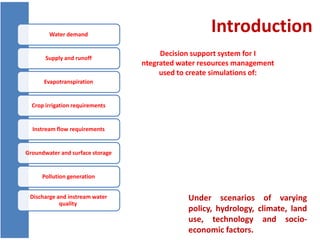
IntroductionWater demand
Supply and runoff
Evapotranspiration
Crop irrigation requirements
Instream flow requirements
Groundwater and surface storage
Pollution generation
Discharge and instream water
quality
Under scenarios of varying
policy, hydrology, climate, land
use, technology and socio-
economic factors.
Decision support system for I
ntegrated water resources management
used to create simulations of:
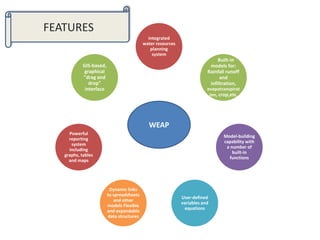
Integrated
water resources
planning
system
Built-in
models for:
Rainfall runoff
and
infiltration,
evapotranspirat
ion, crop,etc.
Model-building
capability with
a number of
built-in
functions
User-defined
variables and
equations
Dynamic links
to spreadsheets
and other
models Flexible
and expandable
data structures
Powerful
reporting
system
including
graphs, tables
and maps
GIS-based,
graphical
"drag and
drop"
interface
WEAP
FEATURES
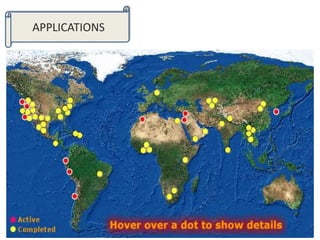
APPLICATIONS
WEAP
Model Framework
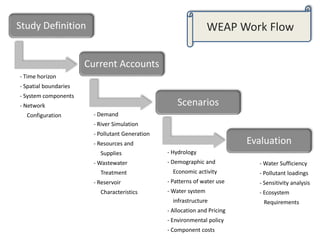
Study Definition
Current Accounts
Scenarios
Evaluation
- Time horizon
- Spatial boundaries
- System components
- Network
Configuration - Demand
- River Simulation
- Pollutant Generation
- Resources and
Supplies
- Wastewater
Treatment
- Reservoir
Characteristics
- Hydrology
- Demographic and
Economic activity
- Patterns of water use
- Water system
infrastructure
- Allocation and Pricing
- Environmental policy
- Component costs
- Water Sufficiency
- Pollutant loadings
- Sensitivity analysis
- Ecosystem
Requirements
WEAP Work Flow
BASIC STRUCTURE OF THE
MODEL
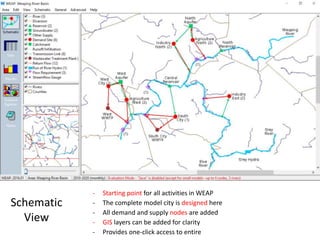
Schematic
View
- Starting point for all activities in WEAP
- The complete model city is designed here
- All demand and supply nodes are added
- GIS layers can be added for clarity
- Provides one-click access to entire
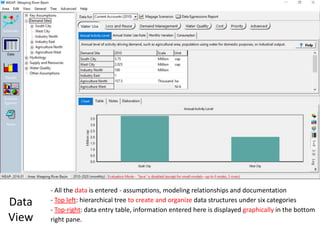
Data
View
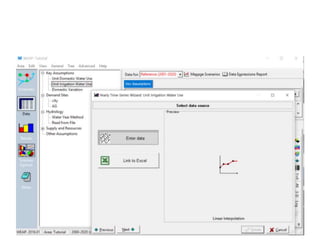
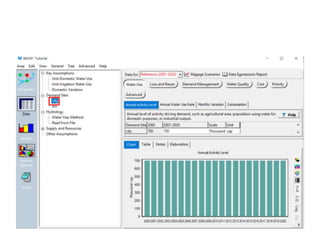
- All the data is entered - assumptions, modeling relationships and documentation
- Top left: hierarchical tree to create and organize data structures under six categories
- Top-right: data entry table, information entered here is displayed graphically in the bottom
right pane.
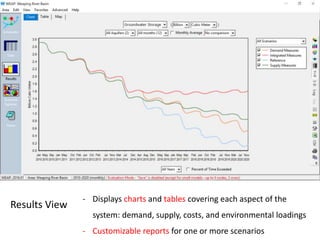
Results View
- Displays charts and tables covering each aspect of the
system: demand, supply, costs, and environmental loadings
- Customizable reports for one or more scenarios
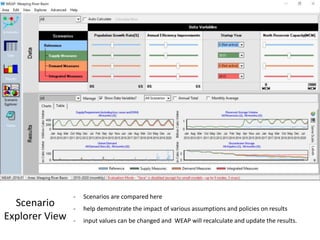
Scenario
Explorer View
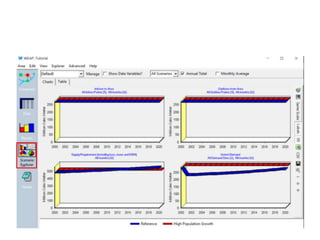
- Scenarios are compared here
- help demonstrate the impact of various assumptions and policies on results
- input values can be changed and WEAP will recalculate and update the results.
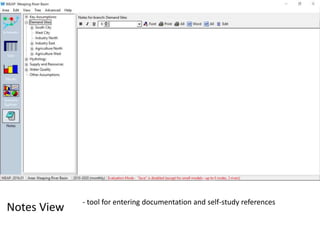
Notes View
- tool for entering documentation and self-study references
Input data Requirement
• Schematic maps of the area
• Supply and Demand data
• Transmission link data
• Hydrology
• Groundwater
• Reservoirs
• Surface Water Quality and
Wastewater Treatment
Facilities.
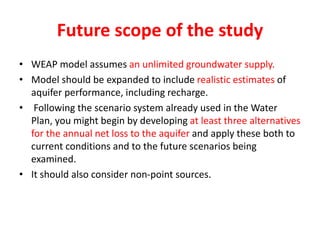
• Other Supply Sources
(imports, transfers,
desalinization, etc.)
 Satellite image
 Municipality
 State Drainage and
Irrigation Deptt.
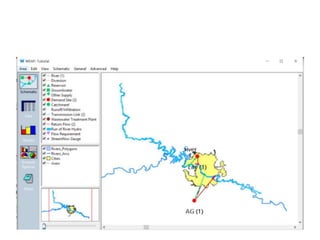
HOWTO
RUNTHE MODEL?
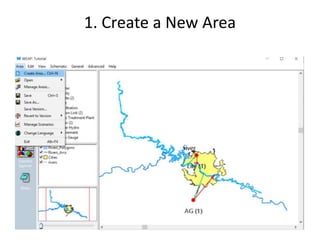
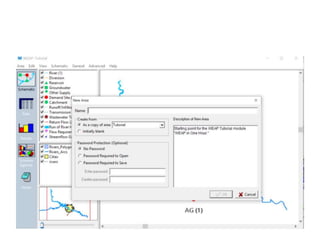
1. Create a New Area
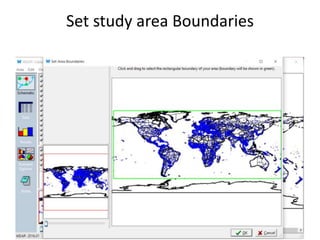
Set study area Boundaries
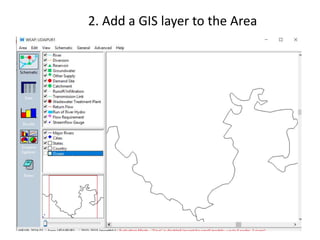
2. Add a GIS layer to the Area
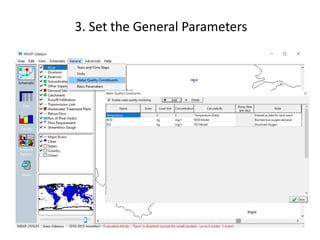
3. Set the General Parameters
Entering Elements into the Schematic
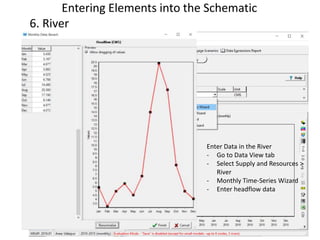
6. River
 Draw the River
- Double-click on River in schematic view
- Take cursor to the head and start
drawing
- Name the river
Enter Data in the River
- Go to Data View tab
- Select Supply and Resources >
River
- Monthly Time-Series Wizard
- Enter headflow data
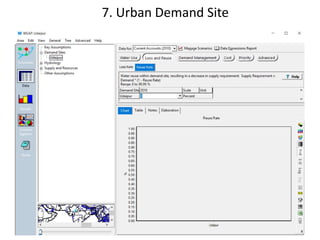
• Pull demand node and
release
• Name the site and set
Demand Priority
7. Urban Demand Site
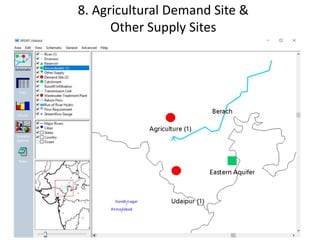
8. Agricultural Demand Site &
Other Supply Sites
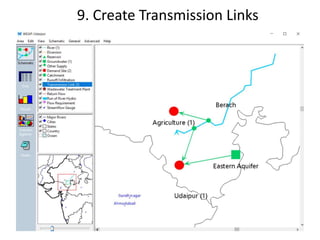
9. Create Transmission Links
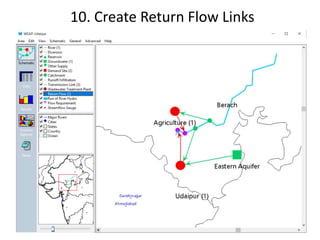
10. Create Return Flow Links
Creating Scenarios
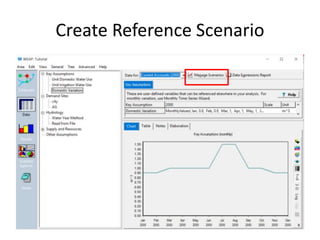
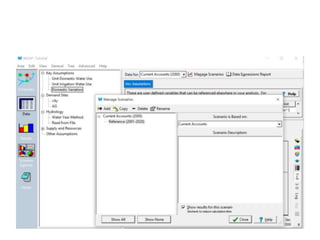
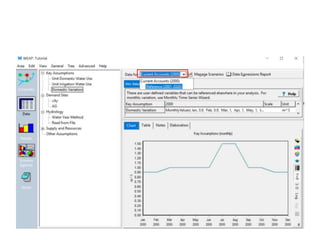
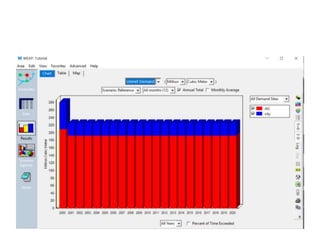
• A “Reference” scenario is established from the Current
Accounts to simulate evolution of the system without
intervention.
• Finally, “what-if” scenarios can be created to alter the
“Reference Scenario” and evaluate the effects of
changes in policies and/or technologies.
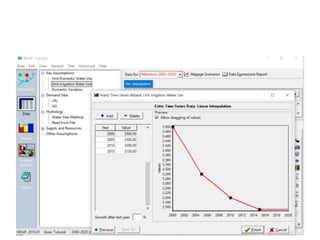
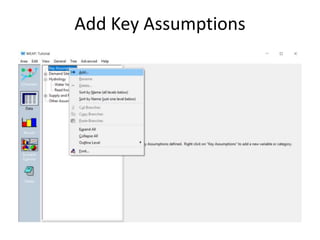
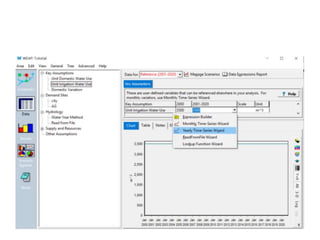
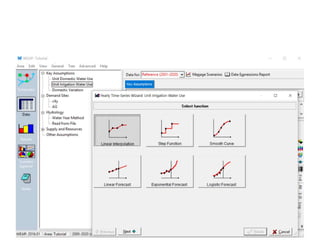
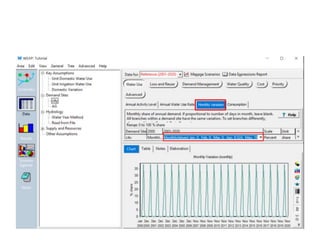
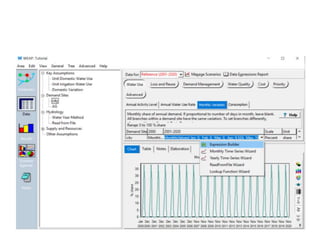
Add Key Assumptions
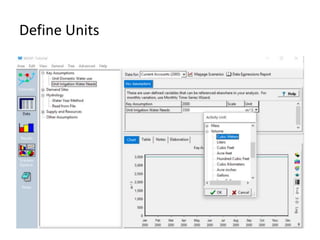
Define Units
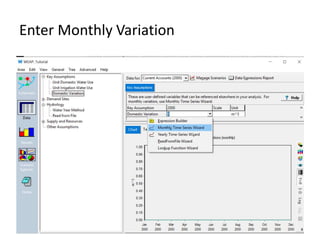
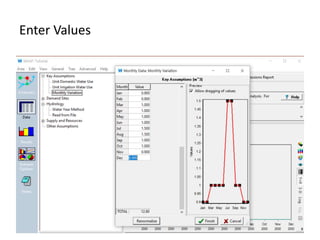
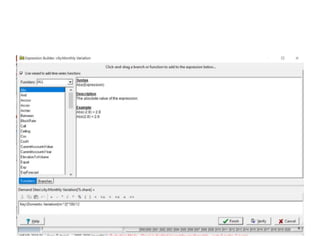
Enter Monthly Variation
Enter Values
Create Reference Scenario
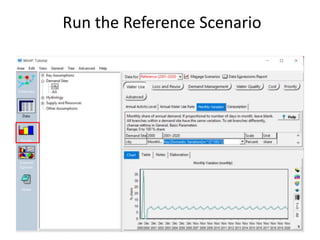
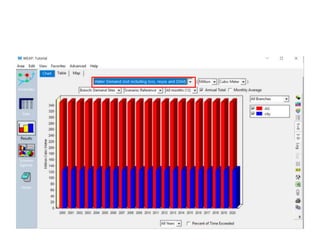
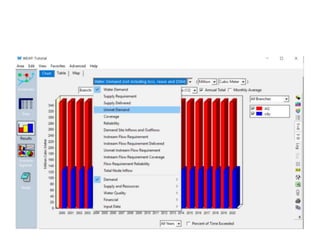
Run the Reference Scenario
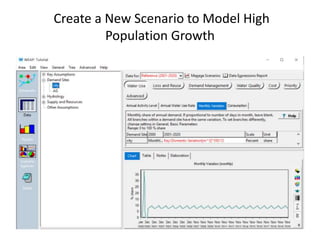
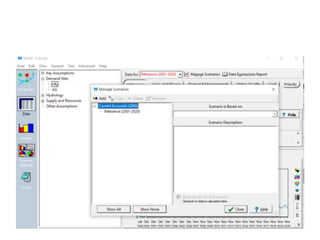
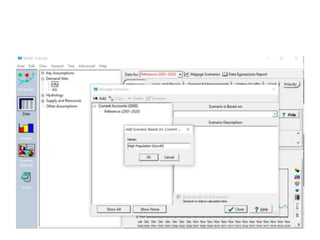
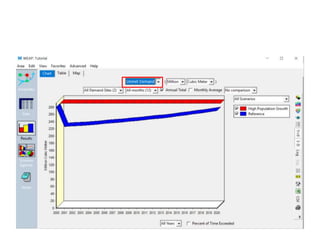
Create a New Scenario to Model High
Population Growth
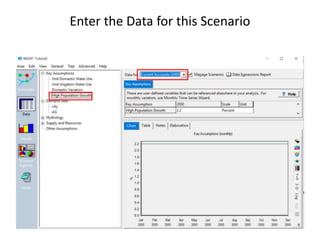
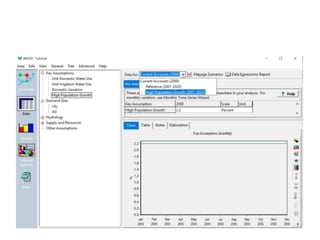
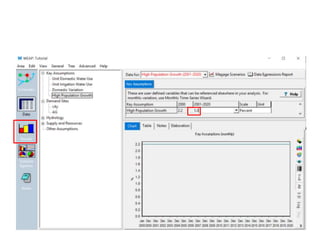
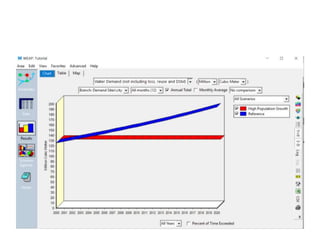
Enter the Data for this Scenario
Case Study
Application of
Water Evaluation and Planning Model
for Integrated Water Resources Management
in Langat River Basin, Malaysia
Objective of the study
• To investigate the trend of supply and demand in Langat
catchment.
• To assess the water availability with population growth in
Langat Catchment using Water Evaluation and Planning
(WEAP).
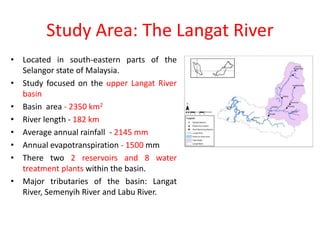
Study Area: The Langat River
• Located in south-eastern parts of the
Selangor state of Malaysia.
• Study focused on the upper Langat River
basin
• Basin area - 2350 km2
• River length - 182 km
• Average annual rainfall - 2145 mm
• Annual evapotranspiration - 1500 mm
• There two 2 reservoirs and 8 water
treatment plants within the basin.
• Major tributaries of the basin: Langat
River, Semenyih River and Labu River.
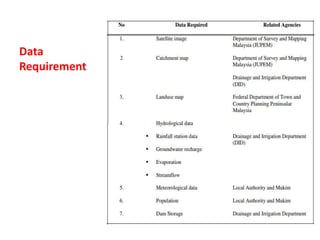
Data
Requirement
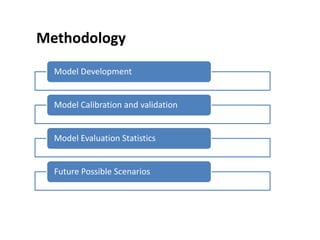
Methodology
Model Development
Model Calibration and validation
Model Evaluation Statistics
Future Possible Scenarios
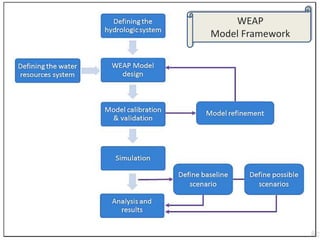
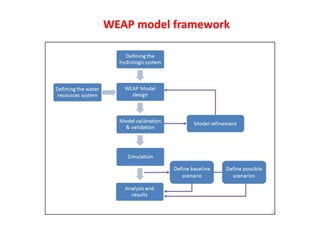
WEAP model framework
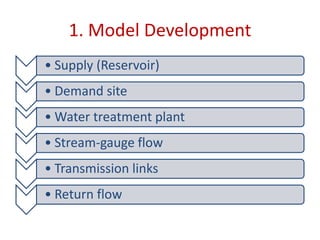
1. Model Development
• Supply (Reservoir)
• Demand site
• Water treatment plant
• Stream-gauge flow
• Transmission links
• Return flow
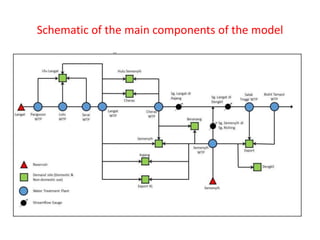
Schematic of the main components of the model
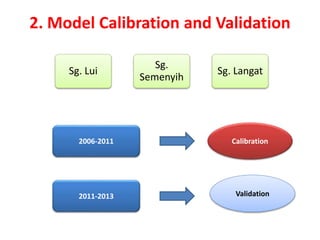
2. Model Calibration and Validation
2006-2011 Calibration
2011-2013 Validation
Sg. Lui
Sg.
Semenyih
Sg. Langat
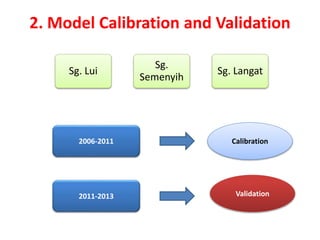
2. Model Calibration and Validation
2006-2011 Calibration
2011-2013 Validation
Sg. Lui
Sg.
Semenyih
Sg. Langat
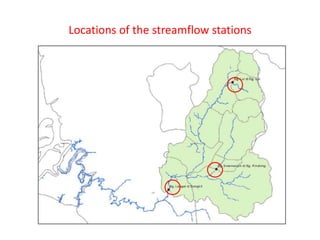
Locations of the streamflow stations
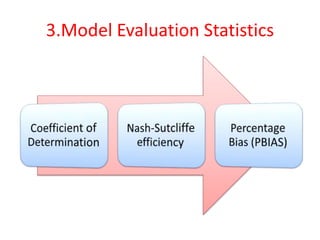
3.Model Evaluation Statistics
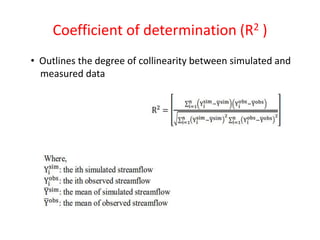
Coefficient of determination (R2 )
• Outlines the degree of collinearity between simulated and
measured data
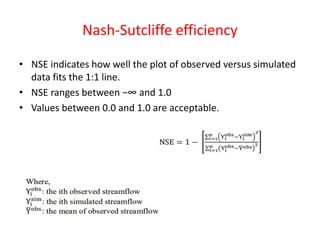
Nash-Sutcliffe efficiency
• NSE indicates how well the plot of observed versus simulated
data fits the 1:1 line.
• NSE ranges between −∞ and 1.0
• Values between 0.0 and 1.0 are acceptable.
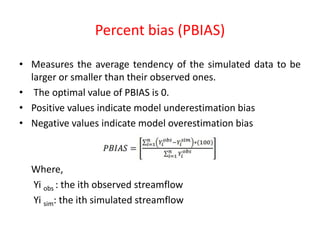
Percent bias (PBIAS)
• Measures the average tendency of the simulated data to be
larger or smaller than their observed ones.
• The optimal value of PBIAS is 0.
• Positive values indicate model underestimation bias
• Negative values indicate model overestimation bias
Where,
Yi obs : the ith observed streamflow
Yi sim: the ith simulated streamflow
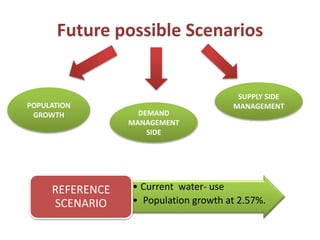
Future possible Scenarios
• Current water- use
• Population growth at 2.57%.
REFERENCE
SCENARIO
POPULATION
GROWTH DEMAND
MANAGEMENT
SIDE
SUPPLY SIDE
MANAGEMENT
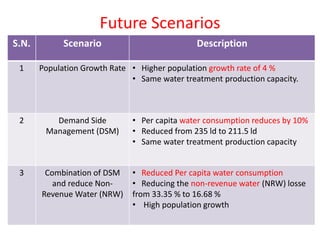
Future Scenarios
S.N. Scenario Description
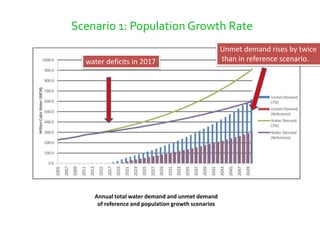
1 Population Growth Rate • Higher population growth rate of 4 %
• Same water treatment production capacity.
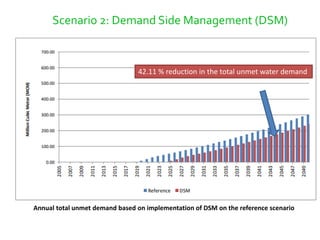
2 Demand Side
Management (DSM)
• Per capita water consumption reduces by 10%
• Reduced from 235 ld to 211.5 ld
• Same water treatment production capacity
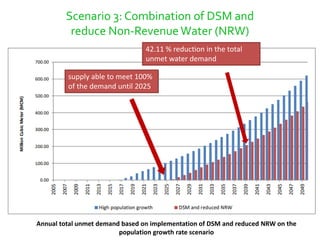
3 Combination of DSM
and reduce Non-
Revenue Water (NRW)
• Reduced Per capita water consumption
• Reducing the non-revenue water (NRW) losse
from 33.35 % to 16.68 %
• High population growth
RESULTS
Model Performance
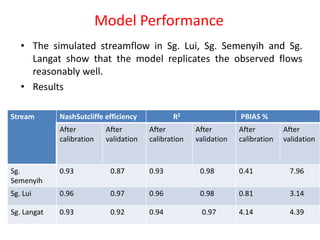
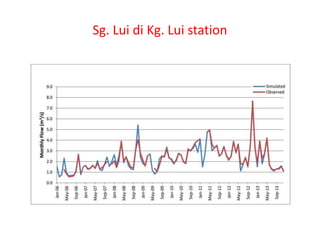
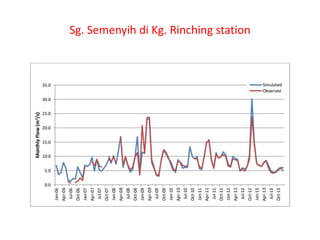
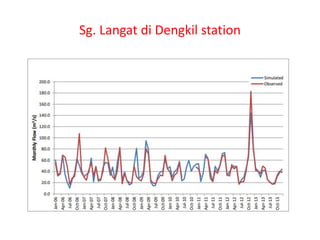
• The simulated streamflow in Sg. Lui, Sg. Semenyih and Sg.
Langat show that the model replicates the observed flows
reasonably well.
• Results
Stream NashSutcliffe efficiency R2 PBIAS %
After
calibration
After
validation
After
calibration
After
validation
After
calibration
After
validation
Sg.
Semenyih
0.93 0.87 0.93 0.98 0.41 7.96
Sg. Lui 0.96 0.97 0.96 0.98 0.81 3.14
Sg. Langat 0.93 0.92 0.94 0.97 4.14 4.39
Sg. Lui di Kg. Lui station
Sg. Semenyih di Kg. Rinching station
Sg. Langat di Dengkil station
Reference scenario
• Water demand would steadily rise by 2.57 % annually from
2005 to 2050.
• Projected water demand rises to a maximum of 599.43 MCM
from 300 MCM
• Langat basin area will face water deficits for both domestic
and non-domestic sectors by the year of 2019.
• 38 % of the treated water were supplied for areas outside of
Langat basin.
Annual total water demand and unmet demand
of reference and population growth scenarios
Scenario 1: Population Growth Rate
Unmet demand rises by twice
than in reference scenario.water deficits in 2017
Annual total unmet demand based on implementation of DSM on the reference scenario
Scenario 2: Demand Side Management (DSM)
42.11 % reduction in the total unmet water demand
Annual total unmet demand based on implementation of DSM and reduced NRW on the
population growth rate scenario
Scenario 3: Combination of DSM and
reduce Non-RevenueWater (NRW)
supply able to meet 100%
of the demand until 2025
42.11 % reduction in the total
unmet water demand
Conclusion
• The model developed through WEAP is highly capable and
showed great performance to manage available water
resources with water demand.
• Model outputs scientifically sound, robust and defensible
• Model able to simulate various possible future scenarios.
• Capable to resolve conflicts over water allocation.
• Should consider Non point sources.
Future scope of the study
• WEAP model assumes an unlimited groundwater supply.
• Model should be expanded to include realistic estimates of
aquifer performance, including recharge.
• Following the scenario system already used in the Water
Plan, you might begin by developing at least three alternatives
for the annual net loss to the aquifer and apply these both to
current conditions and to the future scenarios being
examined.
• It should also consider non-point sources.

Weap final

  • 1.
    WEAP Water Evaluation AndPlanning By: Iqura Malik (17WM60R02) School of Water Resources IIT Kharagpur Sapna Gautam (17WM60R08) Navdesh Nirwan (17WM60R09)
  • 2.
    IntroductionWater demand Supply andrunoff Evapotranspiration Crop irrigation requirements Instream flow requirements Groundwater and surface storage Pollution generation Discharge and instream water quality Under scenarios of varying policy, hydrology, climate, land use, technology and socio- economic factors. Decision support system for I ntegrated water resources management used to create simulations of:
  • 3.
    Integrated water resources planning system Built-in models for: Rainfallrunoff and infiltration, evapotranspirat ion, crop,etc. Model-building capability with a number of built-in functions User-defined variables and equations Dynamic links to spreadsheets and other models Flexible and expandable data structures Powerful reporting system including graphs, tables and maps GIS-based, graphical "drag and drop" interface WEAP FEATURES
  • 4.
  • 5.
  • 6.
    Study Definition Current Accounts Scenarios Evaluation -Time horizon - Spatial boundaries - System components - Network Configuration - Demand - River Simulation - Pollutant Generation - Resources and Supplies - Wastewater Treatment - Reservoir Characteristics - Hydrology - Demographic and Economic activity - Patterns of water use - Water system infrastructure - Allocation and Pricing - Environmental policy - Component costs - Water Sufficiency - Pollutant loadings - Sensitivity analysis - Ecosystem Requirements WEAP Work Flow
  • 7.
  • 8.
    Schematic View - Starting pointfor all activities in WEAP - The complete model city is designed here - All demand and supply nodes are added - GIS layers can be added for clarity - Provides one-click access to entire
  • 9.
    Data View - All thedata is entered - assumptions, modeling relationships and documentation - Top left: hierarchical tree to create and organize data structures under six categories - Top-right: data entry table, information entered here is displayed graphically in the bottom right pane.
  • 10.
    Results View - Displayscharts and tables covering each aspect of the system: demand, supply, costs, and environmental loadings - Customizable reports for one or more scenarios
  • 11.
    Scenario Explorer View - Scenariosare compared here - help demonstrate the impact of various assumptions and policies on results - input values can be changed and WEAP will recalculate and update the results.
  • 12.
    Notes View - toolfor entering documentation and self-study references
  • 13.
    Input data Requirement •Schematic maps of the area • Supply and Demand data • Transmission link data • Hydrology • Groundwater • Reservoirs • Surface Water Quality and Wastewater Treatment Facilities. • Other Supply Sources (imports, transfers, desalinization, etc.)  Satellite image  Municipality  State Drainage and Irrigation Deptt.
  • 14.
  • 16.
    1. Create aNew Area
  • 18.
    Set study areaBoundaries
  • 19.
    2. Add aGIS layer to the Area
  • 20.
    3. Set theGeneral Parameters
  • 21.
    Entering Elements intothe Schematic 6. River  Draw the River - Double-click on River in schematic view - Take cursor to the head and start drawing - Name the river Enter Data in the River - Go to Data View tab - Select Supply and Resources > River - Monthly Time-Series Wizard - Enter headflow data
  • 22.
    • Pull demandnode and release • Name the site and set Demand Priority 7. Urban Demand Site
  • 23.
    8. Agricultural DemandSite & Other Supply Sites
  • 24.
  • 25.
  • 26.
    Creating Scenarios • A“Reference” scenario is established from the Current Accounts to simulate evolution of the system without intervention. • Finally, “what-if” scenarios can be created to alter the “Reference Scenario” and evaluate the effects of changes in policies and/or technologies.
  • 27.
  • 28.
  • 29.
  • 30.
  • 31.
  • 42.
  • 46.
    Create a NewScenario to Model High Population Growth
  • 49.
    Enter the Datafor this Scenario
  • 55.
    Case Study Application of WaterEvaluation and Planning Model for Integrated Water Resources Management in Langat River Basin, Malaysia
  • 56.
    Objective of thestudy • To investigate the trend of supply and demand in Langat catchment. • To assess the water availability with population growth in Langat Catchment using Water Evaluation and Planning (WEAP).
  • 57.
    Study Area: TheLangat River • Located in south-eastern parts of the Selangor state of Malaysia. • Study focused on the upper Langat River basin • Basin area - 2350 km2 • River length - 182 km • Average annual rainfall - 2145 mm • Annual evapotranspiration - 1500 mm • There two 2 reservoirs and 8 water treatment plants within the basin. • Major tributaries of the basin: Langat River, Semenyih River and Labu River.
  • 58.
  • 59.
    Methodology Model Development Model Calibrationand validation Model Evaluation Statistics Future Possible Scenarios
  • 60.
  • 61.
    1. Model Development •Supply (Reservoir) • Demand site • Water treatment plant • Stream-gauge flow • Transmission links • Return flow
  • 62.
    Schematic of themain components of the model
  • 63.
    2. Model Calibrationand Validation 2006-2011 Calibration 2011-2013 Validation Sg. Lui Sg. Semenyih Sg. Langat
  • 64.
    2. Model Calibrationand Validation 2006-2011 Calibration 2011-2013 Validation Sg. Lui Sg. Semenyih Sg. Langat
  • 65.
    Locations of thestreamflow stations
  • 66.
  • 67.
    Coefficient of determination(R2 ) • Outlines the degree of collinearity between simulated and measured data
  • 68.
    Nash-Sutcliffe efficiency • NSEindicates how well the plot of observed versus simulated data fits the 1:1 line. • NSE ranges between −∞ and 1.0 • Values between 0.0 and 1.0 are acceptable.
  • 69.
    Percent bias (PBIAS) •Measures the average tendency of the simulated data to be larger or smaller than their observed ones. • The optimal value of PBIAS is 0. • Positive values indicate model underestimation bias • Negative values indicate model overestimation bias Where, Yi obs : the ith observed streamflow Yi sim: the ith simulated streamflow
  • 70.
    Future possible Scenarios •Current water- use • Population growth at 2.57%. REFERENCE SCENARIO POPULATION GROWTH DEMAND MANAGEMENT SIDE SUPPLY SIDE MANAGEMENT
  • 71.
    Future Scenarios S.N. ScenarioDescription 1 Population Growth Rate • Higher population growth rate of 4 % • Same water treatment production capacity. 2 Demand Side Management (DSM) • Per capita water consumption reduces by 10% • Reduced from 235 ld to 211.5 ld • Same water treatment production capacity 3 Combination of DSM and reduce Non- Revenue Water (NRW) • Reduced Per capita water consumption • Reducing the non-revenue water (NRW) losse from 33.35 % to 16.68 % • High population growth
  • 72.
  • 73.
    Model Performance • Thesimulated streamflow in Sg. Lui, Sg. Semenyih and Sg. Langat show that the model replicates the observed flows reasonably well. • Results Stream NashSutcliffe efficiency R2 PBIAS % After calibration After validation After calibration After validation After calibration After validation Sg. Semenyih 0.93 0.87 0.93 0.98 0.41 7.96 Sg. Lui 0.96 0.97 0.96 0.98 0.81 3.14 Sg. Langat 0.93 0.92 0.94 0.97 4.14 4.39
  • 74.
    Sg. Lui diKg. Lui station
  • 75.
    Sg. Semenyih diKg. Rinching station
  • 76.
    Sg. Langat diDengkil station
  • 77.
    Reference scenario • Waterdemand would steadily rise by 2.57 % annually from 2005 to 2050. • Projected water demand rises to a maximum of 599.43 MCM from 300 MCM • Langat basin area will face water deficits for both domestic and non-domestic sectors by the year of 2019. • 38 % of the treated water were supplied for areas outside of Langat basin.
  • 78.
    Annual total waterdemand and unmet demand of reference and population growth scenarios Scenario 1: Population Growth Rate Unmet demand rises by twice than in reference scenario.water deficits in 2017
  • 79.
    Annual total unmetdemand based on implementation of DSM on the reference scenario Scenario 2: Demand Side Management (DSM) 42.11 % reduction in the total unmet water demand
  • 80.
    Annual total unmetdemand based on implementation of DSM and reduced NRW on the population growth rate scenario Scenario 3: Combination of DSM and reduce Non-RevenueWater (NRW) supply able to meet 100% of the demand until 2025 42.11 % reduction in the total unmet water demand
  • 81.
    Conclusion • The modeldeveloped through WEAP is highly capable and showed great performance to manage available water resources with water demand. • Model outputs scientifically sound, robust and defensible • Model able to simulate various possible future scenarios. • Capable to resolve conflicts over water allocation. • Should consider Non point sources.
  • 82.
    Future scope ofthe study • WEAP model assumes an unlimited groundwater supply. • Model should be expanded to include realistic estimates of aquifer performance, including recharge. • Following the scenario system already used in the Water Plan, you might begin by developing at least three alternatives for the annual net loss to the aquifer and apply these both to current conditions and to the future scenarios being examined. • It should also consider non-point sources.

Editor's Notes

  • #3 Semitheoritical model need calibration Linear programming
  • #80 Saving of 10% of the water consumption per capital from 235 liter/day to 211.5 liter/day