Mobile Accessibility
IS MOBILE REALLY DIFFERENT THAN DESKTOP?
13/2/2017
Introductions
Shadi Abou-Zahra, W3C
Kim Patch, Restart Systems
Kathy Wahlbin, Interactive Accessibility
3/2/2017 2
What is Mobile Accessibility?
Primary question asked by the taskforce
Started by looking at the challenges faced by
users with disabilities using mobile devices
Looked at current WCAG 2.0 and evaluated the
applicability to mobile
3/2/2017 3
Question Also Asked by Policy Makers
US Section 508: WCAG 2.0
Europe: EN 301 549 + additional requirements
to be defined (WCAG 2.1?)
Other local developments with risk of standards
fragmentation
3/2/2017 4
Mobile
Landscape
Changed the way people are
consuming information
5
All ages are using mobile
Using one handed
Using touch screens
Situations where we have
busy eyes and hands
Out in bright light
In noisy, public spaces
3/2/2017
What is Mobile?
Technology that
• Has touch screens, but increasingly supports
other input methods
• Usually smaller than laptops and desktops
• More portable
• Used in many more situations
3/2/2017 6
Mobile Accessibility Isn’t Just Mobile
Touch screens are on devices other than mobile
including traditional desktop, home
automation, car interfaces etc.
Devices come in all different sizes – small
screens are not limited to only mobile
Technology is used in many different situations
3/2/2017 7
Mobile Accessibility Task Force
Task force of WCAG working group
Determine what is important for mobile space
Drafted WCAG Success Criteria that may be
included in WCAG 2.1
WCAG 2.0 does apply and we are adding language
to the understanding documents and techniques
3/2/2017 8
2015: How WCAG 2.0 and Other
W3C/WAI Guidelines Apply to Mobile
First Public Working Draft
◦ http://www.w3.org/TR/mobile
-accessibility-mapping/
It doesn't set requirements
It doesn't replace WCAG 2.0
or WCAG 2.1
93/2/2017
Key Areas for Mobile Accessibility
1. Touch screens
2. Keyboard use on mobile
3. Device sensors and the impact on how users interact
(e.g. 3-D touch, device orientation etc.)
4. Small Screen Size
5. Impact of using device in many locations (e.g. glare)
6. Capabilities of devices including accessibility
features and assistive technology
3/2/2017 10
Gabi uses a screen reader with touch, and uses
dictation and Siri to more quickly enter content
and perform functions
She prefers to access content on her iPhone
Gets frustrated when the touch and gestures do
not work with screen reader
Understands where things are positioned on the
screen through the touch interface
Faces challenges with inaccessible content similar
to the desktop
Screen Reader: Meet Gabi
11
Joe has hand tremors from Parkinsons
Touching small areas of the screen is difficult
He often accidentally activates a control when
controls are close together
12
Touch: Meet Joe
Rebecca uses an external keyboard with her
Android tablet and prefers to use the onscreen
keyboard on her Android phone
She will often use touch, speech and keyboard to
access the content
She prefers the standard onscreen keyboard to
update based on the type of data that needs to be
entered
Keyboard: Meet Rebecca
13
Mark has light sensitivity and 20/200 vision
His device is set to large fonts, increased
contrast and he uses the zoom function
He has a hard time seeing the screen –
especially outside where there is a lot glare
To see the screen, Mark holds the device close
to his face and also relies the on text-to-speech
14
Reading Content: Meet Mark
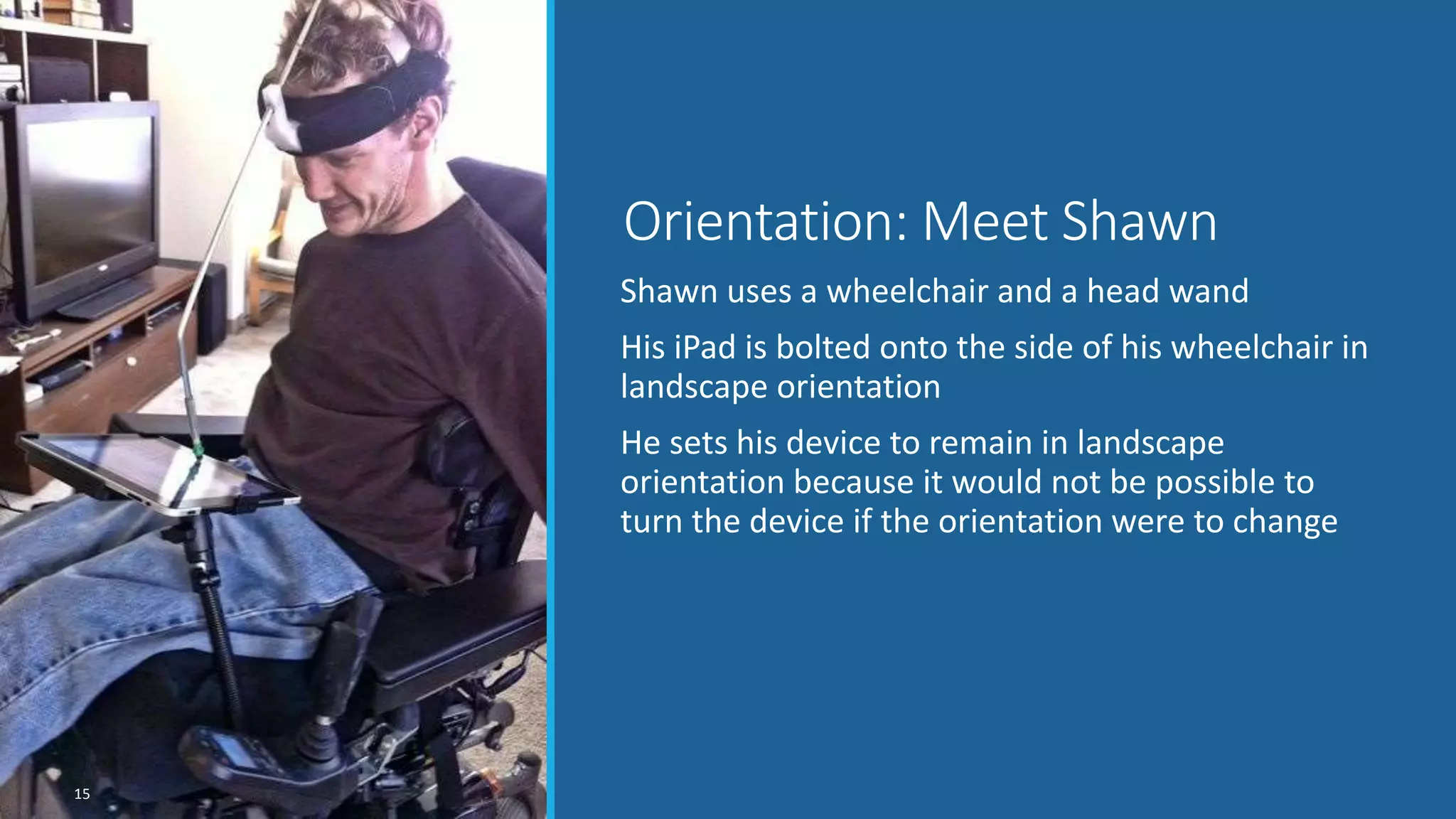
Shawn uses a wheelchair and a head wand
His iPad is bolted onto the side of his wheelchair in
landscape orientation
He sets his device to remain in landscape
orientation because it would not be possible to
turn the device if the orientation were to change
Orientation: Meet Shawn
15
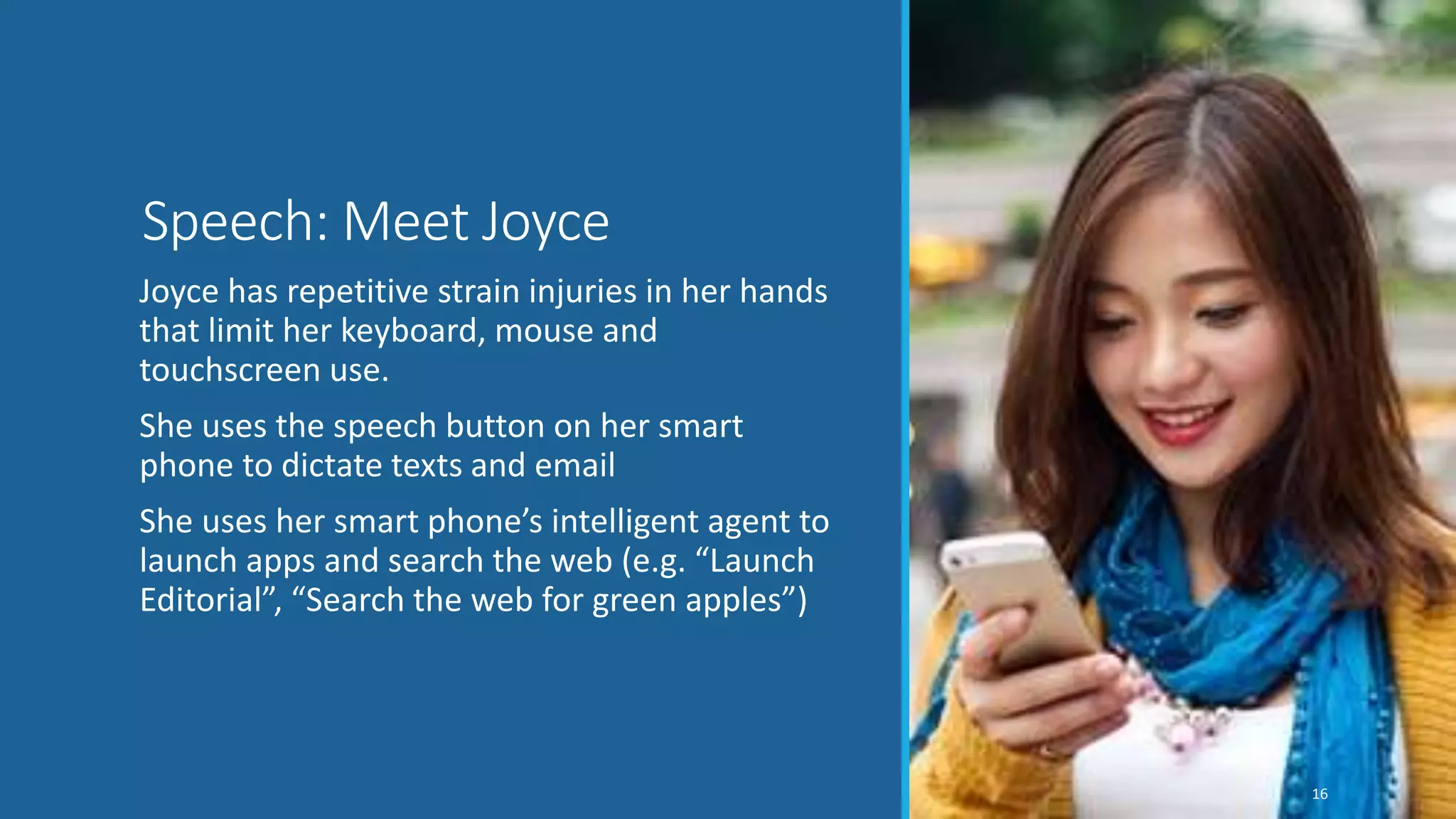
Joyce has repetitive strain injuries in her hands
that limit her keyboard, mouse and
touchscreen use.
She uses the speech button on her smart
phone to dictate texts and email
She uses her smart phone’s intelligent agent to
launch apps and search the web (e.g. “Launch
Editorial”, “Search the web for green apples”)
16
Speech: Meet Joyce
So, based on this research
we concluded…
3/2/2017 17
WCAG 2.0 Still Applicable
WCAG2ICT provides interpretations for “non-
web documents and software”
WCAG 2.1 to provide improvements
UAAG 2.0 relevant in some situations
“AG 3.0” may address broader context
3/2/2017 18
WCAG 2.1
First Public Working Draft published February 28, 2017
◦ https://www.w3.org/TR/WCAG21/
New success criteria submitted from low vision task force, cognitive
task force and mobile task force
◦ Everything is applicable to mobile
◦ Task force did not propose success criteria that would be addressed by Low
Vision or Cognitive task forces
◦ 10 new proposed success criteria specifically from mobile taskforce
◦ See proposed success criteria that did not make this first editors draft at
https://github.com/w3c/wcag21/issues
3/2/2017 19
2.1.4 Speech Input
Level A
All functionality of the content does not
obstruct a user’s ability to access the
commands through speech input.
3/2/2017 20
2.4.11 Single-key Shortcuts
Single-character shortcuts are not the only way
activate a control, unless a mechanism is
available to turn them off or remap them to
shortcuts with two or more characters.
3/2/2017 21
2.5.1 Target Size
Level A
The size of the target in relation to the visible display at the default viewport
size is at least:
◦ 44 px by 44 px for pointer inputs with coarse pointing accuracy (such as a
touchscreen)
◦ 22 px by 22 px for pointer inputs with fine pointing accuracy (such as a mouse,
trackpad or stylus)
where px is a CSS pixel when the page is using the device ideal viewport.
Except when a link or control:
◦ is not part of the primary purpose or function of the page OR
◦ has an alternative link/control whose target does meet the minimum size
requirements
3/2/2017 22
2.5.2 Pointer inputs with additional sensors
Level A
All pointer functionality can be operated using
screen coordinate information, without
requiring additional pointer sensor information.
3/2/2017 23
2.5.3 Touch with Assistive Technology
All functions available by touch are still available
by touch after platform assistive technology
that remaps touch gestures is turned on.
3/2/2017 24
2.5.4 Pointer Gestures
Level A
Functionality requiring complex or timed
pointer gestures or multi-pointer gestures can
also be operated with simple pointer gestures.
3/2/2017 25
2.6.1 Device Sensors
Level A
All functionality of the content can be operated
without requiring specific device sensor
information unless the device sensor is essential
for the function and not using it would
invalidate the activity.
3/2/2017 26
2.6.2 Orientation
Level AA
Content is not locked to a specific orientation,
and functionality of the content is operable in
all orientations, except where orientation is
essential for use of the content.
3/2/2017 27
3.2.6 Accidental Activation
Level A
For single-pointer activation, at least one of the following is
true:
◦ Activation is on the up event, either explicitly or implicitly as a
platform's generic activation/click event;
◦ A mechanism is available that allows the user to choose the up-
event as an option;
◦ Confirmation is provided, which can dismiss activation;
◦ Activation is reversible;
◦ Timing of activation is essential and waiting for the up-event would
invalidate the activity.
3/2/2017 28
3.2.8 Change of Content
Level AA
Programmatic notification is provided for each change of
content that indicates an action was taken or that conveys
information, unless one or more of the following is true:
◦ There is an accessibility supported relationship between the new
content and the control that triggers it.
◦ The user has been advised of the behavior before using the
component.
◦ There are more than 5 notifications per minute.
◦ The change of content is not a result of a user action AND not
related to the primary purpose of the page.
3/2/2017 29
How to Comment
File an issue in the W3C WCAG 2.1 Github
repository
◦File as new issues
◦One issue per discrete comment
Send email to public-agwg-comments@w3.org
Deadline: 31 March 2017
3/2/2017 30
Questions?
313/2/2017

WCAG 2.1 Mobile Accessibility

  • 1.
    Mobile Accessibility IS MOBILEREALLY DIFFERENT THAN DESKTOP? 13/2/2017
  • 2.
    Introductions Shadi Abou-Zahra, W3C KimPatch, Restart Systems Kathy Wahlbin, Interactive Accessibility 3/2/2017 2
  • 3.
    What is MobileAccessibility? Primary question asked by the taskforce Started by looking at the challenges faced by users with disabilities using mobile devices Looked at current WCAG 2.0 and evaluated the applicability to mobile 3/2/2017 3
  • 4.
    Question Also Askedby Policy Makers US Section 508: WCAG 2.0 Europe: EN 301 549 + additional requirements to be defined (WCAG 2.1?) Other local developments with risk of standards fragmentation 3/2/2017 4
  • 5.
    Mobile Landscape Changed the waypeople are consuming information 5 All ages are using mobile Using one handed Using touch screens Situations where we have busy eyes and hands Out in bright light In noisy, public spaces 3/2/2017
  • 6.
    What is Mobile? Technologythat • Has touch screens, but increasingly supports other input methods • Usually smaller than laptops and desktops • More portable • Used in many more situations 3/2/2017 6
  • 7.
    Mobile Accessibility Isn’tJust Mobile Touch screens are on devices other than mobile including traditional desktop, home automation, car interfaces etc. Devices come in all different sizes – small screens are not limited to only mobile Technology is used in many different situations 3/2/2017 7
  • 8.
    Mobile Accessibility TaskForce Task force of WCAG working group Determine what is important for mobile space Drafted WCAG Success Criteria that may be included in WCAG 2.1 WCAG 2.0 does apply and we are adding language to the understanding documents and techniques 3/2/2017 8
  • 9.
    2015: How WCAG2.0 and Other W3C/WAI Guidelines Apply to Mobile First Public Working Draft ◦ http://www.w3.org/TR/mobile -accessibility-mapping/ It doesn't set requirements It doesn't replace WCAG 2.0 or WCAG 2.1 93/2/2017
  • 10.
    Key Areas forMobile Accessibility 1. Touch screens 2. Keyboard use on mobile 3. Device sensors and the impact on how users interact (e.g. 3-D touch, device orientation etc.) 4. Small Screen Size 5. Impact of using device in many locations (e.g. glare) 6. Capabilities of devices including accessibility features and assistive technology 3/2/2017 10
  • 11.
    Gabi uses ascreen reader with touch, and uses dictation and Siri to more quickly enter content and perform functions She prefers to access content on her iPhone Gets frustrated when the touch and gestures do not work with screen reader Understands where things are positioned on the screen through the touch interface Faces challenges with inaccessible content similar to the desktop Screen Reader: Meet Gabi 11
  • 12.
    Joe has handtremors from Parkinsons Touching small areas of the screen is difficult He often accidentally activates a control when controls are close together 12 Touch: Meet Joe
  • 13.
    Rebecca uses anexternal keyboard with her Android tablet and prefers to use the onscreen keyboard on her Android phone She will often use touch, speech and keyboard to access the content She prefers the standard onscreen keyboard to update based on the type of data that needs to be entered Keyboard: Meet Rebecca 13
  • 14.
    Mark has lightsensitivity and 20/200 vision His device is set to large fonts, increased contrast and he uses the zoom function He has a hard time seeing the screen – especially outside where there is a lot glare To see the screen, Mark holds the device close to his face and also relies the on text-to-speech 14 Reading Content: Meet Mark
  • 15.
    Shawn uses awheelchair and a head wand His iPad is bolted onto the side of his wheelchair in landscape orientation He sets his device to remain in landscape orientation because it would not be possible to turn the device if the orientation were to change Orientation: Meet Shawn 15
  • 16.
    Joyce has repetitivestrain injuries in her hands that limit her keyboard, mouse and touchscreen use. She uses the speech button on her smart phone to dictate texts and email She uses her smart phone’s intelligent agent to launch apps and search the web (e.g. “Launch Editorial”, “Search the web for green apples”) 16 Speech: Meet Joyce
  • 17.
    So, based onthis research we concluded… 3/2/2017 17
  • 18.
    WCAG 2.0 StillApplicable WCAG2ICT provides interpretations for “non- web documents and software” WCAG 2.1 to provide improvements UAAG 2.0 relevant in some situations “AG 3.0” may address broader context 3/2/2017 18
  • 19.
    WCAG 2.1 First PublicWorking Draft published February 28, 2017 ◦ https://www.w3.org/TR/WCAG21/ New success criteria submitted from low vision task force, cognitive task force and mobile task force ◦ Everything is applicable to mobile ◦ Task force did not propose success criteria that would be addressed by Low Vision or Cognitive task forces ◦ 10 new proposed success criteria specifically from mobile taskforce ◦ See proposed success criteria that did not make this first editors draft at https://github.com/w3c/wcag21/issues 3/2/2017 19
  • 20.
    2.1.4 Speech Input LevelA All functionality of the content does not obstruct a user’s ability to access the commands through speech input. 3/2/2017 20
  • 21.
    2.4.11 Single-key Shortcuts Single-charactershortcuts are not the only way activate a control, unless a mechanism is available to turn them off or remap them to shortcuts with two or more characters. 3/2/2017 21
  • 22.
    2.5.1 Target Size LevelA The size of the target in relation to the visible display at the default viewport size is at least: ◦ 44 px by 44 px for pointer inputs with coarse pointing accuracy (such as a touchscreen) ◦ 22 px by 22 px for pointer inputs with fine pointing accuracy (such as a mouse, trackpad or stylus) where px is a CSS pixel when the page is using the device ideal viewport. Except when a link or control: ◦ is not part of the primary purpose or function of the page OR ◦ has an alternative link/control whose target does meet the minimum size requirements 3/2/2017 22
  • 23.
    2.5.2 Pointer inputswith additional sensors Level A All pointer functionality can be operated using screen coordinate information, without requiring additional pointer sensor information. 3/2/2017 23
  • 24.
    2.5.3 Touch withAssistive Technology All functions available by touch are still available by touch after platform assistive technology that remaps touch gestures is turned on. 3/2/2017 24
  • 25.
    2.5.4 Pointer Gestures LevelA Functionality requiring complex or timed pointer gestures or multi-pointer gestures can also be operated with simple pointer gestures. 3/2/2017 25
  • 26.
    2.6.1 Device Sensors LevelA All functionality of the content can be operated without requiring specific device sensor information unless the device sensor is essential for the function and not using it would invalidate the activity. 3/2/2017 26
  • 27.
    2.6.2 Orientation Level AA Contentis not locked to a specific orientation, and functionality of the content is operable in all orientations, except where orientation is essential for use of the content. 3/2/2017 27
  • 28.
    3.2.6 Accidental Activation LevelA For single-pointer activation, at least one of the following is true: ◦ Activation is on the up event, either explicitly or implicitly as a platform's generic activation/click event; ◦ A mechanism is available that allows the user to choose the up- event as an option; ◦ Confirmation is provided, which can dismiss activation; ◦ Activation is reversible; ◦ Timing of activation is essential and waiting for the up-event would invalidate the activity. 3/2/2017 28
  • 29.
    3.2.8 Change ofContent Level AA Programmatic notification is provided for each change of content that indicates an action was taken or that conveys information, unless one or more of the following is true: ◦ There is an accessibility supported relationship between the new content and the control that triggers it. ◦ The user has been advised of the behavior before using the component. ◦ There are more than 5 notifications per minute. ◦ The change of content is not a result of a user action AND not related to the primary purpose of the page. 3/2/2017 29
  • 30.
    How to Comment Filean issue in the W3C WCAG 2.1 Github repository ◦File as new issues ◦One issue per discrete comment Send email to public-agwg-comments@w3.org Deadline: 31 March 2017 3/2/2017 30
  • 31.

Editor's Notes

  • #12 Sometimes the standard keyboard can be customized in device settings Sometimes additional custom keyboards can be installed Sometimes different virtual keyboards are available depending on data entry type
  • #14 Sometimes the standard keyboard can be customized in device settings Sometimes additional custom keyboards can be installed Sometimes different virtual keyboards are available depending on data entry type
  • #15 Sets practical limits on how much information people can view at once When magnification is needed there are best practices for helping users make the most of small screens Excessive paging and scrolling can inhibit users who have mobility issues
  • #16 Sometimes the standard keyboard can be customized in device settings Sometimes additional custom keyboards can be installed Sometimes different virtual keyboards are available depending on data entry type
  • #17 Sets practical limits on how much information people can view at once When magnification is needed there are best practices for helping users make the most of small screens Excessive paging and scrolling can inhibit users who have mobility issues
  • #20 Color contrast for icons and user interface controls, linearization Success criteria proposed for attention
  • #31 Do the new and proposed Success Criteria address current user needs for web content accessibility? Does conformance to the new and proposed Success Criteria seem achievable and testable? How well do the new and proposed Success Criteria fit with the existing Success Criteria from WCAG 2.0? How completely does the set of new and proposed Success Criteria address current user needs, particularly for users of touch- and small-screen mobile devices, users with low vision, or users with cognitive or learning disabilities? Is the impact of WCAG 2.1 on policies that reference WCAG 2.0 understandable and not disruptive?