Is the product accessible?

CHALLENGES WITH
VPATS
November 6, 2013

11/6/2013

© 2013 Interactive Accessibility

1
The Accessibility Experts

Kathleen Wahlbin
Email: KathyW@ia11y.com
Phone: 978-443-0798
http://www.interactiveaccessibility.com

11/6/2013

© 2013 Interactive Accessibility

2
VPATS
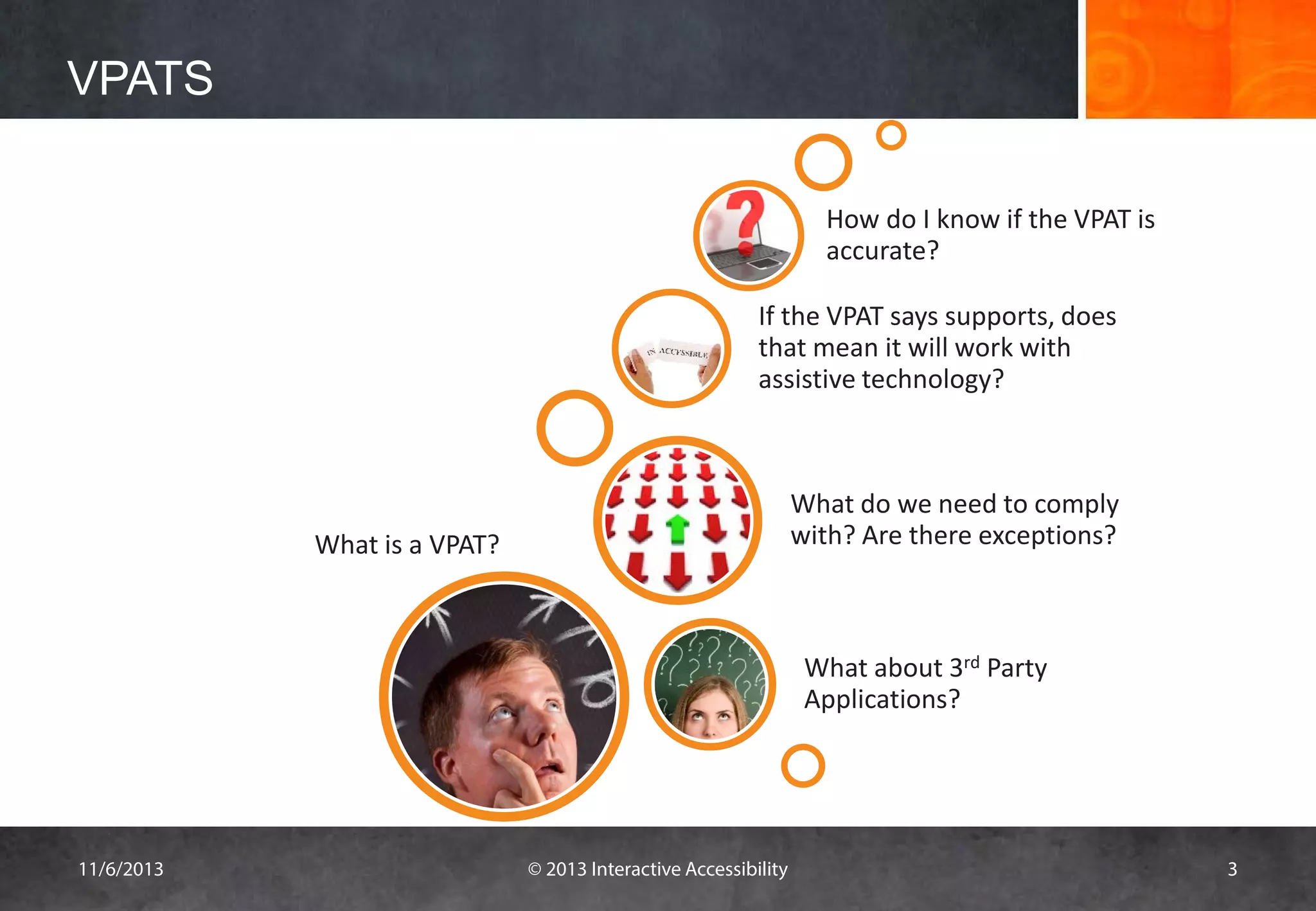
How do I know if the VPAT is
accurate?
If the VPAT says supports, does
that mean it will work with
assistive technology?

What do we need to comply
with? Are there exceptions?

What is a VPAT?

What about 3rd Party
Applications?

11/6/2013

© 2013 Interactive Accessibility

3
What is VPAT?

WHAT IS VPAT?

11/6/2013

© 2013 Interactive Accessibility

4
What is VPAT? What is it’s Purpose?
• Stands for Voluntary Product Accessibility Template
• A tool to document a product's conformance with
Section 508
• Assists procurement departments and government
agencies in making initial assessments of the level of
accessibility

11/6/2013

© 2013 Interactive Accessibility

5
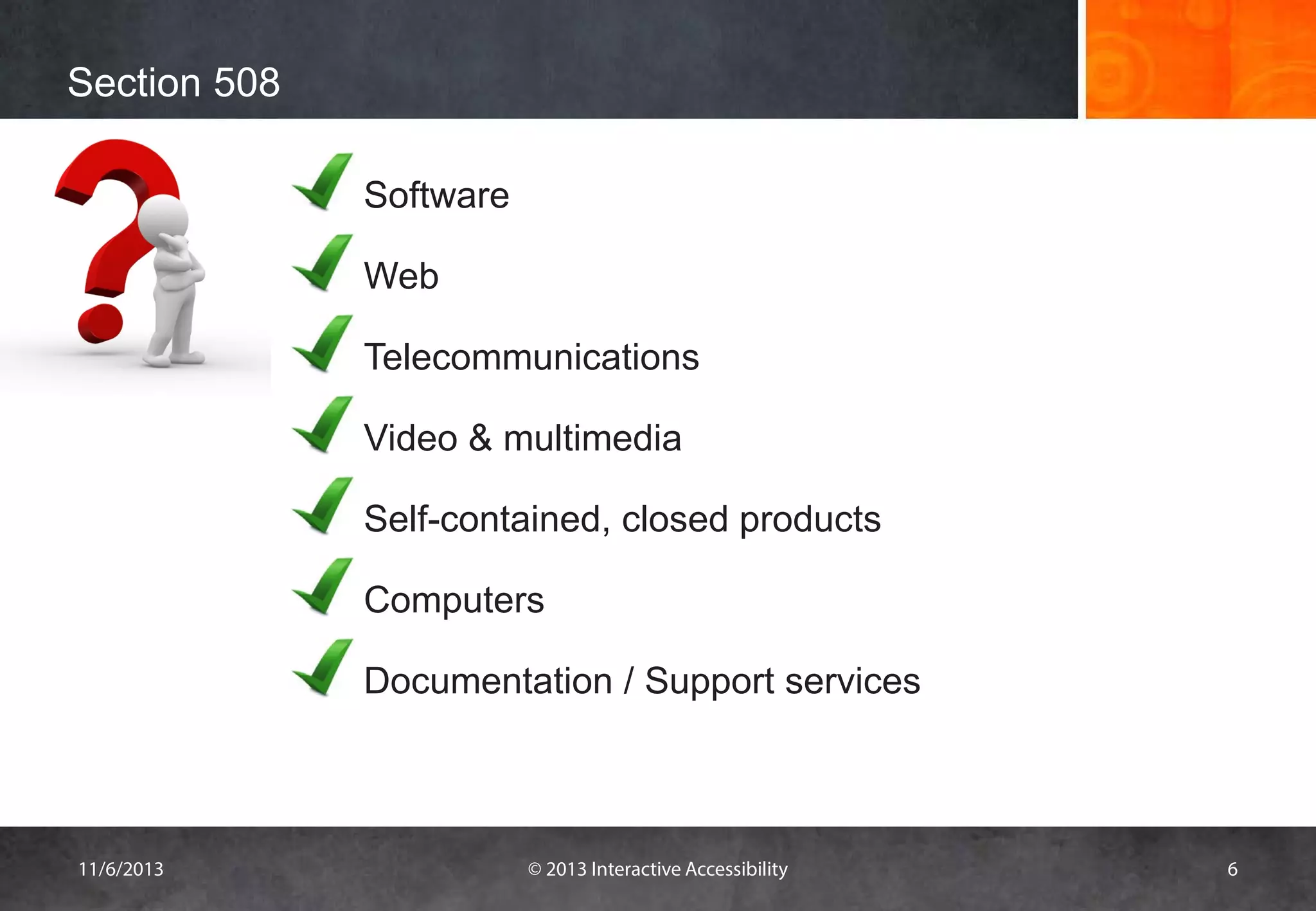
Section 508
Software
Web
Telecommunications
Video & multimedia
Self-contained, closed products
Computers
Documentation / Support services

11/6/2013

© 2013 Interactive Accessibility

6
Format of VPAT

• List of the Section 508 standards with summary
– Summary table provides an overall level of conformance
to Section 508
– Series of Section 1194 tables list the detailed
requirements and the level of conformance to each
provision

11/6/2013

© 2013 Interactive Accessibility

7
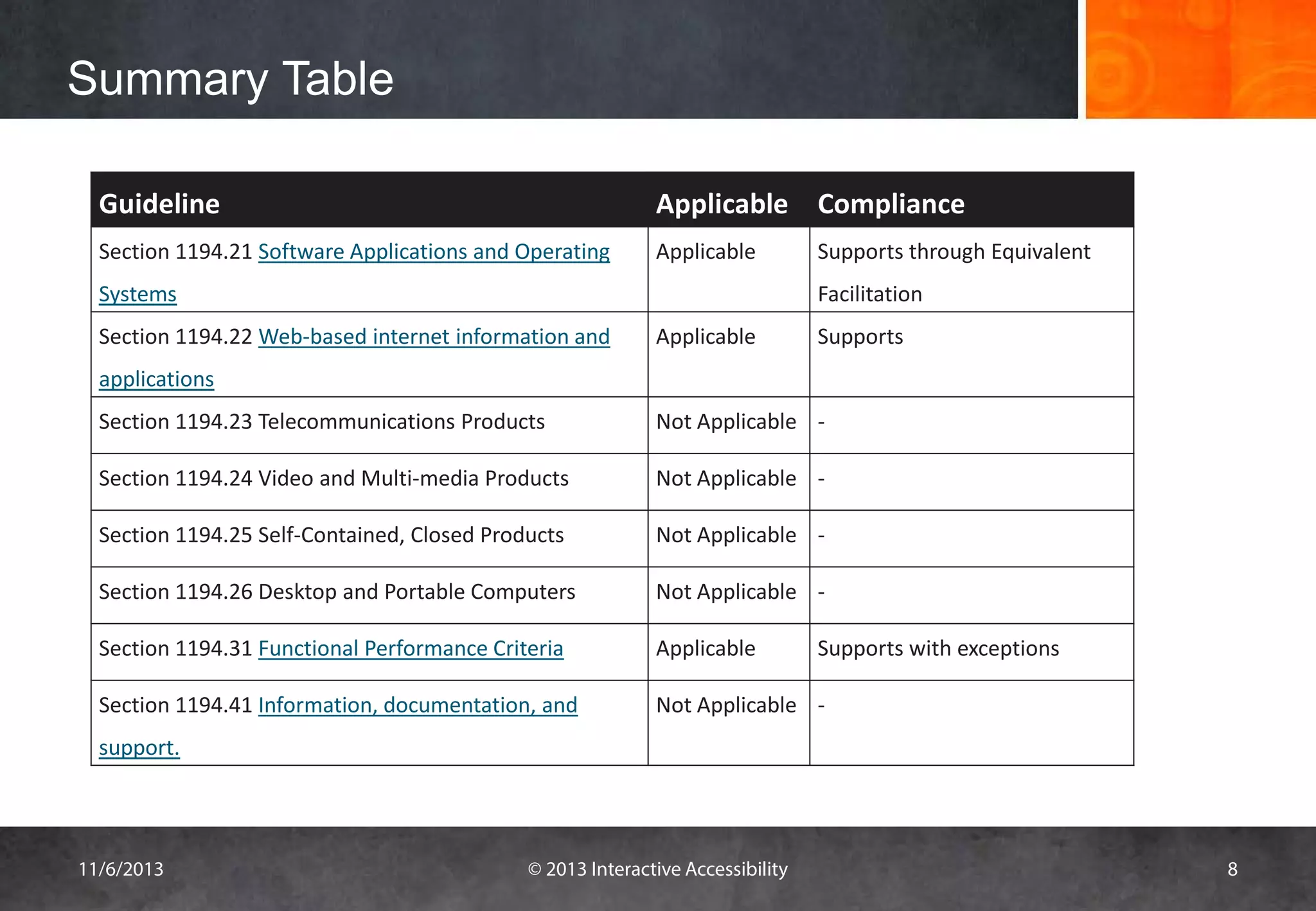
Summary Table
Guideline

Applicable Compliance

Section 1194.21 Software Applications and Operating

Applicable

Systems

Supports through Equivalent
Facilitation

Section 1194.22 Web-based internet information and

Applicable

Supports

applications
Section 1194.23 Telecommunications Products

Not Applicable -

Section 1194.24 Video and Multi-media Products

Not Applicable -

Section 1194.25 Self-Contained, Closed Products

Not Applicable -

Section 1194.26 Desktop and Portable Computers

Not Applicable -

Section 1194.31 Functional Performance Criteria

Applicable

Section 1194.41 Information, documentation, and

Not Applicable -

Supports with exceptions

support.

11/6/2013

© 2013 Interactive Accessibility

8
Summary Table
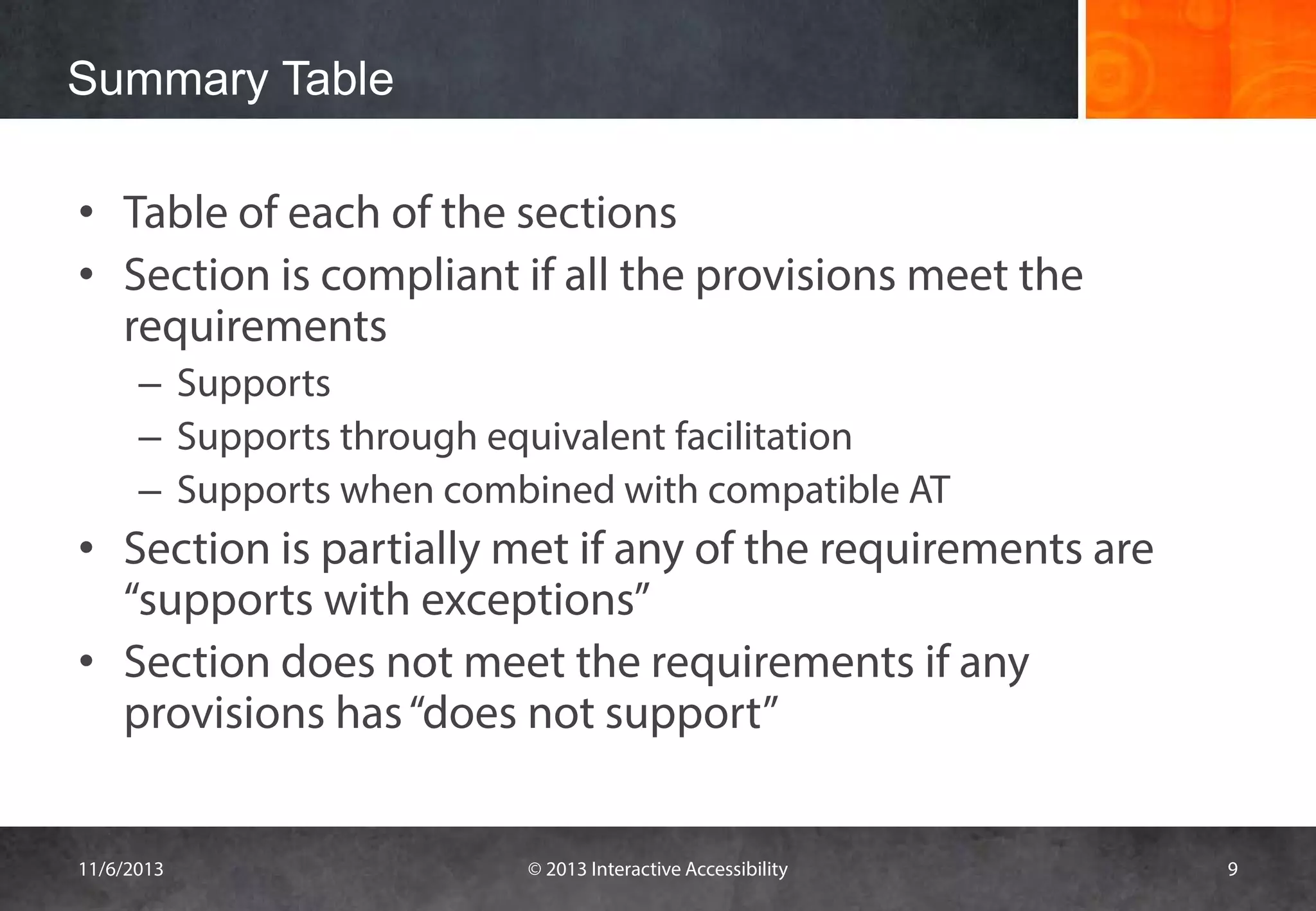
• Table of each of the sections
• Section is compliant if all the provisions meet the
requirements
– Supports
– Supports through equivalent facilitation
– Supports when combined with compatible AT

• Section is partially met if any of the requirements are
“supports with exceptions”
• Section does not meet the requirements if any
provisions has “does not support”
11/6/2013

© 2013 Interactive Accessibility

9
Detail Requirements

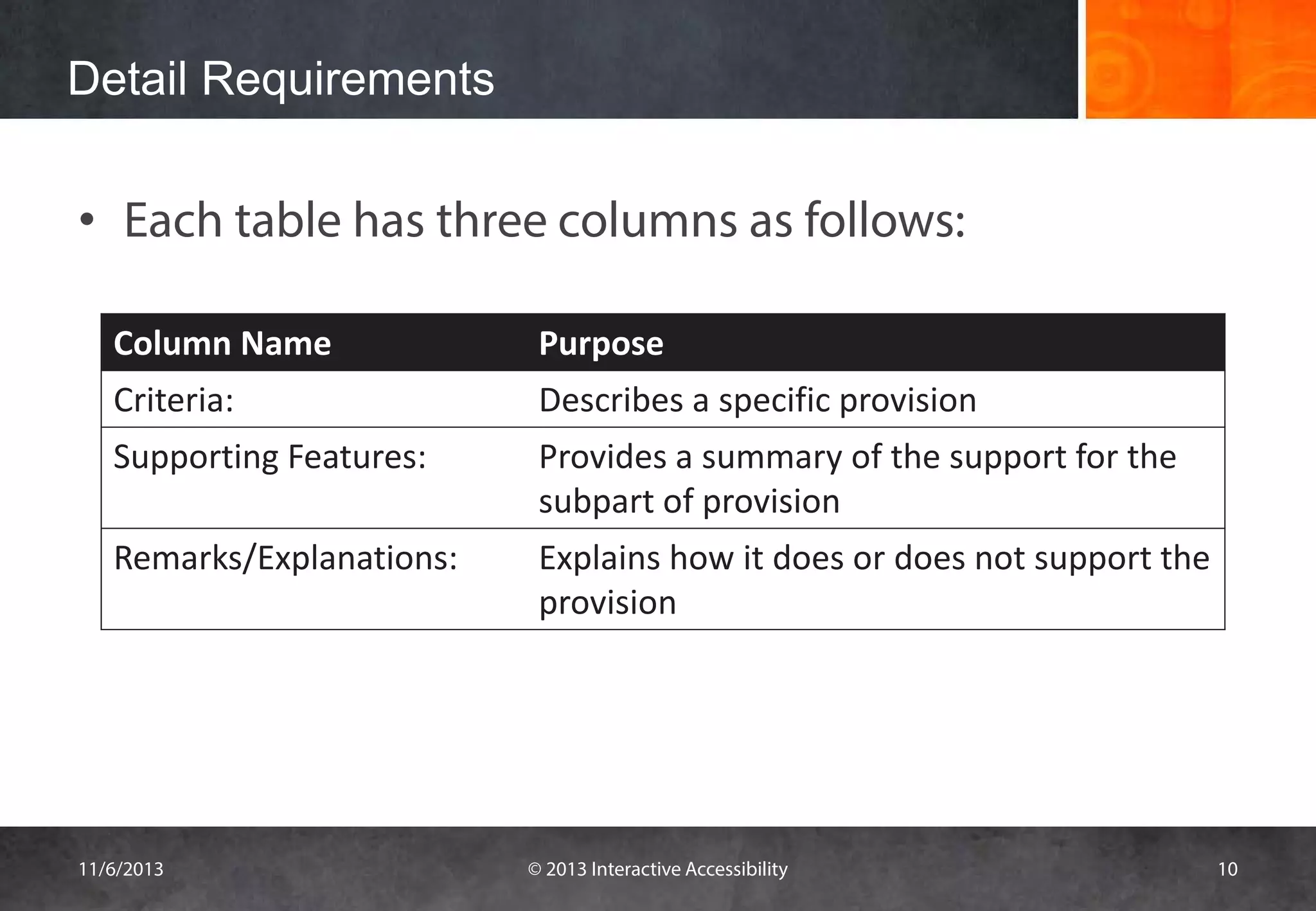
• Each table has three columns as follows:
Column Name

Purpose

Criteria:

Describes a specific provision

Supporting Features:

Provides a summary of the support for the
subpart of provision

Remarks/Explanations:

Explains how it does or does not support the
provision

11/6/2013

© 2013 Interactive Accessibility

10
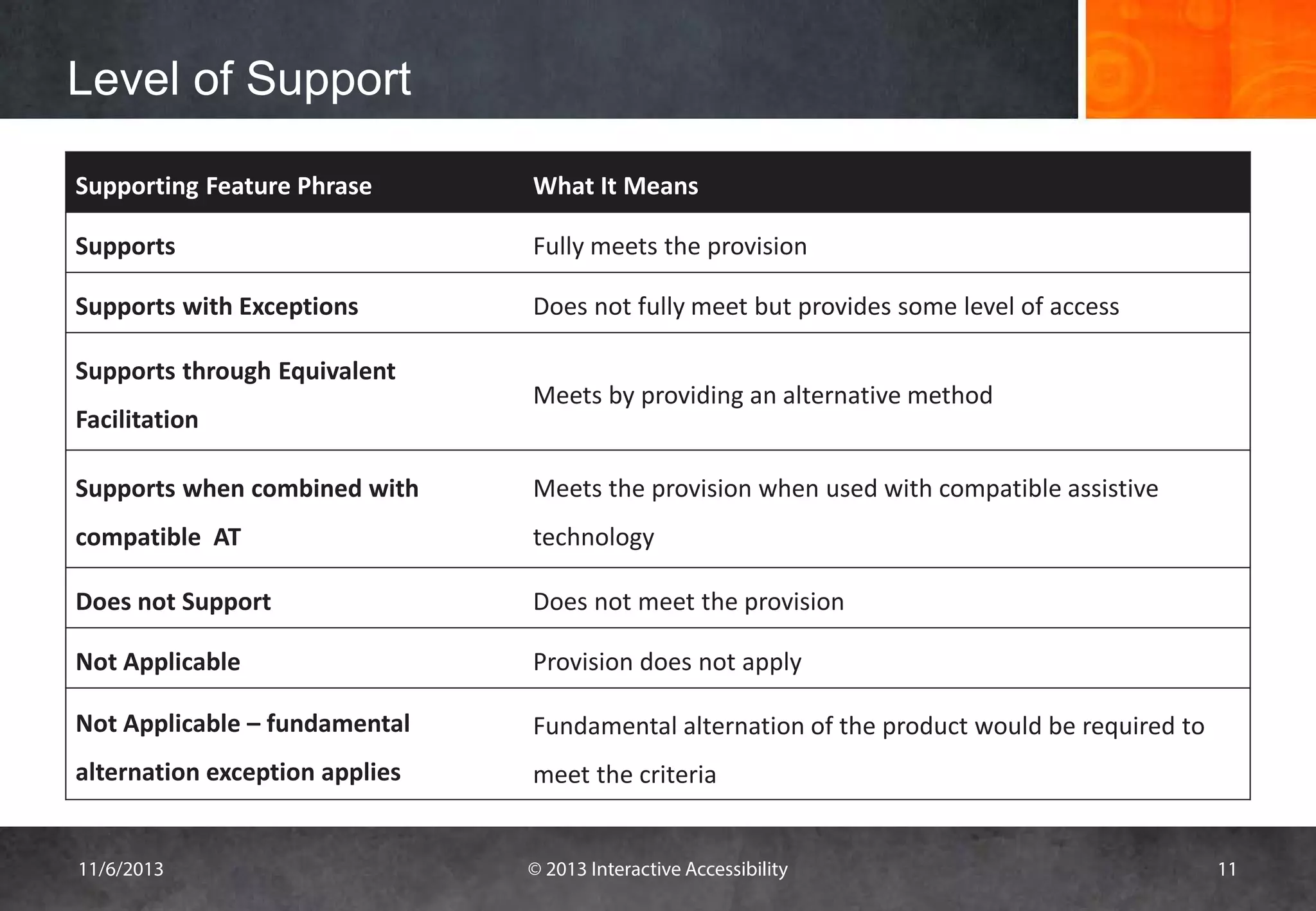
Level of Support
Supporting Feature Phrase

What It Means

Supports

Fully meets the provision

Supports with Exceptions

Does not fully meet but provides some level of access

Supports through Equivalent
Facilitation

Meets by providing an alternative method

Supports when combined with

Meets the provision when used with compatible assistive

compatible AT

technology

Does not Support

Does not meet the provision

Not Applicable

Provision does not apply

Not Applicable – fundamental

Fundamental alternation of the product would be required to

alternation exception applies

meet the criteria

11/6/2013

© 2013 Interactive Accessibility

11
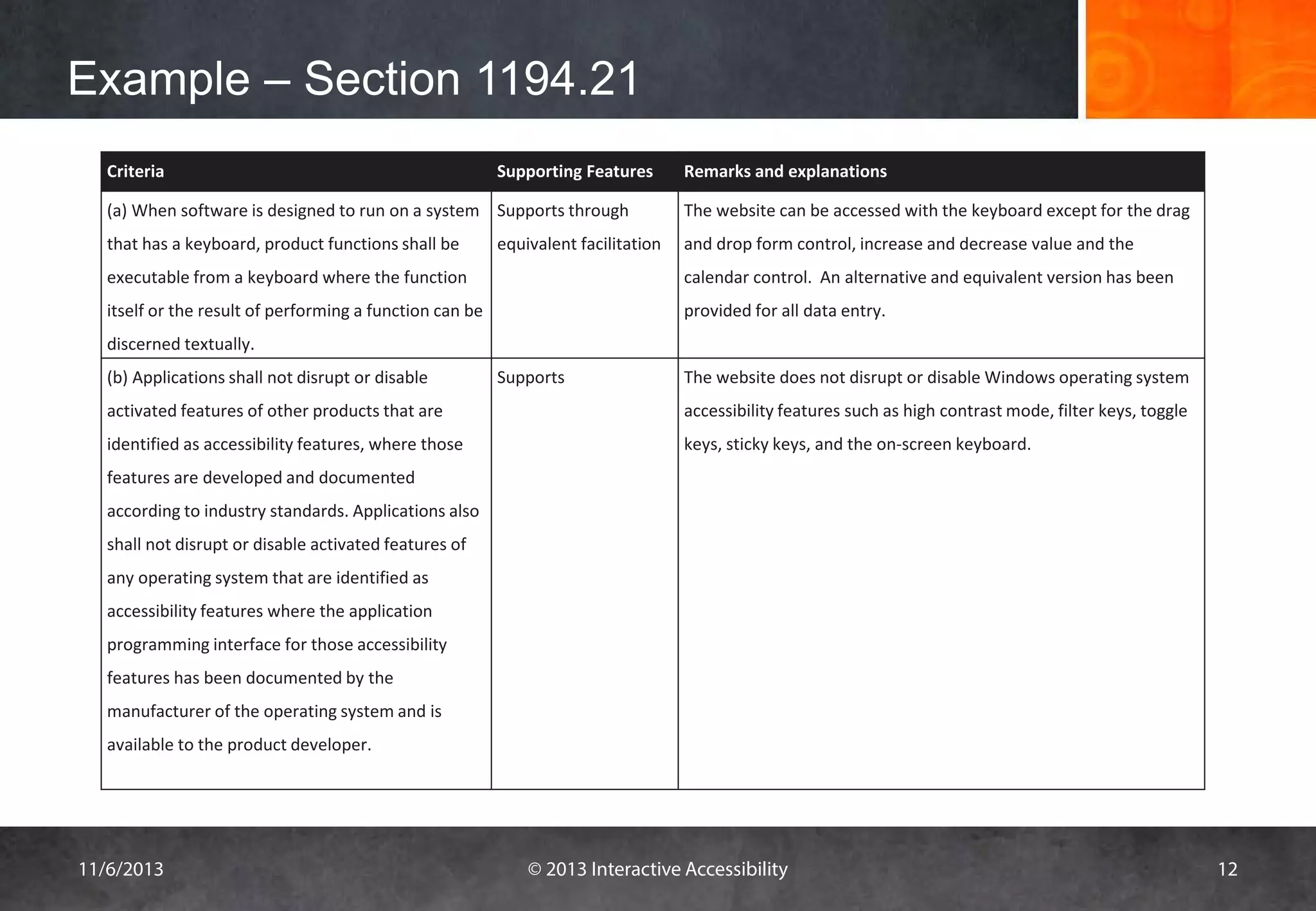
Example – Section 1194.21
Criteria

Supporting Features

(a) When software is designed to run on a system Supports through
that has a keyboard, product functions shall be

equivalent facilitation

Remarks and explanations
The website can be accessed with the keyboard except for the drag
and drop form control, increase and decrease value and the

executable from a keyboard where the function

calendar control. An alternative and equivalent version has been

itself or the result of performing a function can be

provided for all data entry.

discerned textually.
(b) Applications shall not disrupt or disable

Supports

The website does not disrupt or disable Windows operating system

activated features of other products that are

accessibility features such as high contrast mode, filter keys, toggle

identified as accessibility features, where those

keys, sticky keys, and the on-screen keyboard.

features are developed and documented
according to industry standards. Applications also
shall not disrupt or disable activated features of
any operating system that are identified as
accessibility features where the application
programming interface for those accessibility
features has been documented by the
manufacturer of the operating system and is
available to the product developer.

11/6/2013

© 2013 Interactive Accessibility

12
What Sections Are Required?
• Websites
– Subsection 22 & 31

• Web applications
– Subsection 21, 22, 31 and most of the time 41

11/6/2013

© 2013 Interactive Accessibility

13
WCAG 2.0 Statement of Accessibility
• Two options:
– Accessibility statement describing level of compliance with
WCAG 2.0 success criteria
– Conformance claim

11/6/2013

© 2013 Interactive Accessibility

14
CHALLENGES WITH VPATS

11/6/2013

© 2013 Interactive Accessibility

15
Company Perspective
Release schedules often tight
Balance between features and accessibility
Time for accessibility testing
Large, distributed teams
New staff may not know accessibility
New product acquisitions / third party applications
Section 508 is outdated set of guidelines so does not
always make sense given current technology
• Telling too much can hurt the sale of the product
•
•
•
•
•
•
•

11/6/2013

© 2013 Interactive Accessibility

16
VPAT Consumer Perspective
• Procurement officer does not know how to interpret it
• Difficult to know whether or not the VPAT is accurate and
complete
• Often does not have a lot of information
• Information contained in the VPAT may be confusing
• Product may not be available to verify the information
• Hard to compare competing products based on VPAT
– Subjectivity by VPAT authors and product reviewers
– Detail and completeness may vary by authors
– The product with fewer apparent problems may get selected even if
it is not the most accessible

11/6/2013

© 2013 Interactive Accessibility

17
General Issues with VPATs
• Provisions are high-level and do not provide enough
information to know if it will work for a person with a
disability
• Meeting the guidelines does not always mean it will
work well with all assistive technology

11/6/2013

© 2013 Interactive Accessibility

18
What challenges do you face?

11/6/2013

© 2013 Interactive Accessibility

19
What is a good VPAT?

• Has enough information to know what the issues
are and the impact of those issues
• Clearly identifies what areas of the site are
covered under the VPAT
• Documents types of users who may have issues
with the product
• Provides details for all provisions on how it meets
or does not meet the requirements
11/6/2013

© 2013 Interactive Accessibility

20
What are some examples of good VPATS?

11/6/2013

© 2013 Interactive Accessibility

21
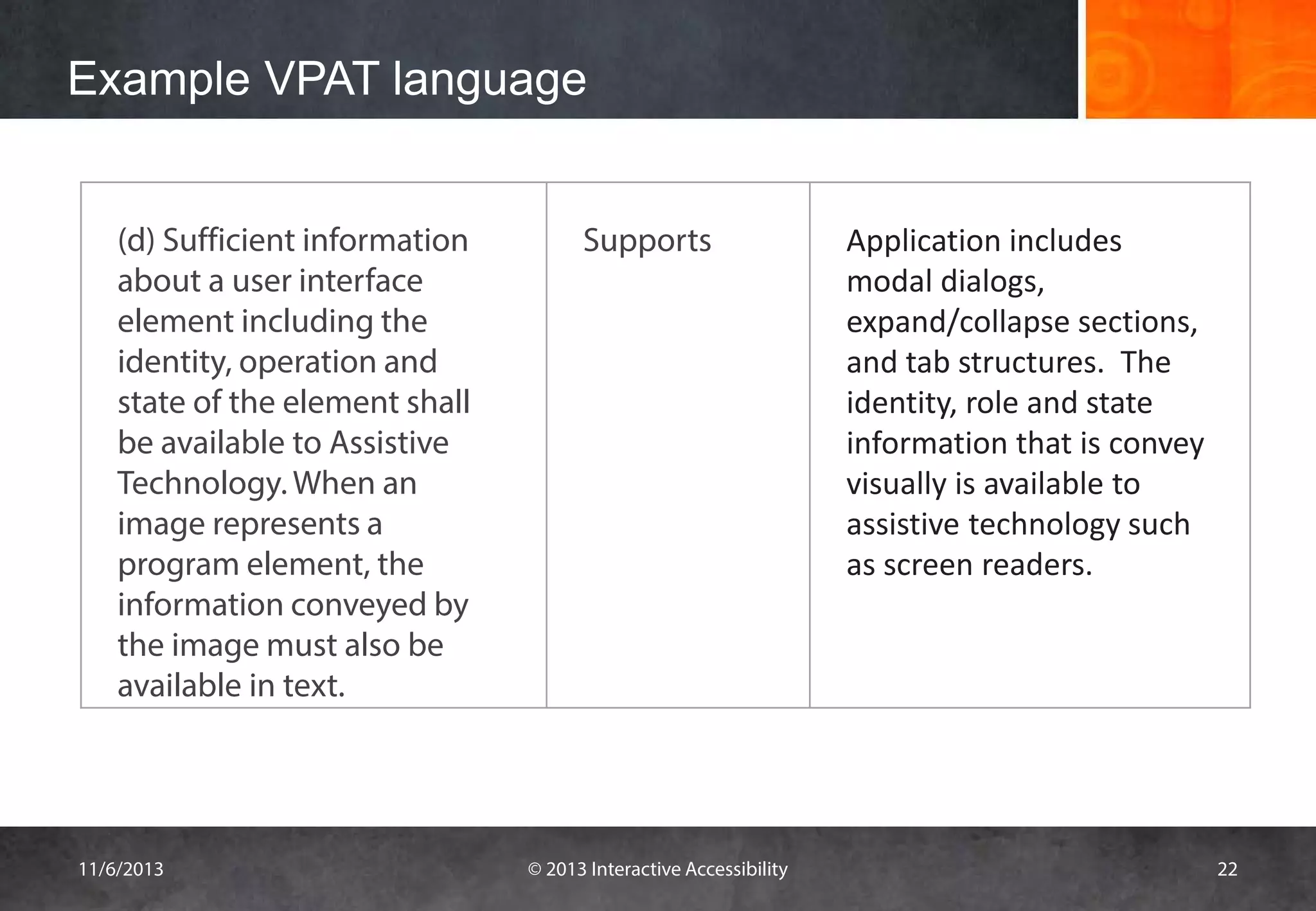
Example VPAT language
(d) Sufficient information
about a user interface
element including the
identity, operation and
state of the element shall
be available to Assistive
Technology. When an
image represents a
program element, the
information conveyed by
the image must also be
available in text.

11/6/2013

Supports

© 2013 Interactive Accessibility

Application includes
modal dialogs,
expand/collapse sections,
and tab structures. The
identity, role and state
information that is convey
visually is available to
assistive technology such
as screen readers.

22
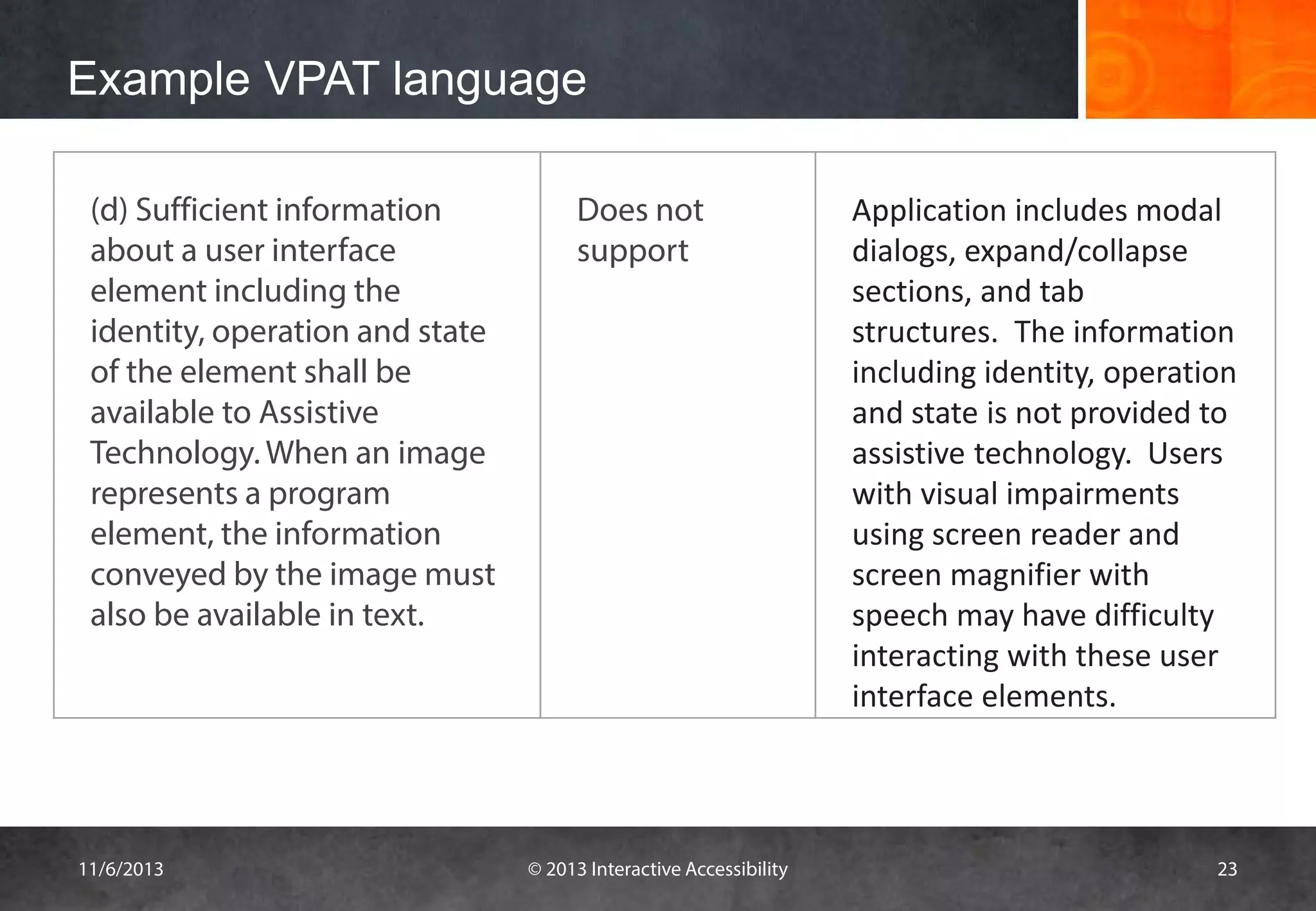
Example VPAT language
(d) Sufficient information
about a user interface
element including the
identity, operation and state
of the element shall be
available to Assistive
Technology. When an image
represents a program
element, the information
conveyed by the image must
also be available in text.

11/6/2013

Does not
support

© 2013 Interactive Accessibility

Application includes modal
dialogs, expand/collapse
sections, and tab
structures. The information
including identity, operation
and state is not provided to
assistive technology. Users
with visual impairments
using screen reader and
screen magnifier with
speech may have difficulty
interacting with these user
interface elements.

23
5 Practical Tips

HOW TO VERIFY A VPAT

11/6/2013

© 2013 Interactive Accessibility

24
Tip 1: Review the VPAT language
•
•
•
•

Review content for clarity and completeness
Identify inconsistencies
Look for detailed explanations
Understand what the impact would be and who would
be affected

11/6/2013

© 2013 Interactive Accessibility

25
Tip 2: Run Accessibility Checker
• Many tools available to check underlying code
– WAVE toolbar
– Sortsite

• Cross-reference reported issues to VPAT
WARNING: Automated tools only capture 25-30% of the
accessibility issues on the page

11/6/2013

© 2013 Interactive Accessibility

26
Tip 3: Try Product with Screen Reader
• Goal of the guidelines is to ensure that it works with
assistive technology
• Testing with screen reader will identify issues that all
users with disabilities may face
– Keyboard only
– Navigation structure
– Readability of content

11/6/2013

© 2013 Interactive Accessibility

27
Tip 4: Meet with Company
• Get further insight into details of provisions
• Gauge the level of knowledge of the team in Section
508
– Did they just copy language from some where else

• Get development plan for areas of non-compliance
• Ask questions about the impact the issues identified
would have on a person with a disability

11/6/2013

© 2013 Interactive Accessibility

28
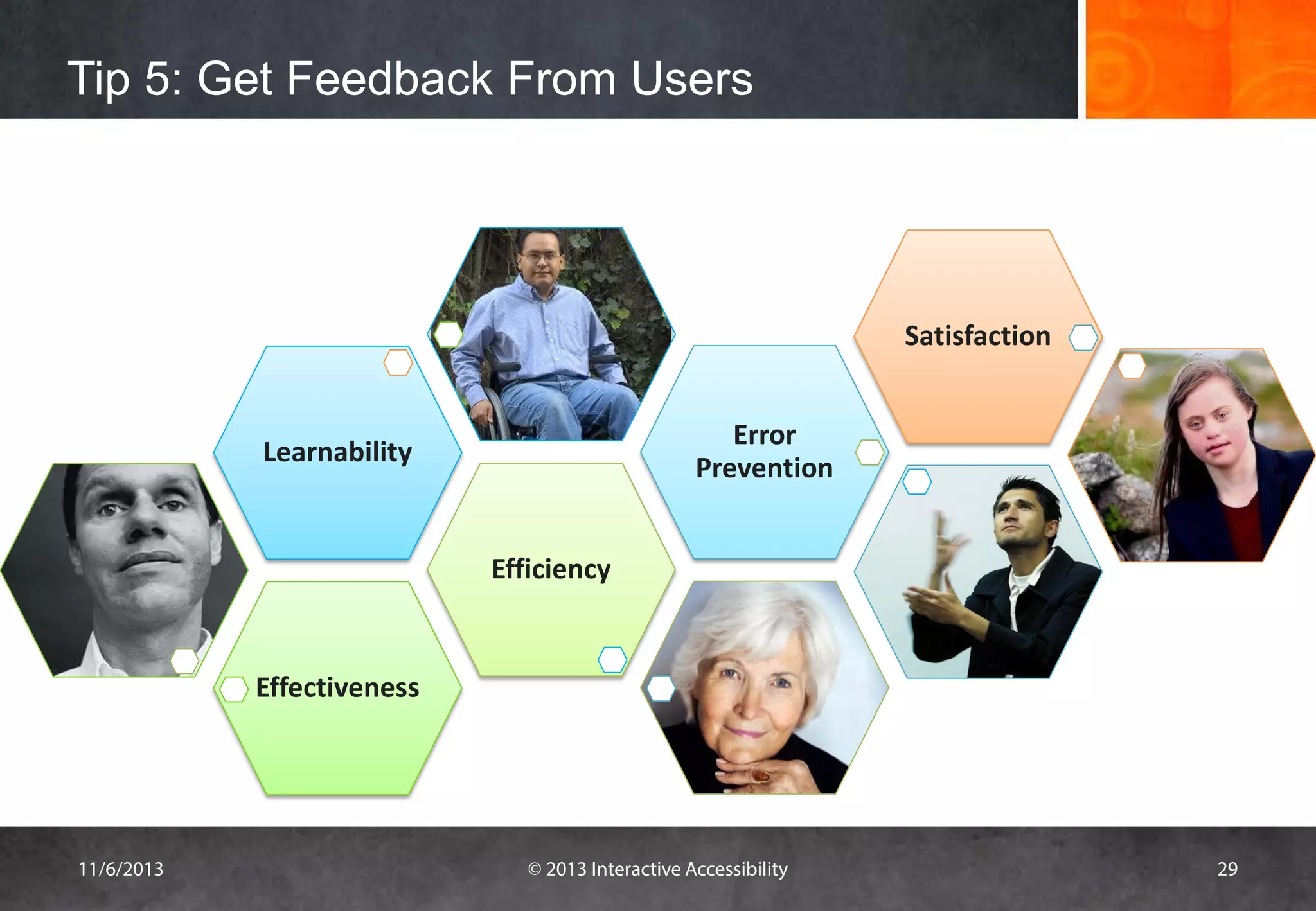
Tip 5: Get Feedback From Users

Satisfaction
Error
Prevention

Learnability

Efficiency

Effectiveness

11/6/2013

© 2013 Interactive Accessibility

29
What do you do?

11/6/2013

© 2013 Interactive Accessibility

30
Questions?

11/6/2013

© 2013 Interactive Accessibility

31
Kathy Wahlbin

Email: KathyW@ia11y.com
Phone: 978-443-0798
http://www.interactiveaccessibility.com
@wahlbin

Are you accessible?
Thank you!

Challenges with VPATs

  • 1.
    Is the productaccessible? CHALLENGES WITH VPATS November 6, 2013 11/6/2013 © 2013 Interactive Accessibility 1
  • 2.
    The Accessibility Experts KathleenWahlbin Email: KathyW@ia11y.com Phone: 978-443-0798 http://www.interactiveaccessibility.com 11/6/2013 © 2013 Interactive Accessibility 2
  • 3.
    VPATS How do Iknow if the VPAT is accurate? If the VPAT says supports, does that mean it will work with assistive technology? What do we need to comply with? Are there exceptions? What is a VPAT? What about 3rd Party Applications? 11/6/2013 © 2013 Interactive Accessibility 3
  • 4.
    What is VPAT? WHATIS VPAT? 11/6/2013 © 2013 Interactive Accessibility 4
  • 5.
    What is VPAT?What is it’s Purpose? • Stands for Voluntary Product Accessibility Template • A tool to document a product's conformance with Section 508 • Assists procurement departments and government agencies in making initial assessments of the level of accessibility 11/6/2013 © 2013 Interactive Accessibility 5
  • 6.
    Section 508 Software Web Telecommunications Video &multimedia Self-contained, closed products Computers Documentation / Support services 11/6/2013 © 2013 Interactive Accessibility 6
  • 7.
    Format of VPAT •List of the Section 508 standards with summary – Summary table provides an overall level of conformance to Section 508 – Series of Section 1194 tables list the detailed requirements and the level of conformance to each provision 11/6/2013 © 2013 Interactive Accessibility 7
  • 8.
    Summary Table Guideline Applicable Compliance Section1194.21 Software Applications and Operating Applicable Systems Supports through Equivalent Facilitation Section 1194.22 Web-based internet information and Applicable Supports applications Section 1194.23 Telecommunications Products Not Applicable - Section 1194.24 Video and Multi-media Products Not Applicable - Section 1194.25 Self-Contained, Closed Products Not Applicable - Section 1194.26 Desktop and Portable Computers Not Applicable - Section 1194.31 Functional Performance Criteria Applicable Section 1194.41 Information, documentation, and Not Applicable - Supports with exceptions support. 11/6/2013 © 2013 Interactive Accessibility 8
  • 9.
    Summary Table • Tableof each of the sections • Section is compliant if all the provisions meet the requirements – Supports – Supports through equivalent facilitation – Supports when combined with compatible AT • Section is partially met if any of the requirements are “supports with exceptions” • Section does not meet the requirements if any provisions has “does not support” 11/6/2013 © 2013 Interactive Accessibility 9
  • 10.
    Detail Requirements • Eachtable has three columns as follows: Column Name Purpose Criteria: Describes a specific provision Supporting Features: Provides a summary of the support for the subpart of provision Remarks/Explanations: Explains how it does or does not support the provision 11/6/2013 © 2013 Interactive Accessibility 10
  • 11.
    Level of Support SupportingFeature Phrase What It Means Supports Fully meets the provision Supports with Exceptions Does not fully meet but provides some level of access Supports through Equivalent Facilitation Meets by providing an alternative method Supports when combined with Meets the provision when used with compatible assistive compatible AT technology Does not Support Does not meet the provision Not Applicable Provision does not apply Not Applicable – fundamental Fundamental alternation of the product would be required to alternation exception applies meet the criteria 11/6/2013 © 2013 Interactive Accessibility 11
  • 12.
    Example – Section1194.21 Criteria Supporting Features (a) When software is designed to run on a system Supports through that has a keyboard, product functions shall be equivalent facilitation Remarks and explanations The website can be accessed with the keyboard except for the drag and drop form control, increase and decrease value and the executable from a keyboard where the function calendar control. An alternative and equivalent version has been itself or the result of performing a function can be provided for all data entry. discerned textually. (b) Applications shall not disrupt or disable Supports The website does not disrupt or disable Windows operating system activated features of other products that are accessibility features such as high contrast mode, filter keys, toggle identified as accessibility features, where those keys, sticky keys, and the on-screen keyboard. features are developed and documented according to industry standards. Applications also shall not disrupt or disable activated features of any operating system that are identified as accessibility features where the application programming interface for those accessibility features has been documented by the manufacturer of the operating system and is available to the product developer. 11/6/2013 © 2013 Interactive Accessibility 12
  • 13.
    What Sections AreRequired? • Websites – Subsection 22 & 31 • Web applications – Subsection 21, 22, 31 and most of the time 41 11/6/2013 © 2013 Interactive Accessibility 13
  • 14.
    WCAG 2.0 Statementof Accessibility • Two options: – Accessibility statement describing level of compliance with WCAG 2.0 success criteria – Conformance claim 11/6/2013 © 2013 Interactive Accessibility 14
  • 15.
    CHALLENGES WITH VPATS 11/6/2013 ©2013 Interactive Accessibility 15
  • 16.
    Company Perspective Release schedulesoften tight Balance between features and accessibility Time for accessibility testing Large, distributed teams New staff may not know accessibility New product acquisitions / third party applications Section 508 is outdated set of guidelines so does not always make sense given current technology • Telling too much can hurt the sale of the product • • • • • • • 11/6/2013 © 2013 Interactive Accessibility 16
  • 17.
    VPAT Consumer Perspective •Procurement officer does not know how to interpret it • Difficult to know whether or not the VPAT is accurate and complete • Often does not have a lot of information • Information contained in the VPAT may be confusing • Product may not be available to verify the information • Hard to compare competing products based on VPAT – Subjectivity by VPAT authors and product reviewers – Detail and completeness may vary by authors – The product with fewer apparent problems may get selected even if it is not the most accessible 11/6/2013 © 2013 Interactive Accessibility 17
  • 18.
    General Issues withVPATs • Provisions are high-level and do not provide enough information to know if it will work for a person with a disability • Meeting the guidelines does not always mean it will work well with all assistive technology 11/6/2013 © 2013 Interactive Accessibility 18
  • 19.
    What challenges doyou face? 11/6/2013 © 2013 Interactive Accessibility 19
  • 20.
    What is agood VPAT? • Has enough information to know what the issues are and the impact of those issues • Clearly identifies what areas of the site are covered under the VPAT • Documents types of users who may have issues with the product • Provides details for all provisions on how it meets or does not meet the requirements 11/6/2013 © 2013 Interactive Accessibility 20
  • 21.
    What are someexamples of good VPATS? 11/6/2013 © 2013 Interactive Accessibility 21
  • 22.
    Example VPAT language (d)Sufficient information about a user interface element including the identity, operation and state of the element shall be available to Assistive Technology. When an image represents a program element, the information conveyed by the image must also be available in text. 11/6/2013 Supports © 2013 Interactive Accessibility Application includes modal dialogs, expand/collapse sections, and tab structures. The identity, role and state information that is convey visually is available to assistive technology such as screen readers. 22
  • 23.
    Example VPAT language (d)Sufficient information about a user interface element including the identity, operation and state of the element shall be available to Assistive Technology. When an image represents a program element, the information conveyed by the image must also be available in text. 11/6/2013 Does not support © 2013 Interactive Accessibility Application includes modal dialogs, expand/collapse sections, and tab structures. The information including identity, operation and state is not provided to assistive technology. Users with visual impairments using screen reader and screen magnifier with speech may have difficulty interacting with these user interface elements. 23
  • 24.
    5 Practical Tips HOWTO VERIFY A VPAT 11/6/2013 © 2013 Interactive Accessibility 24
  • 25.
    Tip 1: Reviewthe VPAT language • • • • Review content for clarity and completeness Identify inconsistencies Look for detailed explanations Understand what the impact would be and who would be affected 11/6/2013 © 2013 Interactive Accessibility 25
  • 26.
    Tip 2: RunAccessibility Checker • Many tools available to check underlying code – WAVE toolbar – Sortsite • Cross-reference reported issues to VPAT WARNING: Automated tools only capture 25-30% of the accessibility issues on the page 11/6/2013 © 2013 Interactive Accessibility 26
  • 27.
    Tip 3: TryProduct with Screen Reader • Goal of the guidelines is to ensure that it works with assistive technology • Testing with screen reader will identify issues that all users with disabilities may face – Keyboard only – Navigation structure – Readability of content 11/6/2013 © 2013 Interactive Accessibility 27
  • 28.
    Tip 4: Meetwith Company • Get further insight into details of provisions • Gauge the level of knowledge of the team in Section 508 – Did they just copy language from some where else • Get development plan for areas of non-compliance • Ask questions about the impact the issues identified would have on a person with a disability 11/6/2013 © 2013 Interactive Accessibility 28
  • 29.
    Tip 5: GetFeedback From Users Satisfaction Error Prevention Learnability Efficiency Effectiveness 11/6/2013 © 2013 Interactive Accessibility 29
  • 30.
    What do youdo? 11/6/2013 © 2013 Interactive Accessibility 30
  • 31.
  • 32.
    Kathy Wahlbin Email: KathyW@ia11y.com Phone:978-443-0798 http://www.interactiveaccessibility.com @wahlbin Are you accessible? Thank you!