Web Accessibility MOOC for Online Educators
Web Accessibility MOOC for Online Educators 
Reg opened: Monday 
Collaboration between 
Sept. 29 
•Portland Community 
College and 
•Brightspace Teaching and 
Learning Community 
Course begins Mon. Oct. 20 
with 5 weeks of active 
facilitation (can start early 
and finish late)
Web Accessibility MOOC for Online Educators 
Free on D2L Open Courses 
opencourses.desire2learn.com 
Mostly activity-based 
learning 
Hands-on, content creation 
Facilitated by Barry Dahl 
of D2L and Karen 
Sorensen of PCC
Why WAMOE? 
• The Brightspace Teaching & Learning 
Community focuses on the following: 
– Professional development for educators 
– Effective practices related to online teaching and learning 
– Spotlighting client contributions for the good of all 
• Web accessibility for online educators has long been 
seen as an area of high need and little attention.
Why WAMOE? 
• Many educational institutions have not been 
able to focus their attention and resources on 
making their online courses more accessible. 
• Several lawsuits in the past few years have 
brought this issue more to the forefront. 
• WAMOE is a step towards closing the gap by 
providing free resources for educators.
Same with Accessibility
Primary Intended 
• Online FacultyA, inusdtruicetorns,c teeachers 
• Secondarily: 
– Instructional designers, instructional technologists, and others who 
support faculty 
– Technical staff, including LMS technicians 
– Administrators (management): those who supervise the faculty and 
staff 
– Disability and Accessibility professionals
Primary Learning Goals 
Goal 1: Build the personal knowledge base in web accessibility for each participant 
• Example 1: Learn how to assess the accessibility of software used for online courses 
Goal 2: Create Accessible Photo Images, Diagrams, and Charts for Online Courses 
• Example 2: Learn when alternate text is required for images, and how to properly provide it 
Goal 3: Create Accessible Audio and Video for Online Courses 
• Example 3: Learn how to add captions to videos or search for already-captioned videos 
Goal 4: Create Accessible HTML Content for Online Courses 
• Example 4: Learn the proper page layout and other items for accessible web pages 
Goal 5: Create Accessible Course Content in Other Formats 
• Example 5: Learn how to make accessible Word documents for use on online courses
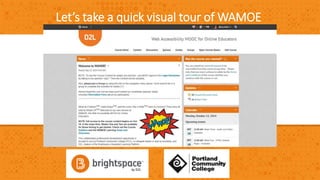
Let’s take a quick visual tour of WAMOE
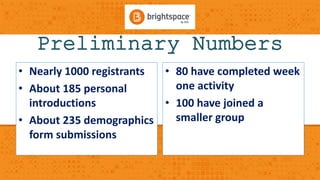
Preliminary Numbers 
• Nearly 1000 registrants 
• About 185 personal 
introductions 
• About 235 demographics 
form submissions 
• 80 have completed week 
one activity 
• 100 have joined a 
smaller group
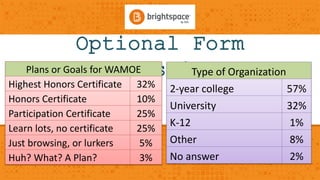
Optional Form 
Plans or Goals Sforu WAbMmOEissions 
Highest Honors Certificate 32% 
Honors Certificate 10% 
Participation Certificate 25% 
Learn lots, no certificate 25% 
Just browsing, or lurkers 5% 
Huh? What? A Plan? 3% 
Type of Organization 
2-year college 57% 
University 32% 
K-12 1% 
Other 8% 
No answer 2%
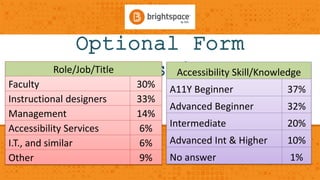
Optional Form 
Role/JobS/Tiutlebmissions 
Faculty 30% 
Instructional designers 33% 
Management 14% 
Accessibility Services 6% 
I.T., and similar 6% 
Other 9% 
Accessibility Skill/Knowledge 
A11Y Beginner 37% 
Advanced Beginner 32% 
Intermediate 20% 
Advanced Int & Higher 10% 
No answer 1%
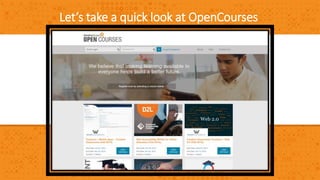
Let’s take a quick look at OpenCourses
Questions and Answers
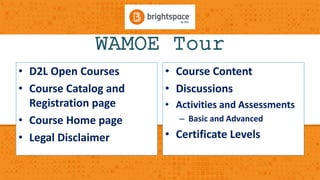
WAMOE Tour 
• D2L Open Courses 
• Course Catalog and 
Registration page 
• Course Home page 
• Legal Disclaimer 
• Course Content 
• Discussions 
• Activities and Assessments 
– Basic and Advanced 
• Certificate Levels
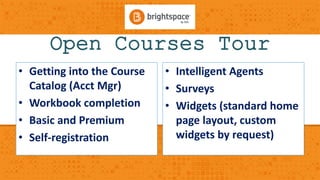
Open Courses Tour 
• Getting into the Course 
Catalog (Acct Mgr) 
• Workbook completion 
• Basic and Premium 
• Self-registration 
• Intelligent Agents 
• Surveys 
• Widgets (standard home 
page layout, custom 
widgets by request)

Wamoe Webinar: Web Accessibility MOOC for Online Educators

  • 1.
    Web Accessibility MOOCfor Online Educators
  • 2.
    Web Accessibility MOOCfor Online Educators Reg opened: Monday Collaboration between Sept. 29 •Portland Community College and •Brightspace Teaching and Learning Community Course begins Mon. Oct. 20 with 5 weeks of active facilitation (can start early and finish late)
  • 3.
    Web Accessibility MOOCfor Online Educators Free on D2L Open Courses opencourses.desire2learn.com Mostly activity-based learning Hands-on, content creation Facilitated by Barry Dahl of D2L and Karen Sorensen of PCC
  • 4.
    Why WAMOE? •The Brightspace Teaching & Learning Community focuses on the following: – Professional development for educators – Effective practices related to online teaching and learning – Spotlighting client contributions for the good of all • Web accessibility for online educators has long been seen as an area of high need and little attention.
  • 5.
    Why WAMOE? •Many educational institutions have not been able to focus their attention and resources on making their online courses more accessible. • Several lawsuits in the past few years have brought this issue more to the forefront. • WAMOE is a step towards closing the gap by providing free resources for educators.
  • 6.
  • 7.
    Primary Intended •Online FacultyA, inusdtruicetorns,c teeachers • Secondarily: – Instructional designers, instructional technologists, and others who support faculty – Technical staff, including LMS technicians – Administrators (management): those who supervise the faculty and staff – Disability and Accessibility professionals
  • 8.
    Primary Learning Goals Goal 1: Build the personal knowledge base in web accessibility for each participant • Example 1: Learn how to assess the accessibility of software used for online courses Goal 2: Create Accessible Photo Images, Diagrams, and Charts for Online Courses • Example 2: Learn when alternate text is required for images, and how to properly provide it Goal 3: Create Accessible Audio and Video for Online Courses • Example 3: Learn how to add captions to videos or search for already-captioned videos Goal 4: Create Accessible HTML Content for Online Courses • Example 4: Learn the proper page layout and other items for accessible web pages Goal 5: Create Accessible Course Content in Other Formats • Example 5: Learn how to make accessible Word documents for use on online courses
  • 9.
    Let’s take aquick visual tour of WAMOE
  • 10.
    Preliminary Numbers •Nearly 1000 registrants • About 185 personal introductions • About 235 demographics form submissions • 80 have completed week one activity • 100 have joined a smaller group
  • 11.
    Optional Form Plansor Goals Sforu WAbMmOEissions Highest Honors Certificate 32% Honors Certificate 10% Participation Certificate 25% Learn lots, no certificate 25% Just browsing, or lurkers 5% Huh? What? A Plan? 3% Type of Organization 2-year college 57% University 32% K-12 1% Other 8% No answer 2%
  • 12.
    Optional Form Role/JobS/Tiutlebmissions Faculty 30% Instructional designers 33% Management 14% Accessibility Services 6% I.T., and similar 6% Other 9% Accessibility Skill/Knowledge A11Y Beginner 37% Advanced Beginner 32% Intermediate 20% Advanced Int & Higher 10% No answer 1%
  • 13.
    Let’s take aquick look at OpenCourses
  • 14.
  • 15.
    WAMOE Tour •D2L Open Courses • Course Catalog and Registration page • Course Home page • Legal Disclaimer • Course Content • Discussions • Activities and Assessments – Basic and Advanced • Certificate Levels
  • 16.
    Open Courses Tour • Getting into the Course Catalog (Acct Mgr) • Workbook completion • Basic and Premium • Self-registration • Intelligent Agents • Surveys • Widgets (standard home page layout, custom widgets by request)