From E-Learning to Active Learning:
Transforming the Learning Environment
Carl Gombrich, Steve Rowett and Clive Young
University College London
Steve Rowett
E-Learning Environments
• “London’s Global University”
• Founded in 1826 as the first university in England for
students of any race and religion
• Now a top 20 global research university with income
of £800m ($1,200m) per year
• 25,000 students
• Term structure; exams at end of academic year
About University College London
“UCL will be flexible, innovative and at the forefront of
developments in the use of new technologies to support
and enhance teaching and learning.”
UCL Council White Paper 2010-2010
UCL strategy
• Echo 360 rebranded as “Lecturecast”
• Installed in 62 lecture theatres
• A few departments record all lectures, but most leave
choice to individual lecturer
Lecture recording at UCL
• 5700 teaching events recorded so far in 2012-13
• About 20% of all lectures
• 200,000 student views of recordings in 2012-13
(and we haven’t yet reached the peak exam period)
• Average of 10,000 views per week
Some statistics
Carl Gombrich
Programme Director,
Bachelor of Arts and Sciences (BASc)
http://lecturecast.ucl.ac.uk:8080/ess/echo/presentation/adc1491d-6554-49fc-a595-74a9093a3be5
How flipping the lecture hall and engaging with students’
questions can improve learning and teaching
Five Steps to Successful Flipping
• Personal capture software downloaded to desktop
• Standard camera and microphone – built in options work fine
• The usual Microsoft Office documents + any bespoke images
etc. you wish to include
• Graphics tablet (optional, but can add a lot) – I used
Wacom/Bamboo
Equipment
• Record lectures in advance – at home, in the office, even
outside. Use Lecturecast -- Easy.
• Ask students to view lecture before timetabled lecture slot.
• Ask students to upload 3 questions each with timings based on
the lecture – and send these questions to Moodle.
• Take a poll of the most popular, say, 10, questions.
• Go to the timetabled lecture slot with questions: interact,
debate, solve problems with the students.
What to do
• HQ screenshot
What to do
• Students can interact with lecturers on questions that interest
them/problems they want to work through.
• Students/lecturers get better relationships in terms of
mentoring/personal contact etc.
• Submitting questions is part of formative assessment so
everyone is involved in the learning.
• Active learning: lecture times can be used for summative
assessments: short tests, blog pieces, group work, debates.
Good things about this
• Maybe the equipment won’t work – I hate technology
:-/
• It will take me double the time – 1 hr to record the
lecture, 1hr for the interactive class
• I hate working to camera
• Students and colleagues will make fun of me or say
inappropriate things about my style or the lecture
Things you might worry about:
• Maybe the equipment won’t work – I hate technology
:-/
• It will take me double the time – 1 hr to record the
lecture, 1hr for the interactive class
• I hate working to camera
• Students and colleagues will make fun of me or say
inappropriate things about my style or the lecture
o Don’t worry; be happy 
Things you might worry about:
On flipping, see e.g.
• http://mast.unco.edu/programs/vodcasting/
• http://vodcasting.ning.com/forum/topics/screen-recording
• http://www.ted.com/talks/salman_khan_let_s_use_video_to_reinvent_education.html
• http://andrewdouch.wordpress.com/2011/11/14/flipping-the-classroom/
For a good ‘how to...’, see
• http://vodcasting.ning.com/video/how-to-make-an-educational-screencast-mac
• On fears of using the technology/inappropriate comments, see
http://www.sonicfoundry.com/webcast/5-reasons-faculty-shouldnt-fear-lecture-
capture?fullscreen=1
References
Steve Rowett
E-Learning Environments
Feedback from student survey
Of the lectures you watched online, how many did you
also attend in person?
• “Lecturecast: more useful than when the lecture was
attended in person as you can replay sections of the
lecture and perhaps did not understand the first time
and pause it to take notes.”
Student comment, UCL Student IT Survey, January 2013
Good uses of technology
• “Lecturecast and slides online. Without
these, attending lectures in October is completely
useless by the time you get to summer exams, as I
can't write everything fast enough at the time or
remember what they said.”
Student comment, UCL Student IT Survey, January 2013
Good uses of technology
• “Using Lecturecast. This has really helped to go over
the parts of the lecture which I didn't fully understand
/ didn't have time to write down so quickly. It helps
me to consolidate smaller parts of the lecture, as I can
pause whenever I wish to do so.”
Student comment, UCL Student IT Survey, January 2013
Good uses of technology
• “Lecturecast extremely helpful for statistics lectures -
I come from a humanities background and initially
struggled with subject matter. Being able to listen to
each lecture more than once was hugely helpful.”
Student comment, UCL Student IT Survey, January 2013
Good uses of technology
• “Lecturecast together with discussion forums
afterwards. Promotes understanding via discussion
and further question could be asked.”
Student comment, UCL Student IT Survey, January 2013
Good uses of technology
Clive Young
E-Learning Environments
The pedagogy of lecture capture
• UCL lead on European Erasmus project REC:all –
recording and augmenting lectures for learning
• Can lecture capture systems enable new models of
learning design?
• Guides published in 2013 [www.rec-all.info/]
:all
Opposing views?
• Is lecture capture the single worst example of poor
educational technology use in higher education?
(Mark Smithers 2011)
or
• The uninspired label “lecture capture,” fails to convey
the disruptive potential of this tool (Janet Russell
2012)
Elements of educational video
Image
+ Interactivity
+ Input
+ Integration
Film strip/slide
TV / VHS
Desktop video
Multimedia
Web media
Lecture capture
Cloud/social video
• visual demonstration, dramatisation, presenting visual
evidence, emotional appeal (Hempe 1999)
• authenticity and reality (Thornhill et al 2002)
• "retain information better if able to visualise a lecturer
saying it” (UCL student)
• help orientate esp. if students unfamiliar with material
or lecturer (Kukkonen 2012)
Image
Image
Interactivity
• Access – own devices, Choice – on-
demand, search, Control –
start, stop, pause, review (Rosenberg
2001)
• Popular at UCL: “we can listen to the
lectures again for better understanding
of the topics!“
• Big users non-native speakers of
English and the “very motivated”
(Stewart, 2012)
Interactivity
• A transmission model of learning?
(Jouvelakis 2009, Smithers 2011)
• Davis (2009) - students are "actively
choosing specific sections of content to
review rather than passively revisiting
entire lectures”.
• “...an active learning activity *that+
provides them with additional control
and interaction with the material“
Integration (and Flipping)
Ideas
• Prepare or motivate
• Elaborate on and further explain
• Recall and integrate
• Lead-in to an assignment
• Learning guidance and strategies
• Content to encourage analysis
dial-e designs (JISC)
Input (from students)
Role of the student [after Chris O’Hagan+
• Sit back film and TV
• Sit forward internet video
• Stand up ‘social video’ – commenting and
contribution – lecture capture not an archive but
and active resource, open to debate.
New models of assessment
http://www.flickr.com/photos/daquellamanera/310344132/
• Image - instruction
• Interactivity - construction
• Integration – conversation and context
• Input - participation
Analysing lecture capture
Beyond lecture capture
Beyond ‘lecture capture’
Steve Rowett
E-Learning Environments
• Lecturetools
• A more interactive lecture experience
• Trialling from September 2013
• Live streaming of lectures
• Valuable service for students?
• Efficiencies in real estate
Future developments
Live streaming of lectures
Graph showing demand for live streaming of lectures
Live streaming of lectures
If we streamed your lectures live, how many would you
watch online and how many would you watch in person?
• “I think Lecturecast is a good thing - however if
lectures were streamed live I think it would be
inevitable that students wouldn't attend lectures and
therefore not engage with the course.”
Student comment, UCL Student IT Survey, January 2013
Live streaming
• “The current level of technology provides me with
enough support without taking away from the tactile
experience that comes from attending lectures and
interacting with the professor and students in
person.”
Student comment, UCL Student IT Survey, January 2013
Live streaming
• “I disagree strongly with being able to stream lectures
live - why should I bother coming in to teach if none
of the students can be bothered. it should work both
ways if this is to be implemented, i.e. possibility of the
teaching to happen remotely too.”
Staff comment, UCL Student IT Survey, January 2013
Live streaming
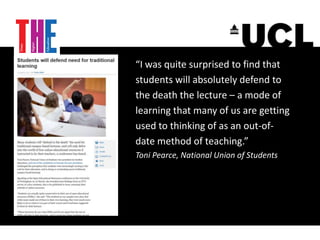
“I was quite surprised to find that
students will absolutely defend to
the death the lecture – a mode of
learning that many of us are getting
used to thinking of as an out-of-
date method of teaching.”
Toni Pearce, National Union of Students
poor educational technology
or
positive disruptive potential
Final thought
Questions and discussion
From E-Learning to Active Learning:
Transforming the Learning Environment
Carl Gombrich, Steve Rowett and Clive Young
University College London

From E-Learning to Active Learning: Transforming the Learning Environment

  • 1.
    From E-Learning toActive Learning: Transforming the Learning Environment Carl Gombrich, Steve Rowett and Clive Young University College London
  • 2.
  • 3.
    • “London’s GlobalUniversity” • Founded in 1826 as the first university in England for students of any race and religion • Now a top 20 global research university with income of £800m ($1,200m) per year • 25,000 students • Term structure; exams at end of academic year About University College London
  • 4.
    “UCL will beflexible, innovative and at the forefront of developments in the use of new technologies to support and enhance teaching and learning.” UCL Council White Paper 2010-2010 UCL strategy
  • 5.
    • Echo 360rebranded as “Lecturecast” • Installed in 62 lecture theatres • A few departments record all lectures, but most leave choice to individual lecturer Lecture recording at UCL
  • 6.
    • 5700 teachingevents recorded so far in 2012-13 • About 20% of all lectures • 200,000 student views of recordings in 2012-13 (and we haven’t yet reached the peak exam period) • Average of 10,000 views per week Some statistics
  • 7.
    Carl Gombrich Programme Director, Bachelorof Arts and Sciences (BASc)
  • 8.
  • 9.
    How flipping thelecture hall and engaging with students’ questions can improve learning and teaching Five Steps to Successful Flipping
  • 10.
    • Personal capturesoftware downloaded to desktop • Standard camera and microphone – built in options work fine • The usual Microsoft Office documents + any bespoke images etc. you wish to include • Graphics tablet (optional, but can add a lot) – I used Wacom/Bamboo Equipment
  • 11.
    • Record lecturesin advance – at home, in the office, even outside. Use Lecturecast -- Easy. • Ask students to view lecture before timetabled lecture slot. • Ask students to upload 3 questions each with timings based on the lecture – and send these questions to Moodle. • Take a poll of the most popular, say, 10, questions. • Go to the timetabled lecture slot with questions: interact, debate, solve problems with the students. What to do
  • 12.
  • 13.
    • Students caninteract with lecturers on questions that interest them/problems they want to work through. • Students/lecturers get better relationships in terms of mentoring/personal contact etc. • Submitting questions is part of formative assessment so everyone is involved in the learning. • Active learning: lecture times can be used for summative assessments: short tests, blog pieces, group work, debates. Good things about this
  • 14.
    • Maybe theequipment won’t work – I hate technology :-/ • It will take me double the time – 1 hr to record the lecture, 1hr for the interactive class • I hate working to camera • Students and colleagues will make fun of me or say inappropriate things about my style or the lecture Things you might worry about:
  • 15.
    • Maybe theequipment won’t work – I hate technology :-/ • It will take me double the time – 1 hr to record the lecture, 1hr for the interactive class • I hate working to camera • Students and colleagues will make fun of me or say inappropriate things about my style or the lecture o Don’t worry; be happy  Things you might worry about:
  • 16.
    On flipping, seee.g. • http://mast.unco.edu/programs/vodcasting/ • http://vodcasting.ning.com/forum/topics/screen-recording • http://www.ted.com/talks/salman_khan_let_s_use_video_to_reinvent_education.html • http://andrewdouch.wordpress.com/2011/11/14/flipping-the-classroom/ For a good ‘how to...’, see • http://vodcasting.ning.com/video/how-to-make-an-educational-screencast-mac • On fears of using the technology/inappropriate comments, see http://www.sonicfoundry.com/webcast/5-reasons-faculty-shouldnt-fear-lecture- capture?fullscreen=1 References
  • 17.
  • 18.
    Feedback from studentsurvey Of the lectures you watched online, how many did you also attend in person?
  • 19.
    • “Lecturecast: moreuseful than when the lecture was attended in person as you can replay sections of the lecture and perhaps did not understand the first time and pause it to take notes.” Student comment, UCL Student IT Survey, January 2013 Good uses of technology
  • 20.
    • “Lecturecast andslides online. Without these, attending lectures in October is completely useless by the time you get to summer exams, as I can't write everything fast enough at the time or remember what they said.” Student comment, UCL Student IT Survey, January 2013 Good uses of technology
  • 21.
    • “Using Lecturecast.This has really helped to go over the parts of the lecture which I didn't fully understand / didn't have time to write down so quickly. It helps me to consolidate smaller parts of the lecture, as I can pause whenever I wish to do so.” Student comment, UCL Student IT Survey, January 2013 Good uses of technology
  • 22.
    • “Lecturecast extremelyhelpful for statistics lectures - I come from a humanities background and initially struggled with subject matter. Being able to listen to each lecture more than once was hugely helpful.” Student comment, UCL Student IT Survey, January 2013 Good uses of technology
  • 23.
    • “Lecturecast togetherwith discussion forums afterwards. Promotes understanding via discussion and further question could be asked.” Student comment, UCL Student IT Survey, January 2013 Good uses of technology
  • 24.
  • 25.
    The pedagogy oflecture capture • UCL lead on European Erasmus project REC:all – recording and augmenting lectures for learning • Can lecture capture systems enable new models of learning design? • Guides published in 2013 [www.rec-all.info/] :all
  • 26.
    Opposing views? • Islecture capture the single worst example of poor educational technology use in higher education? (Mark Smithers 2011) or • The uninspired label “lecture capture,” fails to convey the disruptive potential of this tool (Janet Russell 2012)
  • 27.
    Elements of educationalvideo Image + Interactivity + Input + Integration Film strip/slide TV / VHS Desktop video Multimedia Web media Lecture capture Cloud/social video
  • 28.
    • visual demonstration,dramatisation, presenting visual evidence, emotional appeal (Hempe 1999) • authenticity and reality (Thornhill et al 2002) • "retain information better if able to visualise a lecturer saying it” (UCL student) • help orientate esp. if students unfamiliar with material or lecturer (Kukkonen 2012) Image Image
  • 29.
    Interactivity • Access –own devices, Choice – on- demand, search, Control – start, stop, pause, review (Rosenberg 2001) • Popular at UCL: “we can listen to the lectures again for better understanding of the topics!“ • Big users non-native speakers of English and the “very motivated” (Stewart, 2012)
  • 30.
    Interactivity • A transmissionmodel of learning? (Jouvelakis 2009, Smithers 2011) • Davis (2009) - students are "actively choosing specific sections of content to review rather than passively revisiting entire lectures”. • “...an active learning activity *that+ provides them with additional control and interaction with the material“
  • 31.
    Integration (and Flipping) Ideas •Prepare or motivate • Elaborate on and further explain • Recall and integrate • Lead-in to an assignment • Learning guidance and strategies • Content to encourage analysis dial-e designs (JISC)
  • 32.
    Input (from students) Roleof the student [after Chris O’Hagan+ • Sit back film and TV • Sit forward internet video • Stand up ‘social video’ – commenting and contribution – lecture capture not an archive but and active resource, open to debate. New models of assessment http://www.flickr.com/photos/daquellamanera/310344132/
  • 33.
    • Image -instruction • Interactivity - construction • Integration – conversation and context • Input - participation Analysing lecture capture
  • 34.
  • 35.
  • 36.
  • 37.
    • Lecturetools • Amore interactive lecture experience • Trialling from September 2013 • Live streaming of lectures • Valuable service for students? • Efficiencies in real estate Future developments
  • 38.
    Live streaming oflectures Graph showing demand for live streaming of lectures
  • 39.
    Live streaming oflectures If we streamed your lectures live, how many would you watch online and how many would you watch in person?
  • 40.
    • “I thinkLecturecast is a good thing - however if lectures were streamed live I think it would be inevitable that students wouldn't attend lectures and therefore not engage with the course.” Student comment, UCL Student IT Survey, January 2013 Live streaming
  • 41.
    • “The currentlevel of technology provides me with enough support without taking away from the tactile experience that comes from attending lectures and interacting with the professor and students in person.” Student comment, UCL Student IT Survey, January 2013 Live streaming
  • 42.
    • “I disagreestrongly with being able to stream lectures live - why should I bother coming in to teach if none of the students can be bothered. it should work both ways if this is to be implemented, i.e. possibility of the teaching to happen remotely too.” Staff comment, UCL Student IT Survey, January 2013 Live streaming
  • 43.
    “I was quitesurprised to find that students will absolutely defend to the death the lecture – a mode of learning that many of us are getting used to thinking of as an out-of- date method of teaching.” Toni Pearce, National Union of Students
  • 44.
    poor educational technology or positivedisruptive potential Final thought
  • 45.
  • 46.
    From E-Learning toActive Learning: Transforming the Learning Environment Carl Gombrich, Steve Rowett and Clive Young University College London