AEM6 Component Development 
Adobe Experience Manager 
@GabrielWalt, Product Manager
Specification open sourced to GitHub. 
Implementation donated to Apache Sling. 
Follow @sightlyio on Twitter. 
http://docs.adobe.com/docs/en/aem/6-0/develop/sightly.html 
Adobe Experience Manager
Project Efficiency 
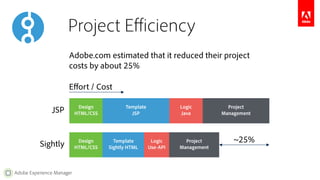
Adobe.com estimated that it reduced their project 
costs by about 25% 
JSP Project 
Adobe Experience Manager 
Design 
HTML/CSS 
Template 
JSP 
Logic 
Java 
Design 
HTML/CSS 
Template 
Sightly HTML 
Logic 
Use-API 
Project 
Management Sightly 
Management 
~25% 
Effort / Cost
Development Workflow 
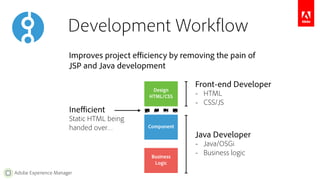
Improves project efficiency by removing the pain of 
JSP and Java development 
Adobe Experience Manager 
Design 
HTML/CSS 
Component 
Business 
Logic 
Inefficient 
Static HTML being 
handed over… 
Front-end Developer 
– HTML 
– CSS/JS 
Java Developer 
– Java/OSGi 
– Business logic
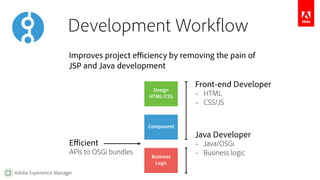
Development Workflow 
Improves project efficiency by removing the pain of 
JSP and Java development 
Adobe Experience Manager 
Design 
HTML/CSS 
Component 
Business 
Logic 
Front-end Developer 
– HTML 
– CSS/JS 
Java Developer 
– Java/OSGi 
– Business logic 
Efficient 
APIs to OSGi bundles
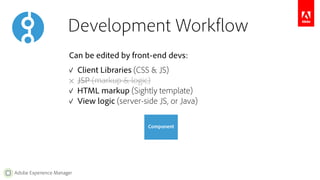
Development Workflow 
Can be edited by front-end devs: 
✓ Client Libraries (CSS & JS) 
✕ JSP (markup & logic) 
✓ HTML markup (Sightly template) 
✓ View logic (server-side JS, or Java) 
Adobe Experience Manager 
Component
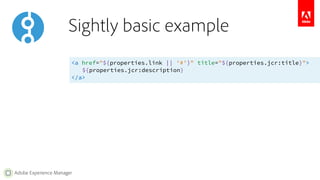
Sightly basic example 
<a href="${properties.link || '#'}" title="${properties.jcr:title}"> 
Adobe Experience Manager 
${properties.jcr:description} 
</a>
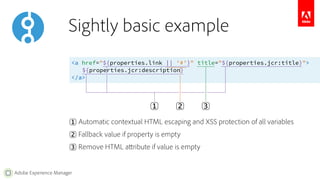
Sightly basic example 
<a href="${properties.link || '#'}" title="${properties.jcr:title}"> 
Adobe Experience Manager 
${properties.jcr:description} 
</a> 
1︎ 
2︎ 3︎ 
1︎ Automatic contextual HTML escaping and XSS protection of all variables 
2︎ Fallback value if property is empty 
3︎ Remove HTML attribute if value is empty
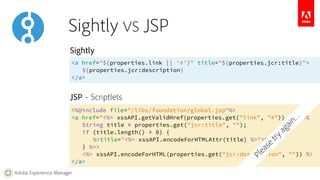
Sightly VS JSP 
Sightly 
<a href="${properties.link || '#'}" title="${properties.jcr:title}"> 
JSP – Scriptlets 
Adobe Experience Manager 
${properties.jcr:description} 
</a> 
<%@include file="/libs/foundation/global.jsp"%> 
<a href="<%= xssAPI.getValidHref(properties.get("link", "#")) %>" <% 
String title = properties.get("jcr:title", ""); 
if (title.length() > 0) { 
%>title="<%= xssAPI.encodeForHTMLAttr(title) %>"<% 
} %>> 
<%= xssAPI.encodeForHTML(properties.get("jcr:description", "")) %> 
</a> 
Please try again…
Sightly 
<a href="${properties.link || '#'}" title="${properties.jcr:title}"> 
Adobe Experience Manager 
${properties.jcr:description} 
</a> 
JSP – Expression Language & JSTL 
<%@include file="/libs/foundation/global.jsp"%> 
<a href="${!empty properties.link ? xss:href(properties.link) : '#'}" 
<c:if test="${!empty properties['jcr:title']}"> 
title="${xss:attr(properties['jcr:title'])}" 
</c:if> 
> 
${xss:text(properties['jcr:description'])} 
</a> 
Still complex 
Sightly VS JSP 
No automatic security
Sightly 
<a href="${properties.link || '#'}" title="${properties.jcr:title}"> 
Adobe Experience Manager 
${properties.jcr:description} 
</a> 
JSP – Custom Tag Libraries 
<%@include file="/libs/foundation/global.jsp"%> 
<a href="<out:href property='link' default='#'/>" 
No automatic security 
<c:if test="${!empty properties['jcr:title']}"> 
title="<out:attr property='jcr:title'/>" 
</c:if> 
> 
<out:text property='jcr:description'/> 
</a> 
Many tags within tags 
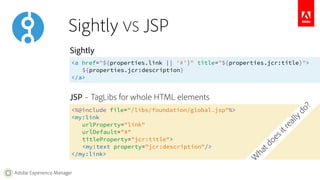
Sightly VS JSP
Sightly 
<a href="${properties.link || '#'}" title="${properties.jcr:title}"> 
Adobe Experience Manager 
${properties.jcr:description} 
</a> 
JSP – TagLibs for whole HTML elements 
<%@include file="/libs/foundation/global.jsp"%> 
<my:link 
urlProperty="link" 
urlDefault="#" 
titleProperty="jcr:title"> 
<my:text property="jcr:description"/> 
</my:link> 
What does it really do? 
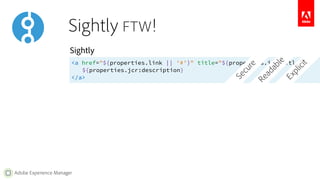
Sightly VS JSP
Sightly 
<a href="${properties.link || '#'}" title="${properties.jcr:title}"> 
Adobe Experience Manager 
${properties.jcr:description} 
</a> 
Readable 
Explicit 
Secure 
Sightly FTW!
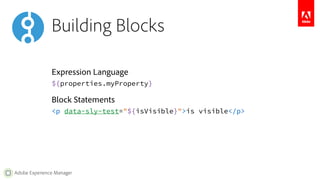
Building Blocks 
Expression Language 
${properties.myProperty} 
Block Statements 
<p data-sly-test="${isVisible}">is visible</p> 
Adobe Experience Manager
Expressions 
Literals (positive integers, booleans, strings, arrays) 
${42} 
${true} ${false} 
${'Hello World'} ${"Hello World"} 
${[1, 2, 3]} ${[42, true, 'Hello World']} 
Variables (and accessing object properties) 
${myVar} 
${properties.propName} 
${properties.jcr:title} 
${properties['my property']} 
${properties[myVar]} 
The available objects are the same ones as in JSP with global.jsp 
Adobe Experience Manager
Expression Operators 
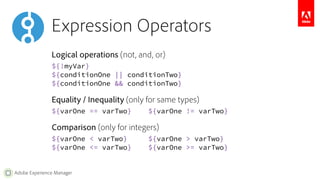
Logical operations (not, and, or) 
${!myVar} 
${conditionOne || conditionTwo} 
${conditionOne && conditionTwo} 
Equality / Inequality (only for same types) 
${varOne == varTwo} ${varOne != varTwo} 
Comparison (only for integers) 
${varOne < varTwo} ${varOne > varTwo} 
${varOne <= varTwo} ${varOne >= varTwo} 
Adobe Experience Manager
Expression Operators 
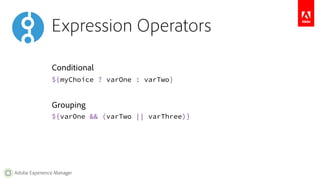
Conditional 
${myChoice ? varOne : varTwo} 
Grouping 
${varOne && (varTwo || varThree)} 
Adobe Experience Manager
Expression Options 
Options allow to manipulate the result of an expression, 
or to pass parameters to a block statement. 
Everything after the @ are comma separated options 
${myVar @ optOne, optTwo} 
Options can have a value (literals or variables) 
${myVar @ optOne='value', optTwo=[1, 2, 3]} 
Parametric expression (containing only options) 
${@ optOne='value', optTwo=[1, 2, 3]} 
Adobe Experience Manager
Expression Options 
String formatting 
${'Page {0} of {1}' @ format=[current, total]} 
Internationalization 
${'Page' @ i18n} 
${'Page' @ i18n, hint='Translation Hint'} 
${'Page' @ i18n, locale='en-US'} 
Array Join 
${['one', 'two'] @ join='; '} 
Adobe Experience Manager
Test Statement 
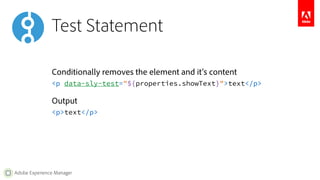
Conditionally removes the element and it's content 
<p data-sly-test="${properties.showText}">text</p> 
Output 
<p>text</p> 
Adobe Experience Manager
List Statement 
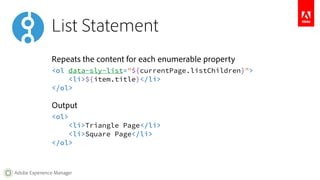
Repeats the content for each enumerable property 
<ol data-sly-list="${currentPage.listChildren}"> 
<li>${item.title}</li> 
</ol> 
Output 
<ol> 
<li>Triangle Page</li> 
<li>Square Page</li> 
</ol> 
Adobe Experience Manager
Include Statement 
Includes the rendering of the indicated template (Sightly, JSP, ESP, etc.) 
<section data-sly-include="path/to/template.html"></section> 
Output 
<section><!-- Result of the rendered resource --></section> 
Adobe Experience Manager
Resource Statement 
Includes the result of the indicated resource 
<article data-sly-resource="path/to/resource"></article> 
Output 
<article><!-- Result of the rendered resource --></article> 
Adobe Experience Manager
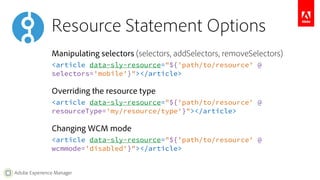
Resource Statement Options 
Manipulating selectors (selectors, addSelectors, removeSelectors) 
<article data-sly-resource="${'path/to/resource' @ 
selectors='mobile'}"></article> 
Overriding the resource type 
<article data-sly-resource="${'path/to/resource' @ 
resourceType='my/resource/type'}"></article> 
Changing WCM mode 
<article data-sly-resource="${'path/to/resource' @ 
wcmmode='disabled'}"></article> 
Adobe Experience Manager
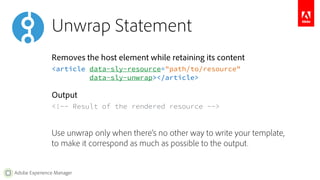
Unwrap Statement 
Removes the host element while retaining its content 
<article data-sly-resource="path/to/resource" 
Adobe Experience Manager 
data-sly-unwrap></article> 
Output 
<!-- Result of the rendered resource --> 
Use unwrap only when there’s no other way to write your template, 
to make it correspond as much as possible to the output.
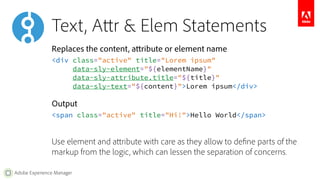
Text, Attr & Elem Statements 
Replaces the content, attribute or element name 
<div class="active" title="Lorem ipsum" 
Adobe Experience Manager 
data-sly-element="${elementName}" 
data-sly-attribute.title="${title}" 
data-sly-text="${content}">Lorem ipsum</div> 
Output 
<span class="active" title="Hi!">Hello World</span> 
Use element and attribute with care as they allow to define parts of the 
markup from the logic, which can lessen the separation of concerns.
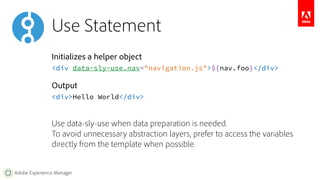
Use Statement 
Initializes a helper object 
<div data-sly-use.nav="navigation.js">${nav.foo}</div> 
Output 
<div>Hello World</div> 
Use data-sly-use when data preparation is needed. 
To avoid unnecessary abstraction layers, prefer to access the variables 
directly from the template when possible. 
Adobe Experience Manager
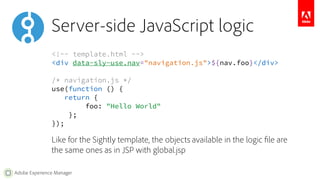
Server-side JavaScript logic 
<!-- template.html --> 
<div data-sly-use.nav="navigation.js">${nav.foo}</div> 
/* navigation.js */ 
use(function () { 
return { 
Adobe Experience Manager 
foo: "Hello World" 
}; 
}); 
Like for the Sightly template, the objects available in the logic file are 
the same ones as in JSP with global.jsp
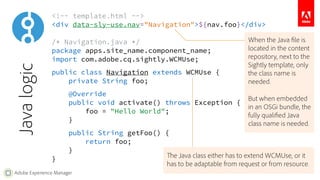
<!-- template.html --> 
<div data-sly-use.nav="Navigation">${nav.foo}</div> 
/* Navigation.java */ 
package apps.site_name.component_name; 
import com.adobe.cq.sightly.WCMUse; 
public class Navigation extends WCMUse { 
private String foo; 
@Override 
public void activate() throws Exception { 
Adobe Experience Manager 
foo = "Hello World"; 
} 
public String getFoo() { 
return foo; 
} 
} 
Java logic 
When the Java file is 
located in the content 
repository, next to the 
Sightly template, only 
the class name is 
needed. 
But when embedded 
in an OSGi bundle, the 
fully qualified Java 
class name is needed. 
The Java class either has to extend WCMUse, or it 
has to be adaptable from request or from resource.
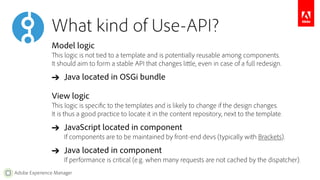
What kind of Use-API? 
Model logic 
This logic is not tied to a template and is potentially reusable among components. 
It should aim to form a stable API that changes little, even in case of a full redesign. 
➔ Java located in OSGi bundle 
View logic 
This logic is specific to the templates and is likely to change if the design changes. 
It is thus a good practice to locate it in the content repository, next to the template. 
➔ JavaScript located in component 
If components are to be maintained by front-end devs (typically with Brackets). 
➔ Java located in component 
If performance is critical (e.g. when many requests are not cached by the dispatcher). 
Adobe Experience Manager
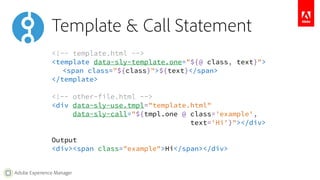
Template & Call Statement 
<!-- template.html --> 
<template data-sly-template.one="${@ class, text}"> 
<span class="${class}">${text}</span> 
</template> 
<!-- other-file.html --> 
<div data-sly-use.tmpl="template.html" 
Adobe Experience Manager 
data-sly-call="${tmpl.one @ class='example', 
text='Hi'}"></div> 
Output 
<div><span class="example">Hi</span></div>
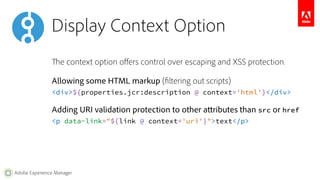
Display Context Option 
The context option offers control over escaping and XSS protection. 
Allowing some HTML markup (filtering out scripts) 
<div>${properties.jcr:description @ context='html'}</div> 
Adding URI validation protection to other attributes than src or href 
<p data-link="${link @ context='uri'}">text</p> 
Adobe Experience Manager
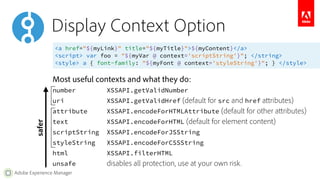
Display Context Option 
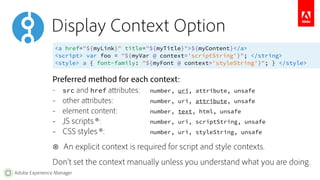
<a href="${myLink}" title="${myTitle}">${myContent}</a> 
<script> var foo = "${myVar @ context='scriptString'}"; </string> 
<style> a { font-family: "${myFont @ context='styleString'}"; } </style> 
Most useful contexts and what they do: 
number XSSAPI.getValidNumber 
uri XSSAPI.getValidHref (default for src and href attributes) 
attribute XSSAPI.encodeForHTMLAttribute (default for other attributes) 
text XSSAPI.encodeForHTML (default for element content) 
scriptString XSSAPI.encodeForJSString 
styleString XSSAPI.encodeForCSSString 
html XSSAPI.filterHTML 
unsafe disables all protection, use at your own risk. 
safer 
Adobe Experience Manager
Display Context Option 
<a href="${myLink}" title="${myTitle}">${myContent}</a> 
<script> var foo = "${myVar @ context='scriptString'}"; </string> 
<style> a { font-family: "${myFont @ context='styleString'}"; } </style> 
Preferred method for each context: 
– src and href attributes: number, uri, attribute, unsafe 
– other attributes: number, uri, attribute, unsafe 
– element content: number, text, html, unsafe 
– JS scripts ⊛: number, uri, scriptString, unsafe 
– CSS styles ⊛: number, uri, styleString, unsafe 
⊛ An explicit context is required for script and style contexts. 
Don’t set the context manually unless you understand what you are doing. 
Adobe Experience Manager
Adobe Experience Manager 
Sightly FAQ 
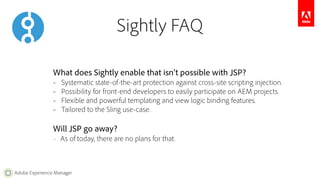
What does Sightly enable that isn’t possible with JSP? 
– Systematic state-of-the-art protection against cross-site scripting injection. 
– Possibility for front-end developers to easily participate on AEM projects. 
– Flexible and powerful templating and view logic binding features. 
– Tailored to the Sling use-case. 
Will JSP go away? 
– As of today, there are no plans for that.
IDE & Developer Mode 
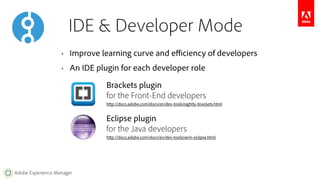
• Improve learning curve and efficiency of developers 
• An IDE plugin for each developer role 
Adobe Experience Manager 
Brackets plugin 
for the Front-End developers 
http://docs.adobe.com/docs/en/dev-tools/sightly-brackets.html 
Eclipse plugin 
for the Java developers 
http://docs.adobe.com/docs/en/dev-tools/aem-eclipse.html
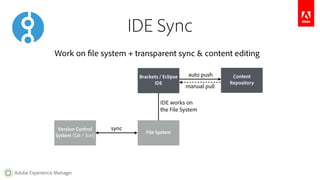
Work on file system + transparent sync & content editing 
Adobe Experience Manager 
IDE Sync 
Version Control 
System (Git / Svn) File System 
Content 
Repository 
sync 
manual pull 
Brackets / Eclipse 
IDE 
auto push 
IDE works on 
the File System
Adobe Experience Manager 
Resources 
Sightly 
– Documentation 
– Specification 
– Sightly AEM Page Example (requires instance on localhost:4502) 
– TodoMVC Example 
Tools 
– Live Sightly execution environment 
– Sightly Brackets extension 
– AEM Developer Tools for Eclipse 
– AEM Developer Mode
EVOLVE'14 | Enhance | Gabriel Walt | Sightly Component Development

EVOLVE'14 | Enhance | Gabriel Walt | Sightly Component Development

  • 1.
    AEM6 Component Development Adobe Experience Manager @GabrielWalt, Product Manager
  • 2.
    Specification open sourcedto GitHub. Implementation donated to Apache Sling. Follow @sightlyio on Twitter. http://docs.adobe.com/docs/en/aem/6-0/develop/sightly.html Adobe Experience Manager
  • 3.
    Project Efficiency Adobe.comestimated that it reduced their project costs by about 25% JSP Project Adobe Experience Manager Design HTML/CSS Template JSP Logic Java Design HTML/CSS Template Sightly HTML Logic Use-API Project Management Sightly Management ~25% Effort / Cost
  • 4.
    Development Workflow Improvesproject efficiency by removing the pain of JSP and Java development Adobe Experience Manager Design HTML/CSS Component Business Logic Inefficient Static HTML being handed over… Front-end Developer – HTML – CSS/JS Java Developer – Java/OSGi – Business logic
  • 5.
    Development Workflow Improvesproject efficiency by removing the pain of JSP and Java development Adobe Experience Manager Design HTML/CSS Component Business Logic Front-end Developer – HTML – CSS/JS Java Developer – Java/OSGi – Business logic Efficient APIs to OSGi bundles
  • 6.
    Development Workflow Canbe edited by front-end devs: ✓ Client Libraries (CSS & JS) ✕ JSP (markup & logic) ✓ HTML markup (Sightly template) ✓ View logic (server-side JS, or Java) Adobe Experience Manager Component
  • 7.
    Sightly basic example <a href="${properties.link || '#'}" title="${properties.jcr:title}"> Adobe Experience Manager ${properties.jcr:description} </a>
  • 8.
    Sightly basic example <a href="${properties.link || '#'}" title="${properties.jcr:title}"> Adobe Experience Manager ${properties.jcr:description} </a> 1︎ 2︎ 3︎ 1︎ Automatic contextual HTML escaping and XSS protection of all variables 2︎ Fallback value if property is empty 3︎ Remove HTML attribute if value is empty
  • 9.
    Sightly VS JSP Sightly <a href="${properties.link || '#'}" title="${properties.jcr:title}"> JSP – Scriptlets Adobe Experience Manager ${properties.jcr:description} </a> <%@include file="/libs/foundation/global.jsp"%> <a href="<%= xssAPI.getValidHref(properties.get("link", "#")) %>" <% String title = properties.get("jcr:title", ""); if (title.length() > 0) { %>title="<%= xssAPI.encodeForHTMLAttr(title) %>"<% } %>> <%= xssAPI.encodeForHTML(properties.get("jcr:description", "")) %> </a> Please try again…
  • 10.
    Sightly <a href="${properties.link|| '#'}" title="${properties.jcr:title}"> Adobe Experience Manager ${properties.jcr:description} </a> JSP – Expression Language & JSTL <%@include file="/libs/foundation/global.jsp"%> <a href="${!empty properties.link ? xss:href(properties.link) : '#'}" <c:if test="${!empty properties['jcr:title']}"> title="${xss:attr(properties['jcr:title'])}" </c:if> > ${xss:text(properties['jcr:description'])} </a> Still complex Sightly VS JSP No automatic security
  • 11.
    Sightly <a href="${properties.link|| '#'}" title="${properties.jcr:title}"> Adobe Experience Manager ${properties.jcr:description} </a> JSP – Custom Tag Libraries <%@include file="/libs/foundation/global.jsp"%> <a href="<out:href property='link' default='#'/>" No automatic security <c:if test="${!empty properties['jcr:title']}"> title="<out:attr property='jcr:title'/>" </c:if> > <out:text property='jcr:description'/> </a> Many tags within tags Sightly VS JSP
  • 12.
    Sightly <a href="${properties.link|| '#'}" title="${properties.jcr:title}"> Adobe Experience Manager ${properties.jcr:description} </a> JSP – TagLibs for whole HTML elements <%@include file="/libs/foundation/global.jsp"%> <my:link urlProperty="link" urlDefault="#" titleProperty="jcr:title"> <my:text property="jcr:description"/> </my:link> What does it really do? Sightly VS JSP
  • 13.
    Sightly <a href="${properties.link|| '#'}" title="${properties.jcr:title}"> Adobe Experience Manager ${properties.jcr:description} </a> Readable Explicit Secure Sightly FTW!
  • 14.
    Building Blocks ExpressionLanguage ${properties.myProperty} Block Statements <p data-sly-test="${isVisible}">is visible</p> Adobe Experience Manager
  • 15.
    Expressions Literals (positiveintegers, booleans, strings, arrays) ${42} ${true} ${false} ${'Hello World'} ${"Hello World"} ${[1, 2, 3]} ${[42, true, 'Hello World']} Variables (and accessing object properties) ${myVar} ${properties.propName} ${properties.jcr:title} ${properties['my property']} ${properties[myVar]} The available objects are the same ones as in JSP with global.jsp Adobe Experience Manager
  • 16.
    Expression Operators Logicaloperations (not, and, or) ${!myVar} ${conditionOne || conditionTwo} ${conditionOne && conditionTwo} Equality / Inequality (only for same types) ${varOne == varTwo} ${varOne != varTwo} Comparison (only for integers) ${varOne < varTwo} ${varOne > varTwo} ${varOne <= varTwo} ${varOne >= varTwo} Adobe Experience Manager
  • 17.
    Expression Operators Conditional ${myChoice ? varOne : varTwo} Grouping ${varOne && (varTwo || varThree)} Adobe Experience Manager
  • 18.
    Expression Options Optionsallow to manipulate the result of an expression, or to pass parameters to a block statement. Everything after the @ are comma separated options ${myVar @ optOne, optTwo} Options can have a value (literals or variables) ${myVar @ optOne='value', optTwo=[1, 2, 3]} Parametric expression (containing only options) ${@ optOne='value', optTwo=[1, 2, 3]} Adobe Experience Manager
  • 19.
    Expression Options Stringformatting ${'Page {0} of {1}' @ format=[current, total]} Internationalization ${'Page' @ i18n} ${'Page' @ i18n, hint='Translation Hint'} ${'Page' @ i18n, locale='en-US'} Array Join ${['one', 'two'] @ join='; '} Adobe Experience Manager
  • 20.
    Test Statement Conditionallyremoves the element and it's content <p data-sly-test="${properties.showText}">text</p> Output <p>text</p> Adobe Experience Manager
  • 21.
    List Statement Repeatsthe content for each enumerable property <ol data-sly-list="${currentPage.listChildren}"> <li>${item.title}</li> </ol> Output <ol> <li>Triangle Page</li> <li>Square Page</li> </ol> Adobe Experience Manager
  • 22.
    Include Statement Includesthe rendering of the indicated template (Sightly, JSP, ESP, etc.) <section data-sly-include="path/to/template.html"></section> Output <section><!-- Result of the rendered resource --></section> Adobe Experience Manager
  • 23.
    Resource Statement Includesthe result of the indicated resource <article data-sly-resource="path/to/resource"></article> Output <article><!-- Result of the rendered resource --></article> Adobe Experience Manager
  • 24.
    Resource Statement Options Manipulating selectors (selectors, addSelectors, removeSelectors) <article data-sly-resource="${'path/to/resource' @ selectors='mobile'}"></article> Overriding the resource type <article data-sly-resource="${'path/to/resource' @ resourceType='my/resource/type'}"></article> Changing WCM mode <article data-sly-resource="${'path/to/resource' @ wcmmode='disabled'}"></article> Adobe Experience Manager
  • 25.
    Unwrap Statement Removesthe host element while retaining its content <article data-sly-resource="path/to/resource" Adobe Experience Manager data-sly-unwrap></article> Output <!-- Result of the rendered resource --> Use unwrap only when there’s no other way to write your template, to make it correspond as much as possible to the output.
  • 26.
    Text, Attr &Elem Statements Replaces the content, attribute or element name <div class="active" title="Lorem ipsum" Adobe Experience Manager data-sly-element="${elementName}" data-sly-attribute.title="${title}" data-sly-text="${content}">Lorem ipsum</div> Output <span class="active" title="Hi!">Hello World</span> Use element and attribute with care as they allow to define parts of the markup from the logic, which can lessen the separation of concerns.
  • 27.
    Use Statement Initializesa helper object <div data-sly-use.nav="navigation.js">${nav.foo}</div> Output <div>Hello World</div> Use data-sly-use when data preparation is needed. To avoid unnecessary abstraction layers, prefer to access the variables directly from the template when possible. Adobe Experience Manager
  • 28.
    Server-side JavaScript logic <!-- template.html --> <div data-sly-use.nav="navigation.js">${nav.foo}</div> /* navigation.js */ use(function () { return { Adobe Experience Manager foo: "Hello World" }; }); Like for the Sightly template, the objects available in the logic file are the same ones as in JSP with global.jsp
  • 29.
    <!-- template.html --> <div data-sly-use.nav="Navigation">${nav.foo}</div> /* Navigation.java */ package apps.site_name.component_name; import com.adobe.cq.sightly.WCMUse; public class Navigation extends WCMUse { private String foo; @Override public void activate() throws Exception { Adobe Experience Manager foo = "Hello World"; } public String getFoo() { return foo; } } Java logic When the Java file is located in the content repository, next to the Sightly template, only the class name is needed. But when embedded in an OSGi bundle, the fully qualified Java class name is needed. The Java class either has to extend WCMUse, or it has to be adaptable from request or from resource.
  • 30.
    What kind ofUse-API? Model logic This logic is not tied to a template and is potentially reusable among components. It should aim to form a stable API that changes little, even in case of a full redesign. ➔ Java located in OSGi bundle View logic This logic is specific to the templates and is likely to change if the design changes. It is thus a good practice to locate it in the content repository, next to the template. ➔ JavaScript located in component If components are to be maintained by front-end devs (typically with Brackets). ➔ Java located in component If performance is critical (e.g. when many requests are not cached by the dispatcher). Adobe Experience Manager
  • 31.
    Template & CallStatement <!-- template.html --> <template data-sly-template.one="${@ class, text}"> <span class="${class}">${text}</span> </template> <!-- other-file.html --> <div data-sly-use.tmpl="template.html" Adobe Experience Manager data-sly-call="${tmpl.one @ class='example', text='Hi'}"></div> Output <div><span class="example">Hi</span></div>
  • 32.
    Display Context Option The context option offers control over escaping and XSS protection. Allowing some HTML markup (filtering out scripts) <div>${properties.jcr:description @ context='html'}</div> Adding URI validation protection to other attributes than src or href <p data-link="${link @ context='uri'}">text</p> Adobe Experience Manager
  • 33.
    Display Context Option <a href="${myLink}" title="${myTitle}">${myContent}</a> <script> var foo = "${myVar @ context='scriptString'}"; </string> <style> a { font-family: "${myFont @ context='styleString'}"; } </style> Most useful contexts and what they do: number XSSAPI.getValidNumber uri XSSAPI.getValidHref (default for src and href attributes) attribute XSSAPI.encodeForHTMLAttribute (default for other attributes) text XSSAPI.encodeForHTML (default for element content) scriptString XSSAPI.encodeForJSString styleString XSSAPI.encodeForCSSString html XSSAPI.filterHTML unsafe disables all protection, use at your own risk. safer Adobe Experience Manager
  • 34.
    Display Context Option <a href="${myLink}" title="${myTitle}">${myContent}</a> <script> var foo = "${myVar @ context='scriptString'}"; </string> <style> a { font-family: "${myFont @ context='styleString'}"; } </style> Preferred method for each context: – src and href attributes: number, uri, attribute, unsafe – other attributes: number, uri, attribute, unsafe – element content: number, text, html, unsafe – JS scripts ⊛: number, uri, scriptString, unsafe – CSS styles ⊛: number, uri, styleString, unsafe ⊛ An explicit context is required for script and style contexts. Don’t set the context manually unless you understand what you are doing. Adobe Experience Manager
  • 35.
    Adobe Experience Manager Sightly FAQ What does Sightly enable that isn’t possible with JSP? – Systematic state-of-the-art protection against cross-site scripting injection. – Possibility for front-end developers to easily participate on AEM projects. – Flexible and powerful templating and view logic binding features. – Tailored to the Sling use-case. Will JSP go away? – As of today, there are no plans for that.
  • 36.
    IDE & DeveloperMode • Improve learning curve and efficiency of developers • An IDE plugin for each developer role Adobe Experience Manager Brackets plugin for the Front-End developers http://docs.adobe.com/docs/en/dev-tools/sightly-brackets.html Eclipse plugin for the Java developers http://docs.adobe.com/docs/en/dev-tools/aem-eclipse.html
  • 37.
    Work on filesystem + transparent sync & content editing Adobe Experience Manager IDE Sync Version Control System (Git / Svn) File System Content Repository sync manual pull Brackets / Eclipse IDE auto push IDE works on the File System
  • 38.
    Adobe Experience Manager Resources Sightly – Documentation – Specification – Sightly AEM Page Example (requires instance on localhost:4502) – TodoMVC Example Tools – Live Sightly execution environment – Sightly Brackets extension – AEM Developer Tools for Eclipse – AEM Developer Mode