Adobe Experience Manager Sites – Core Components
Gabriel Walt, Product Management, Adobe
© 2018 Adobe. All Rights Reserved. Adobe Confidential.
Launched on November 20, 2018
4
Core Components 2.2.2
§ Includes 19 components
§ Provides enhancements for the recently
released Tabs and Carousel components
§ Minimum requirements: 6.3.3.0 & 6.4.2.0
© 2018 Adobe. All Rights Reserved. Adobe Confidential.
Core Components
AEM Sites components that cover the most common web content needs.
Core Components are
§ Pre-Configurable Template policies can define how the page authors can use them.
§ Versatile Authors can create most kind of content with them.
§ Easy to Use Authors can efficiently create and manage content with them.
§ Production Ready Useable as-is, because they are robust, well tested and perform well.
§ Accessible They comply WCAG 2.0 standard, provide ARIA labels and support keyboard navigation.
§ Easy to Style The components implement the Style System and the markup follows BEM CSS naming.
§ SEO Friendly The HTML output is semantic and provides schema.org microdata annotations.
§ PWA/SPA/App Ready The streamlined JSON output of the Sling Models can also be used for client-side rendering.
§ Extensible To also cover custom needs but without starting from scratch, everything can be extended.
§ Open Sourced If something is not as it should, contribute improvements on GitHub (Apache License).
§ Versioned We won’t break your site when improving things that might impact you.
3
© 2018 Adobe. All Rights Reserved. Adobe Confidential.
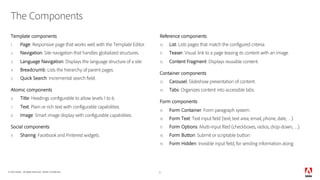
The Components
Template components
1. Page: Responsive page that works well with the Template Editor.
2. Navigation: Site navigation that handles globalized structures.
3. Language Navigation: Displays the language structure of a site.
4. Breadcrumb: Lists the hierarchy of parent pages.
5. Quick Search: Incremental search field.
Atomic components
6. Title: Headings configurable to allow levels 1 to 6.
7. Text: Plain or rich text with configurable capabilities.
8. Image: Smart image display with configurable capabilities.
Social components
9. Sharing: Facebook and Pinterest widgets.
Reference components
10. List: Lists pages that match the configured criteria.
11. Teaser: Visual link to a page teasing its content with an image.
12. Content Fragment: Displays reusable content.
Container components
13. Carousel: Slideshow presentation of content.
14. Tabs: Organizes content into accessible tabs.
Form components
15. Form Container: Form paragraph system.
16. Form Text: Text input field (text, text area, email, phone, date, …).
17. Form Options: Multi-input filed (checkboxes, radios, drop-down, …).
18. Form Button: Submit or scriptable button.
19. Form Hidden: Invisible input field, for sending information along.
5
© 2018 Adobe. All Rights Reserved. Adobe Confidential.
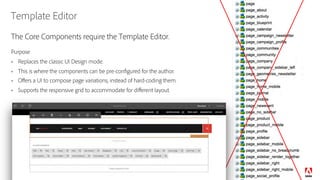
Template Editor
The Core Components require the Template Editor.
Purpose
§ Replaces the classic UI Design mode.
§ This is where the components can be pre-configured for the author.
§ Offers a UI to compose page variations, instead of hard-coding them.
§ Supports the responsive grid to accommodate for different layout.
6
© 2018 Adobe. All Rights Reserved. Adobe Confidential.
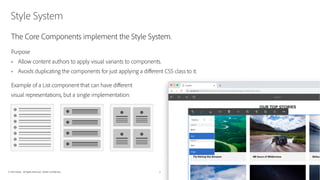
Style System
The Core Components implement the Style System.
Purpose
§ Allow content authors to apply visual variants to components.
§ Avoids duplicating the components for just applying a different CSS class to it.
Example of a List component that can have different
visual representations, but a single implementation:
7
© 2018 Adobe. All Rights Reserved. Adobe Confidential.
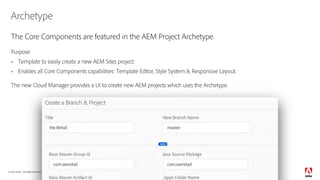
Archetype
The Core Components are featured in the AEM Project Archetype.
Purpose
§ Template to easily create a new AEM Sites project.
§ Enables all Core Components capabilities: Template Editor, Style System & Responsive Layout.
The new Cloud Manager provides a UI to create new AEM projects which uses the Archetype.
8
© 2018 Adobe. All Rights Reserved. Adobe Confidential.
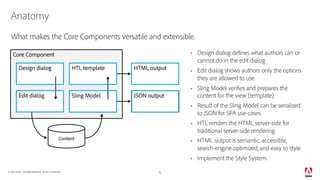
Anatomy
§ Design dialog defines what authors can or
cannot do in the edit dialog.
§ Edit dialog shows authors only the options
they are allowed to use.
§ Sling Model verifies and prepares the
content for the view (template).
§ Result of the Sling Model can be serialized
to JSON for SPA use-cases.
§ HTL renders the HTML server-side for
traditional server-side rendering.
§ HTML output is semantic, accessible,
search-engine optimized, and easy to style.
§ Implement the Style System.
10
Content
Core Component
Design dialog HTL template
Edit dialog Sling Model
HTML output
JSON output
What makes the Core Components versatile and extensible.
© 2018 Adobe. All Rights Reserved. Adobe Confidential. 11
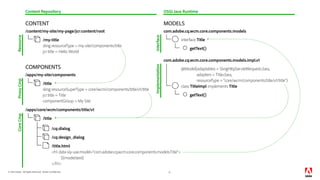
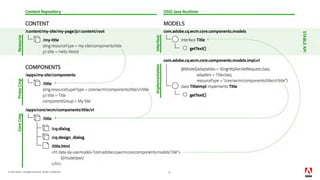
/my-title
sling:resourceType = my-site/components/title
CONTENT MODELS
com.adobe.cq.wcm.core.components.models
interface Title
getText()
com.adobe.cq.wcm.core.components.models.impl.v1
getText()
class TitleImpl implements Title
@Model(adaptables = SlingHttpServletRequest.class,
adapters = Title.class,
resourceType = "core/wcm/components/title/v1/title")
sling:resourceSuperType = core/wcm/components/title/v1/title
jcr:title = Title
componentGroup = My Site
jcr:title = Hello World
/content/my-site/my-page/jcr:content/root
Content Repository
Resource
OSGi Java Runtime
COMPONENTS
/title
/apps/my-site/components
<h1 data-sly-use.model="com.adobe.cq.wcm.core.components.models.Title">
${model.text}
</h1>
/cq:design_dialog
/title.html
/cq:dialog
/title
/apps/core/wcm/components/title/v1
InterfaceImplementation
ProxyCmpCoreCmp
© 2018 Adobe. All Rights Reserved. Adobe Confidential. 12
© 2018 Adobe. All Rights Reserved. Adobe Confidential. 13
© 2018 Adobe. All Rights Reserved. Adobe Confidential.
Delegation Pattern for Sling Models
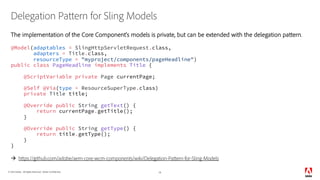
The implementation of the Core Component’s models is private, but can be extended with the delegation pattern.
@Model(adaptables = SlingHttpServletRequest.class,
adapters = Title.class,
resourceType = "myproject/components/pageHeadline")
public class PageHeadline implements Title {
@ScriptVariable private Page currentPage;
@Self @Via(type = ResourceSuperType.class)
private Title title;
@Override public String getText() {
return currentPage.getTitle();
}
@Override public String getType() {
return title.getType();
}
}
à https://github.com/adobe/aem-core-wcm-components/wiki/Delegation-Pattern-for-Sling-Models
14
© 2018 Adobe. All Rights Reserved. Adobe Confidential.
Versioning
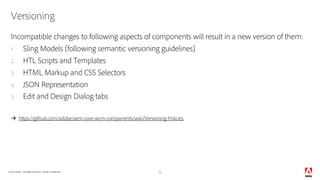
Incompatible changes to following aspects of components will result in a new version of them:
1. Sling Models (following semantic versioning guidelines)
2. HTL Scripts and Templates
3. HTML Markup and CSS Selectors
4. JSON Representation
5. Edit and Design Dialog tabs
à https://github.com/adobe/aem-core-wcm-components/wiki/Versioning-Policies
15
© 2018 Adobe. All Rights Reserved. Adobe Confidential.
Conclusion
The Core Components have a ton of features, don’t waste your time by re-implementing them.
They are versatile and extensible; leverage them and contribute in case anything is missing.
à github.com/adobe/aem-core-wcm-components
Get started with the “WKND” Tutorial à bit.ly/aem-wknd
Do you want us to reach out to you for feedback? à bit.ly/aem-core-cmp-reg
March 26–28, 2019: Please join us at Summit, we’ll present several sessions and labs about
related topics like “Developing Sites” and “Modernizing an existing implementation”.
16© 2018 Adobe. All Rights Reserved. Adobe Confidential.
Adobe Experience Manager Core Components

Adobe Experience Manager Core Components

  • 1.
    Adobe Experience ManagerSites – Core Components Gabriel Walt, Product Management, Adobe
  • 2.
    © 2018 Adobe.All Rights Reserved. Adobe Confidential. Launched on November 20, 2018 4 Core Components 2.2.2 § Includes 19 components § Provides enhancements for the recently released Tabs and Carousel components § Minimum requirements: 6.3.3.0 & 6.4.2.0 © 2018 Adobe. All Rights Reserved. Adobe Confidential.
  • 3.
    © 2018 Adobe.All Rights Reserved. Adobe Confidential. Core Components AEM Sites components that cover the most common web content needs. Core Components are § Pre-Configurable Template policies can define how the page authors can use them. § Versatile Authors can create most kind of content with them. § Easy to Use Authors can efficiently create and manage content with them. § Production Ready Useable as-is, because they are robust, well tested and perform well. § Accessible They comply WCAG 2.0 standard, provide ARIA labels and support keyboard navigation. § Easy to Style The components implement the Style System and the markup follows BEM CSS naming. § SEO Friendly The HTML output is semantic and provides schema.org microdata annotations. § PWA/SPA/App Ready The streamlined JSON output of the Sling Models can also be used for client-side rendering. § Extensible To also cover custom needs but without starting from scratch, everything can be extended. § Open Sourced If something is not as it should, contribute improvements on GitHub (Apache License). § Versioned We won’t break your site when improving things that might impact you. 3
  • 4.
    © 2018 Adobe.All Rights Reserved. Adobe Confidential. The Components Template components 1. Page: Responsive page that works well with the Template Editor. 2. Navigation: Site navigation that handles globalized structures. 3. Language Navigation: Displays the language structure of a site. 4. Breadcrumb: Lists the hierarchy of parent pages. 5. Quick Search: Incremental search field. Atomic components 6. Title: Headings configurable to allow levels 1 to 6. 7. Text: Plain or rich text with configurable capabilities. 8. Image: Smart image display with configurable capabilities. Social components 9. Sharing: Facebook and Pinterest widgets. Reference components 10. List: Lists pages that match the configured criteria. 11. Teaser: Visual link to a page teasing its content with an image. 12. Content Fragment: Displays reusable content. Container components 13. Carousel: Slideshow presentation of content. 14. Tabs: Organizes content into accessible tabs. Form components 15. Form Container: Form paragraph system. 16. Form Text: Text input field (text, text area, email, phone, date, …). 17. Form Options: Multi-input filed (checkboxes, radios, drop-down, …). 18. Form Button: Submit or scriptable button. 19. Form Hidden: Invisible input field, for sending information along. 5
  • 5.
    © 2018 Adobe.All Rights Reserved. Adobe Confidential. Template Editor The Core Components require the Template Editor. Purpose § Replaces the classic UI Design mode. § This is where the components can be pre-configured for the author. § Offers a UI to compose page variations, instead of hard-coding them. § Supports the responsive grid to accommodate for different layout. 6
  • 6.
    © 2018 Adobe.All Rights Reserved. Adobe Confidential. Style System The Core Components implement the Style System. Purpose § Allow content authors to apply visual variants to components. § Avoids duplicating the components for just applying a different CSS class to it. Example of a List component that can have different visual representations, but a single implementation: 7
  • 7.
    © 2018 Adobe.All Rights Reserved. Adobe Confidential. Archetype The Core Components are featured in the AEM Project Archetype. Purpose § Template to easily create a new AEM Sites project. § Enables all Core Components capabilities: Template Editor, Style System & Responsive Layout. The new Cloud Manager provides a UI to create new AEM projects which uses the Archetype. 8
  • 8.
    © 2018 Adobe.All Rights Reserved. Adobe Confidential. Anatomy § Design dialog defines what authors can or cannot do in the edit dialog. § Edit dialog shows authors only the options they are allowed to use. § Sling Model verifies and prepares the content for the view (template). § Result of the Sling Model can be serialized to JSON for SPA use-cases. § HTL renders the HTML server-side for traditional server-side rendering. § HTML output is semantic, accessible, search-engine optimized, and easy to style. § Implement the Style System. 10 Content Core Component Design dialog HTL template Edit dialog Sling Model HTML output JSON output What makes the Core Components versatile and extensible.
  • 9.
    © 2018 Adobe.All Rights Reserved. Adobe Confidential. 11 /my-title sling:resourceType = my-site/components/title CONTENT MODELS com.adobe.cq.wcm.core.components.models interface Title getText() com.adobe.cq.wcm.core.components.models.impl.v1 getText() class TitleImpl implements Title @Model(adaptables = SlingHttpServletRequest.class, adapters = Title.class, resourceType = "core/wcm/components/title/v1/title") sling:resourceSuperType = core/wcm/components/title/v1/title jcr:title = Title componentGroup = My Site jcr:title = Hello World /content/my-site/my-page/jcr:content/root Content Repository Resource OSGi Java Runtime COMPONENTS /title /apps/my-site/components <h1 data-sly-use.model="com.adobe.cq.wcm.core.components.models.Title"> ${model.text} </h1> /cq:design_dialog /title.html /cq:dialog /title /apps/core/wcm/components/title/v1 InterfaceImplementation ProxyCmpCoreCmp
  • 10.
    © 2018 Adobe.All Rights Reserved. Adobe Confidential. 12
  • 11.
    © 2018 Adobe.All Rights Reserved. Adobe Confidential. 13
  • 12.
    © 2018 Adobe.All Rights Reserved. Adobe Confidential. Delegation Pattern for Sling Models The implementation of the Core Component’s models is private, but can be extended with the delegation pattern. @Model(adaptables = SlingHttpServletRequest.class, adapters = Title.class, resourceType = "myproject/components/pageHeadline") public class PageHeadline implements Title { @ScriptVariable private Page currentPage; @Self @Via(type = ResourceSuperType.class) private Title title; @Override public String getText() { return currentPage.getTitle(); } @Override public String getType() { return title.getType(); } } à https://github.com/adobe/aem-core-wcm-components/wiki/Delegation-Pattern-for-Sling-Models 14
  • 13.
    © 2018 Adobe.All Rights Reserved. Adobe Confidential. Versioning Incompatible changes to following aspects of components will result in a new version of them: 1. Sling Models (following semantic versioning guidelines) 2. HTL Scripts and Templates 3. HTML Markup and CSS Selectors 4. JSON Representation 5. Edit and Design Dialog tabs à https://github.com/adobe/aem-core-wcm-components/wiki/Versioning-Policies 15
  • 14.
    © 2018 Adobe.All Rights Reserved. Adobe Confidential. Conclusion The Core Components have a ton of features, don’t waste your time by re-implementing them. They are versatile and extensible; leverage them and contribute in case anything is missing. à github.com/adobe/aem-core-wcm-components Get started with the “WKND” Tutorial à bit.ly/aem-wknd Do you want us to reach out to you for feedback? à bit.ly/aem-core-cmp-reg March 26–28, 2019: Please join us at Summit, we’ll present several sessions and labs about related topics like “Developing Sites” and “Modernizing an existing implementation”. 16© 2018 Adobe. All Rights Reserved. Adobe Confidential.