Force.com Webinar:
                                       Advanced Visualforce

                                       Eric Wilson
                                       Director, Product Management
                                       UI Platforms


Join the conversation: #forcewebinar
Agenda
      1. Assumptions
      2. Your Frienemy: View State
      3. Managing View State
      4. Asynchronous Apex


Join the conversation: #forcewebinar
Assumptions


Join the conversation: #forcewebinar
This Advanced Webinar Assumes...


      ...you have used Visualforce and are comfortable with it.


      ...you have used Apex and are comfortable writing it.


      ...you understand HTML, JavaScript, and AJAX concepts.


Join the conversation: #forcewebinar
Your Frienemy:
                                         View State


Join the conversation: #forcewebinar
Q: What is View State?
      A: An encrypted, hidden <input> field on a Visualforce page that
      keeps track of Apex controller state & Visualforce page state
      between server requests. This field is only generated when
      there is an <apex:form> tag present on a page.


Join the conversation: #forcewebinar
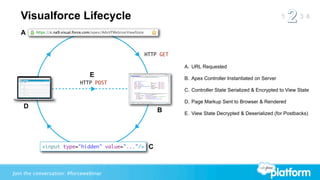
Visualforce Lifecycle
   A


                                                HTTP GET

                                                           A. URL Requested
                               E                           B. Apex Controller Instantiated on Server
                           HTTP POST
                                                           C. Controller State Serialized & Encrypted to View State

                                                           D. Page Markup Sent to Browser & Rendered
    D
                                                     B     E. View State Decrypted & Deserialized (for Postbacks)


           <input type="hidden" value="..."/>    C


Join the conversation: #forcewebinar
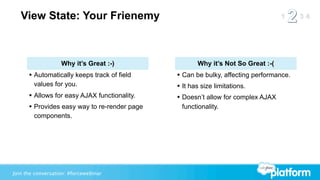
View State: Your Frienemy


                   Why it’s Great :-)               Why it’s Not So Great :-(
      • Automatically keeps track of field    • Can be bulky, affecting performance.
        values for you.                       • It has size limitations.
      • Allows for easy AJAX functionality.   • Doesn’t allow for complex AJAX
      • Provides easy way to re-render page    functionality.
        components.


Join the conversation: #forcewebinar
View State is Required for...
   <apex:action*>
   <apex:command*>
   <apex:inlineEditSupport>
   <apex:input*>
   <apex:select*>


Join the conversation: #forcewebinar
Managing View State


Join the conversation: #forcewebinar
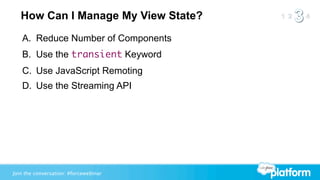
How Can I Manage My View State?
   A. Reduce Number of Components
   B. Use the transient Keyword
   C. Use JavaScript Remoting
   D. Use the Streaming API


Join the conversation: #forcewebinar
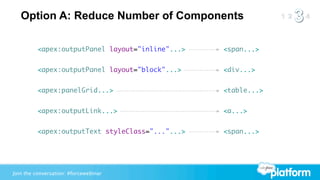
Option A: Reduce Number of Components

          <apex:outputPanel layout="inline"...>   <span...>


          <apex:outputPanel layout="block"...>    <div...>


          <apex:panelGrid...>                     <table...>


          <apex:outputLink...>                    <a...>


          <apex:outputText styleClass="..."...>   <span...>


Join the conversation: #forcewebinar
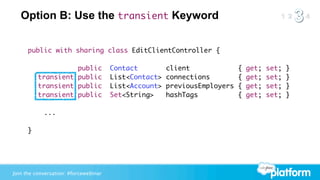
Option B: Use the transient Keyword


      public with sharing class EditClientController {

      	           public               Contact         client              {   get;   set;   }
      	 transient public               List<Contact>   connections         {   get;   set;   }
      	 transient public               List<Account>   previousEmployers   {   get;   set;   }
      	 transient public               Set<String>     hashTags            {   get;   set;   }

            ...

      }


Join the conversation: #forcewebinar
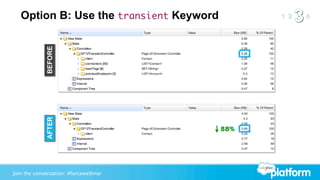
Option B: Use the transient Keyword

             BEFORE
             AFTER


                                         58%


Join the conversation: #forcewebinar
Option C: Use JavaScript Remoting
   Q: What is JavaScript Remoting?
   A: Stateless way to call Apex controller methods from JavaScript.


Join the conversation: #forcewebinar
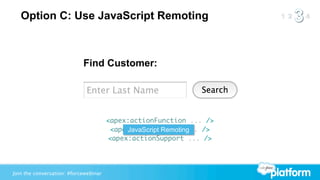
Option C: Use JavaScript Remoting


                            Find Customer:


                                       <apex:actionFunction ... />
                                        <apex:actionRegion ... />
                                            JavaScript Remoting
                                       <apex:actionSupport ... />


Join the conversation: #forcewebinar
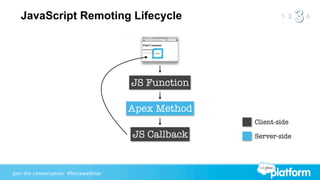
JavaScript Remoting Lifecycle


                                       JS Function

                                       Apex Method
                                                     Client-side

                                       JS Callback   Server-side


Join the conversation: #forcewebinar
JS Function


                                       Apex Method


                                       JS Callback


Join the conversation: #forcewebinar
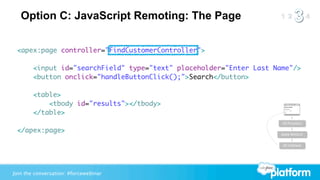
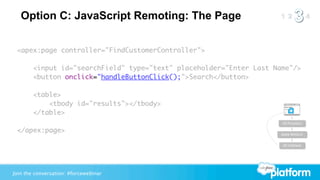
Option C: JavaScript Remoting: The Page

 <apex:page controller="FindCustomerController">

        <input id="searchField" type="text" placeholder="Enter Last Name"/>
        <button onclick="handleButtonClick();">Search</button>

        <table>
            <tbody id="results"></tbody>
        </table>
                                                                      JS Function

 </apex:page>                                                         Apex Method


                                                                      JS Callback


Join the conversation: #forcewebinar
Option C: JavaScript Remoting: The Page

 <apex:page controller="FindCustomerController">

        <input id="searchField" type="text" placeholder="Enter Last Name"/>
        <button onclick="handleButtonClick();">Search</button>

        <table>
            <tbody id="results"></tbody>
        </table>
                                                                      JS Function

 </apex:page>                                                         Apex Method


                                                                      JS Callback


Join the conversation: #forcewebinar
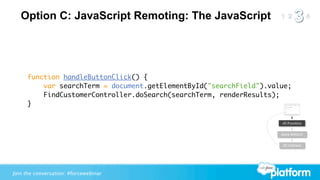
Option C: JavaScript Remoting: The JavaScript


     function handleButtonClick() {
         var searchTerm = document.getElementById("searchField").value;
         FindCustomerController.doSearch(searchTerm, renderResults);
     }

                                                                    JS Function


                                                                    Apex Method


                                                                    JS Callback


Join the conversation: #forcewebinar
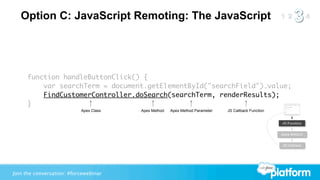
Option C: JavaScript Remoting: The JavaScript


     function handleButtonClick() {
         var searchTerm = document.getElementById("searchField").value;
         FindCustomerController.doSearch(searchTerm, renderResults);
     }
                           Apex Class   Apex Method   Apex Method Parameter   JS Callback Function


                                                                                                     JS Function


                                                                                                     Apex Method


                                                                                                     JS Callback


Join the conversation: #forcewebinar
Option C: JavaScript Remoting: The Apex Class
     public with sharing class FindCustomerController {

           @RemoteAction
           public static List<Contact> doSearch(String customerLastName) {
               customerLastName = '%' + customerLastName + '%';
               return [
                   SELECT id, FirstName, LastName
                   FROM Contact
                   WHERE LastName LIKE :customerLastName
                   LIMIT 200
               ];                                                      JS Function

           }                                                           Apex Method


                                                                            JS Callback
     }


Join the conversation: #forcewebinar
Option C: JavaScript Remoting: The Apex Class
     public with sharing class FindCustomerController {

           @RemoteAction
           public static List<Contact> doSearch(String customerLastName) {
               customerLastName = '%' + customerLastName + '%';
               return [
                   SELECT id, FirstName, LastName
                   FROM Contact
                   WHERE LastName LIKE :customerLastName
                   LIMIT 200
               ];                                                      JS Function

           }                                                           Apex Method


                                                                            JS Callback
     }


Join the conversation: #forcewebinar
Option C: JavaScript Remoting: The Callback


   function renderResults(results, event) {
       var container = document.getElementById("results"),
                html = [];
       for (var i=0, j=results.length; i<j; i++) {
           html.push("<tr><td>");
           html.push(results[i].LastName + ", " + results[i].FirstName);
           html.push("</td></tr>");
       }
       container.innerHTML = html.join("");                         JS Function

   }                                                                Apex Method


                                                                         JS Callback


Join the conversation: #forcewebinar
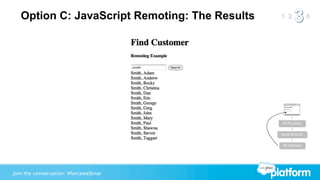
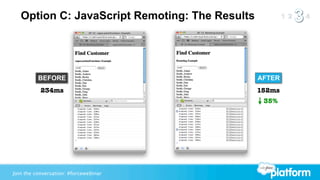
Option C: JavaScript Remoting: The Results


                                                JS Function


                                                Apex Method


                                                JS Callback


Join the conversation: #forcewebinar
Option C: JavaScript Remoting: The Results


          BEFORE                                AFTER
           234ms                                152ms
                                                 35%


Join the conversation: #forcewebinar
Option D: Use the Streaming API
   Q: What is the Streaming API?
   A: A highly performant way to get near-real-time updates from
      a Salesforce instance without polling.


Join the conversation: #forcewebinar
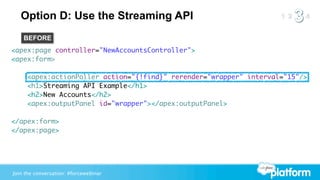
Option D: Use the Streaming API
    BEFORE
<apex:page controller="NewAccountsController">
<apex:form>

     <apex:actionPoller action="{!find}" rerender="wrapper" interval="15"/>
     <h1>Streaming API Example</h1>
     <h2>New Accounts</h2>
     <apex:outputPanel id="wrapper"></apex:outputPanel>

</apex:form>
</apex:page>


Join the conversation: #forcewebinar
Option D: Use the Streaming API
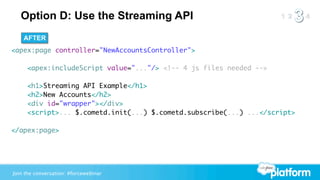
    AFTER
<apex:page controller="NewAccountsController">

     <apex:includeScript value="..."/> <!-- 4 js files needed -->

     <h1>Streaming API Example</h1>
     <h2>New Accounts</h2>
     <div id="wrapper"></div>
     <script>... $.cometd.init(...) $.cometd.subscribe(...) ...</script>

</apex:page>


Join the conversation: #forcewebinar
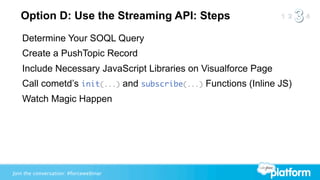
Option D: Use the Streaming API: Steps
   Determine Your SOQL Query
   Create a PushTopic Record
   Include Necessary JavaScript Libraries on Visualforce Page
   Call cometd’s init(...) and subscribe(...) Functions (Inline JS)
   Watch Magic Happen


Join the conversation: #forcewebinar
Asynchronous Apex


Join the conversation: #forcewebinar
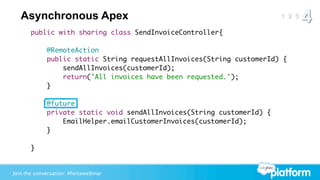
Asynchronous Apex
       public with sharing class SendInvoiceController{

             @RemoteAction
             public static String requestAllInvoices(String customerId) {
                 sendAllInvoices(customerId);
                 return('All invoices have been requested.');
             }

             @future
             private static void sendAllInvoices(String customerId) {
                 EmailHelper.emailCustomerInvoices(customerId);
             }

       }


Join the conversation: #forcewebinar
Survey
          Your feedback is crucial to the success of our webinar programs.
                                        Thank you!

                   http://bit.ly/advancedvfsurvey


Join the conversation: #forcewebinar
Q&A

                                       Eric Wilson
                                       Director, Product Management
                                       UI Platforms


Join the conversation: #forcewebinar
Upcoming Events

                     December 11, 2012
                     AppExchange for Developers Webinar
                     http://bit.ly/XnFERP


                     December 12, 2012
                     Apex CodeTalk Live Q&A
                     http://bit.ly/apexct-vf

  Check out the Developer Force calendar for upcoming local events such as meetups,
  workshops, and user group meetings: http://developer.force.com/Calendar


Join the conversation: #forcewebinar

Advanced Visualforce Webinar

  • 1.
    Force.com Webinar: Advanced Visualforce Eric Wilson Director, Product Management UI Platforms Join the conversation: #forcewebinar
  • 2.
    Agenda 1. Assumptions 2. Your Frienemy: View State 3. Managing View State 4. Asynchronous Apex Join the conversation: #forcewebinar
  • 3.
  • 4.
    This Advanced WebinarAssumes... ...you have used Visualforce and are comfortable with it. ...you have used Apex and are comfortable writing it. ...you understand HTML, JavaScript, and AJAX concepts. Join the conversation: #forcewebinar
  • 5.
    Your Frienemy: View State Join the conversation: #forcewebinar
  • 6.
    Q: What isView State? A: An encrypted, hidden <input> field on a Visualforce page that keeps track of Apex controller state & Visualforce page state between server requests. This field is only generated when there is an <apex:form> tag present on a page. Join the conversation: #forcewebinar
  • 7.
    Visualforce Lifecycle A HTTP GET A. URL Requested E B. Apex Controller Instantiated on Server HTTP POST C. Controller State Serialized & Encrypted to View State D. Page Markup Sent to Browser & Rendered D B E. View State Decrypted & Deserialized (for Postbacks) <input type="hidden" value="..."/> C Join the conversation: #forcewebinar
  • 8.
    View State: YourFrienemy Why it’s Great :-) Why it’s Not So Great :-( • Automatically keeps track of field • Can be bulky, affecting performance. values for you. • It has size limitations. • Allows for easy AJAX functionality. • Doesn’t allow for complex AJAX • Provides easy way to re-render page functionality. components. Join the conversation: #forcewebinar
  • 9.
    View State isRequired for... <apex:action*> <apex:command*> <apex:inlineEditSupport> <apex:input*> <apex:select*> Join the conversation: #forcewebinar
  • 10.
    Managing View State Jointhe conversation: #forcewebinar
  • 11.
    How Can IManage My View State? A. Reduce Number of Components B. Use the transient Keyword C. Use JavaScript Remoting D. Use the Streaming API Join the conversation: #forcewebinar
  • 12.
    Option A: ReduceNumber of Components <apex:outputPanel layout="inline"...> <span...> <apex:outputPanel layout="block"...> <div...> <apex:panelGrid...> <table...> <apex:outputLink...> <a...> <apex:outputText styleClass="..."...> <span...> Join the conversation: #forcewebinar
  • 13.
    Option B: Usethe transient Keyword public with sharing class EditClientController { public Contact client { get; set; } transient public List<Contact> connections { get; set; } transient public List<Account> previousEmployers { get; set; } transient public Set<String> hashTags { get; set; } ... } Join the conversation: #forcewebinar
  • 14.
    Option B: Usethe transient Keyword BEFORE AFTER 58% Join the conversation: #forcewebinar
  • 15.
    Option C: UseJavaScript Remoting Q: What is JavaScript Remoting? A: Stateless way to call Apex controller methods from JavaScript. Join the conversation: #forcewebinar
  • 16.
    Option C: UseJavaScript Remoting Find Customer: <apex:actionFunction ... /> <apex:actionRegion ... /> JavaScript Remoting <apex:actionSupport ... /> Join the conversation: #forcewebinar
  • 17.
    JavaScript Remoting Lifecycle JS Function Apex Method Client-side JS Callback Server-side Join the conversation: #forcewebinar
  • 18.
    JS Function Apex Method JS Callback Join the conversation: #forcewebinar
  • 19.
    Option C: JavaScriptRemoting: The Page <apex:page controller="FindCustomerController"> <input id="searchField" type="text" placeholder="Enter Last Name"/> <button onclick="handleButtonClick();">Search</button> <table> <tbody id="results"></tbody> </table> JS Function </apex:page> Apex Method JS Callback Join the conversation: #forcewebinar
  • 20.
    Option C: JavaScriptRemoting: The Page <apex:page controller="FindCustomerController"> <input id="searchField" type="text" placeholder="Enter Last Name"/> <button onclick="handleButtonClick();">Search</button> <table> <tbody id="results"></tbody> </table> JS Function </apex:page> Apex Method JS Callback Join the conversation: #forcewebinar
  • 21.
    Option C: JavaScriptRemoting: The JavaScript function handleButtonClick() { var searchTerm = document.getElementById("searchField").value; FindCustomerController.doSearch(searchTerm, renderResults); } JS Function Apex Method JS Callback Join the conversation: #forcewebinar
  • 22.
    Option C: JavaScriptRemoting: The JavaScript function handleButtonClick() { var searchTerm = document.getElementById("searchField").value; FindCustomerController.doSearch(searchTerm, renderResults); } Apex Class Apex Method Apex Method Parameter JS Callback Function JS Function Apex Method JS Callback Join the conversation: #forcewebinar
  • 23.
    Option C: JavaScriptRemoting: The Apex Class public with sharing class FindCustomerController { @RemoteAction public static List<Contact> doSearch(String customerLastName) { customerLastName = '%' + customerLastName + '%'; return [ SELECT id, FirstName, LastName FROM Contact WHERE LastName LIKE :customerLastName LIMIT 200 ]; JS Function } Apex Method JS Callback } Join the conversation: #forcewebinar
  • 24.
    Option C: JavaScriptRemoting: The Apex Class public with sharing class FindCustomerController { @RemoteAction public static List<Contact> doSearch(String customerLastName) { customerLastName = '%' + customerLastName + '%'; return [ SELECT id, FirstName, LastName FROM Contact WHERE LastName LIKE :customerLastName LIMIT 200 ]; JS Function } Apex Method JS Callback } Join the conversation: #forcewebinar
  • 25.
    Option C: JavaScriptRemoting: The Callback function renderResults(results, event) { var container = document.getElementById("results"), html = []; for (var i=0, j=results.length; i<j; i++) { html.push("<tr><td>"); html.push(results[i].LastName + ", " + results[i].FirstName); html.push("</td></tr>"); } container.innerHTML = html.join(""); JS Function } Apex Method JS Callback Join the conversation: #forcewebinar
  • 26.
    Option C: JavaScriptRemoting: The Results JS Function Apex Method JS Callback Join the conversation: #forcewebinar
  • 27.
    Option C: JavaScriptRemoting: The Results BEFORE AFTER 234ms 152ms 35% Join the conversation: #forcewebinar
  • 28.
    Option D: Usethe Streaming API Q: What is the Streaming API? A: A highly performant way to get near-real-time updates from a Salesforce instance without polling. Join the conversation: #forcewebinar
  • 29.
    Option D: Usethe Streaming API BEFORE <apex:page controller="NewAccountsController"> <apex:form> <apex:actionPoller action="{!find}" rerender="wrapper" interval="15"/> <h1>Streaming API Example</h1> <h2>New Accounts</h2> <apex:outputPanel id="wrapper"></apex:outputPanel> </apex:form> </apex:page> Join the conversation: #forcewebinar
  • 30.
    Option D: Usethe Streaming API AFTER <apex:page controller="NewAccountsController"> <apex:includeScript value="..."/> <!-- 4 js files needed --> <h1>Streaming API Example</h1> <h2>New Accounts</h2> <div id="wrapper"></div> <script>... $.cometd.init(...) $.cometd.subscribe(...) ...</script> </apex:page> Join the conversation: #forcewebinar
  • 31.
    Option D: Usethe Streaming API: Steps Determine Your SOQL Query Create a PushTopic Record Include Necessary JavaScript Libraries on Visualforce Page Call cometd’s init(...) and subscribe(...) Functions (Inline JS) Watch Magic Happen Join the conversation: #forcewebinar
  • 32.
    Asynchronous Apex Join theconversation: #forcewebinar
  • 33.
    Asynchronous Apex public with sharing class SendInvoiceController{ @RemoteAction public static String requestAllInvoices(String customerId) { sendAllInvoices(customerId); return('All invoices have been requested.'); } @future private static void sendAllInvoices(String customerId) { EmailHelper.emailCustomerInvoices(customerId); } } Join the conversation: #forcewebinar
  • 34.
    Survey Your feedback is crucial to the success of our webinar programs. Thank you! http://bit.ly/advancedvfsurvey Join the conversation: #forcewebinar
  • 35.
    Q&A Eric Wilson Director, Product Management UI Platforms Join the conversation: #forcewebinar
  • 36.
    Upcoming Events December 11, 2012 AppExchange for Developers Webinar http://bit.ly/XnFERP December 12, 2012 Apex CodeTalk Live Q&A http://bit.ly/apexct-vf Check out the Developer Force calendar for upcoming local events such as meetups, workshops, and user group meetings: http://developer.force.com/Calendar Join the conversation: #forcewebinar