Adobe Experience Manager
AEM Developer Meetup
Utrecht, September 3rd 2015
@GabrielWalt, Product Manager
Development Best Practices
Adobe Experience Manager
Best Practices…
Best practices are useful reference points, but they must come with a warning
label : The more you rely on external intelligence, the less you will value an
internal idea.
And this is the age of the idea.
― Gyan Nagpal
Adobe Experience Manager
Best Practices…
Practices that lead to more efficiency
• Less project effort
• Less operational effort
• Less maintenance effort
Automotive assembly line, ca. 1920
Adobe Experience Manager
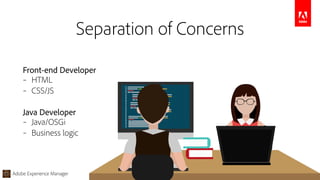
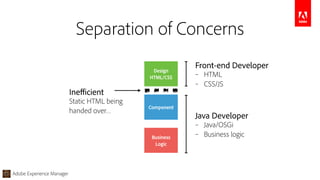
Separation of Concerns
Java Developer
– Java/OSGi
– Business logic
Front-end Developer
– HTML
– CSS/JS
Adobe Experience Manager
Design

HTML/CSS
Component
Business

Logic
Inefficient
Static HTML being

handed over…
Front-end Developer
– HTML
– CSS/JS
Java Developer
– Java/OSGi
– Business logic
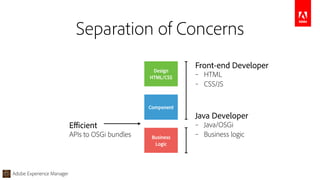
Separation of Concerns
Adobe Experience Manager
Design

HTML/CSS
Component
Business

Logic
Front-end Developer
– HTML
– CSS/JS
Java Developer
– Java/OSGi
– Business logic
Efficient
APIs to OSGi bundles
Separation of Concerns
Adobe Experience Manager
§1 – Separating concerns
http://docs.adobe.com/content/docs/en/aem/6-1/develop/sightly.html
Adobe Experience Manager
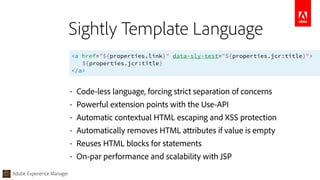
<a href="${properties.link}" data-sly-test="${properties.jcr:title}">

${properties.jcr:title}

</a>
Sightly Template Language
• Code-less language, forcing strict separation of concerns
• Powerful extension points with the Use-API
• Automatic contextual HTML escaping and XSS protection
• Automatically removes HTML attributes if value is empty
• Reuses HTML blocks for statements
• On-par performance and scalability with JSP
Adobe Experience Manager
Initializes a helper object.

<div data-sly-use.logic="logic.js">${logic.hi}</div>
Output:

<div>Hello World</div>


Use Statement
Adobe Experience Manager
<!-- template.html -->

<div data-sly-use.logic="logic.js">${logic.hi}</div>

/* logic.js */

use(function () {

return {

hi: "Hello World"

};

});
Server-side JavaScript logic
Adobe Experience Manager
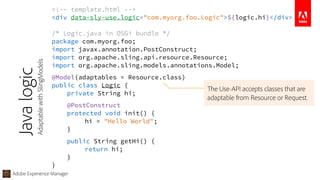
<!-- template.html -->

<div data-sly-use.logic="com.myorg.foo.Logic">${logic.hi}</div>
/* Logic.java in OSGi bundle */

package com.myorg.foo;

import javax.annotation.PostConstruct;

import org.apache.sling.api.resource.Resource;

import org.apache.sling.models.annotations.Model;
@Model(adaptables = Resource.class)

public class Logic {

private String hi;
@PostConstruct

protected void init() {

hi = "Hello World";

}
public String getHi() {

return hi;

}

}
Javalogic
AdaptablewithSlingModels
The Use-API accepts classes that are
adaptable from Resource or Request.
Adobe Experience Manager
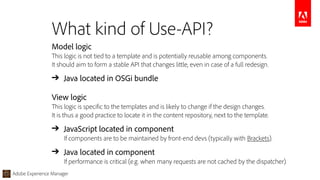
Model logic

This logic is not tied to a template and is potentially reusable among components.

It should aim to form a stable API that changes little, even in case of a full redesign.
➔ Java located in OSGi bundle
View logic

This logic is specific to the templates and is likely to change if the design changes.

It is thus a good practice to locate it in the content repository, next to the template.
➔ JavaScript located in component 

If components are to be maintained by front-end devs (typically with Brackets).
➔ Java located in component

If performance is critical (e.g. when many requests are not cached by the dispatcher).
What kind of Use-API?
Adobe Experience Manager
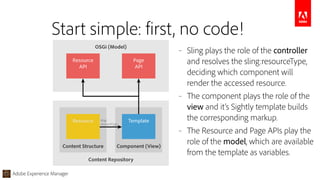
Start simple: first, no code!
OSGi (Model)
Resource
API
Page
API
Content Repository
Component (View)Content Structure
sling:
resourceType
Resource Template
– Sling plays the role of the controller
and resolves the sling:resourceType,
deciding which component will
render the accessed resource.
– The component plays the role of the
view and it’s Sightly template builds
the corresponding markup.
– The Resource and Page APIs play the
role of the model, which are available
from the template as variables.
Adobe Experience Manager
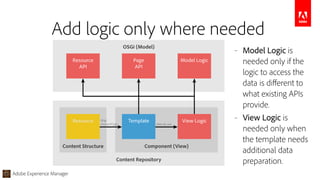
Add logic only where needed
– Model Logic is
needed only if the
logic to access the
data is different to
what existing APIs
provide.
– View Logic is
needed only when
the template needs
additional data
preparation.
OSGi (Model)
Resource
API
Page
API
Model Logic
Content Repository
Component (View)Content Structure
sling:
resourceType data-sly-use
Resource Template View Logic
Adobe Experience Manager
§2 – Enabling the Java Developer
• Getting started

The AEM Project Archetype
• Working efficiently

The AEM Developer Tools
Adobe Experience Manager
AEM Project Archetype
Adobe Experience Manager
AEM Project Archetype
https://github.com/Adobe-Marketing-Cloud/aem-project-archetype
Creates a new project with latest best practices prepared
• Separate project structure for bundles, apps, content and tests.
• Sightly components super-typed in apps with corresponding client-libraries.
• OSGi config folder, asset d&d, device emulator, dictionary structure.
• Bundle examples for Sling Models, Servlets, Filters and Schedulers.
• Unit tests, integration tests, and client-side Hobbes tests with dev mode.
Adobe Experience Manager
AEM Developer Tools
Adobe Experience Manager
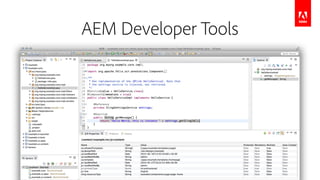
AEM Developer Tools
https://docs.adobe.com/docs/en/dev-tools/aem-eclipse.html
Gets new Java developers quickly efficient with AEM
• Simple bootstrap of AEM projects via a specific Project Creation Wizard.
• Easy synchronization for both content and OSGI bundles.
• Seamless integration with AEM instances through Eclipse Server Connector.
• Debugging support with code hot-swaping capabiliby.
• JCR properties edition.
Adobe Experience Manager
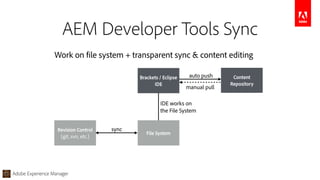
AEM Developer Tools Sync
Revision Control
(git, svn, etc.)
File System
Content
Repository
Work on file system + transparent sync & content editing
sync
manual pull
Brackets / Eclipse
IDE
auto push
IDE works on

the File System
Adobe Experience Manager
§3 – Enabling the Front-End Dev
• Efficiently converting designs to web

Brackets and the Extract extension
• Working efficiently on AEM projects

Brackets and the AEM extension
Adobe Experience Manager
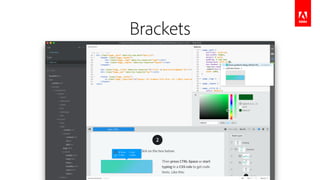
Brackets
Adobe Experience Manager
Brackets
https://docs.adobe.com/docs/en/dev-tools/aem-brackets.html
Brackets and the Extract extension
• Photoshop file support to extract information from a PSD file.
• Code hints from the PSD, to easily reuse this extracted information in the code.
• CSS preprocessor support, like LESS and SCSS.
• And hundreds of additional extensions that cover more specific needs.
Adobe Experience Manager
Brackets
https://docs.adobe.com/docs/en/dev-tools/aem-brackets.html
Brackets and the AEM extension
• Automated synchronization of changed files to the AEM development instance.
• Manual bidirectional synchronization of files and folders.
• Full content-package synchronization of the project.
• Sightly code completion for expressions and data-sly-* block statements.
Adobe Experience Manager
Additional words of wisdom
• Milage may vary, cultivate critical thinking.
• Don’t mix concerns, stick to the language of the file extension.
• Resist complexity, over-architecting is just moving the problem.
• Keep it simple, it’s just a web server.
Adobe Experience Manager
Thank you!
Developer tools:
– Project Archetype

https://github.com/Adobe-Marketing-Cloud/aem-project-archetype
– AEM Eclipse Extension

https://docs.adobe.com/docs/en/dev-tools/aem-eclipse.html
– AEM Brackets Extension

https://docs.adobe.com/docs/en/dev-tools/aem-brackets.html
– Sightly Template Language

http://www.slideshare.net/GabrielWalt/component-development
– Sightly REPL Tool

https://github.com/Adobe-Marketing-Cloud/aem-sightly-repl
– Sightly TodoMVC Example

https://github.com/Adobe-Marketing-Cloud/aem-sightly-sample-todomvc
AEM Best Practices for Component Development

AEM Best Practices for Component Development

  • 1.
    Adobe Experience Manager AEMDeveloper Meetup Utrecht, September 3rd 2015 @GabrielWalt, Product Manager Development Best Practices
  • 2.
    Adobe Experience Manager BestPractices… Best practices are useful reference points, but they must come with a warning label : The more you rely on external intelligence, the less you will value an internal idea. And this is the age of the idea. ― Gyan Nagpal
  • 3.
    Adobe Experience Manager BestPractices… Practices that lead to more efficiency • Less project effort • Less operational effort • Less maintenance effort Automotive assembly line, ca. 1920
  • 4.
    Adobe Experience Manager Separationof Concerns Java Developer – Java/OSGi – Business logic Front-end Developer – HTML – CSS/JS
  • 5.
    Adobe Experience Manager Design
 HTML/CSS Component Business
 Logic Inefficient StaticHTML being
 handed over… Front-end Developer – HTML – CSS/JS Java Developer – Java/OSGi – Business logic Separation of Concerns
  • 6.
    Adobe Experience Manager Design
 HTML/CSS Component Business
 Logic Front-endDeveloper – HTML – CSS/JS Java Developer – Java/OSGi – Business logic Efficient APIs to OSGi bundles Separation of Concerns
  • 7.
    Adobe Experience Manager §1– Separating concerns http://docs.adobe.com/content/docs/en/aem/6-1/develop/sightly.html
  • 8.
    Adobe Experience Manager <ahref="${properties.link}" data-sly-test="${properties.jcr:title}">
 ${properties.jcr:title}
 </a> Sightly Template Language • Code-less language, forcing strict separation of concerns • Powerful extension points with the Use-API • Automatic contextual HTML escaping and XSS protection • Automatically removes HTML attributes if value is empty • Reuses HTML blocks for statements • On-par performance and scalability with JSP
  • 9.
    Adobe Experience Manager Initializesa helper object.
 <div data-sly-use.logic="logic.js">${logic.hi}</div> Output:
 <div>Hello World</div> 


 Use Statement
  • 10.
    Adobe Experience Manager <!--template.html -->
 <div data-sly-use.logic="logic.js">${logic.hi}</div>
 /* logic.js */
 use(function () {
 return {
 hi: "Hello World"
 };
 }); Server-side JavaScript logic
  • 11.
    Adobe Experience Manager <!--template.html -->
 <div data-sly-use.logic="com.myorg.foo.Logic">${logic.hi}</div> /* Logic.java in OSGi bundle */
 package com.myorg.foo;
 import javax.annotation.PostConstruct;
 import org.apache.sling.api.resource.Resource;
 import org.apache.sling.models.annotations.Model; @Model(adaptables = Resource.class)
 public class Logic {
 private String hi; @PostConstruct
 protected void init() {
 hi = "Hello World";
 } public String getHi() {
 return hi;
 }
 } Javalogic AdaptablewithSlingModels The Use-API accepts classes that are adaptable from Resource or Request.
  • 12.
    Adobe Experience Manager Modellogic
 This logic is not tied to a template and is potentially reusable among components.
 It should aim to form a stable API that changes little, even in case of a full redesign. ➔ Java located in OSGi bundle View logic
 This logic is specific to the templates and is likely to change if the design changes.
 It is thus a good practice to locate it in the content repository, next to the template. ➔ JavaScript located in component 
 If components are to be maintained by front-end devs (typically with Brackets). ➔ Java located in component
 If performance is critical (e.g. when many requests are not cached by the dispatcher). What kind of Use-API?
  • 13.
    Adobe Experience Manager Startsimple: first, no code! OSGi (Model) Resource API Page API Content Repository Component (View)Content Structure sling: resourceType Resource Template – Sling plays the role of the controller and resolves the sling:resourceType, deciding which component will render the accessed resource. – The component plays the role of the view and it’s Sightly template builds the corresponding markup. – The Resource and Page APIs play the role of the model, which are available from the template as variables.
  • 14.
    Adobe Experience Manager Addlogic only where needed – Model Logic is needed only if the logic to access the data is different to what existing APIs provide. – View Logic is needed only when the template needs additional data preparation. OSGi (Model) Resource API Page API Model Logic Content Repository Component (View)Content Structure sling: resourceType data-sly-use Resource Template View Logic
  • 15.
    Adobe Experience Manager §2– Enabling the Java Developer • Getting started
 The AEM Project Archetype • Working efficiently
 The AEM Developer Tools
  • 16.
    Adobe Experience Manager AEMProject Archetype Adobe Experience Manager
  • 17.
    Adobe Experience Manager AEMProject Archetype https://github.com/Adobe-Marketing-Cloud/aem-project-archetype Creates a new project with latest best practices prepared • Separate project structure for bundles, apps, content and tests. • Sightly components super-typed in apps with corresponding client-libraries. • OSGi config folder, asset d&d, device emulator, dictionary structure. • Bundle examples for Sling Models, Servlets, Filters and Schedulers. • Unit tests, integration tests, and client-side Hobbes tests with dev mode.
  • 18.
  • 19.
    Adobe Experience Manager AEMDeveloper Tools https://docs.adobe.com/docs/en/dev-tools/aem-eclipse.html Gets new Java developers quickly efficient with AEM • Simple bootstrap of AEM projects via a specific Project Creation Wizard. • Easy synchronization for both content and OSGI bundles. • Seamless integration with AEM instances through Eclipse Server Connector. • Debugging support with code hot-swaping capabiliby. • JCR properties edition.
  • 20.
    Adobe Experience Manager AEMDeveloper Tools Sync Revision Control (git, svn, etc.) File System Content Repository Work on file system + transparent sync & content editing sync manual pull Brackets / Eclipse IDE auto push IDE works on
 the File System
  • 21.
    Adobe Experience Manager §3– Enabling the Front-End Dev • Efficiently converting designs to web
 Brackets and the Extract extension • Working efficiently on AEM projects
 Brackets and the AEM extension
  • 22.
  • 23.
    Adobe Experience Manager Brackets https://docs.adobe.com/docs/en/dev-tools/aem-brackets.html Bracketsand the Extract extension • Photoshop file support to extract information from a PSD file. • Code hints from the PSD, to easily reuse this extracted information in the code. • CSS preprocessor support, like LESS and SCSS. • And hundreds of additional extensions that cover more specific needs.
  • 24.
    Adobe Experience Manager Brackets https://docs.adobe.com/docs/en/dev-tools/aem-brackets.html Bracketsand the AEM extension • Automated synchronization of changed files to the AEM development instance. • Manual bidirectional synchronization of files and folders. • Full content-package synchronization of the project. • Sightly code completion for expressions and data-sly-* block statements.
  • 25.
    Adobe Experience Manager Additionalwords of wisdom • Milage may vary, cultivate critical thinking. • Don’t mix concerns, stick to the language of the file extension. • Resist complexity, over-architecting is just moving the problem. • Keep it simple, it’s just a web server.
  • 26.
    Adobe Experience Manager Thankyou! Developer tools: – Project Archetype
 https://github.com/Adobe-Marketing-Cloud/aem-project-archetype – AEM Eclipse Extension
 https://docs.adobe.com/docs/en/dev-tools/aem-eclipse.html – AEM Brackets Extension
 https://docs.adobe.com/docs/en/dev-tools/aem-brackets.html – Sightly Template Language
 http://www.slideshare.net/GabrielWalt/component-development – Sightly REPL Tool
 https://github.com/Adobe-Marketing-Cloud/aem-sightly-repl – Sightly TodoMVC Example
 https://github.com/Adobe-Marketing-Cloud/aem-sightly-sample-todomvc