vSphere 5 Image Builder and Auto
            Deploy
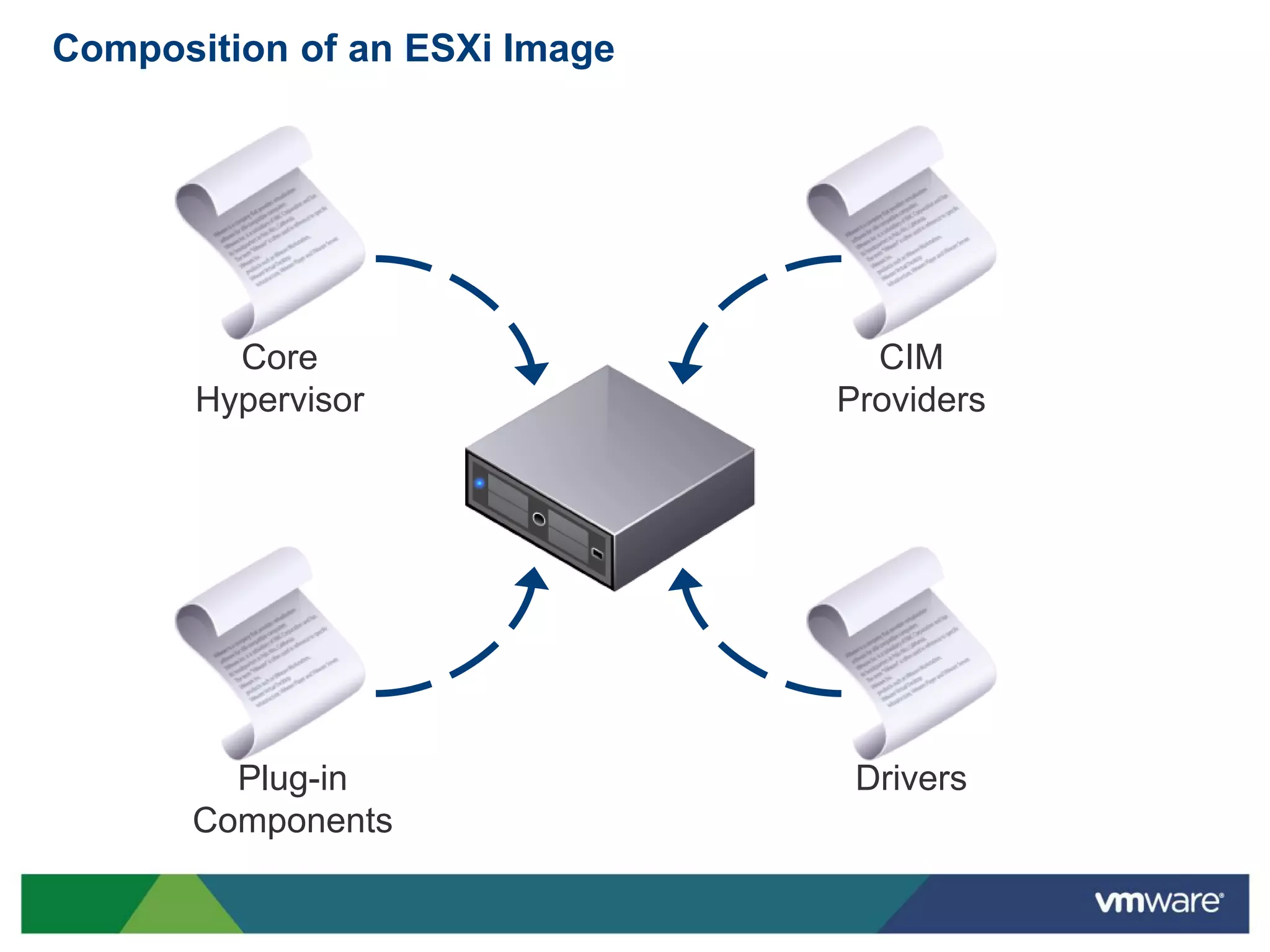
Composition of an ESXi Image


         Core                    CIM
       Hypervisor              Providers


        Plug-in                 Drivers
      Components
ESXi Image Deployment

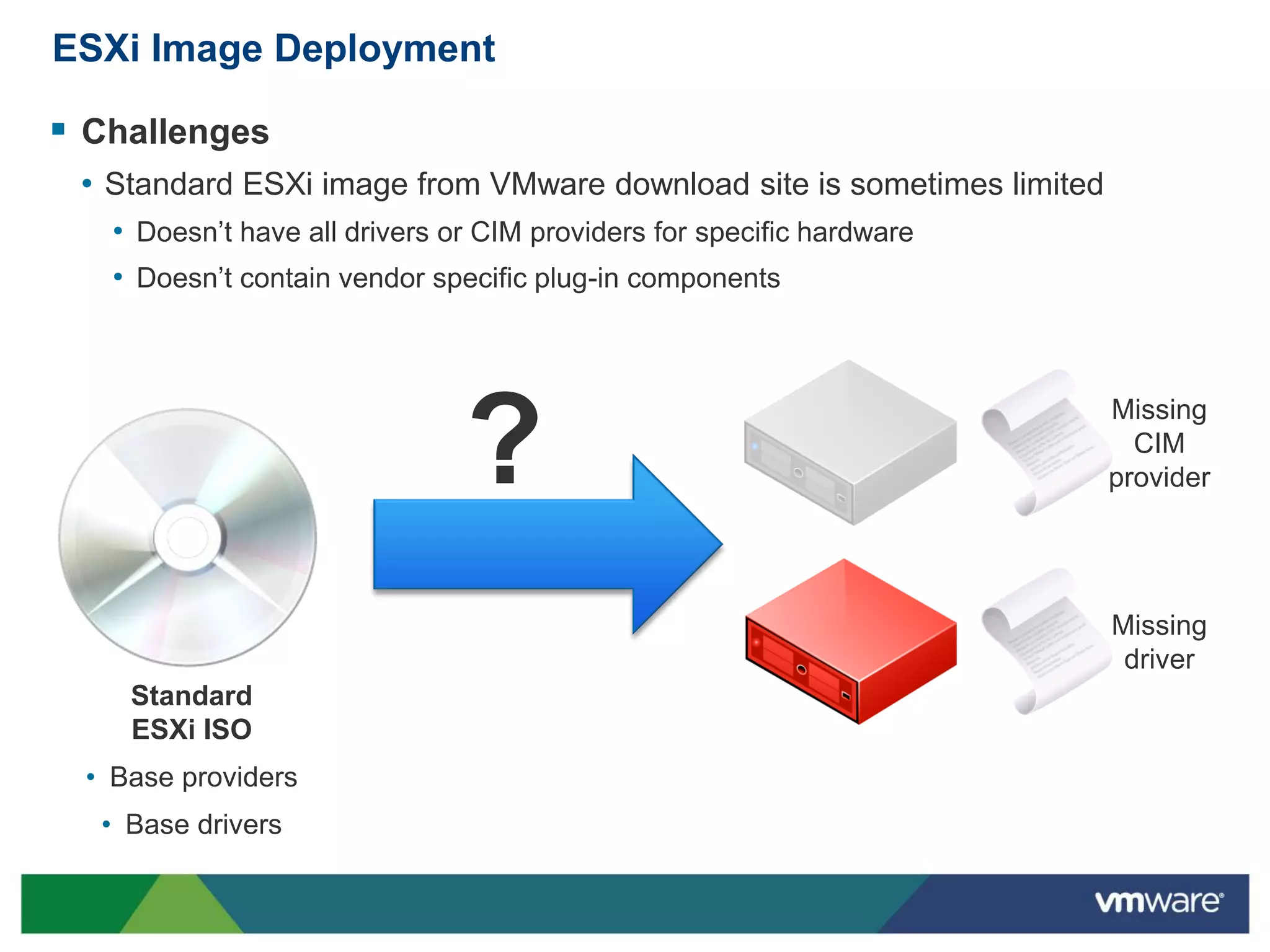
 Challenges
 • Standard ESXi image from VMware download site is sometimes limited
   • Doesn’t have all drivers or CIM providers for specific hardware
   • Doesn’t contain vendor specific plug-in components


                               ?
                                                                        Missing
                                                                          CIM
                                                                        provider


                                                                        Missing
                                                                         driver
    Standard
    ESXi ISO
 • Base providers
  • Base drivers
Describing ESXi Components

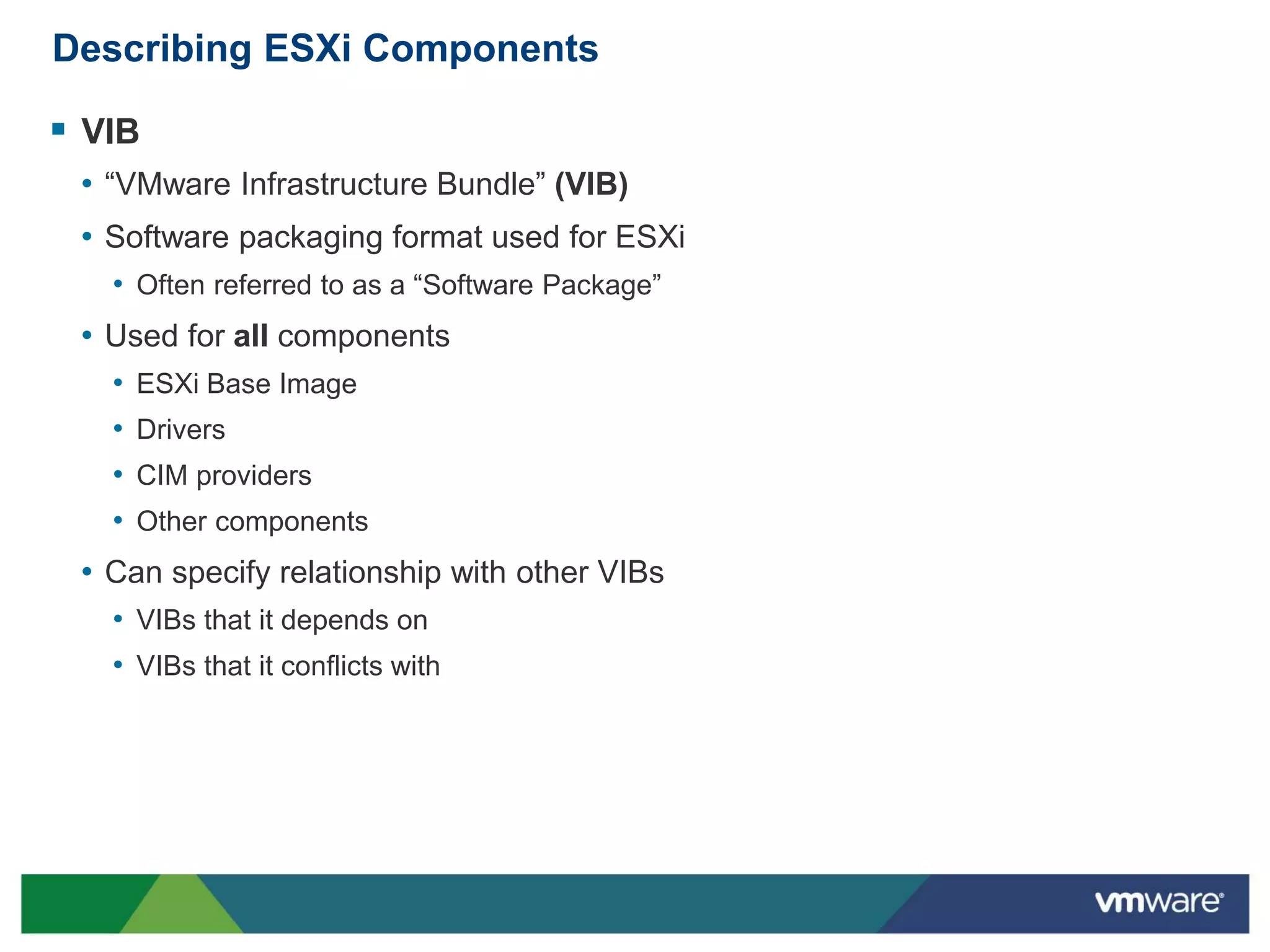
 VIB
 • “VMware Infrastructure Bundle” (VIB)
 • Software packaging format used for ESXi
   • Often referred to as a “Software Package”
 • Used for all components
   •   ESXi Base Image
   •   Drivers
   •   CIM providers
   •   Other components
 • Can specify relationship with other VIBs
   • VIBs that it depends on
   • VIBs that it conflicts with
Managing Customized ESXi Images

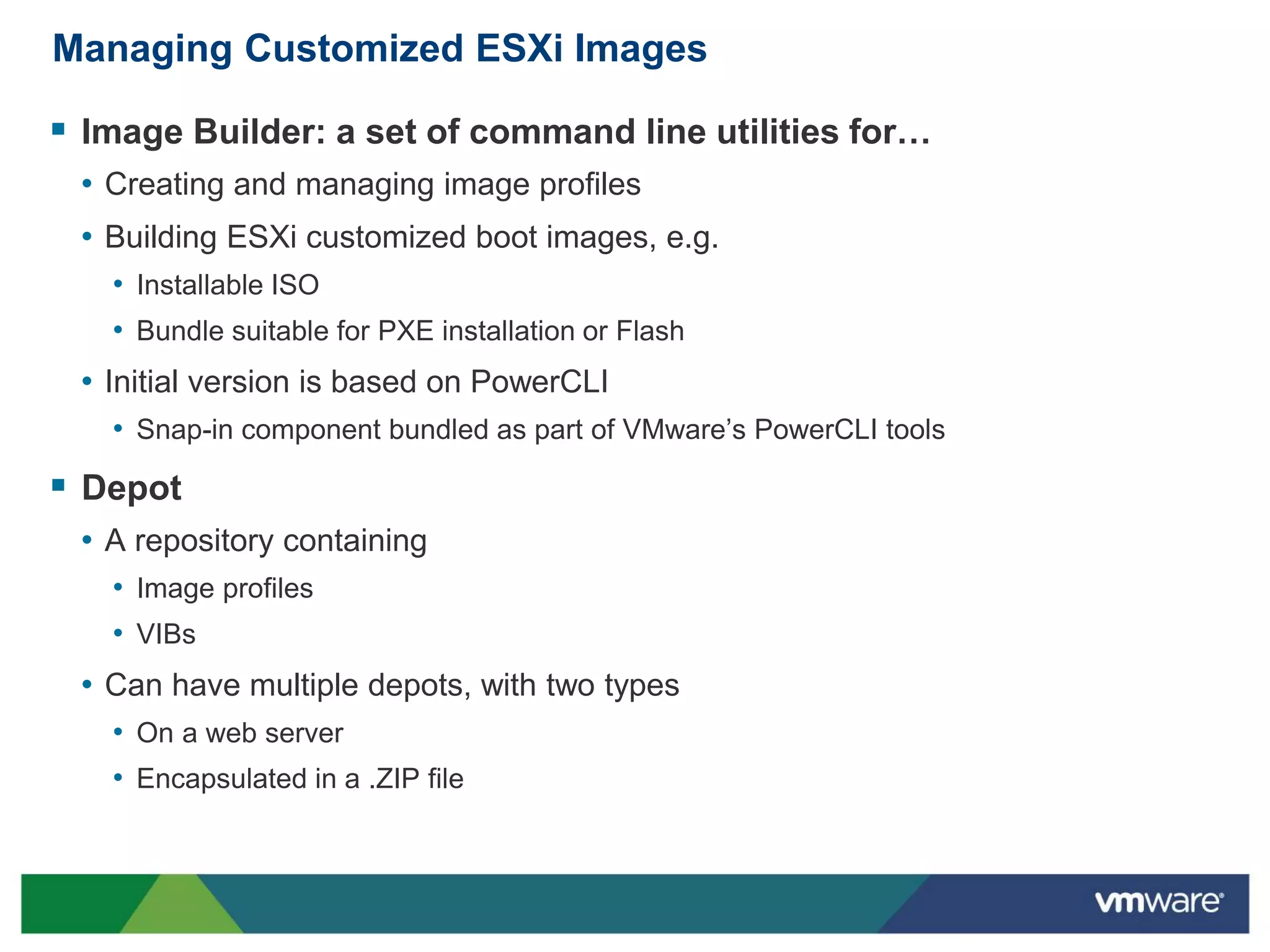
 Image Builder: a set of command line utilities for…
 • Creating and managing image profiles
 • Building ESXi customized boot images, e.g.
   • Installable ISO
   • Bundle suitable for PXE installation or Flash
 • Initial version is based on PowerCLI
   • Snap-in component bundled as part of VMware’s PowerCLI tools
 Depot
 • A repository containing
   • Image profiles
   • VIBs
 • Can have multiple depots, with two types
   • On a web server
   • Encapsulated in a .ZIP file
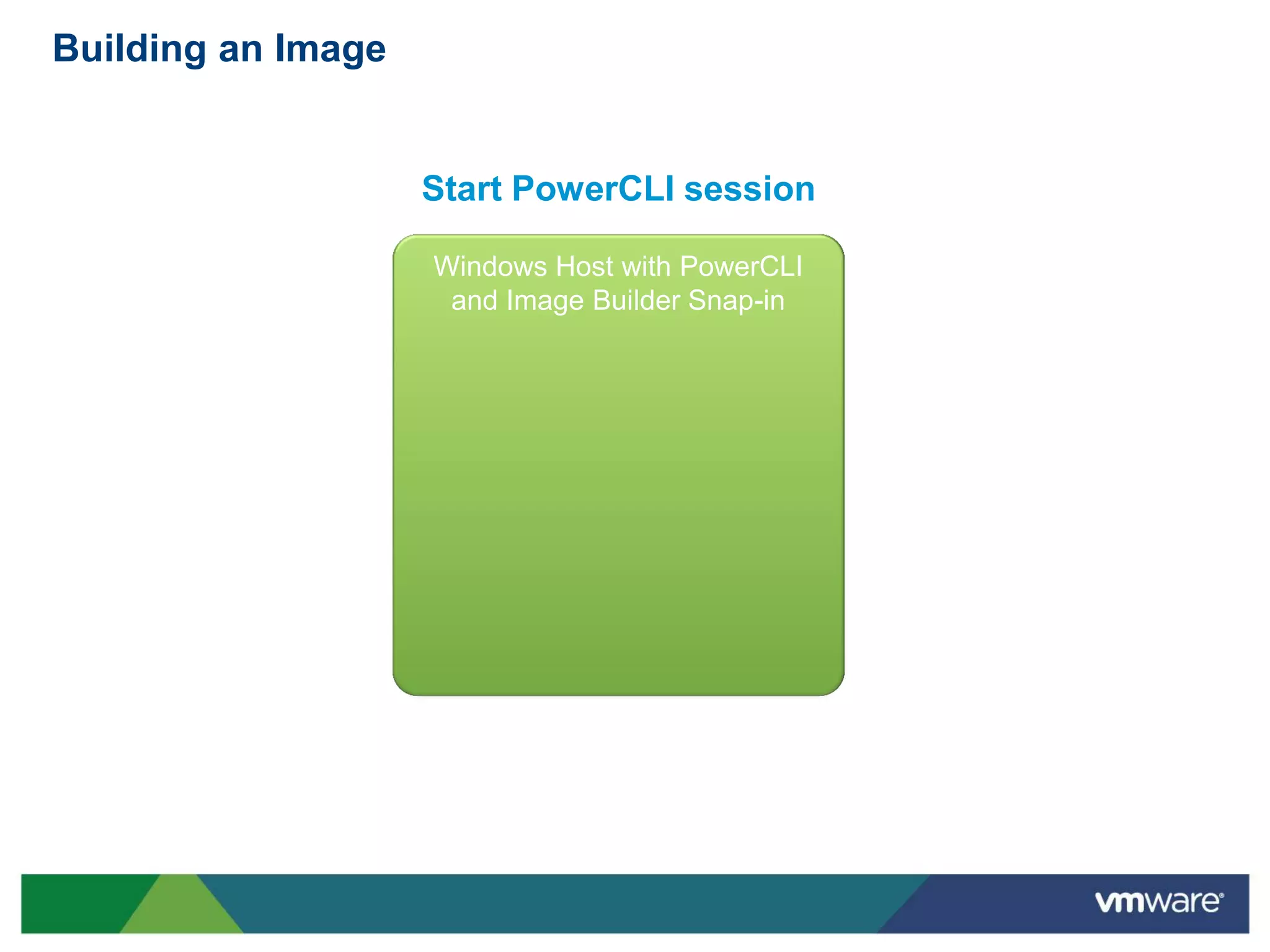
Building an Image


                    Start PowerCLI session

                    Windows Host with PowerCLI
                     and Image Builder Snap-in
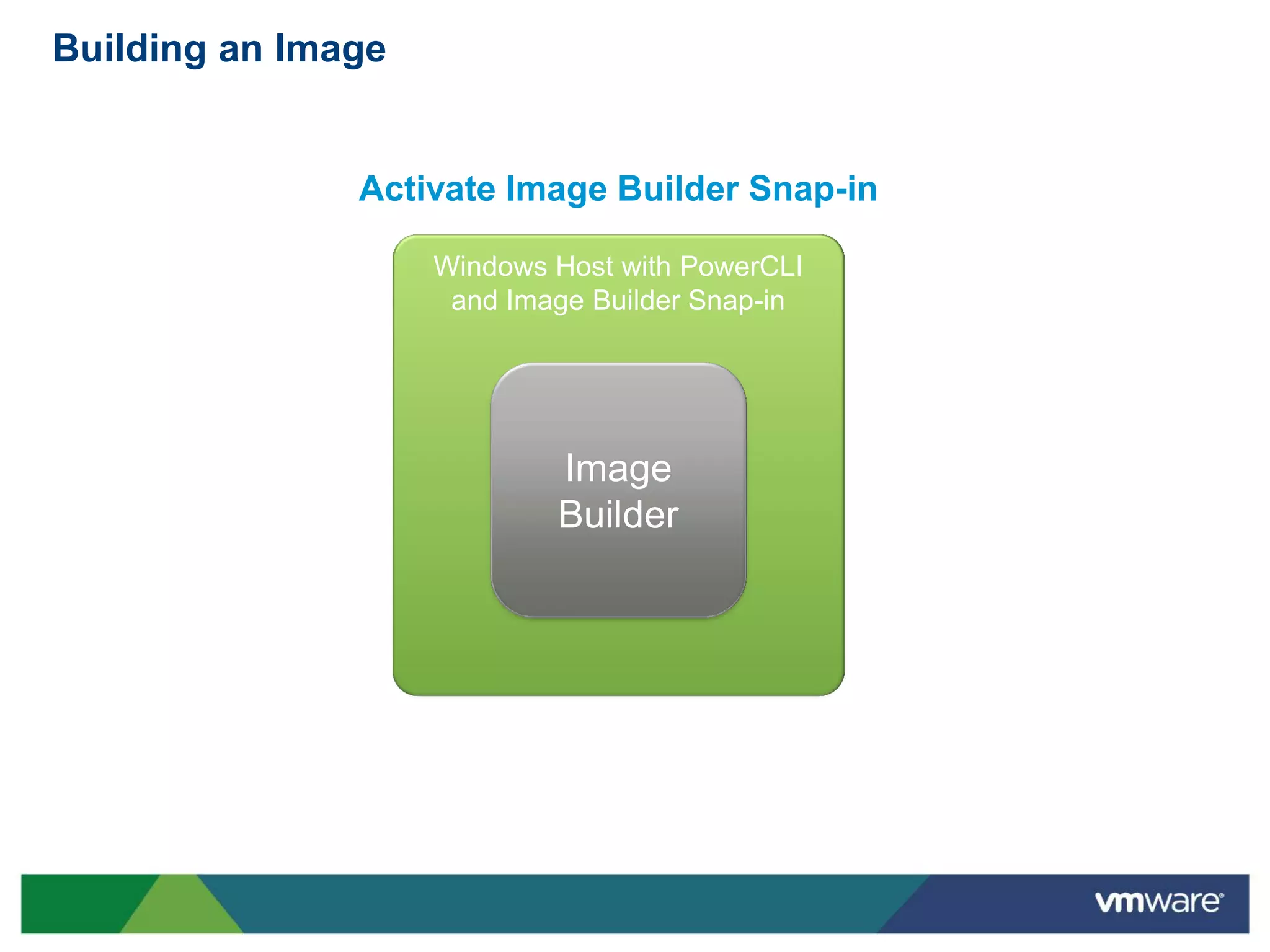
Building an Image


               Activate Image Builder Snap-in

                    Windows Host with PowerCLI
                     and Image Builder Snap-in


                            Image
                            Builder
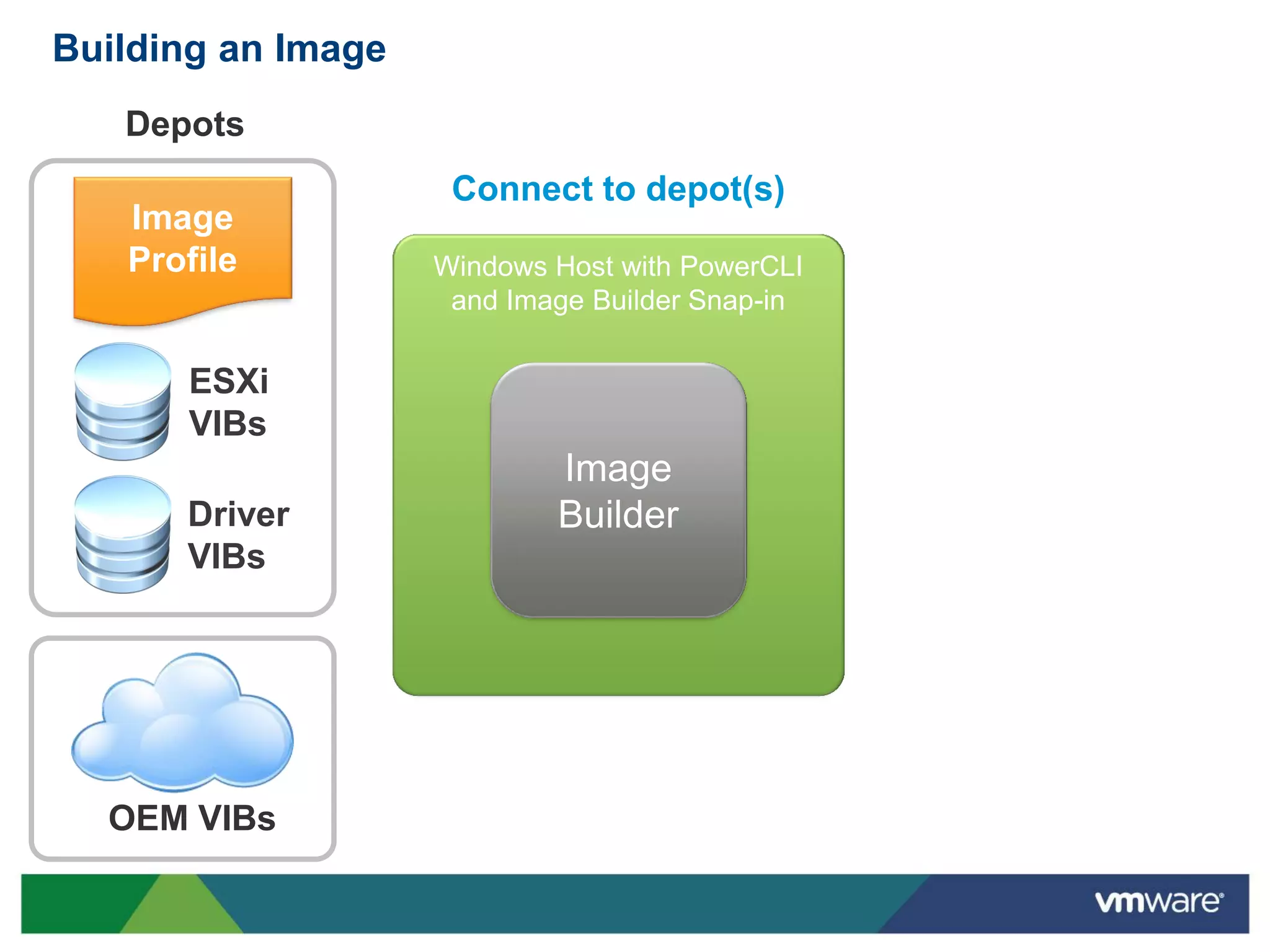
Building an Image
   Depots
                     Connect to depot(s)
   Image
   Profile          Windows Host with PowerCLI
                     and Image Builder Snap-in

      ESXi
      VIBs
                            Image
      Driver                Builder
      VIBs


  OEM VIBs
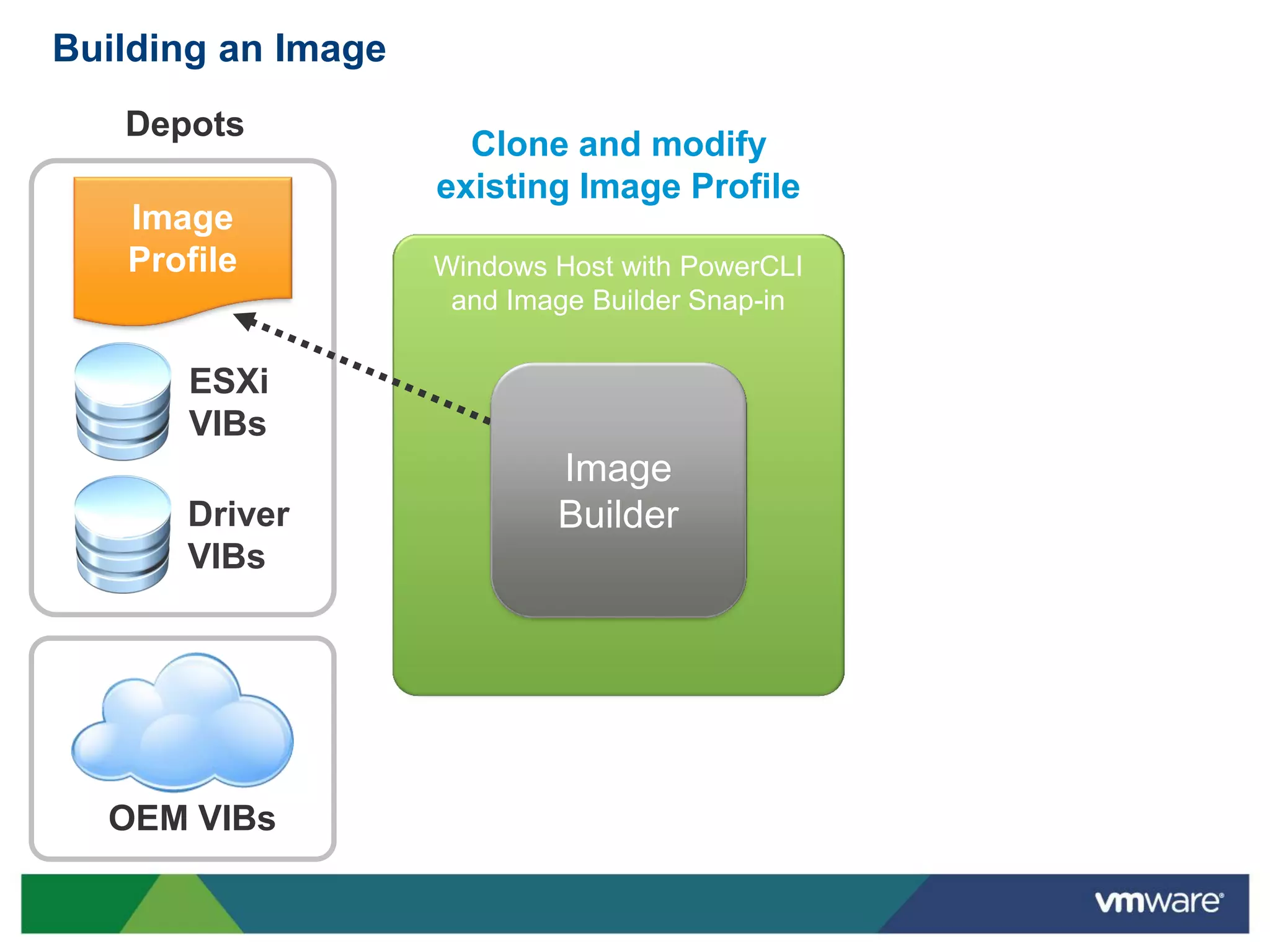
Building an Image
   Depots
                      Clone and modify
                    existing Image Profile
   Image
   Profile          Windows Host with PowerCLI
                     and Image Builder Snap-in

      ESXi
      VIBs
                            Image
      Driver                Builder
      VIBs


  OEM VIBs
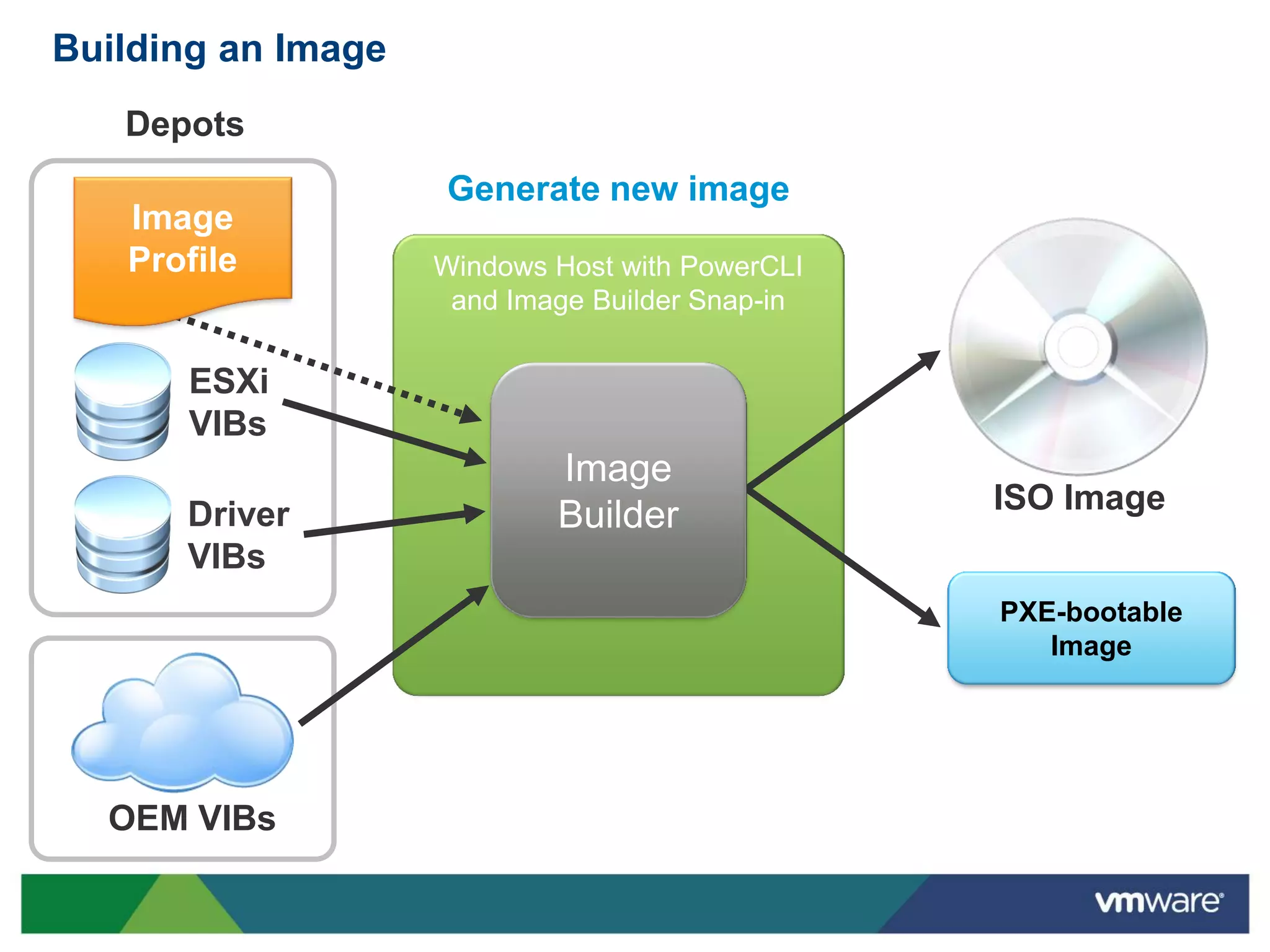
Building an Image
   Depots
                    Generate new image
   Image
   Profile          Windows Host with PowerCLI
                     and Image Builder Snap-in

      ESXi
      VIBs
                            Image
                                                 ISO Image
      Driver                Builder
      VIBs
                                                 PXE-bootable
                                                    Image


  OEM VIBs
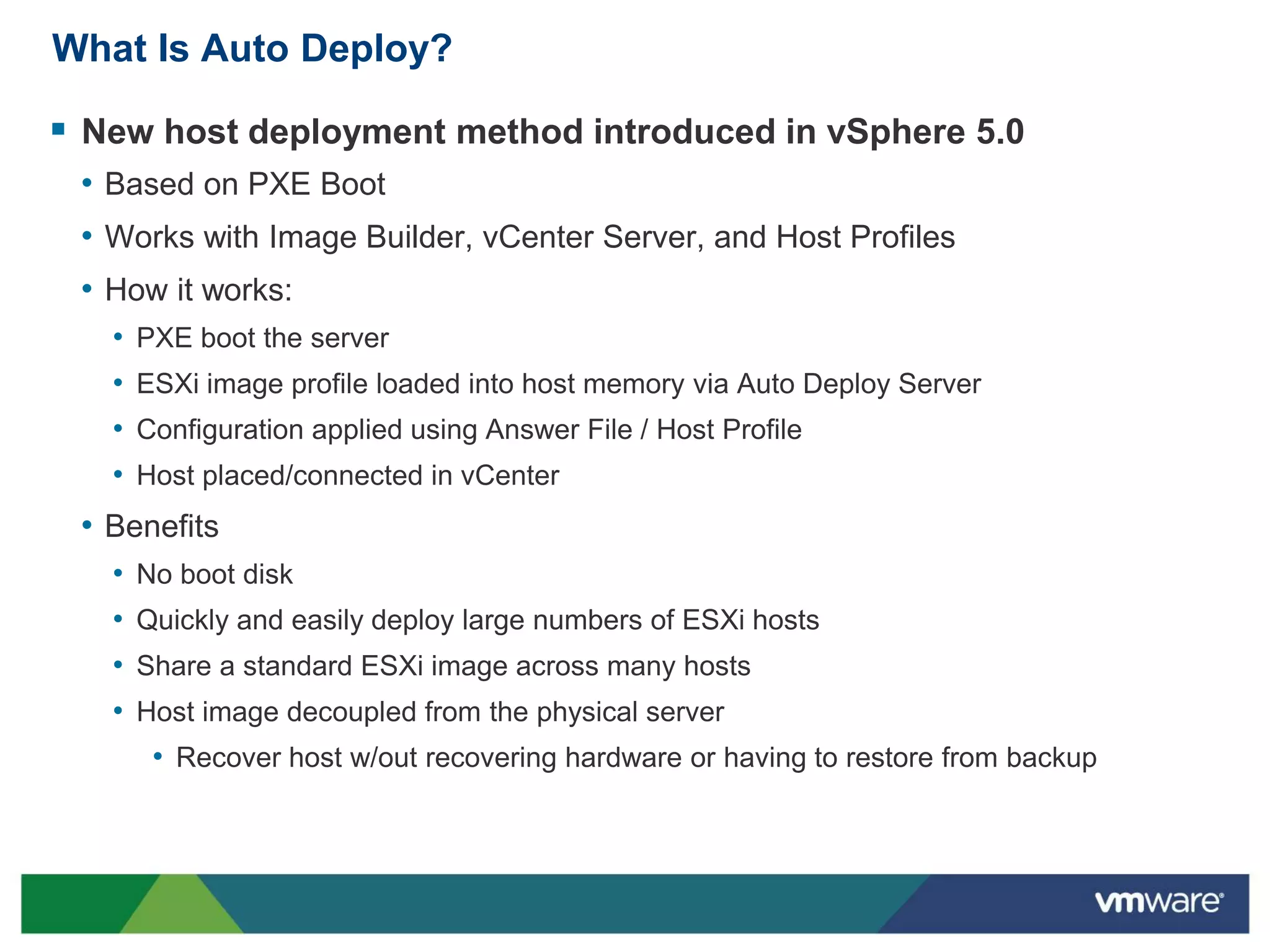
What Is Auto Deploy?

 New host deployment method introduced in vSphere 5.0
 • Based on PXE Boot
 • Works with Image Builder, vCenter Server, and Host Profiles
 • How it works:
   •   PXE boot the server
   •   ESXi image profile loaded into host memory via Auto Deploy Server
   •   Configuration applied using Answer File / Host Profile
   •   Host placed/connected in vCenter
 • Benefits
   •   No boot disk
   •   Quickly and easily deploy large numbers of ESXi hosts
   •   Share a standard ESXi image across many hosts
   •   Host image decoupled from the physical server
        • Recover host w/out recovering hardware or having to restore from backup
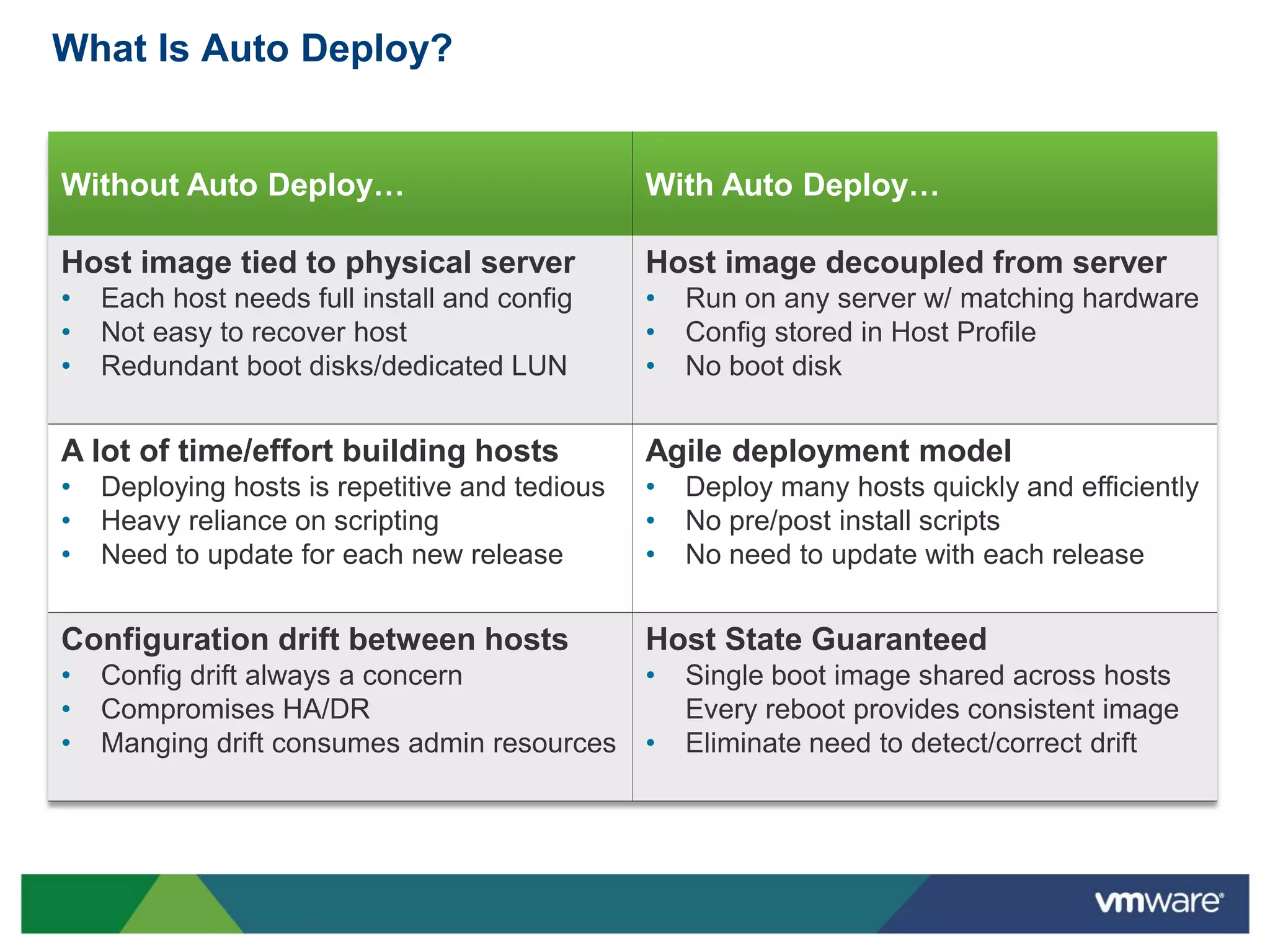
What Is Auto Deploy?


Without Auto Deploy…                            With Auto Deploy…

Host image tied to physical server              Host image decoupled from server
•   Each host needs full install and config     •   Run on any server w/ matching hardware
•   Not easy to recover host                    •   Config stored in Host Profile
•   Redundant boot disks/dedicated LUN          •   No boot disk


A lot of time/effort building hosts             Agile deployment model
•   Deploying hosts is repetitive and tedious   •   Deploy many hosts quickly and efficiently
•   Heavy reliance on scripting                 •   No pre/post install scripts
•   Need to update for each new release         •   No need to update with each release


Configuration drift between hosts               Host State Guaranteed
•   Config drift always a concern               •   Single boot image shared across hosts
•   Compromises HA/DR                               Every reboot provides consistent image
•   Manging drift consumes admin resources      •   Eliminate need to detect/correct drift
What Is Auto Deploy?

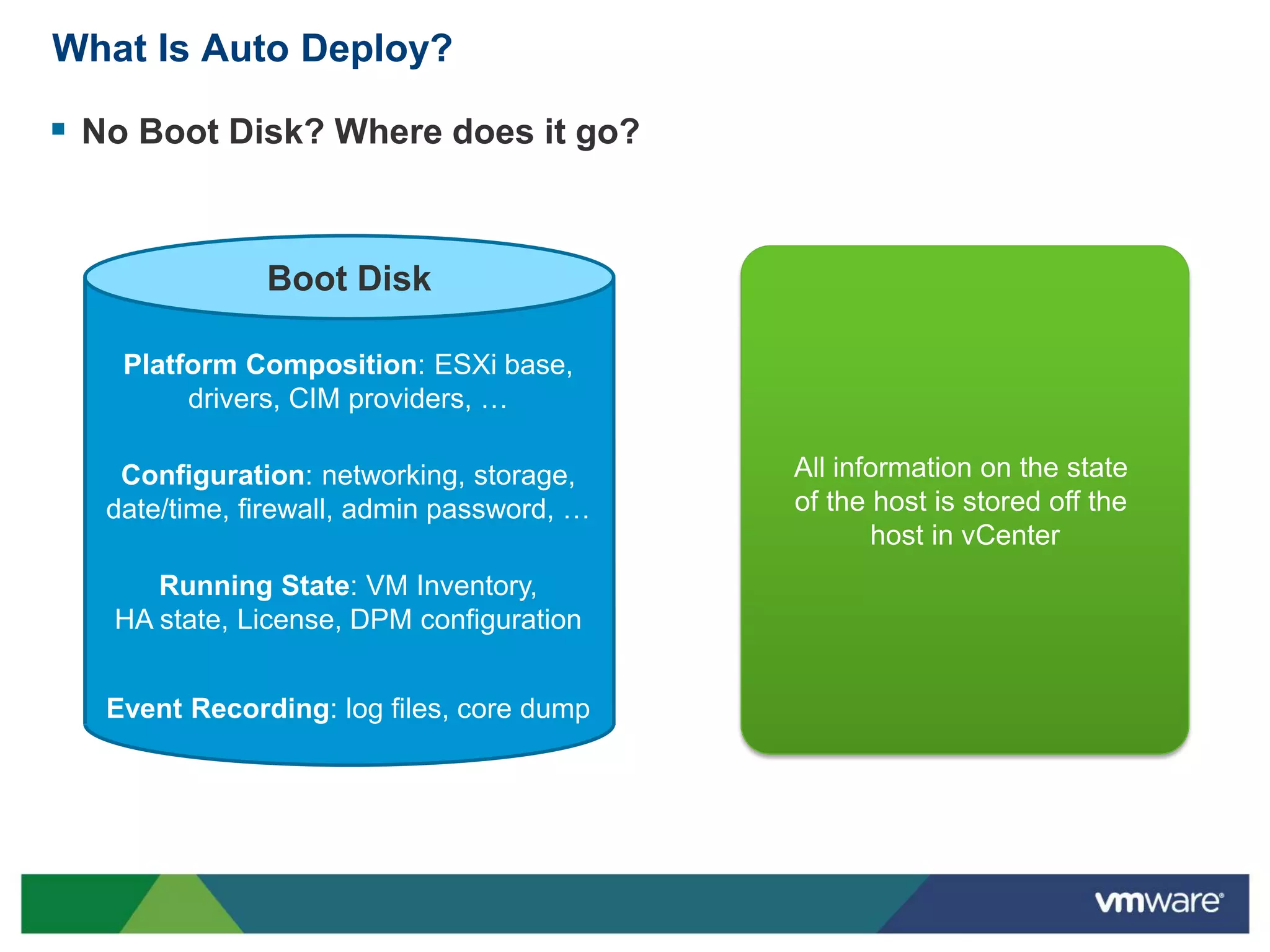
 No Boot Disk? Where does it go?


               Boot Disk

    Platform Composition: ESXi base,
         drivers, CIM providers, …

    Configuration: networking, storage,     All information on the state
   date/time, firewall, admin password, …   of the host is stored off the
                                                   host in vCenter
      Running State: VM Inventory,
   HA state, License, DPM configuration


   Event Recording: log files, core dump
What Is Auto Deploy?

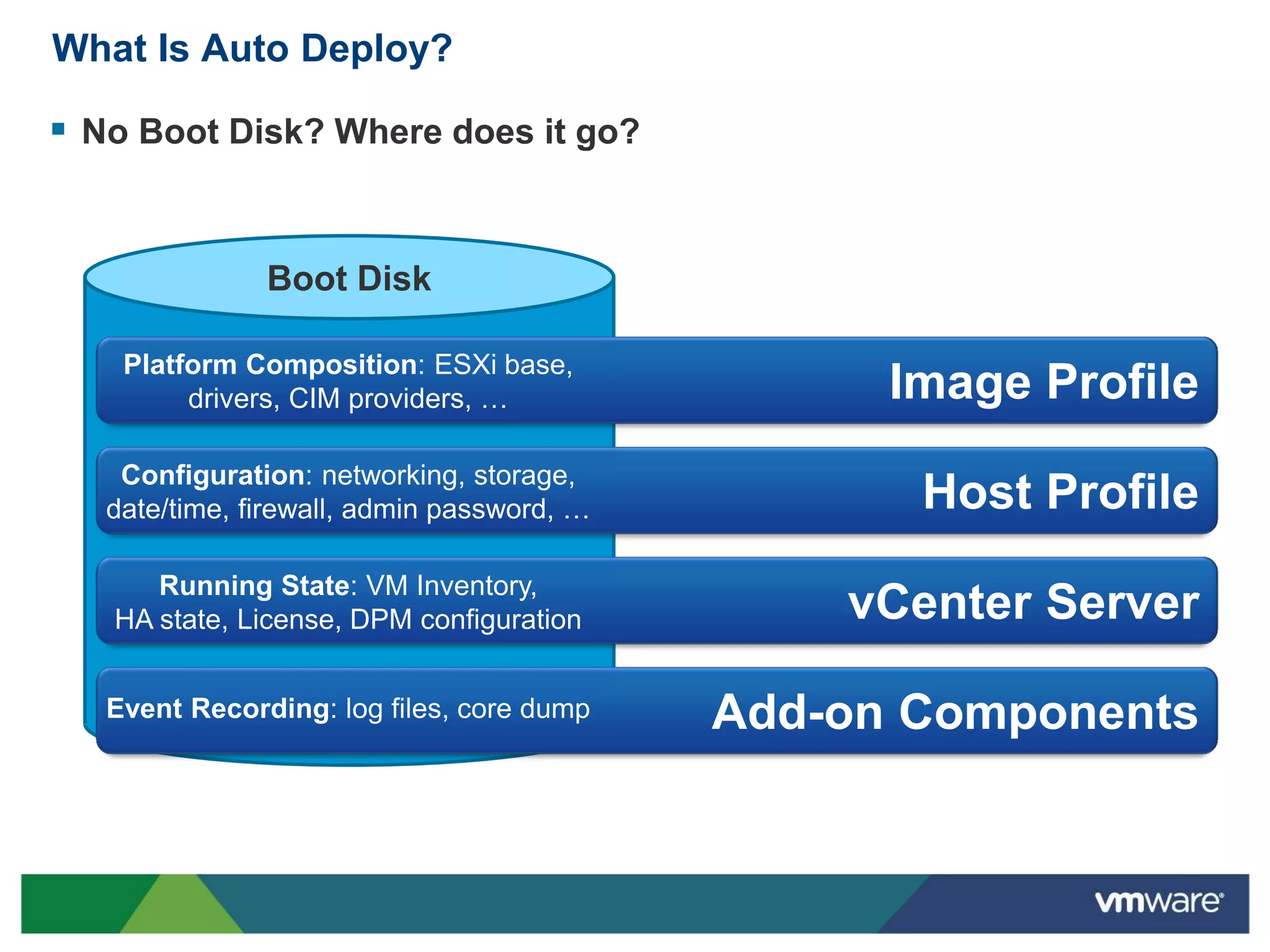
 No Boot Disk? Where does it go?


               Boot Disk

    Platform Composition: ESXi base,
         drivers, CIM providers, …                Image Profile
    Configuration: networking, storage,
   date/time, firewall, admin password, …          Host Profile
      Running State: VM Inventory,
   HA state, License, DPM configuration         vCenter Server

   Event Recording: log files, core dump    Add-on Components
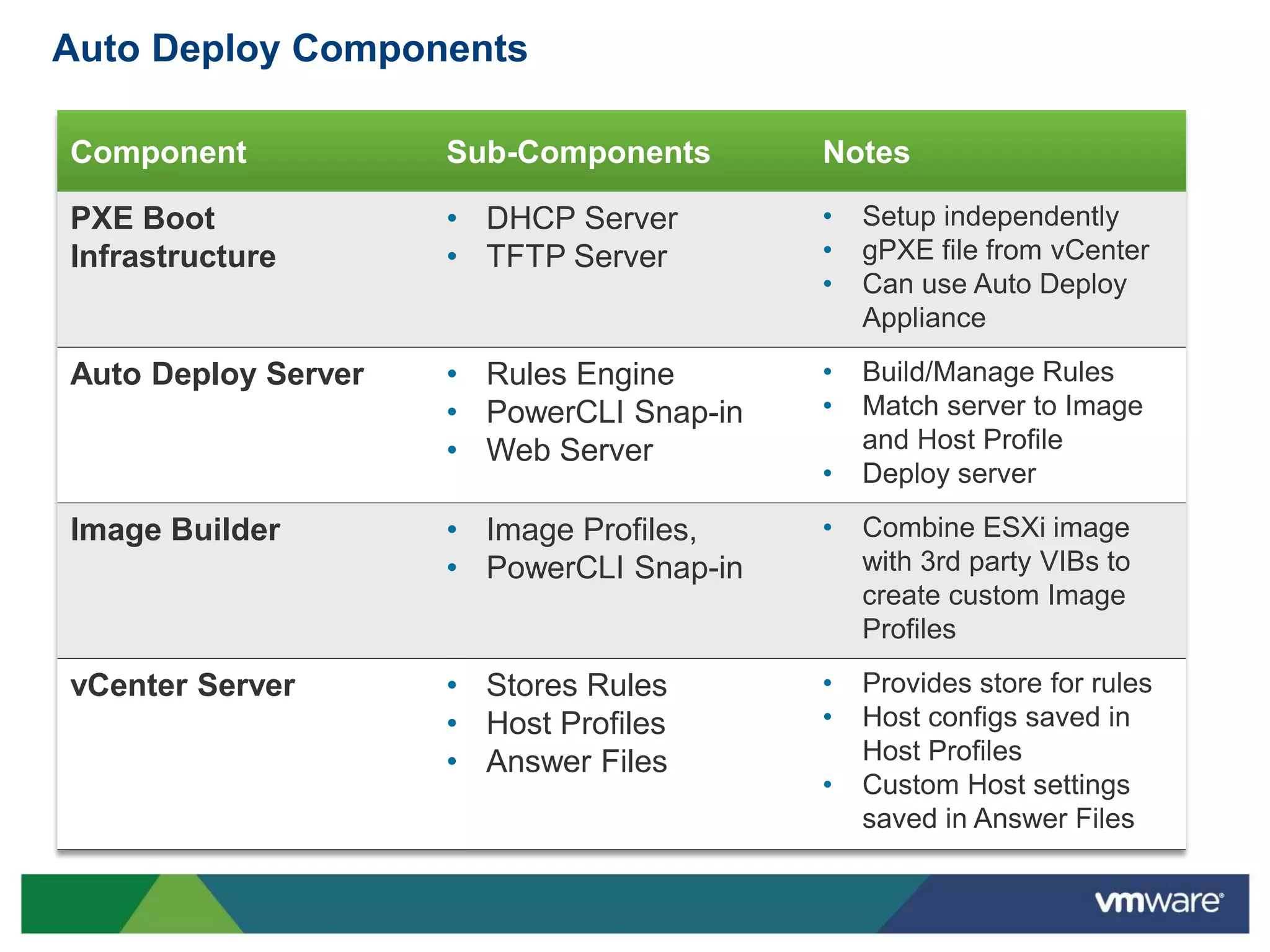
Auto Deploy Components

Component            Sub-Components       Notes

PXE Boot             • DHCP Server        •   Setup independently
Infrastructure       • TFTP Server        •   gPXE file from vCenter
                                          •   Can use Auto Deploy
                                              Appliance

Auto Deploy Server   • Rules Engine       •   Build/Manage Rules
                     • PowerCLI Snap-in   •   Match server to Image
                     • Web Server             and Host Profile
                                          •   Deploy server

Image Builder        • Image Profiles,    •   Combine ESXi image
                     • PowerCLI Snap-in       with 3rd party VIBs to
                                              create custom Image
                                              Profiles

vCenter Server       • Stores Rules       •   Provides store for rules
                     • Host Profiles      •   Host configs saved in
                     • Answer Files           Host Profiles
                                          •   Custom Host settings
                                              saved in Answer Files
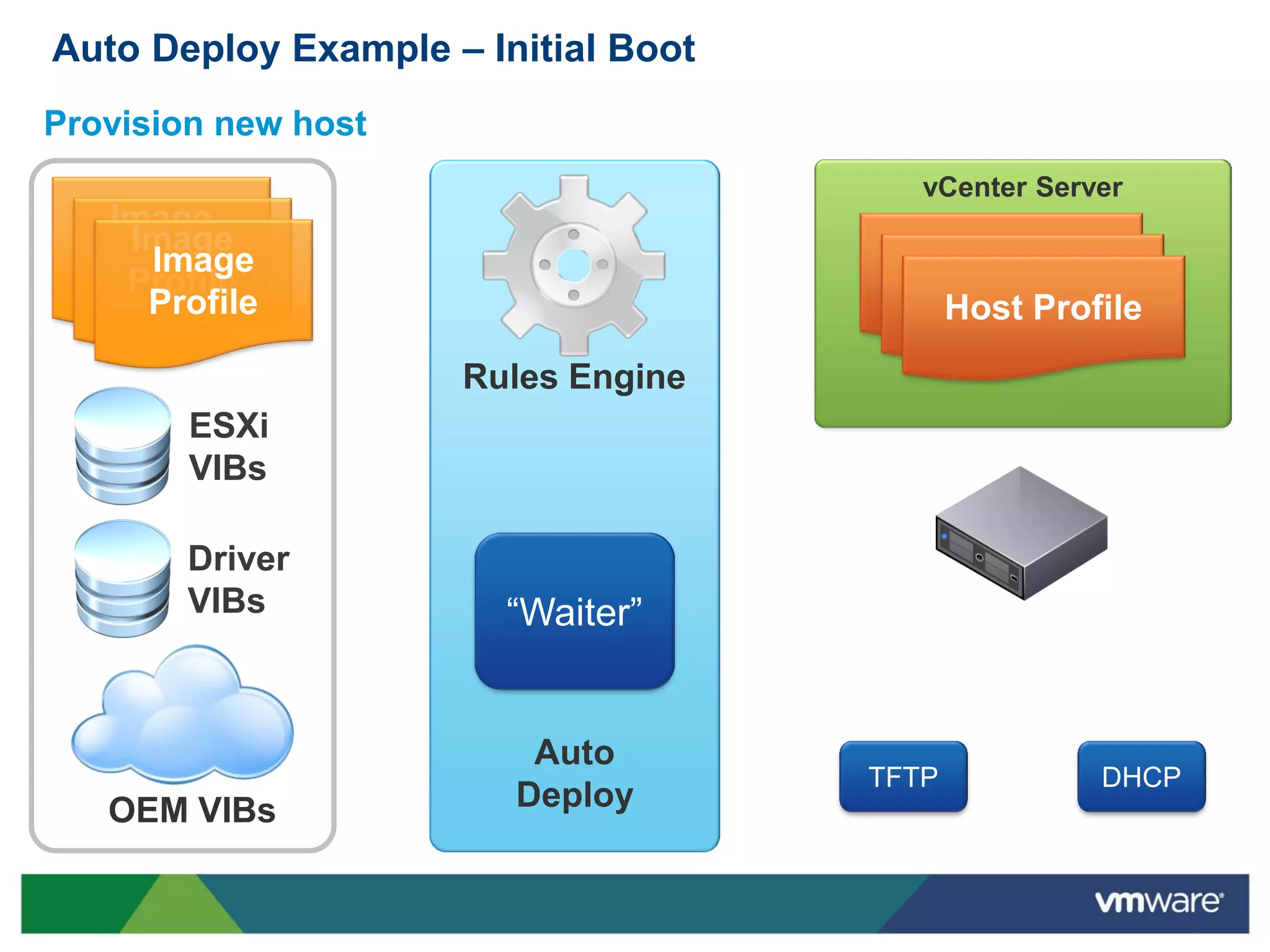
Auto Deploy Example – Initial Boot
Provision new host
                                        vCenter Server
   Image
    Image
   Profile
     Image                            Host Profile
    Profile                            Host Profile
     Profile                            Host Profile
                     Rules Engine
        ESXi
        VIBs

        Driver
        VIBs            “Waiter”


                         Auto
                                     TFTP           DHCP
   OEM VIBs             Deploy
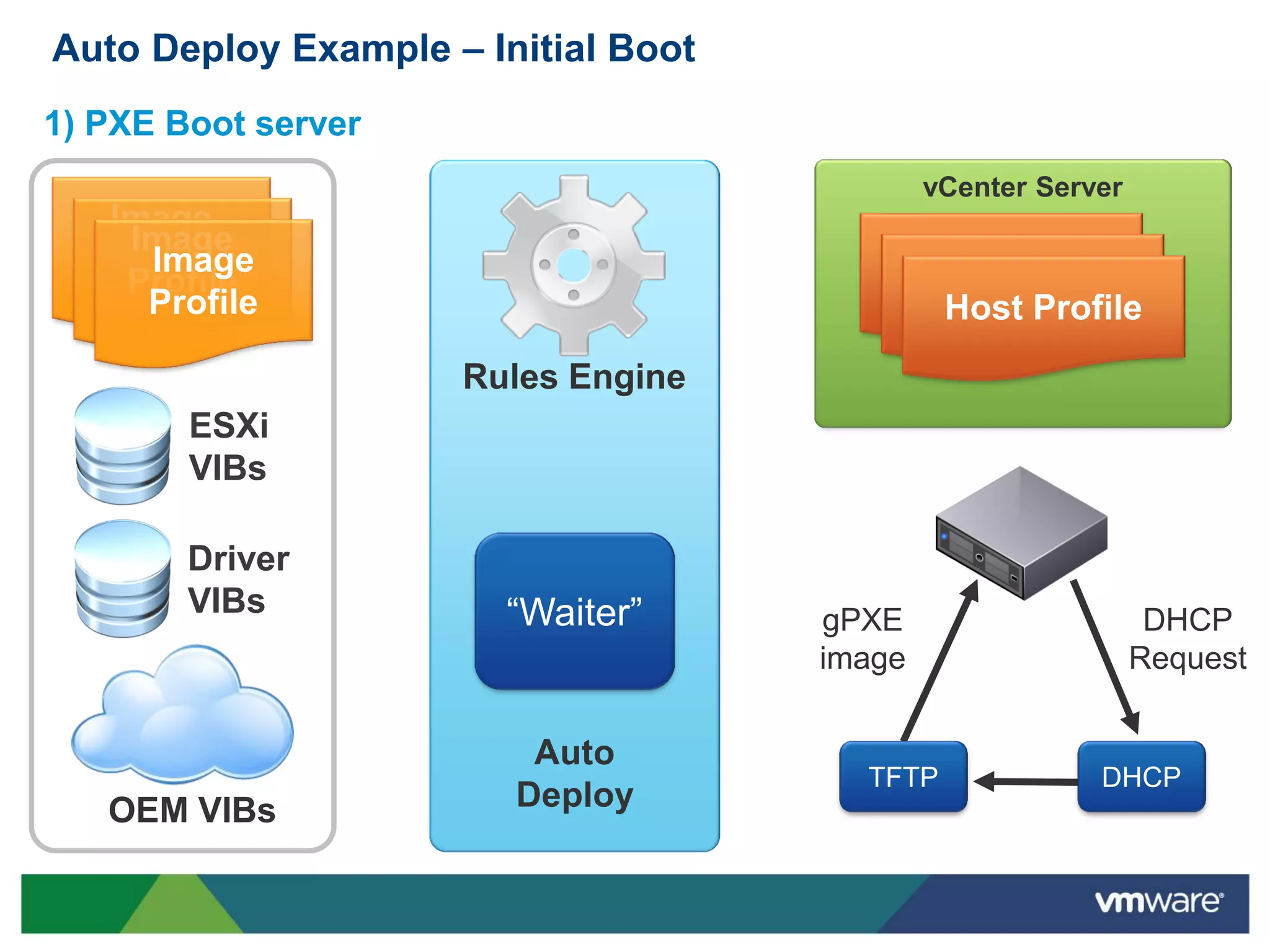
Auto Deploy Example – Initial Boot
1) PXE Boot server
                                             vCenter Server
   Image
    Image
   Profile
     Image                               Host Profile
    Profile                               Host Profile
     Profile                               Host Profile
                     Rules Engine
        ESXi
        VIBs

        Driver
        VIBs            “Waiter”     gPXE                      DHCP
                                     image                    Request


                         Auto
                                       TFTP              DHCP
   OEM VIBs             Deploy
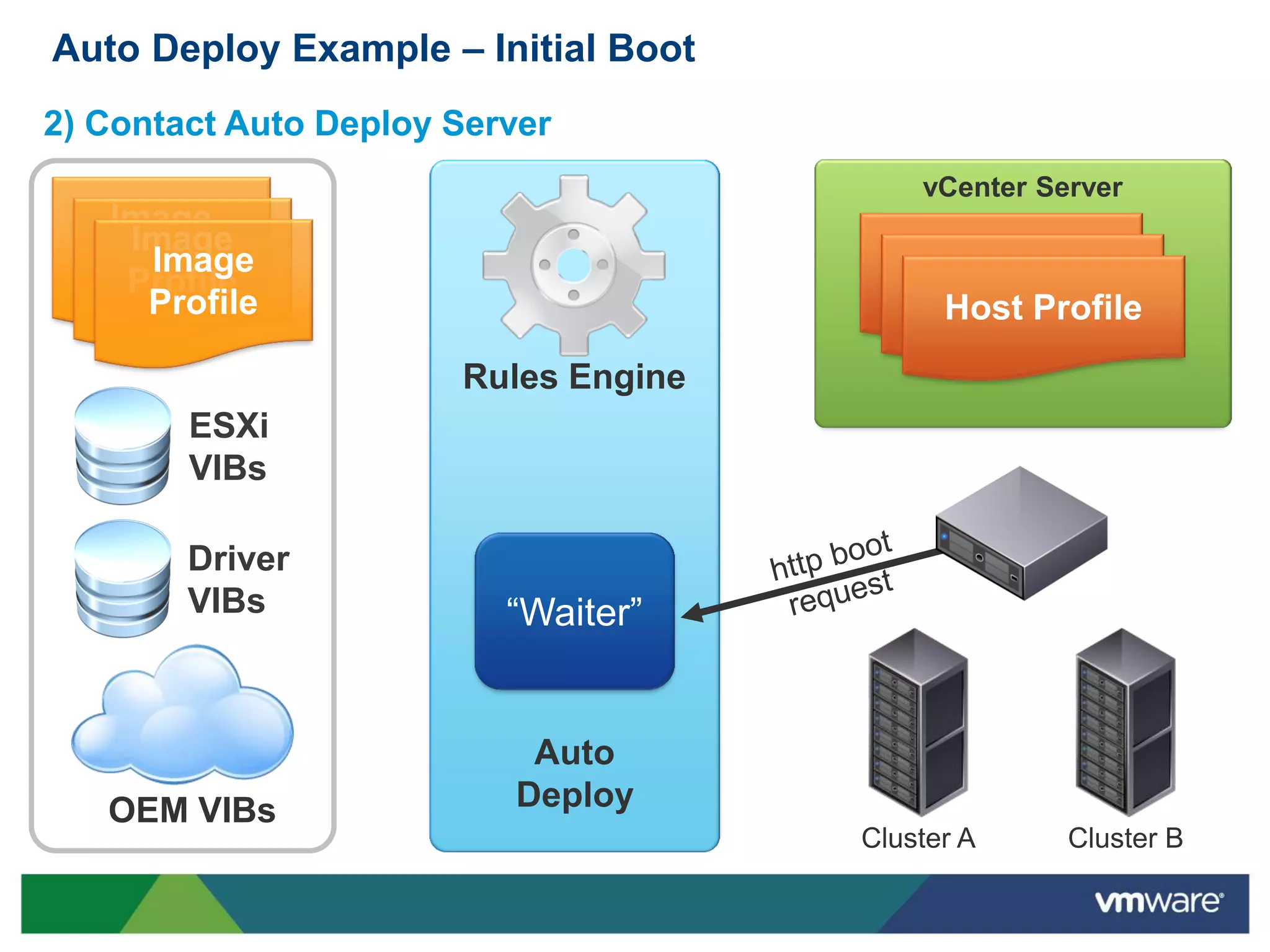
Auto Deploy Example – Initial Boot
2) Contact Auto Deploy Server
                                          vCenter Server
   Image
    Image
   Profile
     Image                               Host Profile
    Profile                               Host Profile
     Profile                               Host Profile
                       Rules Engine
        ESXi
        VIBs

        Driver
        VIBs              “Waiter”


                           Auto
   OEM VIBs               Deploy
                                      Cluster A     Cluster B
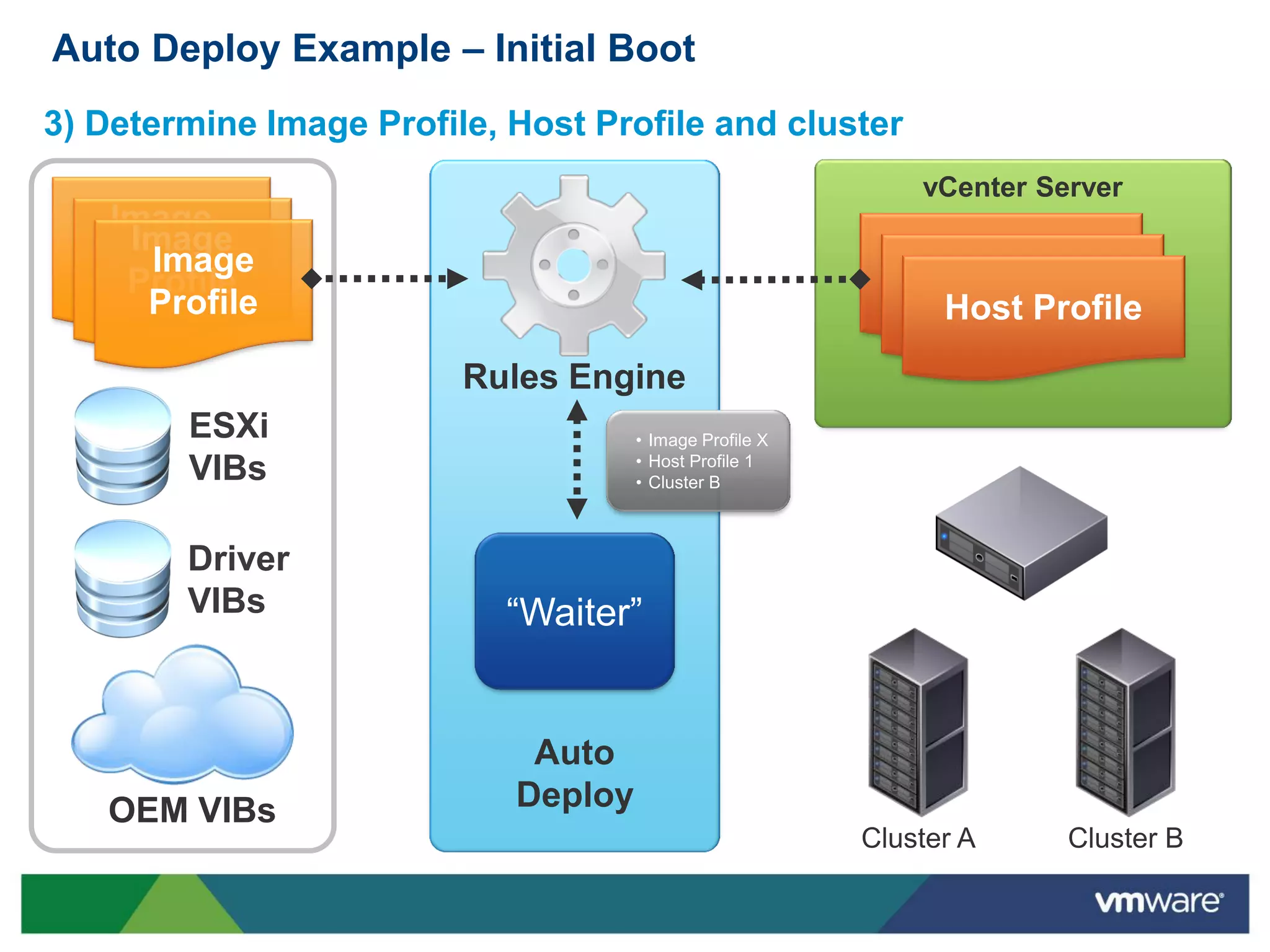
Auto Deploy Example – Initial Boot
3) Determine Image Profile, Host Profile and cluster
                                                             vCenter Server
   Image
    Image
   Profile
     Image                                                  Host Profile
    Profile                                                  Host Profile
     Profile                                                  Host Profile
                         Rules Engine
        ESXi                         • Image Profile X
                                     • Host Profile 1
        VIBs                         • Cluster B


        Driver
        VIBs               “Waiter”


                             Auto
   OEM VIBs                 Deploy
                                                         Cluster A     Cluster B
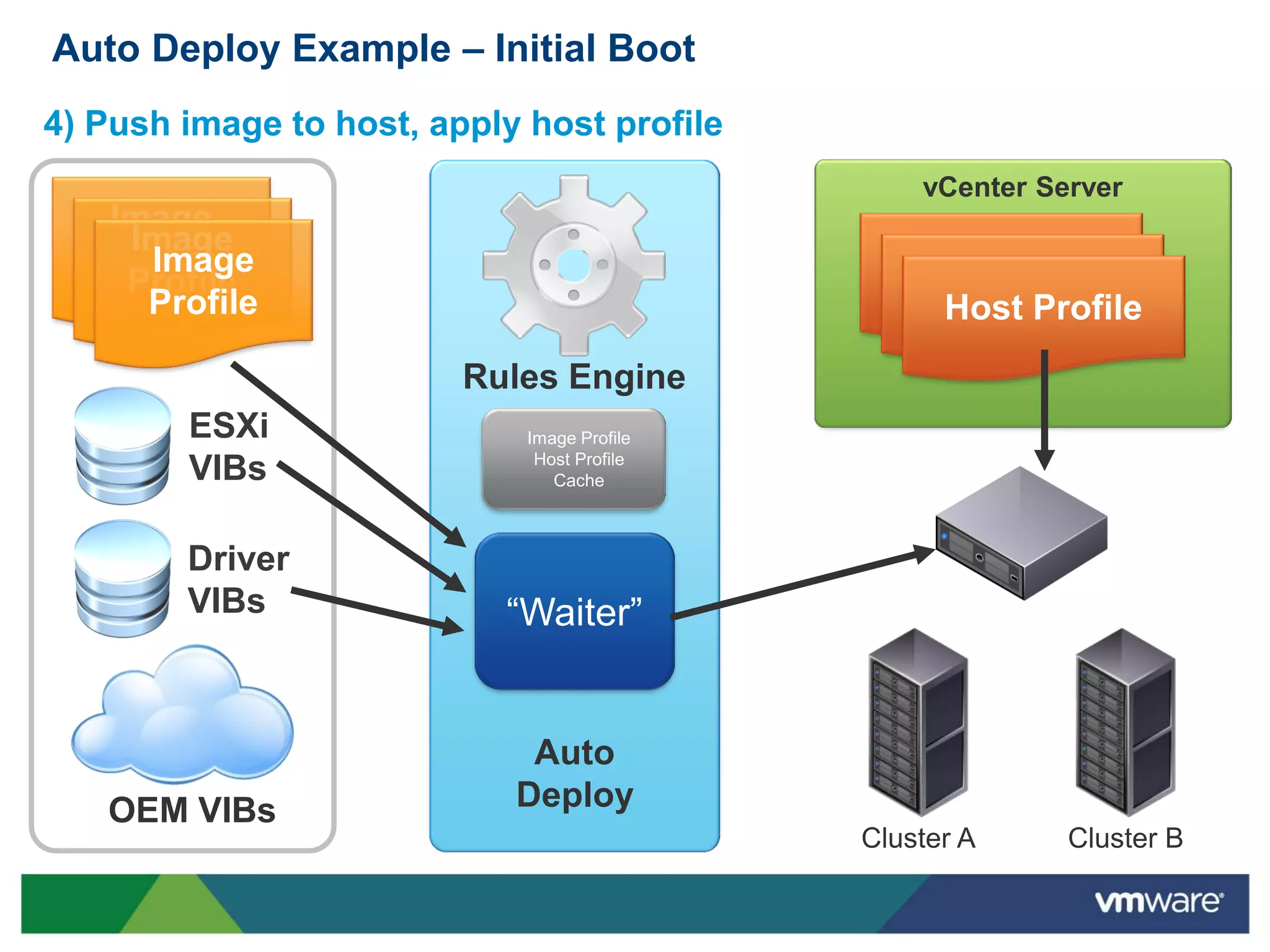
Auto Deploy Example – Initial Boot
4) Push image to host, apply host profile
                                                 vCenter Server
   Image
    Image
   Profile
     Image                                      Host Profile
    Profile                                      Host Profile
     Profile                                      Host Profile
                         Rules Engine
        ESXi                 Image Profile
                              Host Profile
        VIBs                    Cache


        Driver
        VIBs               “Waiter”


                             Auto
   OEM VIBs                 Deploy
                                             Cluster A     Cluster B
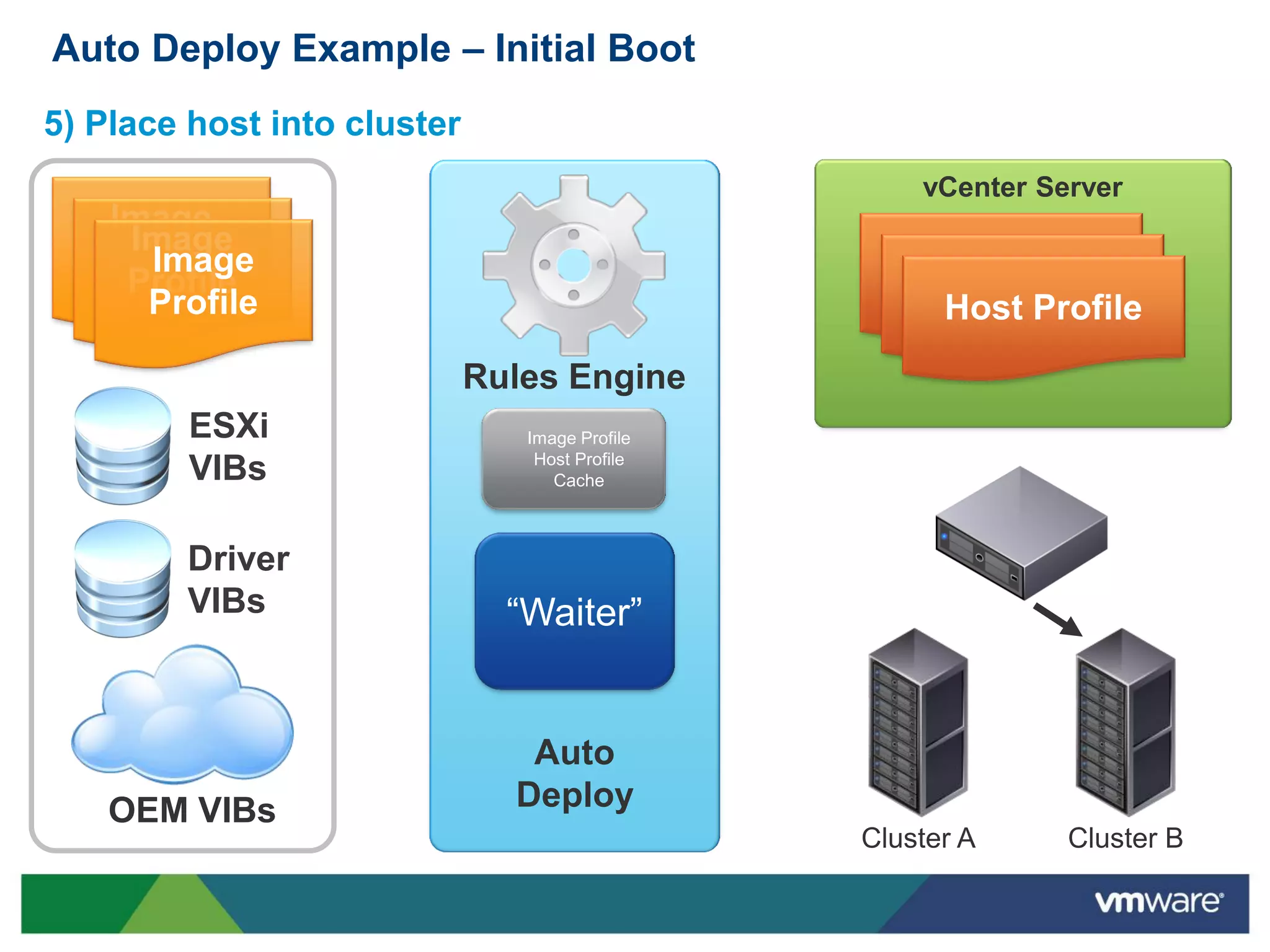
Auto Deploy Example – Initial Boot
5) Place host into cluster
                                                    vCenter Server
   Image
    Image
   Profile
     Image                                         Host Profile
    Profile                                         Host Profile
     Profile                                         Host Profile
                             Rules Engine
         ESXi                   Image Profile
                                 Host Profile
         VIBs                      Cache


        Driver
        VIBs                   “Waiter”


                                Auto
    OEM VIBs                   Deploy
                                                Cluster A     Cluster B
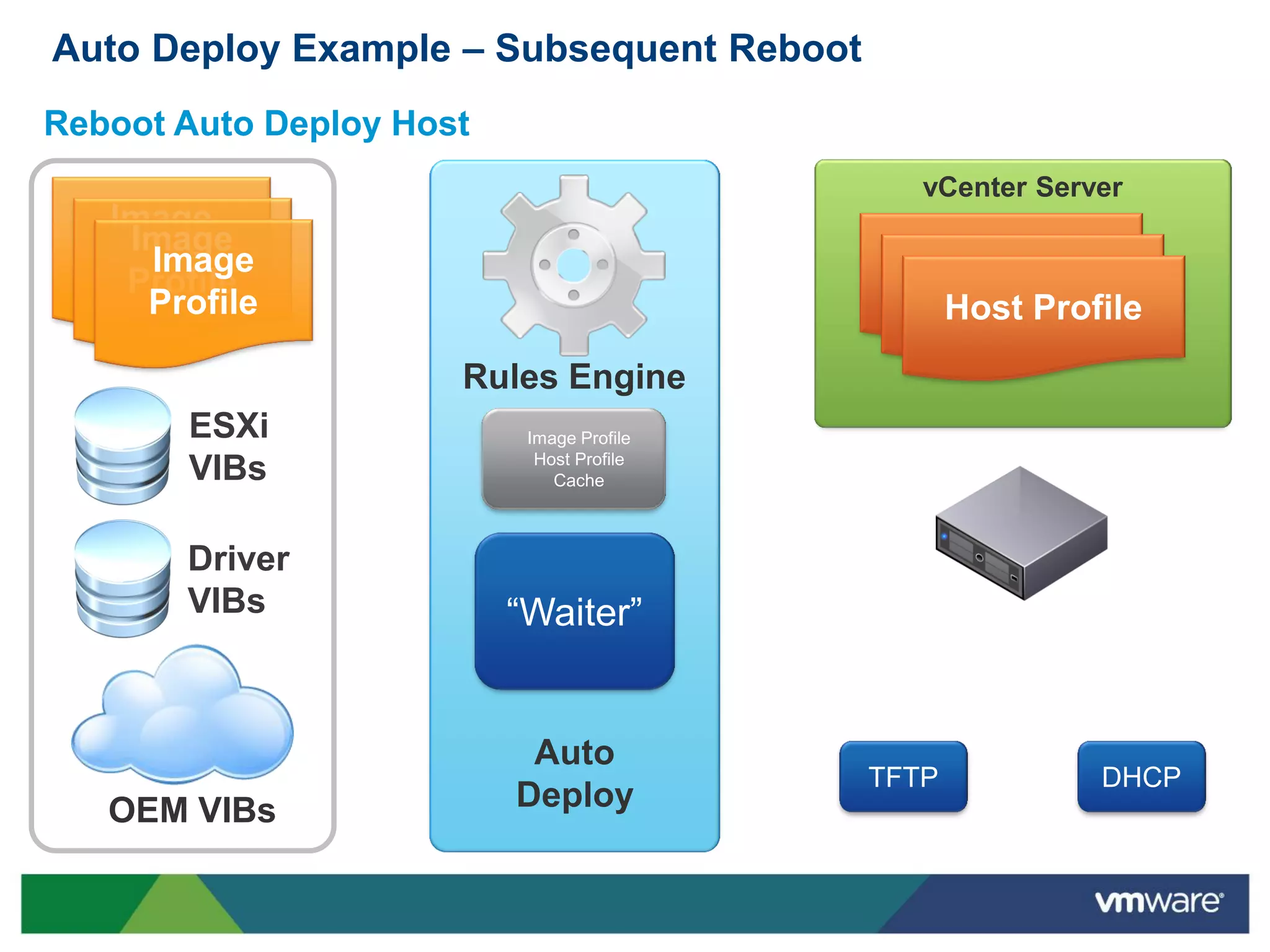
Auto Deploy Example – Subsequent Reboot
Reboot Auto Deploy Host
                                              vCenter Server
   Image
    Image
   Profile
     Image                                  Host Profile
    Profile                                  Host Profile
     Profile                                  Host Profile
                      Rules Engine
       ESXi                Image Profile
                            Host Profile
       VIBs                   Cache


       Driver
       VIBs               “Waiter”


                           Auto
                                           TFTP           DHCP
   OEM VIBs               Deploy
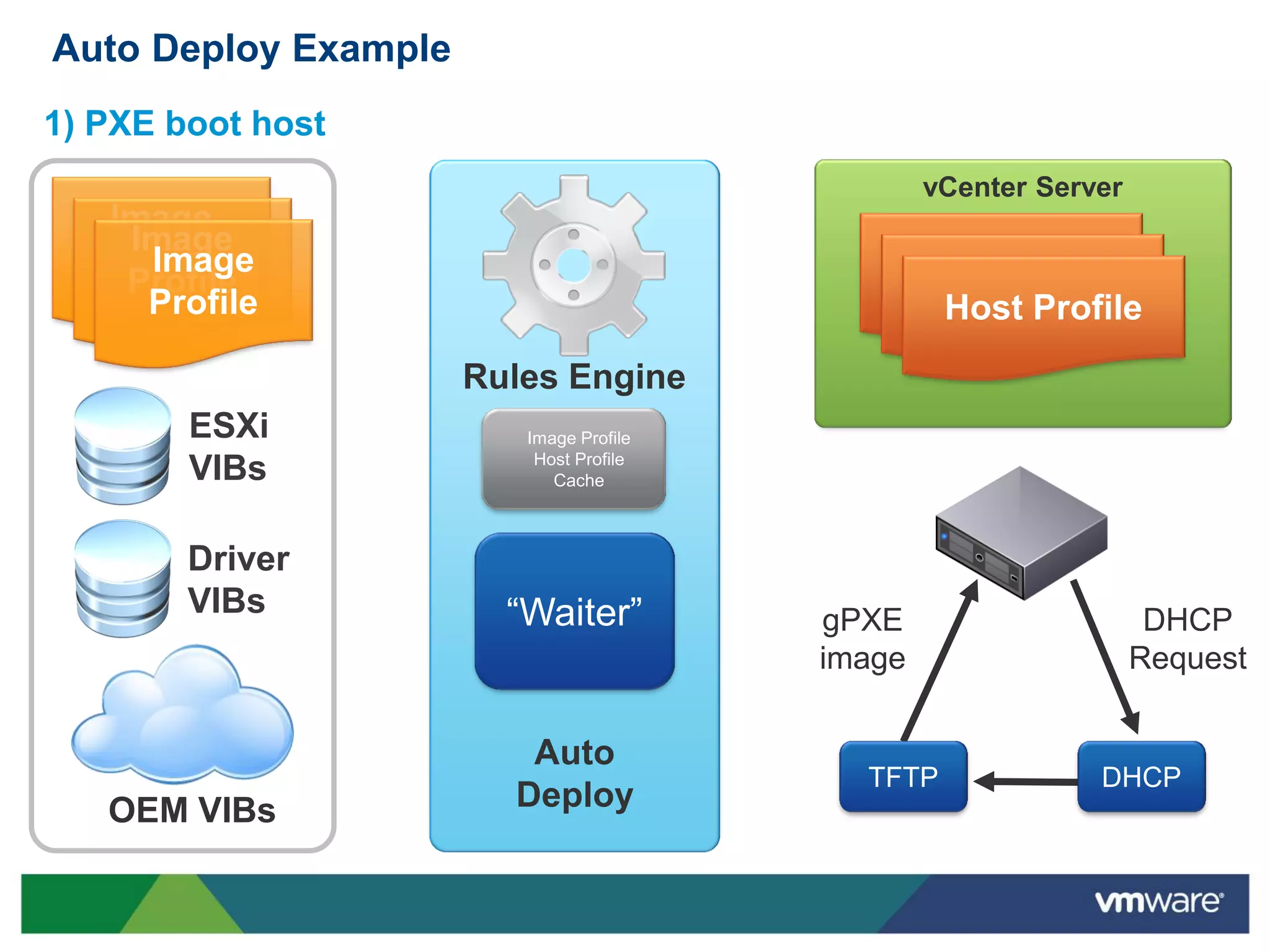
Auto Deploy Example
1) PXE boot host
                                                 vCenter Server
   Image
    Image
   Profile
     Image                                   Host Profile
    Profile                                   Host Profile
     Profile                                   Host Profile
                      Rules Engine
        ESXi             Image Profile
                          Host Profile
        VIBs                Cache


        Driver
        VIBs            “Waiter”         gPXE                      DHCP
                                         image                    Request


                         Auto
                                           TFTP              DHCP
   OEM VIBs             Deploy
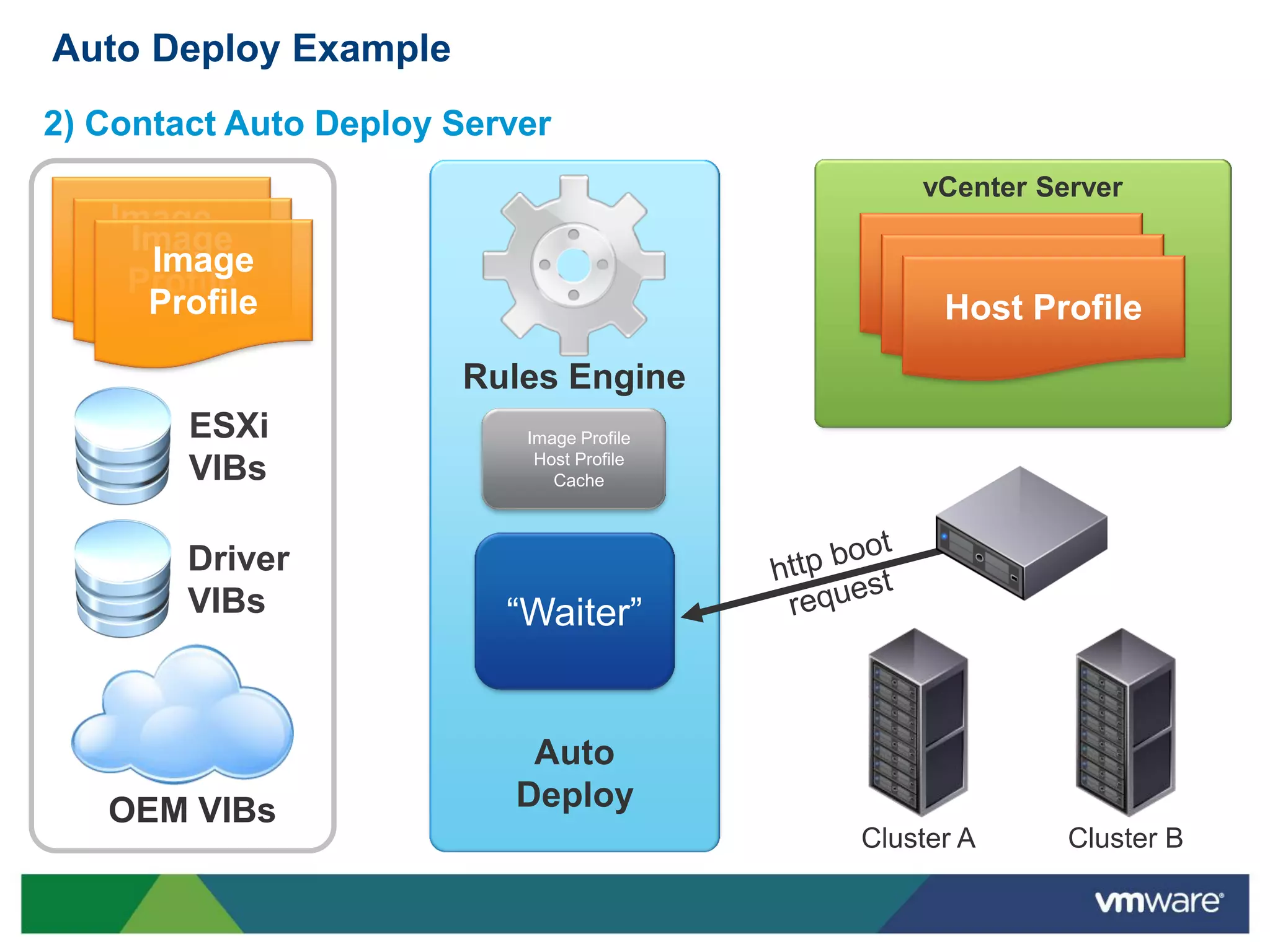
Auto Deploy Example
2) Contact Auto Deploy Server
                                               vCenter Server
   Image
    Image
   Profile
     Image                                    Host Profile
    Profile                                    Host Profile
     Profile                                    Host Profile
                       Rules Engine
        ESXi               Image Profile
                            Host Profile
        VIBs                  Cache


        Driver
        VIBs              “Waiter”


                           Auto
   OEM VIBs               Deploy
                                           Cluster A     Cluster B
Auto Deploy Example
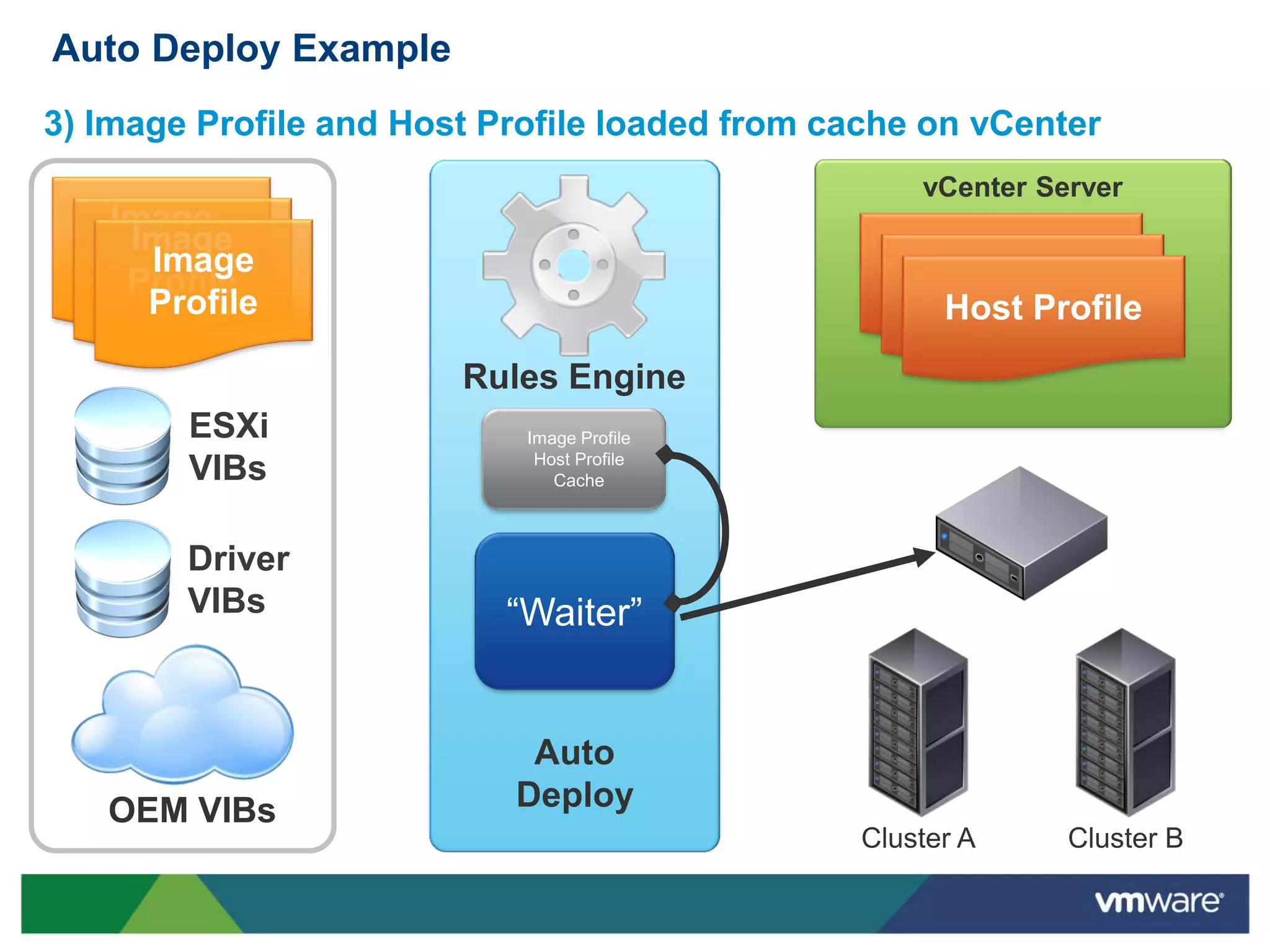
3) Image Profile and Host Profile loaded from cache on vCenter
                                                   vCenter Server
   Image
    Image
   Profile
     Image                                        Host Profile
    Profile                                        Host Profile
     Profile                                        Host Profile
                        Rules Engine
        ESXi                Image Profile
                             Host Profile
        VIBs                   Cache


        Driver
        VIBs               “Waiter”


                            Auto
   OEM VIBs                Deploy
                                               Cluster A     Cluster B
Auto Deploy Example
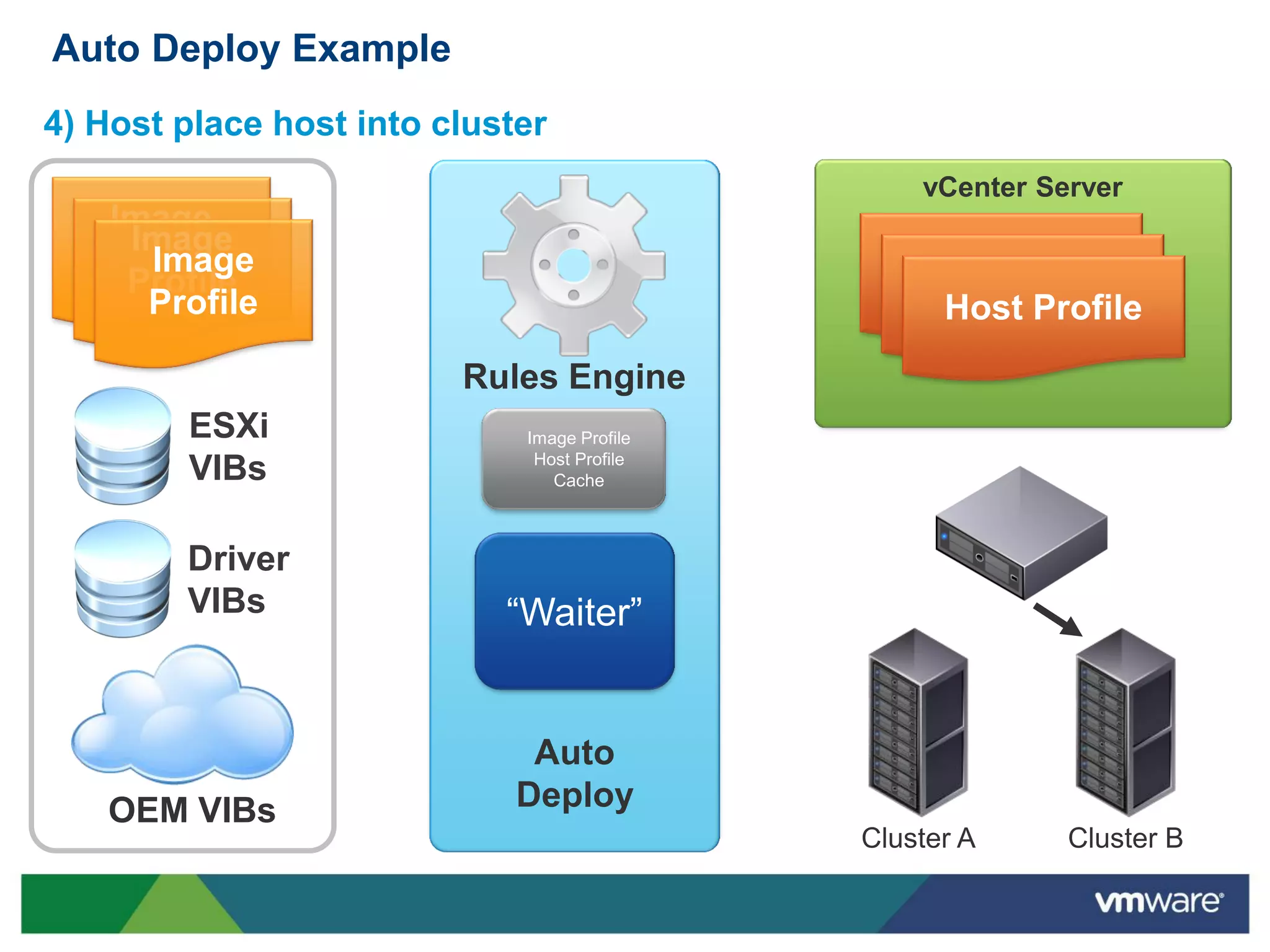
4) Host place host into cluster
                                                 vCenter Server
   Image
    Image
   Profile
     Image                                      Host Profile
    Profile                                      Host Profile
     Profile                                      Host Profile
                         Rules Engine
        ESXi                 Image Profile
                              Host Profile
        VIBs                    Cache


        Driver
        VIBs                “Waiter”


                              Auto
   OEM VIBs                  Deploy
                                             Cluster A     Cluster B

vSphere 5 - Image Builder and Auto Deploy

  • 1.
    vSphere 5 ImageBuilder and Auto Deploy
  • 2.
    Composition of anESXi Image Core CIM Hypervisor Providers Plug-in Drivers Components
  • 3.
    ESXi Image Deployment Challenges • Standard ESXi image from VMware download site is sometimes limited • Doesn’t have all drivers or CIM providers for specific hardware • Doesn’t contain vendor specific plug-in components ? Missing CIM provider Missing driver Standard ESXi ISO • Base providers • Base drivers
  • 4.
    Describing ESXi Components VIB • “VMware Infrastructure Bundle” (VIB) • Software packaging format used for ESXi • Often referred to as a “Software Package” • Used for all components • ESXi Base Image • Drivers • CIM providers • Other components • Can specify relationship with other VIBs • VIBs that it depends on • VIBs that it conflicts with
  • 5.
    Managing Customized ESXiImages  Image Builder: a set of command line utilities for… • Creating and managing image profiles • Building ESXi customized boot images, e.g. • Installable ISO • Bundle suitable for PXE installation or Flash • Initial version is based on PowerCLI • Snap-in component bundled as part of VMware’s PowerCLI tools  Depot • A repository containing • Image profiles • VIBs • Can have multiple depots, with two types • On a web server • Encapsulated in a .ZIP file
  • 6.
    Building an Image Start PowerCLI session Windows Host with PowerCLI and Image Builder Snap-in
  • 7.
    Building an Image Activate Image Builder Snap-in Windows Host with PowerCLI and Image Builder Snap-in Image Builder
  • 8.
    Building an Image Depots Connect to depot(s) Image Profile Windows Host with PowerCLI and Image Builder Snap-in ESXi VIBs Image Driver Builder VIBs OEM VIBs
  • 9.
    Building an Image Depots Clone and modify existing Image Profile Image Profile Windows Host with PowerCLI and Image Builder Snap-in ESXi VIBs Image Driver Builder VIBs OEM VIBs
  • 10.
    Building an Image Depots Generate new image Image Profile Windows Host with PowerCLI and Image Builder Snap-in ESXi VIBs Image ISO Image Driver Builder VIBs PXE-bootable Image OEM VIBs
  • 11.
    What Is AutoDeploy?  New host deployment method introduced in vSphere 5.0 • Based on PXE Boot • Works with Image Builder, vCenter Server, and Host Profiles • How it works: • PXE boot the server • ESXi image profile loaded into host memory via Auto Deploy Server • Configuration applied using Answer File / Host Profile • Host placed/connected in vCenter • Benefits • No boot disk • Quickly and easily deploy large numbers of ESXi hosts • Share a standard ESXi image across many hosts • Host image decoupled from the physical server • Recover host w/out recovering hardware or having to restore from backup
  • 12.
    What Is AutoDeploy? Without Auto Deploy… With Auto Deploy… Host image tied to physical server Host image decoupled from server • Each host needs full install and config • Run on any server w/ matching hardware • Not easy to recover host • Config stored in Host Profile • Redundant boot disks/dedicated LUN • No boot disk A lot of time/effort building hosts Agile deployment model • Deploying hosts is repetitive and tedious • Deploy many hosts quickly and efficiently • Heavy reliance on scripting • No pre/post install scripts • Need to update for each new release • No need to update with each release Configuration drift between hosts Host State Guaranteed • Config drift always a concern • Single boot image shared across hosts • Compromises HA/DR Every reboot provides consistent image • Manging drift consumes admin resources • Eliminate need to detect/correct drift
  • 13.
    What Is AutoDeploy?  No Boot Disk? Where does it go? Boot Disk Platform Composition: ESXi base, drivers, CIM providers, … Configuration: networking, storage, All information on the state date/time, firewall, admin password, … of the host is stored off the host in vCenter Running State: VM Inventory, HA state, License, DPM configuration Event Recording: log files, core dump
  • 14.
    What Is AutoDeploy?  No Boot Disk? Where does it go? Boot Disk Platform Composition: ESXi base, drivers, CIM providers, … Image Profile Configuration: networking, storage, date/time, firewall, admin password, … Host Profile Running State: VM Inventory, HA state, License, DPM configuration vCenter Server Event Recording: log files, core dump Add-on Components
  • 15.
    Auto Deploy Components Component Sub-Components Notes PXE Boot • DHCP Server • Setup independently Infrastructure • TFTP Server • gPXE file from vCenter • Can use Auto Deploy Appliance Auto Deploy Server • Rules Engine • Build/Manage Rules • PowerCLI Snap-in • Match server to Image • Web Server and Host Profile • Deploy server Image Builder • Image Profiles, • Combine ESXi image • PowerCLI Snap-in with 3rd party VIBs to create custom Image Profiles vCenter Server • Stores Rules • Provides store for rules • Host Profiles • Host configs saved in • Answer Files Host Profiles • Custom Host settings saved in Answer Files
  • 16.
    Auto Deploy Example– Initial Boot Provision new host vCenter Server Image Image Profile Image Host Profile Profile Host Profile Profile Host Profile Rules Engine ESXi VIBs Driver VIBs “Waiter” Auto TFTP DHCP OEM VIBs Deploy
  • 17.
    Auto Deploy Example– Initial Boot 1) PXE Boot server vCenter Server Image Image Profile Image Host Profile Profile Host Profile Profile Host Profile Rules Engine ESXi VIBs Driver VIBs “Waiter” gPXE DHCP image Request Auto TFTP DHCP OEM VIBs Deploy
  • 18.
    Auto Deploy Example– Initial Boot 2) Contact Auto Deploy Server vCenter Server Image Image Profile Image Host Profile Profile Host Profile Profile Host Profile Rules Engine ESXi VIBs Driver VIBs “Waiter” Auto OEM VIBs Deploy Cluster A Cluster B
  • 19.
    Auto Deploy Example– Initial Boot 3) Determine Image Profile, Host Profile and cluster vCenter Server Image Image Profile Image Host Profile Profile Host Profile Profile Host Profile Rules Engine ESXi • Image Profile X • Host Profile 1 VIBs • Cluster B Driver VIBs “Waiter” Auto OEM VIBs Deploy Cluster A Cluster B
  • 20.
    Auto Deploy Example– Initial Boot 4) Push image to host, apply host profile vCenter Server Image Image Profile Image Host Profile Profile Host Profile Profile Host Profile Rules Engine ESXi Image Profile Host Profile VIBs Cache Driver VIBs “Waiter” Auto OEM VIBs Deploy Cluster A Cluster B
  • 21.
    Auto Deploy Example– Initial Boot 5) Place host into cluster vCenter Server Image Image Profile Image Host Profile Profile Host Profile Profile Host Profile Rules Engine ESXi Image Profile Host Profile VIBs Cache Driver VIBs “Waiter” Auto OEM VIBs Deploy Cluster A Cluster B
  • 22.
    Auto Deploy Example– Subsequent Reboot Reboot Auto Deploy Host vCenter Server Image Image Profile Image Host Profile Profile Host Profile Profile Host Profile Rules Engine ESXi Image Profile Host Profile VIBs Cache Driver VIBs “Waiter” Auto TFTP DHCP OEM VIBs Deploy
  • 23.
    Auto Deploy Example 1)PXE boot host vCenter Server Image Image Profile Image Host Profile Profile Host Profile Profile Host Profile Rules Engine ESXi Image Profile Host Profile VIBs Cache Driver VIBs “Waiter” gPXE DHCP image Request Auto TFTP DHCP OEM VIBs Deploy
  • 24.
    Auto Deploy Example 2)Contact Auto Deploy Server vCenter Server Image Image Profile Image Host Profile Profile Host Profile Profile Host Profile Rules Engine ESXi Image Profile Host Profile VIBs Cache Driver VIBs “Waiter” Auto OEM VIBs Deploy Cluster A Cluster B
  • 25.
    Auto Deploy Example 3)Image Profile and Host Profile loaded from cache on vCenter vCenter Server Image Image Profile Image Host Profile Profile Host Profile Profile Host Profile Rules Engine ESXi Image Profile Host Profile VIBs Cache Driver VIBs “Waiter” Auto OEM VIBs Deploy Cluster A Cluster B
  • 26.
    Auto Deploy Example 4)Host place host into cluster vCenter Server Image Image Profile Image Host Profile Profile Host Profile Profile Host Profile Rules Engine ESXi Image Profile Host Profile VIBs Cache Driver VIBs “Waiter” Auto OEM VIBs Deploy Cluster A Cluster B