VMware compute driver
         for
     Openstack

              Anantha Padmanabhan CB
              HP
Existing support
• Initial support for VMware was coded by Citrix
• With later versions of openstack, compute driver for the module vmwareapi
  was not functional
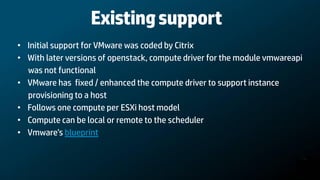
• VMware has fixed / enhanced the compute driver to support instance
  provisioning to a host
• Follows one compute per ESXi host model
• Compute can be local or remote to the scheduler
• Vmware’s blueprint
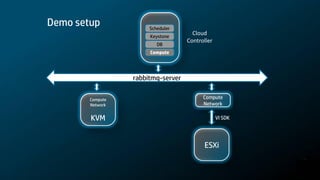
Demo setup             Scheduler
                       Keystone
                                      Cloud
                                    Controller
                          DB
                       Compute


                  rabbitmq-server

        Compute                           Compute
        Network                           Network

        KVM                                      VI SDK


                                          ESXi
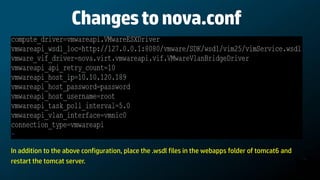
Changes to nova.conf


In addition to the above configuration, place the .wsdl files in the webapps folder of tomcat6 and
restart the tomcat server.
Linked clone

Nova configuration flag for VMware Linked Clone support

•   --use_linked_clone=[true|false]
•   Default value is true
•   Creates a folder vmware_base in the datastore and caches the image
•   Creates a differential disk under the VM folder in the datastore
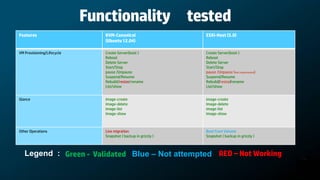
Functionality tested
Features                       KVM-Canonical                    ESXi-Host (5.0)
                               (Ubuntu 12.04)

VM Provisioning/Lifecycle      Create Server(boot )             Create Server(boot )
                               Reboot                           Reboot
                               Delete Server                    Delete Server
                               Start/Stop                       Start/Stop
                               pause /Unpause                   pause /Unpause (Not implemented)
                               Suspend/Resume                   Suspend/Resume
                               Rebuild/resize/rename            Rebuild/resize/rename
                               List/show                        List/show


Glance                         image-create                     image-create
                               Image-delete                     Image-delete
                               image-list                       image-list
                               Image-show                       Image-show


Other Operations               Live migration                   Boot from Volume
                               Snapshot ( backup in grizzly )   Snapshot ( backup in grizzly )


   Legend : Green - Validated Blue – Not attempted RED – Not Working
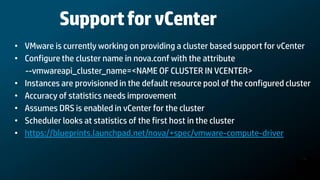
Support for vCenter
• VMware is currently working on providing a cluster based support for vCenter
• Configure the cluster name in nova.conf with the attribute
  --vmwareapi_cluster_name=<NAME OF CLUSTER IN VCENTER>
• Instances are provisioned in the default resource pool of the configured cluster
• Accuracy of statistics needs improvement
• Assumes DRS is enabled in vCenter for the cluster
• Scheduler looks at statistics of the first host in the cluster
• https://blueprints.launchpad.net/nova/+spec/vmware-compute-driver
Demo
Sources
Openstack grizzly :
https://github.com/openstack/nova/blob/master

VMware's patch for compute driver for grizzly-1:
https://review.openstack.org/#/c/16497/

VMware’s compute driver blue print :
https://blueprints.launchpad.net/nova/+spec/vmware-compute-driver

VMware’s patch for vcenter support :
https://review.openstack.org/#/c/19483/
Questions ?

VMware compute driver for OpenStack

  • 1.
    VMware compute driver for Openstack Anantha Padmanabhan CB HP
  • 2.
    Existing support • Initialsupport for VMware was coded by Citrix • With later versions of openstack, compute driver for the module vmwareapi was not functional • VMware has fixed / enhanced the compute driver to support instance provisioning to a host • Follows one compute per ESXi host model • Compute can be local or remote to the scheduler • Vmware’s blueprint
  • 3.
    Demo setup Scheduler Keystone Cloud Controller DB Compute rabbitmq-server Compute Compute Network Network KVM VI SDK ESXi
  • 4.
    Changes to nova.conf Inaddition to the above configuration, place the .wsdl files in the webapps folder of tomcat6 and restart the tomcat server.
  • 5.
    Linked clone Nova configurationflag for VMware Linked Clone support • --use_linked_clone=[true|false] • Default value is true • Creates a folder vmware_base in the datastore and caches the image • Creates a differential disk under the VM folder in the datastore
  • 6.
    Functionality tested Features KVM-Canonical ESXi-Host (5.0) (Ubuntu 12.04) VM Provisioning/Lifecycle Create Server(boot ) Create Server(boot ) Reboot Reboot Delete Server Delete Server Start/Stop Start/Stop pause /Unpause pause /Unpause (Not implemented) Suspend/Resume Suspend/Resume Rebuild/resize/rename Rebuild/resize/rename List/show List/show Glance image-create image-create Image-delete Image-delete image-list image-list Image-show Image-show Other Operations Live migration Boot from Volume Snapshot ( backup in grizzly ) Snapshot ( backup in grizzly ) Legend : Green - Validated Blue – Not attempted RED – Not Working
  • 7.
    Support for vCenter •VMware is currently working on providing a cluster based support for vCenter • Configure the cluster name in nova.conf with the attribute --vmwareapi_cluster_name=<NAME OF CLUSTER IN VCENTER> • Instances are provisioned in the default resource pool of the configured cluster • Accuracy of statistics needs improvement • Assumes DRS is enabled in vCenter for the cluster • Scheduler looks at statistics of the first host in the cluster • https://blueprints.launchpad.net/nova/+spec/vmware-compute-driver
  • 8.
  • 9.
    Sources Openstack grizzly : https://github.com/openstack/nova/blob/master VMware'spatch for compute driver for grizzly-1: https://review.openstack.org/#/c/16497/ VMware’s compute driver blue print : https://blueprints.launchpad.net/nova/+spec/vmware-compute-driver VMware’s patch for vcenter support : https://review.openstack.org/#/c/19483/
  • 10.