Virtualizing Databases: Doing IT Right
Michael Corey, Ntirety, Inc
Jeff Szastak, VMware
VAPP4724
#VAPP4724
Jeff Szastak
Jeff Szastak
MSIA, CISSP, VCP, MCSE, etc.
Staff Systems Engineer – Enterprise Healthcare
VMware, Inc.
Microsoft Exchange & SQL virtualization BC/DR SME
@szastak
Blog contributor:
blogs.vmware.com/apps
www.virtualinsanity.com
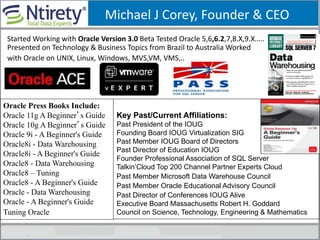
Michael J Corey, Founder & CEO
Oracle Press Books Include:
Oracle 11g A Beginner’s Guide
Oracle 10g A Beginner’s Guide
Oracle 9i - A Beginner's Guide
Oracle8i - Data Warehousing
Oracle8i - A Beginner's Guide
Oracle8 - Data Warehousing
Oracle8 – Tuning
Oracle8 - A Beginner's Guide
Oracle - Data Warehousing
Oracle - A Beginner's Guide
Tuning Oracle- 81-3; 1994)
Key Past/Current Affiliations:
Past President of the IOUG
Founding Board IOUG Virtualization SIG
Past Member IOUG Board of Directors
Past Director of Education IOUG
Founder Professional Association of SQL Server
Talkin’Cloud Top 200 Channel Partner Experts Cloud
Past Member Microsoft Data Warehouse Council
Past Member Oracle Educational Advisory Council
Past Director of Conferences IOUG Alive
Executive Board Massachusetts Robert H. Goddard
Council on Science, Technology, Engineering & Mathematics
Started Working with Oracle Version 3.0 Beta Tested Oracle 5,6,6.2,7,8.X,9.X.….
Presented on Technology & Business Topics from Brazil to Australia Worked
with Oracle on UNIX, Linux, Windows, MVS,VM, VMS,..
Michael Webster
Shameless Plug
<Your Name Here>
DataTone – The New World Order
Why Customers Are Virtualizing
Databases (Business Critical
Applications)
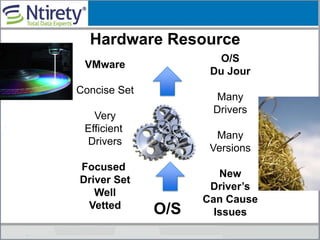
VMware
Concise Set
Very
Efficient
Drivers
Focused
Driver Set
Well
Vetted O/S
Hardware Resource
O/S
Du Jour
Many
Drivers
Many
Versions
New
Driver’s
Can Cause
Issues
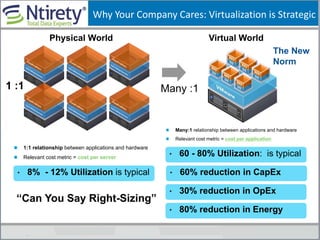
Why Your Company Cares: Virtualization is Strategic
1:1 relationship between applications and hardware
Relevant cost metric = cost per server
• 8% - 12% Utilization is typical
Many:1 relationship between applications and hardware
Relevant cost metric = cost per application
• 60 - 80% Utilization: is typical
• 60% reduction in CapEx
• 30% reduction in OpEx
• 80% reduction in Energy
Physical World
1 :1
Virtual World
Many :1
The New
Norm
“Can You Say Right-Sizing”
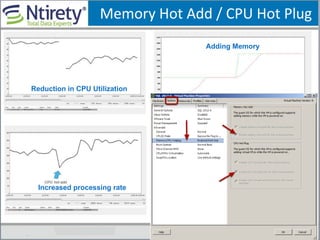
Memory Hot Add / CPU Hot Plug
Reduction in CPU Utilization
Increased processing rate
Adding Memory
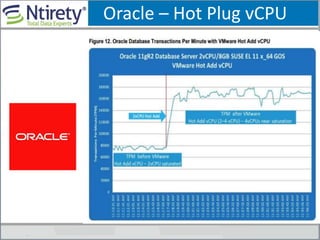
Oracle – Hot Plug vCPU
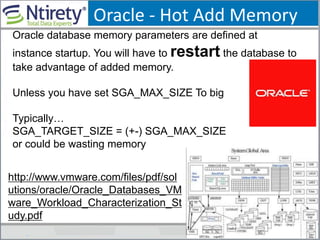
Oracle - Hot Add Memory
Oracle database memory parameters are defined at
instance startup. You will have to restart the database to
take advantage of added memory.
Unless you have set SGA_MAX_SIZE To big
Typically…
SGA_TARGET_SIZE = (+-) SGA_MAX_SIZE
or could be wasting memory
http://www.vmware.com/files/pdf/sol
utions/oracle/Oracle_Databases_VM
ware_Workload_Characterization_St
udy.pdf
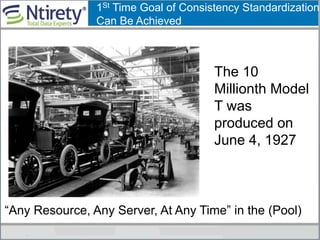
1St Time Goal of Consistency Standardization
Can Be Achieved
“Any Resource, Any Server, At Any Time” in the (Pool)
The 10
Millionth Model
T was
produced on
June 4, 1927
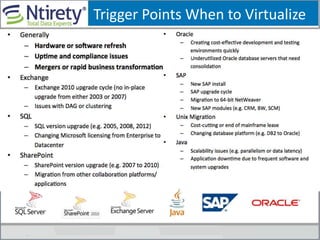
Trigger Points When to Virtualize
Architecting for Performance:
The Right Hypervisor
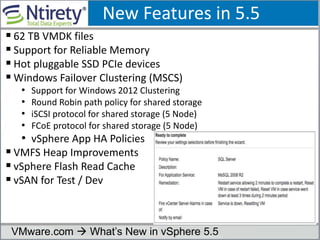
New Features in 5.5
 62 TB VMDK files
 Support for Reliable Memory
 Hot pluggable SSD PCIe devices
 Windows Failover Clustering (MSCS)
• Support for Windows 2012 Clustering
• Round Robin path policy for shared storage
• iSCSI protocol for shared storage (5 Node)
• FCoE protocol for shared storage (5 Node)
• vSphere App HA Policies
 VMFS Heap Improvements
 vSphere Flash Read Cache
 vSAN for Test / Dev
VMware.com  What’s New in vSphere 5.5
Is your database to “Big” to Virtualize?
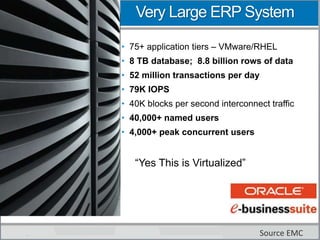
Very Large ERP System
• 75+ application tiers – VMware/RHEL
• 8 TB database; 8.8 billion rows of data
• 52 million transactions per day
• 79K IOPS
• 40K blocks per second interconnect traffic
• 40,000+ named users
• 4,000+ peak concurrent users
Source EMC
“Yes This is Virtualized”
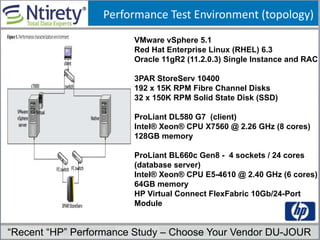
Performance Test Environment (topology)
VMware vSphere 5.1
Red Hat Enterprise Linux (RHEL) 6.3
Oracle 11gR2 (11.2.0.3) Single Instance and RAC
3PAR StoreServ 10400
192 x 15K RPM Fibre Channel Disks
32 x 150K RPM Solid State Disk (SSD)
ProLiant DL580 G7 (client)
Intel® Xeon® CPU X7560 @ 2.26 GHz (8 cores)
128GB memory
ProLiant BL660c Gen8 - 4 sockets / 24 cores
(database server)
Intel® Xeon® CPU E5-4610 @ 2.40 GHz (6 cores)
64GB memory
HP Virtual Connect FlexFabric 10Gb/24-Port
Module
“Recent “HP” Performance Study – Choose Your Vendor DU-JOUR
Workload Characteristics
• OLTP type of workload with a read write ratio of 2:1
• Oracle Database size of 600GB
• workload is an implementation of an online store
• The driver program simulates users logging in, browsing
for products by title, or category, adding selected products
to their shopping cart, and then purchasing those products
Performance Results
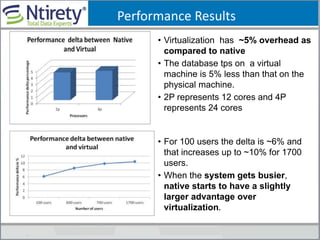
• Virtualization has ~5% overhead as
compared to native
• The database tps on a virtual
machine is 5% less than that on the
physical machine.
• 2P represents 12 cores and 4P
represents 24 cores
• For 100 users the delta is ~6% and
that increases up to ~10% for 1700
users.
• When the system gets busier,
native starts to have a slightly
larger advantage over
virtualization.
Performance Results (contd)
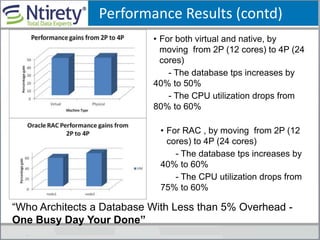
• For both virtual and native, by
moving from 2P (12 cores) to 4P (24
cores)
- The database tps increases by
40% to 50%
- The CPU utilization drops from
80% to 60%
• For RAC , by moving from 2P (12
cores) to 4P (24 cores)
- The database tps increases by
40% to 60%
- The CPU utilization drops from
75% to 60%
“Who Architects a Database With Less than 5% Overhead -
One Busy Day Your Done”
Virtualizing Databases: Doing IT Right
Lessons Learned Tier-1
VIP: What Works in Tier-2 (non-production),
will not always work with Tier-1 (production)”
Doing It Right 1st Time: Very Conservative
Designed to Insure You Avoid Common Traps &
Pitfalls Associated with Production Databases
being Virtualized
Starting Out Right
Doing It Right: Read Best Practices Guides
Read The Documentation
From All Your Vendors……
VMware, Microsoft, Storage
Vendor, Network Vendor….
Appendix of this deck
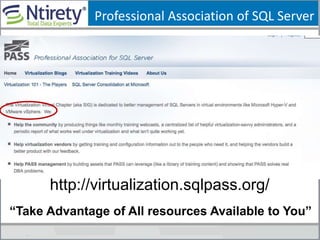
Professional Association of SQL Server
http://virtualization.sqlpass.org/
“Take Advantage of All resources Available to You”
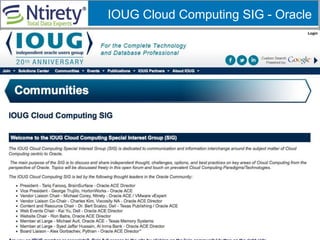
IOUG Cloud Computing SIG - Oracle
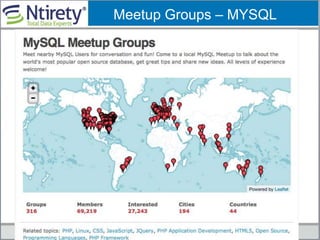
Meetup Groups – MYSQL
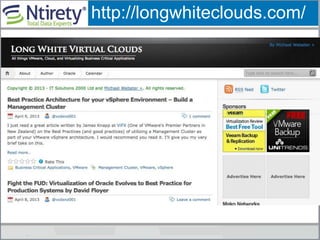
http://longwhiteclouds.com/
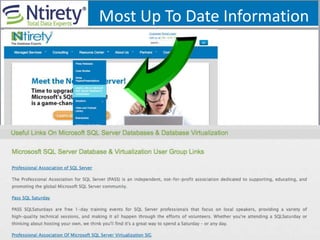
Most Up To Date Information
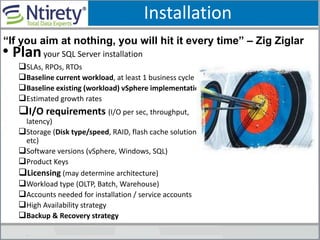
Installation
• Planyour SQL Server installation
SLAs, RPOs, RTOs
Baseline current workload, at least 1 business cycle
Baseline existing (workload) vSphere implementation
Estimated growth rates
I/O requirements (I/O per sec, throughput,
latency)
Storage (Disk type/speed, RAID, flash cache solution,
etc)
Software versions (vSphere, Windows, SQL)
Product Keys
Licensing (may determine architecture)
Workload type (OLTP, Batch, Warehouse)
Accounts needed for installation / service accounts
High Availability strategy
Backup & Recovery strategy
“If you aim at nothing, you will hit it every time” – Zig Ziglar
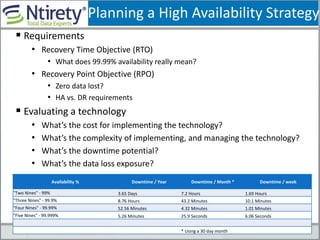
Planning a High Availability Strategy
 Requirements
• Recovery Time Objective (RTO)
• What does 99.99% availability really mean?
• Recovery Point Objective (RPO)
• Zero data lost?
• HA vs. DR requirements
 Evaluating a technology
• What’s the cost for implementing the technology?
• What’s the complexity of implementing, and managing the technology?
• What’s the downtime potential?
• What’s the data loss exposure?
Availability % Downtime / Year Downtime / Month * Downtime / week
"Two Nines" - 99% 3.65 Days 7.2 Hours 1.69 Hours
"Three Nines" - 99.9% 8.76 Hours 43.2 Minutes 10.1 Minutes
"Four Nines" - 99.99% 52.56 Minutes 4.32 Minutes 1.01 Minutes
"Five Nines" - 99.999% 5.26 Minutes 25.9 Seconds 6.06 Seconds
* Using a 30 day month
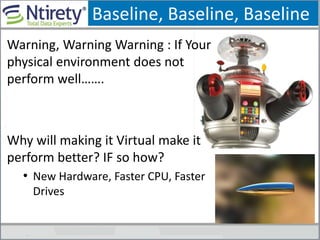
Baseline, Baseline, Baseline
Warning, Warning Warning : If Your
physical environment does not
perform well…….
Why will making it Virtual make it
perform better? IF so how?
• New Hardware, Faster CPU, Faster
Drives
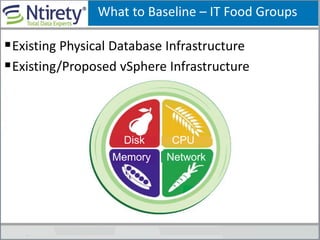
What to Baseline – IT Food Groups
Existing Physical Database Infrastructure
Existing/Proposed vSphere Infrastructure
NetworkMemory
Disk CPU
When You Base Line a database
 Make Sure The Sample Interval Is frequent
CPU, Memory, Disk (15 Seconds or less)
 SQL Server TSQL (1 Minute)
“A Lot can
happen in a
short amount
of time”
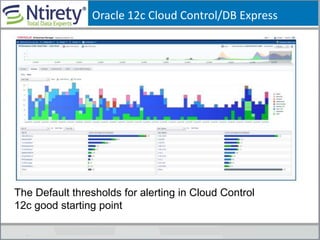
Oracle 12c Cloud Control/DB Express
The Default thresholds for alerting in Cloud Control
12c good starting point
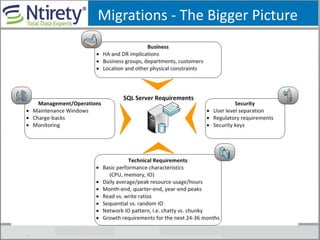
Migrations - The Bigger Picture
Database As A Service – Road Map
Multiple Tier Approach
• Different levels for different DB placement
• Basic and Premium
• Basic = Low utilization, test / dev DBs
• Premium = Moderate to High utilization, production, high visibility
• Different underlying hardware
• Different SLAs, RTO, RPOs and HA between tiers
Center of Excellence
• Assist with migrations, net new DBs and Capacity
Management
• Communication, no “throwing it over the wall”
• VMware, SAN, Network, DB teams to discuss DB migrations
• Optional Teams: Security, Procurement
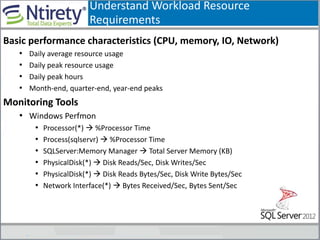
Understand Workload Resource
Requirements
Basic performance characteristics (CPU, memory, IO, Network)
• Daily average resource usage
• Daily peak resource usage
• Daily peak hours
• Month-end, quarter-end, year-end peaks
Monitoring Tools
• Windows Perfmon
• Processor(*)  %Processor Time
• Process(sqlservr)  %Processor Time
• SQLServer:Memory Manager  Total Server Memory (KB)
• PhysicalDisk(*)  Disk Reads/Sec, Disk Writes/Sec
• PhysicalDisk(*)  Disk Reads Bytes/Sec, Disk Write Bytes/Sec
• Network Interface(*)  Bytes Received/Sec, Bytes Sent/Sec
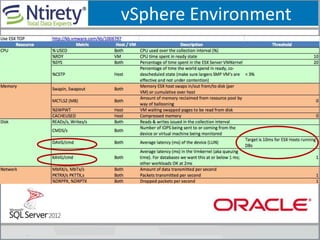
vSphere Environment
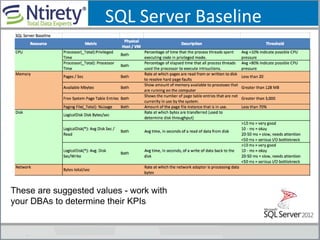
SQL Server Baseline
These are suggested values - work with
your DBAs to determine their KPIs
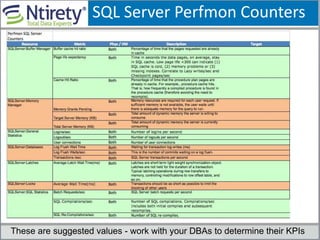
SQL Server Perfmon Counters
These are suggested values - work with your DBAs to determine their KPIs
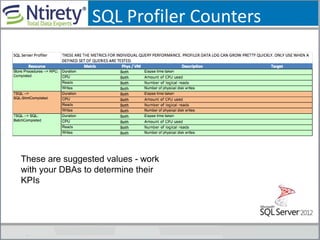
SQL Profiler Counters
These are suggested values - work
with your DBAs to determine their
KPIs
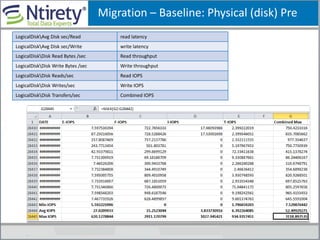
Migration – Baseline: Physical (disk) Pre
LogicalDiskAvg Disk sec/Read read latency
LogicalDiskAvg Disk sec/Write write latency
LogicalDiskDisk Read Bytes /sec Read throughput
LogicalDiskDisk Write Bytes /sec Write throughput
LogicalDiskDisk Reads/sec Read IOPS
LogicalDiskDisk Writes/sec Write IOPS
LogicalDiskDisk Transfers/sec Combined IOPS
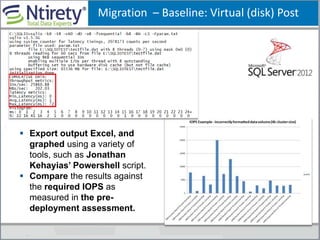
Migration – Baseline: Virtual (disk) Post
 Export output Excel, and
graphed using a variety of
tools, such as Jonathan
Kehayias’ Powershell script.
 Compare the results against
the required IOPS as
measured in the pre-
deployment assessment.
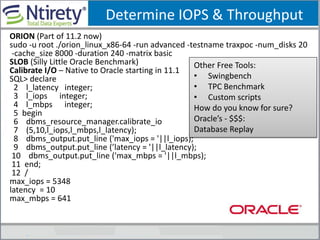
Determine IOPS & Throughput
ORION (Part of 11.2 now)
sudo -u root ./orion_linux_x86-64 -run advanced -testname traxpoc -num_disks 20
-cache_size 8000 -duration 240 -matrix basic
SLOB (Silly Little Oracle Benchmark)
Calibrate I/O – Native to Oracle starting in 11.1
SQL> declare
2 l_latency integer;
3 l_iops integer;
4 l_mbps integer;
5 begin
6 dbms_resource_manager.calibrate_io
7 (5,10,l_iops,l_mbps,l_latency);
8 dbms_output.put_line ('max_iops = '||l_iops);
9 dbms_output.put_line (’latency = '||l_latency);
10 dbms_output.put_line ('max_mbps = '||l_mbps);
11 end;
12 /
max_iops = 5348
latency = 10
max_mbps = 641
Other Free Tools:
• Swingbench
• TPC Benchmark
• Custom scripts
How do you know for sure?
Oracle’s - $$$:
Database Replay
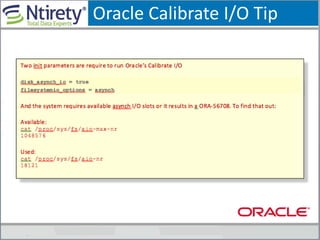
Oracle Calibrate I/O Tip
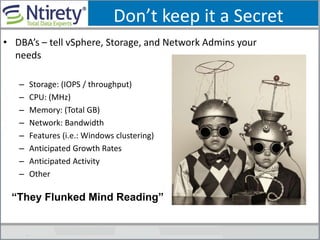
Don’t keep it a Secret
• DBA’s – tell vSphere, Storage, and Network Admins your
needs
– Storage: (IOPS / throughput)
– CPU: (MHz)
– Memory: (Total GB)
– Network: Bandwidth
– Features (i.e.: Windows clustering)
– Anticipated Growth Rates
– Anticipated Activity
– Other
“They Flunked Mind Reading”
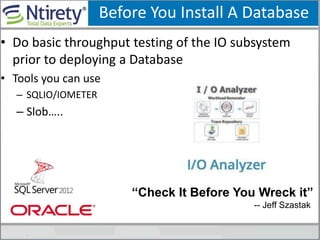
Before You Install A Database
• Do basic throughput testing of the IO subsystem
prior to deploying a Database
• Tools you can use
– SQLIO/IOMETER
– Slob…..
“Check It Before You Wreck it”
-- Jeff Szastak
Should You PV (Via Converter)
Production Environment’s Build “New” From
Scratch – GI/GO
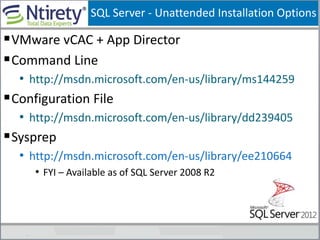
SQL Server - Unattended Installation Options
VMware vCAC + App Director
Command Line
• http://msdn.microsoft.com/en-us/library/ms144259
Configuration File
• http://msdn.microsoft.com/en-us/library/dd239405
Sysprep
• http://msdn.microsoft.com/en-us/library/ee210664
• FYI – Available as of SQL Server 2008 R2
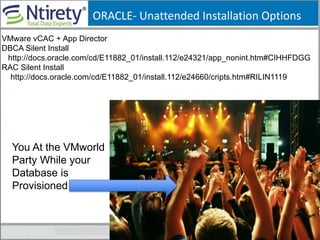
ORACLE- Unattended Installation Options
You At the VMworld
Party While your
Database is
Provisioned
VMware vCAC + App Director
DBCA Silent Install
http://docs.oracle.com/cd/E11882_01/install.112/e24321/app_nonint.htm#CIHHFDGG
RAC Silent Install
http://docs.oracle.com/cd/E11882_01/install.112/e24660/cripts.htm#RILIN1119
Phone-A-Friend
VMware has stated that it will take the ______support call if
a customer calls ______ Support and ______ Support is being
difficult because the customer is running on VMware.
• Hint…….
“TSANET.ORG--- Hardware or Software”
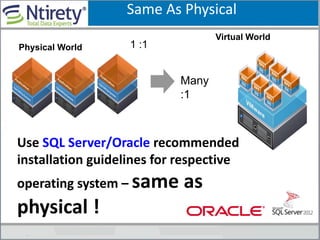
Use SQL Server/Oracle recommended
installation guidelines for respective
operating system – same as
physical !
Physical World 1 :1
Virtual World
Many
:1
Same As Physical
If your OS and database don’t know they
are virtualized do you need to tell them?
Did You Hear That?
Architecting For Performance:
Design
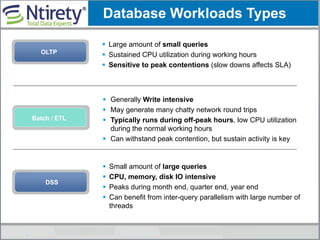
OLTP
 Large amount of small queries
 Sustained CPU utilization during working hours
 Sensitive to peak contentions (slow downs affects SLA)
 Generally Write intensive
 May generate many chatty network round trips
 Typically runs during off-peak hours, low CPU utilization
during the normal working hours
 Can withstand peak contention, but sustain activity is key
Batch / ETL
Database Workloads Types
DSS
 Small amount of large queries
 CPU, memory, disk IO intensive
 Peaks during month end, quarter end, year end
 Can benefit from inter-query parallelism with large number of
threads
OLTP vs. Batch Workloads
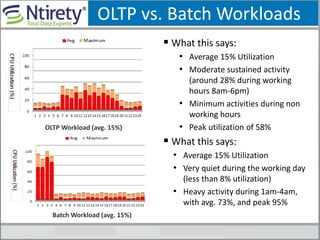
 What this says:
• Average 15% Utilization
• Moderate sustained activity
(around 28% during working
hours 8am-6pm)
• Minimum activities during non
working hours
• Peak utilization of 58%
 What this says:
• Average 15% Utilization
• Very quiet during the working day
(less than 8% utilization)
• Heavy activity during 1am-4am,
with avg. 73%, and peak 95%
Batch Workload (avg. 15%)
OLTP Workload (avg. 15%)
OLTP vs. Batch Workloads
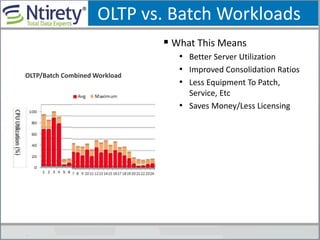
 What This Means
• Better Server Utilization
• Improved Consolidation Ratios
• Less Equipment To Patch,
Service, Etc
• Saves Money/Less Licensing
OLTP/Batch Combined Workload
“Many Tier-2 were built for
capacity not performance”
Separate development, test from
production environments into different
host clusters in the beginning !
Where?/What Year Was The
First Documented Use Of The
Word “Nerd” ?
The Year Was 1950
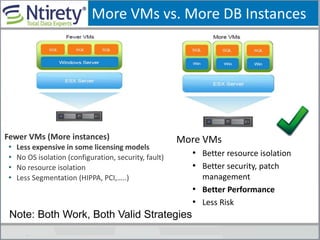
More VMs vs. More DB Instances
More VMs
• Better resource isolation
• Better security, patch
management
• Better Performance
• Less Risk
Fewer VMs (More instances)
• Less expensive in some licensing models
• No OS isolation (configuration, security, fault)
• No resource isolation
• Less Segmentation (HIPPA, PCI,…..)
Note: Both Work, Both Valid Strategies
General Rule of Thumbs
• Resource utilization is the basics, but not all
• Consider business, security, management, and other requirements
• Consider workload characteristics
• OLTP workloads can be stacked up to a sustained utilization level
• OLTP workloads that are high usage during day time, and batch
workloads that run during off-peak hours mixed well together
• Batch/ETL workloads with different peak periods share well together
• Consider operational history, e.g. month end, quarter end
• Additional VMs may be added to handle peak period during month end,
quarter end, and year end if scale out is a possibility
• CPU, memory hot-add may be used to handle the
peak workload
• Reduce VM density, or add more hosts to the cluster
Architecting For Performance:
Storage
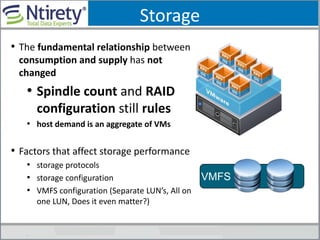
Storage
• The fundamental relationship between
consumption and supply has not
changed
• Spindle count and RAID
configuration still rules
• host demand is an aggregate of VMs
• Factors that affect storage performance
• storage protocols
• storage configuration
• VMFS configuration (Separate LUN’s, All on
one LUN, Does it even matter?)
VMFS
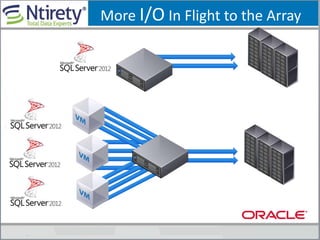
More I/O In Flight to the Array
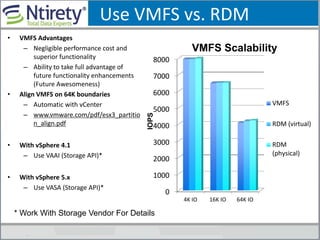
Use VMFS vs. RDM
• VMFS Advantages
– Negligible performance cost and
superior functionality
– Ability to take full advantage of
future functionality enhancements
(Future Awesomeness)
• Align VMFS on 64K boundaries
– Automatic with vCenter
– www.vmware.com/pdf/esx3_partitio
n_align.pdf
• With vSphere 4.1
– Use VAAI (Storage API)*
• With vSphere 5.x
– Use VASA (Storage API)*
0
1000
2000
3000
4000
5000
6000
7000
8000
4K IO 16K IO 64K IO
VMFS
RDM (virtual)
RDM
(physical)IOPS
VMFS Scalability
* Work With Storage Vendor For Details
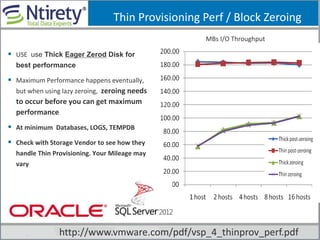
Thin Provisioning Perf / Block Zeroing
MBs I/O Throughput
 USE use Thick Eager Zerod Disk for
best performance
 Maximum Performance happens eventually,
but when using lazy zeroing, zeroing needs
to occur before you can get maximum
performance
 At minimum Databases, LOGS, TEMPDB
 Check with Storage Vendor to see how they
handle Thin Provisioning. Your Mileage may
vary
http://www.vmware.com/pdf/vsp_4_thinprov_perf.pdf
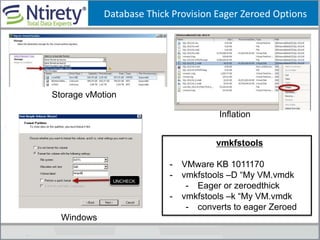
Database Thick Provision Eager Zeroed Options
Inflation
Storage vMotion
Windows
vmkfstools
- VMware KB 1011170
- vmkfstools –D “My VM.vmdk
- Eager or zeroedthick
- vmkfstools –k “My VM.vmdk
- converts to eager Zeroed
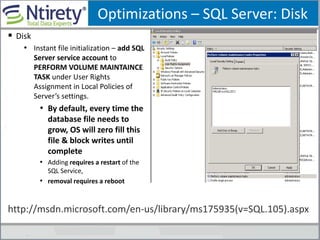
Optimizations – SQL Server: Disk
 Disk
• Instant file initialization – add SQL
Server service account to
PERFORM VOLUME MAINTAINCE
TASK under User Rights
Assignment in Local Policies of
Server’s settings.
• By default, every time the
database file needs to
grow, OS will zero fill this
file & block writes until
complete
• Adding requires a restart of the
SQL Service,
• removal requires a reboot
http://msdn.microsoft.com/en-us/library/ms175935(v=SQL.105).aspx
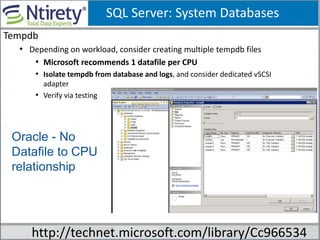
SQL Server: System Databases
Tempdb
• Depending on workload, consider creating multiple tempdb files
• Microsoft recommends 1 datafile per CPU
• Isolate tempdb from database and logs, and consider dedicated vSCSI
adapter
• Verify via testing
http://technet.microsoft.com/library/Cc966534
Oracle - No
Datafile to CPU
relationship
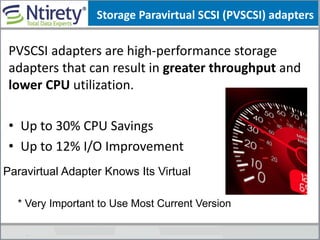
Storage Paravirtual SCSI (PVSCSI) adapters
PVSCSI adapters are high-performance storage
adapters that can result in greater throughput and
lower CPU utilization.
• Up to 30% CPU Savings
• Up to 12% I/O Improvement
Paravirtual Adapter Knows Its Virtual
* Very Important to Use Most Current Version
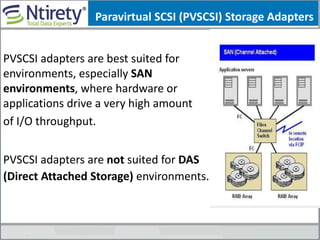
PVSCSI adapters are best suited for
environments, especially SAN
environments, where hardware or
applications drive a very high amount
of I/O throughput.
PVSCSI adapters are not suited for DAS
(Direct Attached Storage) environments.
Paravirtual SCSI (PVSCSI) Storage Adapters
Always Check Storage Vendors
Best Practices
“>80% of the issues
in a virtualized
Environment have
to do with Storage
misconfigurations”
Storage – Putting It All Together
• Work with storage engineer, deliver realistic requirements
early in the cycle
• Size for performance, not capacity
• Large number of small drives, not small number of large drives
• More / faster spindles are better for
performance
• Understand the I/O requirements of different workloads
• Transactional data vs. log vs. backup
• OLTP vs. DSS
“Golden Rule: Capacity Versus Performance”
Storage – Putting It All Together
•Understand the path to the drives, i.e. throughput, multi-
pathing
•Use eagerzeroedthick disk provisioning to avoid lazy
zeroing
• Place swap file on separate dedicated drive on SAN, mitigate
the impact of swapping with EFD (for high performance
workload)
• Can potentially slow down vMotions
• Follow SQL Server storage best practices
http://technet.microsoft.com/en-us/library/cc966534.aspx
Work with your SAN Vendor as well, they have Best
Practices for running these workloads on your array
The Bottom Line
“>80% of performance
problems with
virtualization occur at
the storage layer”
Now that you know, don’t
let it happen to YOU
Architecting For Performance:
Processor
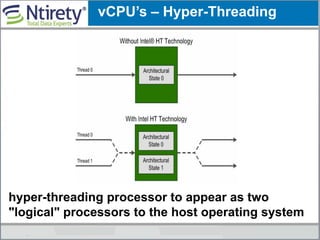
vCPU’s – Hyper-Threading
hyper-threading processor to appear as two
"logical" processors to the host operating system
vCPU’s
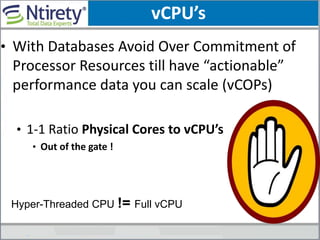
• With Databases Avoid Over Commitment of
Processor Resources till have “actionable”
performance data you can scale (vCOPs)
• 1-1 Ratio Physical Cores to vCPU’s
• Out of the gate !
Hyper-Threaded CPU != Full vCPU
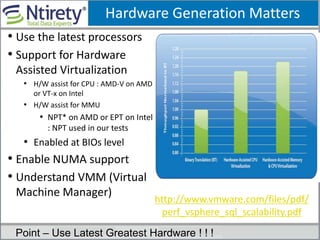
Hardware Generation Matters
• Use the latest processors
• Support for Hardware
Assisted Virtualization
• H/W assist for CPU : AMD-V on AMD
or VT-x on Intel
• H/W assist for MMU
• NPT* on AMD or EPT on Intel
: NPT used in our tests
• Enabled at BIOs level
• Enable NUMA support
• Understand VMM (Virtual
Machine Manager) Benefits of hardware assistance for CPU and Memory Virtualization
http://www.vmware.com/files/pdf/
perf_vsphere_sql_scalability.pdf
Point – Use Latest Greatest Hardware ! ! !
Processor – Putting It All Together
• Leverage hardware-assisted virtualization (enabled by default)
• Consider avg. and peak utilization
• Be aware of hyper-threading, a hyper-thread does not provide the
full power of a physical core
• Consider future growth of the system, sufficient head room should
be reserved
• In high performance environment, consider adding additional
hosts when avg. host CPU utilization exceeds 65%
• Consider increasing CPU resource if guest VM CPU utilization is
above 65% in average
• Ensure Power Saving Features are “OFF”
• Use vCOPs for consumption & capaticity
Architecting For Performance:
Memory
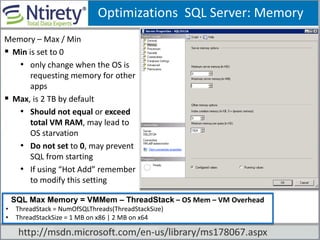
Optimizations SQL Server: Memory
Memory – Max / Min
 Min is set to 0
• only change when the OS is
requesting memory for other
apps
 Max, is 2 TB by default
• Should not equal or exceed
total VM RAM, may lead to
OS starvation
• Do not set to 0, may prevent
SQL from starting
• If using “Hot Add” remember
to modify this setting
SSQL Max Memory = VMMem – ThreadStack – OS Mem – VM Overhead
• ThreadStack = NumOfSQLThreads(ThreadStackSize)
• ThreadStackSize = 1 MB on x86 | 2 MB on x64
http://msdn.microsoft.com/en-us/library/ms178067.aspx
MAX SQL MEM Example
Example: 32 Gig RAM Dedicated to Environment
 Set MAX SQL MEM =28G

 (2 Gig O/S + 2 For the Physical)
Ntirety Rule
2 Gig + Additional 1 Gig per 16 Gig Physical Memory
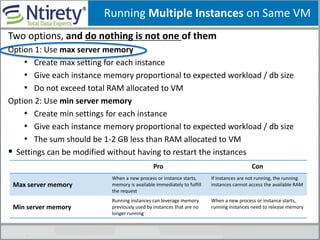
Running Multiple Instances on Same VM
Two options, and do nothing is not one of them
Option 1: Use max server memory
• Create max setting for each instance
• Give each instance memory proportional to expected workload / db size
• Do not exceed total RAM allocated to VM
Option 2: Use min server memory
• Create min settings for each instance
• Give each instance memory proportional to expected workload / db size
• The sum should be 1-2 GB less than RAM allocated to VM
 Settings can be modified without having to restart the instances
Pro Con
Max server memory
When a new process or instance starts,
memory is available immediately to fulfill
the request
If instances are not running, the running
instances cannot access the available RAM
Min server memory
Running instances can leverage memory
previously used by instances that are no
longer running
When a new process or instance starts,
running instances need to release memory
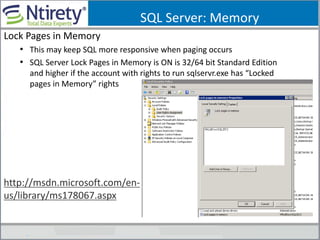
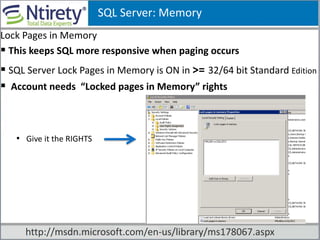
SQL Server: Memory
Lock Pages in Memory
• This may keep SQL more responsive when paging occurs
• SQL Server Lock Pages in Memory is ON is 32/64 bit Standard Edition
and higher if the account with rights to run sqlservr.exe has “Locked
pages in Memory” rights
http://msdn.microsoft.com/en-
us/library/ms178067.aspx
SQL Server: Memory
Lock Pages in Memory
 This keeps SQL more responsive when paging occurs
 SQL Server Lock Pages in Memory is ON in >= 32/64 bit Standard Edition
 Account needs “Locked pages in Memory” rights
• Give it the RIGHTS
http://msdn.microsoft.com/en-us/library/ms178067.aspx
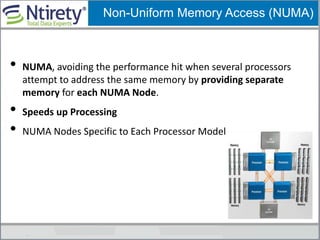
Non-Uniform Memory Access (NUMA)
• NUMA, avoiding the performance hit when several processors
attempt to address the same memory by providing separate
memory for each NUMA Node.
• Speeds up Processing
• NUMA Nodes Specific to Each Processor Model
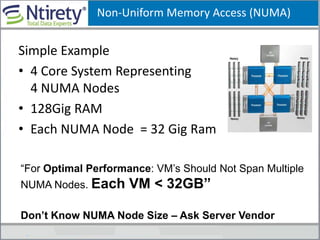
Simple Example
• 4 Core System Representing
4 NUMA Nodes
• 128Gig RAM
• Each NUMA Node = 32 Gig Ram
Non-Uniform Memory Access (NUMA)
“For Optimal Performance: VM’s Should Not Span Multiple
NUMA Nodes. Each VM < 32GB”
Don’t Know NUMA Node Size – Ask Server Vendor
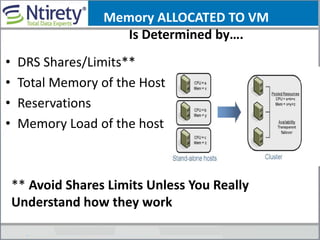
Memory ALLOCATED TO VM
Is Determined by….
• DRS Shares/Limits**
• Total Memory of the Host
• Reservations
• Memory Load of the host
** Avoid Shares Limits Unless You Really
Understand how they work
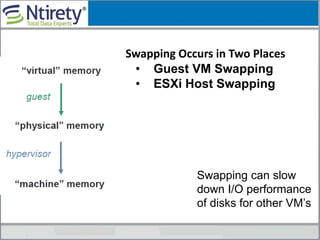
Swapping Occurs in Two Places
• Guest VM Swapping
• ESXi Host Swapping
Swapping can slow
down I/O performance
of disks for other VM’s
Ballooning, Memory Compression, Swapping
Slow You Down
Stating the Obvious
Is Google You Best Friend….
“There is the Google DBA,
The GUI DBA ,
or the DBA that does all the
work” Charles Kim
Don’t Shut Off Memory Ballooning
Ballooning
is You First
Line of
Defense
How Many VMs can I Put on Host?
As many whose active memory will fit in
physical RAM, while leaving some room for
memory spikes.
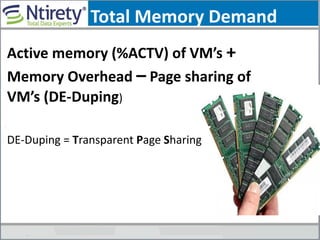
Total Memory Demand
Active memory (%ACTV) of VM’s +
Memory Overhead – Page sharing of
VM’s (DE-Duping)
DE-Duping = Transparent Page Sharing
Transparent Page Sharing more
effective The more similar the
VM’s are
“Put Like Operating
Systems On Same
Physical Host”
TPS – When It Kicks In
• Very Very very
Low Overhead
• Only Kicks in
When
Absolutely
Needed !
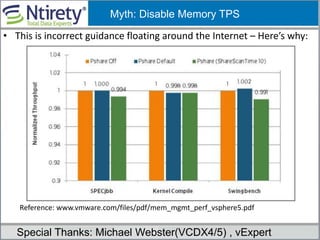
• This is incorrect guidance floating around the Internet – Here’s why:
Reference: www.vmware.com/files/pdf/mem_mgmt_perf_vsphere5.pdf
Myth: Disable Memory TPS
Special Thanks: Michael Webster(VCDX4/5) , vExpert
Disable Unecessry Foreground
Background Processes Within Guest O/S
• Example Windows
– Alerter, automatic updates, clip book, error reporting
– Help & Support, indexing, messenger, netmeeting,
– Remote desktop
• Once established (Clone for reuse by VMware)
Keep VM Footprint as small as Possible
Memory Reservations
• The VM is only allowed to
power on if the CPU and
memory reservation is
available (strict admission)
• The amount of memory
can be guaranteed even
under heavy loads.
• SET CPU/Not Guaranteed
Reservations Rock !
• Set the appropriate reservations to
guarantee physical memory for the VM.
• In many cases, the configured size and
reservation size could be the same
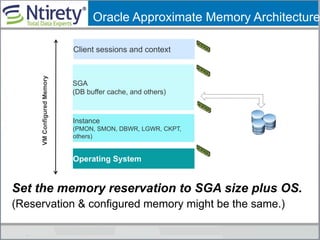
Oracle Approximate Memory Architecture
Set the memory reservation to SGA size plus OS.
(Reservation & configured memory might be the same.)
Client sessions and context
SGA
(DB buffer cache, and others)
Operating System
VMConfiguredMemory
Instance
(PMON, SMON, DBWR, LGWR, CKPT,
others)
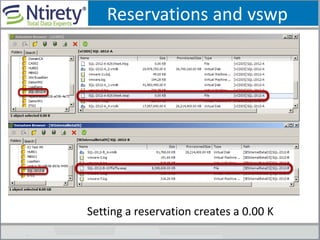
Reservations and vswp
Setting a reservation creates a 0.00 K
Large/Huge Pages
“Large/Huge PAGES Do Not Normally SWAP”
http://kb.vmware.com/kb/1021095
In the cases where host memory is overcommitted, ESX
may have to swap out pages. Since ESX will not swap
out large pages, during host swapping, a large page
will be broken into small pages. ESX tries to share
those small pages using the pre-generated hashes
before they are swapped out. The motivation of doing
this is that the overhead of breaking a shared page is
much smaller than the overhead of swapping in a
page if the page is accessed again in the future.
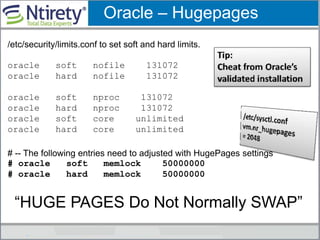
Oracle – Hugepages
/etc/security/limits.conf to set soft and hard limits.
oracle soft nofile 131072
oracle hard nofile 131072
oracle soft nproc 131072
oracle hard nproc 131072
oracle soft core unlimited
oracle hard core unlimited
# -- The following entries need to adjusted with HugePages settings
# oracle soft memlock 50000000
# oracle hard memlock 50000000
“HUGE PAGES Do Not Normally SWAP”
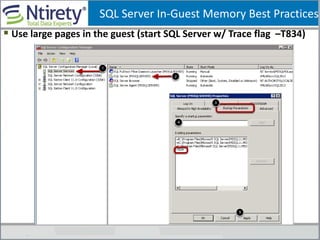
 Use large pages in the guest (start SQL Server w/ Trace flag –T834)
SQL Server In-Guest Memory Best Practices
Memory – Putting It ALL Together
• Do not overcommit memory for production, mission
critical SQL Server VMs
• Set provision memory = reservation = SQL Server max
server memory + OS memory + virtualization overhead
• Set provision memory = reservation = Oracle SGA +
OS memory + virtualization overhead
• To avoid swapping, memory limit should never be set
below the provisioned size. Setting memory limit is not
recommended in general
• To avoid NUMA remote memory access, size VM
memory equal to or less than the memory per NUMA
node if possible
Architecting For Performance:
Network
Jumbo Frames
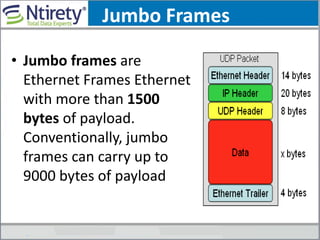
• Jumbo frames are
Ethernet Frames Ethernet
with more than 1500
bytes of payload.
Conventionally, jumbo
frames can carry up to
9000 bytes of payload
Jumbo Frames
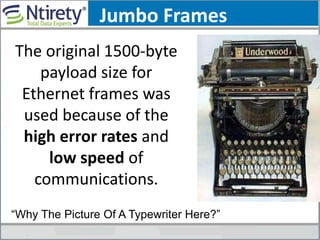
The original 1500-byte
payload size for
Ethernet frames was
used because of the
high error rates and
low speed of
communications.
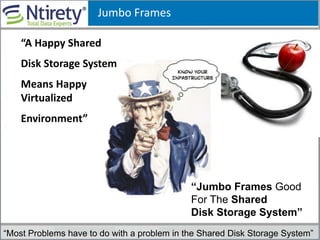
“Why The Picture Of A Typewriter Here?”
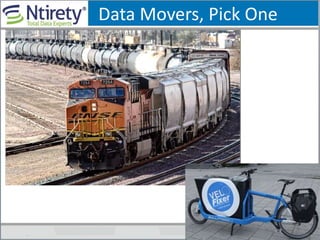
Data Movers, Pick One
Jumbo Frames
“Most Problems have to do with a problem in the Shared Disk Storage System”
“Jumbo Frames Good
For The Shared
Disk Storage System”
“A Happy Shared
Disk Storage System
Means Happy
Virtualized
Environment”
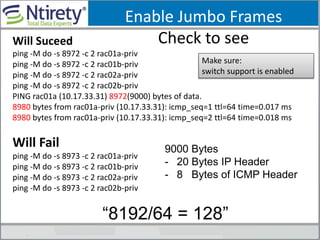
Enable Jumbo Frames
Check to seeWill Suceed
ping -M do -s 8972 -c 2 rac01a-priv
ping -M do -s 8972 -c 2 rac01b-priv
ping -M do -s 8972 -c 2 rac02a-priv
ping -M do -s 8972 -c 2 rac02b-priv
PING rac01a (10.17.33.31) 8972(9000) bytes of data.
8980 bytes from rac01a-priv (10.17.33.31): icmp_seq=1 ttl=64 time=0.017 ms
8980 bytes from rac01a-priv (10.17.33.31): icmp_seq=2 ttl=64 time=0.018 ms
Will Fail
ping -M do -s 8973 -c 2 rac01a-priv
ping -M do -s 8973 -c 2 rac01b-priv
ping -M do -s 8973 -c 2 rac02a-priv
ping -M do -s 8973 -c 2 rac02b-priv
Make sure:
switch support is enabled
9000 Bytes
- 20 Bytes IP Header
- 8 Bytes of ICMP Header
“8192/64 = 128”
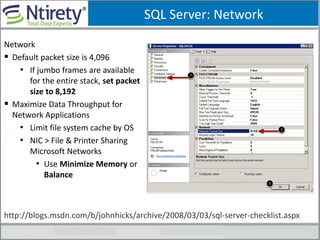
SQL Server: Network
Network
 Default packet size is 4,096
• If jumbo frames are available
for the entire stack, set packet
size to 8,192
 Maximize Data Throughput for
Network Applications
• Limit file system cache by OS
• NIC > File & Printer Sharing
Microsoft Networks
• Use Minimize Memory or
Balance
http://blogs.msdn.com/b/johnhicks/archive/2008/03/03/sql-server-checklist.aspx
Jumbo Frames
“Cost of Reducing To 1500
Bytes Then Back Again is
Very Expensive”
Splitting Is Bad
Network – Putting All Together
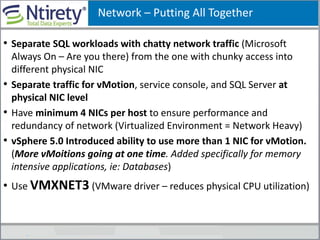
• Separate SQL workloads with chatty network traffic (Microsoft
Always On – Are you there) from the one with chunky access into
different physical NIC
• Separate traffic for vMotion, service console, and SQL Server at
physical NIC level
• Have minimum 4 NICs per host to ensure performance and
redundancy of network (Virtualized Environment = Network Heavy)
• vSphere 5.0 Introduced ability to use more than 1 NIC for vMotion.
(More vMoitions going at one time. Added specifically for memory
intensive applications, ie: Databases)
• Use VMXNET3 (VMware driver – reduces physical CPU utilization)
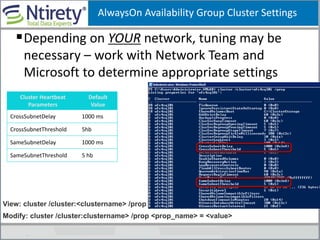
AlwaysOn Availability Group Cluster Settings
Depending on YOUR network, tuning may be
necessary – work with Network Team and
Microsoft to determine appropriate settings
Cluster Heartbeat
Parameters
Default
Value
CrossSubnetDelay 1000 ms
CrossSubnetThreshold 5hb
SameSubnetDelay 1000 ms
SameSubnetThreshold 5 hb
View: cluster /cluster:<clustername> /prop
Modify: cluster /cluster:clustername> /prop <prop_name> = <value>
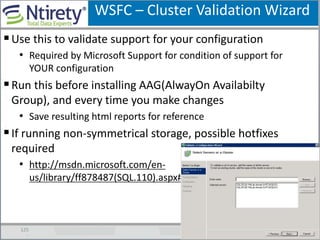
WSFC – Cluster Validation Wizard
125
Use this to validate support for your configuration
• Required by Microsoft Support for condition of support for
YOUR configuration
Run this before installing AAG(AlwayOn Availabilty
Group), and every time you make changes
• Save resulting html reports for reference
If running non-symmetrical storage, possible hotfixes
required
• http://msdn.microsoft.com/en-
us/library/ff878487(SQL.110).aspx#SystemReqsForAOAG
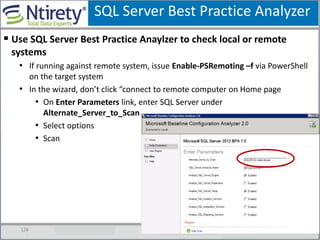
SQL Server Best Practice Analyzer
126
 Use SQL Server Best Practice Anaylzer to check local or remote
systems
• If running against remote system, issue Enable-PSRemoting –f via PowerShell
on the target system
• In the wizard, don’t click “connect to remote computer on Home page
• On Enter Parameters link, enter SQL Server under
Alternate_Server_to_Scan
• Select options
• Scan
Thank You
Michael Corey
Michael.corey@ntirety.com
Blog: http://michaelcorey.ntirety.com
http://www.dbtablog.com/
@Michael_Corey
Jeff Szastak
@Szastak
THANK YOU
Virtualizing Databases: Doing IT Right
Michael Corey, Ntirety, Inc
Jeff Szastak, VMware
VAPP4724
#VAPP4724
Because Your Awesome
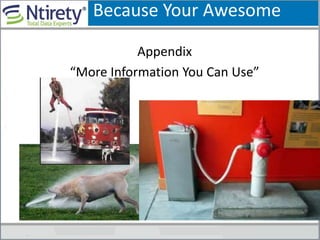
Appendix
“More Information You Can Use”
132
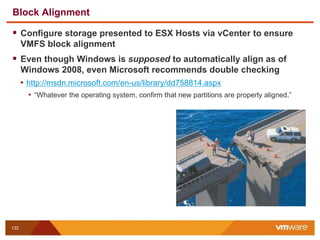
Block Alignment
 Configure storage presented to ESX Hosts via vCenter to ensure
VMFS block alignment
 Even though Windows is supposed to automatically align as of
Windows 2008, even Microsoft recommends double checking
• http://msdn.microsoft.com/en-us/library/dd758814.aspx
• “Whatever the operating system, confirm that new partitions are properly aligned.”
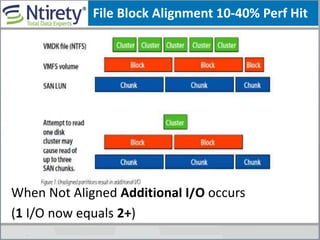
File Block Alignment 10-40% Perf Hit
When Not Aligned Additional I/O occurs
(1 I/O now equals 2+)
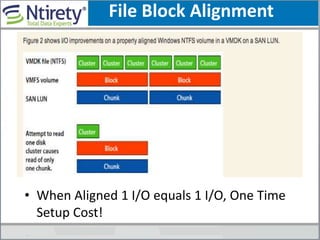
File Block Alignment
• When Aligned 1 I/O equals 1 I/O, One Time
Setup Cost!
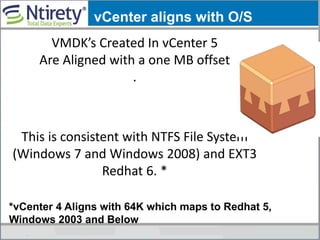
VMDK’s Created In vCenter 5
Are Aligned with a one MB offset
.
This is consistent with NTFS File System
(Windows 7 and Windows 2008) and EXT3
Redhat 6. *
*vCenter 4 Aligns with 64K which maps to Redhat 5,
Windows 2003 and Below
vCenter aligns with O/S
Useful Links
Deployment Guides, Best Practices, Whitepapers
for SQL, Oracle, Exchange, SAP
vmware.com/go/bca
VMware Blog
blogs.vmware.com/apps
What’s New in Performance in vSphere 5.0
vmware.com/resources/techresources/10195
Achieving 1 Million I/O vSphere 5.0
vmware.com/files/pdf/1M-iops-perf-vsphere5.pdf
**Take Advantage of All resources Available to You
Useful Links
137 Confidential
VMware Technical Resource Center – Performance
• www.vmware.com/technical-resources/performance/index.html
SQL Server on vSphere High Availability Guide (technical)
• www.vmware.com/files/pdf/solutions/SQL_Server_Availability_Guide_FINAL.p
df
Useful Links
138 Confidential
Hardware and Software Requirements for Installing SQL 2012
• http://msdn.microsoft.com/en-us/library/ms143506(SQL.110).aspx
Windows 2008 Clustering Whitepaper
• http://www.microsoft.com/windowsserver2008/en/us/failover-clustering-
main.aspx
Microsoft Support Policy for Windows Server 2008/R2 Failover
Clusters
• http://support.microsoft.com/kb/943984
Validating Hardware for a Failover Cluster
• http://technet.microsoft.com/en-us/library/cc732035(WS.10).aspx
Prerquisists for AlwaysOn AAG
• http://msdn.microsoft.com/en-
us/library/ff878487(SQL.110).aspx#SystemReqsForAOAG
Useful Links
139 Confidential
Availability Modes (AlwaysOn Availability Groups)
• http://msdn.microsoft.com/en-us/library/ff877931(SQL.110).aspx
Failover & Failover Modes (AlwaysOn Availability Groups)
• http://msdn.microsoft.com/en-us/library/hh213151.aspx
Configuring Quorum in a Failover Cluster
• http://technet.microsoft.com/en-us/library/cc770620(WS.10).aspx
Configure Cluster Quorum NodeWeight
• http://msdn.microsoft.com/en-us/library/hh270281(SQL.110).aspx
Where Should AlwaysOn Backups Occur
• http://msdn.microsoft.com/en-us/library/hh213244(v=SQL.110).aspx
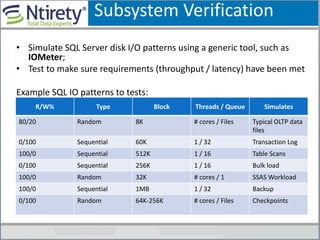
• Simulate SQL Server disk I/O patterns using a generic tool, such as
IOMeter;
• Test to make sure requirements (throughput / latency) have been met
Example SQL IO patterns to tests:
Subsystem Verification
R/W% Type Block Threads / Queue Simulates
80/20 Random 8K # cores / Files Typical OLTP data
files
0/100 Sequential 60K 1 / 32 Transaction Log
100/0 Sequential 512K 1 / 16 Table Scans
0/100 Sequential 256K 1 / 16 Bulk load
100/0 Random 32K # cores / 1 SSAS Workload
100/0 Sequential 1MB 1 / 32 Backup
0/100 Random 64K-256K # cores / Files Checkpoints
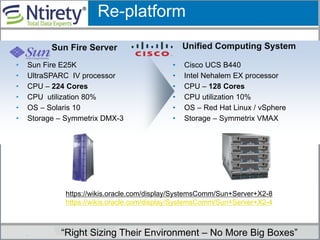
• Cisco UCS B440
• Intel Nehalem EX processor
• CPU – 128 Cores
• CPU utilization 10%
• OS – Red Hat Linux / vSphere
• Storage – Symmetrix VMAX
• Sun Fire E25K
• UltraSPARC IV processor
• CPU – 224 Cores
• CPU utilization 80%
• OS – Solaris 10
• Storage – Symmetrix DMX-3
Sun Fire Server Unified Computing System
Re-platform
“Right Sizing Their Environment – No More Big Boxes”
https://wikis.oracle.com/display/SystemsComm/Sun+Server+X2-8
https://wikis.oracle.com/display/SystemsComm/Sun+Server+X2-4
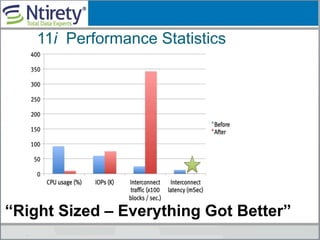
11i Performance Statistics
“Right Sized – Everything Got Better”
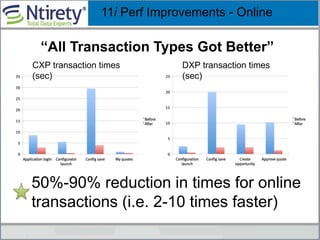
11i Perf Improvements - Online
CXP transaction times
(sec)
50%-90% reduction in times for online
transactions (i.e. 2-10 times faster)
DXP transaction times
(sec)
“All Transaction Types Got Better”
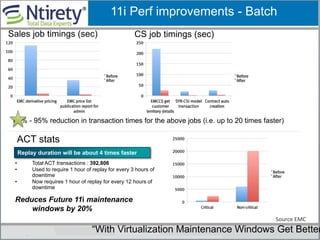
Replay duration will be about 4 times faster
11i Perf improvements - Batch
Sales job timings (sec) CS job timings (sec)
85% - 95% reduction in transaction times for the above jobs (i.e. up to 20 times faster)
ACT stats
• Total ACT transactions : 392,806
• Used to require 1 hour of replay for every 3 hours of
downtime
• Now requires 1 hour of replay for every 12 hours of
downtime
Reduces Future 11i maintenance
windows by 20%
Source EMC
“With Virtualization Maintenance Windows Get Better
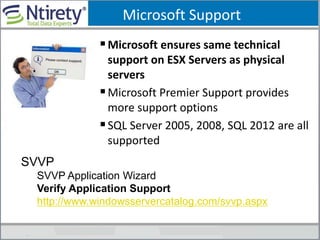
Microsoft Support
Microsoft ensures same technical
support on ESX Servers as physical
servers
Microsoft Premier Support provides
more support options
SQL Server 2005, 2008, SQL 2012 are all
supported
SVVP
SVVP Application Wizard
Verify Application Support
http://www.windowsservercatalog.com/svvp.aspx
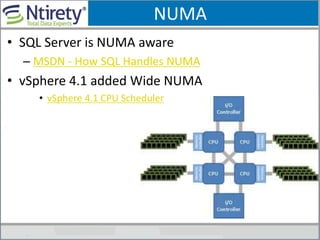
NUMA
• SQL Server is NUMA aware
– MSDN - How SQL Handles NUMA
• vSphere 4.1 added Wide NUMA
• vSphere 4.1 CPU Scheduler
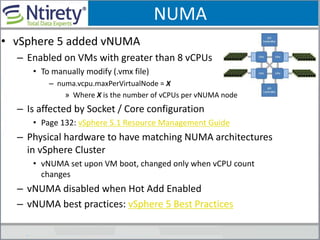
NUMA
• vSphere 5 added vNUMA
– Enabled on VMs with greater than 8 vCPUs
• To manually modify (.vmx file)
– numa.vcpu.maxPerVirtualNode = X
» Where X is the number of vCPUs per vNUMA node
– Is affected by Socket / Core configuration
• Page 132: vSphere 5.1 Resource Management Guide
– Physical hardware to have matching NUMA architectures
in vSphere Cluster
• vNUMA set upon VM boot, changed only when vCPU count
changes
– vNUMA disabled when Hot Add Enabled
– vNUMA best practices: vSphere 5 Best Practices
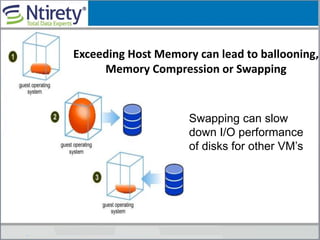
Exceeding Host Memory can lead to ballooning,
Memory Compression or Swapping
Swapping can slow
down I/O performance
of disks for other VM’s
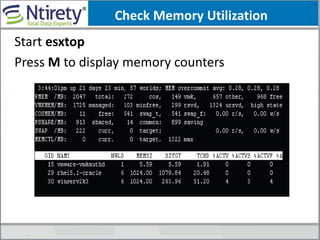
Check Memory Utilization
Start esxtop
Press M to display memory counters
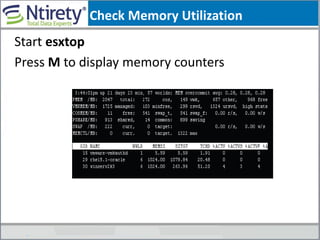
Check Memory Utilization
Start esxtop
Press M to display memory counters
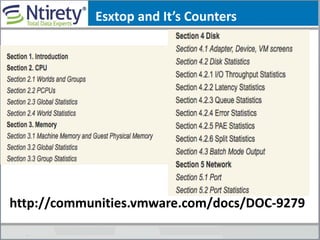
Esxtop and It’s Counters
http://communities.vmware.com/docs/DOC-9279
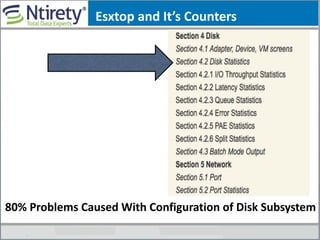
Esxtop and It’s Counters
80% Problems Caused With Configuration of Disk Subsystem
Large/Huge Pages
RockDo Not Get Benefit of TPS
(Transparent Page Sharing)
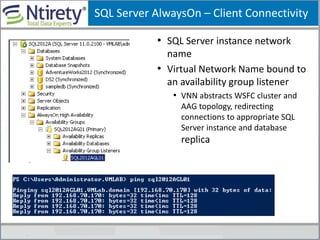
SQL Server AlwaysOn – Client Connectivity
• SQL Server instance network
name
• Virtual Network Name bound to
an availability group listener
• VNN abstracts WSFC cluster and
AAG topology, redirecting
connections to appropriate SQL
Server instance and database
replica
Now Let’s Apply that to SQL 2012
Should you Lock Pages in Memory on a AlwaysOn Secondary
Node?
Should I set a vSphere memory reservation on a failover
node?

VMworld 2013: Virtualizing Databases: Doing IT Right

  • 1.
    Virtualizing Databases: DoingIT Right Michael Corey, Ntirety, Inc Jeff Szastak, VMware VAPP4724 #VAPP4724
  • 2.
    Jeff Szastak Jeff Szastak MSIA,CISSP, VCP, MCSE, etc. Staff Systems Engineer – Enterprise Healthcare VMware, Inc. Microsoft Exchange & SQL virtualization BC/DR SME @szastak Blog contributor: blogs.vmware.com/apps www.virtualinsanity.com
  • 3.
    Michael J Corey,Founder & CEO Oracle Press Books Include: Oracle 11g A Beginner’s Guide Oracle 10g A Beginner’s Guide Oracle 9i - A Beginner's Guide Oracle8i - Data Warehousing Oracle8i - A Beginner's Guide Oracle8 - Data Warehousing Oracle8 – Tuning Oracle8 - A Beginner's Guide Oracle - Data Warehousing Oracle - A Beginner's Guide Tuning Oracle- 81-3; 1994) Key Past/Current Affiliations: Past President of the IOUG Founding Board IOUG Virtualization SIG Past Member IOUG Board of Directors Past Director of Education IOUG Founder Professional Association of SQL Server Talkin’Cloud Top 200 Channel Partner Experts Cloud Past Member Microsoft Data Warehouse Council Past Member Oracle Educational Advisory Council Past Director of Conferences IOUG Alive Executive Board Massachusetts Robert H. Goddard Council on Science, Technology, Engineering & Mathematics Started Working with Oracle Version 3.0 Beta Tested Oracle 5,6,6.2,7,8.X,9.X.…. Presented on Technology & Business Topics from Brazil to Australia Worked with Oracle on UNIX, Linux, Windows, MVS,VM, VMS,..
  • 4.
  • 5.
    DataTone – TheNew World Order
  • 6.
    Why Customers AreVirtualizing Databases (Business Critical Applications)
  • 7.
    VMware Concise Set Very Efficient Drivers Focused Driver Set Well VettedO/S Hardware Resource O/S Du Jour Many Drivers Many Versions New Driver’s Can Cause Issues
  • 8.
    Why Your CompanyCares: Virtualization is Strategic 1:1 relationship between applications and hardware Relevant cost metric = cost per server • 8% - 12% Utilization is typical Many:1 relationship between applications and hardware Relevant cost metric = cost per application • 60 - 80% Utilization: is typical • 60% reduction in CapEx • 30% reduction in OpEx • 80% reduction in Energy Physical World 1 :1 Virtual World Many :1 The New Norm “Can You Say Right-Sizing”
  • 9.
    Memory Hot Add/ CPU Hot Plug Reduction in CPU Utilization Increased processing rate Adding Memory
  • 10.
    Oracle – HotPlug vCPU
  • 11.
    Oracle - HotAdd Memory Oracle database memory parameters are defined at instance startup. You will have to restart the database to take advantage of added memory. Unless you have set SGA_MAX_SIZE To big Typically… SGA_TARGET_SIZE = (+-) SGA_MAX_SIZE or could be wasting memory http://www.vmware.com/files/pdf/sol utions/oracle/Oracle_Databases_VM ware_Workload_Characterization_St udy.pdf
  • 12.
    1St Time Goalof Consistency Standardization Can Be Achieved “Any Resource, Any Server, At Any Time” in the (Pool) The 10 Millionth Model T was produced on June 4, 1927
  • 13.
    Trigger Points Whento Virtualize
  • 14.
  • 15.
    New Features in5.5  62 TB VMDK files  Support for Reliable Memory  Hot pluggable SSD PCIe devices  Windows Failover Clustering (MSCS) • Support for Windows 2012 Clustering • Round Robin path policy for shared storage • iSCSI protocol for shared storage (5 Node) • FCoE protocol for shared storage (5 Node) • vSphere App HA Policies  VMFS Heap Improvements  vSphere Flash Read Cache  vSAN for Test / Dev VMware.com  What’s New in vSphere 5.5
  • 16.
    Is your databaseto “Big” to Virtualize?
  • 17.
    Very Large ERPSystem • 75+ application tiers – VMware/RHEL • 8 TB database; 8.8 billion rows of data • 52 million transactions per day • 79K IOPS • 40K blocks per second interconnect traffic • 40,000+ named users • 4,000+ peak concurrent users Source EMC “Yes This is Virtualized”
  • 18.
    Performance Test Environment(topology) VMware vSphere 5.1 Red Hat Enterprise Linux (RHEL) 6.3 Oracle 11gR2 (11.2.0.3) Single Instance and RAC 3PAR StoreServ 10400 192 x 15K RPM Fibre Channel Disks 32 x 150K RPM Solid State Disk (SSD) ProLiant DL580 G7 (client) Intel® Xeon® CPU X7560 @ 2.26 GHz (8 cores) 128GB memory ProLiant BL660c Gen8 - 4 sockets / 24 cores (database server) Intel® Xeon® CPU E5-4610 @ 2.40 GHz (6 cores) 64GB memory HP Virtual Connect FlexFabric 10Gb/24-Port Module “Recent “HP” Performance Study – Choose Your Vendor DU-JOUR
  • 19.
    Workload Characteristics • OLTPtype of workload with a read write ratio of 2:1 • Oracle Database size of 600GB • workload is an implementation of an online store • The driver program simulates users logging in, browsing for products by title, or category, adding selected products to their shopping cart, and then purchasing those products
  • 20.
    Performance Results • Virtualizationhas ~5% overhead as compared to native • The database tps on a virtual machine is 5% less than that on the physical machine. • 2P represents 12 cores and 4P represents 24 cores • For 100 users the delta is ~6% and that increases up to ~10% for 1700 users. • When the system gets busier, native starts to have a slightly larger advantage over virtualization.
  • 21.
    Performance Results (contd) •For both virtual and native, by moving from 2P (12 cores) to 4P (24 cores) - The database tps increases by 40% to 50% - The CPU utilization drops from 80% to 60% • For RAC , by moving from 2P (12 cores) to 4P (24 cores) - The database tps increases by 40% to 60% - The CPU utilization drops from 75% to 60% “Who Architects a Database With Less than 5% Overhead - One Busy Day Your Done”
  • 22.
  • 23.
    Lessons Learned Tier-1 VIP:What Works in Tier-2 (non-production), will not always work with Tier-1 (production)”
  • 24.
    Doing It Right1st Time: Very Conservative Designed to Insure You Avoid Common Traps & Pitfalls Associated with Production Databases being Virtualized
  • 25.
  • 26.
    Doing It Right:Read Best Practices Guides Read The Documentation From All Your Vendors…… VMware, Microsoft, Storage Vendor, Network Vendor…. Appendix of this deck
  • 27.
    Professional Association ofSQL Server http://virtualization.sqlpass.org/ “Take Advantage of All resources Available to You”
  • 28.
  • 29.
  • 30.
  • 31.
    Most Up ToDate Information
  • 32.
    Installation • Planyour SQLServer installation SLAs, RPOs, RTOs Baseline current workload, at least 1 business cycle Baseline existing (workload) vSphere implementation Estimated growth rates I/O requirements (I/O per sec, throughput, latency) Storage (Disk type/speed, RAID, flash cache solution, etc) Software versions (vSphere, Windows, SQL) Product Keys Licensing (may determine architecture) Workload type (OLTP, Batch, Warehouse) Accounts needed for installation / service accounts High Availability strategy Backup & Recovery strategy “If you aim at nothing, you will hit it every time” – Zig Ziglar
  • 33.
    Planning a HighAvailability Strategy  Requirements • Recovery Time Objective (RTO) • What does 99.99% availability really mean? • Recovery Point Objective (RPO) • Zero data lost? • HA vs. DR requirements  Evaluating a technology • What’s the cost for implementing the technology? • What’s the complexity of implementing, and managing the technology? • What’s the downtime potential? • What’s the data loss exposure? Availability % Downtime / Year Downtime / Month * Downtime / week "Two Nines" - 99% 3.65 Days 7.2 Hours 1.69 Hours "Three Nines" - 99.9% 8.76 Hours 43.2 Minutes 10.1 Minutes "Four Nines" - 99.99% 52.56 Minutes 4.32 Minutes 1.01 Minutes "Five Nines" - 99.999% 5.26 Minutes 25.9 Seconds 6.06 Seconds * Using a 30 day month
  • 34.
    Baseline, Baseline, Baseline Warning,Warning Warning : If Your physical environment does not perform well……. Why will making it Virtual make it perform better? IF so how? • New Hardware, Faster CPU, Faster Drives
  • 35.
    What to Baseline– IT Food Groups Existing Physical Database Infrastructure Existing/Proposed vSphere Infrastructure NetworkMemory Disk CPU
  • 36.
    When You BaseLine a database  Make Sure The Sample Interval Is frequent CPU, Memory, Disk (15 Seconds or less)  SQL Server TSQL (1 Minute) “A Lot can happen in a short amount of time”
  • 37.
    Oracle 12c CloudControl/DB Express The Default thresholds for alerting in Cloud Control 12c good starting point
  • 38.
    Migrations - TheBigger Picture
  • 39.
    Database As AService – Road Map Multiple Tier Approach • Different levels for different DB placement • Basic and Premium • Basic = Low utilization, test / dev DBs • Premium = Moderate to High utilization, production, high visibility • Different underlying hardware • Different SLAs, RTO, RPOs and HA between tiers Center of Excellence • Assist with migrations, net new DBs and Capacity Management • Communication, no “throwing it over the wall” • VMware, SAN, Network, DB teams to discuss DB migrations • Optional Teams: Security, Procurement
  • 40.
    Understand Workload Resource Requirements Basicperformance characteristics (CPU, memory, IO, Network) • Daily average resource usage • Daily peak resource usage • Daily peak hours • Month-end, quarter-end, year-end peaks Monitoring Tools • Windows Perfmon • Processor(*)  %Processor Time • Process(sqlservr)  %Processor Time • SQLServer:Memory Manager  Total Server Memory (KB) • PhysicalDisk(*)  Disk Reads/Sec, Disk Writes/Sec • PhysicalDisk(*)  Disk Reads Bytes/Sec, Disk Write Bytes/Sec • Network Interface(*)  Bytes Received/Sec, Bytes Sent/Sec
  • 41.
  • 42.
    SQL Server Baseline Theseare suggested values - work with your DBAs to determine their KPIs
  • 43.
    SQL Server PerfmonCounters These are suggested values - work with your DBAs to determine their KPIs
  • 44.
    SQL Profiler Counters Theseare suggested values - work with your DBAs to determine their KPIs
  • 45.
    Migration – Baseline:Physical (disk) Pre LogicalDiskAvg Disk sec/Read read latency LogicalDiskAvg Disk sec/Write write latency LogicalDiskDisk Read Bytes /sec Read throughput LogicalDiskDisk Write Bytes /sec Write throughput LogicalDiskDisk Reads/sec Read IOPS LogicalDiskDisk Writes/sec Write IOPS LogicalDiskDisk Transfers/sec Combined IOPS
  • 46.
    Migration – Baseline:Virtual (disk) Post  Export output Excel, and graphed using a variety of tools, such as Jonathan Kehayias’ Powershell script.  Compare the results against the required IOPS as measured in the pre- deployment assessment.
  • 47.
    Determine IOPS &Throughput ORION (Part of 11.2 now) sudo -u root ./orion_linux_x86-64 -run advanced -testname traxpoc -num_disks 20 -cache_size 8000 -duration 240 -matrix basic SLOB (Silly Little Oracle Benchmark) Calibrate I/O – Native to Oracle starting in 11.1 SQL> declare 2 l_latency integer; 3 l_iops integer; 4 l_mbps integer; 5 begin 6 dbms_resource_manager.calibrate_io 7 (5,10,l_iops,l_mbps,l_latency); 8 dbms_output.put_line ('max_iops = '||l_iops); 9 dbms_output.put_line (’latency = '||l_latency); 10 dbms_output.put_line ('max_mbps = '||l_mbps); 11 end; 12 / max_iops = 5348 latency = 10 max_mbps = 641 Other Free Tools: • Swingbench • TPC Benchmark • Custom scripts How do you know for sure? Oracle’s - $$$: Database Replay
  • 48.
  • 49.
    Don’t keep ita Secret • DBA’s – tell vSphere, Storage, and Network Admins your needs – Storage: (IOPS / throughput) – CPU: (MHz) – Memory: (Total GB) – Network: Bandwidth – Features (i.e.: Windows clustering) – Anticipated Growth Rates – Anticipated Activity – Other “They Flunked Mind Reading”
  • 50.
    Before You InstallA Database • Do basic throughput testing of the IO subsystem prior to deploying a Database • Tools you can use – SQLIO/IOMETER – Slob….. “Check It Before You Wreck it” -- Jeff Szastak
  • 51.
    Should You PV(Via Converter) Production Environment’s Build “New” From Scratch – GI/GO
  • 52.
    SQL Server -Unattended Installation Options VMware vCAC + App Director Command Line • http://msdn.microsoft.com/en-us/library/ms144259 Configuration File • http://msdn.microsoft.com/en-us/library/dd239405 Sysprep • http://msdn.microsoft.com/en-us/library/ee210664 • FYI – Available as of SQL Server 2008 R2
  • 53.
    ORACLE- Unattended InstallationOptions You At the VMworld Party While your Database is Provisioned VMware vCAC + App Director DBCA Silent Install http://docs.oracle.com/cd/E11882_01/install.112/e24321/app_nonint.htm#CIHHFDGG RAC Silent Install http://docs.oracle.com/cd/E11882_01/install.112/e24660/cripts.htm#RILIN1119
  • 54.
    Phone-A-Friend VMware has statedthat it will take the ______support call if a customer calls ______ Support and ______ Support is being difficult because the customer is running on VMware. • Hint……. “TSANET.ORG--- Hardware or Software”
  • 55.
    Use SQL Server/Oraclerecommended installation guidelines for respective operating system – same as physical ! Physical World 1 :1 Virtual World Many :1 Same As Physical
  • 56.
    If your OSand database don’t know they are virtualized do you need to tell them? Did You Hear That?
  • 57.
  • 58.
    OLTP  Large amountof small queries  Sustained CPU utilization during working hours  Sensitive to peak contentions (slow downs affects SLA)  Generally Write intensive  May generate many chatty network round trips  Typically runs during off-peak hours, low CPU utilization during the normal working hours  Can withstand peak contention, but sustain activity is key Batch / ETL Database Workloads Types DSS  Small amount of large queries  CPU, memory, disk IO intensive  Peaks during month end, quarter end, year end  Can benefit from inter-query parallelism with large number of threads
  • 59.
    OLTP vs. BatchWorkloads  What this says: • Average 15% Utilization • Moderate sustained activity (around 28% during working hours 8am-6pm) • Minimum activities during non working hours • Peak utilization of 58%  What this says: • Average 15% Utilization • Very quiet during the working day (less than 8% utilization) • Heavy activity during 1am-4am, with avg. 73%, and peak 95% Batch Workload (avg. 15%) OLTP Workload (avg. 15%)
  • 60.
    OLTP vs. BatchWorkloads  What This Means • Better Server Utilization • Improved Consolidation Ratios • Less Equipment To Patch, Service, Etc • Saves Money/Less Licensing OLTP/Batch Combined Workload
  • 61.
    “Many Tier-2 werebuilt for capacity not performance”
  • 62.
    Separate development, testfrom production environments into different host clusters in the beginning !
  • 63.
    Where?/What Year WasThe First Documented Use Of The Word “Nerd” ?
  • 64.
  • 65.
    More VMs vs.More DB Instances More VMs • Better resource isolation • Better security, patch management • Better Performance • Less Risk Fewer VMs (More instances) • Less expensive in some licensing models • No OS isolation (configuration, security, fault) • No resource isolation • Less Segmentation (HIPPA, PCI,…..) Note: Both Work, Both Valid Strategies
  • 66.
    General Rule ofThumbs • Resource utilization is the basics, but not all • Consider business, security, management, and other requirements • Consider workload characteristics • OLTP workloads can be stacked up to a sustained utilization level • OLTP workloads that are high usage during day time, and batch workloads that run during off-peak hours mixed well together • Batch/ETL workloads with different peak periods share well together • Consider operational history, e.g. month end, quarter end • Additional VMs may be added to handle peak period during month end, quarter end, and year end if scale out is a possibility • CPU, memory hot-add may be used to handle the peak workload • Reduce VM density, or add more hosts to the cluster
  • 67.
  • 68.
    Storage • The fundamentalrelationship between consumption and supply has not changed • Spindle count and RAID configuration still rules • host demand is an aggregate of VMs • Factors that affect storage performance • storage protocols • storage configuration • VMFS configuration (Separate LUN’s, All on one LUN, Does it even matter?) VMFS
  • 69.
    More I/O InFlight to the Array
  • 70.
    Use VMFS vs.RDM • VMFS Advantages – Negligible performance cost and superior functionality – Ability to take full advantage of future functionality enhancements (Future Awesomeness) • Align VMFS on 64K boundaries – Automatic with vCenter – www.vmware.com/pdf/esx3_partitio n_align.pdf • With vSphere 4.1 – Use VAAI (Storage API)* • With vSphere 5.x – Use VASA (Storage API)* 0 1000 2000 3000 4000 5000 6000 7000 8000 4K IO 16K IO 64K IO VMFS RDM (virtual) RDM (physical)IOPS VMFS Scalability * Work With Storage Vendor For Details
  • 71.
    Thin Provisioning Perf/ Block Zeroing MBs I/O Throughput  USE use Thick Eager Zerod Disk for best performance  Maximum Performance happens eventually, but when using lazy zeroing, zeroing needs to occur before you can get maximum performance  At minimum Databases, LOGS, TEMPDB  Check with Storage Vendor to see how they handle Thin Provisioning. Your Mileage may vary http://www.vmware.com/pdf/vsp_4_thinprov_perf.pdf
  • 72.
    Database Thick ProvisionEager Zeroed Options Inflation Storage vMotion Windows vmkfstools - VMware KB 1011170 - vmkfstools –D “My VM.vmdk - Eager or zeroedthick - vmkfstools –k “My VM.vmdk - converts to eager Zeroed
  • 73.
    Optimizations – SQLServer: Disk  Disk • Instant file initialization – add SQL Server service account to PERFORM VOLUME MAINTAINCE TASK under User Rights Assignment in Local Policies of Server’s settings. • By default, every time the database file needs to grow, OS will zero fill this file & block writes until complete • Adding requires a restart of the SQL Service, • removal requires a reboot http://msdn.microsoft.com/en-us/library/ms175935(v=SQL.105).aspx
  • 74.
    SQL Server: SystemDatabases Tempdb • Depending on workload, consider creating multiple tempdb files • Microsoft recommends 1 datafile per CPU • Isolate tempdb from database and logs, and consider dedicated vSCSI adapter • Verify via testing http://technet.microsoft.com/library/Cc966534 Oracle - No Datafile to CPU relationship
  • 75.
    Storage Paravirtual SCSI(PVSCSI) adapters PVSCSI adapters are high-performance storage adapters that can result in greater throughput and lower CPU utilization. • Up to 30% CPU Savings • Up to 12% I/O Improvement Paravirtual Adapter Knows Its Virtual * Very Important to Use Most Current Version
  • 76.
    PVSCSI adapters arebest suited for environments, especially SAN environments, where hardware or applications drive a very high amount of I/O throughput. PVSCSI adapters are not suited for DAS (Direct Attached Storage) environments. Paravirtual SCSI (PVSCSI) Storage Adapters
  • 77.
    Always Check StorageVendors Best Practices “>80% of the issues in a virtualized Environment have to do with Storage misconfigurations”
  • 78.
    Storage – PuttingIt All Together • Work with storage engineer, deliver realistic requirements early in the cycle • Size for performance, not capacity • Large number of small drives, not small number of large drives • More / faster spindles are better for performance • Understand the I/O requirements of different workloads • Transactional data vs. log vs. backup • OLTP vs. DSS “Golden Rule: Capacity Versus Performance”
  • 79.
    Storage – PuttingIt All Together •Understand the path to the drives, i.e. throughput, multi- pathing •Use eagerzeroedthick disk provisioning to avoid lazy zeroing • Place swap file on separate dedicated drive on SAN, mitigate the impact of swapping with EFD (for high performance workload) • Can potentially slow down vMotions • Follow SQL Server storage best practices http://technet.microsoft.com/en-us/library/cc966534.aspx Work with your SAN Vendor as well, they have Best Practices for running these workloads on your array
  • 80.
    The Bottom Line “>80%of performance problems with virtualization occur at the storage layer” Now that you know, don’t let it happen to YOU
  • 81.
  • 82.
    vCPU’s – Hyper-Threading hyper-threadingprocessor to appear as two "logical" processors to the host operating system
  • 83.
    vCPU’s • With DatabasesAvoid Over Commitment of Processor Resources till have “actionable” performance data you can scale (vCOPs) • 1-1 Ratio Physical Cores to vCPU’s • Out of the gate ! Hyper-Threaded CPU != Full vCPU
  • 84.
    Hardware Generation Matters •Use the latest processors • Support for Hardware Assisted Virtualization • H/W assist for CPU : AMD-V on AMD or VT-x on Intel • H/W assist for MMU • NPT* on AMD or EPT on Intel : NPT used in our tests • Enabled at BIOs level • Enable NUMA support • Understand VMM (Virtual Machine Manager) Benefits of hardware assistance for CPU and Memory Virtualization http://www.vmware.com/files/pdf/ perf_vsphere_sql_scalability.pdf Point – Use Latest Greatest Hardware ! ! !
  • 85.
    Processor – PuttingIt All Together • Leverage hardware-assisted virtualization (enabled by default) • Consider avg. and peak utilization • Be aware of hyper-threading, a hyper-thread does not provide the full power of a physical core • Consider future growth of the system, sufficient head room should be reserved • In high performance environment, consider adding additional hosts when avg. host CPU utilization exceeds 65% • Consider increasing CPU resource if guest VM CPU utilization is above 65% in average • Ensure Power Saving Features are “OFF” • Use vCOPs for consumption & capaticity
  • 86.
  • 87.
    Optimizations SQL Server:Memory Memory – Max / Min  Min is set to 0 • only change when the OS is requesting memory for other apps  Max, is 2 TB by default • Should not equal or exceed total VM RAM, may lead to OS starvation • Do not set to 0, may prevent SQL from starting • If using “Hot Add” remember to modify this setting SSQL Max Memory = VMMem – ThreadStack – OS Mem – VM Overhead • ThreadStack = NumOfSQLThreads(ThreadStackSize) • ThreadStackSize = 1 MB on x86 | 2 MB on x64 http://msdn.microsoft.com/en-us/library/ms178067.aspx
  • 88.
    MAX SQL MEMExample Example: 32 Gig RAM Dedicated to Environment  Set MAX SQL MEM =28G  (2 Gig O/S + 2 For the Physical) Ntirety Rule 2 Gig + Additional 1 Gig per 16 Gig Physical Memory
  • 89.
    Running Multiple Instanceson Same VM Two options, and do nothing is not one of them Option 1: Use max server memory • Create max setting for each instance • Give each instance memory proportional to expected workload / db size • Do not exceed total RAM allocated to VM Option 2: Use min server memory • Create min settings for each instance • Give each instance memory proportional to expected workload / db size • The sum should be 1-2 GB less than RAM allocated to VM  Settings can be modified without having to restart the instances Pro Con Max server memory When a new process or instance starts, memory is available immediately to fulfill the request If instances are not running, the running instances cannot access the available RAM Min server memory Running instances can leverage memory previously used by instances that are no longer running When a new process or instance starts, running instances need to release memory
  • 90.
    SQL Server: Memory LockPages in Memory • This may keep SQL more responsive when paging occurs • SQL Server Lock Pages in Memory is ON is 32/64 bit Standard Edition and higher if the account with rights to run sqlservr.exe has “Locked pages in Memory” rights http://msdn.microsoft.com/en- us/library/ms178067.aspx
  • 91.
    SQL Server: Memory LockPages in Memory  This keeps SQL more responsive when paging occurs  SQL Server Lock Pages in Memory is ON in >= 32/64 bit Standard Edition  Account needs “Locked pages in Memory” rights • Give it the RIGHTS http://msdn.microsoft.com/en-us/library/ms178067.aspx
  • 92.
    Non-Uniform Memory Access(NUMA) • NUMA, avoiding the performance hit when several processors attempt to address the same memory by providing separate memory for each NUMA Node. • Speeds up Processing • NUMA Nodes Specific to Each Processor Model
  • 93.
    Simple Example • 4Core System Representing 4 NUMA Nodes • 128Gig RAM • Each NUMA Node = 32 Gig Ram Non-Uniform Memory Access (NUMA) “For Optimal Performance: VM’s Should Not Span Multiple NUMA Nodes. Each VM < 32GB” Don’t Know NUMA Node Size – Ask Server Vendor
  • 95.
    Memory ALLOCATED TOVM Is Determined by…. • DRS Shares/Limits** • Total Memory of the Host • Reservations • Memory Load of the host ** Avoid Shares Limits Unless You Really Understand how they work
  • 96.
    Swapping Occurs inTwo Places • Guest VM Swapping • ESXi Host Swapping Swapping can slow down I/O performance of disks for other VM’s
  • 97.
    Ballooning, Memory Compression,Swapping Slow You Down Stating the Obvious
  • 98.
    Is Google YouBest Friend…. “There is the Google DBA, The GUI DBA , or the DBA that does all the work” Charles Kim
  • 99.
    Don’t Shut OffMemory Ballooning Ballooning is You First Line of Defense
  • 100.
    How Many VMscan I Put on Host? As many whose active memory will fit in physical RAM, while leaving some room for memory spikes.
  • 101.
    Total Memory Demand Activememory (%ACTV) of VM’s + Memory Overhead – Page sharing of VM’s (DE-Duping) DE-Duping = Transparent Page Sharing
  • 102.
    Transparent Page Sharingmore effective The more similar the VM’s are “Put Like Operating Systems On Same Physical Host”
  • 103.
    TPS – WhenIt Kicks In • Very Very very Low Overhead • Only Kicks in When Absolutely Needed !
  • 104.
    • This isincorrect guidance floating around the Internet – Here’s why: Reference: www.vmware.com/files/pdf/mem_mgmt_perf_vsphere5.pdf Myth: Disable Memory TPS Special Thanks: Michael Webster(VCDX4/5) , vExpert
  • 105.
    Disable Unecessry Foreground BackgroundProcesses Within Guest O/S • Example Windows – Alerter, automatic updates, clip book, error reporting – Help & Support, indexing, messenger, netmeeting, – Remote desktop • Once established (Clone for reuse by VMware) Keep VM Footprint as small as Possible
  • 106.
    Memory Reservations • TheVM is only allowed to power on if the CPU and memory reservation is available (strict admission) • The amount of memory can be guaranteed even under heavy loads. • SET CPU/Not Guaranteed
  • 107.
    Reservations Rock ! •Set the appropriate reservations to guarantee physical memory for the VM. • In many cases, the configured size and reservation size could be the same
  • 108.
    Oracle Approximate MemoryArchitecture Set the memory reservation to SGA size plus OS. (Reservation & configured memory might be the same.) Client sessions and context SGA (DB buffer cache, and others) Operating System VMConfiguredMemory Instance (PMON, SMON, DBWR, LGWR, CKPT, others)
  • 109.
    Reservations and vswp Settinga reservation creates a 0.00 K
  • 110.
    Large/Huge Pages “Large/Huge PAGESDo Not Normally SWAP” http://kb.vmware.com/kb/1021095 In the cases where host memory is overcommitted, ESX may have to swap out pages. Since ESX will not swap out large pages, during host swapping, a large page will be broken into small pages. ESX tries to share those small pages using the pre-generated hashes before they are swapped out. The motivation of doing this is that the overhead of breaking a shared page is much smaller than the overhead of swapping in a page if the page is accessed again in the future.
  • 111.
    Oracle – Hugepages /etc/security/limits.confto set soft and hard limits. oracle soft nofile 131072 oracle hard nofile 131072 oracle soft nproc 131072 oracle hard nproc 131072 oracle soft core unlimited oracle hard core unlimited # -- The following entries need to adjusted with HugePages settings # oracle soft memlock 50000000 # oracle hard memlock 50000000 “HUGE PAGES Do Not Normally SWAP”
  • 112.
     Use largepages in the guest (start SQL Server w/ Trace flag –T834) SQL Server In-Guest Memory Best Practices
  • 113.
    Memory – PuttingIt ALL Together • Do not overcommit memory for production, mission critical SQL Server VMs • Set provision memory = reservation = SQL Server max server memory + OS memory + virtualization overhead • Set provision memory = reservation = Oracle SGA + OS memory + virtualization overhead • To avoid swapping, memory limit should never be set below the provisioned size. Setting memory limit is not recommended in general • To avoid NUMA remote memory access, size VM memory equal to or less than the memory per NUMA node if possible
  • 114.
  • 115.
    Jumbo Frames • Jumboframes are Ethernet Frames Ethernet with more than 1500 bytes of payload. Conventionally, jumbo frames can carry up to 9000 bytes of payload
  • 116.
    Jumbo Frames The original1500-byte payload size for Ethernet frames was used because of the high error rates and low speed of communications. “Why The Picture Of A Typewriter Here?”
  • 117.
  • 118.
    Jumbo Frames “Most Problemshave to do with a problem in the Shared Disk Storage System” “Jumbo Frames Good For The Shared Disk Storage System” “A Happy Shared Disk Storage System Means Happy Virtualized Environment”
  • 119.
    Enable Jumbo Frames Checkto seeWill Suceed ping -M do -s 8972 -c 2 rac01a-priv ping -M do -s 8972 -c 2 rac01b-priv ping -M do -s 8972 -c 2 rac02a-priv ping -M do -s 8972 -c 2 rac02b-priv PING rac01a (10.17.33.31) 8972(9000) bytes of data. 8980 bytes from rac01a-priv (10.17.33.31): icmp_seq=1 ttl=64 time=0.017 ms 8980 bytes from rac01a-priv (10.17.33.31): icmp_seq=2 ttl=64 time=0.018 ms Will Fail ping -M do -s 8973 -c 2 rac01a-priv ping -M do -s 8973 -c 2 rac01b-priv ping -M do -s 8973 -c 2 rac02a-priv ping -M do -s 8973 -c 2 rac02b-priv Make sure: switch support is enabled 9000 Bytes - 20 Bytes IP Header - 8 Bytes of ICMP Header “8192/64 = 128”
  • 120.
    SQL Server: Network Network Default packet size is 4,096 • If jumbo frames are available for the entire stack, set packet size to 8,192  Maximize Data Throughput for Network Applications • Limit file system cache by OS • NIC > File & Printer Sharing Microsoft Networks • Use Minimize Memory or Balance http://blogs.msdn.com/b/johnhicks/archive/2008/03/03/sql-server-checklist.aspx
  • 121.
    Jumbo Frames “Cost ofReducing To 1500 Bytes Then Back Again is Very Expensive” Splitting Is Bad
  • 122.
    Network – PuttingAll Together • Separate SQL workloads with chatty network traffic (Microsoft Always On – Are you there) from the one with chunky access into different physical NIC • Separate traffic for vMotion, service console, and SQL Server at physical NIC level • Have minimum 4 NICs per host to ensure performance and redundancy of network (Virtualized Environment = Network Heavy) • vSphere 5.0 Introduced ability to use more than 1 NIC for vMotion. (More vMoitions going at one time. Added specifically for memory intensive applications, ie: Databases) • Use VMXNET3 (VMware driver – reduces physical CPU utilization)
  • 123.
    AlwaysOn Availability GroupCluster Settings Depending on YOUR network, tuning may be necessary – work with Network Team and Microsoft to determine appropriate settings Cluster Heartbeat Parameters Default Value CrossSubnetDelay 1000 ms CrossSubnetThreshold 5hb SameSubnetDelay 1000 ms SameSubnetThreshold 5 hb View: cluster /cluster:<clustername> /prop Modify: cluster /cluster:clustername> /prop <prop_name> = <value>
  • 124.
    WSFC – ClusterValidation Wizard 125 Use this to validate support for your configuration • Required by Microsoft Support for condition of support for YOUR configuration Run this before installing AAG(AlwayOn Availabilty Group), and every time you make changes • Save resulting html reports for reference If running non-symmetrical storage, possible hotfixes required • http://msdn.microsoft.com/en- us/library/ff878487(SQL.110).aspx#SystemReqsForAOAG
  • 125.
    SQL Server BestPractice Analyzer 126  Use SQL Server Best Practice Anaylzer to check local or remote systems • If running against remote system, issue Enable-PSRemoting –f via PowerShell on the target system • In the wizard, don’t click “connect to remote computer on Home page • On Enter Parameters link, enter SQL Server under Alternate_Server_to_Scan • Select options • Scan
  • 126.
    Thank You Michael Corey Michael.corey@ntirety.com Blog:http://michaelcorey.ntirety.com http://www.dbtablog.com/ @Michael_Corey Jeff Szastak @Szastak
  • 127.
  • 129.
    Virtualizing Databases: DoingIT Right Michael Corey, Ntirety, Inc Jeff Szastak, VMware VAPP4724 #VAPP4724
  • 130.
    Because Your Awesome Appendix “MoreInformation You Can Use”
  • 131.
    132 Block Alignment  Configurestorage presented to ESX Hosts via vCenter to ensure VMFS block alignment  Even though Windows is supposed to automatically align as of Windows 2008, even Microsoft recommends double checking • http://msdn.microsoft.com/en-us/library/dd758814.aspx • “Whatever the operating system, confirm that new partitions are properly aligned.”
  • 132.
    File Block Alignment10-40% Perf Hit When Not Aligned Additional I/O occurs (1 I/O now equals 2+)
  • 133.
    File Block Alignment •When Aligned 1 I/O equals 1 I/O, One Time Setup Cost!
  • 134.
    VMDK’s Created InvCenter 5 Are Aligned with a one MB offset . This is consistent with NTFS File System (Windows 7 and Windows 2008) and EXT3 Redhat 6. * *vCenter 4 Aligns with 64K which maps to Redhat 5, Windows 2003 and Below vCenter aligns with O/S
  • 135.
    Useful Links Deployment Guides,Best Practices, Whitepapers for SQL, Oracle, Exchange, SAP vmware.com/go/bca VMware Blog blogs.vmware.com/apps What’s New in Performance in vSphere 5.0 vmware.com/resources/techresources/10195 Achieving 1 Million I/O vSphere 5.0 vmware.com/files/pdf/1M-iops-perf-vsphere5.pdf **Take Advantage of All resources Available to You
  • 136.
    Useful Links 137 Confidential VMwareTechnical Resource Center – Performance • www.vmware.com/technical-resources/performance/index.html SQL Server on vSphere High Availability Guide (technical) • www.vmware.com/files/pdf/solutions/SQL_Server_Availability_Guide_FINAL.p df
  • 137.
    Useful Links 138 Confidential Hardwareand Software Requirements for Installing SQL 2012 • http://msdn.microsoft.com/en-us/library/ms143506(SQL.110).aspx Windows 2008 Clustering Whitepaper • http://www.microsoft.com/windowsserver2008/en/us/failover-clustering- main.aspx Microsoft Support Policy for Windows Server 2008/R2 Failover Clusters • http://support.microsoft.com/kb/943984 Validating Hardware for a Failover Cluster • http://technet.microsoft.com/en-us/library/cc732035(WS.10).aspx Prerquisists for AlwaysOn AAG • http://msdn.microsoft.com/en- us/library/ff878487(SQL.110).aspx#SystemReqsForAOAG
  • 138.
    Useful Links 139 Confidential AvailabilityModes (AlwaysOn Availability Groups) • http://msdn.microsoft.com/en-us/library/ff877931(SQL.110).aspx Failover & Failover Modes (AlwaysOn Availability Groups) • http://msdn.microsoft.com/en-us/library/hh213151.aspx Configuring Quorum in a Failover Cluster • http://technet.microsoft.com/en-us/library/cc770620(WS.10).aspx Configure Cluster Quorum NodeWeight • http://msdn.microsoft.com/en-us/library/hh270281(SQL.110).aspx Where Should AlwaysOn Backups Occur • http://msdn.microsoft.com/en-us/library/hh213244(v=SQL.110).aspx
  • 139.
    • Simulate SQLServer disk I/O patterns using a generic tool, such as IOMeter; • Test to make sure requirements (throughput / latency) have been met Example SQL IO patterns to tests: Subsystem Verification R/W% Type Block Threads / Queue Simulates 80/20 Random 8K # cores / Files Typical OLTP data files 0/100 Sequential 60K 1 / 32 Transaction Log 100/0 Sequential 512K 1 / 16 Table Scans 0/100 Sequential 256K 1 / 16 Bulk load 100/0 Random 32K # cores / 1 SSAS Workload 100/0 Sequential 1MB 1 / 32 Backup 0/100 Random 64K-256K # cores / Files Checkpoints
  • 140.
    • Cisco UCSB440 • Intel Nehalem EX processor • CPU – 128 Cores • CPU utilization 10% • OS – Red Hat Linux / vSphere • Storage – Symmetrix VMAX • Sun Fire E25K • UltraSPARC IV processor • CPU – 224 Cores • CPU utilization 80% • OS – Solaris 10 • Storage – Symmetrix DMX-3 Sun Fire Server Unified Computing System Re-platform “Right Sizing Their Environment – No More Big Boxes” https://wikis.oracle.com/display/SystemsComm/Sun+Server+X2-8 https://wikis.oracle.com/display/SystemsComm/Sun+Server+X2-4
  • 141.
    11i Performance Statistics “RightSized – Everything Got Better”
  • 142.
    11i Perf Improvements- Online CXP transaction times (sec) 50%-90% reduction in times for online transactions (i.e. 2-10 times faster) DXP transaction times (sec) “All Transaction Types Got Better”
  • 143.
    Replay duration willbe about 4 times faster 11i Perf improvements - Batch Sales job timings (sec) CS job timings (sec) 85% - 95% reduction in transaction times for the above jobs (i.e. up to 20 times faster) ACT stats • Total ACT transactions : 392,806 • Used to require 1 hour of replay for every 3 hours of downtime • Now requires 1 hour of replay for every 12 hours of downtime Reduces Future 11i maintenance windows by 20% Source EMC “With Virtualization Maintenance Windows Get Better
  • 144.
    Microsoft Support Microsoft ensuressame technical support on ESX Servers as physical servers Microsoft Premier Support provides more support options SQL Server 2005, 2008, SQL 2012 are all supported SVVP SVVP Application Wizard Verify Application Support http://www.windowsservercatalog.com/svvp.aspx
  • 145.
    NUMA • SQL Serveris NUMA aware – MSDN - How SQL Handles NUMA • vSphere 4.1 added Wide NUMA • vSphere 4.1 CPU Scheduler
  • 146.
    NUMA • vSphere 5added vNUMA – Enabled on VMs with greater than 8 vCPUs • To manually modify (.vmx file) – numa.vcpu.maxPerVirtualNode = X » Where X is the number of vCPUs per vNUMA node – Is affected by Socket / Core configuration • Page 132: vSphere 5.1 Resource Management Guide – Physical hardware to have matching NUMA architectures in vSphere Cluster • vNUMA set upon VM boot, changed only when vCPU count changes – vNUMA disabled when Hot Add Enabled – vNUMA best practices: vSphere 5 Best Practices
  • 147.
    Exceeding Host Memorycan lead to ballooning, Memory Compression or Swapping Swapping can slow down I/O performance of disks for other VM’s
  • 148.
    Check Memory Utilization Startesxtop Press M to display memory counters
  • 149.
    Check Memory Utilization Startesxtop Press M to display memory counters
  • 150.
    Esxtop and It’sCounters http://communities.vmware.com/docs/DOC-9279
  • 151.
    Esxtop and It’sCounters 80% Problems Caused With Configuration of Disk Subsystem
  • 152.
    Large/Huge Pages RockDo NotGet Benefit of TPS (Transparent Page Sharing)
  • 153.
    SQL Server AlwaysOn– Client Connectivity • SQL Server instance network name • Virtual Network Name bound to an availability group listener • VNN abstracts WSFC cluster and AAG topology, redirecting connections to appropriate SQL Server instance and database replica
  • 154.
    Now Let’s Applythat to SQL 2012 Should you Lock Pages in Memory on a AlwaysOn Secondary Node? Should I set a vSphere memory reservation on a failover node?