Virtualizing SQL
How to implement on virtual
infrastructure to maximize
performance and HA
Agenda
• Advantages of virtualization
• Licensing considerations
• VM Configuration
• Backups
• Clustering & HA
The Way Virtualization Used to Be
• Old drawbacks
– Storage was slow
– Compute was not sufficient
– Too expensive
– Wasn’t supported
The Way Virtualization Looks Today
• New strengths
– SQL apps are moving to Virtual
– Virtual Infrastructure is now on-par!
– Fear, Doubt, Uncertainty (FUD) remains
– Advantages over physical
Advantages of Virtualized SQL
• High Availability
• Snapshots
• Flexibility
• Portability
Multi-Vendor Virtualization Today
• Storage is blazing fast and large
• Compute has scaled up!
• Cost – consolidation is now a winner
The Golden Rule
Designs are essentially the same
• CPU
• RAM
• Storage
• Network
When is it not a good idea to
Virtualize?
• Vendor support
• Ultra-low latency requirements
• ETL that runs at MAX CPU for hours
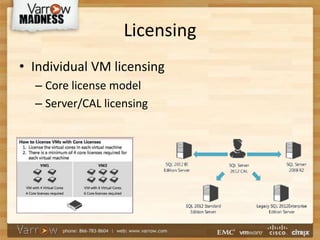
Licensing
• Individual VM licensing
– Core license model
– Server/CAL licensing
Licensing
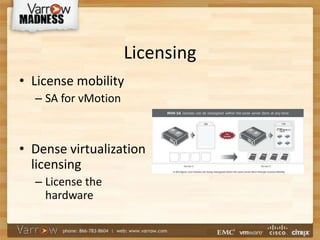
• License mobility
– SA for vMotion
• Dense virtualization
licensing
– License the
hardware
VM Configuration
• TEMPLATE is the means to win!
• Collaborate: DBA’s & VM Admins
• Provision new SQL server in an hour
VM Configuration
• SQL and OS Memory tweaks
– Lock Pages in Memory
– SQL Max Memory
• VM Memory Reservation
– Critical if using Lock Pages
– Legit use of reservations
VM Configuration
• SQL CPU tweaks
– MDOP
– Split TempDB
• VM CPU tweaks
– Single vCPU to start
– Multi-core vs multi-socket vCPU
VM Configuration
• VM Networking
– VMXNET3 (or Flexible)
• Storage considerations
– Block Based - FC / FCoE & iSCSI
– NAS - NFS
VM Configuration
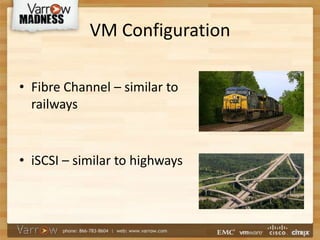
• Fibre Channel – similar to
railways
• iSCSI – similar to highways
VM Configuration - Storage
• RDM vs VMDK
• VM SCSI controllers
• Paravirtualized SCSI controllers
• VMDK - Eager Zeroed Thick
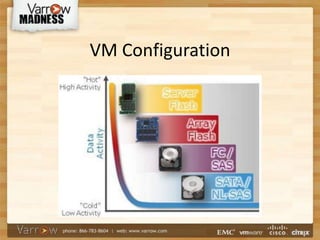
• PCIe SSD cards
VM Configuration
Backup Strategy
• Must choose an approach for Full Recovery Mode!
– Traditional
– Hypervisor based
– Hybrid
• Manage transaction logs
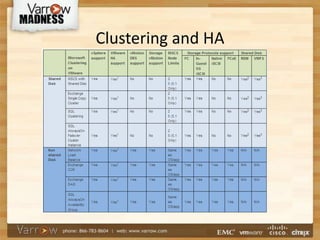
Clustering and HA
• Traditional clustering
• vSphere HA = free clustering
• SQL Always-On clustering
–Best of both worlds!
–Up to 8 secondary copies in 2014 including
native Azure integration
Clustering and HA
Clustering and HA
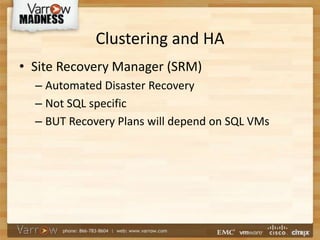
• Site Recovery Manager (SRM)
– Automated Disaster Recovery
– Not SQL specific
– BUT Recovery Plans will depend on SQL VMs
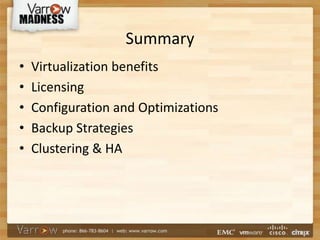
Summary
• Virtualization benefits
• Licensing
• Configuration and Optimizations
• Backup Strategies
• Clustering & HA
Questions and Answers?
Take-away’s for the DBA’s
• Use a TEMPLATE!!
• vCenter access
– Even if it’s just read-only
• More <> better
– Grow as you need it
Links
• Always-On Failover Demonstration – Kyle Quinby, Varrow
• MS KB 920093 - Tuning options for SQL Server when running in high
performance workloads
• MS SQL 2012 license guide for virtualization
• VMw KB 1037959 - Microsoft Clustering on VMware vSphere: Guidelines
for Supported Configurations
• VMware's SQL Server Best Practices Guide
• When to use Lock Pages in Memory with SQL Server
• How to Enable the Lock Pages in Memory Option
• VMware - 1 Million IOPS on 1 VM
• VMw KB 1010398 - Configuring disks to use VMware Paravirtual SCSI
(PVSCSI) adapters
• VMw KB 1022242 - Types of supported Virtual Disks on ESX/ESXi hosts

Varrow Madness 2014 - Virtualizing SQL

  • 1.
    Virtualizing SQL How toimplement on virtual infrastructure to maximize performance and HA
  • 2.
    Agenda • Advantages ofvirtualization • Licensing considerations • VM Configuration • Backups • Clustering & HA
  • 3.
    The Way VirtualizationUsed to Be • Old drawbacks – Storage was slow – Compute was not sufficient – Too expensive – Wasn’t supported
  • 4.
    The Way VirtualizationLooks Today • New strengths – SQL apps are moving to Virtual – Virtual Infrastructure is now on-par! – Fear, Doubt, Uncertainty (FUD) remains – Advantages over physical
  • 5.
    Advantages of VirtualizedSQL • High Availability • Snapshots • Flexibility • Portability
  • 6.
    Multi-Vendor Virtualization Today •Storage is blazing fast and large • Compute has scaled up! • Cost – consolidation is now a winner
  • 7.
    The Golden Rule Designsare essentially the same • CPU • RAM • Storage • Network
  • 8.
    When is itnot a good idea to Virtualize? • Vendor support • Ultra-low latency requirements • ETL that runs at MAX CPU for hours
  • 9.
    Licensing • Individual VMlicensing – Core license model – Server/CAL licensing
  • 10.
    Licensing • License mobility –SA for vMotion • Dense virtualization licensing – License the hardware
  • 11.
    VM Configuration • TEMPLATEis the means to win! • Collaborate: DBA’s & VM Admins • Provision new SQL server in an hour
  • 12.
    VM Configuration • SQLand OS Memory tweaks – Lock Pages in Memory – SQL Max Memory • VM Memory Reservation – Critical if using Lock Pages – Legit use of reservations
  • 13.
    VM Configuration • SQLCPU tweaks – MDOP – Split TempDB • VM CPU tweaks – Single vCPU to start – Multi-core vs multi-socket vCPU
  • 14.
    VM Configuration • VMNetworking – VMXNET3 (or Flexible) • Storage considerations – Block Based - FC / FCoE & iSCSI – NAS - NFS
  • 15.
    VM Configuration • FibreChannel – similar to railways • iSCSI – similar to highways
  • 16.
    VM Configuration -Storage • RDM vs VMDK • VM SCSI controllers • Paravirtualized SCSI controllers • VMDK - Eager Zeroed Thick • PCIe SSD cards
  • 17.
  • 18.
    Backup Strategy • Mustchoose an approach for Full Recovery Mode! – Traditional – Hypervisor based – Hybrid • Manage transaction logs
  • 19.
    Clustering and HA •Traditional clustering • vSphere HA = free clustering • SQL Always-On clustering –Best of both worlds! –Up to 8 secondary copies in 2014 including native Azure integration
  • 20.
  • 21.
    Clustering and HA •Site Recovery Manager (SRM) – Automated Disaster Recovery – Not SQL specific – BUT Recovery Plans will depend on SQL VMs
  • 22.
    Summary • Virtualization benefits •Licensing • Configuration and Optimizations • Backup Strategies • Clustering & HA
  • 23.
  • 24.
    Take-away’s for theDBA’s • Use a TEMPLATE!! • vCenter access – Even if it’s just read-only • More <> better – Grow as you need it
  • 25.
    Links • Always-On FailoverDemonstration – Kyle Quinby, Varrow • MS KB 920093 - Tuning options for SQL Server when running in high performance workloads • MS SQL 2012 license guide for virtualization • VMw KB 1037959 - Microsoft Clustering on VMware vSphere: Guidelines for Supported Configurations • VMware's SQL Server Best Practices Guide • When to use Lock Pages in Memory with SQL Server • How to Enable the Lock Pages in Memory Option • VMware - 1 Million IOPS on 1 VM • VMw KB 1010398 - Configuring disks to use VMware Paravirtual SCSI (PVSCSI) adapters • VMw KB 1022242 - Types of supported Virtual Disks on ESX/ESXi hosts