

Databases Love Nutanix
@Twitter
22
Principles of Database Servers
Databases are an extension of storage
Performance is more than just
the underlying storage devices
Size for performance before capacity
“The Bitterness of Poor Performance Lasts Long
After the Sweetness of a Cheap Price is Forgotten”
33
“The best strategy to win an F1 GP is to have the fastest car – David Coulthard”
Principles of Database Servers
Virtualize, but without compromise
Keep it standardized and simple
“Flash! Ah-ahh! Savior of the Universe!...
Flash! Ah-ahh! King of the Impossible!”
44
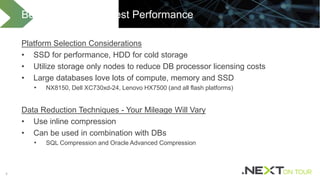
Platform Selection Considerations
• SSD for performance, HDD for cold storage
• Utilize storage only nodes to reduce DB processor licensing costs
• Large databases love lots of compute, memory and SSD
• NX8150, Dell XC730xd-24, Lenovo HX7500 (and all flash platforms)
Data Reduction Techniques - Your Mileage Will Vary
• Use inline compression
• Can be used in combination with DBs
• SQL Compression and Oracle Advanced Compression
Best Practices for Best Performance
55
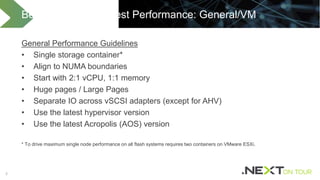
General Performance Guidelines
• Single storage container*
• Align to NUMA boundaries
• Start with 2:1 vCPU, 1:1 memory
• Huge pages / Large Pages
• Separate IO across vSCSI adapters (except for AHV)
• Use the latest hypervisor version
• Use the latest Acropolis (AOS) version
* To drive maximum single node performance on all flash systems requires two containers on VMware ESXi.
Best Practices for Best Performance: General/VM
66
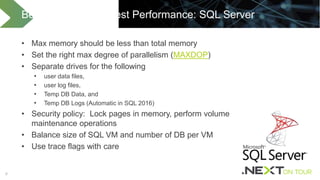
• Max memory should be less than total memory
• Set the right max degree of parallelism (MAXDOP)
• Separate drives for the following
• user data files,
• user log files,
• Temp DB Data, and
• Temp DB Logs (Automatic in SQL 2016)
• Security policy: Lock pages in memory, perform volume
maintenance operations
• Balance size of SQL VM and number of DB per VM
• Use trace flags with care
Best Practices for Best Performance: SQL Server
77
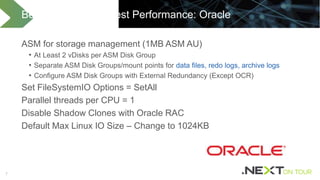
ASM for storage management (1MB ASM AU)
• At Least 2 vDisks per ASM Disk Group
• Separate ASM Disk Groups/mount points for data files, redo logs, archive logs
• Configure ASM Disk Groups with External Redundancy (Except OCR)
Set FileSystemIO Options = SetAll
Parallel threads per CPU = 1
Disable Shadow Clones with Oracle RAC
Default Max Linux IO Size – Change to 1024KB
Best Practices for Best Performance: Oracle
88
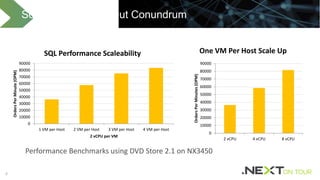
Scale Up vs Scale Out Conundrum
0
10000
20000
30000
40000
50000
60000
70000
80000
90000
1 VM per Host 2 VM per Host 3 VM per Host 4 VM per Host
OrdersPerMinute(OPM)
2 vCPU per VM
SQL Performance Scaleability
0
10000
20000
30000
40000
50000
60000
70000
80000
90000
2 vCPU 4 vCPU 8 vCPU
OrdersPerMinutes(OPM)
One VM Per Host Scale Up
Performance Benchmarks using DVD Store 2.1 on NX3450
99
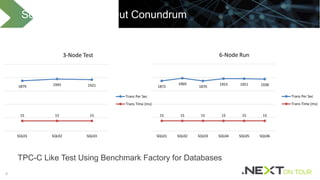
TPC-C Like Test Using Benchmark Factory for Databases
Scale Up vs Scale Out Conundrum
1879 1945 1921
15 15 15
SQL01 SQL02 SQL03
3-Node Test
Trans Per Sec
Trans Time (ms)
1872
1969
1870
1953 1951 1938
15 15 15 15 15 15
SQL01 SQL02 SQL03 SQL04 SQL05 SQL06
6-Node Run
Trans Per Sec
Trans Time (ms)
1010
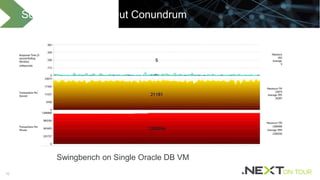
Swingbench on Single Oracle DB VM
Scale Up vs Scale Out Conundrum
1111
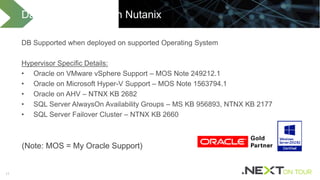
DB Supported when deployed on supported Operating System
Hypervisor Specific Details:
• Oracle on VMware vSphere Support – MOS Note 249212.1
• Oracle on Microsoft Hyper-V Support – MOS Note 1563794.1
• Oracle on AHV – NTNX KB 2682
• SQL Server AlwaysOn Availability Groups – MS KB 956893, NTNX KB 2177
• SQL Server Failover Cluster – NTNX KB 2660
Database Support on Nutanix
(Note: MOS = My Oracle Support)
1212
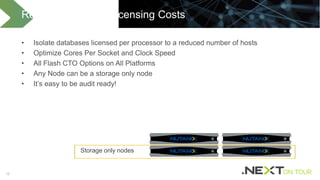
• Isolate databases licensed per processor to a reduced number of hosts
• Optimize Cores Per Socket and Clock Speed
• All Flash CTO Options on All Platforms
• Any Node can be a storage only node
• It’s easy to be audit ready!
Reduce Database Licensing Costs
Storage only nodes
1313
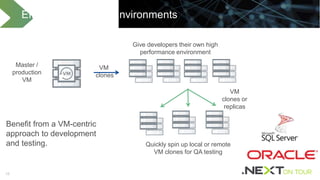
Efficient Dev / Test Environments
VM
clones
Give developers their own high
performance environment
Master /
production
VM
Quickly spin up local or remote
VM clones for QA testing
VM
clones or
replicas
Benefit from a VM-centric
approach to development
and testing.
1414
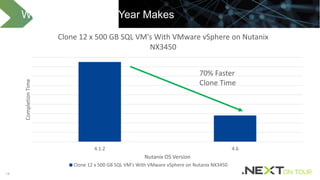
What a Difference a Year Makes
4.1.2 4.6
CompletionTime
Nutanix OS Version
Clone 12 x 500 GB SQL VM's With VMware vSphere on Nutanix
NX3450
Clone 12 x 500 GB SQL VM's With VMware vSphere on Nutanix NX3450
70% Faster
Clone Time
1515
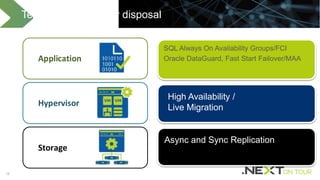
SQL Always On Availability Groups/FCI
Oracle DataGuard, Fast Start Failover/MAA
Technologies at your disposal
Application
Storage
Hypervisor
Async and Sync Replication
High Availability /
Live Migration
16
Like What You Just Heard… There’s More!
READ
• Longwhiteclouds.com and Next.Nutanix.com: Lots of Performance, Oracle and SQL Content
• SQL Server and Oracle Best Practice Guide
• Virtualizing SQL Server with VMware: Doing IT Right (VMware Press 2014)
Questions
@Twitter
Thank You
@Twitter

Databases love nutanix

  • 1.
  • 2.
    22 Principles of DatabaseServers Databases are an extension of storage Performance is more than just the underlying storage devices Size for performance before capacity “The Bitterness of Poor Performance Lasts Long After the Sweetness of a Cheap Price is Forgotten”
  • 3.
    33 “The best strategyto win an F1 GP is to have the fastest car – David Coulthard” Principles of Database Servers Virtualize, but without compromise Keep it standardized and simple “Flash! Ah-ahh! Savior of the Universe!... Flash! Ah-ahh! King of the Impossible!”
  • 4.
    44 Platform Selection Considerations •SSD for performance, HDD for cold storage • Utilize storage only nodes to reduce DB processor licensing costs • Large databases love lots of compute, memory and SSD • NX8150, Dell XC730xd-24, Lenovo HX7500 (and all flash platforms) Data Reduction Techniques - Your Mileage Will Vary • Use inline compression • Can be used in combination with DBs • SQL Compression and Oracle Advanced Compression Best Practices for Best Performance
  • 5.
    55 General Performance Guidelines •Single storage container* • Align to NUMA boundaries • Start with 2:1 vCPU, 1:1 memory • Huge pages / Large Pages • Separate IO across vSCSI adapters (except for AHV) • Use the latest hypervisor version • Use the latest Acropolis (AOS) version * To drive maximum single node performance on all flash systems requires two containers on VMware ESXi. Best Practices for Best Performance: General/VM
  • 6.
    66 • Max memoryshould be less than total memory • Set the right max degree of parallelism (MAXDOP) • Separate drives for the following • user data files, • user log files, • Temp DB Data, and • Temp DB Logs (Automatic in SQL 2016) • Security policy: Lock pages in memory, perform volume maintenance operations • Balance size of SQL VM and number of DB per VM • Use trace flags with care Best Practices for Best Performance: SQL Server
  • 7.
    77 ASM for storagemanagement (1MB ASM AU) • At Least 2 vDisks per ASM Disk Group • Separate ASM Disk Groups/mount points for data files, redo logs, archive logs • Configure ASM Disk Groups with External Redundancy (Except OCR) Set FileSystemIO Options = SetAll Parallel threads per CPU = 1 Disable Shadow Clones with Oracle RAC Default Max Linux IO Size – Change to 1024KB Best Practices for Best Performance: Oracle
  • 8.
    88 Scale Up vsScale Out Conundrum 0 10000 20000 30000 40000 50000 60000 70000 80000 90000 1 VM per Host 2 VM per Host 3 VM per Host 4 VM per Host OrdersPerMinute(OPM) 2 vCPU per VM SQL Performance Scaleability 0 10000 20000 30000 40000 50000 60000 70000 80000 90000 2 vCPU 4 vCPU 8 vCPU OrdersPerMinutes(OPM) One VM Per Host Scale Up Performance Benchmarks using DVD Store 2.1 on NX3450
  • 9.
    99 TPC-C Like TestUsing Benchmark Factory for Databases Scale Up vs Scale Out Conundrum 1879 1945 1921 15 15 15 SQL01 SQL02 SQL03 3-Node Test Trans Per Sec Trans Time (ms) 1872 1969 1870 1953 1951 1938 15 15 15 15 15 15 SQL01 SQL02 SQL03 SQL04 SQL05 SQL06 6-Node Run Trans Per Sec Trans Time (ms)
  • 10.
    1010 Swingbench on SingleOracle DB VM Scale Up vs Scale Out Conundrum
  • 11.
    1111 DB Supported whendeployed on supported Operating System Hypervisor Specific Details: • Oracle on VMware vSphere Support – MOS Note 249212.1 • Oracle on Microsoft Hyper-V Support – MOS Note 1563794.1 • Oracle on AHV – NTNX KB 2682 • SQL Server AlwaysOn Availability Groups – MS KB 956893, NTNX KB 2177 • SQL Server Failover Cluster – NTNX KB 2660 Database Support on Nutanix (Note: MOS = My Oracle Support)
  • 12.
    1212 • Isolate databaseslicensed per processor to a reduced number of hosts • Optimize Cores Per Socket and Clock Speed • All Flash CTO Options on All Platforms • Any Node can be a storage only node • It’s easy to be audit ready! Reduce Database Licensing Costs Storage only nodes
  • 13.
    1313 Efficient Dev /Test Environments VM clones Give developers their own high performance environment Master / production VM Quickly spin up local or remote VM clones for QA testing VM clones or replicas Benefit from a VM-centric approach to development and testing.
  • 14.
    1414 What a Differencea Year Makes 4.1.2 4.6 CompletionTime Nutanix OS Version Clone 12 x 500 GB SQL VM's With VMware vSphere on Nutanix NX3450 Clone 12 x 500 GB SQL VM's With VMware vSphere on Nutanix NX3450 70% Faster Clone Time
  • 15.
    1515 SQL Always OnAvailability Groups/FCI Oracle DataGuard, Fast Start Failover/MAA Technologies at your disposal Application Storage Hypervisor Async and Sync Replication High Availability / Live Migration
  • 16.
    16 Like What YouJust Heard… There’s More! READ • Longwhiteclouds.com and Next.Nutanix.com: Lots of Performance, Oracle and SQL Content • SQL Server and Oracle Best Practice Guide • Virtualizing SQL Server with VMware: Doing IT Right (VMware Press 2014)
  • 17.
  • 18.

Editor's Notes

  • #18 What big data apps are you running on Nutanix? Is this a new service for you or did you migrate it from another platform? ---If you migrated it, what did you migrate it from? ---What were the drivers for change? ---If it was new, what were the drivers for you to adopt big data? What other options did you consider for your app? Why did you choose Nutanix to run your app? ---Why did you virtualize rather then going bare metal? ---Did you consider cloud offerings?  What were the deciding factors? What are the benefits that you've seen running your app on Nutanix?