




Extreme Performance Series:
vCenter Performance Best Practices
Ravi Soundararajan, VMware, Inc
Dilpreet Bindra, VMware, Inc.
Zhelong Pan, VMware, Inc.
INF4764
#INF4764
• This presentation may contain product features that are currently under development.
• This overview of new technology represents no commitment from VMware to deliver these
features in any generally available product.
• Features are subject to change, and must not be included in contracts, purchase orders, or
sales agreements of any kind.
• Technical feasibility and market demand will affect final delivery.
• Pricing and packaging for any new technologies or features discussed or presented have not
been determined.
Disclaimer
CONFIDENTIAL 2
Our Goals
• Help you understand vCenter architecture
• Help you understand what factors influence vCenter performance
• Help you use this knowledge to guide vCenter deployment
CONFIDENTIAL 3
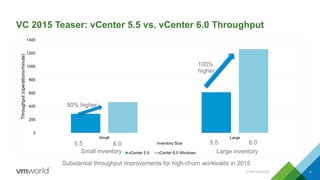
VC 2015 Teaser: vCenter 5.5 vs. vCenter 6.0 Throughput
0
200
400
600
800
1000
1200
1400
Small Large
Throughput(operations/minute)
Inventory Size
vCenter 5.5 vCenter 6.0 Windows
5.5 6.0
CONFIDENTIAL 4
50% higher
100%
higher
Substantial throughput improvements for high-churn workloads in 2015
5.5 6.0
Small inventory Large inventory
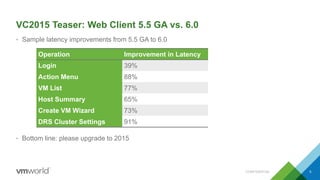
VC2015 Teaser: Web Client 5.5 GA vs. 6.0
• Sample latency improvements from 5.5 GA to 6.0
• Bottom line: please upgrade to 2015
CONFIDENTIAL 5
Operation Improvement in Latency
Login 39%
Action Menu 88%
VM List 77%
Host Summary 65%
Create VM Wizard 73%
DRS Cluster Settings 91%
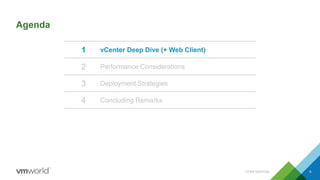
Agenda
1 vCenter Deep Dive (+ Web Client)
2 Performance Considerations
3 Deployment Strategies
4 Concluding Remarks
CONFIDENTIAL 6
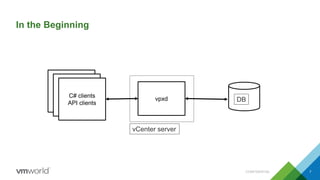
In the Beginning
CONFIDENTIAL 7
C# clients
API clients
vpxd DB
vCenter server
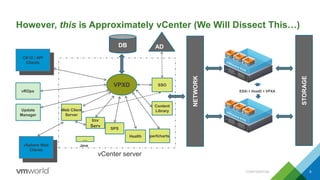
However, this is Approximately vCenter (We Will Dissect This…)
CONFIDENTIAL 8
ESXi + HostD + VPXA
STORAGE
NETWORK
VPXD
DB
Web Client
Server
Health perfcharts
vSphere Web
Clients
Update
Manager
vROps
AD
C# UI / API
Clients
Java
Inv
Serv
…
vCenter server
SSO
SPS
Content
Library
vCenter Deep Dive
+ Web Client
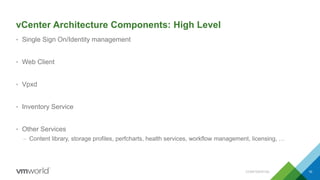
vCenter Architecture Components: High Level
• Single Sign On/Identity management
• Web Client
• Vpxd
• Inventory Service
• Other Services
– Content library, storage profiles, perfcharts, health services, workflow management, licensing, …
CONFIDENTIAL 10
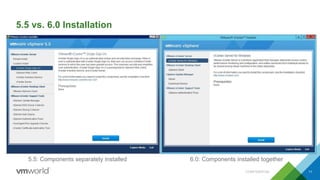
5.5 vs. 6.0 Installation
CONFIDENTIAL 11
5.5: Components separately installed 6.0: Components installed together
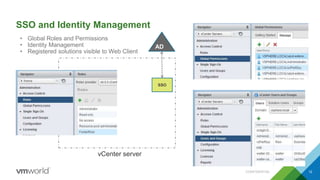
SSO and Identity Management
CONFIDENTIAL 12
AD
vCenter server
SSO
• Global Roles and Permissions
• Identity Management
• Registered solutions visible to Web Client
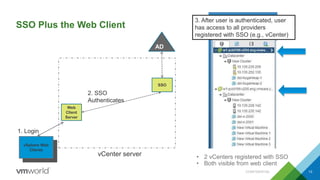
SSO Plus the Web Client
CONFIDENTIAL 13
Web
Client
Server
vSphere Web
Clients
AD
vCenter server
SSO
• 2 vCenters registered with SSO
• Both visible from web client
1. Login
2. SSO
Authenticates
3. After user is authenticated, user
has access to all providers
registered with SSO (e.g., vCenter)
Vpxd
14
VPXD
DB
Web
Client
Server
vSphere Web
Clients
AD
vCenter server
SSO
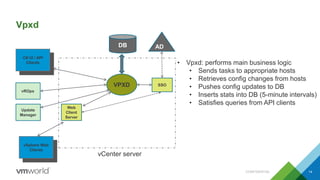
• Vpxd: performs main business logic
• Sends tasks to appropriate hosts
• Retrieves config changes from hosts
• Pushes config updates to DB
• Inserts stats into DB (5-minute intervals)
• Satisfies queries from API clients
Update
Manager
vROps
C# UI / API
Clients
CONFIDENTIAL
Database
CONFIDENTIAL 15
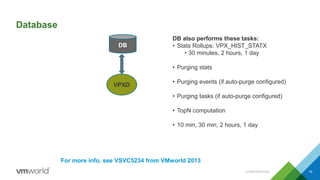
DB also performs these tasks:
• Stats Rollups: VPX_HIST_STATX
• 30 minutes, 2 hours, 1 day
• Purging stats
• Purging events (if auto-purge configured)
• Purging tasks (if auto-purge configured)
• TopN computation
• 10 min, 30 min, 2 hours, 1 day
For more info, see VSVC5234 from VMworld 2013
VPXD
DB
Inventory Service
CONFIDENTIAL 16
VPXD
DB
Web Client
Server
vSphere Web
Clients
AD
Inv
Serv
vCenter server
SSO
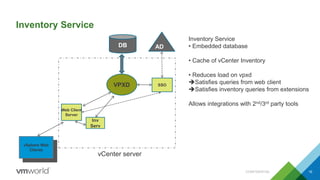
Inventory Service
• Embedded database
• Cache of vCenter Inventory
• Reduces load on vpxd
Satisfies queries from web client
Satisfies inventory queries from extensions
Allows integrations with 2nd/3rd party tools
Inventory Service: Integrations with Extensions
CONFIDENTIAL 17
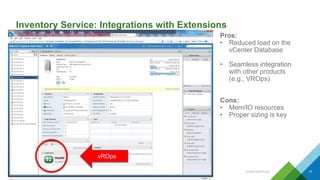
Pros:
• Reduced load on the
vCenter Database
• Seamless integration
with other products
(e.g., VROps)
Cons:
• Mem/IO resources
• Proper sizing is key
vROps
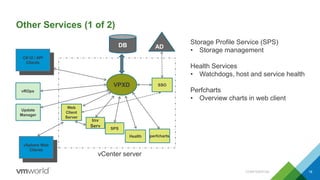
Other Services (1 of 2)
CONFIDENTIAL 18
VPXD
DB
Web
Client
Server
Health perfcharts
vSphere Web
Clients
Update
Manager
vROps
AD
C# UI / API
Clients
Inv
Serv
vCenter server
SSO
SPS
Storage Profile Service (SPS)
• Storage management
Health Services
• Watchdogs, host and service health
Perfcharts
• Overview charts in web client
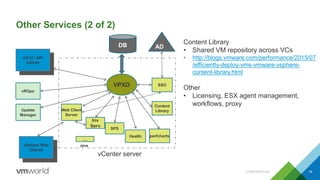
Other Services (2 of 2)
CONFIDENTIAL 19
VPXD
DB
Web Client
Server
Health perfcharts
vSphere Web
Clients
Update
Manager
vROps
AD
C# UI / API
Clients
Java
Inv
Serv
…
vCenter server
SSO
SPS
Content
Library
Content Library
• Shared VM repository across VCs
• http://blogs.vmware.com/performance/2015/07
/efficiently-deploy-vms-vmware-vsphere-
content-library.html
Other
• Licensing, ESX agent management,
workflows, proxy
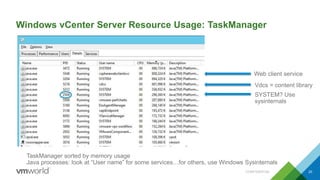
Windows vCenter Server Resource Usage: TaskManager
CONFIDENTIAL 20
TaskManager sorted by memory usage
Java processes: look at “User name” for some services…for others, use Windows Sysinternals
Web client service
Vdcs = content library
SYSTEM? Use
sysinternals
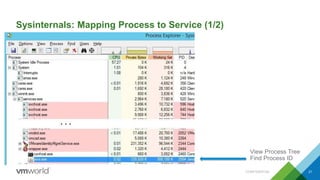
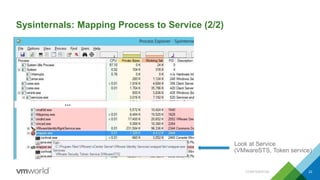
Sysinternals: Mapping Process to Service (1/2)
CONFIDENTIAL 21
View Process Tree
Find Process ID
Sysinternals: Mapping Process to Service (2/2)
CONFIDENTIAL 22
Look at Service
(VMwareSTS, Token service)
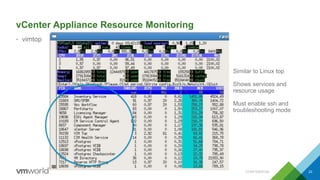
vCenter Appliance Resource Monitoring
• vimtop
CONFIDENTIAL 23
Similar to Linux top
Shows services and
resource usage
Must enable ssh and
troubleshooting mode
Agenda
1 vCenter Deep Dive (+ Web Client)
2 Performance Considerations
3 Deployment Strategies
4 Concluding Remarks
CONFIDENTIAL 24
Performance Considerations
vCenter Server Performance Considerations
Sufficient Resource Provisioning is Key
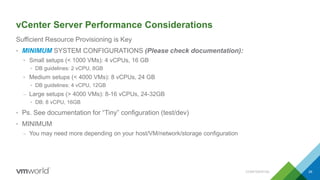
• MINIMUM SYSTEM CONFIGURATIONS (Please check documentation):
• Small setups (< 1000 VMs): 4 vCPUs, 16 GB
• DB guidelines: 2 vCPU, 8GB
• Medium setups (< 4000 VMs): 8 vCPUs, 24 GB
• DB guidelines: 4 vCPU, 12GB
– Large setups (> 4000 VMs): 8-16 vCPUs, 24-32GB
• DB: 8 vCPU, 16GB
• Ps. See documentation for “Tiny” configuration (test/dev)
• MINIMUM
– You may need more depending on your host/VM/network/storage configuration
CONFIDENTIAL 26
Factors Influencing vCenter Resource Usage
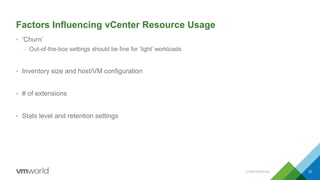
• ‘Churn’
– Out-of-the-box settings should be fine for ‘light’ workloads
• Inventory size and host/VM configuration
• # of extensions
• Stats level and retention settings
CONFIDENTIAL 27
Resource Usage Discussion
• Examine resources under different inventory sizes and churn factors
– CPU
– Memory
– Disk
– Network
CONFIDENTIAL 28
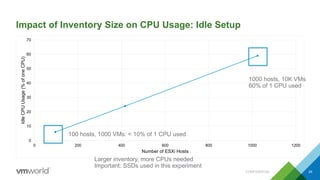
Impact of Inventory Size on CPU Usage: Idle Setup
0
10
20
30
40
50
60
70
0 200 400 600 800 1000 1200
IdleCPUUsage(%ofoneCPU)
Number of ESXi Hosts
CONFIDENTIAL 29
1000 hosts, 10K VMs
60% of 1 CPU used
100 hosts, 1000 VMs: < 10% of 1 CPU used
Larger inventory, more CPUs needed
Important: SSDs used in this experiment
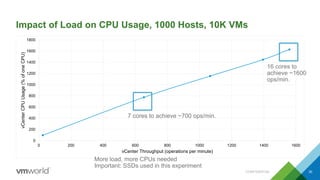
Impact of Load on CPU Usage, 1000 Hosts, 10K VMs
0
200
400
600
800
1000
1200
1400
1600
1800
0 200 400 600 800 1000 1200 1400 1600
vCenterCPUUsage(%ofoneCPU)
vCenter Throughput (operations per minute)
CONFIDENTIAL 30
More load, more CPUs needed
Important: SSDs used in this experiment
16 cores to
achieve ~1600
ops/min.
7 cores to achieve ~700 ops/min.
CPU Version
• Newer CPUs can impact performance
• Example for large inventory:
– 60% more throughput with E5-2670v3 Haswell-EP than with E7-8837 Westmere-EX
CONFIDENTIAL 31
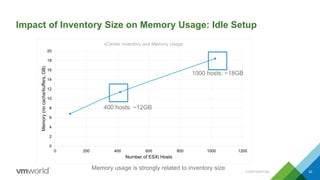
Impact of Inventory Size on Memory Usage: Idle Setup
CONFIDENTIAL 32
0
2
4
6
8
10
12
14
16
18
20
0 200 400 600 800 1000 1200
Memory(nocache/buffers,GB)
Number of ESXi Hosts
vCenter Inventory and Memory Usage
1000 hosts: ~18GB
400 hosts: ~12GB
Memory usage is strongly related to inventory size
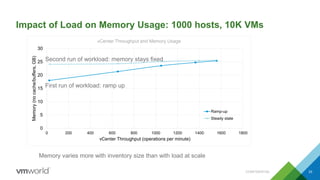
Impact of Load on Memory Usage: 1000 hosts, 10K VMs
CONFIDENTIAL 33
0
5
10
15
20
25
30
0 200 400 600 800 1000 1200 1400 1600 1800
Memory(nocache/buffers,GB)
vCenter Throughput (operations per minute)
vCenter Throughput and Memory Usage
Ramp-up
Steady state
Memory varies more with inventory size than with load at scale
First run of workload: ramp up
Second run of workload: memory stays fixed
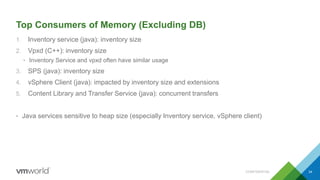
Top Consumers of Memory (Excluding DB)
1. Inventory service (java): inventory size
2. Vpxd (C++): inventory size
• Inventory Service and vpxd often have similar usage
3. SPS (java): inventory size
4. vSphere Client (java): impacted by inventory size and extensions
5. Content Library and Transfer Service (java): concurrent transfers
• Java services sensitive to heap size (especially Inventory service, vSphere client)
CONFIDENTIAL 34
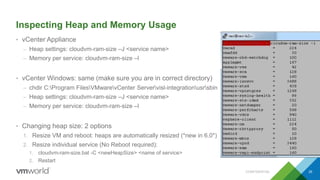
Inspecting Heap and Memory Usage
• vCenter Appliance
– Heap settings: cloudvm-ram-size –J <service name>
– Memory per service: cloudvm-ram-size –l
• vCenter Windows: same (make sure you are in correct directory)
– chdir C:Program FilesVMwarevCenter Servervisl-integrationusrsbin
– Heap settings: cloudvm-ram-size –J <service name>
– Memory per service: cloudvm-ram-size –l
• Changing heap size: 2 options
1. Resize VM and reboot: heaps are automatically resized (*new in 6.0*)
2. Resize individual service (No Reboot required):
1. cloudvm-ram-size.bat -C <newHeapSize> <name of service>
2. Restart
CONFIDENTIAL 35
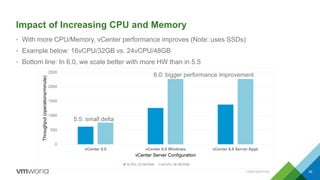
Impact of Increasing CPU and Memory
• With more CPU/Memory, vCenter performance improves (Note: uses SSDs)
• Example below: 16vCPU/32GB vs. 24vCPU/48GB
• Bottom line: In 6.0, we scale better with more HW than in 5.5
CONFIDENTIAL 36
0
500
1000
1500
2000
2500
vCenter 5.5 vCenter 6.0 Windows vCenter 6.0 Server Appl.
Throughput(operations/minute)
vCenter Server Configuration
16 CPU, 32 GB RAM 24 CPU, 48 GB RAM
5.5: small delta
6.0: bigger performance improvement
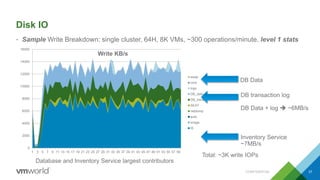
Disk IO
• Sample Write Breakdown: single cluster, 64H, 8K VMs, ~300 operations/minute, level 1 stats
CONFIDENTIAL 37
0
2000
4000
6000
8000
10000
12000
14000
16000
1 3 5 7 9 11 13 15 17 19 21 23 25 27 29 31 33 35 37 39 41 43 45 47 49 51 53 55 57 59
Write KB/s
swap
core
logs
DB_data
DB_trans
SEAT
netdump
auto
image
IS
DB transaction log
DB Data + log  ~6MB/s
Inventory Service
~7MB/s
DB Data
Total: ~3K write IOPs
Database and Inventory Service largest contributors
Disk Characterization
Traffic related to load, inventory size, and statistics level
• Relational DB
– Workload
– Inventory Size
– Statistics Level
– Attached extensions causing vCenter Events
• Inventory Service
– Workload
– Inventory Size
• DB is involved in nearly all operations: latency is key
CONFIDENTIAL 38
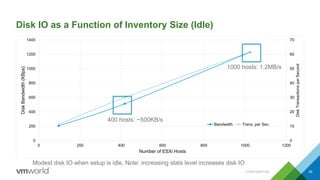
Disk IO as a Function of Inventory Size (Idle)
0
10
20
30
40
50
60
70
0
200
400
600
800
1000
1200
1400
0 200 400 600 800 1000 1200
DiskTransactionsperSecond
DiskBandwidth(KBps)
Number of ESXi Hosts
Bandwidth Trans. per Sec.
CONFIDENTIAL 39
1000 hosts: 1.2MB/s
400 hosts: ~500KB/s
Modest disk IO when setup is idle. Note: increasing stats level increases disk IO
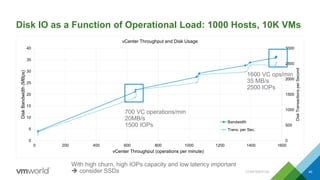
Disk IO as a Function of Operational Load: 1000 Hosts, 10K VMs
0
500
1000
1500
2000
2500
3000
0
5
10
15
20
25
30
35
40
0 200 400 600 800 1000 1200 1400 1600
DiskTransactionsperSecond
DiskBandwidth(MBps)
vCenter Throughput (operations per minute)
vCenter Throughput and Disk Usage
Bandwidth
Trans. per Sec.
CONFIDENTIAL 40
1600 VC ops/min
35 MB/s
2500 IOPs
700 VC operations/min
20MB/s
1500 IOPs
With high churn, high IOPs capacity and low latency important
 consider SSDs
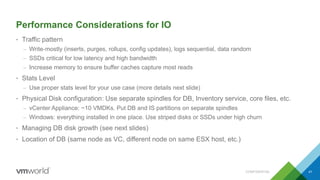
Performance Considerations for IO
• Traffic pattern
– Write-mostly (inserts, purges, rollups, config updates), logs sequential, data random
– SSDs critical for low latency and high bandwidth
– Increase memory to ensure buffer caches capture most reads
• Stats Level
– Use proper stats level for your use case (more details next slide)
• Physical Disk configuration: Use separate spindles for DB, Inventory service, core files, etc.
– vCenter Appliance: ~10 VMDKs. Put DB and IS partitions on separate spindles
– Windows: everything installed in one place. Use striped disks or SSDs under high churn
• Managing DB disk growth (see next slides)
• Location of DB (same node as VC, different node on same ESX host, etc.)
CONFIDENTIAL 41
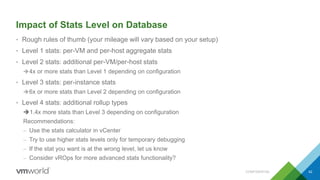
Impact of Stats Level on Database
• Rough rules of thumb (your mileage will vary based on your setup)
• Level 1 stats: per-VM and per-host aggregate stats
• Level 2 stats: additional per-VM/per-host stats
4x or more stats than Level 1 depending on configuration
• Level 3 stats: per-instance stats
6x or more stats than Level 2 depending on configuration
• Level 4 stats: additional rollup types
1.4x more stats than Level 3 depending on configuration
Recommendations:
– Use the stats calculator in vCenter
– Try to use higher stats levels only for temporary debugging
– If the stat you want is at the wrong level, let us know
– Consider vROps for more advanced stats functionality?
CONFIDENTIAL 42
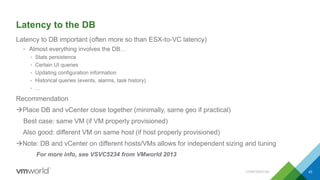
Latency to the DB
Latency to DB important (often more so than ESX-to-VC latency)
• Almost everything involves the DB…
• Stats persistence
• Certain UI queries
• Updating configuration information
• Historical queries (events, alarms, task history)
• …
Recommendation
Place DB and vCenter close together (minimally, same geo if practical)
Best case: same VM (if VM properly provisioned)
Also good: different VM on same host (if host properly provisioned)
Note: DB and vCenter on different hosts/VMs allows for independent sizing and tuning
For more info, see VSVC5234 from VMworld 2013
CONFIDENTIAL 43
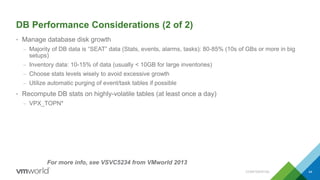
DB Performance Considerations (2 of 2)
• Manage database disk growth
– Majority of DB data is “SEAT” data (Stats, events, alarms, tasks): 80-85% (10s of GBs or more in big
setups)
– Inventory data: 10-15% of data (usually < 10GB for large inventories)
– Choose stats levels wisely to avoid excessive growth
– Utilize automatic purging of event/task tables if possible
• Recompute DB stats on highly-volatile tables (at least once a day)
– VPX_TOPN*
44
For more info, see VSVC5234 from VMworld 2013
CONFIDENTIAL
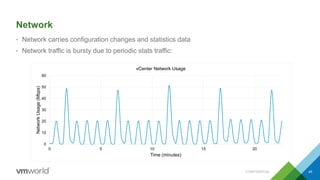
Network
• Network carries configuration changes and statistics data
• Network traffic is bursty due to periodic stats traffic:
CONFIDENTIAL 45
0
10
20
30
40
50
60
0 5 10 15 20
NetworkUsage(Mbps)
Time (minutes)
vCenter Network Usage
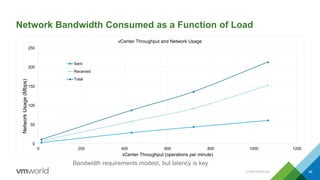
Network Bandwidth Consumed as a Function of Load
0
50
100
150
200
250
0 200 400 600 800 1000 1200
NetworkUsage(Mbps)
vCenter Throughput (operations per minute)
vCenter Throughput and Network Usage
Sent
Received
Total
CONFIDENTIAL 46
Bandwidth requirements modest, but latency is key
Network
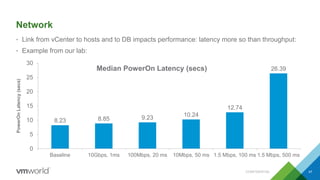
• Link from vCenter to hosts and to DB impacts performance: latency more so than throughput:
• Example from our lab:
CONFIDENTIAL 47
8.23 8.85 9.23 10.24
12.74
26.39
0
5
10
15
20
25
30
Baseline 10Gbps, 1ms 100Mbps, 20 ms 10Mbps, 50 ms 1.5 Mbps, 100 ms 1.5 Mbps, 500 ms
PowerOnLatency(secs)
Median PowerOn Latency (secs)
Other Performance Considerations
• Concurrency
• API
• Extensions
• Windows vs. Linux
CONFIDENTIAL 48
How Many Concurrent Operations Can I Perform? (1 of 2)
• vCenter hard limits
– 640 concurrent operations before incoming requests are queued
– 2000 concurrent sessions (incoming requests plus remote console sessions)
• Per-host or per-datastore limits
– A host can perform up to 8 provisioning operations at once (provisioning = clone, VMotion, relocate)
– If host is source and destination, host can only do 4 operations at once
– A datastore can perform up to 128 VMotions at once
– A datastore can perform up to 8 Storage VMotions at once
– Limits can be changed, but changes are not officially supported
• NIC configuration: 10Gb vs. 1Gb
– 10Gb NIC allows a host to do 2x more VMotions at a time than 1Gb NIC
CONFIDENTIAL 49
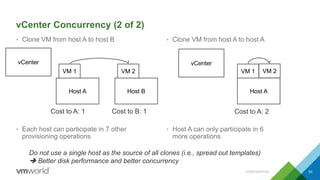
vCenter Concurrency (2 of 2)
• Clone VM from host A to host B
• Each host can participate in 7 other
provisioning operations
• Clone VM from host A to host A
• Host A can only participate in 6
more operations
CONFIDENTIAL 50
vCenter
Host A
VM 1
Host B
VM 2
Cost to A: 1 Cost to B: 1
vCenter
Host A
VM 1 VM 2
Cost to A: 2
Do not use a single host as the source of all clones (i.e., spread out templates)
 Better disk performance and better concurrency
API Performance Considerations: An Example
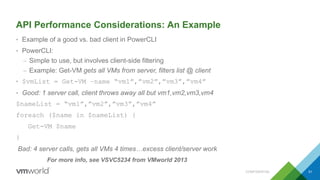
• Example of a good vs. bad client in PowerCLI
• PowerCLI:
– Simple to use, but involves client-side filtering
– Example: Get-VM gets all VMs from server, filters list @ client
• $vmList = Get-VM –name “vm1”,”vm2”,”vm3”,”vm4”
• Good: 1 server call, client throws away all but vm1,vm2,vm3,vm4
$nameList = “vm1”,”vm2”,”vm3”,”vm4”
foreach ($name in $nameList) {
Get-VM $name
}
Bad: 4 server calls, gets all VMs 4 times…excess client/server work
For more info, see VSVC5234 from VMworld 2013
CONFIDENTIAL 51
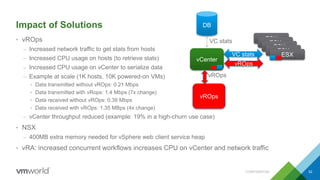
Impact of Solutions
• vROps
– Increased network traffic to get stats from hosts
– Increased CPU usage on hosts (to retrieve stats)
– Increased CPU usage on vCenter to serialize data
– Example at scale (1K hosts, 10K powered-on VMs)
• Data transmitted without vROps: 0.21 Mbps
• Data transmitted with vRops: 1.4 Mbps (7x change)
• Data received without vROps: 0.39 Mbps
• Data received with vROps: 1.35 MBps (4x change)
– vCenter throughput reduced (example: 19% in a high-churn use case)
• NSX
– 400MB extra memory needed for vSphere web client service heap
• vRA: increased concurrent workflows increases CPU on vCenter and network traffic
CONFIDENTIAL 52
vROps
vCenter
ESX
ESX
ESX
ESX
ESXVC stats
DB
VC stats
vROps
vROps
Windows vs. vCenter Appliance
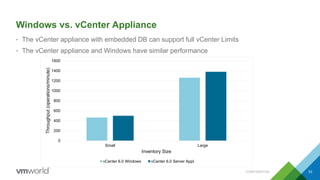
• The vCenter appliance with embedded DB can support full vCenter Limits
• The vCenter appliance and Windows have similar performance
CONFIDENTIAL 53
0
200
400
600
800
1000
1200
1400
1600
Small Large
Throughput(operations/minute)
Inventory Size
vCenter 6.0 Windows vCenter 6.0 Server Appl.
Web Client
Performance Concerns
Web Client: Performance Considerations
• If possible, browser machine should have 2 CPUs, 4GB
• Faster CPUs help (on both client and server side)
• Use browser in same geo as application server (RDP to a local machine?)
• Make sure application server has sufficient heap size (may need to increase if plugins are
installed)
• Make sure Inventory Service has sufficient heap size
CONFIDENTIAL 55
Agenda
1 vCenter Deep Dive (+ Web Client)
2 Performance Considerations
3 Deployment Strategies
4 Concluding Remarks
CONFIDENTIAL 56
Deployment Strategies
Deployment Options
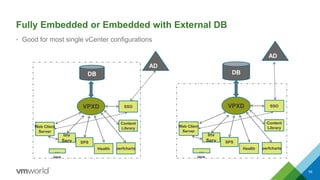
• With increased scaling, our goal is that inventory size and churn are NOT the reasons you need
to use multiple VCs
• Possibilities
– Fully Embedded
– Embedded + external DB
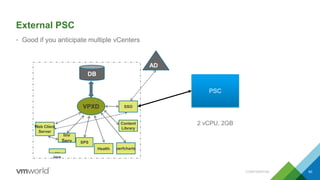
– External Platform Services Controller (PSC)
– Multiple VCs with External PSCs, high-availability
– Multiple VCs with External PSCs, multi-site
• SSO on PSC replaces linked mode
– Works on both Windows and Appliance
– Allows global sharing of roles, permissions, tags, and licenses
CONFIDENTIAL 58
Fully Embedded or Embedded with External DB
• Good for most single vCenter configurations
59
DB
AD
VPXD
Web Client
Server
Health perfcharts
Java
Inv
Serv
…
SSO
SPS
Content
Library
AD
VPXD
DB
Web Client
Server
Health perfcharts
Java
Inv
Serv
…
SSO
SPS
Content
Library
External PSC
• Good if you anticipate multiple vCenters
CONFIDENTIAL 60
AD
VPXD
DB
Web Client
Server
Health perfcharts
Java
Inv
Serv
…
SSO
SPS
Content
Library
PSC
2 vCPU, 2GB
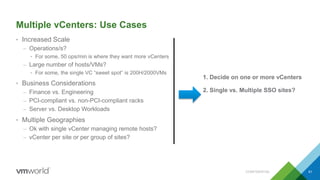
Multiple vCenters: Use Cases
• Increased Scale
– Operations/s?
• For some, 50 ops/min is where they want more vCenters
– Large number of hosts/VMs?
• For some, the single VC “sweet spot” is 200H/2000VMs
• Business Considerations
– Finance vs. Engineering
– PCI-compliant vs. non-PCI-compliant racks
– Server vs. Desktop Workloads
• Multiple Geographies
– Ok with single vCenter managing remote hosts?
– vCenter per site or per group of sites?
CONFIDENTIAL 61
1. Decide on one or more vCenters
2. Single vs. Multiple SSO sites?
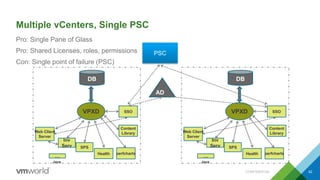
Multiple vCenters, Single PSC
Pro: Single Pane of Glass
Pro: Shared Licenses, roles, permissions
Con: Single point of failure (PSC)
VPXD
DB
Web Client
Server
Health perfcharts
Java
Inv
Serv
…
SSO
SPS
Content
Library
AD
VPXD
DB
Web Client
Server
Health perfcharts
Java
Inv
Serv
…
SSO
SPS
Content
Library
PSC
CONFIDENTIAL 62
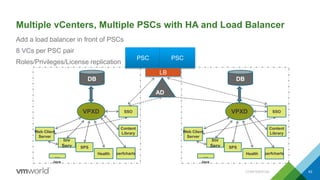
Multiple vCenters, Multiple PSCs with HA and Load Balancer
Add a load balancer in front of PSCs
8 VCs per PSC pair
Roles/Privileges/License replication
VPXD
DB
Web Client
Server
Health perfcharts
Java
Inv
Serv
…
SSO
SPS
Content
Library
AD
VPXD
DB
Web Client
Server
Health perfcharts
Java
Inv
Serv
…
SSO
SPS
Content
Library
PSC PSC
LB
CONFIDENTIAL 63
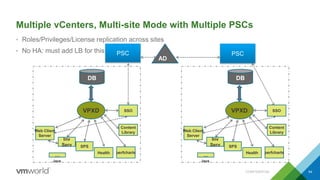
Multiple vCenters, Multi-site Mode with Multiple PSCs
• Roles/Privileges/License replication across sites
• No HA: must add LB for this
VPXD
DB
Web Client
Server
Health perfcharts
Java
Inv
Serv
…
SSO
SPS
Content
Library
AD
VPXD
DB
Web Client
Server
Health perfcharts
Java
Inv
Serv
…
SSO
SPS
Content
Library
PSC PSC
CONFIDENTIAL 64
PSC: Performance Considerations
• Default size (2 vCPU, 2GB) should be fine
• Tag performance can be impacted by slow link between vCenter and PSC
• Login may be slower for SSO vs. Standalone (contacting multiple vCenters)
• Search is slower for external SSO (contacting multiple vCenters)
• One slow vCenter may slow down Login/Search
CONFIDENTIAL 65
Agenda
1 vCenter Deep Dive (+ Web Client)
2 Performance Considerations
3 Deployment Strategies
4 Concluding Remarks
CONFIDENTIAL 66
Conclusions
• vCenter 6.0 vastly improved in scalability and performance over 5.5
– Our goal: performance is not the reason you need multiple vCenters
– Use PSCs for availability, not performance
• For best performance, vCenter needs sufficient resources
– CPU: scales with inventory size and churn
– Memory: scales with inventory size
– IO: scales with inventory size, churn, and stats level
– Network: low-latency between VC and DB recommended
• With 2nd or 3rd party solutions, resource requirements of vCenter will likely increase to manage
the same inventory size
• Use the appliance!
– Windows vCenter and Linux appliance: similar performance, same scale limits
– PSC provides sharing of roles/permissions/licenses
CONFIDENTIAL 67
Extreme Performance Series – Break Out Sessions
• INF4764 vCenter Performance Best Practices
• INF5701 vSphere Compute & Memory
• INF4936 Insight Into vSphere 6 vMotion
• VAPP4639 Best Practices for Performance Tuning of Virtualized Telco and NFV
• INF4853 Docker Containers on vSphere
• VAPP5724 High Performance Panel - No App Left Behind
• VAPP5165 Monster VM Database Performance
• STO4949 Virtual SAN Performance Deep-Dive
• EUC5802 Horizon View 6.x Performance and Best Practices
• VAPP6537-GD Maximize Performance on vSphere 6
CONFIDENTIAL 68
Performance Hands On Labs
• HOL-SDC-1604 vSphere Performance Optimization
This Lab covers vSphere performance best practices and various performance related features available
in vSphere 6.
• SPL-CHG-1695 vSphere 6 Challenge Lab
The vSphere 6 Challenge asks you to put on your thinking cap to save the day! Each module places you
in a different fictional scenario to fix common vSphere operational and performance problems.
• ELW-SDC-1604 vSphere Performance Optimization
This expert led workshop will take you though the vSphere 6 performance best practices hands on lab
with additional support and discussion.
CONFIDENTIAL 69
Extreme Performance Series:
vCenter Performance Best Practices
Ravi Soundararajan, VMware, Inc
INF4764
#INF4764

VMworld 2015: Extreme Performance Series - vCenter Performance Best Practices

  • 1.
    Extreme Performance Series: vCenterPerformance Best Practices Ravi Soundararajan, VMware, Inc Dilpreet Bindra, VMware, Inc. Zhelong Pan, VMware, Inc. INF4764 #INF4764
  • 2.
    • This presentationmay contain product features that are currently under development. • This overview of new technology represents no commitment from VMware to deliver these features in any generally available product. • Features are subject to change, and must not be included in contracts, purchase orders, or sales agreements of any kind. • Technical feasibility and market demand will affect final delivery. • Pricing and packaging for any new technologies or features discussed or presented have not been determined. Disclaimer CONFIDENTIAL 2
  • 3.
    Our Goals • Helpyou understand vCenter architecture • Help you understand what factors influence vCenter performance • Help you use this knowledge to guide vCenter deployment CONFIDENTIAL 3
  • 4.
    VC 2015 Teaser:vCenter 5.5 vs. vCenter 6.0 Throughput 0 200 400 600 800 1000 1200 1400 Small Large Throughput(operations/minute) Inventory Size vCenter 5.5 vCenter 6.0 Windows 5.5 6.0 CONFIDENTIAL 4 50% higher 100% higher Substantial throughput improvements for high-churn workloads in 2015 5.5 6.0 Small inventory Large inventory
  • 5.
    VC2015 Teaser: WebClient 5.5 GA vs. 6.0 • Sample latency improvements from 5.5 GA to 6.0 • Bottom line: please upgrade to 2015 CONFIDENTIAL 5 Operation Improvement in Latency Login 39% Action Menu 88% VM List 77% Host Summary 65% Create VM Wizard 73% DRS Cluster Settings 91%
  • 6.
    Agenda 1 vCenter DeepDive (+ Web Client) 2 Performance Considerations 3 Deployment Strategies 4 Concluding Remarks CONFIDENTIAL 6
  • 7.
    In the Beginning CONFIDENTIAL7 C# clients API clients vpxd DB vCenter server
  • 8.
    However, this isApproximately vCenter (We Will Dissect This…) CONFIDENTIAL 8 ESXi + HostD + VPXA STORAGE NETWORK VPXD DB Web Client Server Health perfcharts vSphere Web Clients Update Manager vROps AD C# UI / API Clients Java Inv Serv … vCenter server SSO SPS Content Library
  • 9.
  • 10.
    vCenter Architecture Components:High Level • Single Sign On/Identity management • Web Client • Vpxd • Inventory Service • Other Services – Content library, storage profiles, perfcharts, health services, workflow management, licensing, … CONFIDENTIAL 10
  • 11.
    5.5 vs. 6.0Installation CONFIDENTIAL 11 5.5: Components separately installed 6.0: Components installed together
  • 12.
    SSO and IdentityManagement CONFIDENTIAL 12 AD vCenter server SSO • Global Roles and Permissions • Identity Management • Registered solutions visible to Web Client
  • 13.
    SSO Plus theWeb Client CONFIDENTIAL 13 Web Client Server vSphere Web Clients AD vCenter server SSO • 2 vCenters registered with SSO • Both visible from web client 1. Login 2. SSO Authenticates 3. After user is authenticated, user has access to all providers registered with SSO (e.g., vCenter)
  • 14.
    Vpxd 14 VPXD DB Web Client Server vSphere Web Clients AD vCenter server SSO •Vpxd: performs main business logic • Sends tasks to appropriate hosts • Retrieves config changes from hosts • Pushes config updates to DB • Inserts stats into DB (5-minute intervals) • Satisfies queries from API clients Update Manager vROps C# UI / API Clients CONFIDENTIAL
  • 15.
    Database CONFIDENTIAL 15 DB alsoperforms these tasks: • Stats Rollups: VPX_HIST_STATX • 30 minutes, 2 hours, 1 day • Purging stats • Purging events (if auto-purge configured) • Purging tasks (if auto-purge configured) • TopN computation • 10 min, 30 min, 2 hours, 1 day For more info, see VSVC5234 from VMworld 2013 VPXD DB
  • 16.
    Inventory Service CONFIDENTIAL 16 VPXD DB WebClient Server vSphere Web Clients AD Inv Serv vCenter server SSO Inventory Service • Embedded database • Cache of vCenter Inventory • Reduces load on vpxd Satisfies queries from web client Satisfies inventory queries from extensions Allows integrations with 2nd/3rd party tools
  • 17.
    Inventory Service: Integrationswith Extensions CONFIDENTIAL 17 Pros: • Reduced load on the vCenter Database • Seamless integration with other products (e.g., VROps) Cons: • Mem/IO resources • Proper sizing is key vROps
  • 18.
    Other Services (1of 2) CONFIDENTIAL 18 VPXD DB Web Client Server Health perfcharts vSphere Web Clients Update Manager vROps AD C# UI / API Clients Inv Serv vCenter server SSO SPS Storage Profile Service (SPS) • Storage management Health Services • Watchdogs, host and service health Perfcharts • Overview charts in web client
  • 19.
    Other Services (2of 2) CONFIDENTIAL 19 VPXD DB Web Client Server Health perfcharts vSphere Web Clients Update Manager vROps AD C# UI / API Clients Java Inv Serv … vCenter server SSO SPS Content Library Content Library • Shared VM repository across VCs • http://blogs.vmware.com/performance/2015/07 /efficiently-deploy-vms-vmware-vsphere- content-library.html Other • Licensing, ESX agent management, workflows, proxy
  • 20.
    Windows vCenter ServerResource Usage: TaskManager CONFIDENTIAL 20 TaskManager sorted by memory usage Java processes: look at “User name” for some services…for others, use Windows Sysinternals Web client service Vdcs = content library SYSTEM? Use sysinternals
  • 21.
    Sysinternals: Mapping Processto Service (1/2) CONFIDENTIAL 21 View Process Tree Find Process ID
  • 22.
    Sysinternals: Mapping Processto Service (2/2) CONFIDENTIAL 22 Look at Service (VMwareSTS, Token service)
  • 23.
    vCenter Appliance ResourceMonitoring • vimtop CONFIDENTIAL 23 Similar to Linux top Shows services and resource usage Must enable ssh and troubleshooting mode
  • 24.
    Agenda 1 vCenter DeepDive (+ Web Client) 2 Performance Considerations 3 Deployment Strategies 4 Concluding Remarks CONFIDENTIAL 24
  • 25.
  • 26.
    vCenter Server PerformanceConsiderations Sufficient Resource Provisioning is Key • MINIMUM SYSTEM CONFIGURATIONS (Please check documentation): • Small setups (< 1000 VMs): 4 vCPUs, 16 GB • DB guidelines: 2 vCPU, 8GB • Medium setups (< 4000 VMs): 8 vCPUs, 24 GB • DB guidelines: 4 vCPU, 12GB – Large setups (> 4000 VMs): 8-16 vCPUs, 24-32GB • DB: 8 vCPU, 16GB • Ps. See documentation for “Tiny” configuration (test/dev) • MINIMUM – You may need more depending on your host/VM/network/storage configuration CONFIDENTIAL 26
  • 27.
    Factors Influencing vCenterResource Usage • ‘Churn’ – Out-of-the-box settings should be fine for ‘light’ workloads • Inventory size and host/VM configuration • # of extensions • Stats level and retention settings CONFIDENTIAL 27
  • 28.
    Resource Usage Discussion •Examine resources under different inventory sizes and churn factors – CPU – Memory – Disk – Network CONFIDENTIAL 28
  • 29.
    Impact of InventorySize on CPU Usage: Idle Setup 0 10 20 30 40 50 60 70 0 200 400 600 800 1000 1200 IdleCPUUsage(%ofoneCPU) Number of ESXi Hosts CONFIDENTIAL 29 1000 hosts, 10K VMs 60% of 1 CPU used 100 hosts, 1000 VMs: < 10% of 1 CPU used Larger inventory, more CPUs needed Important: SSDs used in this experiment
  • 30.
    Impact of Loadon CPU Usage, 1000 Hosts, 10K VMs 0 200 400 600 800 1000 1200 1400 1600 1800 0 200 400 600 800 1000 1200 1400 1600 vCenterCPUUsage(%ofoneCPU) vCenter Throughput (operations per minute) CONFIDENTIAL 30 More load, more CPUs needed Important: SSDs used in this experiment 16 cores to achieve ~1600 ops/min. 7 cores to achieve ~700 ops/min.
  • 31.
    CPU Version • NewerCPUs can impact performance • Example for large inventory: – 60% more throughput with E5-2670v3 Haswell-EP than with E7-8837 Westmere-EX CONFIDENTIAL 31
  • 32.
    Impact of InventorySize on Memory Usage: Idle Setup CONFIDENTIAL 32 0 2 4 6 8 10 12 14 16 18 20 0 200 400 600 800 1000 1200 Memory(nocache/buffers,GB) Number of ESXi Hosts vCenter Inventory and Memory Usage 1000 hosts: ~18GB 400 hosts: ~12GB Memory usage is strongly related to inventory size
  • 33.
    Impact of Loadon Memory Usage: 1000 hosts, 10K VMs CONFIDENTIAL 33 0 5 10 15 20 25 30 0 200 400 600 800 1000 1200 1400 1600 1800 Memory(nocache/buffers,GB) vCenter Throughput (operations per minute) vCenter Throughput and Memory Usage Ramp-up Steady state Memory varies more with inventory size than with load at scale First run of workload: ramp up Second run of workload: memory stays fixed
  • 34.
    Top Consumers ofMemory (Excluding DB) 1. Inventory service (java): inventory size 2. Vpxd (C++): inventory size • Inventory Service and vpxd often have similar usage 3. SPS (java): inventory size 4. vSphere Client (java): impacted by inventory size and extensions 5. Content Library and Transfer Service (java): concurrent transfers • Java services sensitive to heap size (especially Inventory service, vSphere client) CONFIDENTIAL 34
  • 35.
    Inspecting Heap andMemory Usage • vCenter Appliance – Heap settings: cloudvm-ram-size –J <service name> – Memory per service: cloudvm-ram-size –l • vCenter Windows: same (make sure you are in correct directory) – chdir C:Program FilesVMwarevCenter Servervisl-integrationusrsbin – Heap settings: cloudvm-ram-size –J <service name> – Memory per service: cloudvm-ram-size –l • Changing heap size: 2 options 1. Resize VM and reboot: heaps are automatically resized (*new in 6.0*) 2. Resize individual service (No Reboot required): 1. cloudvm-ram-size.bat -C <newHeapSize> <name of service> 2. Restart CONFIDENTIAL 35
  • 36.
    Impact of IncreasingCPU and Memory • With more CPU/Memory, vCenter performance improves (Note: uses SSDs) • Example below: 16vCPU/32GB vs. 24vCPU/48GB • Bottom line: In 6.0, we scale better with more HW than in 5.5 CONFIDENTIAL 36 0 500 1000 1500 2000 2500 vCenter 5.5 vCenter 6.0 Windows vCenter 6.0 Server Appl. Throughput(operations/minute) vCenter Server Configuration 16 CPU, 32 GB RAM 24 CPU, 48 GB RAM 5.5: small delta 6.0: bigger performance improvement
  • 37.
    Disk IO • SampleWrite Breakdown: single cluster, 64H, 8K VMs, ~300 operations/minute, level 1 stats CONFIDENTIAL 37 0 2000 4000 6000 8000 10000 12000 14000 16000 1 3 5 7 9 11 13 15 17 19 21 23 25 27 29 31 33 35 37 39 41 43 45 47 49 51 53 55 57 59 Write KB/s swap core logs DB_data DB_trans SEAT netdump auto image IS DB transaction log DB Data + log  ~6MB/s Inventory Service ~7MB/s DB Data Total: ~3K write IOPs Database and Inventory Service largest contributors
  • 38.
    Disk Characterization Traffic relatedto load, inventory size, and statistics level • Relational DB – Workload – Inventory Size – Statistics Level – Attached extensions causing vCenter Events • Inventory Service – Workload – Inventory Size • DB is involved in nearly all operations: latency is key CONFIDENTIAL 38
  • 39.
    Disk IO asa Function of Inventory Size (Idle) 0 10 20 30 40 50 60 70 0 200 400 600 800 1000 1200 1400 0 200 400 600 800 1000 1200 DiskTransactionsperSecond DiskBandwidth(KBps) Number of ESXi Hosts Bandwidth Trans. per Sec. CONFIDENTIAL 39 1000 hosts: 1.2MB/s 400 hosts: ~500KB/s Modest disk IO when setup is idle. Note: increasing stats level increases disk IO
  • 40.
    Disk IO asa Function of Operational Load: 1000 Hosts, 10K VMs 0 500 1000 1500 2000 2500 3000 0 5 10 15 20 25 30 35 40 0 200 400 600 800 1000 1200 1400 1600 DiskTransactionsperSecond DiskBandwidth(MBps) vCenter Throughput (operations per minute) vCenter Throughput and Disk Usage Bandwidth Trans. per Sec. CONFIDENTIAL 40 1600 VC ops/min 35 MB/s 2500 IOPs 700 VC operations/min 20MB/s 1500 IOPs With high churn, high IOPs capacity and low latency important  consider SSDs
  • 41.
    Performance Considerations forIO • Traffic pattern – Write-mostly (inserts, purges, rollups, config updates), logs sequential, data random – SSDs critical for low latency and high bandwidth – Increase memory to ensure buffer caches capture most reads • Stats Level – Use proper stats level for your use case (more details next slide) • Physical Disk configuration: Use separate spindles for DB, Inventory service, core files, etc. – vCenter Appliance: ~10 VMDKs. Put DB and IS partitions on separate spindles – Windows: everything installed in one place. Use striped disks or SSDs under high churn • Managing DB disk growth (see next slides) • Location of DB (same node as VC, different node on same ESX host, etc.) CONFIDENTIAL 41
  • 42.
    Impact of StatsLevel on Database • Rough rules of thumb (your mileage will vary based on your setup) • Level 1 stats: per-VM and per-host aggregate stats • Level 2 stats: additional per-VM/per-host stats 4x or more stats than Level 1 depending on configuration • Level 3 stats: per-instance stats 6x or more stats than Level 2 depending on configuration • Level 4 stats: additional rollup types 1.4x more stats than Level 3 depending on configuration Recommendations: – Use the stats calculator in vCenter – Try to use higher stats levels only for temporary debugging – If the stat you want is at the wrong level, let us know – Consider vROps for more advanced stats functionality? CONFIDENTIAL 42
  • 43.
    Latency to theDB Latency to DB important (often more so than ESX-to-VC latency) • Almost everything involves the DB… • Stats persistence • Certain UI queries • Updating configuration information • Historical queries (events, alarms, task history) • … Recommendation Place DB and vCenter close together (minimally, same geo if practical) Best case: same VM (if VM properly provisioned) Also good: different VM on same host (if host properly provisioned) Note: DB and vCenter on different hosts/VMs allows for independent sizing and tuning For more info, see VSVC5234 from VMworld 2013 CONFIDENTIAL 43
  • 44.
    DB Performance Considerations(2 of 2) • Manage database disk growth – Majority of DB data is “SEAT” data (Stats, events, alarms, tasks): 80-85% (10s of GBs or more in big setups) – Inventory data: 10-15% of data (usually < 10GB for large inventories) – Choose stats levels wisely to avoid excessive growth – Utilize automatic purging of event/task tables if possible • Recompute DB stats on highly-volatile tables (at least once a day) – VPX_TOPN* 44 For more info, see VSVC5234 from VMworld 2013 CONFIDENTIAL
  • 45.
    Network • Network carriesconfiguration changes and statistics data • Network traffic is bursty due to periodic stats traffic: CONFIDENTIAL 45 0 10 20 30 40 50 60 0 5 10 15 20 NetworkUsage(Mbps) Time (minutes) vCenter Network Usage
  • 46.
    Network Bandwidth Consumedas a Function of Load 0 50 100 150 200 250 0 200 400 600 800 1000 1200 NetworkUsage(Mbps) vCenter Throughput (operations per minute) vCenter Throughput and Network Usage Sent Received Total CONFIDENTIAL 46 Bandwidth requirements modest, but latency is key
  • 47.
    Network • Link fromvCenter to hosts and to DB impacts performance: latency more so than throughput: • Example from our lab: CONFIDENTIAL 47 8.23 8.85 9.23 10.24 12.74 26.39 0 5 10 15 20 25 30 Baseline 10Gbps, 1ms 100Mbps, 20 ms 10Mbps, 50 ms 1.5 Mbps, 100 ms 1.5 Mbps, 500 ms PowerOnLatency(secs) Median PowerOn Latency (secs)
  • 48.
    Other Performance Considerations •Concurrency • API • Extensions • Windows vs. Linux CONFIDENTIAL 48
  • 49.
    How Many ConcurrentOperations Can I Perform? (1 of 2) • vCenter hard limits – 640 concurrent operations before incoming requests are queued – 2000 concurrent sessions (incoming requests plus remote console sessions) • Per-host or per-datastore limits – A host can perform up to 8 provisioning operations at once (provisioning = clone, VMotion, relocate) – If host is source and destination, host can only do 4 operations at once – A datastore can perform up to 128 VMotions at once – A datastore can perform up to 8 Storage VMotions at once – Limits can be changed, but changes are not officially supported • NIC configuration: 10Gb vs. 1Gb – 10Gb NIC allows a host to do 2x more VMotions at a time than 1Gb NIC CONFIDENTIAL 49
  • 50.
    vCenter Concurrency (2of 2) • Clone VM from host A to host B • Each host can participate in 7 other provisioning operations • Clone VM from host A to host A • Host A can only participate in 6 more operations CONFIDENTIAL 50 vCenter Host A VM 1 Host B VM 2 Cost to A: 1 Cost to B: 1 vCenter Host A VM 1 VM 2 Cost to A: 2 Do not use a single host as the source of all clones (i.e., spread out templates)  Better disk performance and better concurrency
  • 51.
    API Performance Considerations:An Example • Example of a good vs. bad client in PowerCLI • PowerCLI: – Simple to use, but involves client-side filtering – Example: Get-VM gets all VMs from server, filters list @ client • $vmList = Get-VM –name “vm1”,”vm2”,”vm3”,”vm4” • Good: 1 server call, client throws away all but vm1,vm2,vm3,vm4 $nameList = “vm1”,”vm2”,”vm3”,”vm4” foreach ($name in $nameList) { Get-VM $name } Bad: 4 server calls, gets all VMs 4 times…excess client/server work For more info, see VSVC5234 from VMworld 2013 CONFIDENTIAL 51
  • 52.
    Impact of Solutions •vROps – Increased network traffic to get stats from hosts – Increased CPU usage on hosts (to retrieve stats) – Increased CPU usage on vCenter to serialize data – Example at scale (1K hosts, 10K powered-on VMs) • Data transmitted without vROps: 0.21 Mbps • Data transmitted with vRops: 1.4 Mbps (7x change) • Data received without vROps: 0.39 Mbps • Data received with vROps: 1.35 MBps (4x change) – vCenter throughput reduced (example: 19% in a high-churn use case) • NSX – 400MB extra memory needed for vSphere web client service heap • vRA: increased concurrent workflows increases CPU on vCenter and network traffic CONFIDENTIAL 52 vROps vCenter ESX ESX ESX ESX ESXVC stats DB VC stats vROps vROps
  • 53.
    Windows vs. vCenterAppliance • The vCenter appliance with embedded DB can support full vCenter Limits • The vCenter appliance and Windows have similar performance CONFIDENTIAL 53 0 200 400 600 800 1000 1200 1400 1600 Small Large Throughput(operations/minute) Inventory Size vCenter 6.0 Windows vCenter 6.0 Server Appl.
  • 54.
  • 55.
    Web Client: PerformanceConsiderations • If possible, browser machine should have 2 CPUs, 4GB • Faster CPUs help (on both client and server side) • Use browser in same geo as application server (RDP to a local machine?) • Make sure application server has sufficient heap size (may need to increase if plugins are installed) • Make sure Inventory Service has sufficient heap size CONFIDENTIAL 55
  • 56.
    Agenda 1 vCenter DeepDive (+ Web Client) 2 Performance Considerations 3 Deployment Strategies 4 Concluding Remarks CONFIDENTIAL 56
  • 57.
  • 58.
    Deployment Options • Withincreased scaling, our goal is that inventory size and churn are NOT the reasons you need to use multiple VCs • Possibilities – Fully Embedded – Embedded + external DB – External Platform Services Controller (PSC) – Multiple VCs with External PSCs, high-availability – Multiple VCs with External PSCs, multi-site • SSO on PSC replaces linked mode – Works on both Windows and Appliance – Allows global sharing of roles, permissions, tags, and licenses CONFIDENTIAL 58
  • 59.
    Fully Embedded orEmbedded with External DB • Good for most single vCenter configurations 59 DB AD VPXD Web Client Server Health perfcharts Java Inv Serv … SSO SPS Content Library AD VPXD DB Web Client Server Health perfcharts Java Inv Serv … SSO SPS Content Library
  • 60.
    External PSC • Goodif you anticipate multiple vCenters CONFIDENTIAL 60 AD VPXD DB Web Client Server Health perfcharts Java Inv Serv … SSO SPS Content Library PSC 2 vCPU, 2GB
  • 61.
    Multiple vCenters: UseCases • Increased Scale – Operations/s? • For some, 50 ops/min is where they want more vCenters – Large number of hosts/VMs? • For some, the single VC “sweet spot” is 200H/2000VMs • Business Considerations – Finance vs. Engineering – PCI-compliant vs. non-PCI-compliant racks – Server vs. Desktop Workloads • Multiple Geographies – Ok with single vCenter managing remote hosts? – vCenter per site or per group of sites? CONFIDENTIAL 61 1. Decide on one or more vCenters 2. Single vs. Multiple SSO sites?
  • 62.
    Multiple vCenters, SinglePSC Pro: Single Pane of Glass Pro: Shared Licenses, roles, permissions Con: Single point of failure (PSC) VPXD DB Web Client Server Health perfcharts Java Inv Serv … SSO SPS Content Library AD VPXD DB Web Client Server Health perfcharts Java Inv Serv … SSO SPS Content Library PSC CONFIDENTIAL 62
  • 63.
    Multiple vCenters, MultiplePSCs with HA and Load Balancer Add a load balancer in front of PSCs 8 VCs per PSC pair Roles/Privileges/License replication VPXD DB Web Client Server Health perfcharts Java Inv Serv … SSO SPS Content Library AD VPXD DB Web Client Server Health perfcharts Java Inv Serv … SSO SPS Content Library PSC PSC LB CONFIDENTIAL 63
  • 64.
    Multiple vCenters, Multi-siteMode with Multiple PSCs • Roles/Privileges/License replication across sites • No HA: must add LB for this VPXD DB Web Client Server Health perfcharts Java Inv Serv … SSO SPS Content Library AD VPXD DB Web Client Server Health perfcharts Java Inv Serv … SSO SPS Content Library PSC PSC CONFIDENTIAL 64
  • 65.
    PSC: Performance Considerations •Default size (2 vCPU, 2GB) should be fine • Tag performance can be impacted by slow link between vCenter and PSC • Login may be slower for SSO vs. Standalone (contacting multiple vCenters) • Search is slower for external SSO (contacting multiple vCenters) • One slow vCenter may slow down Login/Search CONFIDENTIAL 65
  • 66.
    Agenda 1 vCenter DeepDive (+ Web Client) 2 Performance Considerations 3 Deployment Strategies 4 Concluding Remarks CONFIDENTIAL 66
  • 67.
    Conclusions • vCenter 6.0vastly improved in scalability and performance over 5.5 – Our goal: performance is not the reason you need multiple vCenters – Use PSCs for availability, not performance • For best performance, vCenter needs sufficient resources – CPU: scales with inventory size and churn – Memory: scales with inventory size – IO: scales with inventory size, churn, and stats level – Network: low-latency between VC and DB recommended • With 2nd or 3rd party solutions, resource requirements of vCenter will likely increase to manage the same inventory size • Use the appliance! – Windows vCenter and Linux appliance: similar performance, same scale limits – PSC provides sharing of roles/permissions/licenses CONFIDENTIAL 67
  • 68.
    Extreme Performance Series– Break Out Sessions • INF4764 vCenter Performance Best Practices • INF5701 vSphere Compute & Memory • INF4936 Insight Into vSphere 6 vMotion • VAPP4639 Best Practices for Performance Tuning of Virtualized Telco and NFV • INF4853 Docker Containers on vSphere • VAPP5724 High Performance Panel - No App Left Behind • VAPP5165 Monster VM Database Performance • STO4949 Virtual SAN Performance Deep-Dive • EUC5802 Horizon View 6.x Performance and Best Practices • VAPP6537-GD Maximize Performance on vSphere 6 CONFIDENTIAL 68
  • 69.
    Performance Hands OnLabs • HOL-SDC-1604 vSphere Performance Optimization This Lab covers vSphere performance best practices and various performance related features available in vSphere 6. • SPL-CHG-1695 vSphere 6 Challenge Lab The vSphere 6 Challenge asks you to put on your thinking cap to save the day! Each module places you in a different fictional scenario to fix common vSphere operational and performance problems. • ELW-SDC-1604 vSphere Performance Optimization This expert led workshop will take you though the vSphere 6 performance best practices hands on lab with additional support and discussion. CONFIDENTIAL 69
  • 72.
    Extreme Performance Series: vCenterPerformance Best Practices Ravi Soundararajan, VMware, Inc INF4764 #INF4764

Editor's Notes

  • #5 ‘Small’ Inventory: 100H, 1500VMs, 1000VMs powered on ‘Large’ Inventory, 1000H, 15K VMs, 10K VMs powered on
  • #6 Though we have more services in 2015, we’ve reduced memory usage of vpxd and web client enough to offset these added services, so the resource usage is the same for 2013.
  • #9 8
  • #13 12
  • #14 13
  • #15 14
  • #17 16
  • #19 18
  • #20 19
  • #21 vCenter server contains new services Windows Task Manager “Java” processes: Inventory Service (for linked mode and web client) vCO, storage policy-based management Windows Task Manager “tomcat” processes: SRS (Stats Reporting Service): Performance overview charts in VI client SMS (Storage Management Service): Storage Views in VI client … New services may require additional resources on vCenter server More CPU to accommodate bursts More disk bandwidth to accommodate Inventory Service (embedded DB) More memory for JVMs for Java/Tomcat
  • #55 Ravi Transition to Ameet for this set of slides.
  • #56 Ameet transition to Ravi to do this slide. Then, Ravi will transition to Ameet after slide is done. Ameet will talk about common customer performance complaints and what we are doing about it in an unspecified future, and then he’ll transition to some UE fixes. Question for the audience: if the Web Client were blazingly fast, would you still be bothered by navigational differences? Or are the two so intertwined that the question isn’t meaningful.
  • #58 Ameet transition to Ravi
  • #64 The synchronization latency between PSCs is ~30s, whether in a single site or multi-site configuration, according to Sriram.
  • #65 In a configuration like this, you can use a remote PSC if your local one crashes, but you need to manually run a script to repoint your PSC configuration to the remote PSC.