vSphere Distributed Switch –
Design and Best Practices
Vyenkatesh (Venky) Deshpande, VMware
Marcos Hernandez, VMware
NET5521
#NET5521
2
Session Objective
 New capabilities in VDS
 VDS can meet your design requirements
 Provide Common best practices while designing with VDS
3
Recommended Sessions & Labs
 VSVC4966 – vSphere Distributed Switch – Technical Deep Dive
 VSVC5103 - vSphere Networking and vCloud Networking Suite
Best Practices and Troubleshooting
 You can check out VSS to VDS Migration workflow and new VDS
features in the lab HOL-SDC-1302
 NET5266 - Bringing Network Virtualization to VMware environments
with NSX
 NET5654 - Troubleshooting VXLAN and Network Services in a
Virtualized Environment
4
Agenda
 Overview of VDS and New Features in 5.5
 Common Customer Deployments
 Design and Best Practices
 NSX and VDS
5
VDS Overview and 5.5 Features
6
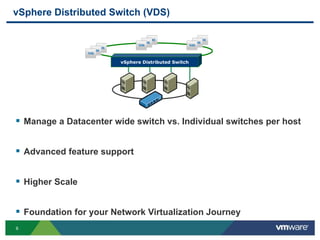
vSphere Distributed Switch (VDS)
vSphere Distributed Switch
 Manage a Datacenter wide switch vs. Individual switches per host
 Advanced feature support
 Higher Scale
 Foundation for your Network Virtualization Journey
7
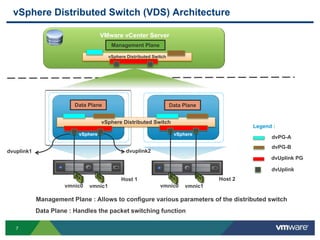
vSphere Distributed Switch (VDS) Architecture
vSphere vSphere
vSphere Distributed Switch
Host 1 Host 2
Legend :
dvPG-A
dvPG-B
Data Plane Data Plane
Data Plane : Handles the packet switching function
VMware vCenter Server
Management Plane
vSphere Distributed Switch
Management Plane : Allows to configure various parameters of the distributed switch
vmnic0 vmnic1 vmnic0 vmnic1
dvUplink PG
dvUplink
dvuplink1 dvuplink2
8
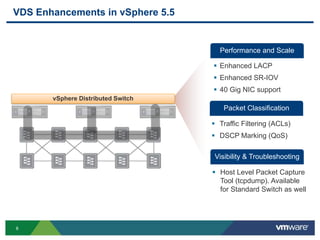
VDS Enhancements in vSphere 5.5
Visibility & Troubleshooting
Performance and Scale
 Host Level Packet Capture
Tool (tcpdump). Available
for Standard Switch as well
 Enhanced LACP
 Enhanced SR-IOV
 40 Gig NIC support
Packet Classification
 Traffic Filtering (ACLs)
 DSCP Marking (QoS)
vSphere Distributed Switch
9
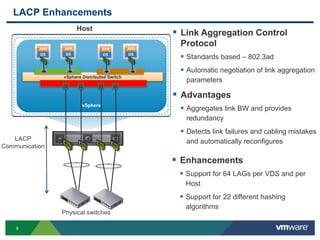
LACP Enhancements
vSphere
vSphere Distributed Switch
Host
Physical switches
LACP
Communication
 Link Aggregation Control
Protocol
 Standards based – 802.3ad
 Automatic negotiation of link aggregation
parameters
 Advantages
 Aggregates link BW and provides
redundancy
 Detects link failures and cabling mistakes
and automatically reconfigures
 Enhancements
 Support for 64 LAGs per VDS and per
Host
 Support for 22 different hashing
algorithms
10
Common Customer Deployments
11
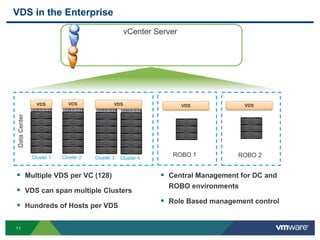
VDS in the Enterprise
VMware vCentServervCenter Server
 Multiple VDS per VC (128)
 VDS can span multiple Clusters
 Hundreds of Hosts per VDS
 Central Management for DC and
ROBO environments
 Role Based management control
VDS VDS
ROBO 1 ROBO 2
VDSVDS VDS
Cluster 1 Cluster 2 Cluster 3 Cluster 4
DataCenter
12
Design Best Practices
13
Infrastructure Design Goals
 Reliable
 Secure
 Performance
 Scalable
 Operational
14
Infrastructure Types Influence Your Design Decisions
 Available Infrastructure
• Type of Servers
• Type of Physical Switches
 Servers
• Rack mount or Blade
• Number of Ports and Speed. For example, Multiple 1 Gig or 2 – 10 Gig
 Physical Switches
• Managed and un-managed
• Protocol and features support
 Example Deployment – 2 – 10 Gig Server configuration
15
Reliable - Connectivity
16
Physical Connection Options
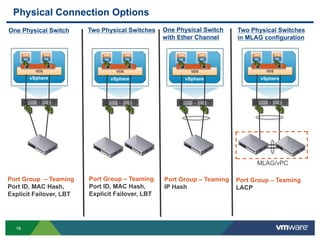
vSphere
VDS
vSphere
VDS
vSphere
VDS
vSphere
VDS
Port Group – Teaming
Port ID, MAC Hash,
Explicit Failover, LBT
One Physical Switch Two Physical Switches One Physical Switch
with Ether Channel
Two Physical Switches
in MLAG configuration
Port Group – Teaming
IP Hash
Port Group – Teaming
LACP
Port Group – Teaming
Port ID, MAC Hash,
Explicit Failover, LBT
MLAG/vPC
17
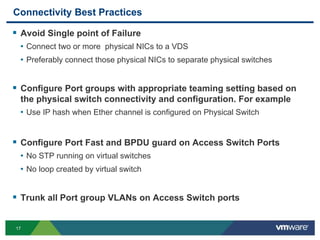
Connectivity Best Practices
 Avoid Single point of Failure
• Connect two or more physical NICs to a VDS
• Preferably connect those physical NICs to separate physical switches
 Configure Port groups with appropriate teaming setting based on
the physical switch connectivity and configuration. For example
• Use IP hash when Ether channel is configured on Physical Switch
 Configure Port Fast and BPDU guard on Access Switch Ports
• No STP running on virtual switches
• No loop created by virtual switch
 Trunk all Port group VLANs on Access Switch ports
18
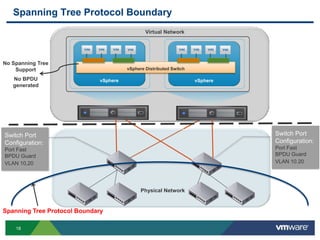
Spanning Tree Protocol Boundary
vSphere vSphere
vSphere Distributed Switch
Switch Port
Configuration:
Port Fast
BPDU Guard
VLAN 10,20
Switch Port
Configuration:
Port Fast
BPDU Guard
VLAN 10.20
Physical Network
Virtual Network
Spanning Tree Protocol Boundary
No Spanning Tree
Support
No BPDU
generated
19
Teaming Best Practices
 Link Aggregation mechanisms do not double the BW
• Hashing algorithm performs better in some scenarios. For example
• Web servers accessed by different users have enough variation in IP Src and Dest
fields and can utilize links effectively
• However, few workloads accessing a NAS array doesn’t have any variation in
the packet header fields. Traffic might end up on only one physical NIC
 Why Load Based Teaming is better ?
 Takes into account link utilization
 Checks Utilization of Links every 30 seconds
 No special configuration required on the physical switches
20
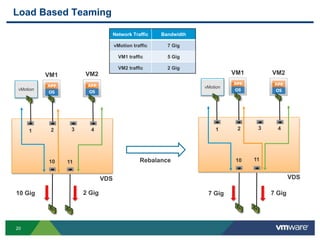
Load Based Teaming
1 2 3 4
10 11
VM1 VM2
vMotion
1 2 3 4
10 11
VM2
Network Traffic Bandwidth
vMotion traffic 7 Gig
VM1 traffic 5 Gig
VM2 traffic 2 Gig
10 Gig 2 Gig 7 Gig 7 Gig
VDS VDS
VM1
vMotion
Rebalance
21
Security/Isolation
22
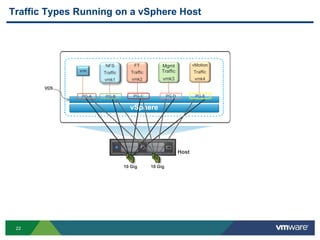
Traffic Types Running on a vSphere Host
vSphere
PG-A PG-B
Host
VDS
PG-C PG-EPG-D
Mgmt
Traffic
vmk3
vMotion
Traffic
vmk4
FT
Traffic
vmk2
NFS
Traffic
vmk1
10 Gig 10 Gig
23
Security Best Practices
 Provide Traffic Isolation using VLANs
• Each Port group can be associated with different VLAN
 Keep default Security settings on the Port group
• Promiscuous Mode – Reject
• MAC address Changes – Reject
• Forged Transmit – Reject
 While utilizing PVLAN feature make sure Physical Switches are
also configured with Primary, Secondary VLAN configuration
 Enable BPDU filter property at Host level to prevent DoS attack
situation due to compromised virtual machines
 Make use Access Control List Feature (5.5)
24
Performance
25
Why Should You Care About Performance?
 As more workloads are getting virtualized, 10 Gig pipes
are getting filled
 Some workloads have specific BW and latency requirements
• Business Critical applications
• VOIP applications
• VDI application
 Noisy Neighbors problem has to be addressed
• vMotion is very BW intensive and can impact other traffic types
• General Purpose VM traffic can impact other critical applications such
as VOIP application
26
Administrator
MgmtvMotion
Teaming Policy
vSphere Distributed Switch
vSphere Distributed
Port groups
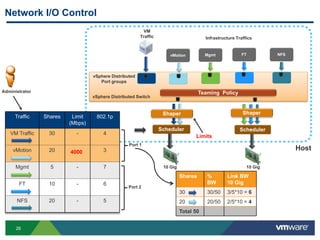
Network I/O Control
VM
Traffic
Scheduler
Shaper
Scheduler
Shaper
FT NFS
Traffic Shares Limit
(Mbps)
802.1p
VM Traffic 30 - 4
vMotion 20 - 3
Mgmt 5 - 7
FT 10 - 6
NFS 20 - 5
Port 1
Port 2
10 Gig 10 Gig
Infrastructure Traffics
4000
Limits
Host
Shares %
BW
Link BW
10 Gig
30 30/50 3/5*10 = 6
20 20/50 2/5*10 = 4
Total 50
27
Administrator
MgmtvMotion
Teaming Policy
vSphere Distributed Switch
vSphere Distributed Port groups
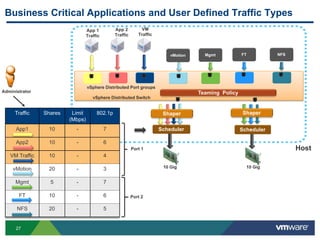
Business Critical Applications and User Defined Traffic Types
VM
Traffic
Scheduler
Shaper
Scheduler
FT NFS
Traffic Shares Limit
(Mbps)
802.1p
App1 10 - 7
App2 10 - 6
VM Traffic 10 - 4
vMotion 20 - 3
Mgmt 5 - 7
FT 10 - 6
NFS 20 - 5
Port 1
Port 2
10 Gig 10 Gig
App 2
Traffic
App 1
Traffic
Shaper
Host
28
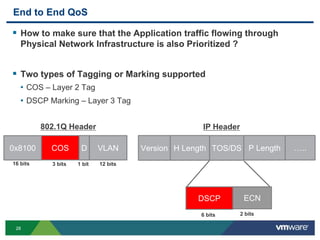
End to End QoS
 How to make sure that the Application traffic flowing through
Physical Network Infrastructure is also Prioritized ?
 Two types of Tagging or Marking supported
• COS – Layer 2 Tag
• DSCP Marking – Layer 3 Tag
0x8100 COS VLAND
16 bits 3 bits 12 bits1 bit
802.1Q Header
DSCP ECN
6 bits 2 bits
Version H Length TOS/DS P Length …..
IP Header
29
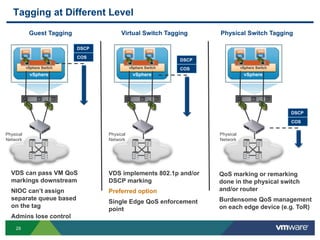
Tagging at Different Level
vSphere
vSphere Switch
Physical
Network
DSCP
COS
vSphere
vSphere Switch
Physical
Network
DSCP
COS
vSphere
vSphere Switch
Physical
Network
DSCP
COS
Guest Tagging Virtual Switch Tagging Physical Switch Tagging
VDS can pass VM QoS
markings downstream
NIOC can’t assign
separate queue based
on the tag
Admins lose control
VDS implements 802.1p and/or
DSCP marking
Preferred option
Single Edge QoS enforcement
point
QoS marking or remarking
done in the physical switch
and/or router
Burdensome QoS management
on each edge device (e.g. ToR)
30
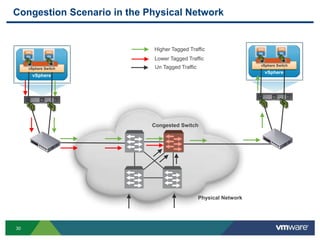
Congestion Scenario in the Physical Network
vSphere
vSphere Switch
vSphere
vSphere Switch
Higher Tagged Traffic
Un Tagged Traffic
Lower Tagged Traffic
Congested Switch
Physical Network
31
MgmtvMotion
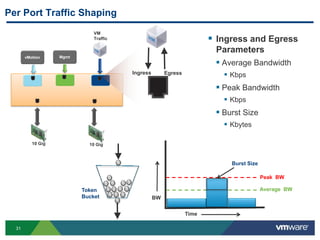
Per Port Traffic Shaping
VM
Traffic
10 Gig 10 Gig
Ingress Egress
Time
BW
Average BW
Peak BW
Burst Size
 Ingress and Egress
Parameters
 Average Bandwidth
 Kbps
 Peak Bandwidth
 Kbps
 Burst Size
 Kbytes
Token
Bucket
32
Other Performance Related Decisions
 Need more BW for Storage
• If iSCSI, utilize Multi-Pathing.
• MTU configuration – Jumbo frame
• LBT can’t work for iSCSI traffic because of port binding requirements
 Need more BW for vMotion
• Use Multi-NIC vMotion.
• LBT doesn’t split the vMotion traffic to multiple Physical NICs.
 Latency Sensitive application – Care about Micro seconds
• Utilize SR-IOV
• Doesn’t support vMotion, HA and DRS features
33
Scalable
34
Scale
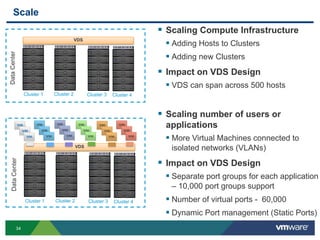
 Scaling Compute Infrastructure
 Adding Hosts to Clusters
 Adding new Clusters
 Impact on VDS Design
 VDS can span across 500 hosts
VDS
Cluster 1 Cluster 2 Cluster 3 Cluster 4
DataCenter
VDS
Cluster 1 Cluster 2 Cluster 3 Cluster 4
DataCenter
 Scaling number of users or
applications
 More Virtual Machines connected to
isolated networks (VLANs)
 Impact on VDS Design
 Separate port groups for each application
– 10,000 port groups support
 Number of virtual ports - 60,000
 Dynamic Port management (Static Ports)
35
Operational
36
How to Operate Your Virtual Network?
 Major concerns
• Lost visibility into traffic from VM to VM on the same Host
• How do I troubleshoot configuration issues?
• How do I troubleshoot connectivity issues?
 Make use of VDS features
• Netflow and Port Mirroring
• Network Health Check detects mis-configuration across virtual
and physical switches
• Host level Packet Capture allows you to monitor traffic at vnic,
vmknic and vmnic level
37
NSX and VDS
38
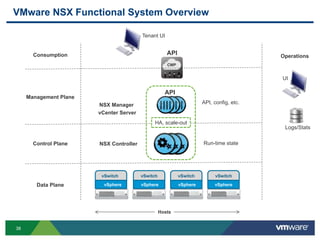
VMware NSX Functional System Overview
vSphere vSphere vSphere vSphere
vSwitch vSwitch vSwitch vSwitch
Hosts
Data Plane
Operations
UI
Logs/Stats
CMP
Consumption
Tenant UI
API
Control Plane Run-time state
Management Plane
API
API, config, etc.
HA, scale-out
NSX Manager
NSX Controller
vCenter Server
39
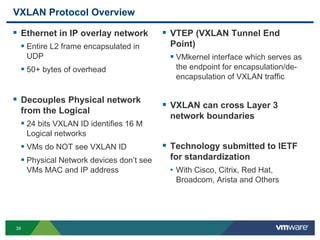
VXLAN Protocol Overview
 Ethernet in IP overlay network
 Entire L2 frame encapsulated in
UDP
 50+ bytes of overhead
 Decouples Physical network
from the Logical
 24 bits VXLAN ID identifies 16 M
Logical networks
 VMs do NOT see VXLAN ID
 Physical Network devices don’t see
VMs MAC and IP address
 VTEP (VXLAN Tunnel End
Point)
 VMkernel interface which serves as
the endpoint for encapsulation/de-
encapsulation of VXLAN traffic
 VXLAN can cross Layer 3
network boundaries
 Technology submitted to IETF
for standardization
• With Cisco, Citrix, Red Hat,
Broadcom, Arista and Others
40
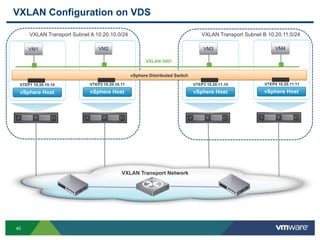
VXLAN Configuration on VDS
vSphere Host
VM1
VXLAN Transport Network
vSphere Host
VM2
vSphere Host
VXLAN 5001
VTEP1 10.20.10.10 VTEP2 10.20.10.11 VTEP3 10.20.11.10
vSphere Host
VTEP4 10.20.11.11
VM3 VM4
VXLAN Transport Subnet A 10.20.10.0/24 VXLAN Transport Subnet B 10.20.11.0/24
vSphere Distributed Switch
41
For More Details on VXLAN attend
NET5654 - Troubleshooting VXLAN and Network
Services in a Virtualized Environment
42
Key Takeaways
 VDS is flexible and scalable to meet your design requirements.
 VDS simplifies the deployment and operational aspects
of virtual network
 Make use of NIOC and LBT feature to improve utilization
of your I/O resources
 VDS is a key component of NSX Platform
43
Q&A
Paper: http://www.vmware.com/resources/techresources/10250
http://blogs.vmware.com/vsphere/networking
@VMWNetworking
44
Other VMware Activities Related to This Session
 HOL:
HOL-SDC-1302
vSphere Distributed Switch from A to Z
 Group Discussions:
NET1000-GD
vSphere Distributed Switch with Vyenkatesh Deshpande
THANK YOU
vSphere Distributed Switch –
Design and Best Practices
Vyenkatesh Deshpande, VMware
Marcos Hernandez, VMware
NET5521
#NET5521
48
Backup: Example Design
49
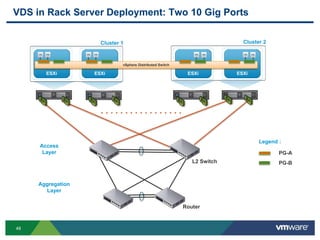
VDS in Rack Server Deployment: Two 10 Gig Ports
Access
Layer
Aggregation
Layer
. . . . . . . . . . . . . . . . .
Cluster 1 Cluster 2
ESXi ESXi ESXi ESXi
vSphere Distributed Switch
Legend :
PG-A
PG-BL2 Switch
Router
50
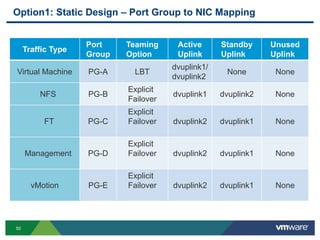
Option1: Static Design – Port Group to NIC Mapping
Traffic Type
Port
Group
Teaming
Option
Active
Uplink
Standby
Uplink
Unused
Uplink
Virtual Machine PG-A LBT
dvuplink1/
dvuplink2
None None
NFS PG-B
Explicit
Failover
dvuplink1 dvuplink2 None
FT PG-C
Explicit
Failover dvuplink2 dvuplink1 None
Management PG-D
Explicit
Failover dvuplink2 dvuplink1 None
vMotion PG-E
Explicit
Failover dvuplink2 dvuplink1 None
51
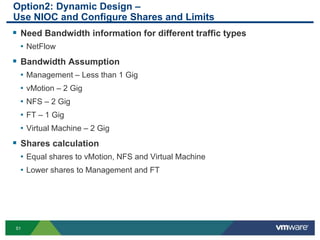
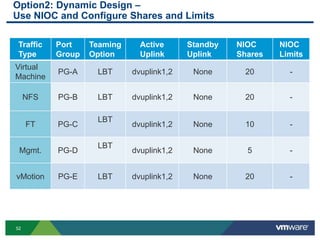
Option2: Dynamic Design –
Use NIOC and Configure Shares and Limits
 Need Bandwidth information for different traffic types
• NetFlow
 Bandwidth Assumption
• Management – Less than 1 Gig
• vMotion – 2 Gig
• NFS – 2 Gig
• FT – 1 Gig
• Virtual Machine – 2 Gig
 Shares calculation
• Equal shares to vMotion, NFS and Virtual Machine
• Lower shares to Management and FT
52
Option2: Dynamic Design –
Use NIOC and Configure Shares and Limits
Traffic
Type
Port
Group
Teaming
Option
Active
Uplink
Standby
Uplink
NIOC
Shares
NIOC
Limits
Virtual
Machine
PG-A LBT dvuplink1,2 None 20 -
NFS PG-B LBT dvuplink1,2 None 20 -
FT PG-C
LBT
dvuplink1,2 None 10 -
Mgmt. PG-D
LBT
dvuplink1,2 None 5 -
vMotion PG-E LBT dvuplink1,2 None 20 -
53
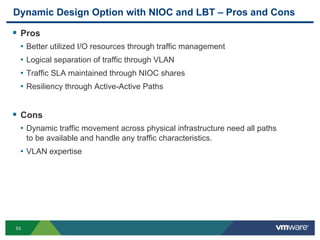
Dynamic Design Option with NIOC and LBT – Pros and Cons
 Pros
• Better utilized I/O resources through traffic management
• Logical separation of traffic through VLAN
• Traffic SLA maintained through NIOC shares
• Resiliency through Active-Active Paths
 Cons
• Dynamic traffic movement across physical infrastructure need all paths
to be available and handle any traffic characteristics.
• VLAN expertise

VMworld 2013: vSphere Distributed Switch – Design and Best Practices

  • 1.
    vSphere Distributed Switch– Design and Best Practices Vyenkatesh (Venky) Deshpande, VMware Marcos Hernandez, VMware NET5521 #NET5521
  • 2.
    2 Session Objective  Newcapabilities in VDS  VDS can meet your design requirements  Provide Common best practices while designing with VDS
  • 3.
    3 Recommended Sessions &Labs  VSVC4966 – vSphere Distributed Switch – Technical Deep Dive  VSVC5103 - vSphere Networking and vCloud Networking Suite Best Practices and Troubleshooting  You can check out VSS to VDS Migration workflow and new VDS features in the lab HOL-SDC-1302  NET5266 - Bringing Network Virtualization to VMware environments with NSX  NET5654 - Troubleshooting VXLAN and Network Services in a Virtualized Environment
  • 4.
    4 Agenda  Overview ofVDS and New Features in 5.5  Common Customer Deployments  Design and Best Practices  NSX and VDS
  • 5.
    5 VDS Overview and5.5 Features
  • 6.
    6 vSphere Distributed Switch(VDS) vSphere Distributed Switch  Manage a Datacenter wide switch vs. Individual switches per host  Advanced feature support  Higher Scale  Foundation for your Network Virtualization Journey
  • 7.
    7 vSphere Distributed Switch(VDS) Architecture vSphere vSphere vSphere Distributed Switch Host 1 Host 2 Legend : dvPG-A dvPG-B Data Plane Data Plane Data Plane : Handles the packet switching function VMware vCenter Server Management Plane vSphere Distributed Switch Management Plane : Allows to configure various parameters of the distributed switch vmnic0 vmnic1 vmnic0 vmnic1 dvUplink PG dvUplink dvuplink1 dvuplink2
  • 8.
    8 VDS Enhancements invSphere 5.5 Visibility & Troubleshooting Performance and Scale  Host Level Packet Capture Tool (tcpdump). Available for Standard Switch as well  Enhanced LACP  Enhanced SR-IOV  40 Gig NIC support Packet Classification  Traffic Filtering (ACLs)  DSCP Marking (QoS) vSphere Distributed Switch
  • 9.
    9 LACP Enhancements vSphere vSphere DistributedSwitch Host Physical switches LACP Communication  Link Aggregation Control Protocol  Standards based – 802.3ad  Automatic negotiation of link aggregation parameters  Advantages  Aggregates link BW and provides redundancy  Detects link failures and cabling mistakes and automatically reconfigures  Enhancements  Support for 64 LAGs per VDS and per Host  Support for 22 different hashing algorithms
  • 10.
  • 11.
    11 VDS in theEnterprise VMware vCentServervCenter Server  Multiple VDS per VC (128)  VDS can span multiple Clusters  Hundreds of Hosts per VDS  Central Management for DC and ROBO environments  Role Based management control VDS VDS ROBO 1 ROBO 2 VDSVDS VDS Cluster 1 Cluster 2 Cluster 3 Cluster 4 DataCenter
  • 12.
  • 13.
    13 Infrastructure Design Goals Reliable  Secure  Performance  Scalable  Operational
  • 14.
    14 Infrastructure Types InfluenceYour Design Decisions  Available Infrastructure • Type of Servers • Type of Physical Switches  Servers • Rack mount or Blade • Number of Ports and Speed. For example, Multiple 1 Gig or 2 – 10 Gig  Physical Switches • Managed and un-managed • Protocol and features support  Example Deployment – 2 – 10 Gig Server configuration
  • 15.
  • 16.
    16 Physical Connection Options vSphere VDS vSphere VDS vSphere VDS vSphere VDS PortGroup – Teaming Port ID, MAC Hash, Explicit Failover, LBT One Physical Switch Two Physical Switches One Physical Switch with Ether Channel Two Physical Switches in MLAG configuration Port Group – Teaming IP Hash Port Group – Teaming LACP Port Group – Teaming Port ID, MAC Hash, Explicit Failover, LBT MLAG/vPC
  • 17.
    17 Connectivity Best Practices Avoid Single point of Failure • Connect two or more physical NICs to a VDS • Preferably connect those physical NICs to separate physical switches  Configure Port groups with appropriate teaming setting based on the physical switch connectivity and configuration. For example • Use IP hash when Ether channel is configured on Physical Switch  Configure Port Fast and BPDU guard on Access Switch Ports • No STP running on virtual switches • No loop created by virtual switch  Trunk all Port group VLANs on Access Switch ports
  • 18.
    18 Spanning Tree ProtocolBoundary vSphere vSphere vSphere Distributed Switch Switch Port Configuration: Port Fast BPDU Guard VLAN 10,20 Switch Port Configuration: Port Fast BPDU Guard VLAN 10.20 Physical Network Virtual Network Spanning Tree Protocol Boundary No Spanning Tree Support No BPDU generated
  • 19.
    19 Teaming Best Practices Link Aggregation mechanisms do not double the BW • Hashing algorithm performs better in some scenarios. For example • Web servers accessed by different users have enough variation in IP Src and Dest fields and can utilize links effectively • However, few workloads accessing a NAS array doesn’t have any variation in the packet header fields. Traffic might end up on only one physical NIC  Why Load Based Teaming is better ?  Takes into account link utilization  Checks Utilization of Links every 30 seconds  No special configuration required on the physical switches
  • 20.
    20 Load Based Teaming 12 3 4 10 11 VM1 VM2 vMotion 1 2 3 4 10 11 VM2 Network Traffic Bandwidth vMotion traffic 7 Gig VM1 traffic 5 Gig VM2 traffic 2 Gig 10 Gig 2 Gig 7 Gig 7 Gig VDS VDS VM1 vMotion Rebalance
  • 21.
  • 22.
    22 Traffic Types Runningon a vSphere Host vSphere PG-A PG-B Host VDS PG-C PG-EPG-D Mgmt Traffic vmk3 vMotion Traffic vmk4 FT Traffic vmk2 NFS Traffic vmk1 10 Gig 10 Gig
  • 23.
    23 Security Best Practices Provide Traffic Isolation using VLANs • Each Port group can be associated with different VLAN  Keep default Security settings on the Port group • Promiscuous Mode – Reject • MAC address Changes – Reject • Forged Transmit – Reject  While utilizing PVLAN feature make sure Physical Switches are also configured with Primary, Secondary VLAN configuration  Enable BPDU filter property at Host level to prevent DoS attack situation due to compromised virtual machines  Make use Access Control List Feature (5.5)
  • 24.
  • 25.
    25 Why Should YouCare About Performance?  As more workloads are getting virtualized, 10 Gig pipes are getting filled  Some workloads have specific BW and latency requirements • Business Critical applications • VOIP applications • VDI application  Noisy Neighbors problem has to be addressed • vMotion is very BW intensive and can impact other traffic types • General Purpose VM traffic can impact other critical applications such as VOIP application
  • 26.
    26 Administrator MgmtvMotion Teaming Policy vSphere DistributedSwitch vSphere Distributed Port groups Network I/O Control VM Traffic Scheduler Shaper Scheduler Shaper FT NFS Traffic Shares Limit (Mbps) 802.1p VM Traffic 30 - 4 vMotion 20 - 3 Mgmt 5 - 7 FT 10 - 6 NFS 20 - 5 Port 1 Port 2 10 Gig 10 Gig Infrastructure Traffics 4000 Limits Host Shares % BW Link BW 10 Gig 30 30/50 3/5*10 = 6 20 20/50 2/5*10 = 4 Total 50
  • 27.
    27 Administrator MgmtvMotion Teaming Policy vSphere DistributedSwitch vSphere Distributed Port groups Business Critical Applications and User Defined Traffic Types VM Traffic Scheduler Shaper Scheduler FT NFS Traffic Shares Limit (Mbps) 802.1p App1 10 - 7 App2 10 - 6 VM Traffic 10 - 4 vMotion 20 - 3 Mgmt 5 - 7 FT 10 - 6 NFS 20 - 5 Port 1 Port 2 10 Gig 10 Gig App 2 Traffic App 1 Traffic Shaper Host
  • 28.
    28 End to EndQoS  How to make sure that the Application traffic flowing through Physical Network Infrastructure is also Prioritized ?  Two types of Tagging or Marking supported • COS – Layer 2 Tag • DSCP Marking – Layer 3 Tag 0x8100 COS VLAND 16 bits 3 bits 12 bits1 bit 802.1Q Header DSCP ECN 6 bits 2 bits Version H Length TOS/DS P Length ….. IP Header
  • 29.
    29 Tagging at DifferentLevel vSphere vSphere Switch Physical Network DSCP COS vSphere vSphere Switch Physical Network DSCP COS vSphere vSphere Switch Physical Network DSCP COS Guest Tagging Virtual Switch Tagging Physical Switch Tagging VDS can pass VM QoS markings downstream NIOC can’t assign separate queue based on the tag Admins lose control VDS implements 802.1p and/or DSCP marking Preferred option Single Edge QoS enforcement point QoS marking or remarking done in the physical switch and/or router Burdensome QoS management on each edge device (e.g. ToR)
  • 30.
    30 Congestion Scenario inthe Physical Network vSphere vSphere Switch vSphere vSphere Switch Higher Tagged Traffic Un Tagged Traffic Lower Tagged Traffic Congested Switch Physical Network
  • 31.
    31 MgmtvMotion Per Port TrafficShaping VM Traffic 10 Gig 10 Gig Ingress Egress Time BW Average BW Peak BW Burst Size  Ingress and Egress Parameters  Average Bandwidth  Kbps  Peak Bandwidth  Kbps  Burst Size  Kbytes Token Bucket
  • 32.
    32 Other Performance RelatedDecisions  Need more BW for Storage • If iSCSI, utilize Multi-Pathing. • MTU configuration – Jumbo frame • LBT can’t work for iSCSI traffic because of port binding requirements  Need more BW for vMotion • Use Multi-NIC vMotion. • LBT doesn’t split the vMotion traffic to multiple Physical NICs.  Latency Sensitive application – Care about Micro seconds • Utilize SR-IOV • Doesn’t support vMotion, HA and DRS features
  • 33.
  • 34.
    34 Scale  Scaling ComputeInfrastructure  Adding Hosts to Clusters  Adding new Clusters  Impact on VDS Design  VDS can span across 500 hosts VDS Cluster 1 Cluster 2 Cluster 3 Cluster 4 DataCenter VDS Cluster 1 Cluster 2 Cluster 3 Cluster 4 DataCenter  Scaling number of users or applications  More Virtual Machines connected to isolated networks (VLANs)  Impact on VDS Design  Separate port groups for each application – 10,000 port groups support  Number of virtual ports - 60,000  Dynamic Port management (Static Ports)
  • 35.
  • 36.
    36 How to OperateYour Virtual Network?  Major concerns • Lost visibility into traffic from VM to VM on the same Host • How do I troubleshoot configuration issues? • How do I troubleshoot connectivity issues?  Make use of VDS features • Netflow and Port Mirroring • Network Health Check detects mis-configuration across virtual and physical switches • Host level Packet Capture allows you to monitor traffic at vnic, vmknic and vmnic level
  • 37.
  • 38.
    38 VMware NSX FunctionalSystem Overview vSphere vSphere vSphere vSphere vSwitch vSwitch vSwitch vSwitch Hosts Data Plane Operations UI Logs/Stats CMP Consumption Tenant UI API Control Plane Run-time state Management Plane API API, config, etc. HA, scale-out NSX Manager NSX Controller vCenter Server
  • 39.
    39 VXLAN Protocol Overview Ethernet in IP overlay network  Entire L2 frame encapsulated in UDP  50+ bytes of overhead  Decouples Physical network from the Logical  24 bits VXLAN ID identifies 16 M Logical networks  VMs do NOT see VXLAN ID  Physical Network devices don’t see VMs MAC and IP address  VTEP (VXLAN Tunnel End Point)  VMkernel interface which serves as the endpoint for encapsulation/de- encapsulation of VXLAN traffic  VXLAN can cross Layer 3 network boundaries  Technology submitted to IETF for standardization • With Cisco, Citrix, Red Hat, Broadcom, Arista and Others
  • 40.
    40 VXLAN Configuration onVDS vSphere Host VM1 VXLAN Transport Network vSphere Host VM2 vSphere Host VXLAN 5001 VTEP1 10.20.10.10 VTEP2 10.20.10.11 VTEP3 10.20.11.10 vSphere Host VTEP4 10.20.11.11 VM3 VM4 VXLAN Transport Subnet A 10.20.10.0/24 VXLAN Transport Subnet B 10.20.11.0/24 vSphere Distributed Switch
  • 41.
    41 For More Detailson VXLAN attend NET5654 - Troubleshooting VXLAN and Network Services in a Virtualized Environment
  • 42.
    42 Key Takeaways  VDSis flexible and scalable to meet your design requirements.  VDS simplifies the deployment and operational aspects of virtual network  Make use of NIOC and LBT feature to improve utilization of your I/O resources  VDS is a key component of NSX Platform
  • 43.
  • 44.
    44 Other VMware ActivitiesRelated to This Session  HOL: HOL-SDC-1302 vSphere Distributed Switch from A to Z  Group Discussions: NET1000-GD vSphere Distributed Switch with Vyenkatesh Deshpande
  • 45.
  • 47.
    vSphere Distributed Switch– Design and Best Practices Vyenkatesh Deshpande, VMware Marcos Hernandez, VMware NET5521 #NET5521
  • 48.
  • 49.
    49 VDS in RackServer Deployment: Two 10 Gig Ports Access Layer Aggregation Layer . . . . . . . . . . . . . . . . . Cluster 1 Cluster 2 ESXi ESXi ESXi ESXi vSphere Distributed Switch Legend : PG-A PG-BL2 Switch Router
  • 50.
    50 Option1: Static Design– Port Group to NIC Mapping Traffic Type Port Group Teaming Option Active Uplink Standby Uplink Unused Uplink Virtual Machine PG-A LBT dvuplink1/ dvuplink2 None None NFS PG-B Explicit Failover dvuplink1 dvuplink2 None FT PG-C Explicit Failover dvuplink2 dvuplink1 None Management PG-D Explicit Failover dvuplink2 dvuplink1 None vMotion PG-E Explicit Failover dvuplink2 dvuplink1 None
  • 51.
    51 Option2: Dynamic Design– Use NIOC and Configure Shares and Limits  Need Bandwidth information for different traffic types • NetFlow  Bandwidth Assumption • Management – Less than 1 Gig • vMotion – 2 Gig • NFS – 2 Gig • FT – 1 Gig • Virtual Machine – 2 Gig  Shares calculation • Equal shares to vMotion, NFS and Virtual Machine • Lower shares to Management and FT
  • 52.
    52 Option2: Dynamic Design– Use NIOC and Configure Shares and Limits Traffic Type Port Group Teaming Option Active Uplink Standby Uplink NIOC Shares NIOC Limits Virtual Machine PG-A LBT dvuplink1,2 None 20 - NFS PG-B LBT dvuplink1,2 None 20 - FT PG-C LBT dvuplink1,2 None 10 - Mgmt. PG-D LBT dvuplink1,2 None 5 - vMotion PG-E LBT dvuplink1,2 None 20 -
  • 53.
    53 Dynamic Design Optionwith NIOC and LBT – Pros and Cons  Pros • Better utilized I/O resources through traffic management • Logical separation of traffic through VLAN • Traffic SLA maintained through NIOC shares • Resiliency through Active-Active Paths  Cons • Dynamic traffic movement across physical infrastructure need all paths to be available and handle any traffic characteristics. • VLAN expertise