vRealize Operation Manager 7.5 – What’s new
Kiss Tibor vExpert 17/18/19/Cloud/Pro
@kisstib0r
kisstibor.info
Agenda
1 Sizing tool
2 Install and Upgrade
3 Allocation model / Metric Colleration
4 Application monitoring (native VMware management packs)
5 Automatization
6 vExpert program
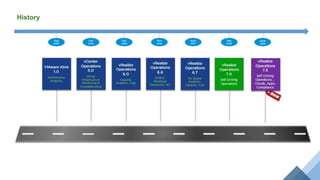
History
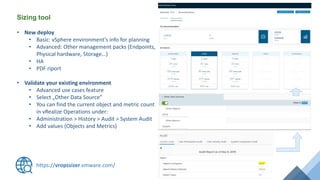
Sizing tool
https://vropssizer.vmware.com/
• New deploy
• Basic: vSphere environment’s info for planning
• Advanced: Other management packs (Endpoints,
Physical hardware, Storage…)
• HA
• PDF riport
• Validate your existing environment
• Advanced use cases feature
• Select „Other Data Source”
• You can find the current object and metric count
in vRealize Operations under:
• Administration > History > Audit > System Audit
• Add values (Objects and Metrics)
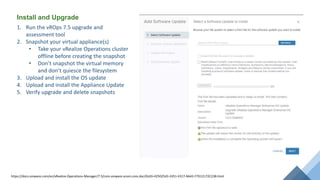
Install and Upgrade
1. Run the vROps 7.5 upgrade and
assessment tool
2. Snapshot your virtual appliance(s)
• Take your vRealize Operations cluster
offline before creating the snapshot
• Don’t snapshot the virtual memory
and don’t quiesce the filesystem
3. Upload and install the OS update
4. Upload and install the Appliance Update
5. Verify upgrade and delete snapshots
https://docs.vmware.com/en/vRealize-Operations-Manager/7.5/com.vmware.vcom.core.doc/GUID-42502543-2451-4317-BA42-F7D12172C23B.html
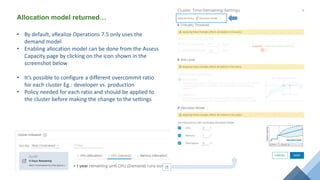
Allocation model returned…
• By default, vRealize Operations 7.5 only uses the
demand model
• Enabling allocation model can be done from the Assess
Capacity page by clicking on the icon shown in the
screenshot below
• It’s possible to configure a different overcommit ratio
for each cluster Eg.: developer vs. production
• Policy needed for each ratio and should be applied to
the cluster before making the change to the settings
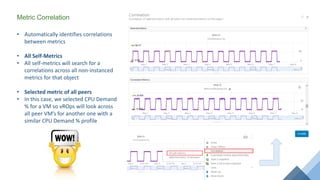
Metric Correlation
• Automatically identifies correlations
between metrics
• All Self-Metrics
• All self-metrics will search for a
correlations across all non-instanced
metrics for that object
• Selected metric of all peers
• In this case, we selected CPU Demand
% for a VM so vROps will look across
all peer VM’s for another one with a
similar CPU Demand % profile
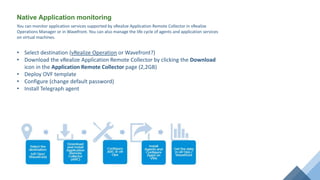
Native Application monitoring
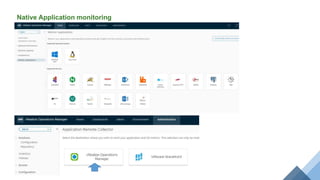
• Select destination (vRealize Operation or Wavefront?)
• Download the vRealize Application Remote Collector by clicking the Download
icon in the Application Remote Collector page (2,2GB)
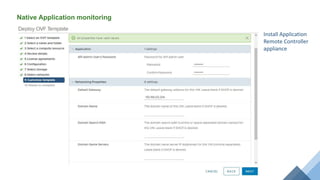
• Deploy OVF template
• Configure (change default password)
• Install Telegraph agent
You can monitor application services supported by vRealize Application Remote Collector in vRealize
Operations Manager or in Wavefront. You can also manage the life cycle of agents and application services
on virtual machines.
Native Application monitoring
Install Application
Remote Controller
appliance
Native Application monitoring
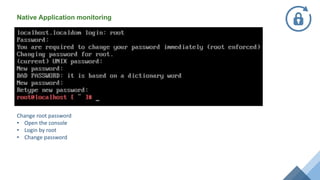
Change root password
• Open the console
• Login by root
• Change password
Native Application monitoring
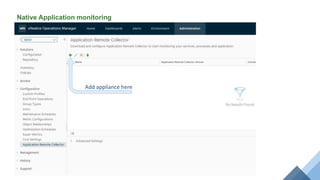
Add appliance here
Native Application monitoring
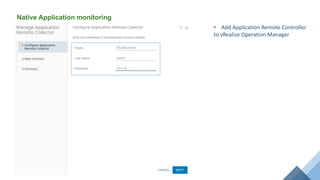
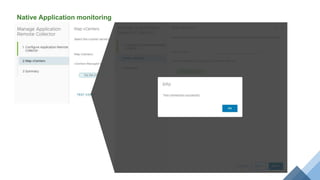
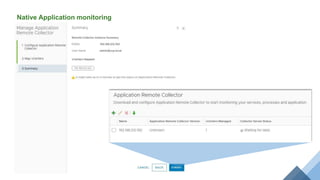
• Add Application Remote Controller
to vRealize Operation Manager
Native Application monitoring
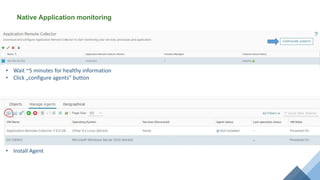
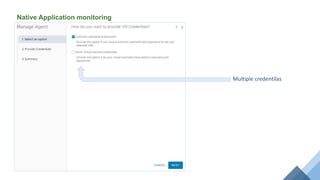
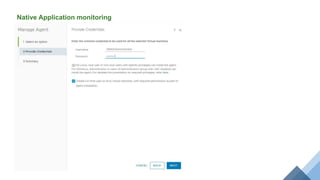
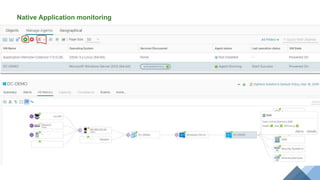
• Install Agent
• Wait ~5 minutes for healthy information
• Click „configure agents” button
Native Application monitoring
Multiple credentilas
Native Application monitoring
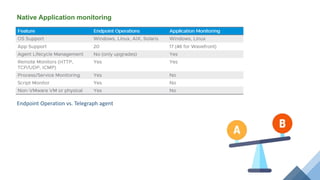
Endpoint Operation vs. Telegraph agent
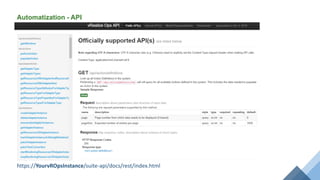
Automatization - API
https://YourvROpsInstance/suite-api/docs/rest/index.html
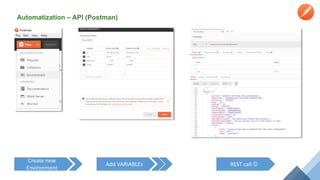
Automatization – API (Postman)
REST call 
Create new
Environment
Add VARIABLEs
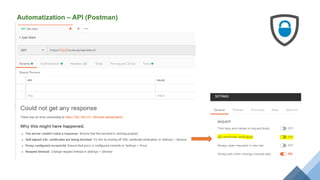
Automatization – API (Postman)
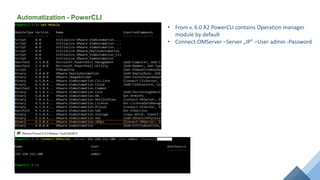
Automatization - PowerCLI
• From v. 6.0 R2 PowerCLI contains Operation manager
module by default
• Connect-OMServer –Server „IP” –User admin -Password
Automatization - PowerCLI
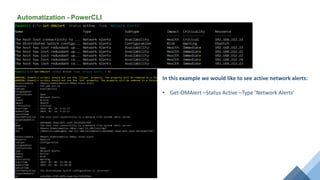
In this example we would like to see active network alerts:
• Get-OMAlert –Status Active –Type ’Network Alerts’
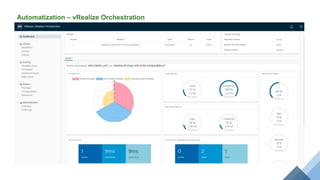
Automatization – vRealize Orchestration
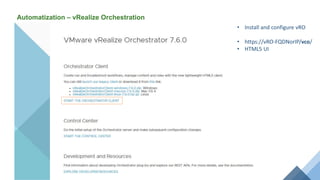
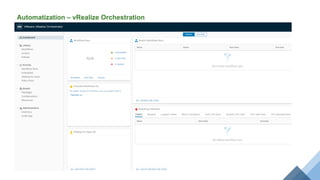
• Install and configure vRO
• https://vRO-FQDNorIP/vco/
• HTML5 UI
Automatization – vRealize Orchestration
Automatization – vRO and vROps
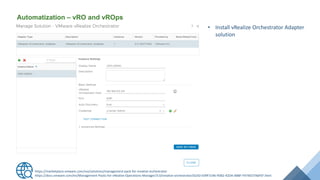
• Install vRealize Orchestrator Adapter
solution
https://marketplace.vmware.com/vsx/solutions/management-pack-for-vrealize-orchestrator
https://docs.vmware.com/en/Management-Packs-for-vRealize-Operations-Manager/3.0/vrealize-orchestrator/GUID-E09F3146-95B2-42D4-AB8F-F474ED7A6FEF.html
Automatization – vRO and vROps
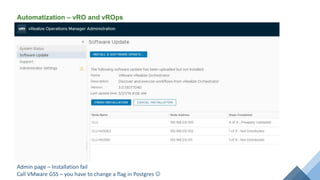
Admin page – Installation fail
Call VMware GSS – you have to change a flag in Postgres 
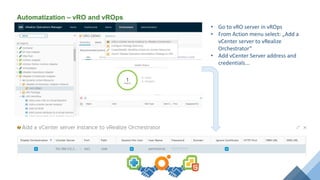
Automatization – vRO and vROps
• Go to vRO server in vROps
• From Action menu select: „Add a
vCenter server to vRealize
Orchestrator”
• Add vCenter Server address and
credentials...
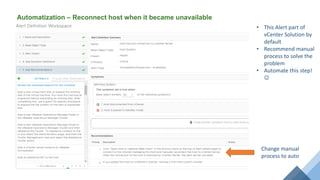
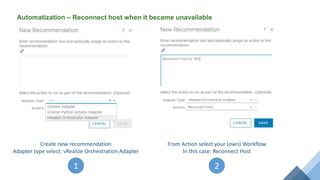
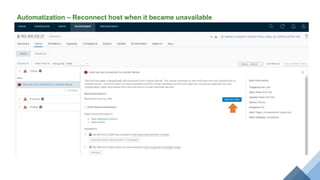
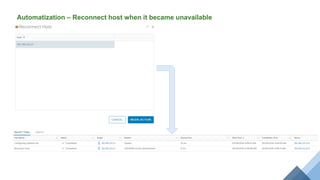
Automatization – Reconnect host when it became unavailable
Change manual
process to auto
• This Alert part of
vCenter Solution by
default
• Recommend manual
process to solve the
problem
• Automate this step!

Automatization – Reconnect host when it became unavailable
Create new recommendation
Adapter type select: vRealize Orchestration Adapter
1
From Action select your (own) Workflow
In this case: Reconnect Host
2
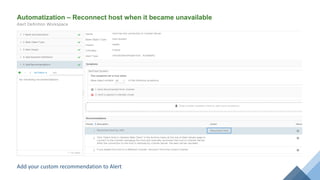
Automatization – Reconnect host when it became unavailable
Add your custom recommendation to Alert
Automatization – Reconnect host when it became unavailable
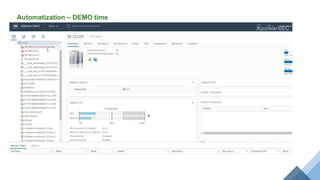
Automatization – DEMO time
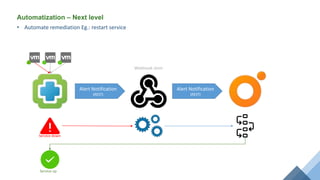
Automatization – Next level
• Automate remediation Eg.: restart service
Alert Notification
(REST)
Alert Notification
(REST)
Service down
Service up
Webhook shim
Links
Application Monitoring https://docs.vmware.com/en/vRealize-Operations-Manager/7.5/com.vmware.vcom.core.doc/GUID-D9692377-6DDB-4321-9200-79D5F12D4234.html
Postman https://www.getpostman.com/
vRealize Orchestrator https://www.vmware.com/hu/products/vrealize-orchestrator.html
vRealize Operation 7.5
Release Notes
https://docs.vmware.com/en/vRealize-Operations-Manager/7.5/rn/vRealize-Operations-Manager-75.html
vExpert Official page https://vexpert.vmware.com/
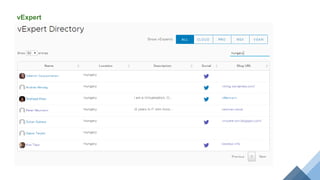
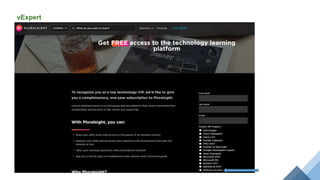
vExpert
vExpert
vExpert Program Benefits:
• Invite to our private #Slack channel
• vExpert certificate signed by our CEO Pat Gelsinger
• Private forums on communities.vmware.com
• Permission to use the vExpert logo on cards, website, etc for one year
• Access to a private directory for networking, etc
• Exclusive gifts from various VMware partners
• Private webinars with VMware partners as well as NFRs
• Access to private betas (subject to admission by beta teams)
• 365-day eval licenses for most products for home lab / cloud providers
• Private pre-launch briefings via our blogger briefing pre-VMworld (subject to admission by product teams)
• Blogger early access program for vSphere and some other products
• Featured in a public vExpert online directory
• Access to vetted VMware & Virtualization content for your social channels
• Yearly vExpert parties at both VMworld US and VMworld Europe events
• Identification as a vExpert at both VMworld US and VMworld EU
If you are interested in becoming a vExpert the criteria is simple
We are looking for IT Professionals who are sharing their VMware knowledge and contributing that back to the community. The term "giving back" is
defined as going above and beyond your day job. There are several ways to share your knowledge and engage with the community. Some of those
activities are blogging, book authoring, magazine articles, CloudCred task writing, active in facebook groups, forum (VMTN as well as other non VMware)
platforms, public speaking, VMUG leadership, videos and so on.
vExpert
vExpert
https://www.arrowecs.hu/gyartok/vmware/oktatas/oktatas.cfm
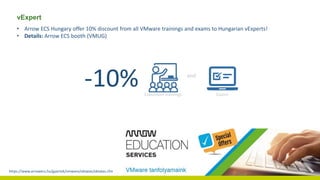
• Arrow ECS Hungary offer 10% discount from all VMware trainings and exams to Hungarian vExperts!
• Details: Arrow ECS booth (VMUG)
-10% Classroom trainings Exams
and
Thank You

vRealize Operation 7.5 What's new

  • 1.
    vRealize Operation Manager7.5 – What’s new Kiss Tibor vExpert 17/18/19/Cloud/Pro @kisstib0r kisstibor.info
  • 2.
    Agenda 1 Sizing tool 2Install and Upgrade 3 Allocation model / Metric Colleration 4 Application monitoring (native VMware management packs) 5 Automatization 6 vExpert program
  • 3.
  • 4.
    Sizing tool https://vropssizer.vmware.com/ • Newdeploy • Basic: vSphere environment’s info for planning • Advanced: Other management packs (Endpoints, Physical hardware, Storage…) • HA • PDF riport • Validate your existing environment • Advanced use cases feature • Select „Other Data Source” • You can find the current object and metric count in vRealize Operations under: • Administration > History > Audit > System Audit • Add values (Objects and Metrics)
  • 5.
    Install and Upgrade 1.Run the vROps 7.5 upgrade and assessment tool 2. Snapshot your virtual appliance(s) • Take your vRealize Operations cluster offline before creating the snapshot • Don’t snapshot the virtual memory and don’t quiesce the filesystem 3. Upload and install the OS update 4. Upload and install the Appliance Update 5. Verify upgrade and delete snapshots https://docs.vmware.com/en/vRealize-Operations-Manager/7.5/com.vmware.vcom.core.doc/GUID-42502543-2451-4317-BA42-F7D12172C23B.html
  • 6.
    Allocation model returned… •By default, vRealize Operations 7.5 only uses the demand model • Enabling allocation model can be done from the Assess Capacity page by clicking on the icon shown in the screenshot below • It’s possible to configure a different overcommit ratio for each cluster Eg.: developer vs. production • Policy needed for each ratio and should be applied to the cluster before making the change to the settings
  • 7.
    Metric Correlation • Automaticallyidentifies correlations between metrics • All Self-Metrics • All self-metrics will search for a correlations across all non-instanced metrics for that object • Selected metric of all peers • In this case, we selected CPU Demand % for a VM so vROps will look across all peer VM’s for another one with a similar CPU Demand % profile
  • 8.
    Native Application monitoring •Select destination (vRealize Operation or Wavefront?) • Download the vRealize Application Remote Collector by clicking the Download icon in the Application Remote Collector page (2,2GB) • Deploy OVF template • Configure (change default password) • Install Telegraph agent You can monitor application services supported by vRealize Application Remote Collector in vRealize Operations Manager or in Wavefront. You can also manage the life cycle of agents and application services on virtual machines.
  • 9.
  • 10.
    Native Application monitoring InstallApplication Remote Controller appliance
  • 11.
    Native Application monitoring Changeroot password • Open the console • Login by root • Change password
  • 12.
  • 13.
    Native Application monitoring •Add Application Remote Controller to vRealize Operation Manager
  • 14.
  • 15.
  • 16.
    Native Application monitoring •Install Agent • Wait ~5 minutes for healthy information • Click „configure agents” button
  • 17.
  • 18.
  • 19.
  • 20.
    Native Application monitoring EndpointOperation vs. Telegraph agent
  • 21.
  • 22.
    Automatization – API(Postman) REST call  Create new Environment Add VARIABLEs
  • 23.
  • 24.
    Automatization - PowerCLI •From v. 6.0 R2 PowerCLI contains Operation manager module by default • Connect-OMServer –Server „IP” –User admin -Password
  • 25.
    Automatization - PowerCLI Inthis example we would like to see active network alerts: • Get-OMAlert –Status Active –Type ’Network Alerts’
  • 26.
    Automatization – vRealizeOrchestration • Install and configure vRO • https://vRO-FQDNorIP/vco/ • HTML5 UI
  • 27.
  • 28.
  • 29.
    Automatization – vROand vROps • Install vRealize Orchestrator Adapter solution https://marketplace.vmware.com/vsx/solutions/management-pack-for-vrealize-orchestrator https://docs.vmware.com/en/Management-Packs-for-vRealize-Operations-Manager/3.0/vrealize-orchestrator/GUID-E09F3146-95B2-42D4-AB8F-F474ED7A6FEF.html
  • 30.
    Automatization – vROand vROps Admin page – Installation fail Call VMware GSS – you have to change a flag in Postgres 
  • 31.
    Automatization – vROand vROps • Go to vRO server in vROps • From Action menu select: „Add a vCenter server to vRealize Orchestrator” • Add vCenter Server address and credentials...
  • 32.
    Automatization – Reconnecthost when it became unavailable Change manual process to auto • This Alert part of vCenter Solution by default • Recommend manual process to solve the problem • Automate this step! 
  • 33.
    Automatization – Reconnecthost when it became unavailable Create new recommendation Adapter type select: vRealize Orchestration Adapter 1 From Action select your (own) Workflow In this case: Reconnect Host 2
  • 34.
    Automatization – Reconnecthost when it became unavailable Add your custom recommendation to Alert
  • 35.
    Automatization – Reconnecthost when it became unavailable
  • 36.
    Automatization – Reconnecthost when it became unavailable
  • 37.
  • 38.
    Automatization – Nextlevel • Automate remediation Eg.: restart service Alert Notification (REST) Alert Notification (REST) Service down Service up Webhook shim
  • 39.
    Links Application Monitoring https://docs.vmware.com/en/vRealize-Operations-Manager/7.5/com.vmware.vcom.core.doc/GUID-D9692377-6DDB-4321-9200-79D5F12D4234.html Postmanhttps://www.getpostman.com/ vRealize Orchestrator https://www.vmware.com/hu/products/vrealize-orchestrator.html vRealize Operation 7.5 Release Notes https://docs.vmware.com/en/vRealize-Operations-Manager/7.5/rn/vRealize-Operations-Manager-75.html vExpert Official page https://vexpert.vmware.com/
  • 40.
  • 41.
    vExpert vExpert Program Benefits: •Invite to our private #Slack channel • vExpert certificate signed by our CEO Pat Gelsinger • Private forums on communities.vmware.com • Permission to use the vExpert logo on cards, website, etc for one year • Access to a private directory for networking, etc • Exclusive gifts from various VMware partners • Private webinars with VMware partners as well as NFRs • Access to private betas (subject to admission by beta teams) • 365-day eval licenses for most products for home lab / cloud providers • Private pre-launch briefings via our blogger briefing pre-VMworld (subject to admission by product teams) • Blogger early access program for vSphere and some other products • Featured in a public vExpert online directory • Access to vetted VMware & Virtualization content for your social channels • Yearly vExpert parties at both VMworld US and VMworld Europe events • Identification as a vExpert at both VMworld US and VMworld EU If you are interested in becoming a vExpert the criteria is simple We are looking for IT Professionals who are sharing their VMware knowledge and contributing that back to the community. The term "giving back" is defined as going above and beyond your day job. There are several ways to share your knowledge and engage with the community. Some of those activities are blogging, book authoring, magazine articles, CloudCred task writing, active in facebook groups, forum (VMTN as well as other non VMware) platforms, public speaking, VMUG leadership, videos and so on.
  • 42.
  • 43.
    vExpert https://www.arrowecs.hu/gyartok/vmware/oktatas/oktatas.cfm • Arrow ECSHungary offer 10% discount from all VMware trainings and exams to Hungarian vExperts! • Details: Arrow ECS booth (VMUG) -10% Classroom trainings Exams and
  • 44.

Editor's Notes

  • #2 Mindenkinek egészségére az ebédet, a következő 30 percben az alábbi témákkal próbálom fenntartani a figyelmeteket
  • #12 Open a console Login by root Change password