Cloud ComputingAn OverviewBy ChiragDani
Cloud Computing Definitions“Cloud computing is a model for enabling ubiquitous, convenient, on-demand network access to a shared pool of configurable computing resources (e.g., networks, servers, storage, applications, and services) that can be rapidly provisioned and released with minimal management effort or service provider interaction.“ (NIST)“Cloud computing is Internet-based computing, whereby shared resources, software and information are provided to computers and other devices on-demand, like electricity” (Wikipedia)2www.chiragdani.com  |  reach2chirag@gmail.com
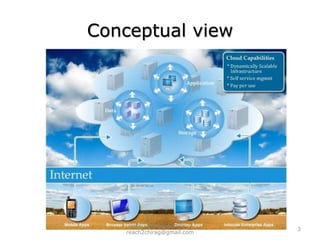
Conceptual view3www.chiragdani.com  |  reach2chirag@gmail.com
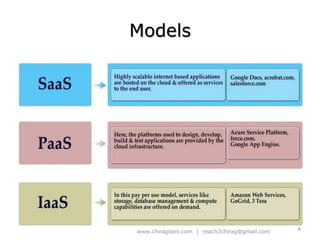
Models4www.chiragdani.com  |  reach2chirag@gmail.com
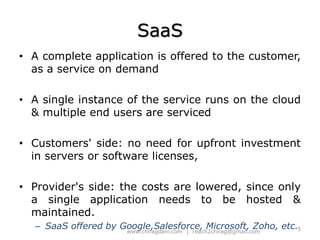
SaaSA complete application is offered to the customer, as a service on demandA single instance of the service runs on the cloud & multiple end users are servicedCustomers' side: no need for upfront investment in servers or software licenses,Provider's side: the costs are lowered, since only a single application needs to be hosted & maintained.SaaSoffered by Google,Salesforce, Microsoft, Zoho, etc.5www.chiragdani.com  |  reach2chirag@gmail.com
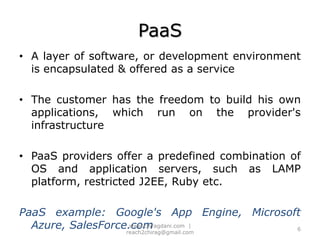
PaaSA layer of software, or development environment is encapsulated & offered as a serviceThe customer has the freedom to build his own applications, which run on the provider's infrastructurePaaS providers offer a predefined combination of OS and application servers, such as LAMP platform, restricted J2EE, Ruby etc.PaaS example: Google's App Engine, Microsoft Azure, SalesForce.com6www.chiragdani.com  |  reach2chirag@gmail.com
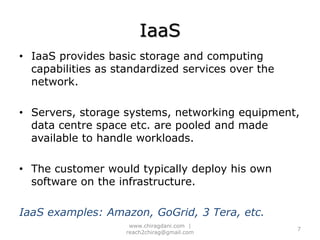
IaaSIaaS provides basic storage and computing capabilities as standardized services over the network.Servers, storage systems, networking equipment, data centre space etc. are pooled and made available to handle workloads.The customer would typically deploy his own software on the infrastructure.IaaS examples: Amazon, GoGrid, 3 Tera, etc.7www.chiragdani.com  |  reach2chirag@gmail.com
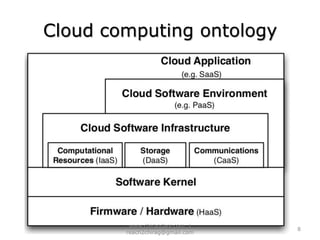
Cloud computing ontology8www.chiragdani.com  |  reach2chirag@gmail.com
Public and Private cloudEnterprises can choose to deploy applications on:Public CloudPrivate Cloud Hybrid cloud9www.chiragdani.com  |  reach2chirag@gmail.com
Cloud Computing BenefitsReduced costIncreased storageFlexibility10www.chiragdani.com  |  reach2chirag@gmail.com
Cloud Computing ChallengesData ProtectionData Recovery and AvailabilityManagement CapabilitiesRegulatory and Compliance Restrictions11www.chiragdani.com  |  reach2chirag@gmail.com
Virtualization
What is Virtualization? Virtualization is a technology that transforms hardware into software.
 Virtualization allows you to run multiple operating systems as virtual machines on a single computer.
 Each copy of an operating system is installed into a virtual machine.
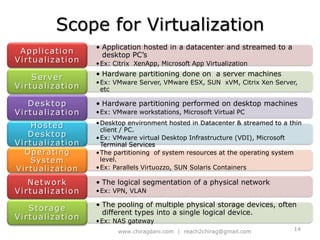
 Virtualization is not Simulation or EmulationScope for Virtualization14www.chiragdani.com  |  reach2chirag@gmail.com
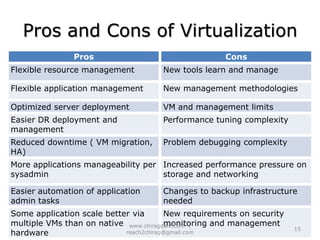
Pros and Cons of Virtualization15www.chiragdani.com  |  reach2chirag@gmail.com
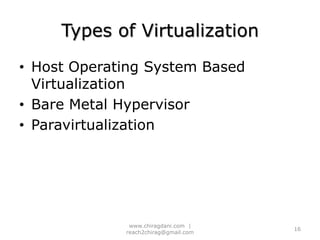
Types of VirtualizationHost Operating System Based VirtualizationBare Metal HypervisorParavirtualization16www.chiragdani.com  |  reach2chirag@gmail.com
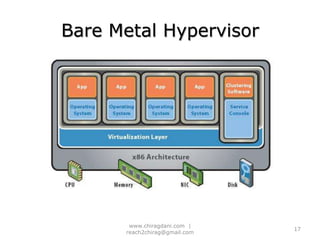
Bare Metal Hypervisor17www.chiragdani.com  |  reach2chirag@gmail.com
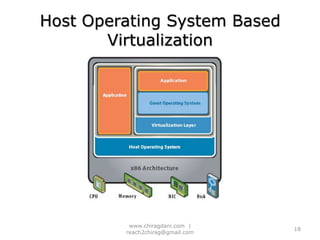
Host Operating System Based Virtualization18www.chiragdani.com  |  reach2chirag@gmail.com
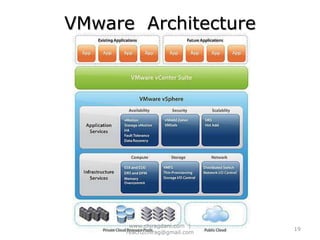
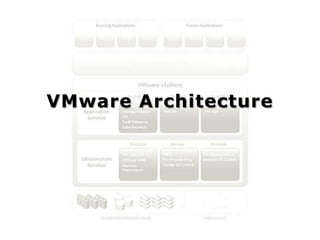
VMware  Architecture19www.chiragdani.com  |  reach2chirag@gmail.com
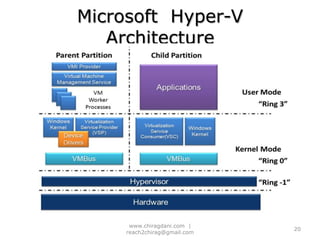
Microsoft  Hyper-V  Architecture20www.chiragdani.com  |  reach2chirag@gmail.com
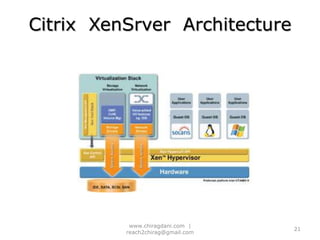
Citrix  XenSrver  Architecture 21www.chiragdani.com  |  reach2chirag@gmail.com
VMware Architecture
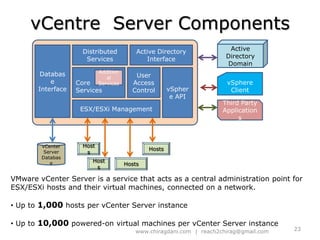
vCentre  Server ComponentsActive Directory DomainDistributed ServicesActive Directory InterfaceDatabase InterfaceCore ServicesUser Access ControlvSphere APIAdditional ServicesvSphere ClientESX/ESXi ManagementThird Party ApplicationsvCenter Server DatabaseHostsHostsHostsHostsVMware vCenter Server is a service that acts as a central administration point for ESX/ESXi hosts and their virtual machines, connected on a network. Up to 1,000 hosts per vCenter Server instance
 Up to 10,000 powered-on virtual machines per vCenter Server instance23www.chiragdani.com  |  reach2chirag@gmail.com
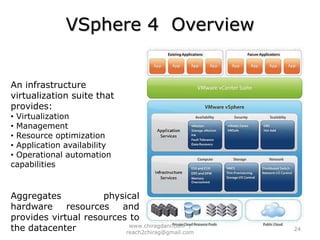
VSphere 4  OverviewAn infrastructure virtualization suite that provides: Virtualization
 Management
 Resource optimization
 Application availability
 Operational automation  capabilitiesAggregates physical hardware resources and provides virtual resources to the datacenter24www.chiragdani.com  |  reach2chirag@gmail.com
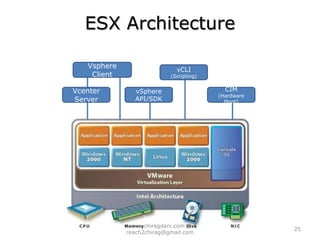
ESX ArchitectureVsphere ClientvCLI(Scripting)Vcenter ServervSphere API/SDKCIM(Hardware Mgnt)25www.chiragdani.com  |  reach2chirag@gmail.com
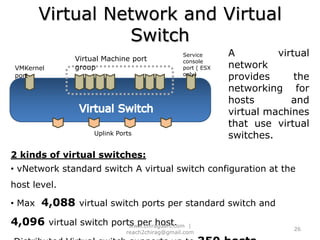
Virtual Network and Virtual SwitchA virtual network provides the networking for hosts and virtual machines that use virtual switches.Service console port ( ESX only)Virtual Machine port groupVMKernel portVirtual SwitchUplink Ports2 kinds of virtual switches: vNetwork standard switch A virtual switch configuration at the host level.
 Max  4,088 virtual switch ports per standard switch and 4,096 virtual switch ports per host.
Distributed Virtual switch supports up to 350 hosts26www.chiragdani.com  |  reach2chirag@gmail.com
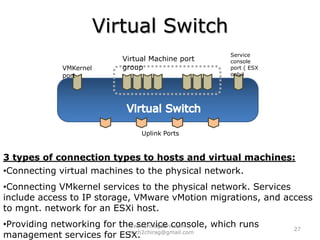
Virtual SwitchService console port ( ESX only)Virtual Machine port groupVMKernel portVirtual SwitchUplink Ports3 types of connection types to hosts and virtual machines:Connecting virtual machines to the physical network.
Connecting VMkernel services to the physical network. Services include access to IP storage, VMware vMotion migrations, and access to mgnt. network for an ESXi host.
Providing networking for the service console, which runs management services for ESX.  27www.chiragdani.com  |  reach2chirag@gmail.com
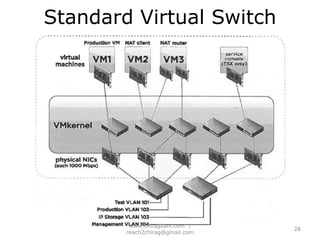
Standard Virtual Switch28www.chiragdani.com  |  reach2chirag@gmail.com
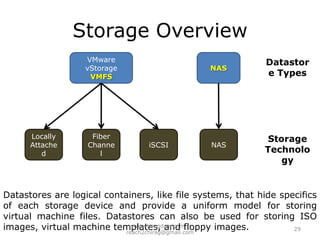
Storage OverviewVMware vStorage VMFSNASDatastore TypesLocally AttachedFiber ChanneliSCSINASStorage TechnologyDatastores are logical containers, like file systems, that hide specifics of each storage device and provide a uniform model for storing virtual machine files. Datastores can also be used for storing ISO images, virtual machine templates, and floppy images.29www.chiragdani.com  |  reach2chirag@gmail.com
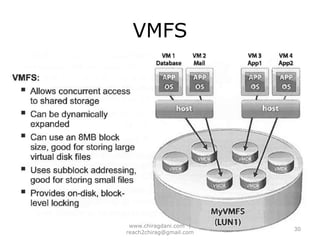
VMFS30www.chiragdani.com  |  reach2chirag@gmail.com
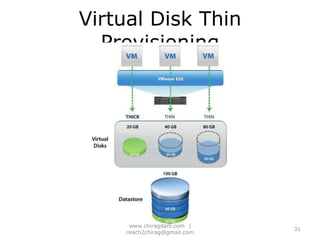
Virtual Disk Thin Provisioning31www.chiragdani.com  |  reach2chirag@gmail.com
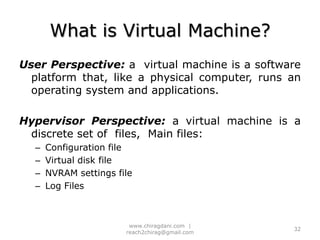
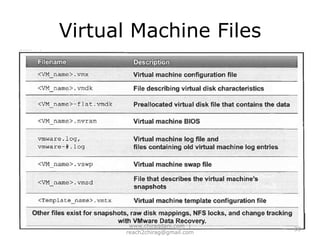
What is Virtual Machine?User Perspective: a  virtual machine is a software platform that, like a physical computer, runs an  operating system and applications.Hypervisor Perspective: a virtual machine is a discrete set of  files,  Main files:Configuration fileVirtual disk fileNVRAM settings fileLog Files32www.chiragdani.com  |  reach2chirag@gmail.com
Virtual Machine Files33www.chiragdani.com  |  reach2chirag@gmail.com
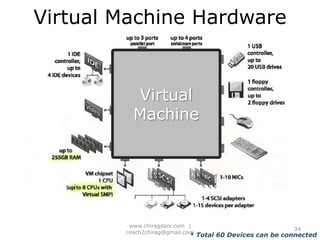
Virtual Machine HardwareVirtual Machine* Total 60 Devices can be connected34www.chiragdani.com  |  reach2chirag@gmail.com
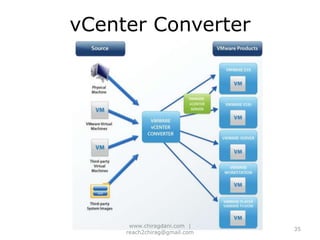
vCenter Converter35www.chiragdani.com  |  reach2chirag@gmail.com
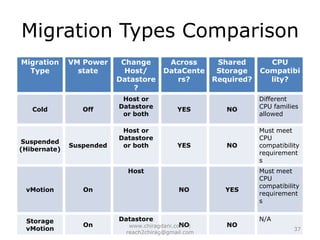
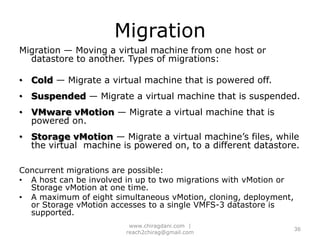
MigrationMigration — Moving a virtual machine from one host or datastore to another. Types of migrations:Cold— Migrate a virtual machine that is powered off.Suspended — Migrate a virtual machine that is suspended.VMware vMotion— Migrate a virtual machine that is powered on. Storage vMotion— Migrate a virtual machine’s files, while the virtual  machine is powered on, to a different datastore.Concurrent migrations are possible:A host can be involved in up to two migrations with vMotion or Storage vMotion at one time. A maximum of eight simultaneous vMotion, cloning, deployment, or Storage vMotion accesses to a single VMFS-3 datastore is supported.36www.chiragdani.com  |  reach2chirag@gmail.com
Migration Types Comparison37www.chiragdani.com  |  reach2chirag@gmail.com

Cloud Computing and Vertualization

  • 1.
  • 2.
    Cloud Computing Definitions“Cloudcomputing is a model for enabling ubiquitous, convenient, on-demand network access to a shared pool of configurable computing resources (e.g., networks, servers, storage, applications, and services) that can be rapidly provisioned and released with minimal management effort or service provider interaction.“ (NIST)“Cloud computing is Internet-based computing, whereby shared resources, software and information are provided to computers and other devices on-demand, like electricity” (Wikipedia)2www.chiragdani.com | reach2chirag@gmail.com
  • 3.
    Conceptual view3www.chiragdani.com | reach2chirag@gmail.com
  • 4.
    Models4www.chiragdani.com | reach2chirag@gmail.com
  • 5.
    SaaSA complete applicationis offered to the customer, as a service on demandA single instance of the service runs on the cloud & multiple end users are servicedCustomers' side: no need for upfront investment in servers or software licenses,Provider's side: the costs are lowered, since only a single application needs to be hosted & maintained.SaaSoffered by Google,Salesforce, Microsoft, Zoho, etc.5www.chiragdani.com | reach2chirag@gmail.com
  • 6.
    PaaSA layer ofsoftware, or development environment is encapsulated & offered as a serviceThe customer has the freedom to build his own applications, which run on the provider's infrastructurePaaS providers offer a predefined combination of OS and application servers, such as LAMP platform, restricted J2EE, Ruby etc.PaaS example: Google's App Engine, Microsoft Azure, SalesForce.com6www.chiragdani.com | reach2chirag@gmail.com
  • 7.
    IaaSIaaS provides basicstorage and computing capabilities as standardized services over the network.Servers, storage systems, networking equipment, data centre space etc. are pooled and made available to handle workloads.The customer would typically deploy his own software on the infrastructure.IaaS examples: Amazon, GoGrid, 3 Tera, etc.7www.chiragdani.com | reach2chirag@gmail.com
  • 8.
  • 9.
    Public and PrivatecloudEnterprises can choose to deploy applications on:Public CloudPrivate Cloud Hybrid cloud9www.chiragdani.com | reach2chirag@gmail.com
  • 10.
    Cloud Computing BenefitsReducedcostIncreased storageFlexibility10www.chiragdani.com | reach2chirag@gmail.com
  • 11.
    Cloud Computing ChallengesDataProtectionData Recovery and AvailabilityManagement CapabilitiesRegulatory and Compliance Restrictions11www.chiragdani.com | reach2chirag@gmail.com
  • 12.
  • 13.
    What is Virtualization?Virtualization is a technology that transforms hardware into software.
  • 14.
    Virtualization allowsyou to run multiple operating systems as virtual machines on a single computer.
  • 15.
    Each copyof an operating system is installed into a virtual machine.
  • 16.
    Virtualization isnot Simulation or EmulationScope for Virtualization14www.chiragdani.com | reach2chirag@gmail.com
  • 17.
    Pros and Consof Virtualization15www.chiragdani.com | reach2chirag@gmail.com
  • 18.
    Types of VirtualizationHostOperating System Based VirtualizationBare Metal HypervisorParavirtualization16www.chiragdani.com | reach2chirag@gmail.com
  • 19.
  • 20.
    Host Operating SystemBased Virtualization18www.chiragdani.com | reach2chirag@gmail.com
  • 21.
  • 22.
    Microsoft Hyper-V Architecture20www.chiragdani.com | reach2chirag@gmail.com
  • 23.
    Citrix XenSrver Architecture 21www.chiragdani.com | reach2chirag@gmail.com
  • 24.
  • 25.
    vCentre ServerComponentsActive Directory DomainDistributed ServicesActive Directory InterfaceDatabase InterfaceCore ServicesUser Access ControlvSphere APIAdditional ServicesvSphere ClientESX/ESXi ManagementThird Party ApplicationsvCenter Server DatabaseHostsHostsHostsHostsVMware vCenter Server is a service that acts as a central administration point for ESX/ESXi hosts and their virtual machines, connected on a network. Up to 1,000 hosts per vCenter Server instance
  • 26.
    Up to10,000 powered-on virtual machines per vCenter Server instance23www.chiragdani.com | reach2chirag@gmail.com
  • 27.
    VSphere 4 OverviewAn infrastructure virtualization suite that provides: Virtualization
  • 28.
  • 29.
  • 30.
  • 31.
    Operational automation capabilitiesAggregates physical hardware resources and provides virtual resources to the datacenter24www.chiragdani.com | reach2chirag@gmail.com
  • 32.
    ESX ArchitectureVsphere ClientvCLI(Scripting)VcenterServervSphere API/SDKCIM(Hardware Mgnt)25www.chiragdani.com | reach2chirag@gmail.com
  • 33.
    Virtual Network andVirtual SwitchA virtual network provides the networking for hosts and virtual machines that use virtual switches.Service console port ( ESX only)Virtual Machine port groupVMKernel portVirtual SwitchUplink Ports2 kinds of virtual switches: vNetwork standard switch A virtual switch configuration at the host level.
  • 34.
    Max 4,088 virtual switch ports per standard switch and 4,096 virtual switch ports per host.
  • 35.
    Distributed Virtual switchsupports up to 350 hosts26www.chiragdani.com | reach2chirag@gmail.com
  • 36.
    Virtual SwitchService consoleport ( ESX only)Virtual Machine port groupVMKernel portVirtual SwitchUplink Ports3 types of connection types to hosts and virtual machines:Connecting virtual machines to the physical network.
  • 37.
    Connecting VMkernel servicesto the physical network. Services include access to IP storage, VMware vMotion migrations, and access to mgnt. network for an ESXi host.
  • 38.
    Providing networking forthe service console, which runs management services for ESX. 27www.chiragdani.com | reach2chirag@gmail.com
  • 39.
  • 40.
    Storage OverviewVMware vStorageVMFSNASDatastore TypesLocally AttachedFiber ChanneliSCSINASStorage TechnologyDatastores are logical containers, like file systems, that hide specifics of each storage device and provide a uniform model for storing virtual machine files. Datastores can also be used for storing ISO images, virtual machine templates, and floppy images.29www.chiragdani.com | reach2chirag@gmail.com
  • 41.
    VMFS30www.chiragdani.com | reach2chirag@gmail.com
  • 42.
    Virtual Disk ThinProvisioning31www.chiragdani.com | reach2chirag@gmail.com
  • 43.
    What is VirtualMachine?User Perspective: a virtual machine is a software platform that, like a physical computer, runs an operating system and applications.Hypervisor Perspective: a virtual machine is a discrete set of files, Main files:Configuration fileVirtual disk fileNVRAM settings fileLog Files32www.chiragdani.com | reach2chirag@gmail.com
  • 44.
  • 45.
    Virtual Machine HardwareVirtualMachine* Total 60 Devices can be connected34www.chiragdani.com | reach2chirag@gmail.com
  • 46.
  • 47.
    MigrationMigration — Movinga virtual machine from one host or datastore to another. Types of migrations:Cold— Migrate a virtual machine that is powered off.Suspended — Migrate a virtual machine that is suspended.VMware vMotion— Migrate a virtual machine that is powered on. Storage vMotion— Migrate a virtual machine’s files, while the virtual machine is powered on, to a different datastore.Concurrent migrations are possible:A host can be involved in up to two migrations with vMotion or Storage vMotion at one time. A maximum of eight simultaneous vMotion, cloning, deployment, or Storage vMotion accesses to a single VMFS-3 datastore is supported.36www.chiragdani.com | reach2chirag@gmail.com
  • 48.

Editor's Notes

  • #13 Virtualization is a technology that transforms hardware into software.Virtualization allows you to run multiple operating systems as virtual machines on a single computer.Each copy of an operating system is installed into a virtual machine.Virtualization is not:SimulationEmulation
  • #14 One of the most important ideas behind cloud computing is scalability, and the key technology that makes that possible is virtualization.Although virtualization technology has been around for many years, it is only now beginning to be fully deployed. One of the reasons for this is the increase in processing power and advances in hardware technology.
  • #16 You can run one or more applications that are not supported by the Host O/S Better security and isolation, since malfunctions or malware infection of a guest O/S does not affect the others Peace of cake creation of test environments Easy cloning of virtual machines on the same physical hardware or across servers Snapshot technique which enables you to revert back to a specific point in time. Especially useful in case of configuration changes and service pack and patches malfunctions. Excellent recovery scenarios if you backup in VM level. Since VMs are abstracted from hardware you can easily move/restore them to new physicals servers without complications Better utilize hardware resources. VM management software allows you to configure hardware to virtual resource partitioning and utilization. For example you can set specific CPU thresholds, memory allocation, disk space allocation, I/O structures, etc. Also you can let the virtual machine monitor to decide the resources allocation according to utilization. Reduce physical space consumption and reduce hardware costs. You have fewer servers to buy. Benefit from the licensing models many O/S vendors as Microsoft are providing. For example, if you buy Windows 2008 ENT edition you get licenses for 4 virtual machines.
  • #18 a Hypervisor architecture is the first layer of software installed on a clean x86-based system, sometimes referred to as a “bare metal” approach, as it would be in the case of a computer running VMware ESX server on top of which there maybe one or more virtual machines running.
  • #19 A Hosted approach provides services on top of a standard operating system, and example of this would be VMware Workstation or VMware server running on a Windows or Linux system on top of which one or more virtual machines are running.
  • #20 vSpherevSphere is an infrastructure virtualization suite that provides virtualization, management, resource optimization, application availability, and operational automation capabilities in an integrated package.vSphere virtualizes and aggregates the underlying physical hardware resources across multiple systems and provides pools of virtual resources to the datacenter.In addition, vSphere provides a set of distributed services that enable detailed, policy-driven resource allocation, high availability, and scalability of the entire virtual datacenter.vCenter suitVMware vCenter Suite :The central point for configuring, provisioning, and managing virtualized IT environments.
  • #21 The virtualization stack runs in the parent partition and has direct access to the hardware devices. The root partition then creates the child partitions which host the guest operating systems. 
  • #24 Core services include management of resources and virtual machines, task scheduling, statistics logging, management of alarms and events, virtual machine provisioning, and host and virtual machine configuration.Distributed services include vMotion, DRS and VMware HA. They are installed with vCenter Server.Additional services are packaged separately from the base product and requires separate installation. No additional license is necessary. Examples include VMware vCenter Update Manager and VMware vCenter Converter.Database interface provides access to the vCenter Server database. ESX/ESXi management. vCenter Server provides access to the ESX/ESXi host through a vCenter Server agent, which is installed on the host when it is added to the vCenter Server inventory. The Active Directory interface provides access to domain user accounts. The VMware vSphere API, in combination with the vSphere SDK, provides an interface for writing custom applications that access vCenter Server functionality.
  • #26 Extended Sky ElasticESX uses RedHat Linux.The service console uses a 64-bit, 2.6-based Linux kernel compatible with Red Hat Enterprise Linux Server (RHEL) 5.2, CentOS 5.2, and equivalent Linux systems.ESXi = 70MB, does not contain service consol.CIM = Common Information Model.
  • #27 Virtual switches work at layer 2 of the OSI model. You cannot have two virtual switches mapped to the same physical network interface card ( NIC). But you have two or more physical NICs mapped to the same virtual switch.
  • #28 Virtual switches work at layer 2 of the OSI model. You cannot have two virtual switches mapped to the same physical network interface card (NIC). you have two or more physical NICs mapped to the same virtual switch.Network Policies:1) Security:Promiscuous modeMAC Address ChangeForged Transmits2) Traffic Shaping: Mechanism of controlling VM network bandwidth 3) NIC (Network Interface Card) Teaming: Load BalancingNetwork Failover DetectionFailbackFailover Order
  • #29 The slide shows five standard virtual switches, each devoted to a different purpose. From left to right, the switches are:A standard virtual switch with a single outbound adapter. It is being used only by VM1. (Production VM)2. An internal-only standard virtual switch, which allows virtual machines within a single ESX/ ESXi host to communicate directly with other virtual machines connected to the same standard virtual switch. VM2 and VM3 can use this switch communicate with each other. (Network Address Translation)3. A standard virtual switch with teamed NICs. A NIC team provides automatic distribution of packets and failover.4. A standard virtual switch that is used by the VMkemel for accessing iSCSI or NAS-based storage.5. A standard virtual switch that is used by the VMkernel to allow remote management capabilities.
  • #33 Server virtualization benefits :The first one is certainly at the deployment level. A virtual machine can often be built and customized in less than 20 minutes. Virtual machine mobility. You can move a VM from one host to another at any time. In some cases, you can move it while it is running. This is a great advantage and will help reduce downtime in your network.Virtual machines are just easy to use. Once it is built and configured, you just start the machine and it is immediately ready to deliver services to users.Virtual machines support standard configurations. You can control the way VMs are built: Just create a standard VM and copy the source files for this VM each time you need a new machine. This way, you will always have standard configurations for any VM.Virtual machines also support the concept of volatile services. If a tester or developer needs a virtual machine to perform a given series of tests, you can fire up a new VM, provide it to them in minutes, and then, when they are done with it, you simply delete it. Try doing that with a physical machine!VMs can be certified by the virtualization vendor, ensuring you are using the best of their technology’s capabilities with your VMs.VMs are also secure because they can be completely isolated at any time; just cut off their communications through the host’s virtualization technology.VMs can be scaled out or scaled up. To scale out, simply create more VMs with the same services. To scale up, shut down the VM and assign more resources, such as RAM, processor cores, disks, and NICs to it.VMs are also ideal for disaster recovery, since all you need to do is copy their files to another location, either within your datacenter or to another site entirely.
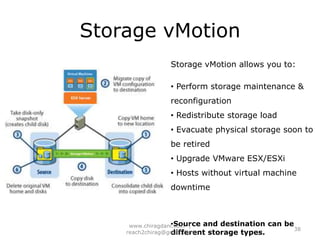
  • #39 The diagram shows what happens when you migrate a virtual machine with Storage VMotion:When initiating a migration, vSphere copies all virtual machine files, except the virtual disk files, from the old virtual machine directory to a new directory on the destination datastore.2. Storage vMotion copies the contents of the entire virtual disk file (or files) to the destination datastore, using “changed block tracking” to maintain data integrity during the migrationprocess. Changed block tracking tracks changes to the disk so that Storage vMotion knows which regions of the disk include data.3. Storage vMotion queries the changed block tracking module to determine what regions of the disk were written to during the first iteration. It then performs a second iteration of copy, which copies regions that were changed during the first iteration (several more iterations are possible).4. The virtual machine is quickly suspended and resumed so that it can begin using the virtual machine home directory and disk file or files on the destination datastore.5. Before ESXIESXi allows the virtual machine to start running again, the final changed regions of the source datastore are copied over to the destination and the source home and disks are removed. This approach guarantees complete transactional integrity and is fast enough to be unnoticeable to the end user.
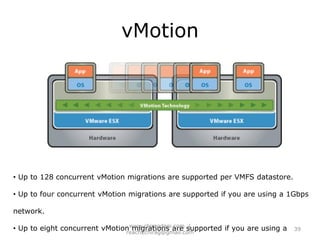
  • #40 vMotion migration consists of the following steps:The virtual machine’s memory state is copied over the vMotion network from the source host to the target host. Users continue to access the virtual machine and, potentially, update pages in memory. A list of modified pages in memory is kept in a memory bitmap on the source host.2. After most of the virtual machine’s memory is copied from the source host to the target host, the virtual machine is quiesced: no additional activity will occur on the virtual machine. In the quiesce period, vMotion transfers the virtual machine device state and memory bitmap to the destination host.3. Immediately after the virtual machine is quiesced on the source host, the virtual machine is initialized and starts running on the target host. A Reverse Address Resolution Protocol (RARP) request notifies the subnet that virtual machine A’s MAC address is now on a new switch port.4. Users access the virtual machine on the target host instead of the source host. 5. The virtual machine is deleted from the source host.
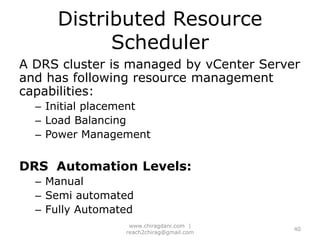
  • #41 Distributed Resource Scheduler:VMware DRS - utility that balances computing workloads with available resources in a virtualized environment.VMware will balance load on each physical CPU every 20 milliseconds.
  • #44 VMware HA provides high availability for applications running in virtual machines. In a server failure, affected virtual machines are automatically restarted on other production servers with spare capacity. VMware HA is configured, managed, and monitored in vCenter Server.
  • #47 SMP=Symmetric Multiprocessing