MIGRATION
• Migration is the techniques of moving a virtual machine from one host to another
host or from one datastore to another datastore.
• Why Migration need?
• Backup Need Additional Storage
• Physical switching required in backup
• Backup Need More cost
• When backup also damage
TYPES OF MIGRATION
• Cold Migration
• Vmotion
• Suspended Migration
• Physical to Virtual (P2V)
• Virtual to Virtual (V2V)
Note: Datastore stores virtual machine files, log files, virtual disk and ISO images
Two types- VMFS (VM File System) & NFS (Network File System)
COLD MIGRATION:
• Movement of virtual machine to another host in powered-off state.
• VM must be powered off during Migration.
• Cold migration are flexible then vmotion.
• Cold migration can be used to move a virtual machine between data centers, as
large as both data centers are on the same vCenter Server instance.
• Chances of failures is less in cold migration, in comparison to hot migration.
SUSPENDED MIGRATION:
• Migration a virtual machine that is in suspended state.
• Suspended state is like paused state in which you resume from some point on
later stage.
• Suspended and vmotion migration are considered hot because in both cases the
virtual machine is running.
• The primary reason to suspend a virtual machine on an ESXi host is for
troubleshooting.
VMOTION/ LIVE MIGRATION
• Migration a virtual machine that is in “Powered ON” state. This is very useful as
this does not cause any downtime for the VM.
• In VMware vMotion machine is migrated from one ESXi host to another in
powered ON state, whereas in storage vMotion machine is migrated from one
datastores to another datastore in powered ON state.
• vMotion moves a running virtual machine to a different ESXi host in the same
cluster.
• It is also known as Live Migration.
• 2 µs
P2V:
• Convert a physical computer/Server/Machine to virtual one.
• For example you have a Webserver running on physical hardware you can run
VMware vCenter converter, target the Webserver and have a copy of the physical
server created on the ESXi host.
V2V:
• V2V migration are exactly like P2V migration expect that the source machine
already a virtual machine.
• For example migration from hyper-V and VMware virtualization to ESXi would be
considered a V2V migration.
HIGH AVAILABILITY
• Before H.A was available , the failure of a single ESXi host meant that a large
number of virtual machines that were running on it would be down. This was
referenced to as the “ all of your eggs in one basket” issue and caused some
companies not to deploy virtual server.
• In H.A, when the hist crashes or fails the VM get Restarted on another host.
• H.A works on ESXi host.
• So, there is a very small time downtime which is only related to the time for VM
to Restart.
HIGH AVAILABILITY (CONT..)
• Automated detection of server failure.
• H.A is a complete automated process and not need any admin Interference as
there is no time to recover machine if host is about to crash.
• No passive standby ESXi host is required neither any extra or duplicate VM. The
VM for which its parent host is crashing it can retore on any of the other running
host.
• H.A does not use vMotion.
• Enable H.A on the cluster setting, in order to use H.A.
HIGH AVAILABILITY (CONT..)
• For H.A, also we need following things
• Cluster
• Shared Storage
• vCenter Server Configured for the environment.
• Resource Check: Ensure that capacity is always available in order to restart on
virtual or affected by server failure H.A continuously monitors capacity to be able
to restart virtual machine.
PRE-REQUISITE FOR VMWARE VSHPEHE H.A
• All host must be licensed for VMware H.A.
• You need at least two host in the cluster.
• All host need a unique host name.
• All host need to configured with static IP address if you are using DHCP, you must
ensure that the address for each host persist across reboots.
• VM must be located on shared, not local storage, otherwise they cannot be failed
over in case of a host failure.
• All host in a VMware H.A clusters must have DBS configured.
PRE-REQUISITE FOR VMWARE VSHPEHE H.A
(CONT..)
• H.A works on the master and slave architecture when you enable H.A on this
cluster than election process occurs between all the host in the cluster and one
host which has large number of datastores mounted has an chance to become a
master server.
• Once the election process complete, there will be one master server and other
ESXi are considered as the slave server of the master server..
• If the master server goes down or crashes than the new election process will
once.
H.A FAILOVER TIME
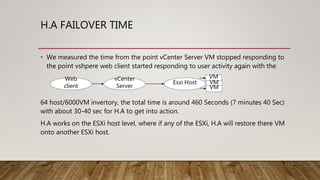
• We measured the time from the point vCenter Server VM stopped responding to
the point vshpere web client started responding to user activity again with the
64 host/6000VM invertory, the total time is around 460 Seconds (7 minutes 40 Sec)
with about 30-40 sec for H.A to get into action.
H.A works on the ESXi host level, where if any of the ESXi, H.A will restore there VM
onto another ESXi host.
Web
client
vCenter
Server
Esxi Host
VM
VM
VM

Lecture5(VM).pptx

  • 2.
    MIGRATION • Migration isthe techniques of moving a virtual machine from one host to another host or from one datastore to another datastore. • Why Migration need? • Backup Need Additional Storage • Physical switching required in backup • Backup Need More cost • When backup also damage
  • 3.
    TYPES OF MIGRATION •Cold Migration • Vmotion • Suspended Migration • Physical to Virtual (P2V) • Virtual to Virtual (V2V) Note: Datastore stores virtual machine files, log files, virtual disk and ISO images Two types- VMFS (VM File System) & NFS (Network File System)
  • 4.
    COLD MIGRATION: • Movementof virtual machine to another host in powered-off state. • VM must be powered off during Migration. • Cold migration are flexible then vmotion. • Cold migration can be used to move a virtual machine between data centers, as large as both data centers are on the same vCenter Server instance. • Chances of failures is less in cold migration, in comparison to hot migration.
  • 5.
    SUSPENDED MIGRATION: • Migrationa virtual machine that is in suspended state. • Suspended state is like paused state in which you resume from some point on later stage. • Suspended and vmotion migration are considered hot because in both cases the virtual machine is running. • The primary reason to suspend a virtual machine on an ESXi host is for troubleshooting.
  • 6.
    VMOTION/ LIVE MIGRATION •Migration a virtual machine that is in “Powered ON” state. This is very useful as this does not cause any downtime for the VM. • In VMware vMotion machine is migrated from one ESXi host to another in powered ON state, whereas in storage vMotion machine is migrated from one datastores to another datastore in powered ON state. • vMotion moves a running virtual machine to a different ESXi host in the same cluster. • It is also known as Live Migration. • 2 µs
  • 7.
    P2V: • Convert aphysical computer/Server/Machine to virtual one. • For example you have a Webserver running on physical hardware you can run VMware vCenter converter, target the Webserver and have a copy of the physical server created on the ESXi host.
  • 8.
    V2V: • V2V migrationare exactly like P2V migration expect that the source machine already a virtual machine. • For example migration from hyper-V and VMware virtualization to ESXi would be considered a V2V migration.
  • 9.
    HIGH AVAILABILITY • BeforeH.A was available , the failure of a single ESXi host meant that a large number of virtual machines that were running on it would be down. This was referenced to as the “ all of your eggs in one basket” issue and caused some companies not to deploy virtual server. • In H.A, when the hist crashes or fails the VM get Restarted on another host. • H.A works on ESXi host. • So, there is a very small time downtime which is only related to the time for VM to Restart.
  • 10.
    HIGH AVAILABILITY (CONT..) •Automated detection of server failure. • H.A is a complete automated process and not need any admin Interference as there is no time to recover machine if host is about to crash. • No passive standby ESXi host is required neither any extra or duplicate VM. The VM for which its parent host is crashing it can retore on any of the other running host. • H.A does not use vMotion. • Enable H.A on the cluster setting, in order to use H.A.
  • 11.
    HIGH AVAILABILITY (CONT..) •For H.A, also we need following things • Cluster • Shared Storage • vCenter Server Configured for the environment. • Resource Check: Ensure that capacity is always available in order to restart on virtual or affected by server failure H.A continuously monitors capacity to be able to restart virtual machine.
  • 12.
    PRE-REQUISITE FOR VMWAREVSHPEHE H.A • All host must be licensed for VMware H.A. • You need at least two host in the cluster. • All host need a unique host name. • All host need to configured with static IP address if you are using DHCP, you must ensure that the address for each host persist across reboots. • VM must be located on shared, not local storage, otherwise they cannot be failed over in case of a host failure. • All host in a VMware H.A clusters must have DBS configured.
  • 13.
    PRE-REQUISITE FOR VMWAREVSHPEHE H.A (CONT..) • H.A works on the master and slave architecture when you enable H.A on this cluster than election process occurs between all the host in the cluster and one host which has large number of datastores mounted has an chance to become a master server. • Once the election process complete, there will be one master server and other ESXi are considered as the slave server of the master server.. • If the master server goes down or crashes than the new election process will once.
  • 14.
    H.A FAILOVER TIME •We measured the time from the point vCenter Server VM stopped responding to the point vshpere web client started responding to user activity again with the 64 host/6000VM invertory, the total time is around 460 Seconds (7 minutes 40 Sec) with about 30-40 sec for H.A to get into action. H.A works on the ESXi host level, where if any of the ESXi, H.A will restore there VM onto another ESXi host. Web client vCenter Server Esxi Host VM VM VM