Copyright © 2005 VMware, Inc. All rights reserved.
VMware ESX Server
Datacenter-Class Virtual Infrastructure
for Mission-Critical Environments
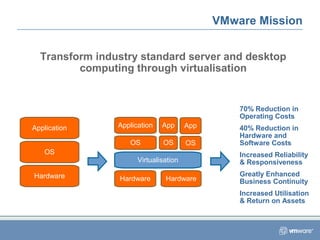
VMware Mission
Transform industry standard server and desktop
computing through virtualisation
Application
OS
Hardware
Application
OS
Hardware
Virtualisation
Hardware
App
OS
App
OS
70% Reduction in
Operating Costs
40% Reduction in
Hardware and
Software Costs
Increased Reliability
& Responsiveness
Greatly Enhanced
Business Continuity
Increased Utilisation
& Return on Assets
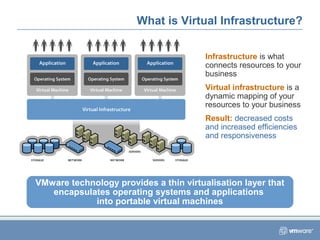
Infrastructure is what
connects resources to your
business
Virtual infrastructure is a
dynamic mapping of your
resources to your business
Result: decreased costs
and increased efficiencies
and responsiveness
What is Virtual Infrastructure?
VMware technology provides a thin virtualisation layer that
encapsulates operating systems and applications
into portable virtual machines
Hardware
Application
Operating System
With VirtualisationWithout Virtualisation
What is Virtualisation?
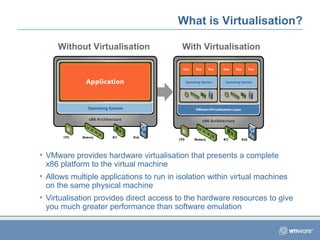
• VMware provides hardware virtualisation that presents a complete
x86 platform to the virtual machine
• Allows multiple applications to run in isolation within virtual machines
on the same physical machine
• Virtualisation provides direct access to the hardware resources to give
you much greater performance than software emulation
Three Key Properties of Virtualisation
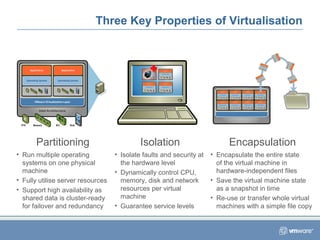
Partitioning
• Run multiple operating
systems on one physical
machine
• Fully utilise server resources
• Support high availability as
shared data is cluster-ready
for failover and redundancy
Encapsulation
• Encapsulate the entire state
of the virtual machine in
hardware-independent files
• Save the virtual machine state
as a snapshot in time
• Re-use or transfer whole virtual
machines with a simple file copy
Isolation
• Isolate faults and security at
the hardware level
• Dynamically control CPU,
memory, disk and network
resources per virtual
machine
• Guarantee service levels
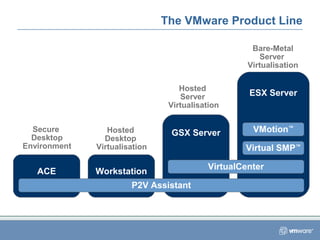
Workstation
Hosted
Desktop
Virtualisation
GSX Server
Hosted
Server
Virtualisation
ESX Server
Bare-Metal
Server
Virtualisation
ACE
Secure
Desktop
Environment
The VMware Product Line
P2V Assistant
VirtualCenter
Virtual SMP™
VMotion™
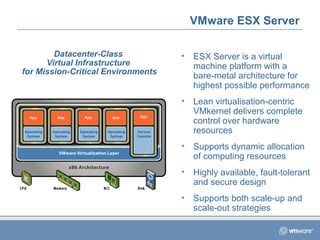
• ESX Server is a virtual
machine platform with a
bare-metal architecture for
highest possible performance
• Lean virtualisation-centric
VMkernel delivers complete
control over hardware
resources
• Supports dynamic allocation
of computing resources
• Highly available, fault-tolerant
and secure design
• Supports both scale-up and
scale-out strategies
VMware ESX Server
Datacenter-Class
Virtual Infrastructure
for Mission-Critical Environments
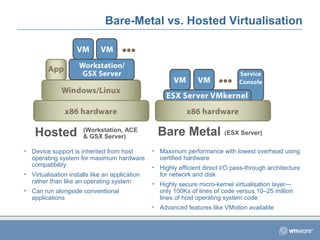
Bare-Metal vs. Hosted Virtualisation
Bare MetalHosted
• Device support is inherited from host
operating system for maximum hardware
compatibility
• Virtualisation installs like an application
rather than like an operating system
• Can run alongside conventional
applications
• Maximum performance with lowest overhead using
certified hardware
• Highly efficient direct I/O pass-through architecture
for network and disk
• Highly secure micro-kernel virtualisation layer—
only 100Ks of lines of code versus 10–25 million
lines of host operating system code
• Advanced features like VMotion available
(ESX Server)(Workstation, ACE
& GSX Server)
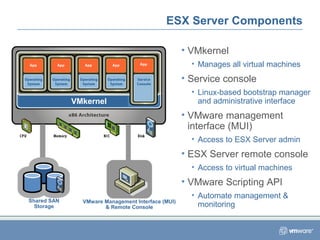
ESX Server Components
VMkernel
Shared SAN
Storage
VMware Management Interface (MUI)
& Remote Console
• VMkernel
• Manages all virtual machines
• Service console
• Linux-based bootstrap manager
and administrative interface
• VMware management
interface (MUI)
• Access to ESX Server admin
• ESX Server remote console
• Access to virtual machines
• VMware Scripting API
• Automate management &
monitoring
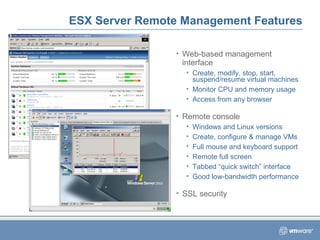
• Web-based management
interface
• Create, modify, stop, start,
suspend/resume virtual machines
• Monitor CPU and memory usage
• Access from any browser
• Remote console
• Windows and Linux versions
• Create, configure & manage VMs
• Full mouse and keyboard support
• Remote full screen
• Tabbed “quick switch” interface
• Good low-bandwidth performance
• SSL security
ESX Server Remote Management Features
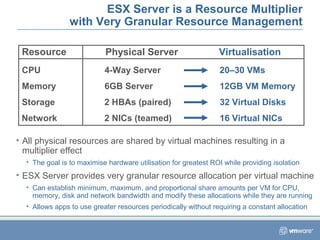
ESX Server is a Resource Multiplier
with Very Granular Resource Management
• All physical resources are shared by virtual machines resulting in a
multiplier effect
• The goal is to maximise hardware utilisation for greatest ROI while providing isolation
• ESX Server provides very granular resource allocation per virtual machine
• Can establish minimum, maximum, and proportional share amounts per VM for CPU,
memory, disk and network bandwidth and modify these allocations while they are running
• Allows apps to use greater resources periodically without requiring a constant allocation
Resource Physical Server Virtualisation
CPU
Memory
Storage
Network
4-Way Server 20–30 VMs
6GB Server 12GB VM Memory
2 HBAs (paired) 32 Virtual Disks
2 NICs (teamed) 16 Virtual NICs
VMware Virtual SMP
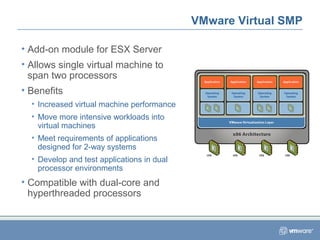
• Add-on module for ESX Server
• Allows single virtual machine to
span two processors
• Benefits
• Increased virtual machine performance
• Move more intensive workloads into
virtual machines
• Meet requirements of applications
designed for 2-way systems
• Develop and test applications in dual
processor environments
• Compatible with dual-core and
hyperthreaded processors
Device Management
for Hardware Virtualisation
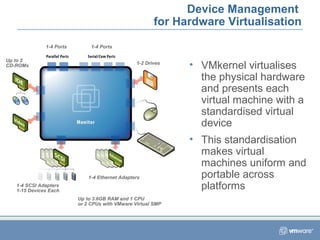
• VMkernel virtualises
the physical hardware
and presents each
virtual machine with a
standardised virtual
device
• This standardisation
makes virtual
machines uniform and
portable across
platforms
1-4 Ports 1-4 Ports
1-2 Drives
1-4 Ethernet Adapters
1-4 SCSI Adapters
1-15 Devices Each
Up to 2
CD-ROMs
Up to 3.6GB RAM and 1 CPU
or 2 CPUs with VMware Virtual SMP
Network Management
for Network Virtualisation
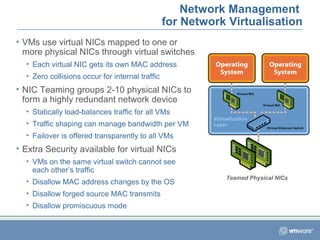
• VMs use virtual NICs mapped to one or
more physical NICs through virtual switches
• Each virtual NIC gets its own MAC address
• Zero collisions occur for internal traffic
• NIC Teaming groups 2-10 physical NICs to
form a highly redundant network device
• Statically load-balances traffic for all VMs
• Traffic shaping can manage bandwidth per VM
• Failover is offered transparently to all VMs
• Extra Security available for virtual NICs
• VMs on the same virtual switch cannot see
each other’s traffic
• Disallow MAC address changes by the OS
• Disallow forged source MAC transmits
• Disallow promiscuous mode
Teamed Physical NICs
Access Management
ESX Roles Allow Granular Management Control
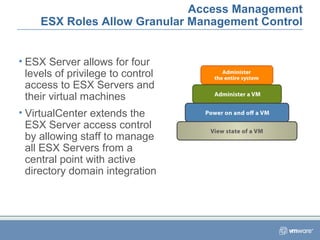
• ESX Server allows for four
levels of privilege to control
access to ESX Servers and
their virtual machines
• VirtualCenter extends the
ESX Server access control
by allowing staff to manage
all ESX Servers from a
central point with active
directory domain integration
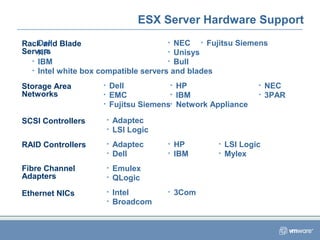
ESX Server Hardware Support
Rack and Blade
Servers
Storage Area
Networks
SCSI Controllers
RAID Controllers
Fibre Channel
Adapters
Ethernet NICs
• Dell
• HP
• IBM
• Intel white box compatible servers and blades
• NEC
• Unisys
• Bull
• Dell
• EMC
• Fujitsu Siemens
• HP
• IBM
• Network Appliance
• NEC
• 3PAR
• Adaptec
• LSI Logic
• Adaptec
• Dell
• HP
• IBM
• LSI Logic
• Mylex
• Emulex
• QLogic
• Intel
• Broadcom
• 3Com
• Fujitsu Siemens
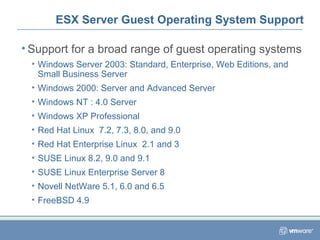
ESX Server Guest Operating System Support
• Support for a broad range of guest operating systems
• Windows Server 2003: Standard, Enterprise, Web Editions, and
Small Business Server
• Windows 2000: Server and Advanced Server
• Windows NT : 4.0 Server
• Windows XP Professional
• Red Hat Linux 7.2, 7.3, 8.0, and 9.0
• Red Hat Enterprise Linux 2.1 and 3
• SUSE Linux 8.2, 9.0 and 9.1
• SUSE Linux Enterprise Server 8
• Novell NetWare 5.1, 6.0 and 6.5
• FreeBSD 4.9
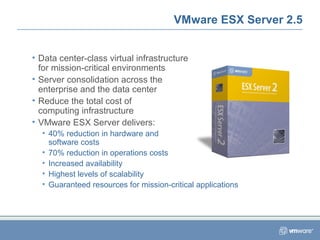
VMware ESX Server 2.5
• Data center-class virtual infrastructure
for mission-critical environments
• Server consolidation across the
enterprise and the data center
• Reduce the total cost of
computing infrastructure
• VMware ESX Server delivers:
• 40% reduction in hardware and
software costs
• 70% reduction in operations costs
• Increased availability
• Highest levels of scalability
• Guaranteed resources for mission-critical applications
Copyright © 2005 VMware, Inc. All rights reserved.
Thank You.

Esx short presentation

  • 1.
    Copyright © 2005VMware, Inc. All rights reserved. VMware ESX Server Datacenter-Class Virtual Infrastructure for Mission-Critical Environments
  • 2.
    VMware Mission Transform industrystandard server and desktop computing through virtualisation Application OS Hardware Application OS Hardware Virtualisation Hardware App OS App OS 70% Reduction in Operating Costs 40% Reduction in Hardware and Software Costs Increased Reliability & Responsiveness Greatly Enhanced Business Continuity Increased Utilisation & Return on Assets
  • 3.
    Infrastructure is what connectsresources to your business Virtual infrastructure is a dynamic mapping of your resources to your business Result: decreased costs and increased efficiencies and responsiveness What is Virtual Infrastructure? VMware technology provides a thin virtualisation layer that encapsulates operating systems and applications into portable virtual machines
  • 4.
    Hardware Application Operating System With VirtualisationWithoutVirtualisation What is Virtualisation? • VMware provides hardware virtualisation that presents a complete x86 platform to the virtual machine • Allows multiple applications to run in isolation within virtual machines on the same physical machine • Virtualisation provides direct access to the hardware resources to give you much greater performance than software emulation
  • 5.
    Three Key Propertiesof Virtualisation Partitioning • Run multiple operating systems on one physical machine • Fully utilise server resources • Support high availability as shared data is cluster-ready for failover and redundancy Encapsulation • Encapsulate the entire state of the virtual machine in hardware-independent files • Save the virtual machine state as a snapshot in time • Re-use or transfer whole virtual machines with a simple file copy Isolation • Isolate faults and security at the hardware level • Dynamically control CPU, memory, disk and network resources per virtual machine • Guarantee service levels
  • 6.
  • 7.
    • ESX Serveris a virtual machine platform with a bare-metal architecture for highest possible performance • Lean virtualisation-centric VMkernel delivers complete control over hardware resources • Supports dynamic allocation of computing resources • Highly available, fault-tolerant and secure design • Supports both scale-up and scale-out strategies VMware ESX Server Datacenter-Class Virtual Infrastructure for Mission-Critical Environments
  • 8.
    Bare-Metal vs. HostedVirtualisation Bare MetalHosted • Device support is inherited from host operating system for maximum hardware compatibility • Virtualisation installs like an application rather than like an operating system • Can run alongside conventional applications • Maximum performance with lowest overhead using certified hardware • Highly efficient direct I/O pass-through architecture for network and disk • Highly secure micro-kernel virtualisation layer— only 100Ks of lines of code versus 10–25 million lines of host operating system code • Advanced features like VMotion available (ESX Server)(Workstation, ACE & GSX Server)
  • 9.
    ESX Server Components VMkernel SharedSAN Storage VMware Management Interface (MUI) & Remote Console • VMkernel • Manages all virtual machines • Service console • Linux-based bootstrap manager and administrative interface • VMware management interface (MUI) • Access to ESX Server admin • ESX Server remote console • Access to virtual machines • VMware Scripting API • Automate management & monitoring
  • 10.
    • Web-based management interface •Create, modify, stop, start, suspend/resume virtual machines • Monitor CPU and memory usage • Access from any browser • Remote console • Windows and Linux versions • Create, configure & manage VMs • Full mouse and keyboard support • Remote full screen • Tabbed “quick switch” interface • Good low-bandwidth performance • SSL security ESX Server Remote Management Features
  • 11.
    ESX Server isa Resource Multiplier with Very Granular Resource Management • All physical resources are shared by virtual machines resulting in a multiplier effect • The goal is to maximise hardware utilisation for greatest ROI while providing isolation • ESX Server provides very granular resource allocation per virtual machine • Can establish minimum, maximum, and proportional share amounts per VM for CPU, memory, disk and network bandwidth and modify these allocations while they are running • Allows apps to use greater resources periodically without requiring a constant allocation Resource Physical Server Virtualisation CPU Memory Storage Network 4-Way Server 20–30 VMs 6GB Server 12GB VM Memory 2 HBAs (paired) 32 Virtual Disks 2 NICs (teamed) 16 Virtual NICs
  • 12.
    VMware Virtual SMP •Add-on module for ESX Server • Allows single virtual machine to span two processors • Benefits • Increased virtual machine performance • Move more intensive workloads into virtual machines • Meet requirements of applications designed for 2-way systems • Develop and test applications in dual processor environments • Compatible with dual-core and hyperthreaded processors
  • 13.
    Device Management for HardwareVirtualisation • VMkernel virtualises the physical hardware and presents each virtual machine with a standardised virtual device • This standardisation makes virtual machines uniform and portable across platforms 1-4 Ports 1-4 Ports 1-2 Drives 1-4 Ethernet Adapters 1-4 SCSI Adapters 1-15 Devices Each Up to 2 CD-ROMs Up to 3.6GB RAM and 1 CPU or 2 CPUs with VMware Virtual SMP
  • 14.
    Network Management for NetworkVirtualisation • VMs use virtual NICs mapped to one or more physical NICs through virtual switches • Each virtual NIC gets its own MAC address • Zero collisions occur for internal traffic • NIC Teaming groups 2-10 physical NICs to form a highly redundant network device • Statically load-balances traffic for all VMs • Traffic shaping can manage bandwidth per VM • Failover is offered transparently to all VMs • Extra Security available for virtual NICs • VMs on the same virtual switch cannot see each other’s traffic • Disallow MAC address changes by the OS • Disallow forged source MAC transmits • Disallow promiscuous mode Teamed Physical NICs
  • 15.
    Access Management ESX RolesAllow Granular Management Control • ESX Server allows for four levels of privilege to control access to ESX Servers and their virtual machines • VirtualCenter extends the ESX Server access control by allowing staff to manage all ESX Servers from a central point with active directory domain integration
  • 16.
    ESX Server HardwareSupport Rack and Blade Servers Storage Area Networks SCSI Controllers RAID Controllers Fibre Channel Adapters Ethernet NICs • Dell • HP • IBM • Intel white box compatible servers and blades • NEC • Unisys • Bull • Dell • EMC • Fujitsu Siemens • HP • IBM • Network Appliance • NEC • 3PAR • Adaptec • LSI Logic • Adaptec • Dell • HP • IBM • LSI Logic • Mylex • Emulex • QLogic • Intel • Broadcom • 3Com • Fujitsu Siemens
  • 17.
    ESX Server GuestOperating System Support • Support for a broad range of guest operating systems • Windows Server 2003: Standard, Enterprise, Web Editions, and Small Business Server • Windows 2000: Server and Advanced Server • Windows NT : 4.0 Server • Windows XP Professional • Red Hat Linux 7.2, 7.3, 8.0, and 9.0 • Red Hat Enterprise Linux 2.1 and 3 • SUSE Linux 8.2, 9.0 and 9.1 • SUSE Linux Enterprise Server 8 • Novell NetWare 5.1, 6.0 and 6.5 • FreeBSD 4.9
  • 18.
    VMware ESX Server2.5 • Data center-class virtual infrastructure for mission-critical environments • Server consolidation across the enterprise and the data center • Reduce the total cost of computing infrastructure • VMware ESX Server delivers: • 40% reduction in hardware and software costs • 70% reduction in operations costs • Increased availability • Highest levels of scalability • Guaranteed resources for mission-critical applications
  • 19.
    Copyright © 2005VMware, Inc. All rights reserved. Thank You.