Visualising a New Christchurch

          Mark Billinghurst
            HIT Lab NZ
      University of Canterbury
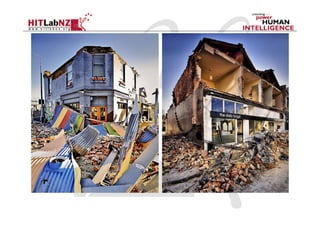
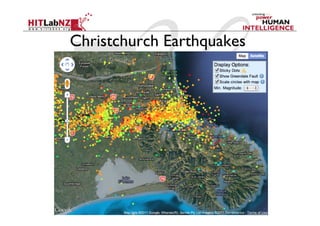
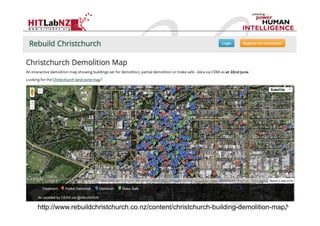
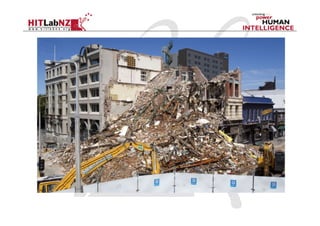
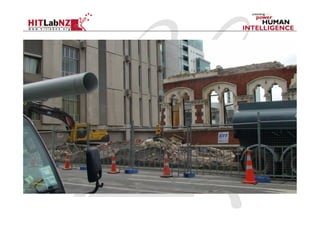
Christchurch Earthquakes
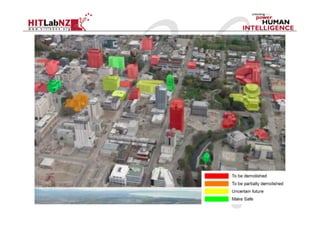
http://www.rebuildchristchurch.co.nz/content/christchurch-building-demolition-map
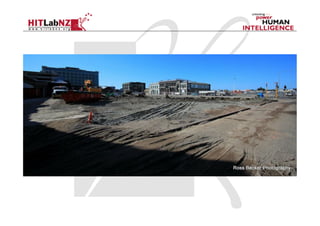
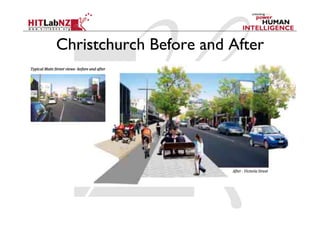
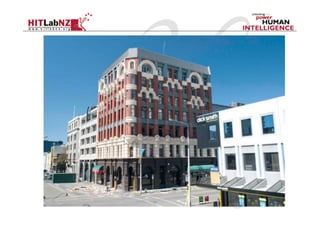
Christchurch Before and After
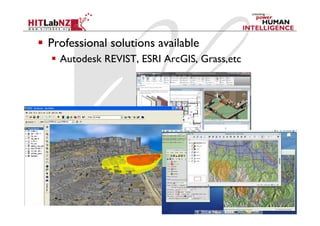
  Professional solutions available
    Autodesk REVIST, ESRI ArcGIS, Grass,etc
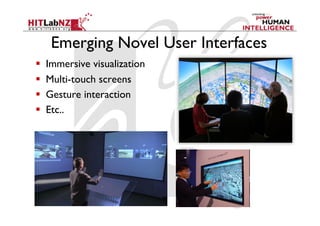
Emerging Novel User Interfaces
    Immersive visualization
    Multi-touch screens
    Gesture interaction
    Etc..
Limitations
  Interface
     Complex to use
     Unintuitive interaction
     2D display for 3D content
  Context of Use
     Remote visualization
     Separation from the real world
     Unable to show life-sized content
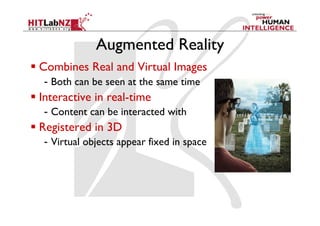
Augmented Reality
  Combines Real and Virtual Images
   -  Both can be seen at the same time
  Interactive in real-time
   -  Content can be interacted with
  Registered in 3D
   -  Virtual objects appear fixed in space
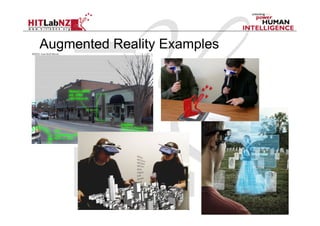
Augmented Reality Examples
  Put AR pictures here
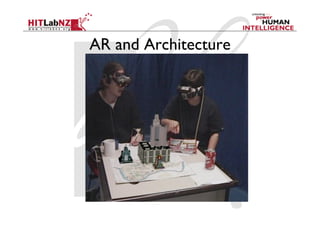
AR and Architecture
AR and Archiecture
  Enhanced Maps
    AR overlay on printed material
  Outdoor AR
    In place visualization
  Mobile AR
    Urban Visualization
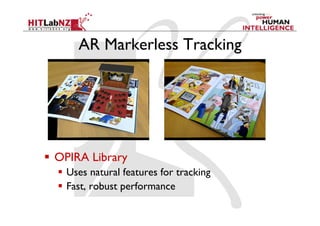
AR Markerless Tracking


  OPIRA Library
    Uses natural features for tracking
    Fast, robust performance
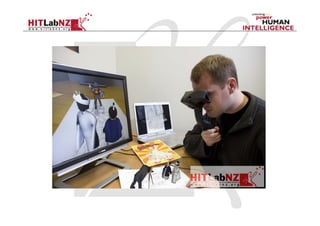
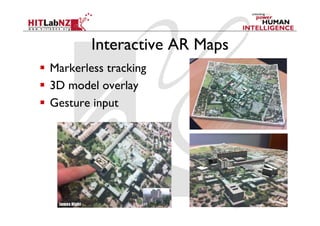
Interactive AR Maps
  Markerless tracking
  3D model overlay
  Gesture input
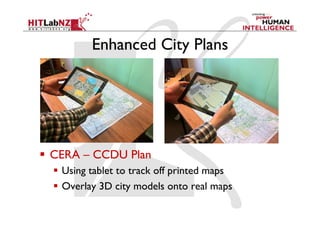
Enhanced City Plans


  CERA – CCDU Plan
    Using tablet to track off printed maps
    Overlay 3D city models onto real maps
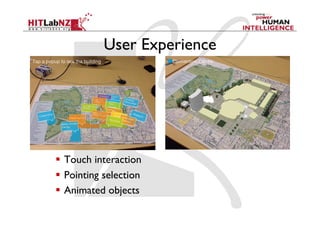
User Experience


  Touch interaction
  Pointing selection
  Animated objects
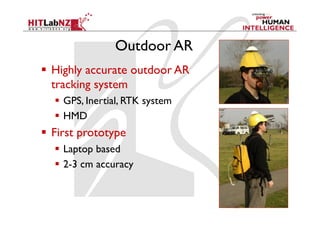
Outdoor AR
  Highly accurate outdoor AR
   tracking system
    GPS, Inertial, RTK system
    HMD
  First prototype
    Laptop based
    2-3 cm accuracy
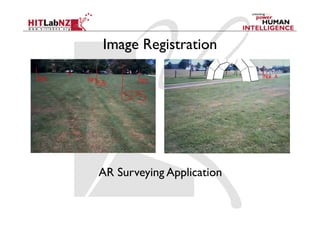
Image Registration


AR Surveying Application
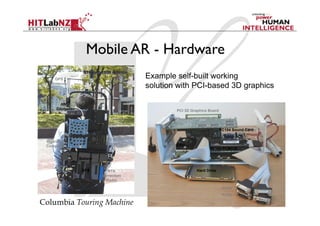
Mobile AR - Hardware
    GPS
                                       Example self-built working
   Antenna
                                       solution with PCI-based 3D graphics


                                               PCI 3D Graphics Board

                           Tracker
                          Controller
                                                                       PC104 Sound Card

                        DC to DC
 Wearable
                        Converter              CPU
 Computer
                                                               PC104 PCMCIA

             Battery


              GPS         RTK                           Hard Drive
                       correction
                         Radio

                                                                        Serial
                                                                        Ports

Columbia Touring Machine
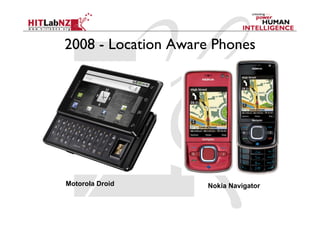
2008 - Location Aware Phones


Motorola Droid       Nokia Navigator
Real World Information Overlay
  Tag real world locations
    GPS + Compass input
    Overlay graphics on live video
  Applications
    Travel guide, Advertising, etc
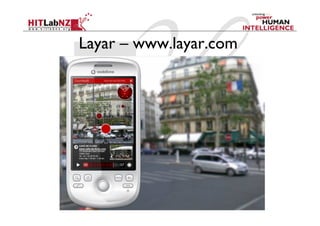
  Eg: Layar (www.layar.com)
    iPhone, Android based, Public API released
  Other companies
    Wikitude, Metaio, AcrossAir, Tochnidot, etc
Layar – www.layar.com
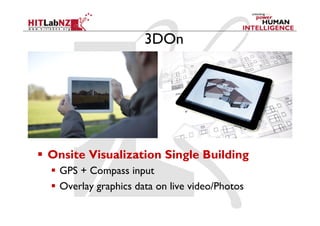
3DOn


  Onsite Visualization Single Building
    GPS + Compass input
    Overlay graphics data on live video/Photos
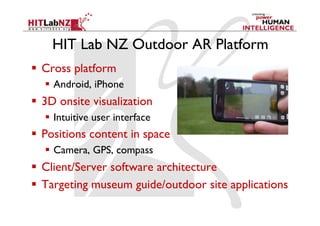
HIT Lab NZ Outdoor AR Platform
  Cross platform
    Android, iPhone
  3D onsite visualization
    Intuitive user interface
  Positions content in space
    Camera, GPS, compass
  Client/Server software architecture
  Targeting museum guide/outdoor site applications
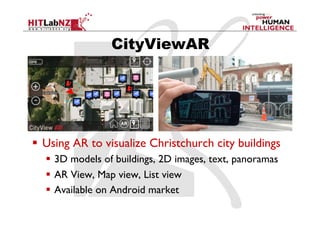
CityViewAR


  Using AR to visualize Christchurch city buildings
    3D models of buildings, 2D images, text, panoramas
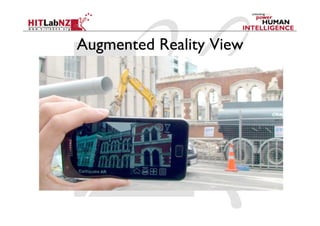
    AR View, Map view, List view
    Available on Android market
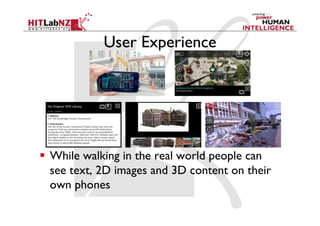
User Experience


  While walking in the real world people can
   see text, 2D images and 3D content on their
   own phones
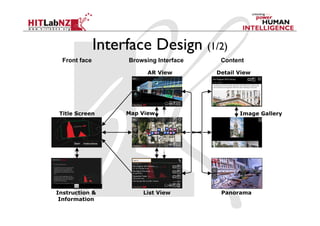
Interface Design (1/2)	
  Front face	
     Browsing Interface	
    Content	

                         AR View	
        Detail View	


 Title Screen	
   Map View	
                      Image Gallery	


Instruction &          List View	
         Panorama	
 Information
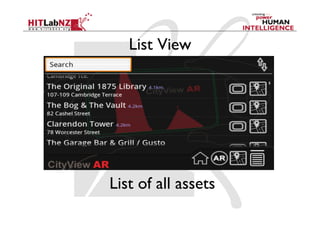
List View


List of all assets
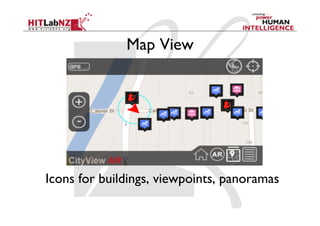
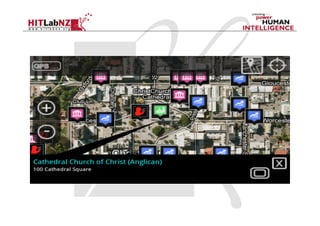
Map View


Icons for buildings, viewpoints, panoramas
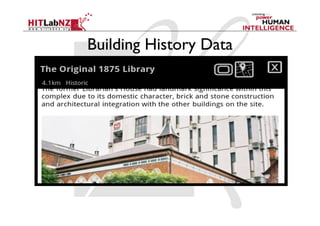
Building History Data
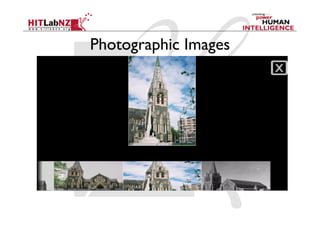
Photographic Images
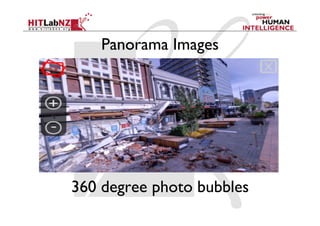
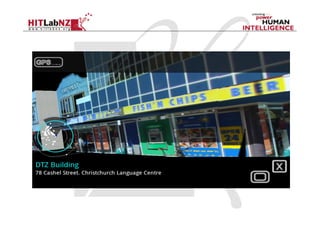
Panorama Images


360 degree photo bubbles
Augmented Reality View
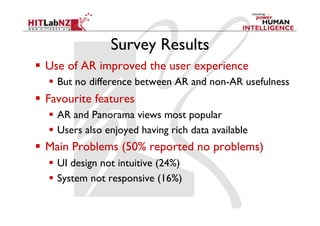
Survey Results
  Use of AR improved the user experience
    But no difference between AR and non-AR usefulness
  Favourite features
    AR and Panorama views most popular
    Users also enjoyed having rich data available
  Main Problems (50% reported no problems)
    UI design not intuitive (24%)
    System not responsive (16%)
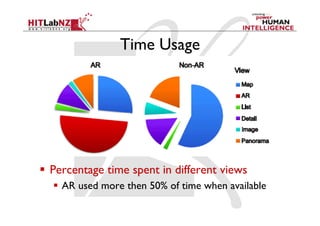
Time Usage


  Percentage time spent in different views
    AR used more then 50% of time when available
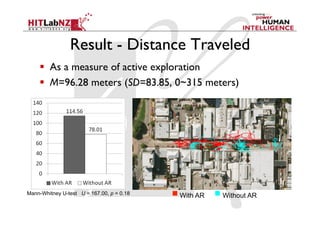
Result - Distance Traveled	
       As a measure of active exploration
       M=96.28 meters (SD=83.85, 0~315 meters)


Mann-Whitney U-test U = 167.00, p = 0.18	
   With AR	
   Without AR
Areas for Improvement
  Outdoor AR tracking
    Reduce tracking errors
  User interface design
    Make options more obvious
  Make system more responsive
    Some lag in loading content
  Touch input
    Responding to unintended touches
AR Urban Design Tool (2012)
  CERA CCDU Application
    Enhanced CityViewAR application
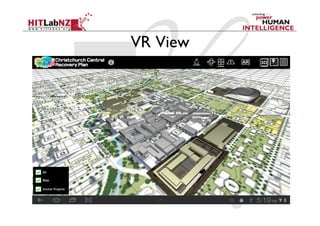
  Add VR view mode
    3D model viewing/interaction
  Add concept models of buildings
    Multiple buildings at single site
  Client/Server architecture
    Support for user generated feedback
VR View
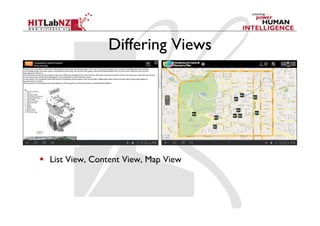
Differing Views


  List View, Content View, Map View
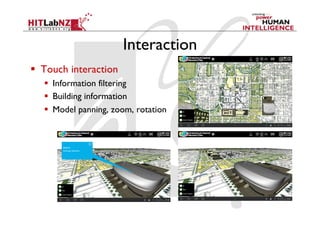
Interaction	
  Touch interaction
     Information filtering
     Building information
     Model panning, zoom, rotation
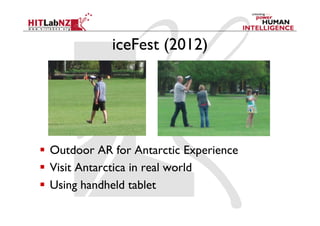
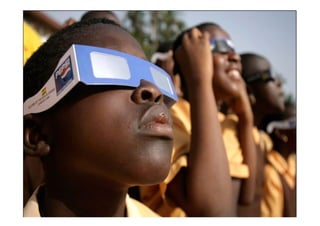
iceFest (2012)


  Outdoor AR for Antarctic Experience
  Visit Antarctica in real world
  Using handheld tablet
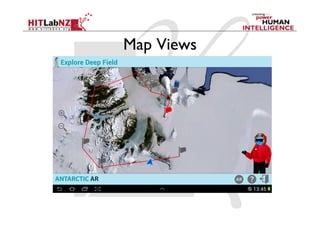
Map Views
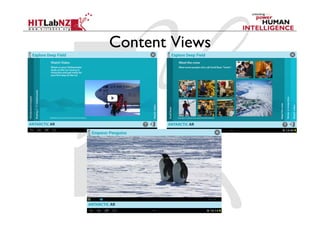
Content Views
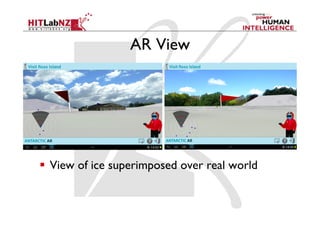
AR View


  View of ice superimposed over real world
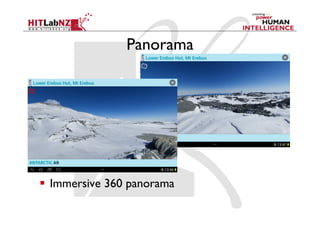
Panorama


  Immersive 360 panorama
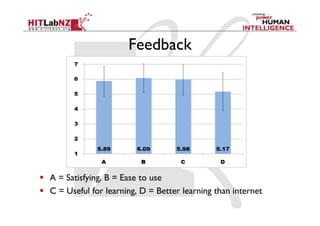
Feedback


  A = Satisfying, B = Ease to use
  C = Useful for learning, D = Better learning than internet
Looking to the Future
Next Steps
  Subsurface Visualization
    See underground infrastructure
  User evaluation
    Architects, Urban Designers, Public
  Develop authoring tool
    Web-based content management system
  Improve technology
    Tracking, 3D rendering
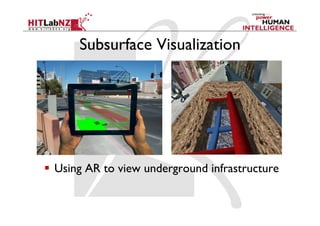
Subsurface Visualization


  Using AR to view underground infrastructure
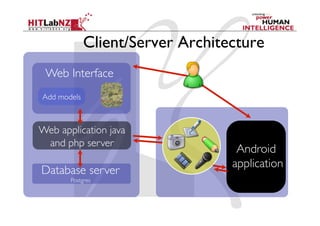
Client/Server Architecture
 Web Interface	

Add models	


Web application java
 and php server	

                                      Android	

                                     application	

Database server	

         Postgres
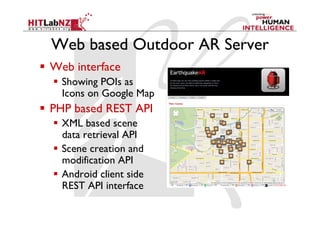
Web based Outdoor AR Server
  Web interface
    Showing POIs as
     Icons on Google Map
  PHP based REST API
    XML based scene
     data retrieval API
    Scene creation and
     modification API
    Android client side
     REST API interface
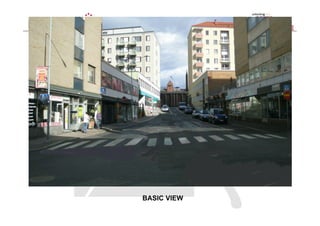
BASIC VIEW
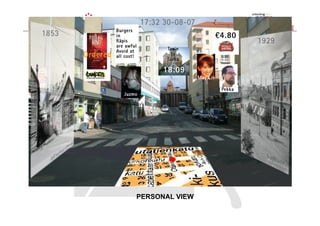
PERSONAL VIEW
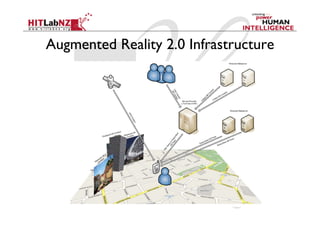
Augmented Reality 2.0 Infrastructure
Leveraging Web 2.0
  Content retrieval using HTTP
  XML encoded meta information
     KML placemarks + extensions
  Queries
     Based on location (from GPS, image recognition)
     Based on situation (barcode markers)
  Syndication
     Community servers for end-user content
     Tagging
  AR client subscribes to data feeds
Conclusions
•    AR allows for information overlay in place
•    CityViewAR provides pre earthquake viewing
•    Opportunities for on-going development
•    Important research problems need to be solved
        – Wide area tracking
        – User experience
        – Social networking
        – Etc..
Collaborators
  Jason Mills (PVI)
     Panoramas, 3D models
  Historic Places Trust
     Pre-1950 building information
  Christchurch City Council
     Statements of Significance
  CEISMIC
     Digital content
More Information

•  Mark Billinghurst	

   –  mark.billinghurst@hitlabnz.org	

•  Website	

   –  www.hitlabnz.org

Visualizing a New Christchurch

  • 1.
    Visualising a NewChristchurch Mark Billinghurst HIT Lab NZ University of Canterbury
  • 3.
  • 6.
  • 7.
  • 9.
      Professional solutionsavailable   Autodesk REVIST, ESRI ArcGIS, Grass,etc
  • 10.
    Emerging Novel UserInterfaces   Immersive visualization   Multi-touch screens   Gesture interaction   Etc..
  • 11.
    Limitations   Interface   Complex to use   Unintuitive interaction   2D display for 3D content   Context of Use   Remote visualization   Separation from the real world   Unable to show life-sized content
  • 12.
    Augmented Reality   CombinesReal and Virtual Images -  Both can be seen at the same time   Interactive in real-time -  Content can be interacted with   Registered in 3D -  Virtual objects appear fixed in space
  • 13.
  • 14.
  • 15.
    AR and Archiecture  Enhanced Maps   AR overlay on printed material   Outdoor AR   In place visualization   Mobile AR   Urban Visualization
  • 16.
    AR Markerless Tracking  OPIRA Library   Uses natural features for tracking   Fast, robust performance
  • 18.
    Interactive AR Maps  Markerless tracking   3D model overlay   Gesture input
  • 20.
    Enhanced City Plans  CERA – CCDU Plan   Using tablet to track off printed maps   Overlay 3D city models onto real maps
  • 21.
    User Experience   Touchinteraction   Pointing selection   Animated objects
  • 22.
    Outdoor AR   Highlyaccurate outdoor AR tracking system   GPS, Inertial, RTK system   HMD   First prototype   Laptop based   2-3 cm accuracy
  • 23.
  • 25.
    Mobile AR -Hardware GPS Example self-built working Antenna solution with PCI-based 3D graphics PCI 3D Graphics Board Tracker Controller PC104 Sound Card DC to DC Wearable Converter CPU Computer PC104 PCMCIA Battery GPS RTK Hard Drive correction Radio Serial Ports Columbia Touring Machine
  • 26.
    2008 - LocationAware Phones Motorola Droid Nokia Navigator
  • 27.
    Real World InformationOverlay   Tag real world locations   GPS + Compass input   Overlay graphics on live video   Applications   Travel guide, Advertising, etc   Eg: Layar (www.layar.com)   iPhone, Android based, Public API released   Other companies   Wikitude, Metaio, AcrossAir, Tochnidot, etc
  • 28.
  • 29.
    3DOn   Onsite VisualizationSingle Building   GPS + Compass input   Overlay graphics data on live video/Photos
  • 30.
    HIT Lab NZOutdoor AR Platform   Cross platform   Android, iPhone   3D onsite visualization   Intuitive user interface   Positions content in space   Camera, GPS, compass   Client/Server software architecture   Targeting museum guide/outdoor site applications
  • 33.
    CityViewAR   Using ARto visualize Christchurch city buildings   3D models of buildings, 2D images, text, panoramas   AR View, Map view, List view   Available on Android market
  • 35.
    User Experience   Whilewalking in the real world people can see text, 2D images and 3D content on their own phones
  • 36.
    Interface Design (1/2) Front face Browsing Interface Content AR View Detail View Title Screen Map View Image Gallery Instruction & List View Panorama Information
  • 37.
  • 38.
    Map View Icons forbuildings, viewpoints, panoramas
  • 40.
  • 41.
  • 42.
  • 43.
  • 45.
    Survey Results   Useof AR improved the user experience   But no difference between AR and non-AR usefulness   Favourite features   AR and Panorama views most popular   Users also enjoyed having rich data available   Main Problems (50% reported no problems)   UI design not intuitive (24%)   System not responsive (16%)
  • 46.
    Time Usage   Percentagetime spent in different views   AR used more then 50% of time when available
  • 47.
    Result - DistanceTraveled   As a measure of active exploration   M=96.28 meters (SD=83.85, 0~315 meters) Mann-Whitney U-test U = 167.00, p = 0.18 With AR Without AR
  • 48.
    Areas for Improvement  Outdoor AR tracking   Reduce tracking errors   User interface design   Make options more obvious   Make system more responsive   Some lag in loading content   Touch input   Responding to unintended touches
  • 49.
    AR Urban DesignTool (2012)   CERA CCDU Application   Enhanced CityViewAR application   Add VR view mode   3D model viewing/interaction   Add concept models of buildings   Multiple buildings at single site   Client/Server architecture   Support for user generated feedback
  • 50.
  • 51.
    Differing Views   ListView, Content View, Map View
  • 52.
    Interaction   Touch interaction   Information filtering   Building information   Model panning, zoom, rotation
  • 53.
    iceFest (2012)   OutdoorAR for Antarctic Experience   Visit Antarctica in real world   Using handheld tablet
  • 54.
  • 55.
  • 56.
    AR View   Viewof ice superimposed over real world
  • 57.
  • 58.
    Feedback   A =Satisfying, B = Ease to use   C = Useful for learning, D = Better learning than internet
  • 59.
  • 60.
    Next Steps   SubsurfaceVisualization   See underground infrastructure   User evaluation   Architects, Urban Designers, Public   Develop authoring tool   Web-based content management system   Improve technology   Tracking, 3D rendering
  • 61.
    Subsurface Visualization   UsingAR to view underground infrastructure
  • 62.
    Client/Server Architecture WebInterface Add models Web application java and php server Android application Database server Postgres
  • 63.
    Web based OutdoorAR Server   Web interface   Showing POIs as Icons on Google Map   PHP based REST API   XML based scene data retrieval API   Scene creation and modification API   Android client side REST API interface
  • 64.
  • 65.
  • 66.
    Augmented Reality 2.0Infrastructure
  • 67.
    Leveraging Web 2.0  Content retrieval using HTTP   XML encoded meta information   KML placemarks + extensions   Queries   Based on location (from GPS, image recognition)   Based on situation (barcode markers)   Syndication   Community servers for end-user content   Tagging   AR client subscribes to data feeds
  • 68.
    Conclusions •  AR allows for information overlay in place •  CityViewAR provides pre earthquake viewing •  Opportunities for on-going development •  Important research problems need to be solved – Wide area tracking – User experience – Social networking – Etc..
  • 69.
    Collaborators   Jason Mills(PVI)   Panoramas, 3D models   Historic Places Trust   Pre-1950 building information   Christchurch City Council   Statements of Significance   CEISMIC   Digital content
  • 70.
    More Information •  MarkBillinghurst –  mark.billinghurst@hitlabnz.org •  Website –  www.hitlabnz.org